vs-code: How to open current WSL folder *as wsl* from command line?
Answer a question
How do I do this in my non-vs-code terminal:
wsl:/home/peter/myproject$ code .
and then have myproject open in Visual Studio Code in a new WSL window or somehow in WSL mode?
I am able to open the current folder as a "normal" windows folder using:
"$(wslpath 'C:\Users\pvm\AppData\Local\Programs\Microsoft VS Code\Code.exe')" .
but then many things don't work, because it isn't opened as a WSL folder. I can however, click on where the red arrow points, and then on where the green arrow points.
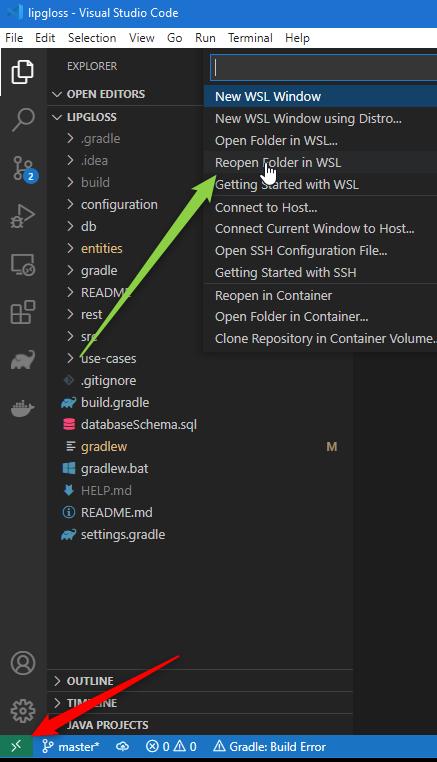
As an alternative, I can open a WSL window in VS Code, and open a terminal from there. From inside this terminal-in-code, I can navigate to a folder and type code .. Then it gets opened exactly as I want, but this is only possible from a terminal-in-code, not from a standalone "normal" WSL terminal. If one tries to run the same code command from a normal terminal, one gets a "Command is only available in WSL or inside a Visual Studio Code terminal." error. And this is as designed.
So the question remains: How do I open a folder from a standalone WSL terminal in VS code in WSL mode?
Answers
VS Code can be started with the --remote command line parameter:
code --remote wsl+<distro name> <path in WSL>
For your example:
"$(wslpath 'C:\Users\pvm\AppData\Local\Programs\Microsoft VS Code\Code.exe')" --remote wsl+<distro name> "$(pwd)"

开发云社区提供前沿行业资讯和优质的学习知识,同时提供优质稳定、价格优惠的云主机、数据库、网络、云储存等云服务产品
更多推荐
 0
0 0
0- 0


 已为社区贡献4439条内容

所有评论(0)