How can I remove symbols on right scrollbar of vscode?
·
Answer a question
How can I remove the symbols on the right scrollbar in VSCode? 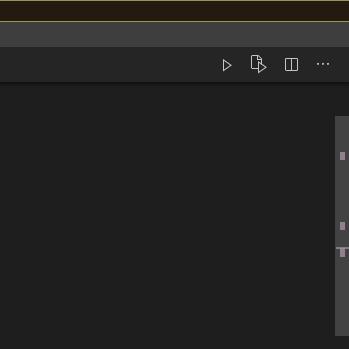
Answers
It looks like you're referring to the Overview ruler in VSCode. This is detailed in this answer. Copied below:
You can configure these settings:
// Controls if the cursor should be hidden in the overview ruler.
"editor.hideCursorInOverviewRuler": false,

// Controls if a border should be drawn around the overview ruler.
"editor.overviewRulerBorder": true,

// Controls the number of decorations that can show up at the same position in the overview ruler
"editor.overviewRulerLanes": 3
… but also some configurable colours, which is the most thorough explanation I've found:
Overview ruler
This ruler is located beneath the scroll bar on the right edge of the editor and gives an overview of the decorations in the editor.
editorOverviewRuler.border: Color of the overview ruler border.editorOverviewRuler.findMatchForeground: Overview ruler marker color for find matches. The color must not be opaque to not hide underlying decorations.editorOverviewRuler.rangeHighlightForeground: Overview ruler marker color for highlighted ranges, like by the Quick Open, Symbol in File and Find features. The color must not be opaque to not hide underlying decorations.editorOverviewRuler.selectionHighlightForeground: Overview ruler marker color for selection highlights. The color must not be opaque to not hide underlying decorations.editorOverviewRuler.wordHighlightForeground: Overview ruler marker color for symbol highlights. The color must not be opaque to not hide underlying decorations.editorOverviewRuler.wordHighlightStrongForeground: Overview ruler marker color for write-access symbol highlights. The color must not be opaque to not hide underlying decorations.editorOverviewRuler.modifiedForeground: Overview ruler marker color for modified content.editorOverviewRuler.addedForeground: Overview ruler marker color for added content.editorOverviewRuler.deletedForeground: Overview ruler marker color for deleted content.editorOverviewRuler.errorForeground: Overview ruler marker color for errors.editorOverviewRuler.warningForeground: Overview ruler marker color for warnings.editorOverviewRuler.infoForeground: Overview ruler marker color for infos.editorOverviewRuler.bracketMatchForeground: Overview ruler marker color for matching brackets.

开发云社区提供前沿行业资讯和优质的学习知识,同时提供优质稳定、价格优惠的云主机、数据库、网络、云储存等云服务产品
更多推荐
 0
0 0
0- 0


 已为社区贡献4439条内容

所有评论(0)