Why are some of my extensions not working in VS Code 1.57?
Answer a question
I just upgraded to VS Code 1.57 and now many of my extensions aren't working! It seems like they are not even enabled. I tried restarting but it didn't fix the issue
What is going on and how can I fix this? They were working fine with VS Code 1.56
Answers
While there are many, many reasons why an extension may not be working, with VS Code 1.57 one big new reason you be running into is workspace trust.
Workspace trust tries to keep you safe when simply browsing through code, even if that code came from an untrustworthy source. As extensions may load and execute content from the current workspace, in VS Code 1.57 extensions the run code are disabled by default in 'Restricted mode' (untrusted workspace)
Checking if an extension is disabled due to workspace trust
If you are in restricted mode, you should see Restricted mode in the status bar:
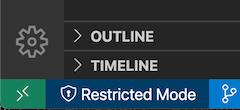
To check if one of your installed extension is disabled because you are in 'restricted mode':
- Open the extensions view
- Search
@installedand find the extension you are interested in
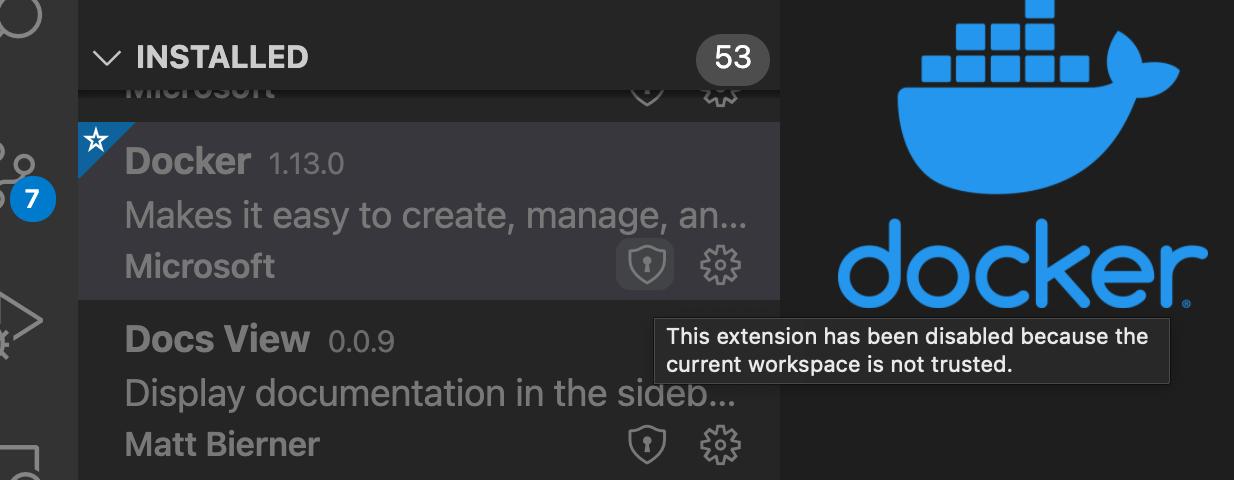
Extensions that are disabled due to workspace trust will be faded out and have a little shield next to them:
Enabling all extensions
To enable all of your extensions again, trust the current workspace by running the Workspace: Manage Workspace Trust command and then trusting the current workspace
Selectively enabling extensions
You can also selectively enable individual extensions in 'restricted mode' with the Extensions: Support Untrusted Workspaces setting
You need to edit this setting in the JSON editor. The setting value is an object that uses extension ids as keys:
"extensions.supportUntrustedWorkspaces": {
  "ms-azuretools.vscode-docker": {
    "supported": true,

    // Omit the version if you want the extension to
    // be enabled for every version
    "version": "1.13.0"
  },
}
Over time, many extensions should be updated to support the concept of workspace trust. This means that the extension can choose if they are enabled or disabled in 'restricted mode'. Some extensions may also enable themselves in 'restricted mode' but limit potentially dangerous functionality
Note that simple extensions, such as themes and grammars, are always enabled, even in 'restricted mode'.

开发云社区提供前沿行业资讯和优质的学习知识,同时提供优质稳定、价格优惠的云主机、数据库、网络、云储存等云服务产品
更多推荐
 0
0 0
0- 0


 已为社区贡献4439条内容

所有评论(0)