Find \n and replace with \r\n in VS Code
·
Answer a question
I have a legacy system that only accepts Windows \r\n and I want to edit a file in VS Code that has just \n to have \r\n.
I'm trying to use a Regex replace:

But this puts literal \r in instead of the whitespace char.
I've tried putting a newline in the replacement using SHIFT+ENTER:
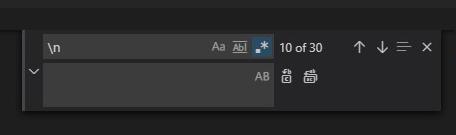
But this just puts in \n.
How do I change the line feed chars used and save the file in VS Code?
Answers
There's the text "LF" in the bottom bar on the right, click on it and select "CRLF". Or press Ctrl+Shift+P and enter Change End of Line Sequence.
No idea why your approach doesn't work. Nor does \x0D or \15 get recognized. I'd call it a bug.
For multiple files, on Linux, I'd do it outside of the editor, e.g., with
find somedir -name '*.someext' -exec perl -pi -e 's/\n/\r\n/' {} +

开发云社区提供前沿行业资讯和优质的学习知识,同时提供优质稳定、价格优惠的云主机、数据库、网络、云储存等云服务产品
更多推荐
 0
0 0
0- 0


 已为社区贡献4439条内容

所有评论(0)