Add left space/margin/padding in VS Code editor window between line numbers and code
Answer a question
I would love to have some space between the line numbers and the first intendation/code in the VS Code editor window:
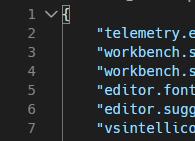
I just want to indent the code in the editor without actually adding whitespace in the code.
I tried "editor.glyphMargin", but this will only increase the space on the left of the line numbers, not between the line numbers and the code.
I'm also aware of the "Centered Layout" view, but this also decreases the width of e. g. the tabs for the file selection.
Is there a setting I'm missing or do I need a plugin/custom CSS?
Answers
You can try this --
"editor.lineDecorationsWidth": 25,
This increases the space on the right side of the numbers. I haven't seen anything that increases the padding on the other side of the gutter nearest your code.
Opinion -- Ideally, there would be a editor.padding.left like there is a editor.padding.top, but I haven't seen this yet.

开发云社区提供前沿行业资讯和优质的学习知识,同时提供优质稳定、价格优惠的云主机、数据库、网络、云储存等云服务产品
更多推荐
 0
0 0
0- 0


 已为社区贡献4439条内容

所有评论(0)