How to enable logs for Language server in Visual Studio Code
Answer a question
In the Language Server Extension Guide it says:
'If you are using
vscode-languageclientto implement the client, you can specify a setting[langId].trace.serverthat instructs the Client to log communications between Language Client / Server to a channel of the Language Client'sname.For lsp-sample, you can set this setting:
"languageServerExample.trace.server": "verbose". Now head to the channel "Language Server Example". You should see the logs:
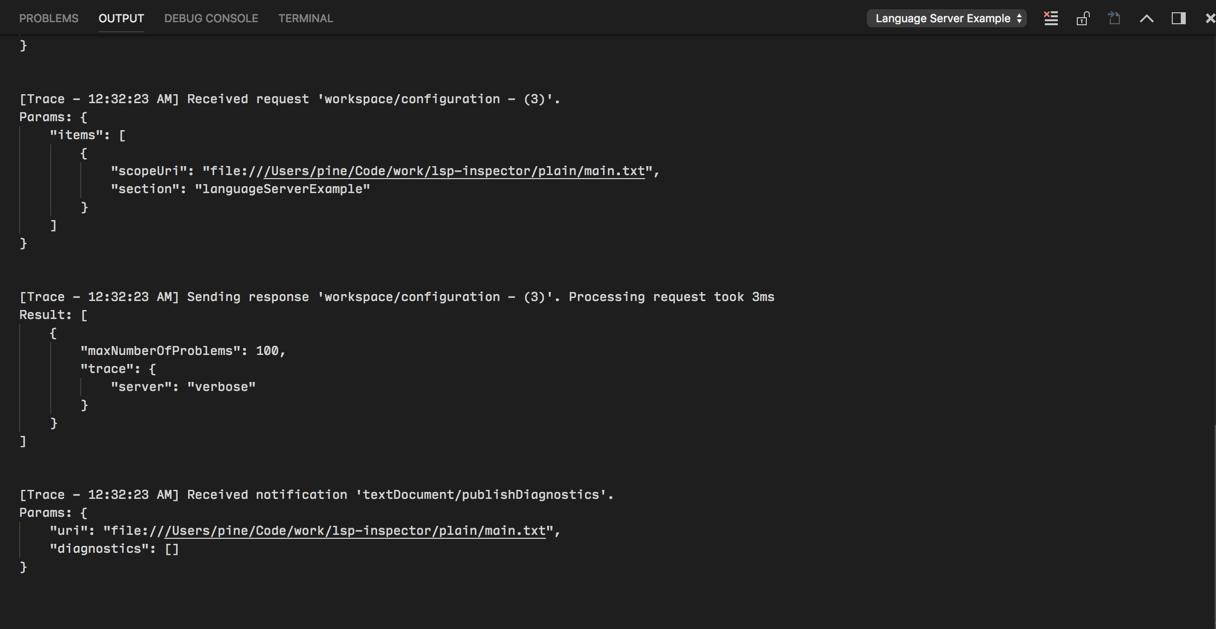
Where and how exactly do I specify this setting in VS Code?
Answers
What I do for php language server is adding "log": true to launch.json file, Then the compiler will try to show logs when you press f5 to start debugging. But from what I understand from the documentation you have shared in your question, You can follow this instructions (I don't guarantee this will work, As I mentioned this is the instruction for what you have shared in your question):
- Press Ctrl+comma.
- Search for "trace server".
- Now languages should be listed. If you are on the latest version of vscode, choose verbose in any language server you want.
- If you are on an older version of vscode, then choose the pencil button next to the language you want, and select "verbose".

开发云社区提供前沿行业资讯和优质的学习知识,同时提供优质稳定、价格优惠的云主机、数据库、网络、云储存等云服务产品
更多推荐
 0
0 0
0- 0


 已为社区贡献4439条内容

所有评论(0)