VSCode folder structure
Answer a question
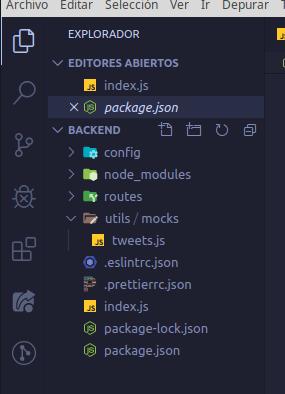
I want to change the folder structure.. if you see in the folder "utils" i have another folder called "mocks" well.. what i want is change the structure to see 1 folder by folder.. something like this
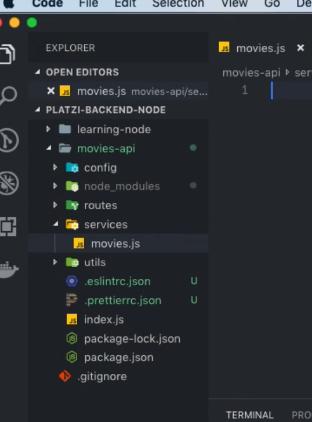
Like the "services" folder which have just a 1 file.. i have the same structure, 1 folder inside another and 1 file but in the structure i see 1 folder in the same line. I don't know if i explained me
Answers
This is a setting: explorer.compactFolders.
More info here: Compact folders in Explorer.
In the File Explorer, we now render single child folders in a compact form. In such a form, single child folders will be compressed in a combined tree element. Useful for Java package structures, for example.
Setting
explorer.compactFolderscontrols this behavior. By default, this setting is turned on.

开发云社区提供前沿行业资讯和优质的学习知识,同时提供优质稳定、价格优惠的云主机、数据库、网络、云储存等云服务产品
更多推荐
 0
0 0
0- 0


 已为社区贡献4439条内容

所有评论(0)