Unity type or namespace name 'InputSystem' does not exist in the namespace 'UnityEngine'
Answer a question
I have installed the new InputSystem package in my Unity project. I have set the input to "new inputsystem" in the Unity Player Settings. I have quit and restarted both Unity and VS Code.
But when I try to use the system in VS Code, I immediately get this error:
using UnityEngine;
using System.Collections;
using UnityEngine.InputSystem;              // <-error
using UnityEngine.InputSystem.Controls;     // <-error
The type or namespace name 'InputSystem' does not exist in the namespace 'UnityEngine' (are you missing an assembly reference?) [Assembly-CSharp]
What can I do to make VS Code recognise the Unity InputSystem package?
Answers
The issue is that the required .csproj files (VSCode needs them to understand the available libraries) for the new package were not auto-generated when you installed the new package (it didn't happen for me either, maybe it is intentionally manual).
Go to Edit -> Preferences... and then click on External Tools. You need to tick the box to Generate .csproj files for: Registry packages (and any other ones you might want) and then click on Regenerate project files.
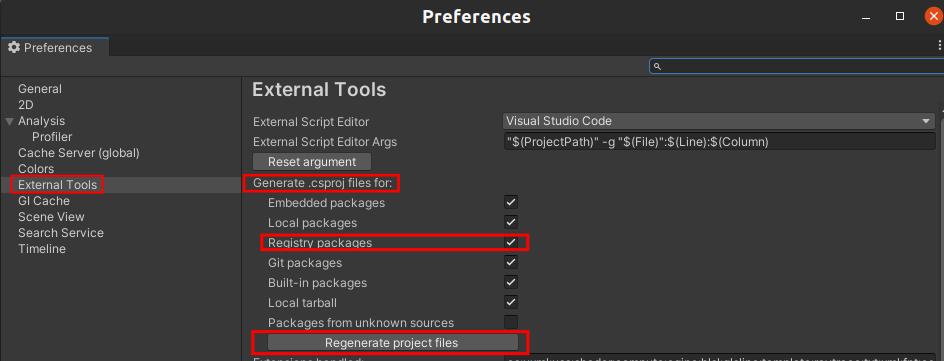
That should generate whatever is needed for VSCode to recognize the new package - you shouldn't even need to restart it.

开发云社区提供前沿行业资讯和优质的学习知识,同时提供优质稳定、价格优惠的云主机、数据库、网络、云储存等云服务产品
更多推荐
 0
0 0
0- 0


 已为社区贡献4439条内容

所有评论(0)