VSCode LLDB on MacOS error when starting debugging session
Answer a question
I'm trying to configure VSCode for compiling/debugging C++ programs on MacOS. I am using the following launch.json file:
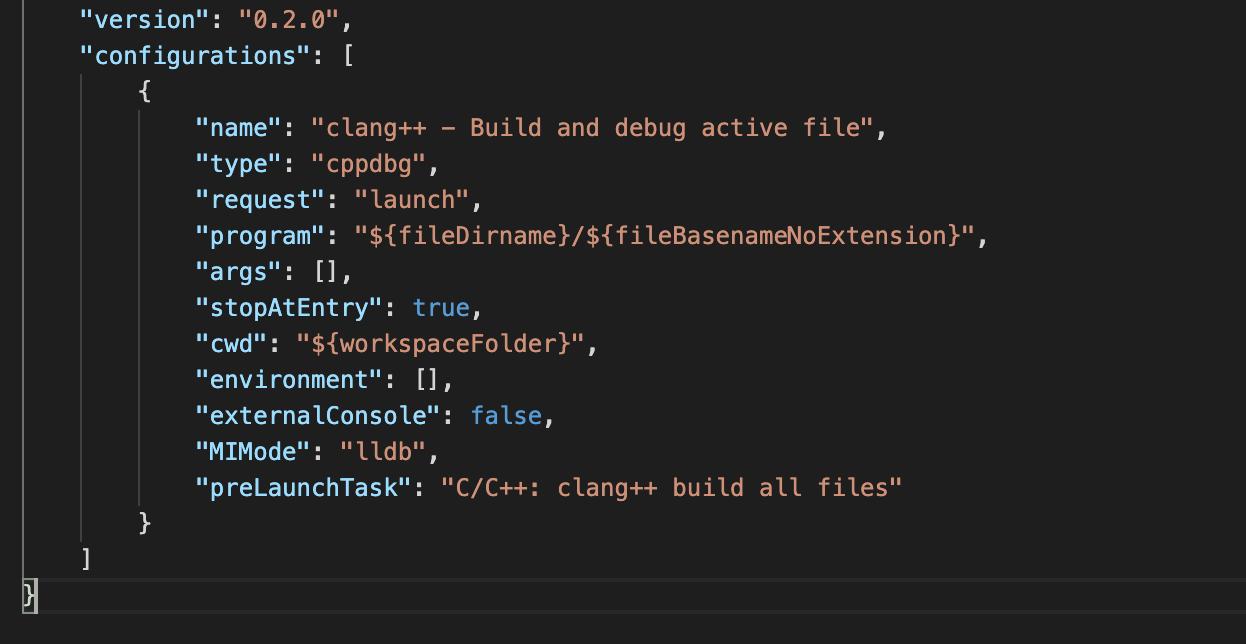
When I try and start a debugging session, I get the following error:
Warning: Debuggee TargetArchitecture not detected, assuming x86_64.
ERROR: Unable to start debugging. Unexpected LLDB output from command "-exec-run". process
exited with status -1 (attach failed ((os/kern) invalid argument))
The program '/path/to/Development/C++/helloworld/main' has exited with code 42
(0x0000002a).
It is worth mentioning that I am using an M1 Macbook, so x86_64 is not the correct architecture. I'm assuming that this is the reason for the error.
I can't seem to find any reference to this error anywhere online, does anyone know how I can solve this?
Edit: Adding "targetArchitecture": "ARM64" removed the warning, but does not fix the error.
Answers
I had the same problem and I found that VScode does not support a debugger for ARM64 binaries yet. Here is the issue link.
However, it works if you use another extension. Install CodeLLDB and set "type": "lldb" on launch.json like below.
{
    // Use IntelliSense to learn about possible attributes.
    // Hover to view descriptions of existing attributes.
    // For more information, visit: https://go.microsoft.com/fwlink/?linkid=830387
    "version": "0.2.0",
    "configurations": [
      {
        "name": "clang++ - Build and debug active file",
        "type": "lldb",
        "request": "launch",
        "program": "${fileDirname}/${fileBasenameNoExtension}",
        "args": [],
        "cwd": "${workspaceFolder}",
        "preLaunchTask": "clang++ build active file"
      }
    ]
  }
You can check quick start guide of vscode-lldb repository.
Note that preLaunchTask's value should be the same as the label's value in your task.json.

开发云社区提供前沿行业资讯和优质的学习知识,同时提供优质稳定、价格优惠的云主机、数据库、网络、云储存等云服务产品
更多推荐
 0
0 0
0- 0


 已为社区贡献4438条内容

所有评论(0)