How to disable VS Code auto-rename-tag / HTML mirror feature?
Answer a question
I wanted to be able to easily edit HTML tags together. It seemed to me like this is such an easy thing to implement nowadays, so I've installed this auto-rename-tag extension, and it turned out to be not useful for me: instead of helping me in html/jsx code editing, it breaks everything and I have to undo what it does and try to edit the thing to avoid triggering it.
The logical thing here would obviously be to remove this extension from my system. The only problem here, however, is that I can't seem to do that - I've uninstalled it, even reinstalled VS Code, tried VS Code Insiders, but here it is, still enabled:

Is it built-in now? How do I disable it?
VSCode version: 1.41.0, commit 9579eda04fdb3a9bba2750f15193e5fafe16b959
Answers
It has become a built-in feature, separate from the Auto Rename Tag extension. If you don't like it, you can disable it depending on which version you've got installed.
Update for 1.52+
The setting has now been renamed to Linked Editing:
The On Type Rename feature for editing a tag when its matching closing tag is modified is now called linked editing. The command to enable linked editing is Start Linked Editing (⇧⌘F2) and Escape disables linked editing mode.
The setting to enable/disable it is now:
"editor.linkedEditing": true
Or from the UI:

Update for 1.44+
They changed the mirror cursor feature and are now calling it Synced Regions.
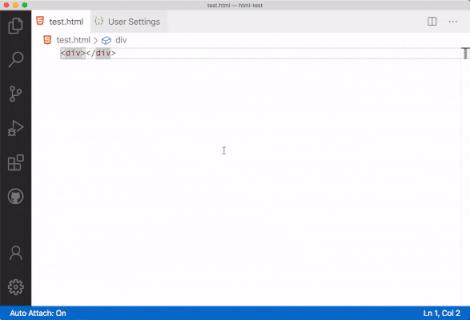
(copied from the VS Code 1.44 release notes)
When activated on HTML tags, if both start and end tags become "synced", then changing one also changes the other. The feature is disabled by default though, and either you explicitly execute the On Type Rename Symbol command or set the editor.renameOnType setting to true.
With this change, the html.mirrorCursorOnMatchingTag introduced in 1.41 will now show up as deprecated (or grayed-out).
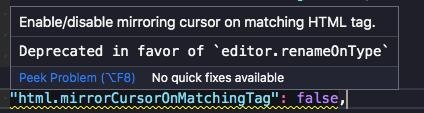
Update for 1.42+
The html.mirrorCursorOnMatchingTag is now disabled by default starting in 1.42.
See this other answer for the quotation from the release notes.
Original Answer for 1.41
It's now a built-in feature starting 1.41.
HTML mirror cursor
https://code.visualstudio.com/updates/v1_41#_html-mirror-cursor
VS Code now adds a "mirror cursor" when you are editing HTML tags. This behavior is controlled by the setting
html.mirrorCursorOnMatchingTag, which is on by default.This feature works by adding a multi-cursor to the matching tag when your cursor moves into an HTML tag name range. Just like in multi-cursor mode, you can use word-wise deletion or word-wise selection. The mirrored cursor is removed when you move your cursor outside the tag name range.
Basically, selecting either the tag start or the tag end puts 2 cursors on each, so editing one also edits the other. It is enabled by default.
You can explicitly disable it from your settings.
Via UI:
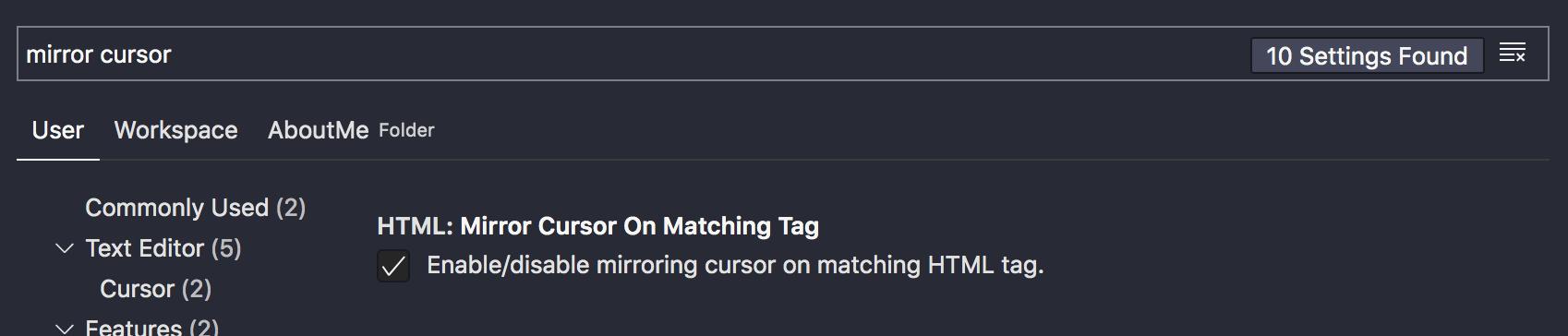
Via settings.json:
"html.mirrorCursorOnMatchingTag": false,

开发云社区提供前沿行业资讯和优质的学习知识,同时提供优质稳定、价格优惠的云主机、数据库、网络、云储存等云服务产品
更多推荐
 0
0 0
0- 0


 已为社区贡献4439条内容

所有评论(0)