Is it possible to make an editor split full-screen in VSCode?
Answer a question
I'd like to have the ability to make one of multiple split editor windows full screen.
I usually have two vertically splitted windows with code and it would be useful to make sort of full-screen-zoom without explorer terminal and all other bars, just code.
Initally I have the following:
but I would like to configure a shortcut to make an active window full-screen like this:
It is like F11, closing the explorer, and merging the split. It is messy to do it by hand all the time...
Answers
I would like to configure a shortcut to make an active window full-screen.
You need to edit keybindings. Press Ctrl+K and then Ctrl+S to open keyboard shortcuts.
If you're on a mac, use
Commandkey instead ofCtrl.
Search full screen in search bar. You will see something like this:
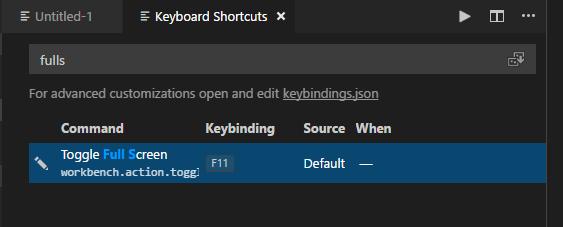
Click on the result. Press Ctrl+K and Ctrl+K (again!) or click pencil icon to edit the shortcut. Press desired key combination. That's it.
And here are some more shortcuts to learn:
Press Ctrl+K and then Z to open editor in full screen without explorer and terminal, etc. And you can use Ctrl+B to show/hide side bar and Ctrl+J to show terminal and console panel.
Download keyboard shortcuts file here for your favourite OS.
To make these hotkeys work in vim-mode:
Actually VSCodeVim will take over your control keys. This behaviour can be adjusted with the useCtrlKeys and handleKeys settings. Go to File>>Preferences>>Keyboard Shortcuts. Search for Ctrl+k in search bar. You will see extension.vim_ctrl+k as below:

Change this hotkey. Now it should work.

开发云社区提供前沿行业资讯和优质的学习知识,同时提供优质稳定、价格优惠的云主机、数据库、网络、云储存等云服务产品
更多推荐
 0
0 0
0- 0


 已为社区贡献4439条内容

所有评论(0)