Activity Bar width in Visual Studio Code
Answer a question
Is there a way to selectively change the width of the Activity Bar in VSCode (v. 1.14)? I have a 1366×768 screen where every pixel counts, so I would like to make this bar narrow and icons smaller, by at least 50%. In comparison to vertical OS interface elements, e.g. Windows 10 Taskbar or Plasma 5 panel it looks monstrous and out of place:
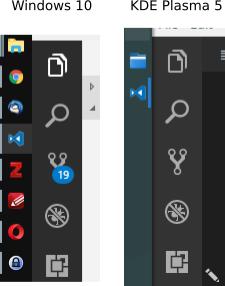
I've been also trying to find a solution for the Insider version of VSCode, but apart from just hiding it I haven't discovered anything relevant yet.
I have "window.zoomLevel": 0 set in settings.json.
Answers
EDIT (03/03/20): You can also use the customize-ui addon that allows more fine-grained font sizes and other goodies
You can also use the negative zoom trick in settings.json:
{
  "window.zoomLevel": -1,
  "editor.fontSize": 13,
  "terminal.integrated.fontSize": 16,
}
The whole editor will get smaller so you need to compensate editor.fontSize and terminal.integrated.fontSize
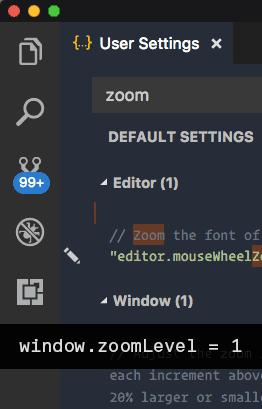
This allows for smaller activity bar (unfortunately it acts on everything (icons size, font-size ...)) but I much prefer this than the defaults.

开发云社区提供前沿行业资讯和优质的学习知识,同时提供优质稳定、价格优惠的云主机、数据库、网络、云储存等云服务产品
更多推荐
 0
0 0
0- 0


 已为社区贡献4439条内容

所有评论(0)