#include errors detected in vscode
Answer a question
I am using Visual Studio Code in my C++ project. I installed Microsoft C/C++ Extension for VS Code. I got the following error:
#include errors detected. Please update your includePath. IntelliSense features for this translation unit (
/path/to/project/file.cpp) will be provided by the Tag Parser.
Answers
The answer is here: How to use C/Cpp extension and add includepath to configurations.
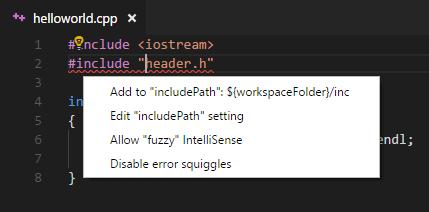
Click the light bulb and then edit the JSON file which is opened. Choose the right block corresponding to your platform (there are Mac, Linux, Win32 – ms-vscode.cpptools version: 3). Update paths in includePath (matters if you compile with VS Code) or browse.paths (matters if you navigate with VS Code) or both.
Thanks to @Francesco Borzì, I will append his answer here:
You have to Left 🖰 click on the bulb next to the squiggled code line.
If a
#includefile or one of its dependencies cannot be found, you can also click on the red squiggles under the include statements to view suggestions for how to update your configuration.

开发云社区提供前沿行业资讯和优质的学习知识,同时提供优质稳定、价格优惠的云主机、数据库、网络、云储存等云服务产品
更多推荐
 0
0 0
0- 0


 已为社区贡献4438条内容

所有评论(0)