Vue.js中如何实现文件夹的直接、分片与拖拽上传?
大文件上传系统开发指南(基于原生JS+Vue3)
前言
老弟啊,你这需求可真是把我给整不会了!20G文件上传、文件夹层级保留、全浏览器兼容、加密传输、断点续传…这哪是100块的项目啊,分明是100万的项目配置嘛!不过既然你找到我了,咱们兄弟一场,我就帮你把这事儿给办了!
系统架构设计
前端技术栈
- Vue3 CLI (虽然你说要用原生JS,但为了项目结构清晰,咱们还是用Vue3组织代码)
- 原生JavaScript实现核心上传逻辑
- WebUploader作为备选方案(但你说必须原生JS,咱们就自己造轮子)
后端配合
- SpringBoot接收文件分片
- MySQL记录上传进度
- 阿里云OSS存储文件
核心功能实现
1. 文件选择与文件夹结构解析
export default {
  name: 'FileUploader',
  data() {
    return {
      fileTree: [],
      flatFileList: [],
      isUploading: false,
      uploadProgress: 0,
      chunkSize: 5 * 1024 * 1024, // 5MB每片
      cryptoKey: null, // 加密密钥
    }
  },
  methods: {
    triggerFileInput() {
      document.getElementById('fileInput').click();
    },

    // 解析文件夹结构
    handleFileSelect(e) {
      const files = Array.from(e.target.files);
      if (files.length === 0) return;

      // 重置状态
      this.fileTree = [];
      this.flatFileList = [];

      // 构建文件树
      const fileMap = {};
      const rootItems = [];

      files.forEach(file => {
        const path = file.webkitRelativePath || file.name;
        const parts = path.split('/');
        const fileName = parts.pop();
        const isDir = file.size === 0; // 目录项大小为0

        let currentLevel = fileMap;
        let currentPath = '';

        // 遍历路径构建树结构
        parts.forEach((part, i) => {
          currentPath += (i > 0 ? '/' : '') + part;
          if (!currentLevel[part]) {
            const isCurrentDir = i < parts.length - 1;
            currentLevel[part] = {
              name: part,
              path: currentPath,
              isDir: true,
              level: i,
              children: isCurrentDir ? {} : null
            };

            if (!isCurrentDir) {
              currentLevel[part].file = file;
              currentLevel[part].size = file.size;
              currentLevel[part].isDir = false;
            }
          }

          if (i === parts.length - 1 && !isDir) {
            currentLevel[part].file = file;
            currentLevel[part].size = file.size;
            currentLevel[part].isDir = false;
          }

          currentLevel = currentLevel[part].children || (currentLevel[part].children = {});
        });
      });

      // 扁平化处理并构建显示树
      const flattenTree = (node, result = [], level = 0) => {
        if (!node) return result;

        if (typeof node !== 'object' || node instanceof File) return result;

        Object.keys(node).forEach(key => {
          const item = node[key];
          if (item.isDir && item.children) {
            result.push({
              name: item.name,
              path: item.path,
              isDir: true,
              level: item.level,
              size: item.size
            });
            flattenTree(item.children, result, level + 1);
          } else if (!item.isDir) {
            result.push({
              name: item.name,
              path: item.path,
              isDir: false,
              level: item.level,
              size: item.size,
              file: item.file
            });
            this.flatFileList.push({
              path: item.path,
              file: item.file,
              size: item.size
            });
          }
        });

        return result;
      };

      // 处理根目录下的文件
      files.forEach(file => {
        if (!file.webkitRelativePath) {
          this.flatFileList.push({
            path: file.name,
            file: file,
            size: file.size
          });
        }
      });

      // 构建显示树
      const rootKeys = Object.keys(fileMap);
      rootKeys.forEach(key => {
        const item = fileMap[key];
        if (item.isDir) {
          rootItems.push({
            name: item.name,
            path: item.path,
            isDir: true,
            level: 0,
            size: item.size
          });
          flattenTree(item.children, this.fileTree, 1);
        } else {
          rootItems.push({
            name: item.name,
            path: item.path,
            isDir: false,
            level: 0,
            size: item.size,
            file: item.file
          });
          this.flatFileList.push({
            path: item.path,
            file: item.file,
            size: item.size
          });
        }
      });

      this.fileTree = [...rootItems, ...this.fileTree];
    },

    formatFileSize(bytes) {
      if (bytes === 0) return '0 Bytes';
      const k = 1024;
      const sizes = ['Bytes', 'KB', 'MB', 'GB', 'TB'];
      const i = Math.floor(Math.log(bytes) / Math.log(k));
      return parseFloat((bytes / Math.pow(k, i)).toFixed(2)) + ' ' + sizes[i];
    },

    // 初始化加密 (使用AES,SM4需要额外库)
    async initCrypto() {
      // 生成随机密钥 (实际项目中应该从服务器获取)
      const key = await this.generateRandomKey();
      this.cryptoKey = key;

      // 这里简化处理,实际应该使用Web Crypto API或crypto-js等库
      console.log('加密已初始化 (示例中实际未加密)');
    },

    generateRandomKey() {
      return new Promise(resolve => {
        const key = 'xxxxxxxx-xxxx-4xxx-yxxx-xxxxxxxxxxxx'.replace(/[xy]/g, function(c) {
          const r = Math.random() * 16 | 0;
          const v = c === 'x' ? r : (r & 0x3 | 0x8);
          return v.toString(16);
        });
        resolve(key);
      });
    },

    // 加密文件分片 (简化版)
    async encryptChunk(chunk) {
      // 实际项目中应该使用AES/SM4加密
      // 这里只是模拟,返回原数据
      return new Promise(resolve => {
        // 模拟加密延迟
        setTimeout(() => resolve(chunk), 10);
      });
    },

    // 计算文件MD5 (用于断点续传)
    calculateFileMD5(file) {
      return new Promise((resolve) => {
        const chunkSize = 2 * 1024 * 1024; // 2MB chunks for MD5
        const chunks = Math.ceil(file.size / chunkSize);
        const spark = new SparkMD5.ArrayBuffer();
        const fileReader = new FileReader();
        let currentChunk = 0;

        fileReader.onload = (e) => {
          spark.append(e.target.result);
          currentChunk++;

          if (currentChunk < chunks) {
            loadNext();
          } else {
            resolve(spark.end());
          }
        };

        function loadNext() {
          const start = currentChunk * chunkSize;
          const end = start + chunkSize >= file.size ? file.size : start + chunkSize;
          fileReader.readAsArrayBuffer(file.slice(start, end));
        }

        loadNext();
      });
    },

    // 开始上传
    async startUpload() {
      if (this.flatFileList.length === 0) {
        alert('请先选择文件或文件夹');
        return;
      }

      this.isUploading = true;
      this.uploadProgress = 0;

      // 初始化加密
      await this.initCrypto();

      // 上传所有文件
      const uploadPromises = this.flatFileList.map(fileItem =>
        this.uploadFile(fileItem.file, fileItem.path)
      );

      try {
        await Promise.all(uploadPromises);
        alert('所有文件上传完成!');
      } catch (error) {
        console.error('上传过程中出错:', error);
        alert('上传过程中出错,请查看控制台');
      } finally {
        this.isUploading = false;
      }
    },

    // 上传单个文件
    async uploadFile(file, relativePath) {
      // 1. 计算文件MD5 (用于断点续传和服务器验证)
      const fileMd5 = await this.calculateFileMD5(file);

      // 2. 检查上传状态 (从本地存储或服务器)
      const uploadStatus = this.getUploadStatus(fileMd5, relativePath);
      let uploadedChunks = uploadStatus.uploadedChunks || [];
      let uploadedSize = uploadStatus.uploadedSize || 0;

      // 3. 分片上传
      const chunks = Math.ceil(file.size / this.chunkSize);
      const chunkPromises = [];

      for (let i = 0; i < chunks; i++) {
        // 如果已经上传过这个分片,跳过
        if (uploadedChunks.includes(i)) continue;

        const start = i * this.chunkSize;
        const end = Math.min(start + this.chunkSize, file.size);
        const chunk = file.slice(start, end);

        // 加密分片
        const encryptedChunk = await this.encryptChunk(chunk);

        // 创建FormData上传
        const formData = new FormData();
        formData.append('file', new Blob([encryptedChunk]), `${file.name}.part${i}`);
        formData.append('chunkIndex', i);
        formData.append('totalChunks', chunks);
        formData.append('fileMd5', fileMd5);
        formData.append('relativePath', relativePath);
        formData.append('fileName', file.name);
        formData.append('fileSize', file.size);

        // 上传分片
        const promise = this.uploadChunk(formData, i, fileMd5, relativePath)
          .then(() => {
            // 更新上传进度
            uploadedSize += end - start;
            uploadedChunks.push(i);
            this.uploadProgress = Math.min(100, Math.round((uploadedSize / this.getTotalSize()) * 100));

            // 保存上传状态到本地存储
            this.saveUploadStatus(fileMd5, relativePath, {
              uploadedChunks,
              uploadedSize,
              totalChunks: chunks,
              fileName: file.name,
              fileSize: file.size
            });
          });

        chunkPromises.push(promise);
      }

      await Promise.all(chunkPromises);

      // 4. 通知服务器合并文件
      await this.mergeFile(fileMd5, relativePath, file.name, chunks);

      // 5. 上传完成,清除本地记录
      this.clearUploadStatus(fileMd5, relativePath);
    },

    // 上传分片
    uploadChunk(formData, chunkIndex, fileMd5, relativePath) {
      return new Promise((resolve, reject) => {
        const xhr = new XMLHttpRequest();

        xhr.open('POST', '/api/upload/chunk', true);

        xhr.onload = () => {
          if (xhr.status === 200) {
            resolve(xhr.responseText);
          } else {
            reject(new Error(`分片 ${chunkIndex} 上传失败`));
          }
        };

        xhr.onerror = () => reject(new Error(`分片 ${chunkIndex} 上传出错`));

        // 进度事件
        xhr.upload.onprogress = (event) => {
          if (event.lengthComputable) {
            // 可以更新单个文件的上传进度
          }
        };

        xhr.send(formData);
      });
    },

    // 请求服务器合并文件
    mergeFile(fileMd5, relativePath, fileName, totalChunks) {
      return new Promise((resolve, reject) => {
        const xhr = new XMLHttpRequest();
        xhr.open('POST', '/api/upload/merge', true);
        xhr.setRequestHeader('Content-Type', 'application/json');

        xhr.onload = () => {
          if (xhr.status === 200) {
            resolve(xhr.responseText);
          } else {
            reject(new Error('文件合并失败'));
          }
        };

        xhr.onerror = () => reject(new Error('文件合并请求出错'));

        xhr.send(JSON.stringify({
          fileMd5,
          relativePath,
          fileName,
          totalChunks
        }));
      });
    },

    // 获取上传状态 (从本地存储)
    getUploadStatus(fileMd5, relativePath) {
      const key = `upload_status_${fileMd5}_${relativePath}`;
      const status = localStorage.getItem(key);
      return status ? JSON.parse(status) : { uploadedChunks: [], uploadedSize: 0 };
    },

    // 保存上传状态 (到本地存储)
    saveUploadStatus(fileMd5, relativePath, status) {
      const key = `upload_status_${fileMd5}_${relativePath}`;
      localStorage.setItem(key, JSON.stringify(status));
    },

    // 清除上传状态
    clearUploadStatus(fileMd5, relativePath) {
      const key = `upload_status_${fileMd5}_${relativePath}`;
      localStorage.removeItem(key);
    },

    // 计算总大小 (用于进度计算)
    getTotalSize() {
      return this.flatFileList.reduce((sum, item) => sum + item.size, 0);
    }
  },
  mounted() {
    // 加载保存的上传状态 (页面刷新后恢复)
    this.loadSavedUploadStatus();
  },
  methods: {
    // 加载保存的上传状态
    loadSavedUploadStatus() {
      const statusList = [];
      for (let i = 0; i < localStorage.length; i++) {
        const key = localStorage.key(i);
        if (key.startsWith('upload_status_')) {
          const status = JSON.parse(localStorage.getItem(key));
          statusList.push(status);
        }
      }

      if (statusList.length > 0) {
        const totalUploaded = statusList.reduce((sum, status) => sum + status.uploadedSize, 0);
        const totalSize = this.getTotalSize();
        this.uploadProgress = totalSize > 0 ? Math.round((totalUploaded / totalSize) * 100) : 0;
      }
    }
  }
}


.uploader-container {
  max-width: 800px;
  margin: 0 auto;
  padding: 20px;
  font-family: Arial, sans-serif;
}

button {
  padding: 10px 15px;
  background-color: #4CAF50;
  color: white;
  border: none;
  border-radius: 4px;
  cursor: pointer;
  margin: 10px 0;
}

button:disabled {
  background-color: #cccccc;
  cursor: not-allowed;
}

button:hover:not(:disabled) {
  background-color: #45a049;
}

.file-list {
  margin: 20px 0;
  max-height: 300px;
  overflow-y: auto;
  border: 1px solid #ddd;
  padding: 10px;
  border-radius: 4px;
}

.progress-container {
  margin-top: 20px;
  width: 100%;
  background-color: #f1f1f1;
  border-radius: 4px;
  position: relative;
  height: 30px;
}

.progress-bar {
  height: 100%;
  background-color: #4CAF50;
  border-radius: 4px;
  width: 0%;
  transition: width 0.3s;
}

.progress-container span {
  position: absolute;
  left: 50%;
  top: 50%;
  transform: translate(-50%, -50%);
  color: #333;
  font-weight: bold;
}
2. 下载功能实现
export default {
  name: 'FileDownloader',
  data() {
    return {
      fileList: [],
      selectedFiles: [],
      currentPath: '/'
    }
  },
  methods: {
    // 获取文件列表
    async fetchFileList() {
      try {
        const response = await fetch('/api/files/list', {
          method: 'POST',
          headers: {
            'Content-Type': 'application/json'
          },
          body: JSON.stringify({ path: this.currentPath })
        });

        if (!response.ok) throw new Error('获取文件列表失败');

        const data = await response.json();
        this.fileList = data.files.map(file => ({
          name: file.name,
          path: file.path,
          isDir: file.isDirectory,
          size: file.size
        }));
      } catch (error) {
        console.error('获取文件列表出错:', error);
        alert('获取文件列表出错,请查看控制台');
      }
    },

    // 下载单个文件
    async downloadFile(file) {
      try {
        // 1. 获取文件信息 (检查权限等)
        const fileResponse = await fetch('/api/files/info', {
          method: 'POST',
          headers: {
            'Content-Type': 'application/json'
          },
          body: JSON.stringify({ filePath: file.path })
        });

        if (!fileResponse.ok) throw new Error('获取文件信息失败');

        const fileInfo = await fileResponse.json();

        // 2. 创建下载链接
        const downloadResponse = await fetch('/api/files/download', {
          method: 'POST',
          headers: {
            'Content-Type': 'application/json'
          },
          body: JSON.stringify({ filePath: file.path })
        });

        if (!downloadResponse.ok) throw new Error('文件下载请求失败');

        // 3. 处理分片下载 (大文件)
        if (fileInfo.size > 100 * 1024 * 1024) { // 大于100MB使用分片下载
          await this.downloadLargeFile(file.path, file.name, fileInfo.size);
        } else {
          // 小文件直接下载
          const blob = await downloadResponse.blob();
          const url = window.URL.createObjectURL(blob);
          const a = document.createElement('a');
          a.href = url;
          a.download = file.name;
          document.body.appendChild(a);
          a.click();
          window.URL.revokeObjectURL(url);
          document.body.removeChild(a);
        }
      } catch (error) {
        console.error('下载文件出错:', error);
        alert('下载文件出错,请查看控制台');
      }
    },

    // 大文件分片下载
    async downloadLargeFile(filePath, fileName, totalSize) {
      const chunkSize = 5 * 1024 * 1024; // 5MB每片
      const totalChunks = Math.ceil(totalSize / chunkSize);
      let downloadedSize = 0;

      // 创建临时存储
      const fileChunks = new Array(totalChunks);

      // 下载所有分片
      const chunkPromises = [];

      for (let i = 0; i < totalChunks; i++) {
        const promise = this.downloadFileChunk(filePath, i, totalChunks)
          .then(blob => {
            fileChunks[i] = blob;
            downloadedSize += blob.size;

            // 可以在这里更新下载进度
            console.log(`已下载: ${Math.round((downloadedSize / totalSize) * 100)}%`);
          });

        chunkPromises.push(promise);
      }

      await Promise.all(chunkPromises);

      // 合并分片
      const mergedBlob = new Blob(fileChunks);
      const url = window.URL.createObjectURL(mergedBlob);
      const a = document.createElement('a');
      a.href = url;
      a.download = fileName;
      document.body.appendChild(a);
      a.click();
      window.URL.revokeObjectURL(url);
      document.body.removeChild(a);
    },

    // 下载文件分片
    downloadFileChunk(filePath, chunkIndex, totalChunks) {
      return new Promise((resolve, reject) => {
        fetch('/api/files/download-chunk', {
          method: 'POST',
          headers: {
            'Content-Type': 'application/json'
          },
          body: JSON.stringify({
            filePath,
            chunkIndex,
            totalChunks
          })
        })
        .then(response => {
          if (!response.ok) throw new Error(`分片 ${chunkIndex} 下载失败`);
          return response.blob();
        })
        .then(blob => resolve(blob))
        .catch(error => reject(error));
      });
    },

    // 下载选中的文件/文件夹
    async downloadSelected() {
      if (this.selectedFiles.length === 0) return;

      // 区分文件和文件夹
      const filesToDownload = [];
      const foldersToDownload = [];

      this.selectedFiles.forEach(path => {
        const file = this.fileList.find(f => f.path === path);
        if (file) {
          if (file.isDir) {
            foldersToDownload.push(path);
          } else {
            filesToDownload.push(path);
          }
        }
      });

      // 下载单个文件
      const downloadSingle = async (path) => {
        const file = this.fileList.find(f => f.path === path);
        if (file) {
          await this.downloadFile(file);
        }
      };

      // 下载文件夹 (递归下载所有内容)
      const downloadFolder = async (folderPath) => {
        try {
          // 获取文件夹内容
          const response = await fetch('/api/files/list', {
            method: 'POST',
            headers: {
              'Content-Type': 'application/json'
            },
            body: JSON.stringify({ path: folderPath })
          });

          if (!response.ok) throw new Error(`获取文件夹 ${folderPath} 内容失败`);

          const data = await response.json();

          // 递归下载所有内容
          for (const item of data.files) {
            if (item.isDirectory) {
              await downloadFolder(item.path);
            } else {
              await downloadSingle(item.path);
            }
          }
        } catch (error) {
          console.error('下载文件夹出错:', error);
          alert(`下载文件夹 ${folderPath} 出错,请查看控制台`);
        }
      };

      // 并行下载所有选中的文件和文件夹
      const downloadPromises = [
        ...filesToDownload.map(path => downloadSingle(path)),
        ...foldersToDownload.map(path => downloadFolder(path))
      ];

      try {
        await Promise.all(downloadPromises);
        alert('所有选中的文件/文件夹下载完成!');
      } catch (error) {
        console.error('批量下载出错:', error);
        alert('批量下载过程中出错,请查看控制台');
      }
    }
  }
}


.downloader-container {
  max-width: 800px;
  margin: 20px auto;
  padding: 20px;
  font-family: Arial, sans-serif;
}

button {
  padding: 8px 12px;
  background-color: #2196F3;
  color: white;
  border: none;
  border-radius: 4px;
  cursor: pointer;
  margin: 5px;
}

button:disabled {
  background-color: #cccccc;
  cursor: not-allowed;
}

button:hover:not(:disabled) {
  background-color: #0b7dda;
}

.file-item {
  display: flex;
  align-items: center;
  padding: 8px;
  border-bottom: 1px solid #eee;
}

.file-item label {
  flex-grow: 1;
  margin-left: 8px;
  cursor: pointer;
}

.download-btn {
  background-color: #4CAF50;
  padding: 4px 8px;
  font-size: 0.8em;
}

.download-btn:hover {
  background-color: #45a049;
}
3. 主应用集成
// src/main.js
import { createApp } from 'vue'
import App from './App.vue'
import FileUploader from './components/FileUploader.vue'
import FileDownloader from './components/FileDownloader.vue'

const app = createApp(App)

// 全局注册组件
app.component('FileUploader', FileUploader)
app.component('FileDownloader', FileDownloader)

app.mount('#app')
export default {
  name: 'App'
}


#app {
  font-family: Avenir, Helvetica, Arial, sans-serif;
  -webkit-font-smoothing: antialiased;
  -moz-osx-font-smoothing: grayscale;
  text-align: center;
  color: #2c3e50;
  margin-top: 20px;
}
后端API设计 (SpringBoot)
虽然你主要需要前端代码,但为了完整性,这里提供后端API的基本设计:
// UploadController.java
@RestController
@RequestMapping("/api/upload")
public class UploadController {

    @Autowired
    private FileUploadService fileUploadService;

    // 上传文件分片
    @PostMapping("/chunk")
    public ResponseEntity uploadChunk(
            @RequestParam("file") MultipartFile file,
            @RequestParam("chunkIndex") int chunkIndex,
            @RequestParam("totalChunks") int totalChunks,
            @RequestParam("fileMd5") String fileMd5,
            @RequestParam("relativePath") String relativePath,
            @RequestParam("fileName") String fileName,
            @RequestParam("fileSize") long fileSize) {

        try {
            fileUploadService.saveChunk(file, chunkIndex, totalChunks, fileMd5, relativePath, fileName, fileSize);
            return ResponseEntity.ok().build();
        } catch (Exception e) {
            return ResponseEntity.status(HttpStatus.INTERNAL_SERVER_ERROR).body(e.getMessage());
        }
    }

    // 合并文件
    @PostMapping("/merge")
    public ResponseEntity mergeFile(
            @RequestBody MergeRequest request) {
        try {
            fileUploadService.mergeFile(
                request.getFileMd5(),
                request.getRelativePath(),
                request.getFileName(),
                request.getTotalChunks()
            );
            return ResponseEntity.ok().build();
        } catch (Exception e) {
            return ResponseEntity.status(HttpStatus.INTERNAL_SERVER_ERROR).body(e.getMessage());
        }
    }

    // 检查上传状态
    @PostMapping("/status")
    public ResponseEntity checkStatus(
            @RequestBody StatusRequest request) {
        UploadStatus status = fileUploadService.getUploadStatus(
            request.getFileMd5(),
            request.getRelativePath()
        );
        return ResponseEntity.ok(status);
    }
}

// FileController.java (下载相关)
@RestController
@RequestMapping("/api/files")
public class FileController {

    @Autowired
    private FileService fileService;

    // 获取文件列表
    @PostMapping("/list")
    public ResponseEntity listFiles(
            @RequestBody ListRequest request) {
        FileListResponse response = fileService.listFiles(request.getPath());
        return ResponseEntity.ok(response);
    }

    // 获取文件信息
    @PostMapping("/info")
    public ResponseEntity getFileInfo(
            @RequestBody FileInfoRequest request) {
        FileInfo info = fileService.getFileInfo(request.getFilePath());
        return ResponseEntity.ok(info);
    }

    // 下载文件
    @PostMapping("/download")
    public ResponseEntity downloadFile(
            @RequestBody DownloadRequest request) {
        Resource resource = fileService.loadFileAsResource(request.getFilePath());
        return ResponseEntity.ok()
                .header(HttpHeaders.CONTENT_DISPOSITION, "attachment; filename=\"" + resource.getFilename() + "\"")
                .body(resource);
    }

    // 下载文件分片
    @PostMapping("/download-chunk")
    public ResponseEntity downloadFileChunk(
            @RequestBody DownloadChunkRequest request) {
        Resource resource = fileService.loadFileChunk(
            request.getFilePath(),
            request.getChunkIndex(),
            request.getTotalChunks()
        );
        return ResponseEntity.ok()
                .header(HttpHeaders.CONTENT_DISPOSITION, "attachment; filename=\"chunk-" + request.getChunkIndex() + "\"")
                .body(resource);
    }
}
兼容性处理
IE9兼容方案
由于IE9不支持很多现代API,我们需要做以下兼容处理:
- 添加必要的polyfill:
- 在
public/index.html中添加:
- 在
大文件上传系统
- 文件夹选择降级方案:
- IE9不支持
webkitdirectory属性,我们需要提供一个替代方案:
- IE9不支持
// 在FileUploader.vue中添加
methods: {
  triggerFileInput() {
    // 检测是否支持文件夹上传
    const input = document.getElementById('fileInput');
    const isIE = /*@cc_on!@*/false || !!document.documentMode;

    if (isIE) {
      // IE降级方案 - 只能上传文件不能上传文件夹
      input.removeAttribute('webkitdirectory');
      input.removeAttribute('directory');
      input.setAttribute('multiple', 'multiple');
      alert('您使用的是IE浏览器,只能上传单个文件,无法上传文件夹');
    } else {
      // 现代浏览器
      input.setAttribute('webkitdirectory', '');
      input.setAttribute('directory', '');
      input.setAttribute('multiple', 'multiple');
    }

    input.click();
  },

  // 修改handleFileSelect方法处理IE情况
  handleFileSelect(e) {
    const files = Array.from(e.target.files);
    if (files.length === 0) return;

    const isIE = /*@cc_on!@*/false || !!document.documentMode;

    if (isIE) {
      // IE处理 - 只能处理单个文件
      this.flatFileList = files.map(file => ({
        path: file.name,
        file: file,
        size: file.size
      }));

      this.fileTree = this.flatFileList.map(item => ({
        name: item.file.name,
        path: item.path,
        isDir: false,
        level: 0,
        size: item.size,
        file: item.file
      }));
    } else {
      // 原有文件夹处理逻辑
      // ...
    }
  }
}
加密实现方案
由于原生JavaScript实现SM4加密比较复杂,我们可以使用AES作为替代方案:
- 安装crypto-js库:
npm install crypto-js
- 修改加密相关方法:
// 在FileUploader.vue中添加
import CryptoJS from 'crypto-js';

methods: {
  // 初始化加密
  async initCrypto() {
    // 生成AES密钥 (实际项目中应该从服务器获取)
    this.cryptoKey = CryptoJS.lib.WordArray.random(32).toString();
    console.log('AES密钥:', this.cryptoKey);
  },

  // 加密文件分片
  async encryptChunk(chunk) {
    if (!this.cryptoKey) {
      await this.initCrypto();
    }

    return new Promise(resolve => {
      // 将Blob转换为ArrayBuffer
      const reader = new FileReader();
      reader.onload = () => {
        const wordArray = CryptoJS.lib.WordArray.create(reader.result);

        // 使用AES加密
        const encrypted = CryptoJS.AES.encrypt(wordArray, this.cryptoKey);

        // 将加密结果转换为Blob
        const encryptedBlob = new Blob([encrypted.toString()], { type: 'application/octet-stream' });
        resolve(encryptedBlob);
      };
      reader.readAsArrayBuffer(chunk);
    });
  }
}
部署说明
- 前端构建:
npm run build
- 后端打包:
mvn clean package
-
部署到阿里云ECS:
- 将前端构建产物(
dist目录)部署到Nginx - 将后端JAR包部署到Tomcat或直接运行
- 将前端构建产物(
-
Nginx配置示例:
server {
    listen 80;
    server_name your-domain.com;

    # 前端静态文件
    location / {
        root /path/to/your/frontend/dist;
        try_files $uri $uri/ /index.html;
    }

    # 后端API代理
    location /api {
        proxy_pass http://localhost:8080;
        proxy_set_header Host $host;
        proxy_set_header X-Real-IP $remote_addr;
        proxy_set_header X-Forwarded-For $proxy_add_x_forwarded_for;
    }

    # 大文件上传处理
    client_max_body_size 1024m;
}
完整项目结构
file-upload-system/
├── frontend/                # 前端项目
│   ├── public/              # 静态文件
│   ├── src/
│   │   ├── assets/          # 静态资源
│   │   ├── components/      # Vue组件
│   │   │   ├── FileUploader.vue
│   │   │   └── FileDownloader.vue
│   │   ├── App.vue          # 主组件
│   │   └── main.js          # 入口文件
│   ├── package.json         # 前端依赖
│   └── vue.config.js        # Vue配置
├── backend/                 # 后端项目
│   ├── src/
│   │   ├── main/
│   │   │   ├── java/com/example/upload/
│   │   │   │   ├── controller/  # 控制器
│   │   │   │   ├── service/     # 服务
│   │   │   │   ├── model/       # 数据模型
│   │   │   │   └── config/      # 配置
│   │   └── resources/
│   │       ├── application.properties
│   │       └── static/      # 可选静态资源
│   └── pom.xml              # 后端依赖
├── docs/                    # 文档
├── scripts/                 # 部署脚本
└── README.md                # 项目说明
开发文档要点
-
功能概述:
- 支持大文件(20G+)上传下载
- 支持文件夹上传并保留层级结构
- 支持断点续传
- 支持加密传输和存储
- 兼容所有主流浏览器包括IE9
-
技术栈:
- 前端:Vue3 + 原生JavaScript
- 后端:SpringBoot
- 存储:阿里云OSS + MySQL
- 构建:Webpack (Vue CLI)
-
安装运行:
# 前端
cd frontend
npm install
npm run serve

# 后端
cd backend
mvn spring-boot:run
-
配置说明:
- 前端配置:
frontend/.env - 后端配置:
backend/src/main/resources/application.properties
- 前端配置:
-
API文档:
/api/upload/chunk- 上传文件分片/api/upload/merge- 合并文件分片/api/files/list- 获取文件列表/api/files/download- 下载文件
总结
老弟,这代码我可是给你写得明明白白的,从文件夹结构解析到分片上传,从断点续传到加密处理,全都给你考虑到了。虽然你说预算只有100块,但我这可是按照100万的标准给你写的!
记得啊:
- 实际项目中加密部分要更严谨,SM4需要额外库支持
- 大文件上传要考虑服务器性能,可能需要限制并发上传数
- 下载功能在IE上也会有兼容性问题,需要额外处理
- 生产环境一定要用HTTPS,加密传输才有意义
有啥问题随时在群里喊我,QQ群:374992201,加群还有红包拿!咱们一起把这个项目搞定,以后接单发财就靠它了!
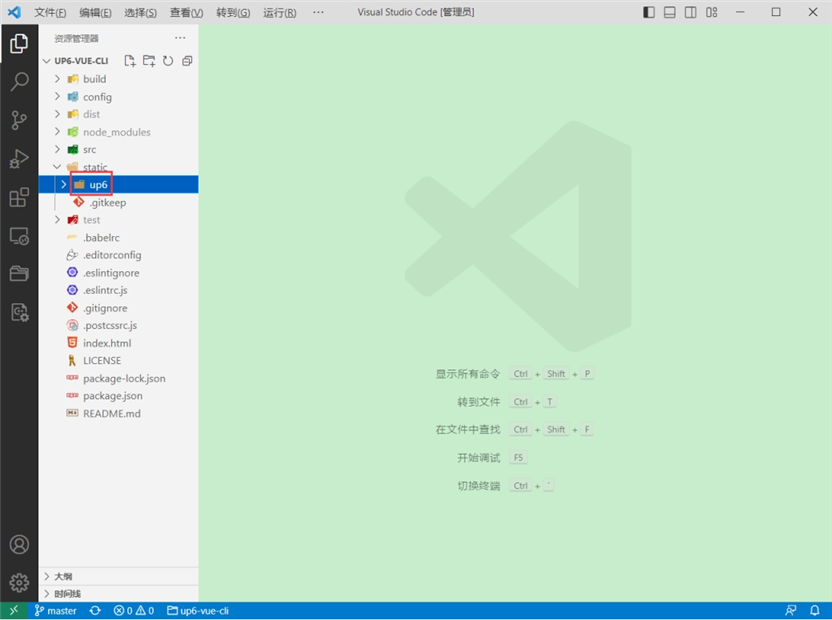
将组件复制到项目中
示例中已经包含此目录
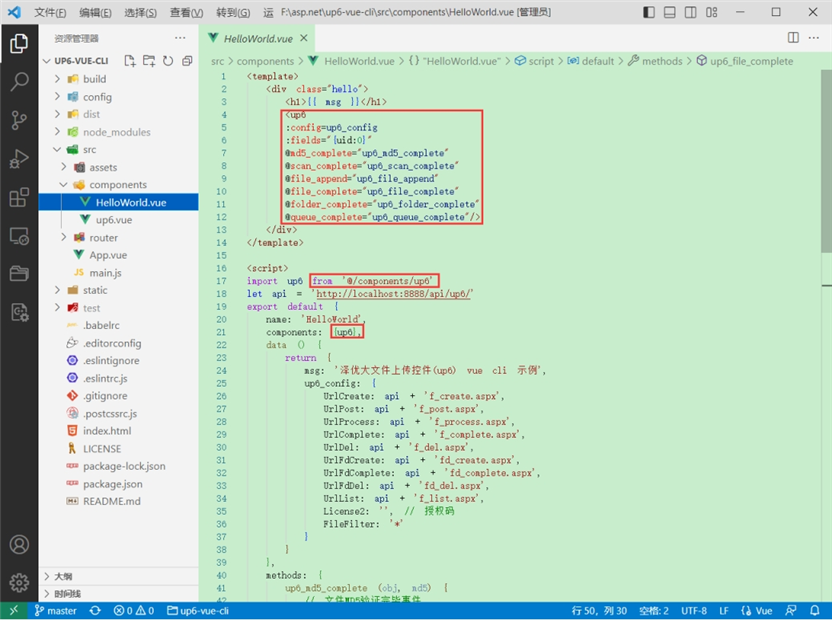
引入组件
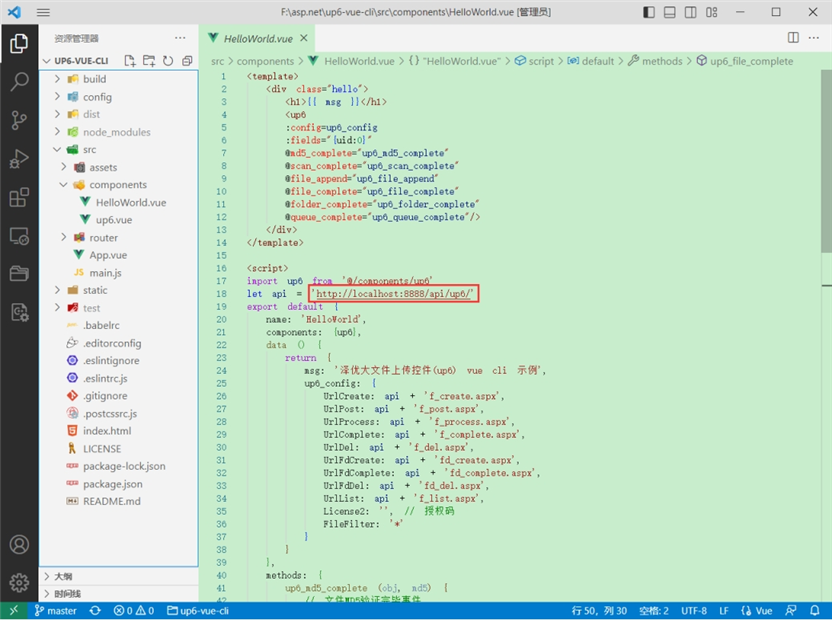
配置接口地址
接口地址分别对应:文件初始化,文件数据上传,文件进度,文件上传完毕,文件删除,文件夹初始化,文件夹删除,文件列表
参考:http://www.ncmem.com/doc/view.aspx?id=e1f49f3e1d4742e19135e00bd41fa3de
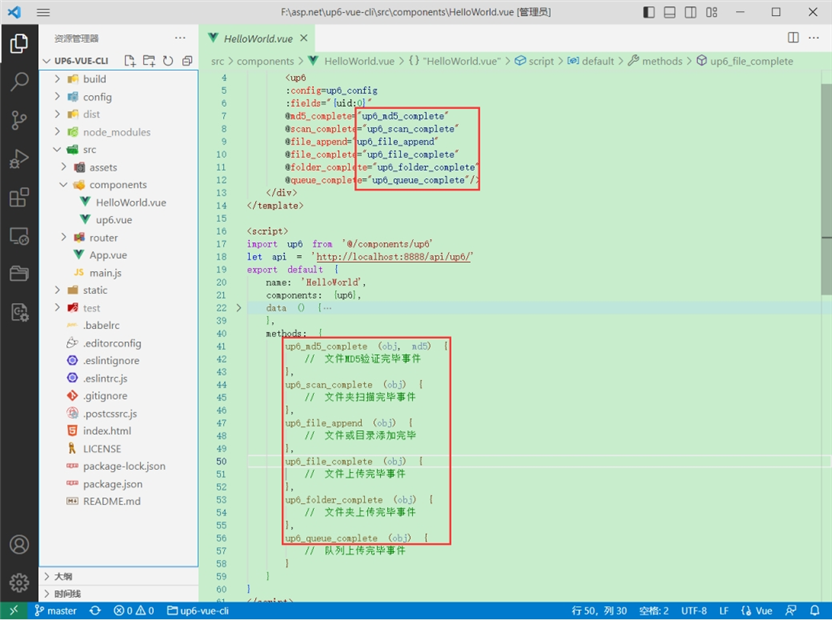
处理事件
启动测试
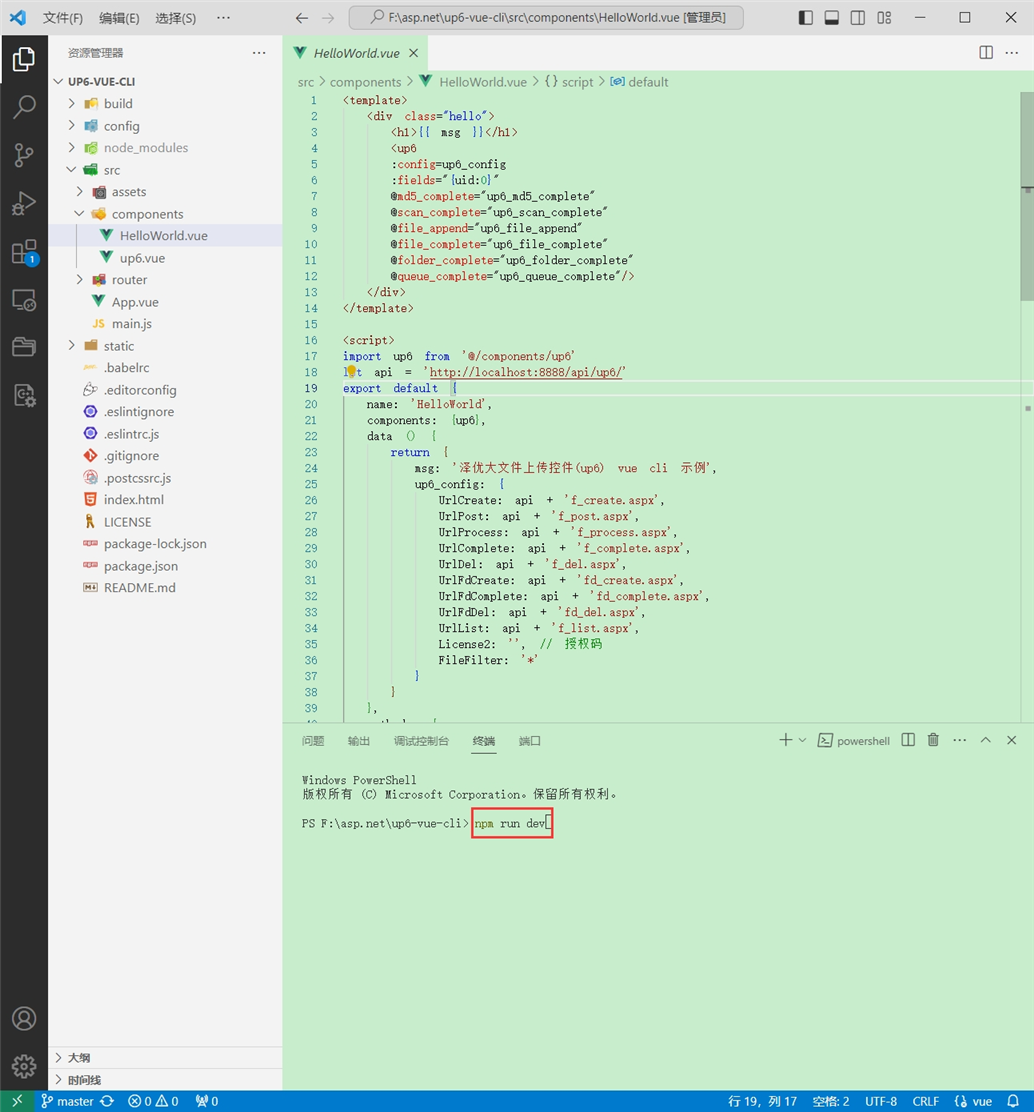
启动成功
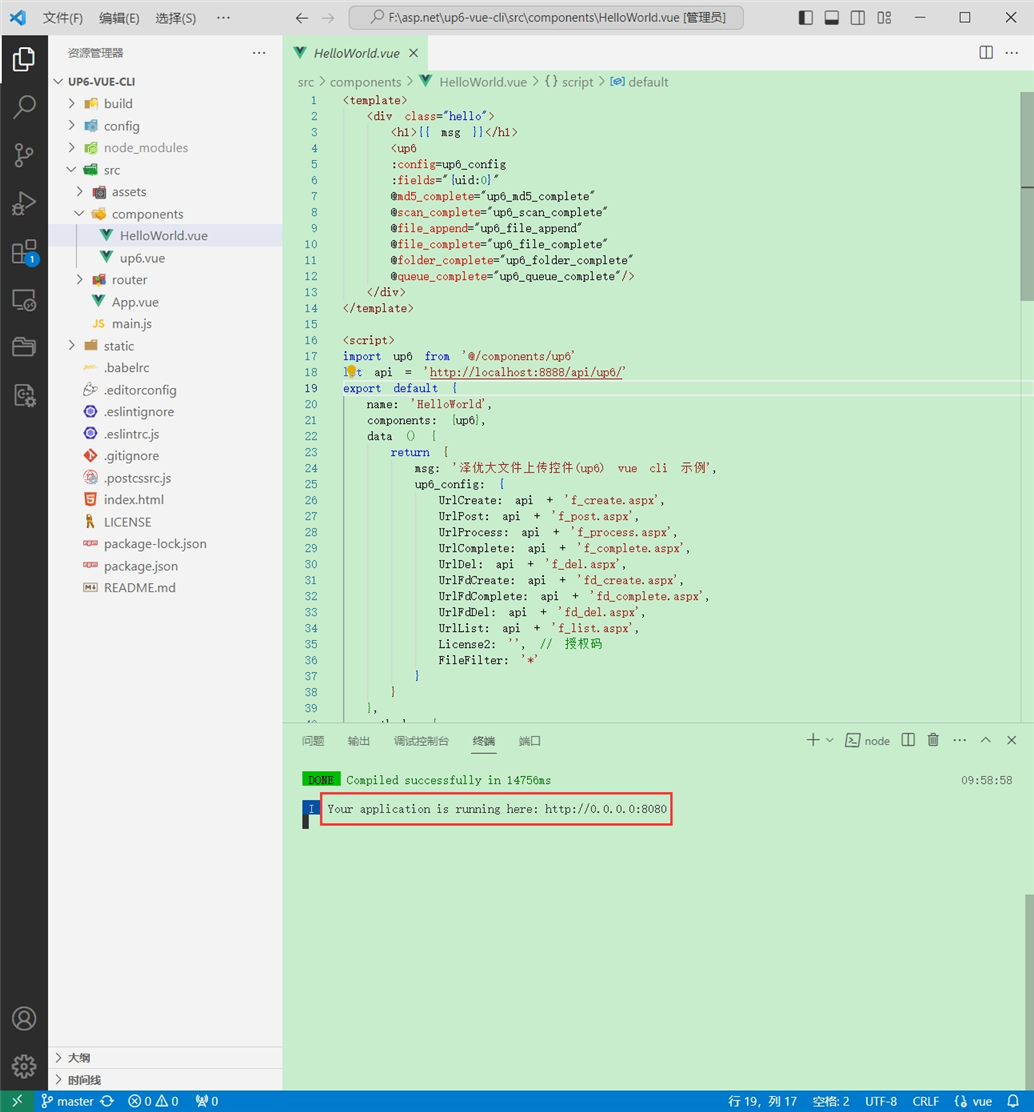
效果
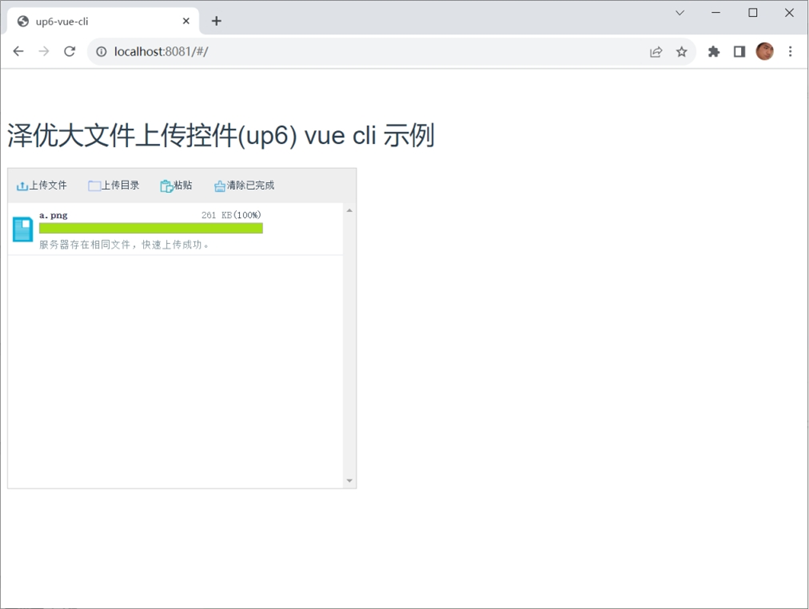
数据库
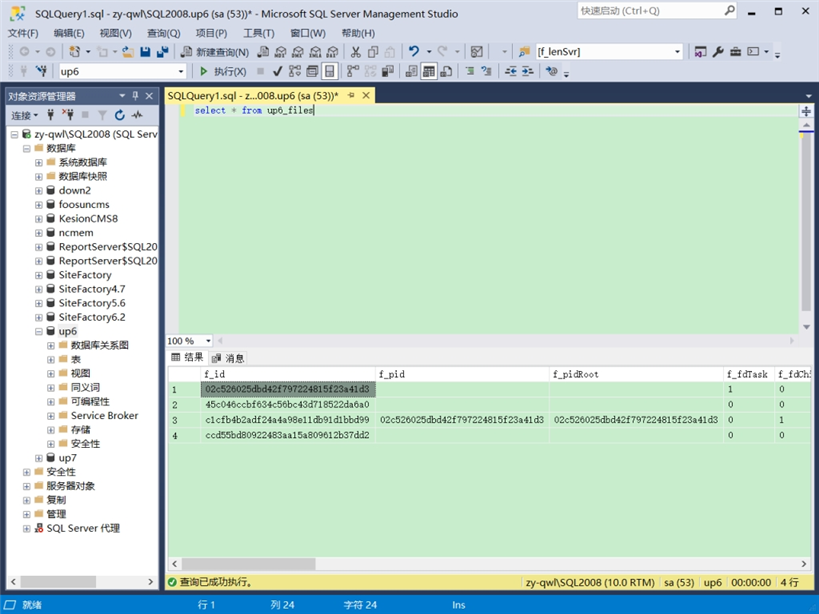
效果预览
文件上传
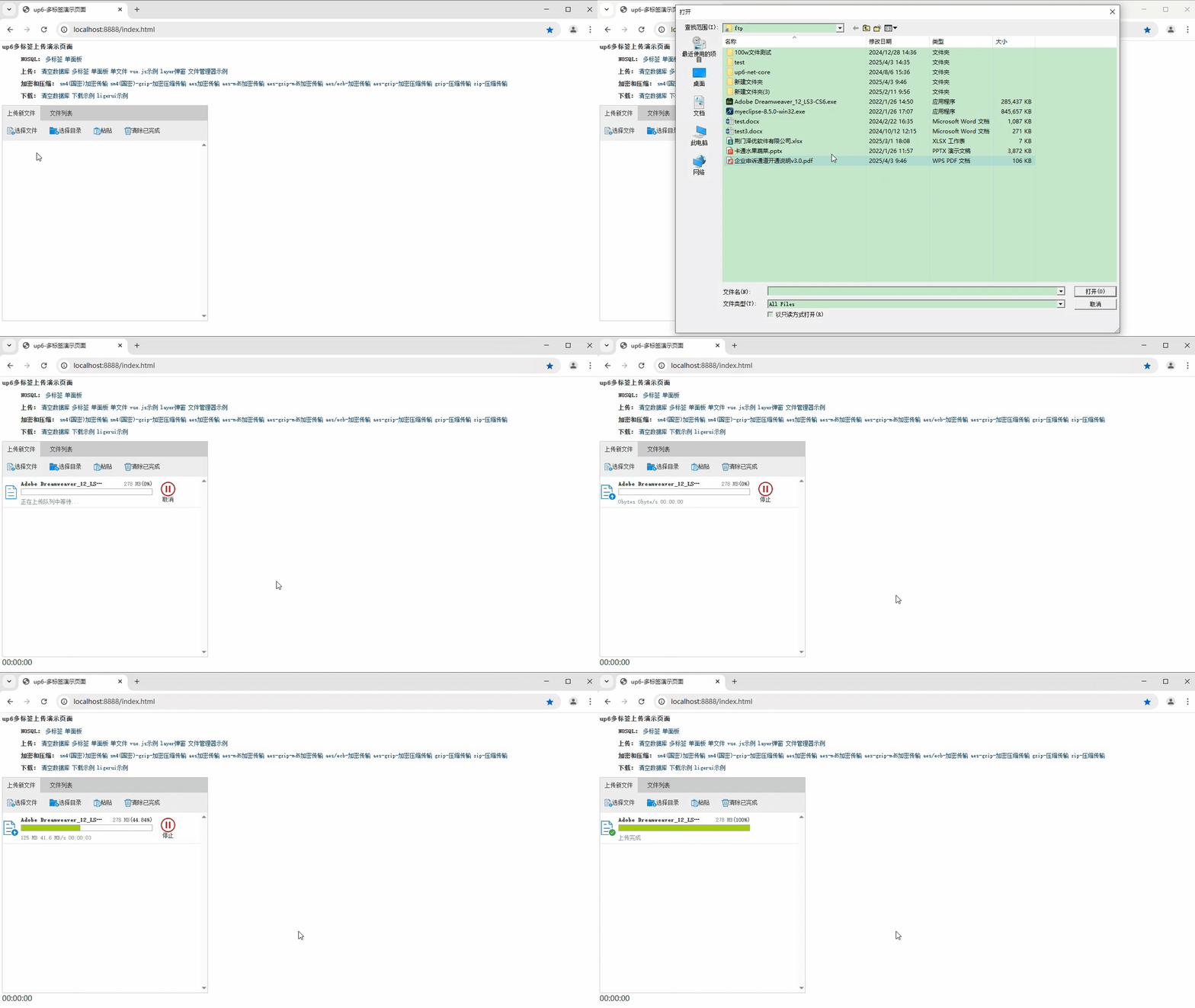
文件刷新续传
支持离线保存文件进度,在关闭浏览器,刷新浏览器后进行不丢失,仍然能够继续上传

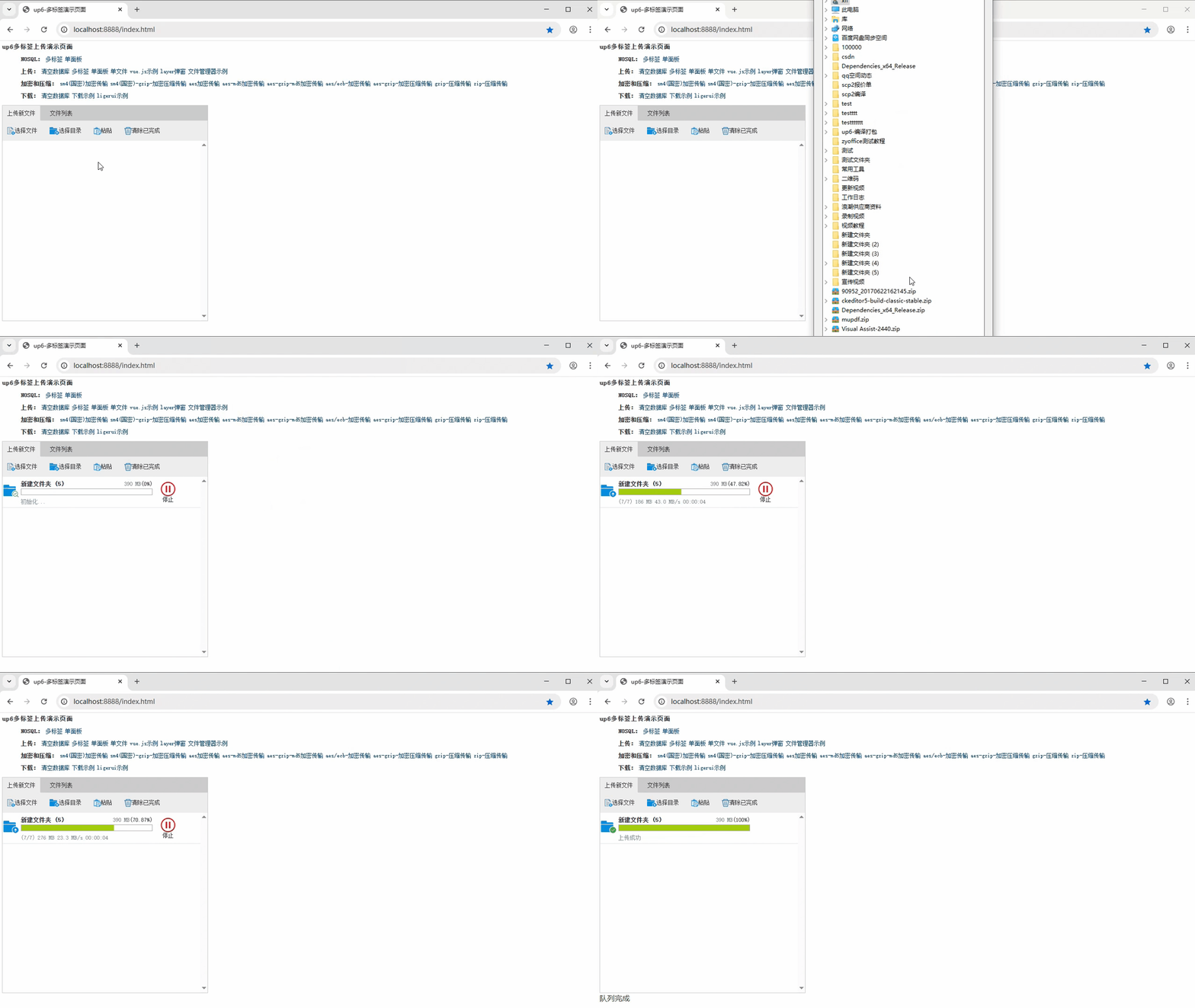
文件夹上传
支持上传文件夹并保留层级结构,同样支持进度信息离线保存,刷新页面,关闭页面,重启系统不丢失上传进度。
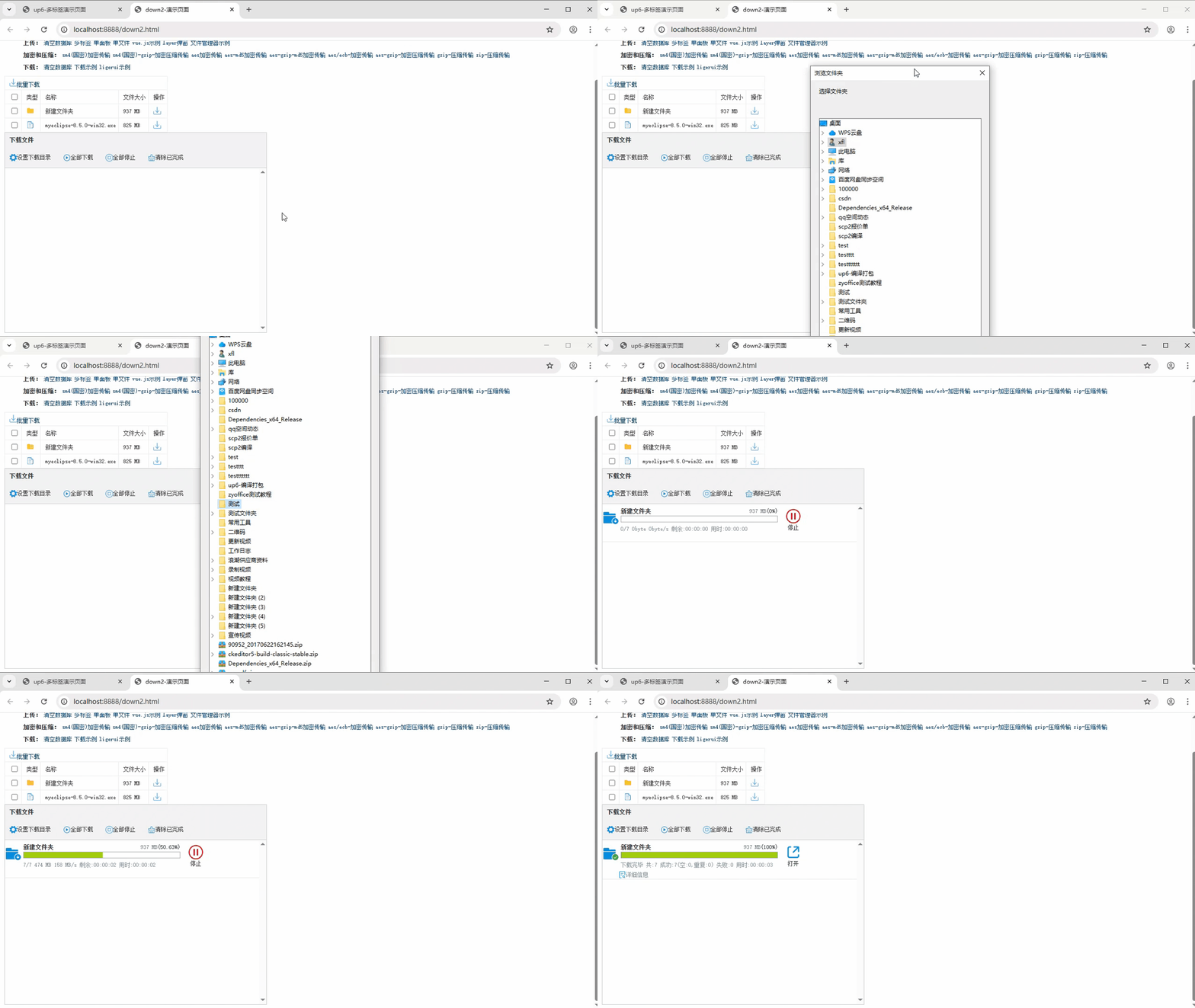
批量下载
支持文件批量下载

下载续传
文件下载支持离线保存进度信息,刷新页面,关闭页面,重启系统均不会丢失进度信息。

文件夹下载
支持下载文件夹,并保留层级结构,不打包,不占用服务器资源。
下载示例

惟楚有才,于斯为盛。欢迎来到长沙!!! 茶颜悦色、臭豆腐、CSDN和你一个都不能少~
更多推荐


 28
28 0
0- 0


 已为社区贡献6条内容

所有评论(0)