
k8s部署ELK系列一:集成Filebeat日志收集器
k8s部署ELK系列一:集成Filebeat日志收集器
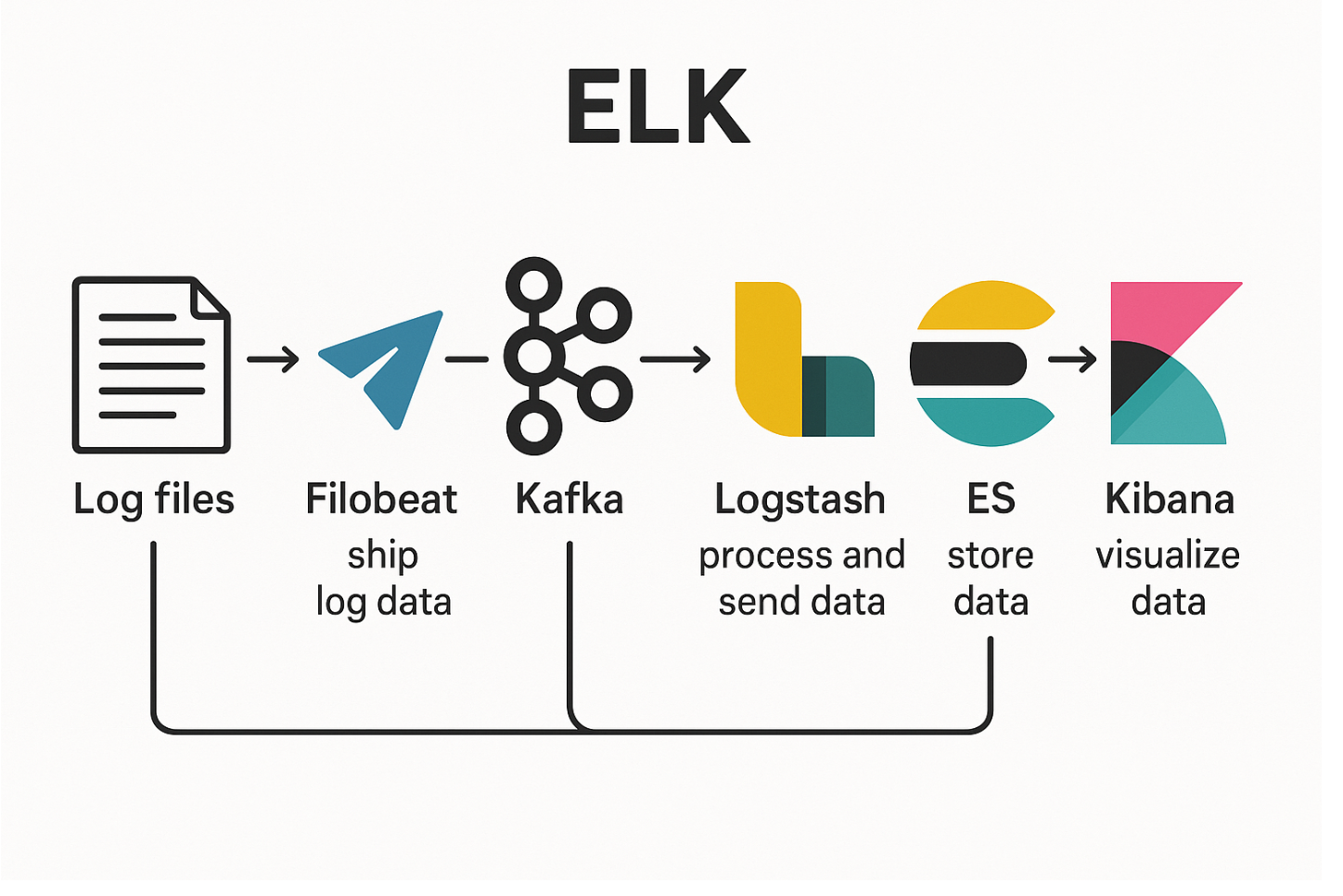
在 Kubernetes 集群中,应用服务的日志对于故障排查和性能分析至关重要。传统的日志查看方式(如 kubectl logs)存在不便于集中管理和持久化存储的问题,因此,我们需要构建一套集中化的日志采集系统。
ELK(Elasticsearch + Logstash + Kibana)是目前主流的日志分析解决方案,而 Filebeat 则是轻量级日志采集工具,通常作为日志系统的数据入口。本篇文章将介绍如何在 Kubernetes 环境中部署 Filebeat 实现日志的采集和转发。
一、Filebeat简介
Filebeat 是 Elastic Stack 中的一款轻量级日志采集器,设计用于从各种日志文件中收集和转发数据。它主要用于高效地从应用程序或系统的日志文件中提取数据,并将日志发送到 Elastic Stack 的其他组件(如 Kafka 或 Logstash)。与传统的日志采集工具相比,Filebeat 的资源占用非常小,适合运行在资源受限的环境中,如容器和微服务架构。
二、Filebeat优势
✅ 轻量级和低资源占用
Filebeat 是一个资源占用非常低的日志采集器,尤其适用于 Kubernetes 集群中,能够高效地在多个容器中运行而不影响容器的性能。
⚡ 高效的日志转发
Filebeat 提供了对日志的高效采集和转发功能,可以将日志实时发送到 Kafka,这样可以确保日志流的高吞吐量和低延迟。
Kafka 可以作为日志的缓冲区,帮助处理高频日志数据并将其转发到 Logstash,避免了 Logstash 被压垮。
🔄 支持多种日志输出目标
Filebeat 本身可以将日志发送到不同的目标,例如直接发送到 Elasticsearch 或者通过 Kafka 转发给 Logstash,提供灵活的日志传输方案。
🛠️ 配置简单,易于扩展
在 Kubernetes 中,Filebeat 的配置非常简单,可以通过 ConfigMap 或 Helm chart 进行管理,支持动态扩展以满足集群中的日志收集需求。
🌐 适用于分布式环境
在 Kubernetes 这样的分布式环境中,Filebeat 可以通过配置自动发现 Kubernetes 中的 Pod 和容器日志,并自动采集日志数据。
三、Filebeat实战部署
1. 创建yaml(filebeat-all.yaml)
# ========================
# 1. 创建 Namespace
# ========================
apiVersion: v1
kind: Namespace
metadata:
  name: elk
---
# ========================
# 2. 创建 ServiceAccount
# ========================
apiVersion: v1
kind: ServiceAccount
metadata:
  name: filebeat
  namespace: elk
  labels:
    k8s-app: filebeat
---
# ========================
# 3. 创建 RBAC
# ========================
apiVersion: rbac.authorization.k8s.io/v1
kind: ClusterRoleBinding
metadata:
  name: filebeat
subjects:
- kind: ServiceAccount
  name: filebeat
  namespace: elk
roleRef:
  kind: ClusterRole
  name: filebeat
  apiGroup: rbac.authorization.k8s.io
---
apiVersion: rbac.authorization.k8s.io/v1
kind: RoleBinding
metadata:
  name: filebeat
  namespace: elk
subjects:
  - kind: ServiceAccount
    name: filebeat
    namespace: elk
roleRef:
  kind: Role
  name: filebeat
  apiGroup: rbac.authorization.k8s.io
---
apiVersion: rbac.authorization.k8s.io/v1
kind: RoleBinding
metadata:
  name: filebeat-kubeadm-config
  namespace: elk
subjects:
  - kind: ServiceAccount
    name: filebeat
    namespace: elk
roleRef:
  kind: Role
  name: filebeat-kubeadm-config
  apiGroup: rbac.authorization.k8s.io
---
apiVersion: rbac.authorization.k8s.io/v1
kind: ClusterRole
metadata:
  name: filebeat
  labels:
    k8s-app: filebeat
rules:
- apiGroups: [""]
  resources:
  - namespaces
  - pods
  - nodes
  verbs:
  - get
  - watch
  - list
- apiGroups: ["apps"]
  resources:
    - replicasets
  verbs: ["get", "list", "watch"]
---
apiVersion: rbac.authorization.k8s.io/v1
kind: Role
metadata:
  name: filebeat
  namespace: elk
  labels:
    k8s-app: filebeat
rules:
  - apiGroups:
      - coordination.k8s.io
    resources:
      - leases
    verbs: ["get", "create", "update"]
---
apiVersion: rbac.authorization.k8s.io/v1
kind: Role
metadata:
  name: filebeat-kubeadm-config
  namespace: elk
  labels:
    k8s-app: filebeat
rules:
  - apiGroups: [""]
    resources:
      - configmaps
    resourceNames:
      - kubeadm-config
    verbs: ["get"]
---
# ========================
# 4. 创建 ConfigMap
# ========================
apiVersion: v1
kind: ConfigMap
metadata:
  name: filebeat-config
  namespace: elk
  labels:
    k8s-app: filebeat
data:
  filebeat.yml: |-
    filebeat.inputs:
    - type: container
      paths:
        - /var/log/containers/*.log
      fields:
        project: "k8s-outlog"
        logtype: "k8s-outlog"
      multiline.pattern: '^[[:space:]]+(at|\.{3})\b|^Caused by:'
      multiline.negate: false
      multiline.match: after
      processors:
        - add_kubernetes_metadata:
            host: ${NODE_NAME}
            matchers:
            - logs_path:
                logs_path: "/var/log/containers/"
    - type: log
      paths:
        - /var/log/messages
      fields:
        project: "k8s-messagelog"
        logtype: "k8s-messagelog"
      processors:
        - add_fields:
            when:
              regexp:
                message: ".* kubelet.*: .*"
            fields:
              component: "kubelet"
    processors:
      - add_host_metadata:
    output.kafka:
      hosts: ["kafka-0.kafka-headless.elk.svc.cluster.local:9092"]
      topic: 'k8s-outlog'
      sasl.mechanism: "SCRAM-SHA-256"
      partition.round_robin:
        reachable_only: true
      required_acks: 1
      max_message_bytes: 10000000
---
# ========================
# 5. 创建 DaemonSet
# ========================
apiVersion: apps/v1
kind: DaemonSet
metadata:
  name: filebeat
  namespace: elk
  labels:
    k8s-app: filebeat
spec:
  selector:
    matchLabels:
      k8s-app: filebeat
  template:
    metadata:
      labels:
        k8s-app: filebeat
    spec:
      serviceAccountName: filebeat
      terminationGracePeriodSeconds: 30
      hostNetwork: true
      dnsPolicy: ClusterFirstWithHostNet
      containers:
      - name: filebeat
        image: swr.cn-north-4.myhuaweicloud.com/ddn-k8s/docker.elastic.co/beats/filebeat:7.17.2
        args: ["-c", "/etc/filebeat.yml", "-e"]
        env:
        - name: NODE_NAME
          valueFrom:
            fieldRef:
              fieldPath: spec.nodeName
        securityContext:
          runAsUser: 0
        resources:
          limits:
            cpu: 500m
            memory: 500Mi
          requests:
            cpu: 100m
            memory: 100Mi
        volumeMounts:
        - name: config
          mountPath: /etc/filebeat.yml
          readOnly: true
          subPath: filebeat.yml
        - name: data
          mountPath: /usr/share/filebeat/data
        - name: varlibdockercontainers
          mountPath: /data/docker/containers
          readOnly: true
        - name: varlog
          mountPath: /var/log
          readOnly: true
        - name: tz-config
          mountPath: /etc/localtime
          readOnly: true
      volumes:
      - name: config
        configMap:
          defaultMode: 0640
          name: filebeat-config
      - name: varlibdockercontainers
        hostPath:
          path: /data/docker/containers
      - name: varlog
        hostPath:
          path: /var/log
      - name: data
        hostPath:
          path: /var/lib/filebeat-data
          type: DirectoryOrCreate
      - name: tz-config
        hostPath:
          path: /etc/localtime
```
2. 部署所有资源
kubectl apply -f filebeat-all.yaml
3. 验证Filebeat Pod状态
kubectl get pod -n elk
更多推荐

 4
4 0
0- 0


 已为社区贡献2条内容

所有评论(0)