
大模型学习(四)LangChain实现RAG检索增强
由于一些依赖库的版本更新太快了,导致出现不兼容的情况,我也是试了好久,最好是跟我一样安装下面的版本:
# 大模型核心框架
vllm==0.4.2
vllm-flash-attn==2.5.9
vllm_nccl_cu12==2.18.1.0.4.0
transformers==4.41.0
transformers-stream-generator==0.0.4
langchain==0.1.6
langchain-community==0.0.20
langchain-core==0.1.46
langchain-openai==0.1.7
langgraph==1.0.2
langgraph-sdk==0.2.9
langsmith==0.0.83

# 量化相关
auto_gptq==0.7.1
compressed-tensors==0.8.1
peft==0.12.0
optimum==2.0.0

# 推理优化
xformers==0.0.26.post1
triton==2.3.0
flash-attn==2.5.9

# 模型服务相关
fastapi==0.121.0
uvicorn==0.38.0
openai==1.109.1

# 向量数据库
faiss-cpu==1.12.0

# Embedding相关
sentencepiece==0.2.1
tokenizers==0.19.1
tiktoken==0.6.0

# 模型下载与管理
huggingface-hub==0.36.0
modelscope==1.9.0

# PyTorch生态
torch==2.3.0+cu118
torchaudio==2.3.1+cu121
torchvision==0.18.0

# 其他重要依赖
pydantic==2.12.4
outlines==0.0.34
outlines_core==0.2.11
启动vLLM的openai兼容server
export VLLM_USE_MODELSCOPE=True
python -m vllm.entrypoints.openai.api_server --model '../Qwen-vllm/Models/qwen/Qwen-14B-Chat-Int4' --trust-remote-code -q gptq --dtype float16 --gpu-memory-utilization 0.6
tips:为什么要用 vllm.entrypoints.openai.api_server 启动?和我之前自己写的 FastAPI + vLLM 服务有什么区别?——涉及开发效率、兼容性、标准化和维护成本。核心目的是:让本地大模型“看起来就像 OpenAI API”,从而获得最大兼容性、最低接入成本和最强生态支持。
生成知识向量库
# 解析PDF,切成chunk片段
pdf_loader=PyPDFLoader('LLM.pdf',extract_images=True)   # 使用OCR解析pdf中图片里面的文字
chunks=pdf_loader.load_and_split(text_splitter=RecursiveCharacterTextSplitter(chunk_size=100,chunk_overlap=10))
使用PyPDFLoader工具解析PDF文件,extract_images为True表示会使用OCR解析图片文件中的文字,然后设置分块大小为100,重叠区域为10。
输出内容如下:

一共432段文字,chunks列表里面存放的就是Document类数据,它包括page_content(也就是我们需要的文字),和meta信息,例如metadata={'source': 'LLM.pdf', 'page': 0}包括数据来源以及页码等等信息。
接下来加载embedding模型,用于将chunk向量化,这里通过modelscope加载一些免费的model进行向量化:
# 加载embedding模型,用于将chunk向量化
embeddings=ModelScopeEmbeddings(model_id='iic/nlp_corom_sentence-embedding_chinese-base')
这里用的通用领域的,可以根据自己的需要进行选择:

最后保存到脸书的faiss本地向量数据库中:
# 将chunk插入到faiss本地向量数据库
vector_db=FAISS.from_documents(chunks,embeddings)
vector_db.save_local('LLM.faiss')
也可以用其他的,在langchain里面有很多:
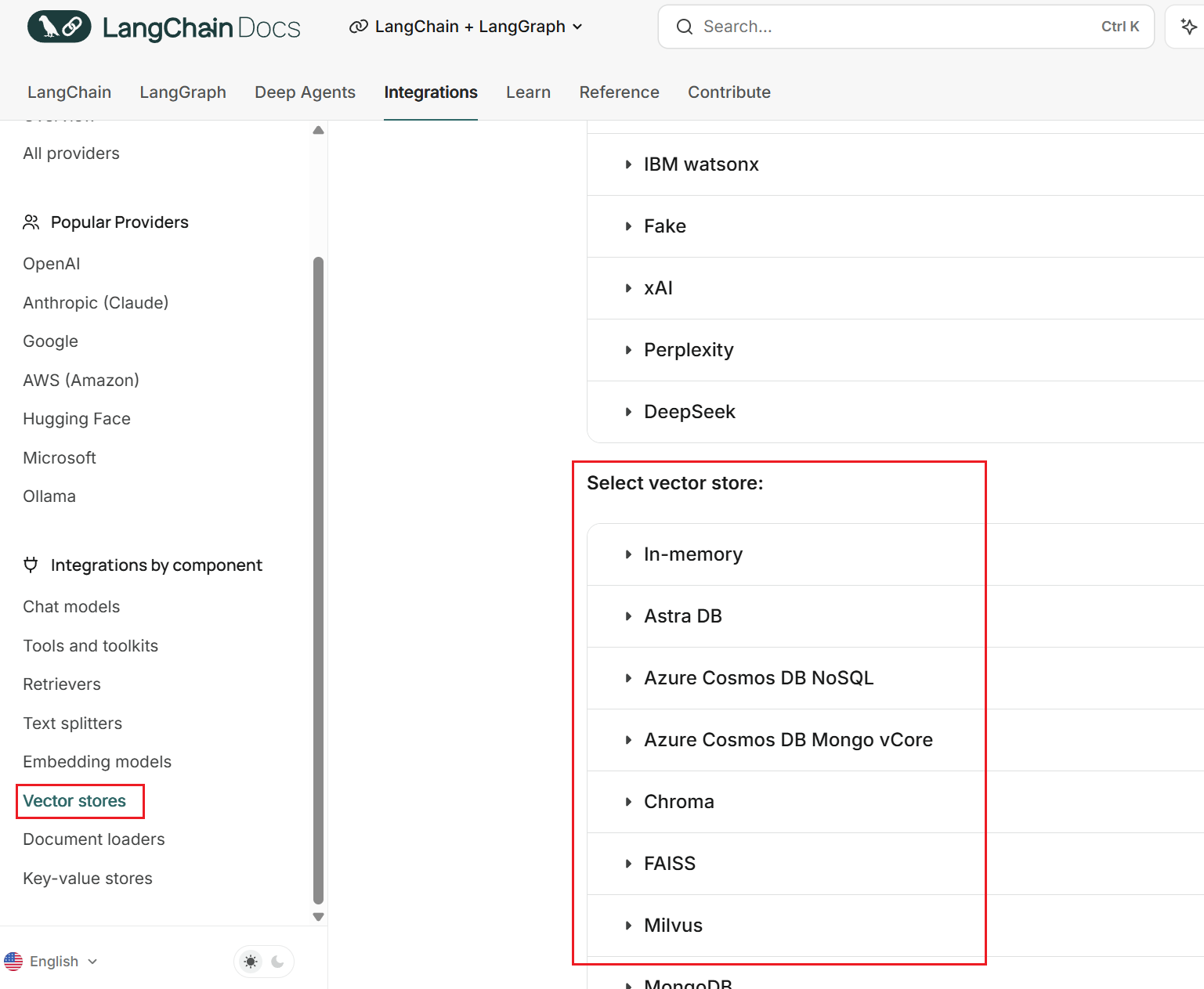
使用这些集成的工具可以帮助我们快速构建RAG,在具体的项目中这些工具可能会限制你,所以可以考虑自己实现底层逻辑。
构建RAG
首先加载同一个embedding模型,用于将Query向量化:
embeddings=ModelScopeEmbeddings(model_id='iic/nlp_corom_sentence-embedding_chinese-base')
然后加载本地faiss向量库,用于知识召回:
vector_db=FAISS.load_local('LLM.faiss',embeddings)
retriever=vector_db.as_retriever(search_kwargs={"k":5})
这段代码先加载向量库,然后将向量库作为一个检索器。这里指定top_k为5,返回5个最相关的向量。
用vllm部署openai兼容的服务端接口,然后走ChatOpenAI客户端调用
os.environ['VLLM_USE_MODELSCOPE']='True'
chat=ChatOpenAI(
    model="qwen/Qwen-7B-Chat-Int4",
    openai_api_key="EMPTY",
    openai_api_base='http://localhost:8000/v1',
    stop=['<|im_end|>']
)
再使用langchain提供的提示词模板,非常方便,就不需要我们像之前一样自己写了:
system_prompt=SystemMessagePromptTemplate.from_template('You are a helpful assistant.')
user_prompt=HumanMessagePromptTemplate.from_template('''
Answer the question based only on the following context:

{context}

Question: {query}
''')
full_chat_prompt=ChatPromptTemplate.from_messages([system_prompt,MessagesPlaceholder(variable_name="chat_history"),user_prompt])
可以看到最终的full_chat_prompt由三部分组成,头部+腰部+尾部,完全符合之前的结构,它构成的内容也跟之前的ChatML结构是一样的:
<|im_start|>system
You are a helpful assistant.
<|im_end|>
...
<|im_start|>user
Answer the question based only on the following context:

{context}

Question: {query}
<|im_end|>
<|im_start|>assitant
......
<|im_end|>
然后构建Chat chain
chat_chain={
        "context": itemgetter("query") | retriever,
        "query": itemgetter("query"),
        "chat_history":itemgetter("chat_history"),
    }|full_chat_prompt|chat
它的逻辑就是首先将query传入到检索器中,检索到5个最相关的向量作为context,然后依次传入query和chat_history,再将这三个内容传入到full_chat_prompt,构建起一个完整的Prompt,最后输入到我们的chat模型得到输出。
最后进行对话:
# 开始对话
chat_history=[]
while True:
    query=input('query:')
    response=chat_chain.invoke({'query':query,'chat_history':chat_history})
    chat_history.extend((HumanMessage(content=query),response))
    print(response.content)
    chat_history=chat_history[-20:] # 最新10轮对话
查看效果:
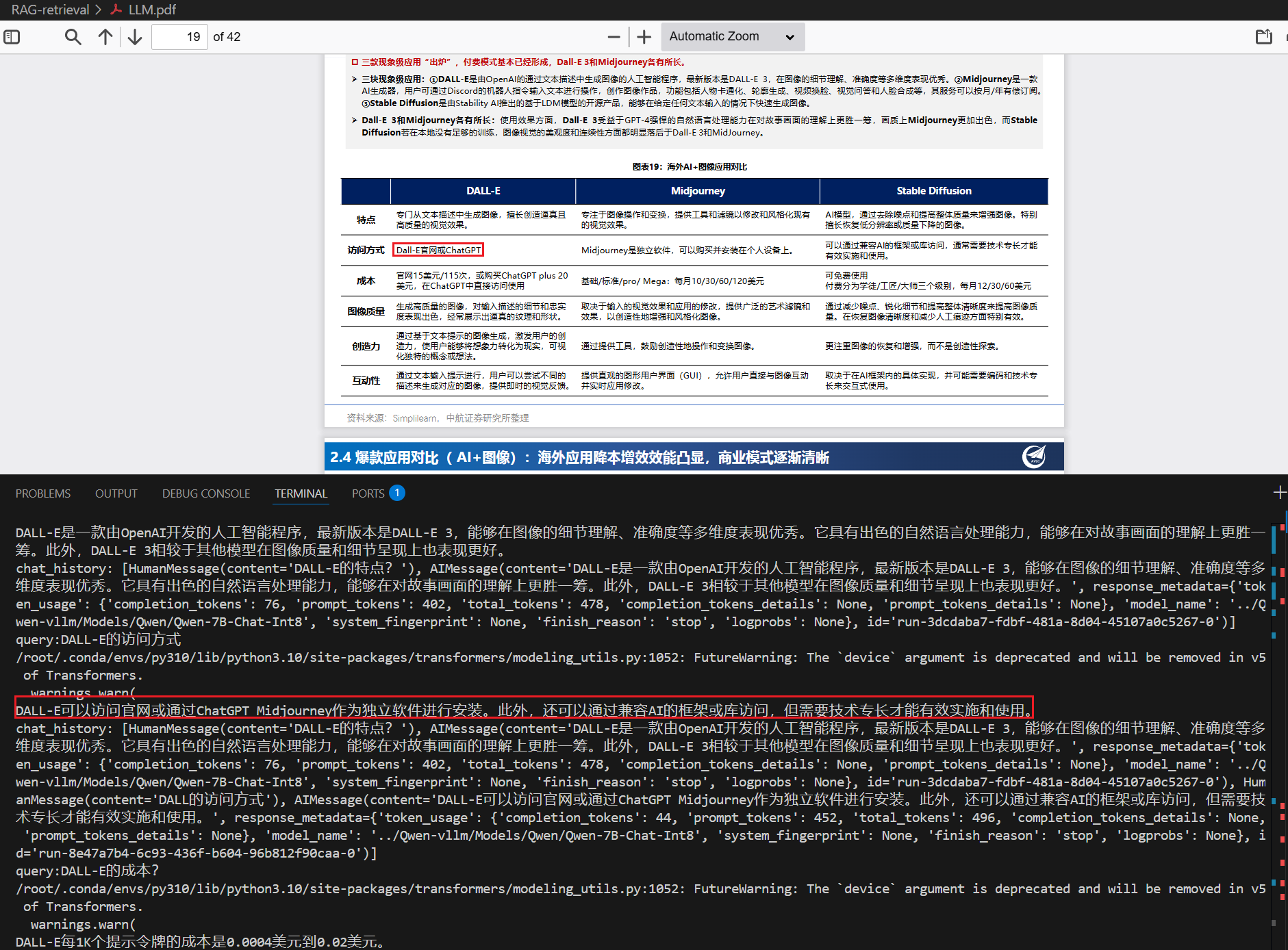
我打印了相关的信息:
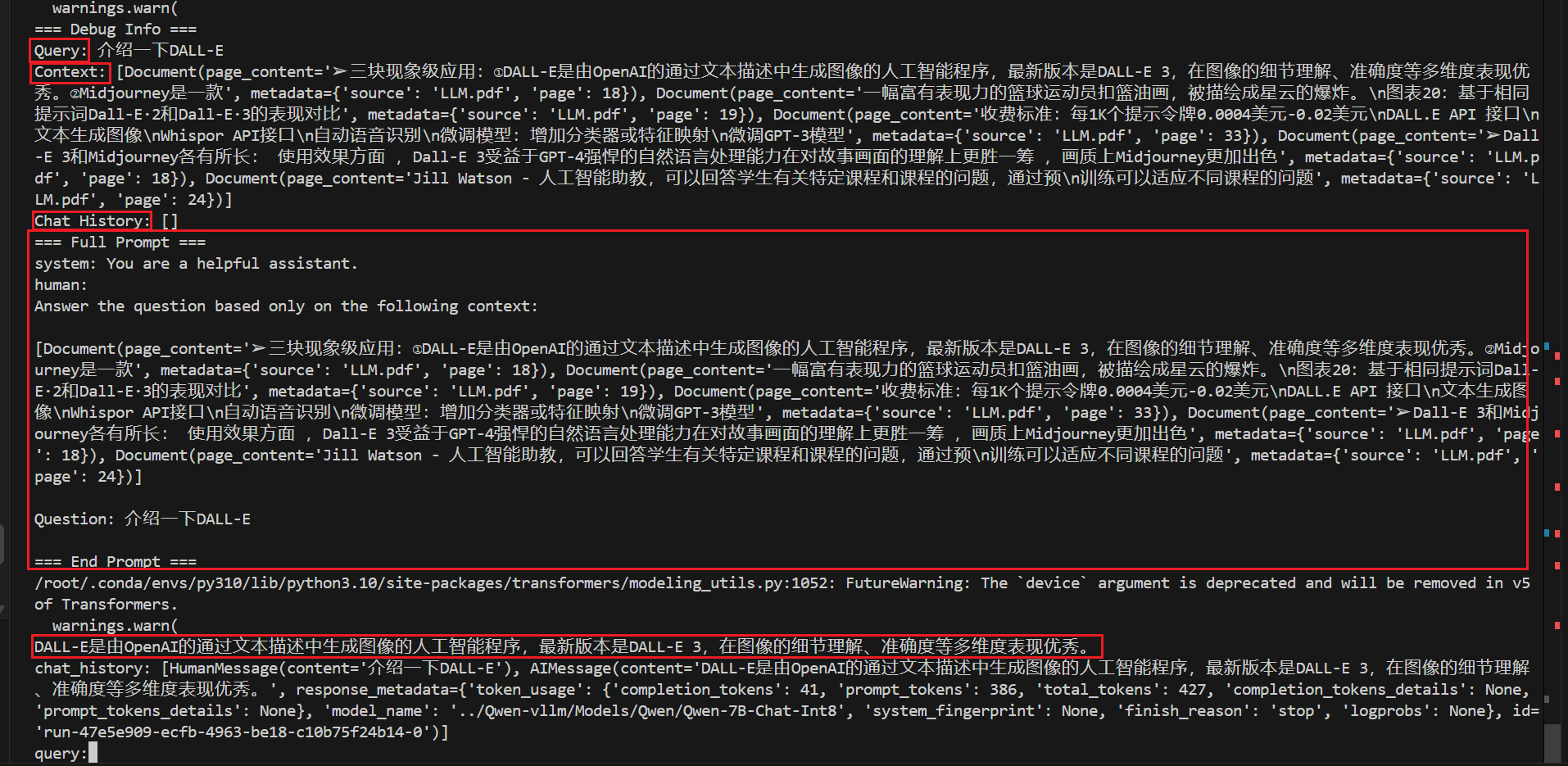
可以看到,检索器能够检索到query问题相关的信息并召回当做context,由于是第一次检索,所以chat_history是空的,然后生成的Prompt指令,最后输入到大模型得到答复。
更多推荐
 12
12 0
0- 0


 已为社区贡献12条内容

所有评论(0)