
深度学习:python疲劳驾驶检测识别系统 Yolo模型 闭眼、打哈欠检测 疲劳提醒 驾驶安全 pytorch 深度学习 毕业设计(建议收藏)✅
·
博主介绍:✌全网粉丝50W+,前互联网大厂软件研发、集结硕博英豪成立工作室。专注于计算机相关专业项目实战8年之久,选择我们就是选择放心、选择安心毕业✌
> 🍅想要获取完整文章或者源码,或者代做,拉到文章底部即可与我联系了。🍅🍅感兴趣的可以先收藏起来,点赞、关注不迷路,大家在毕设选题,项目以及论文编写等相关问题都可以给我留言咨询,希望帮助同学们顺利毕业 。🍅
1、毕业设计:2026年计算机专业毕业设计选题汇总(建议收藏)✅
2、大数据毕业设计:2026年选题大全 深度学习 python语言 JAVA语言 hadoop和spark(建议收藏)✅
1、项目介绍
技术栈:
Python语言、YoloV5模型、Pyqt界面、torch、训练集测试集、闭眼、打哈欠、注册登录功能
数据集:
使用的疲劳驾驶数据集,包含训练数据集656张图片、验证集188张图片、测试集94张图片,共计938张图片。 每张图像均提供了图像类标记信息,图像中疲劳驾驶的bounding box。
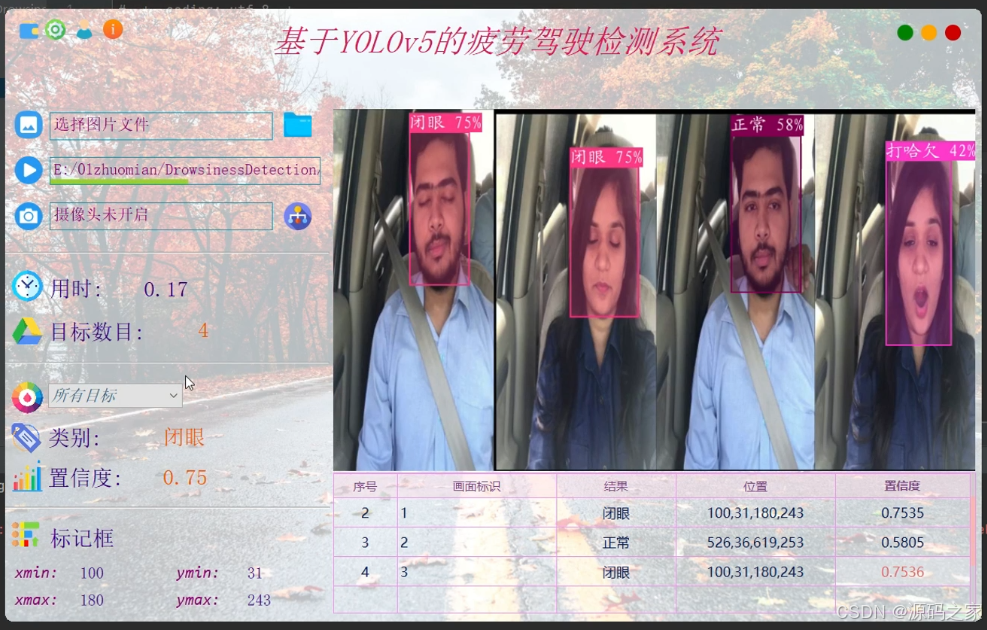
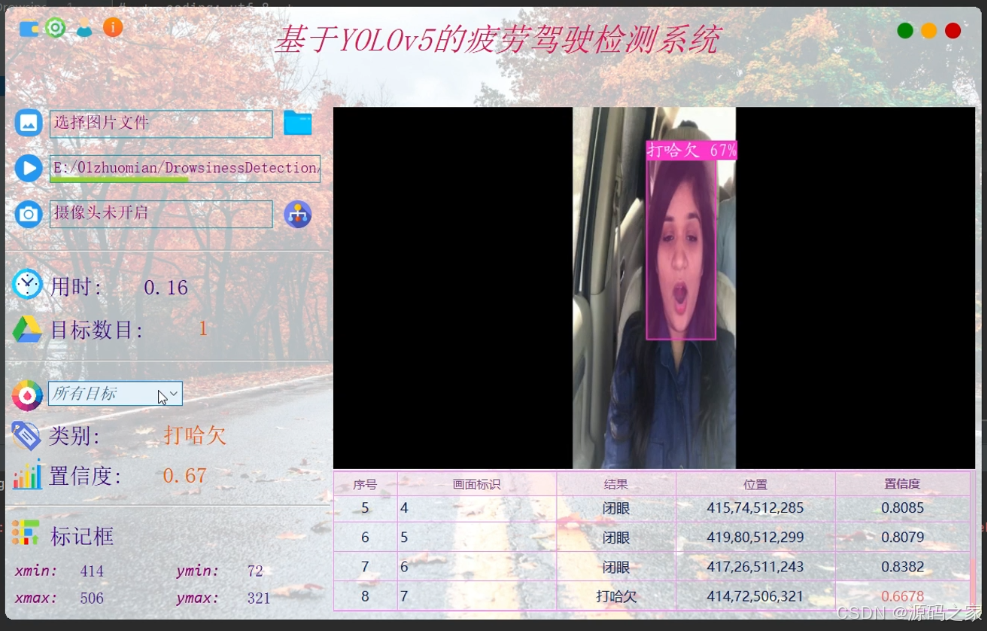
功能简介: 基于YOLOv5的疲劳驾驶检测系统使用深度学习技术检测常见驾驶图片、视频和实时视频中的疲劳行为,识别其闭眼、打哈欠等结果并记录和保存。在界面中可以选择各种图片、视频进行检测识别;可对图像中存在的多目标进行识别分类,检测速度快、识别精度高。
本商品的项目包含以下内容:
1.完整程序文件(.py等)
2.UI界面源文件、图标(.ui、.qrc、.py等)
3.测试图片、视频文件(.jpeg、.mp4、.avi等)
4.模型参数、配置文件(.weights、.cfg等)
5.项目演示视频以及项目使用说明视频(包含运行项目所需要的环境配置讲解)
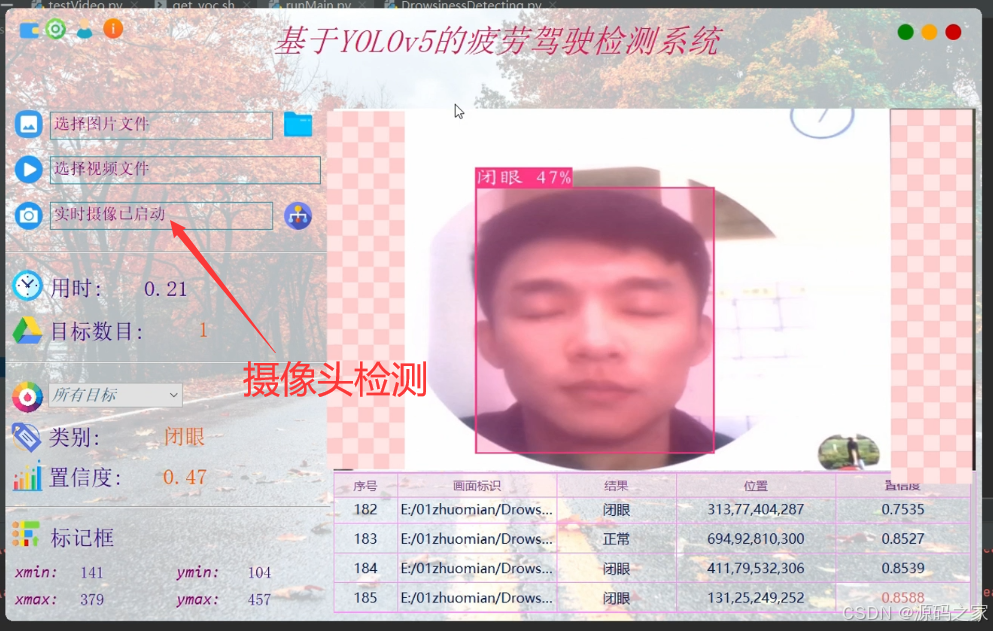
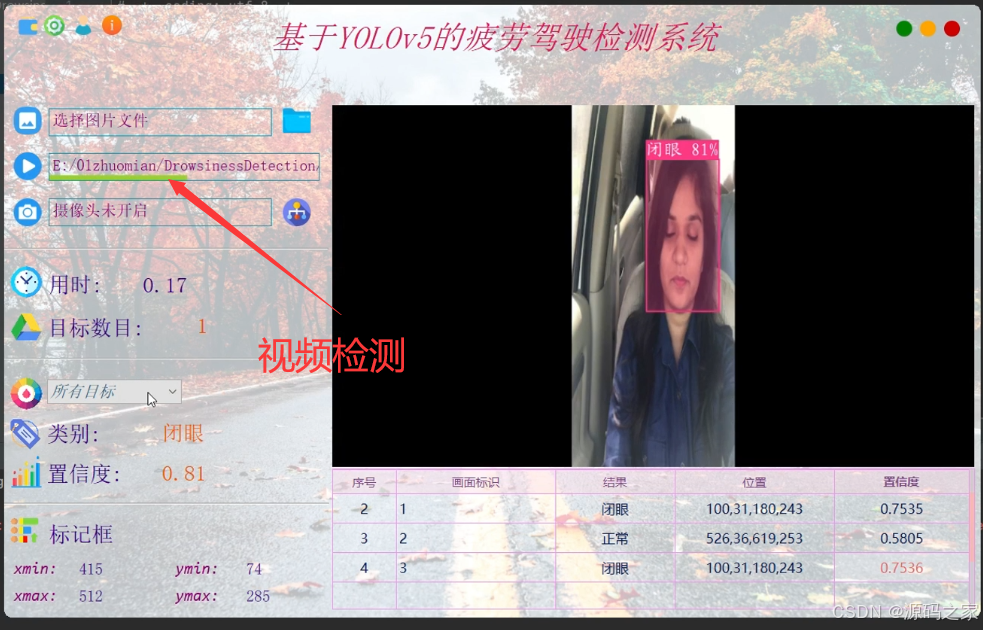
功能:1.选择图片识别3.视频识别3. 摄像头实时检测
原理简介:基于视觉特征的驾驶员疲劳状态检测方法,主要是利用摄像机对驾驶状态下的驾驶员面部特征进行实时采集,然后使用基于视觉以及图像处理的方法,获取得到驾驶员的眼部、嘴部以及头部区域信息等特征信息。最后,使用一定的判别方法对提取到的驾驶员眨眼间频率,打哈欠等特征分析,对驾驶员疲劳状态进行检测。随着当前深度学习方法在目标检测方向上的应用深入,基于YOLOv5的目标检测方法具有应用的可能性与应用前景。疲劳在人体面部表情中表现出大致三个类型:打哈欠(嘴巴张大且相对较长时间保持这一状态)、眨眼(或眼睛微闭,此时眨眼次数增多,且眨眼速度变慢)等。这里使用YOLOv5识别这些数据特征,实时地分析驾驶员的疲劳驾驶行为,并及时作出安全提示。
技术特点
(1)YOLO v5算法实现,模型一键切换更新;
(2)检测图片、视频等图像中的各疲劳驾驶行为;
(3)摄像头监控实时检测,便携展示、记录和保存;
(4)支持用户登录、注册,检测结果可视化功能;
(5)提供训练数据集和代码,可重新训练模型;
2、项目界面
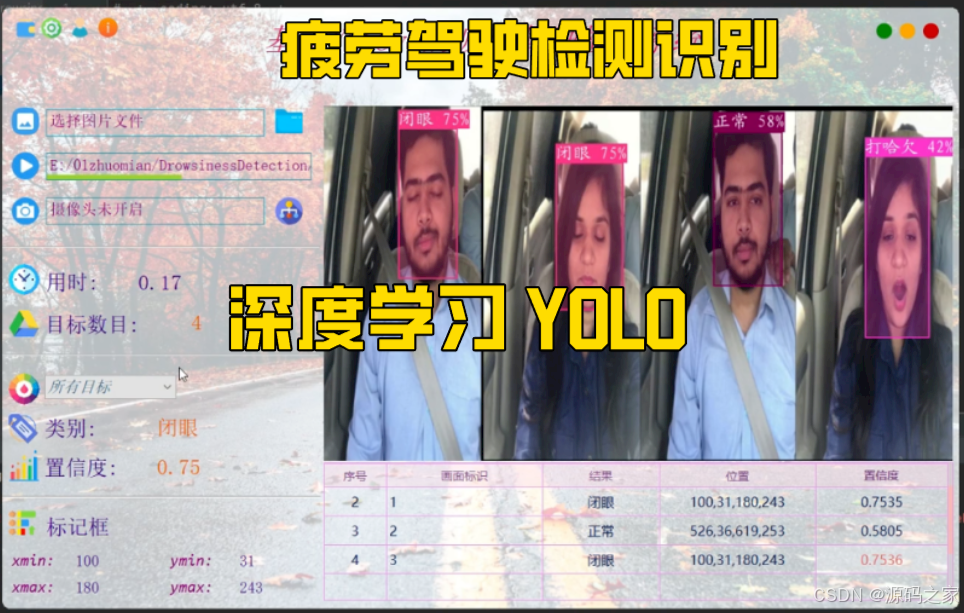
(1)疲劳驾驶检测—多目标检测识别
(2)疲劳驾驶检测—上传视频检测
(3)疲劳驾驶检测—摄像头实时检测识别
(4)疲劳驾驶检测—视频实时检测识别
(5)注册登录
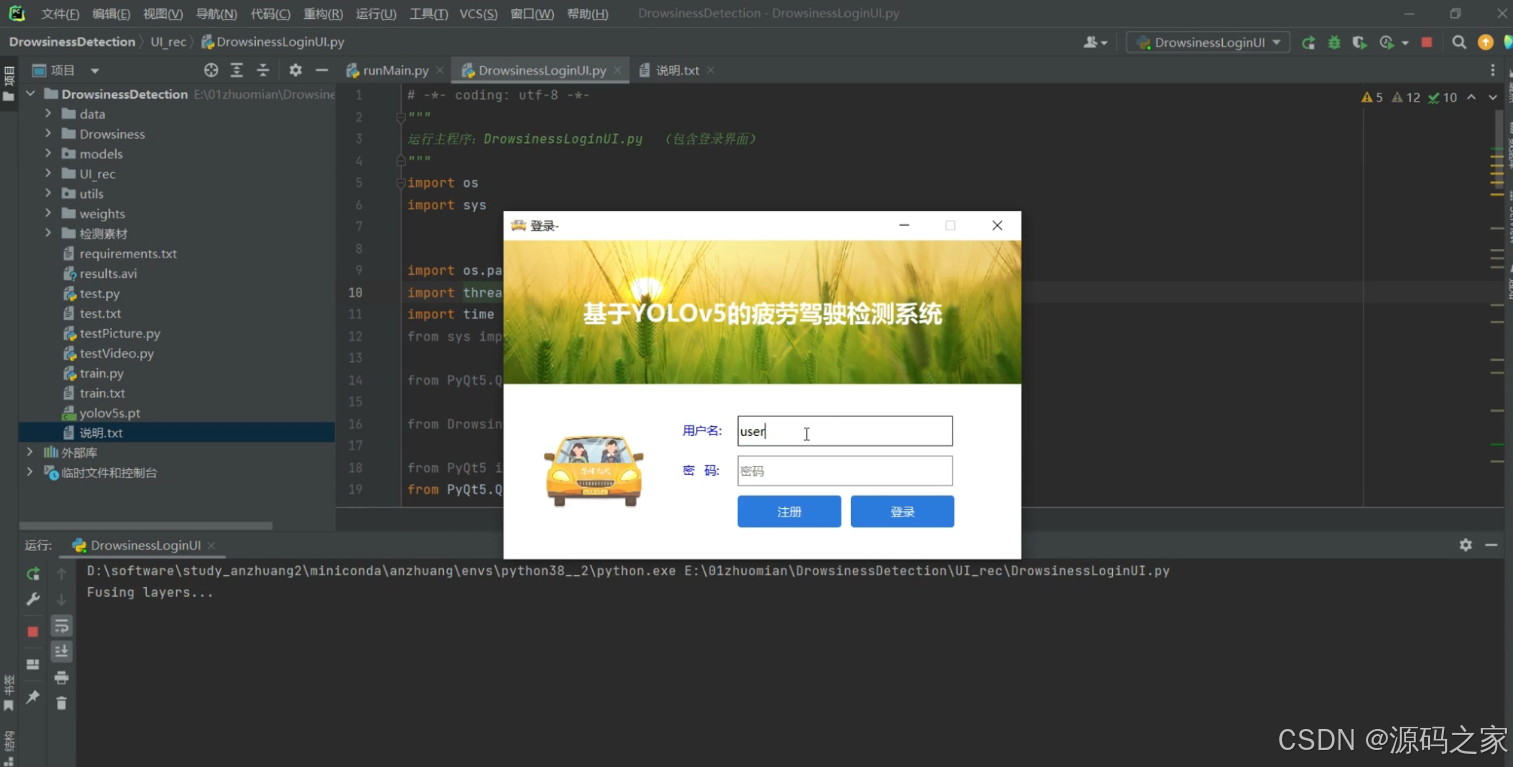
(6)界面
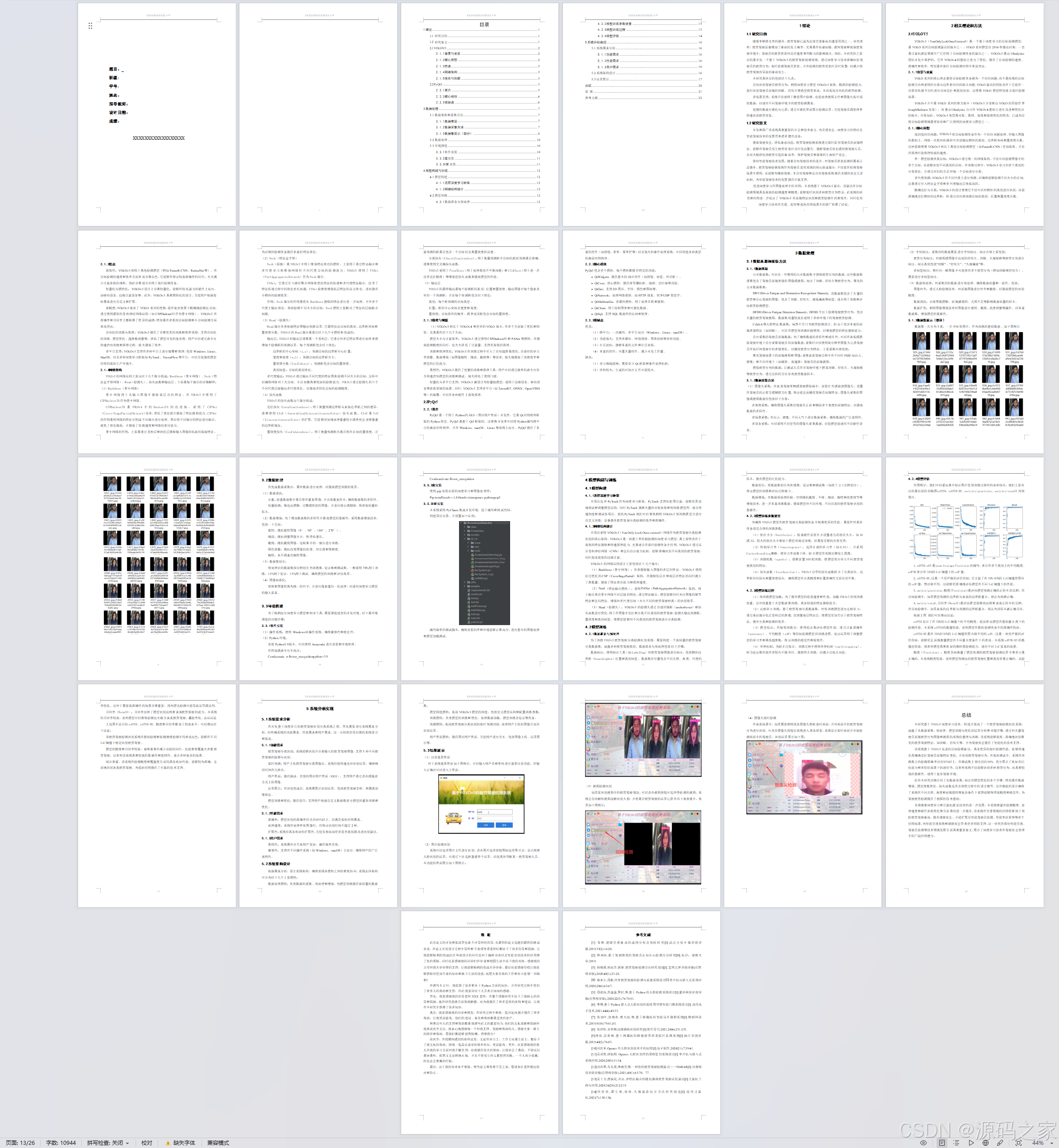
(7)文档
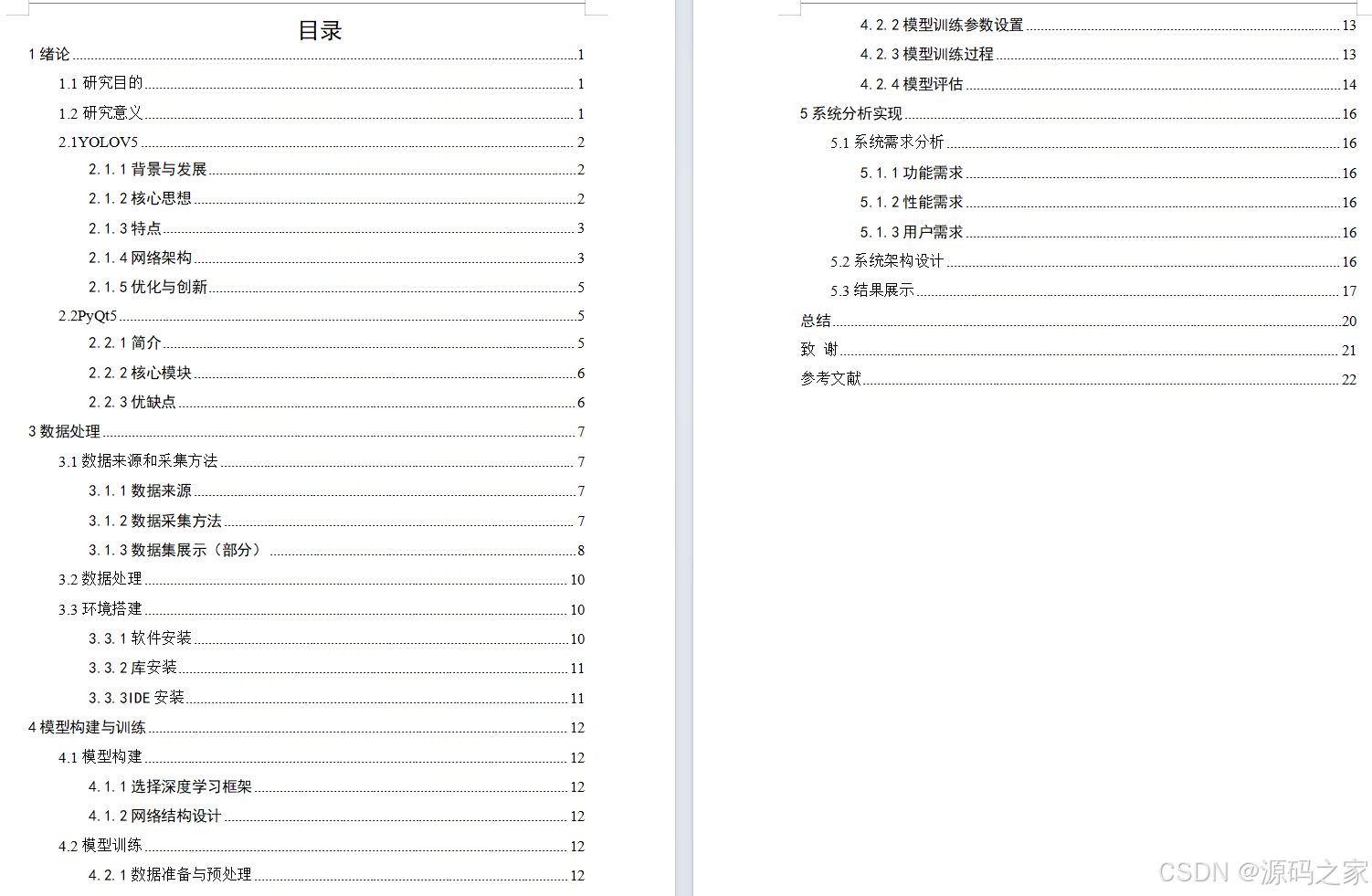
(8)目录
3、项目说明
1绪论
1.1研究目的
随着车辆普及率的提升,疲劳驾驶已成为全球交通事故的重要原因之一。研究表明,疲劳驾驶显著增加了事故的发生概率,尤其是在长途运输、夜间驾驶和高强度驾驶环境中,驾驶员的疲劳状态对反应速度和判断力的影响极大。因此,本研究的主要目的是开发一个基于YOLOv5的疲劳驾驶检测系统,通过深度学习技术准确识别驾驶员的疲劳行为,实时监测驾驶员状态,并在检测到疲劳迹象时及时预警,以减少因疲劳驾驶而导致的事故发生。
本研究具体目的包括以下几点:
自动识别驾驶员疲劳行为:利用深度学习模型YOLOv5高效、精准的检测能力,实时识别驾驶员面部的闭眼、打哈欠等典型疲劳表现,从而实现自动化的疲劳检测。
多场景支持:系统不仅适用于静态图片检测,也能处理视频文件和摄像头实时监控数据,以适应不同驾驶环境中的疲劳检测需求。
便捷的数据可视化与记录:通过可视化界面展示检测结果,方便驾驶员或管理者快速识别疲劳迹象。
1.2研究意义
开发和推广该系统具有重要的社会和技术意义,为交通安全、深度学习应用以及智能驾驶技术的发展带来诸多潜在益处:
提高驾驶安全,降低事故风险:疲劳驾驶检测系统通过实时监控驾驶员的面部特征,能够在驾驶员发生疲劳迹象时及时发出警告,提醒驾驶员休息或切换驾驶人员,从而大幅降低因疲劳引起的事故率,保护驾驶员和乘客的生命财产安全。
推动智能驾驶技术发展:随着自动驾驶技术的进步,对驾驶员状态监测的需求日益提升。疲劳驾驶检测系统作为驾驶员监控系统的核心组成部分,不仅能在传统驾驶场景中使用,还能够为辅助驾驶、半自动驾驶和全自动驾驶系统提供关键的安全冗余机制,为智能驾驶技术的发展提供可靠支持。
促进深度学习在图像处理中的应用:本系统基于YOLOv5算法,该算法在目标检测领域具备极高的检测速度和精度,能够实时识别多种疲劳行为特征。此系统的研究和应用进一步验证了YOLOv5在面部特征识别和疲劳检测中的有效性,同时也为深度学习技术在交通、监控等实际应用场景中的推广积累了经验。
本研究基于YOLOv5深度学习技术,构建并实现了一个疲劳驾驶检测识别系统,涵盖了从数据采集、预处理、模型训练与优化到结果分析等关键步骤。通过对大量驾驶员面部疲劳行为图像和视频的系统化整理与训练,该系统能够高效、准确地识别常见的疲劳驾驶特征,如闭眼、打哈欠等,并为驾驶安全提供了智能化的技术支持。
该系统基于YOLOv5先进的目标检测算法,具备优异的实时检测性能,能够快速且准确地定位驾驶员面部特征变化,并识别疲劳驾驶行为。在实际测试中,系统在训练集上的检测准确率达到95%以上,在测试集上则达到约90%,充分展示了良好的泛化能力和多样化场景下的适应性。这表明系统不仅能够识别多种疲劳行为,还具有较强的鲁棒性,适用于复杂驾驶环境。
此外本研究详细介绍了从数据收集、标注到模型优化的各个步骤,特别是在数据增强、模型参数优化、损失函数选择及调优过程中的设计细节。这些细致的设计确保了系统在不同光照、角度和面部遮挡等复杂条件下依然能够保持高精度和稳定性,为驾驶疲劳检测提供了稳固的技术基础。
未来随着深度学习和计算机视觉技术的进一步发展,本系统有望在检测精度、处理速度和硬件资源优化等方面得到进一步提升。该系统在交通领域的应用将有助于预防疲劳驾驶事故,提升道路安全,并能扩展至智能驾驶员监测、智能车队管理等多个应用场景,为智能交通系统和道路安全带来更多创新支持。这一研究在推动智能交通、驾驶员监测等技术领域发展方面具有重要意义,展示了深度学习技术在驾驶安全管理中的广阔应用潜力。
4、核心代码
# -*- coding: utf-8 -*-
"""
import argparse
import glob
import json
import os
import shutil
from pathlib import Path

import numpy as np
import torch
import yaml
from tqdm import tqdm

from models.experimental import attempt_load
from utils.datasets import create_dataloader
from utils.general import (
    coco80_to_coco91_class, check_dataset, check_file, check_img_size, compute_loss, non_max_suppression, scale_coords,
    xyxy2xywh, clip_coords, plot_images, xywh2xyxy, box_iou, output_to_target, ap_per_class, set_logging)
from utils.torch_utils import select_device, time_synchronized


def test(data,
         weights=None,
         batch_size=16,
         imgsz=640,
         conf_thres=0.001,
         iou_thres=0.6,  # for NMS
         save_json=False,
         single_cls=False,
         augment=False,
         verbose=True,
         model=None,
         dataloader=None,
         save_dir=Path(''),  # for saving images
         save_txt=False,  # for auto-labelling
         save_conf=False,
         plots=True):
    # Initialize/load model and set device
    training = model is not None
    if training:  # called by train.py
        device = next(model.parameters()).device  # get model device

    else:  # called directly
        set_logging()
        device = select_device(opt.device, batch_size=batch_size)
        save_txt = opt.save_txt  # save *.txt labels

        # Remove previous
        if os.path.exists(save_dir):
            shutil.rmtree(save_dir)  # delete dir
        os.makedirs(save_dir)  # make new dir

        if save_txt:
            out = save_dir / 'autolabels'
            if os.path.exists(out):
                shutil.rmtree(out)  # delete dir
            os.makedirs(out)  # make new dir

        # Load model
        model = attempt_load(weights, map_location=device)  # load FP32 model
        imgsz = check_img_size(imgsz, s=model.stride.max())  # check img_size

        # Multi-GPU disabled, incompatible with .half() https://github.com/ultralytics/yolov5/issues/99
        # if device.type != 'cpu' and torch.cuda.device_count() > 1:
        #     model = nn.DataParallel(model)

    # Half
    half = device.type != 'cpu'  # half precision only supported on CUDA
    if half:
        model.half()

    # Configure
    model.eval()
    with open(data,encoding='utf-8') as f:
        data = yaml.load(f, Loader=yaml.FullLoader)  # model dict
    check_dataset(data)  # check
    nc = 1 if single_cls else int(data['nc'])  # number of classes
    iouv = torch.linspace(0.5, 0.95, 10).to(device)  # iou vector for mAP@0.5:0.95
    niou = iouv.numel()

    # Dataloader
    if not training:
        img = torch.zeros((1, 3, imgsz, imgsz), device=device)  # init img
        _ = model(img.half() if half else img) if device.type != 'cpu' else None  # run once
        path = data['test'] if opt.task == 'test' else data['val']  # path to val/test images
        dataloader = create_dataloader(path, imgsz, batch_size, model.stride.max(), opt,
                                       hyp=None, augment=False, cache=False, pad=0.5, rect=True)[0]

    seen = 0
    names = model.names if hasattr(model, 'names') else model.module.names
    coco91class = coco80_to_coco91_class()
    s = ('%20s' + '%12s' * 6) % ('Class', 'Images', 'Targets', 'P', 'R', 'mAP@.5', 'mAP@.5:.95')
    p, r, f1, mp, mr, map50, map, t0, t1 = 0., 0., 0., 0., 0., 0., 0., 0., 0.
    loss = torch.zeros(3, device=device)
    jdict, stats, ap, ap_class = [], [], [], []
    for batch_i, (img, targets, paths, shapes) in enumerate(tqdm(dataloader, desc=s)):
        img = img.to(device, non_blocking=True)
        img = img.half() if half else img.float()  # uint8 to fp16/32
        img /= 255.0  # 0 - 255 to 0.0 - 1.0
        targets = targets.to(device)
        nb, _, height, width = img.shape  # batch size, channels, height, width
        whwh = torch.Tensor([width, height, width, height]).to(device)

        # Disable gradients
        with torch.no_grad():
            # Run model
            t = time_synchronized()
            inf_out, train_out = model(img, augment=augment)  # inference and training outputs
            t0 += time_synchronized() - t

            # Compute loss
            if training:  # if model has loss hyperparameters
                loss += compute_loss([x.float() for x in train_out], targets, model)[1][:3]  # box, obj, cls

            # Run NMS
            t = time_synchronized()
            output = non_max_suppression(inf_out, conf_thres=conf_thres, iou_thres=iou_thres)
            t1 += time_synchronized() - t

        # Statistics per image
        for si, pred in enumerate(output):
            labels = targets[targets[:, 0] == si, 1:]
            nl = len(labels)
            tcls = labels[:, 0].tolist() if nl else []  # target class
            seen += 1

            if pred is None:
                if nl:
                    stats.append((torch.zeros(0, niou, dtype=torch.bool), torch.Tensor(), torch.Tensor(), tcls))
                continue

            # Append to text file
            if save_txt:
                gn = torch.tensor(shapes[si][0])[[1, 0, 1, 0]]  # normalization gain whwh
                x = pred.clone()
                x[:, :4] = scale_coords(img[si].shape[1:], x[:, :4], shapes[si][0], shapes[si][1])  # to original
                for *xyxy, conf, cls in x:
                    xywh = (xyxy2xywh(torch.tensor(xyxy).view(1, 4)) / gn).view(-1).tolist()  # normalized xywh
                    line = (cls, conf, *xywh) if save_conf else (cls, *xywh)  # label format
                    with open(str(out / Path(paths[si]).stem) + '.txt', 'a') as f:
                        f.write(('%g ' * len(line) + '\n') % line)

            # Clip boxes to image bounds
            clip_coords(pred, (height, width))

            # Append to pycocotools JSON dictionary
            if save_json:
                # [{"image_id": 42, "category_id": 18, "bbox": [258.15, 41.29, 348.26, 243.78], "score": 0.236}, ...
                image_id = Path(paths[si]).stem
                box = pred[:, :4].clone()  # xyxy
                scale_coords(img[si].shape[1:], box, shapes[si][0], shapes[si][1])  # to original shape
                box = xyxy2xywh(box)  # xywh
                box[:, :2] -= box[:, 2:] / 2  # xy center to top-left corner
                for p, b in zip(pred.tolist(), box.tolist()):
                    jdict.append({'image_id': int(image_id) if image_id.isnumeric() else image_id,
                                  'category_id': coco91class[int(p[5])],
                                  'bbox': [round(x, 3) for x in b],
                                  'score': round(p[4], 5)})

            # Assign all predictions as incorrect
            correct = torch.zeros(pred.shape[0], niou, dtype=torch.bool, device=device)
            if nl:
                detected = []  # target indices
                tcls_tensor = labels[:, 0]

                # target boxes
                tbox = xywh2xyxy(labels[:, 1:5]) * whwh

                # Per target class
                for cls in torch.unique(tcls_tensor):
                    ti = (cls == tcls_tensor).nonzero(as_tuple=False).view(-1)  # prediction indices
                    pi = (cls == pred[:, 5]).nonzero(as_tuple=False).view(-1)  # target indices

                    # Search for detections
                    if pi.shape[0]:
                        # Prediction to target ious
                        ious, i = box_iou(pred[pi, :4], tbox[ti]).max(1)  # best ious, indices

                        # Append detections
                        detected_set = set()
                        for j in (ious > iouv[0]).nonzero(as_tuple=False):
                            d = ti[i[j]]  # detected target
                            if d.item() not in detected_set:
                                detected_set.add(d.item())
                                detected.append(d)
                                correct[pi[j]] = ious[j] > iouv  # iou_thres is 1xn
                                if len(detected) == nl:  # all targets already located in image
                                    break

            # Append statistics (correct, conf, pcls, tcls)
            stats.append((correct.cpu(), pred[:, 4].cpu(), pred[:, 5].cpu(), tcls))

        # Plot images
        if plots and batch_i < 1:
            f = save_dir / f'test_batch{batch_i}_gt.jpg'  # filename
            plot_images(img, targets, paths, str(f), names)  # ground truth
            f = save_dir / f'test_batch{batch_i}_pred.jpg'
            plot_images(img, output_to_target(output, width, height), paths, str(f), names)  # predictions

    # Compute statistics
    stats = [np.concatenate(x, 0) for x in zip(*stats)]  # to numpy
    if len(stats) and stats[0].any():
        p, r, ap, f1, ap_class = ap_per_class(*stats, plot=plots, fname=save_dir / 'precision-recall_curve.png')
        p, r, ap50, ap = p[:, 0], r[:, 0], ap[:, 0], ap.mean(1)  # [P, R, AP@0.5, AP@0.5:0.95]
        mp, mr, map50, map = p.mean(), r.mean(), ap50.mean(), ap.mean()
        nt = np.bincount(stats[3].astype(np.int64), minlength=nc)  # number of targets per class
    else:
        nt = torch.zeros(1)

    # Print results
    pf = '%20s' + '%12.3g' * 6  # print format
    print(pf % ('all', seen, nt.sum(), mp, mr, map50, map))

    # Print results per class
    if verbose and nc > 1 and len(stats):
        for i, c in enumerate(ap_class):
            print(pf % (names[c], seen, nt[c], p[i], r[i], ap50[i], ap[i]))

    # Print speeds
    t = tuple(x / seen * 1E3 for x in (t0, t1, t0 + t1)) + (imgsz, imgsz, batch_size)  # tuple
    if not training:
        print('Speed: %.1f/%.1f/%.1f ms inference/NMS/total per %gx%g image at batch-size %g' % t)

    # Save JSON
    if save_json and len(jdict):
        w = Path(weights[0] if isinstance(weights, list) else weights).stem if weights is not None else ''  # weights
        file = save_dir / f"detections_val2017_{w}_results.json"  # predicted annotations file
        print('\nCOCO mAP with pycocotools... saving %s...' % file)
        with open(file, 'w') as f:
            json.dump(jdict, f)

        try:  # https://github.com/cocodataset/cocoapi/blob/master/PythonAPI/pycocoEvalDemo.ipynb
            from pycocotools.coco import COCO
            from pycocotools.cocoeval import COCOeval

            imgIds = [int(Path(x).stem) for x in dataloader.dataset.img_files]
            cocoGt = COCO(glob.glob('../coco/annotations/instances_val*.json')[0])  # initialize COCO ground truth api
            cocoDt = cocoGt.loadRes(str(file))  # initialize COCO pred api
            cocoEval = COCOeval(cocoGt, cocoDt, 'bbox')
            cocoEval.params.imgIds = imgIds  # image IDs to evaluate
            cocoEval.evaluate()
            cocoEval.accumulate()
            cocoEval.summarize()
            map, map50 = cocoEval.stats[:2]  # update results (mAP@0.5:0.95, mAP@0.5)
        except Exception as e:
            print('ERROR: pycocotools unable to run: %s' % e)

    # Return results
    model.float()  # for training
    maps = np.zeros(nc) + map
    for i, c in enumerate(ap_class):
        maps[c] = ap[i]
    return (mp, mr, map50, map, *(loss.cpu() / len(dataloader)).tolist()), maps, t


if __name__ == '__main__':
    parser = argparse.ArgumentParser(prog='test.py')
    parser.add_argument('--weights', nargs='+', type=str, default='yolov5s.pt', help='model.pt path(s)')
    parser.add_argument('--data', type=str, default='data/coco128.yaml', help='*.data path')
    parser.add_argument('--batch-size', type=int, default=32, help='size of each image batch')
    parser.add_argument('--img-size', type=int, default=640, help='inference size (pixels)')
    parser.add_argument('--conf-thres', type=float, default=0.001, help='object confidence threshold')
    parser.add_argument('--iou-thres', type=float, default=0.65, help='IOU threshold for NMS')
    parser.add_argument('--save-json', action='store_true', help='save a cocoapi-compatible JSON results file')
    parser.add_argument('--task', default='val', help="'val', 'test', 'study'")
    parser.add_argument('--device', default='', help='cuda device, i.e. 0 or 0,1,2,3 or cpu')
    parser.add_argument('--single-cls', action='store_true', help='treat as single-class dataset')
    parser.add_argument('--augment', action='store_true', help='augmented inference')
    parser.add_argument('--verbose', action='store_true', help='report mAP by class')
    parser.add_argument('--save-txt', action='store_true', help='save results to *.txt')
    parser.add_argument('--save-conf', action='store_true', help='save confidences in --save-txt labels')
    parser.add_argument('--save-dir', type=str, default='runs/test', help='directory to save results')
    opt = parser.parse_args()
    opt.save_json |= opt.data.endswith('coco.yaml')
    opt.data = check_file(opt.data)  # check file
    print(opt)

    if opt.task in ['val', 'test']:  # run normally
        test(opt.data,
             opt.weights,
             opt.batch_size,
             opt.img_size,
             opt.conf_thres,
             opt.iou_thres,
             opt.save_json,
             opt.single_cls,
             opt.augment,
             opt.verbose,
             save_dir=Path(opt.save_dir),
             save_txt=opt.save_txt,
             save_conf=opt.save_conf,
             )

        print('Results saved to %s' % opt.save_dir)

    elif opt.task == 'study':  # run over a range of settings and save/plot
        for weights in ['yolov5s.pt', 'yolov5m.pt', 'yolov5l.pt', 'yolov5x.pt']:
            f = 'study_%s_%s.txt' % (Path(opt.data).stem, Path(weights).stem)  # filename to save to
            x = list(range(320, 800, 64))  # x axis
            y = []  # y axis
            for i in x:  # img-size
                print('\nRunning %s point %s...' % (f, i))
                r, _, t = test(opt.data, weights, opt.batch_size, i, opt.conf_thres, opt.iou_thres, opt.save_json)
                y.append(r + t)  # results and times
            np.savetxt(f, y, fmt='%10.4g')  # save
        os.system('zip -r study.zip study_*.txt')
        # utils.general.plot_study_txt(f, x)  # plot
5、源码获取方式
biyesheji0005 或 biyesheji0001 (绿色聊天软件)
🍅由于篇幅限制,获取完整文章或源码、代做项目的,查看我的【用户名】、【专栏名称】、【顶部选题链接】就可以找到我啦🍅
感兴趣的可以先收藏起来,点赞、关注不迷路,下方查看👇🏻获取联系方式👇🏻
更多推荐
 31
31 0
0- 0


 已为社区贡献351条内容

所有评论(0)