
Kubernetes从入门到精通
1、kubernetes介绍
1.1、应用部署方式演变
在部署应用程序的方式上,主要经历了三个阶段:
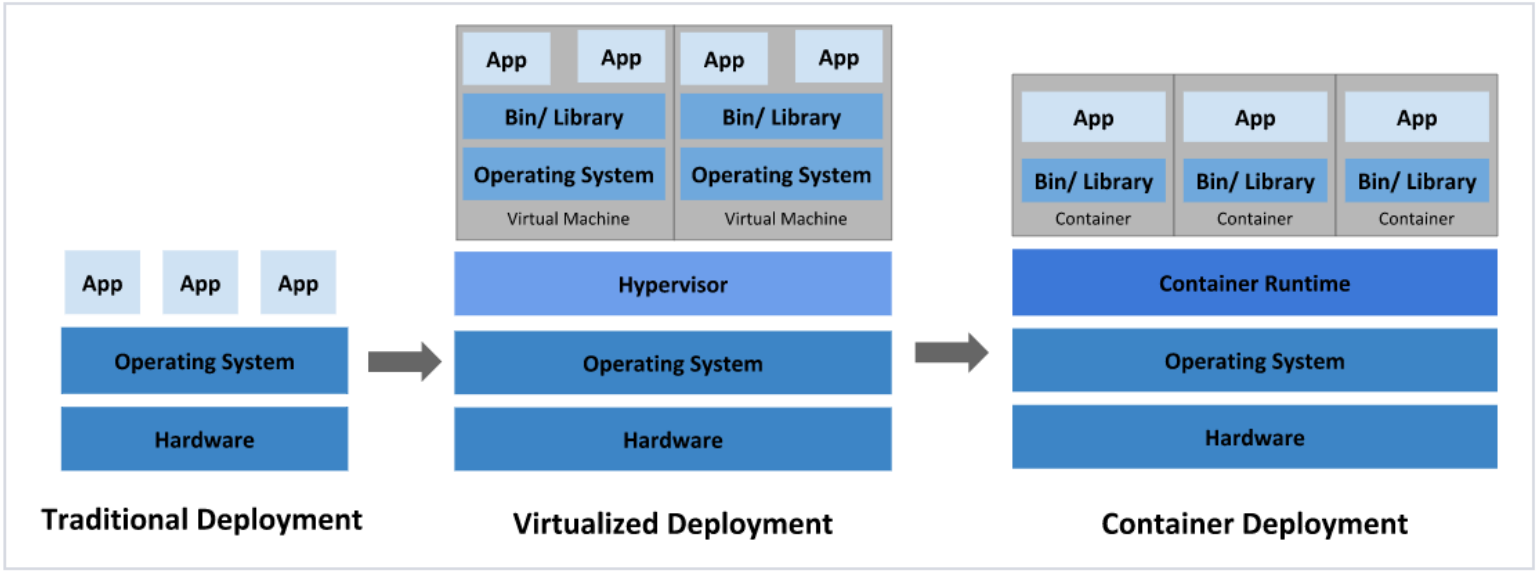
传统部署:互联网早期,会直接将应用程序部署在物理机上
- 优点:简单,不需要其它技术的参与
- 缺点:不能为应用程序定义资源使用边界,很难合理地分配计算资源,而且程序之间容易产生影响
虚拟化部署:可以在一台物理机上运行多个虚拟机,每个虚拟机都是独立的一个环境
- 优点:程序环境不会相互产生影响,提供了一定程度的安全性
- 缺点:增加了操作系统,浪费了部分资源
容器化部署:与虚拟化类似,但是共享了操作系统
优点:
- 可以保证每个容器拥有自己的文件系统、CPU、内存、进程空间等
- 运行应用程序所需要的资源都被容器包装,并和底层基础架构解耦
- 容器化的应用程序可以跨云服务商、跨Linux操作系统发行版进行部署
容器化部署方式给带来很多的便利,但是也会出现一些问题,比如说:
- 一个容器故障停机了,怎么样让另外一个容器立刻启动去替补停机的容器
- 当并发访问量变大的时候,怎么样做到横向扩展容器数量
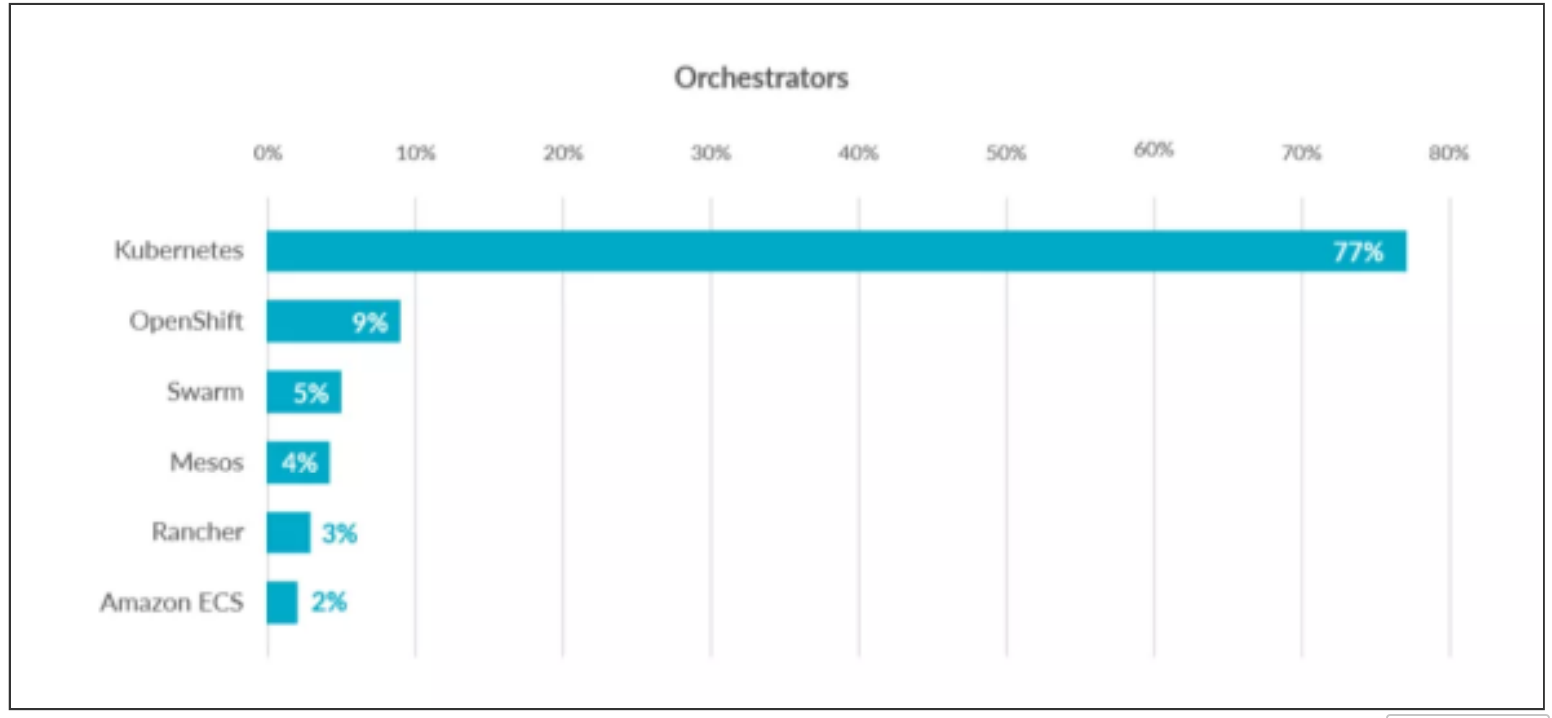
这些容器管理的问题统称为容器编排问题,为了解决这些容器编排问题,就产生了一些容器编排的软件:
- Swarm:Docker自己的容器编排工具
- Mesos:Apache的一个资源统一管控的工具,需要和Marathon结合使用
- Kubernetes:Google开源的的容器编排工具
1.2、kubernetes简介
kubernetes,是一个全新的基于容器技术的分布式架构领先方案,是谷歌严格保密十几年的秘密武 器----Borg系统的一个开源版本,于2014年9月发布第一个版本,2015年7月发布第一个正式版本。 kubernetes的本质是一组服务器集群,它可以在集群的每个节点上运行特定的程序,来对节点中的容器进行管理。目的是实现资源管理的自动化,主要提供了如下的主要功能:
- 自我修复:一旦某一个容器崩溃,能够在1秒中左右迅速启动新的容器
- 弹性伸缩:可以根据需要,自动对集群中正在运行的容器数量进行调整
- 服务发现:服务可以通过自动发现的形式找到它所依赖的服务
- 负载均衡:如果一个服务起动了多个容器,能够自动实现请求的负载均衡
- 版本回退:如果发现新发布的程序版本有问题,可以立即回退到原来的版本
- 存储编排:可以根据容器自身的需求自动创建存储卷
1.3、kubernetes架构
1.3.1、各个组件的作用
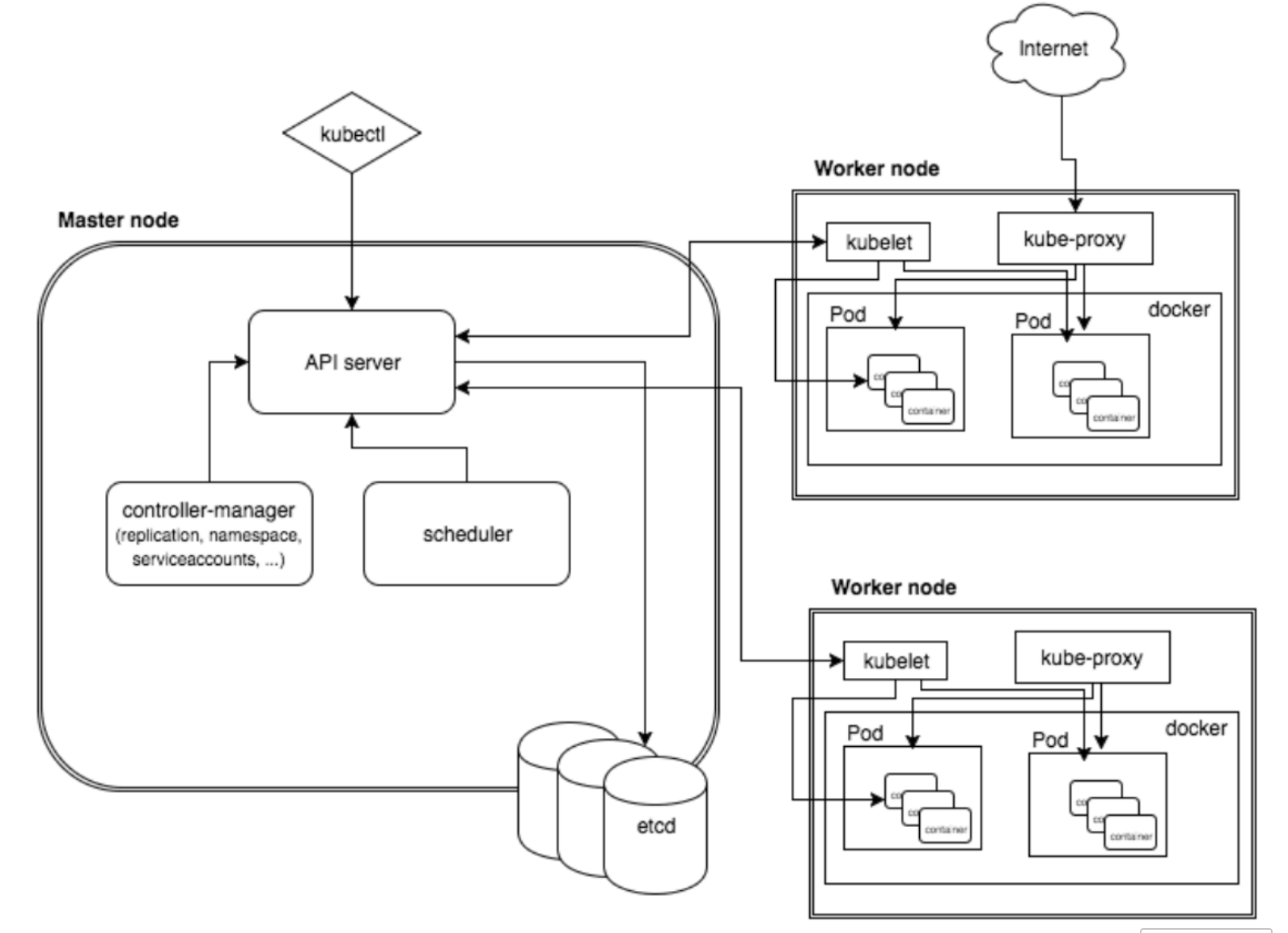
一个kubernetes集群主要是由控制节点(master)、**工作节点(node)**构成,每个节点上都会安装不同的组件
master:集群的控制平面,负责集群的决策
- ApiServer : 资源操作的唯一入口,接收用户输入的命令,提供认证、授权、API注册和发现等机制
- Scheduler : 负责集群资源调度,按照预定的调度策略将Pod调度到相应的node节点上
- ControllerManager : 负责维护集群的状态,比如程序部署安排、故障检测、自动扩展、滚动更新等
Etcd :负责存储集群中各种资源对象的信息
node:集群的数据平面,负责为容器提供运行环境
- kubelet:负责维护容器的生命周期,同时也负责Volume(CVI)和网络(CNI)的管理
- Container runtime:负责镜像管理以及Pod和容器的真正运行(CRI)
- kube-proxy:负责为Service提供cluster内部的服务发现和负载均衡
1.3.2、k8s各组件之间的调用关系
当我们要运行一个web服务时
- kubernetes环境启动之后,master和node都会将自身的信息存储到etcd数据库中
- web服务的安装请求会首先被发送到master节点的apiServer组件
- apiServer组件会调用scheduler组件来决定到底应该把这个服务安装到哪个node节点上
- 在此时,它会从etcd中读取各个node节点的信息,然后按照一定的算法进行选择,并将结果告知apiServer
- apiServer调用controller-manager去调度Node节点安装web服务
- kubelet接收到指令后,会通知docker,然后由docker来启动一个web服务的pod
- 如果需要访问web服务,就需要通过kube-proxy来对pod产生访问的代理
1.3.3、 K8S的常用名词解释
- Master:集群控制节点,每个集群需要至少一个master节点负责集群的管控
- Node:工作负载节点,由master分配容器到这些node工作节点上,然后node节点上的
- Pod:kubernetes的最小控制单元,容器都是运行在pod中的,一个pod中可以有1个或者多个容器
- Controller:控制器,通过它来实现对pod的管理,比如启动pod、停止pod、伸缩pod的数量等等
- Service:pod对外服务的统一入口,下面可以维护者同一类的多个pod
- Label:标签,用于对pod进行分类,同一类pod会拥有相同的标签
- NameSpace:命名空间,用来隔离pod的运行环境
1.3.4、k8s的分层架构
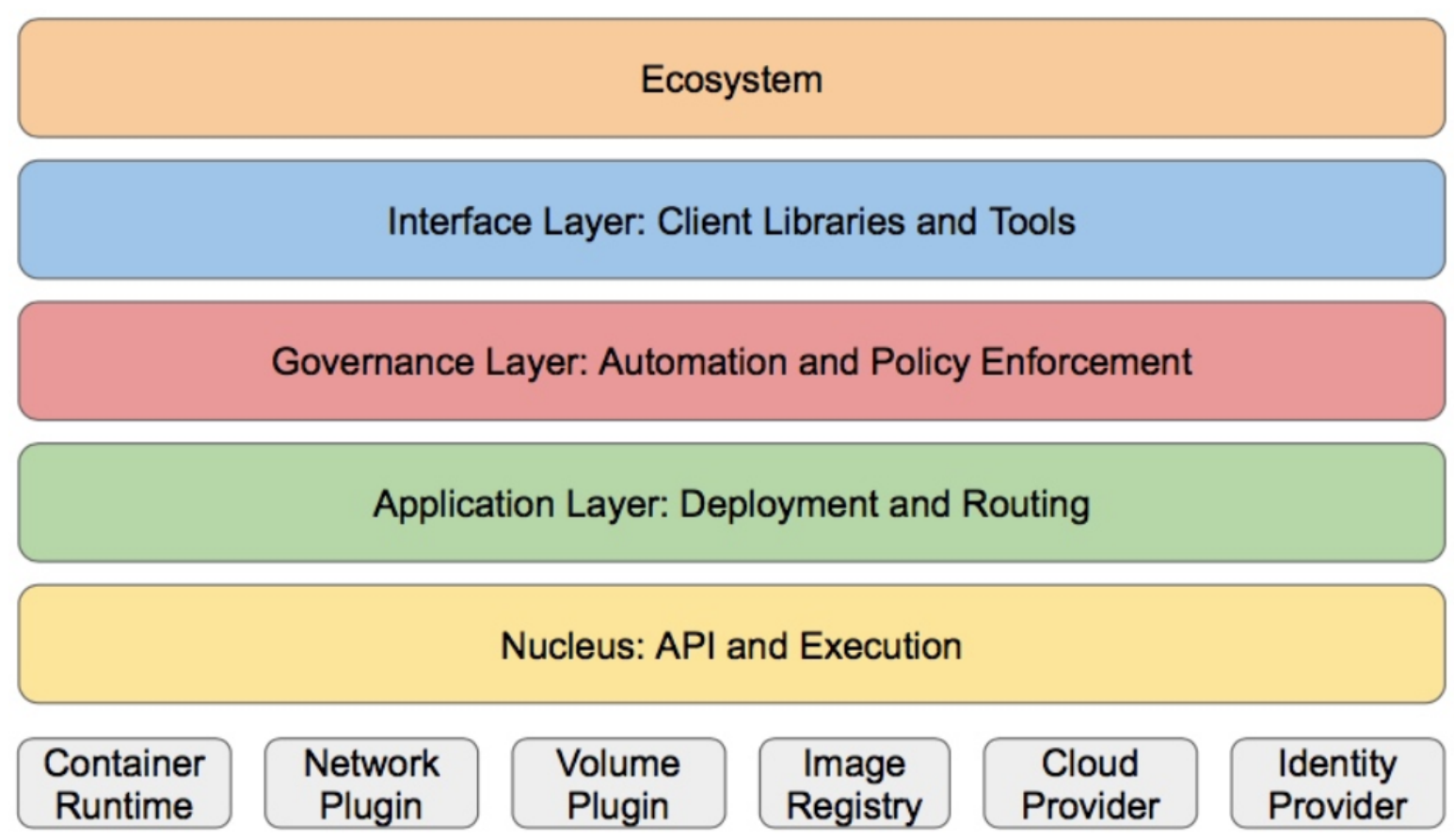
- 生态系统:在接口层之上的庞大容器集群管理调度的生态系统,可以划分为两个范畴
- 接口层:kubectl命令行工具、客户端SDK以及集群联邦
- 管理层:系统度量(如基础设施、容器和网络的度量),自动化(如自动扩展、动态Provision等)以及策略管理(RBAC、Quota、PSP、NetworkPolicy等)
- 应用层:部署(无状态应用、有状态应用、批处理任务、集群应用等)和路由(服务发现、DNS解析等)
- 核心层:Kubernetes最核心的功能,对外提供API构建高层的应用,对内提供插件式应用执行环境
- Kubernetes外部:日志、监控、配置管理、CI、CD、Workflow、FaaS、OTS应用、ChatOps等
- Kubernetes内部:CRI、CNI、CVI、镜像仓库、Cloud Provider、集群自身的配置和管理等
2、集群环境搭建
2.1、容器的管理方式
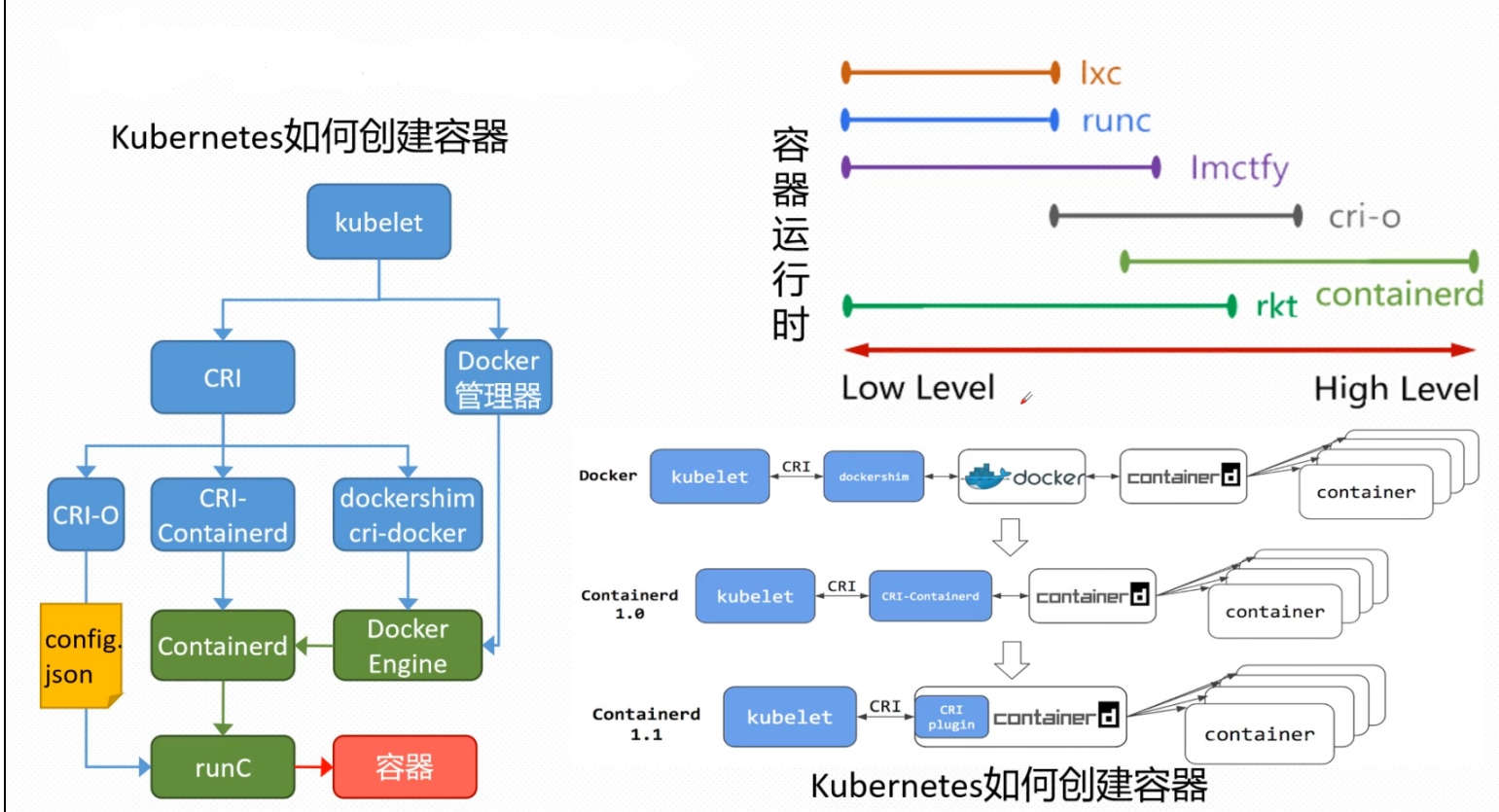
K8S 集群创建方式有3种:
centainerd
- 默认情况下,K8S在创建集群时使用的方式
docker
- Docker使用的普记录最高,虽然K8S在1.24版本后已经废弃了kubelet对docker的支持,但是可以借助cri-docker方式来实现集群创建
cri-o
- CRI-O的方式是Kubernetes创建容器最直接的一种方式,在创建集群的时候,需要借助于cri-o插件的方式来实现Kubernetes集群的创建。
注意:后两种方式需要对Kubelet程序的启动参数进行改造
2.2、k8s集群环境的部署
参考:https://blog.csdn.net/weixin_74344274/article/details/150346432?spm=1001.2014.3001.5502
3、kubernetes 中的资源
3.1、资源管理介绍
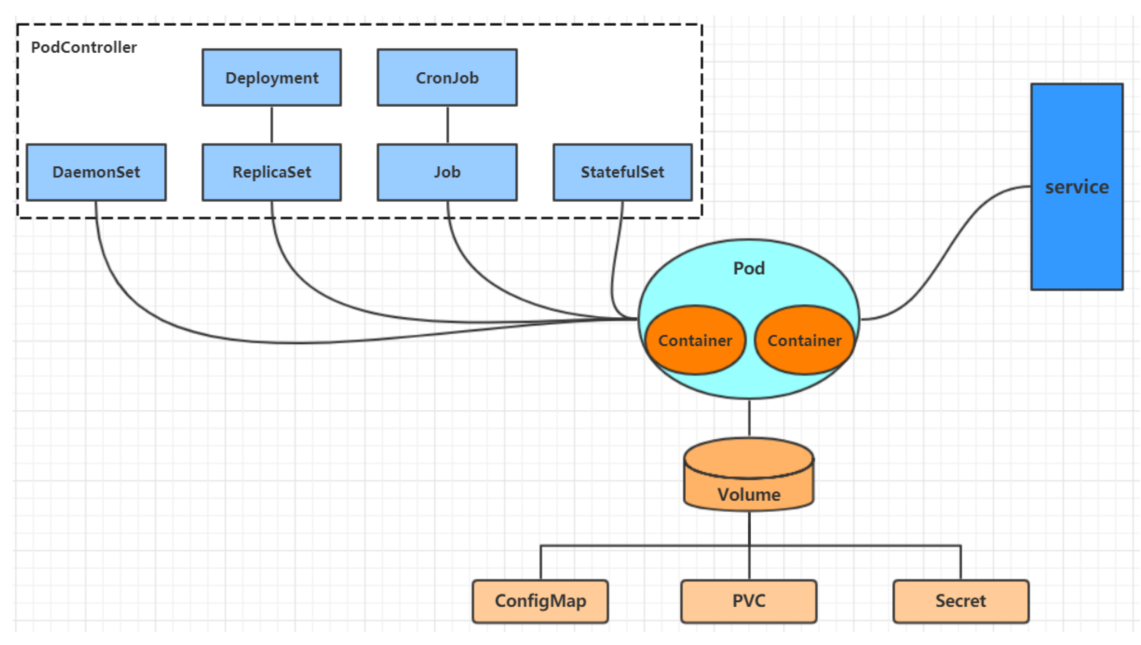
- 在kubernetes中,所有的内容都抽象为资源,用户需要通过操作资源来管理kubernetes。
- kubernetes的本质上就是一个集群系统,用户可以在集群中部署各种服务
- 所谓的部署服务,其实就是在kubernetes集群中运行一个个的容器,并将指定的程序跑在容器中。
- kubernetes的最小管理单元是pod而不是容器,只能将容器放在Pod中,
- kubernetes一般也不会直接管理Pod,而是通过Pod控制器来管理Pod的。
- Pod中服务的访问是由kubernetes提供的Service资源来实现。
- Pod中程序的数据需要持久化是由kubernetes提供的各种存储系统来实现
3.2、资源管理方式
命令式对象管理:直接使用命令去操作kubernetes资源
- kubectl run nginx-pod --image=nginx:latest --port=80
命令式对象配置:通过命令配置和配置文件去操作kubernetes资源
- kubectl create/patch -f nginx-pod.yaml
声明式对象配置:通过apply命令和配置文件去操作kubernetes资源
- kubectl apply -f nginx-pod.yaml
| 类型 | 操作对象 | 适用环境 | 优点 | 缺点 |
|---|---|---|---|---|
| 命令式对象管理 | 对象 | 测试 | 简单 | 只能操作活动对象,无法审计、跟踪 |
| 命令式对象配置 | 文件 | 开发 | 可以审计、跟踪 | 项目大时,配置文件多,操作麻烦 |
| 声明式对象配置 | 目录 | 开发 | 支持目录操作 | 意外情况下难以调试 |
3.2.1、命令式对象管理
kubectl是kubernetes集群的命令行工具,通过它能够对集群本身进行管理,并能够在集群上进行容器化应用的安装部署
kubectl命令的语法如下:
kubectl [command] [type] [name] [flags]
- comand:指定要对资源执行的操作,例如create、get、delete
- type:指定资源类型,比如deployment、pod、service
- name:指定资源的名称,名称大小写敏感
- flags:指定额外的可选参数
# 查看所有pod
kubectl get pod

# 查看某个pod
kubectl get pod pod_name

# 查看某个pod,以yaml格式展示结果
kubectl get pod pod_name -o yaml
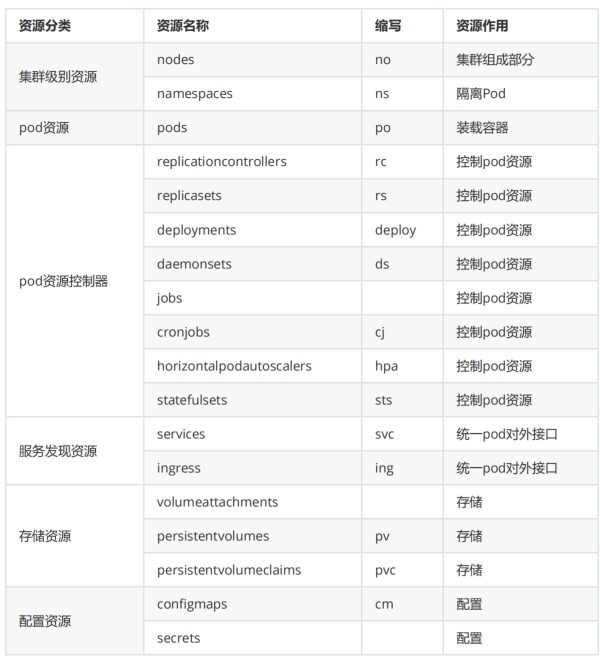
3.2.2、资源类型
kubernetes中所有的内容都抽象为资源
kubectl api-resources
常用资源类型
kubect 常见命令操作
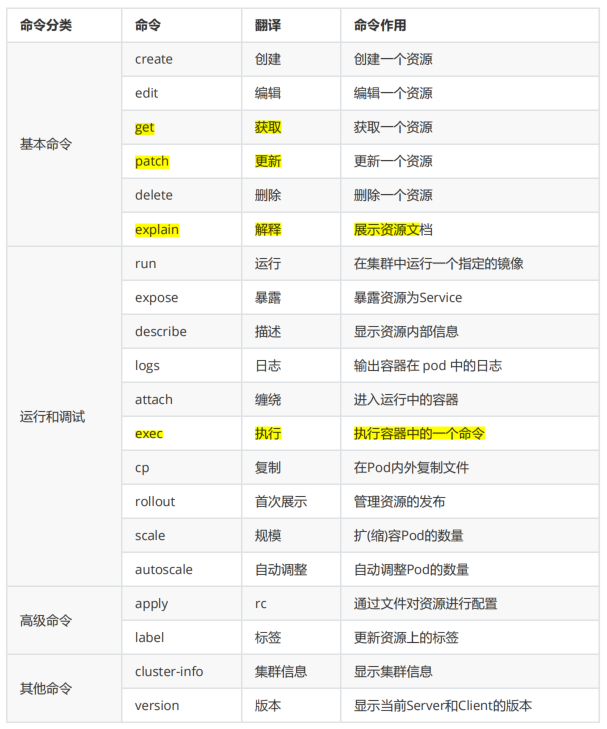
3.2.3、基本命令示例
kubectl的详细说明地址:https://kubernetes.io/docs/reference/generated/kubectl/kubectl-commands
显示版本号
[root@Rocky-1 ~]# kubectl version
Client Version: v1.32.9
Kustomize Version: v5.5.0
Server Version: v1.32.2
显示集群信息
[root@Rocky-1 ~]# kubectl cluster-info
Kubernetes control plane is running at https://192.168.1.156:6443
CoreDNS is running at https://192.168.1.156:6443/api/v1/namespaces/kube-system/services/kube-dns:dns/proxy

To further debug and diagnose cluster problems, use 'kubectl cluster-info dump'.
创建一个webcluster控制器,控制器中pod数量为2
[root@Rocky-1 ~]# kubectl create deployment webcluster --image=nginx --replicas=2
deployment.apps/webcluster created
查看控制器的数量
[root@Rocky-1 ~]# kubectl get deployments.apps
NAME         READY   UP-TO-DATE   AVAILABLE   AGE
nginx        1/1     1            1           27d
webcluster   2/2     2            2           65s
查看资源帮助
[root@Rocky-1 ~]# kubectl explain deployment
GROUP:      apps
KIND:       Deployment
VERSION:    v1

DESCRIPTION:
    Deployment enables declarative updates for Pods and ReplicaSets.

FIELDS:
  apiVersion	<string>
    APIVersion defines the versioned schema of this representation of an object.
    Servers should convert recognized schemas to the latest internal value, and
    may reject unrecognized values. More info:
    https://git.k8s.io/community/contributors/devel/sig-architecture/api-conventions.md#resources

  kind	<string>
    Kind is a string value representing the REST resource this object
    represents. Servers may infer this from the endpoint the client submits
    requests to. Cannot be updated. In CamelCase. More info:
    https://git.k8s.io/community/contributors/devel/sig-architecture/api-conventions.md#types-kinds

  metadata	<ObjectMeta>
    Standard object's metadata. More info:
    https://git.k8s.io/community/contributors/devel/sig-architecture/api-conventions.md#metadata

  spec	<DeploymentSpec>
    Specification of the desired behavior of the Deployment.

  status	<DeploymentStatus>
    Most recently observed status of the Deployment.


查看控制器参数帮助
[root@Rocky-1 ~]# kubectl explain deployment.spec
GROUP:      apps
KIND:       Deployment
VERSION:    v1

FIELD: spec <DeploymentSpec>


DESCRIPTION:
    Specification of the desired behavior of the Deployment.
    DeploymentSpec is the specification of the desired behavior of the
    Deployment.

FIELDS:
  minReadySeconds	<integer>
    Minimum number of seconds for which a newly created pod should be ready
    without any of its container crashing, for it to be considered available.
    Defaults to 0 (pod will be considered available as soon as it is ready)

  paused	<boolean>
    Indicates that the deployment is paused.

  progressDeadlineSeconds	<integer>
    The maximum time in seconds for a deployment to make progress before it is
    considered to be failed. The deployment controller will continue to process
    failed deployments and a condition with a ProgressDeadlineExceeded reason
    will be surfaced in the deployment status. Note that progress will not be
    estimated during the time a deployment is paused. Defaults to 600s.

  replicas	<integer>
    Number of desired pods. This is a pointer to distinguish between explicit
    zero and not specified. Defaults to 1.

  revisionHistoryLimit	<integer>
    The number of old ReplicaSets to retain to allow rollback. This is a pointer
    to distinguish between explicit zero and not specified. Defaults to 10.

  selector	<LabelSelector> -required-
    Label selector for pods. Existing ReplicaSets whose pods are selected by
    this will be the ones affected by this deployment. It must match the pod
    template's labels.

  strategy	<DeploymentStrategy>
    The deployment strategy to use to replace existing pods with new ones.

  template	<PodTemplateSpec> -required-
    Template describes the pods that will be created. The only allowed
    template.spec.restartPolicy value is "Always".
编辑控制器配置
[root@Rocky-1 ~]# kubectl edit deployments.apps webcluster
Edit cancelled, no changes made.
[root@Rocky-1 ~]# kubectl get deployments.apps
NAME         READY   UP-TO-DATE   AVAILABLE   AGE
nginx        1/1     1            1           27d
webcluster   2/2     2            2           11m
利用补丁更改控制器配置
[root@Rocky-1 ~]# kubectl patch deployments.apps webcluster -p '{"spec":{"replicas":4}}'
deployment.apps/webcluster patched
[root@Rocky-1 ~]# kubectl get deployments.apps
NAME         READY   UP-TO-DATE   AVAILABLE   AGE
nginx        1/1     1            1           27d
webcluster   2/4     4            2           16m
删除pod
[root@Rocky-1 ~]# kubectl delete deployments.apps webcluster
deployment.apps "webcluster" deleted
[root@Rocky-1 ~]# kubectl get deployments.apps
NAME    READY   UP-TO-DATE   AVAILABLE   AGE
nginx   1/1     1            1           27d
更多推荐

 22
22 0
0- 0


 已为社区贡献2条内容

所有评论(0)