
Dubbo网络通信性能优化全攻略:让微服务飞起来
深入掌握Dubbo网络通信优化技巧,打造高性能微服务架构
文章目录
引言
想象一下,你正在建设一个高效的高速公路系统 🛣️。如果道路狭窄、收费站过多、交通信号不合理,即使有再好的汽车也无法快速到达目的地。Dubbo的网络通信就像这个高速公路系统,优化网络通信就是在为微服务架构建设"信息高速公路"!
在分布式系统中,网络通信性能直接影响整个系统的响应速度和吞吐量。今天,让我们一起探索如何优化Dubbo的网络通信性能,让你的微服务架构真正"飞起来"!
一、理解Dubbo网络通信基础 🏗️
1.1 Dubbo网络通信架构
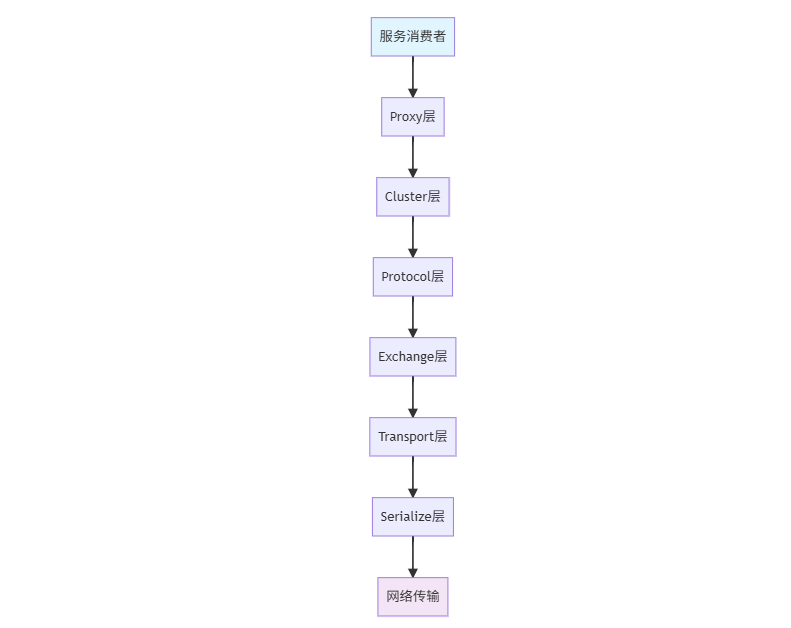
Dubbo采用分层架构设计,网络通信位于整个架构的底层:
1.2 网络通信性能瓶颈
在分布式系统中,网络通信可能成为性能瓶颈的主要环节:
| 瓶颈环节 | 影响程度 | 优化难度 |
|---|---|---|
| 序列化/反序列化 | 高 ⭐⭐⭐ | 中 |
| 网络I/O操作 | 高 ⭐⭐⭐ | 高 |
| 线程模型 | 中 ⭐⭐ | 中 |
| 连接管理 | 中 ⭐⭐ | 低 |
| 协议设计 | 高 ⭐⭐⭐ | 高 |
1.3 性能优化的核心目标
// 优化前的性能问题
public class PerformanceIssues {
    // 高延迟:请求响应时间过长
    public void highLatencyIssue() {
        long start = System.currentTimeMillis();
        User user = userService.getUser(1L); // 耗时500ms
        long duration = System.currentTimeMillis() - start;
        System.out.println("请求耗时: " + duration + "ms"); // 输出: 请求耗时: 500ms
    }

    // 低吞吐:单位时间处理请求数少
    public void lowThroughputIssue() {
        // 每秒只能处理100个请求
        // 理想状态应该达到1000+ QPS
    }

    // 高资源消耗:CPU/内存使用率高
    public void highResourceUsage() {
        // 处理单个请求消耗过多资源
    }
}
二、协议层优化:选择合适的通信协议 📡
2.1 Dubbo协议深度优化
Dubbo协议是默认的二进制RPC协议,针对性能进行了深度优化:
# dubbo协议优化配置
dubbo:
  protocol:
    name: dubbo
    port: 20880
    # 核心优化参数
    threadpool: fixed           # 固定大小线程池
    threads: 500                # 业务线程数
    iothreads: 8                # IO线程数,通常为CPU核数
    queues: 0                   # 队列大小,0表示无界队列
    accepts: 1000               # 服务端最大接受连接数
    payload: 8388608            # 请求数据包大小限制8MB
    buffer: 8192                # 网络缓冲区大小8KB
    serialization: hessian2     # 序列化方式
    dispatcher: message         # 消息派发模式
    charset: UTF-8              # 字符编码
2.2 多协议支持与选择
Dubbo支持多种协议,根据业务场景选择合适的协议:
@Configuration
public class MultiProtocolConfig {

    /**
     * Dubbo协议 - 高性能二进制协议
     * 适用场景:高并发、低延迟的内部服务调用
     */
    @Bean
    public ProtocolConfig dubboProtocol() {
        ProtocolConfig config = new ProtocolConfig();
        config.setName("dubbo");
        config.setPort(20880);
        config.setThreads(500);
        config.setSerialization("hessian2");
        return config;
    }

    /**
     * REST协议 - HTTP RESTful风格
     * 适用场景:对外API、跨语言调用
     */
    @Bean
    public ProtocolConfig restProtocol() {
        ProtocolConfig config = new ProtocolConfig();
        config.setName("rest");
        config.setPort(8080);
        config.setServer("netty");  // 使用Netty作为HTTP服务器
        config.setContextpath("/api");
        return config;
    }

    /**
     * gRPC协议 - 云原生标准协议
     * 适用场景:云原生环境、多语言微服务
     */
    @Bean
    public ProtocolConfig grpcProtocol() {
        ProtocolConfig config = new ProtocolConfig();
        config.setName("grpc");
        config.setPort(50051);
        config.setSerialization("protobuf");
        return config;
    }

    /**
     * Triple协议 - Dubbo3新一代协议
     * 适用场景:未来标准、兼容gRPC
     */
    @Bean
    public ProtocolConfig tripleProtocol() {
        ProtocolConfig config = new ProtocolConfig();
        config.setName("tri");
        config.setPort(50052);
        config.setSerialization("protobuf");
        return config;
    }
}
2.3 协议性能对比分析
| 协议类型 | 性能 | 跨语言 | 流式支持 | 适用场景 |
|---|---|---|---|---|
| Dubbo协议 | ⭐⭐⭐⭐⭐ | ⭐⭐ | ⭐⭐ | 内部高性能调用 |
| Triple协议 | ⭐⭐⭐⭐ | ⭐⭐⭐⭐ | ⭐⭐⭐⭐ | 云原生、多语言 |
| gRPC协议 | ⭐⭐⭐⭐ | ⭐⭐⭐⭐⭐ | ⭐⭐⭐⭐⭐ | 云原生标准 |
| REST协议 | ⭐⭐ | ⭐⭐⭐⭐⭐ | ⭐⭐ | 对外API |
| HTTP/2 | ⭐⭐⭐ | ⭐⭐⭐⭐⭐ | ⭐⭐⭐⭐ | 现代Web服务 |
三、序列化优化:减少数据转换开销 🔄
3.1 序列化性能对比
序列化是RPC调用中最重要的性能影响因素之一:
/**
 * 序列化性能测试工具
 */
@Component
public class SerializationBenchmark {

    private static final int TEST_COUNT = 10000;
    private final User sampleUser = createSampleUser();

    public void benchmarkSerialization() {
        // 测试Hessian2
        long hessian2Time = testSerialization("hessian2");

        // 测试Kryo
        long kryoTime = testSerialization("kryo");

        // 测试FST
        long fstTime = testSerialization("fst");

        // 测试JSON
        long jsonTime = testSerialization("fastjson");

        System.out.println("序列化性能对比 (越小越好):");
        System.out.println("Hessian2: " + hessian2Time + "ms");
        System.out.println("Kryo: " + kryoTime + "ms");
        System.out.println("FST: " + fstTime + "ms");
        System.out.println("FastJSON: " + jsonTime + "ms");
    }

    private long testSerialization(String serialization) {
        long startTime = System.currentTimeMillis();

        for (int i = 0; i < TEST_COUNT; i++) {
            byte[] data = serialize(serialization, sampleUser);
            User user = deserialize(serialization, data);
        }

        return System.currentTimeMillis() - startTime;
    }

    private byte[] serialize(String serialization, Object obj) {
        // 实现不同序列化方式的序列化
        return new byte[0];
    }

    private User deserialize(String serialization, byte[] data) {
        // 实现不同序列化方式的反序列化
        return null;
    }
}
3.2 序列化配置优化
# 序列化优化配置
dubbo:
  protocol:
    serialization: hessian2    # 生产环境推荐
    # 或者使用kryo获得更高性能
    # serialization: kryo

  # Kryo序列化高级配置
  serializer:
    kryo:
      # 注册需要序列化的类,提升性能
      registered-classes:
        - com.example.User
        - com.example.Order
        - com.example.Product
      # 开启引用检测,避免循环引用
      references: true
      # 开启自动注册未序列化类
      registration-required: false

  # Hessian2配置
  hessian2:
    # 允许非序列化接口
    allow-non-serializable: false
    # 启用短路引用
    enable-short-circuit-references: true
3.3 自定义序列化优化
对于特定业务场景,可以自定义序列化器以获得最佳性能:
/**
 * 自定义高性能序列化器
 */
public class CustomSerializer implements Serialization {

    @Override
    public byte getContentTypeId() {
        return 100; // 自定义类型ID
    }

    @Override
    public String getContentType() {
        return "x-custom-serialization";
    }

    @Override
    public ObjectOutput serialize(URL url, OutputStream output) throws IOException {
        return new CustomObjectOutput(output);
    }

    @Override
    public ObjectInput deserialize(URL url, InputStream input) throws IOException {
        return new CustomObjectInput(input);
    }

    /**
     * 自定义对象输出
     */
    private static class CustomObjectOutput implements ObjectOutput {
        private final DataOutputStream output;

        public CustomObjectOutput(OutputStream output) {
            this.output = new DataOutputStream(output);
        }

        @Override
        public void writeObject(Object obj) throws IOException {
            if (obj instanceof User) {
                User user = (User) obj;
                // 自定义高效序列化逻辑
                output.writeLong(user.getId());
                writeString(user.getName());
                writeString(user.getEmail());
            } else {
                //  fallback到其他序列化方式
                throw new IOException("Unsupported type: " + obj.getClass());
            }
        }

        private void writeString(String str) throws IOException {
            if (str == null) {
                output.writeInt(-1);
            } else {
                byte[] bytes = str.getBytes(StandardCharsets.UTF_8);
                output.writeInt(bytes.length);
                output.write(bytes);
            }
        }

        // 实现其他write方法...
    }

    /**
     * 自定义对象输入
     */
    private static class CustomObjectInput implements ObjectInput {
        private final DataInputStream input;

        public CustomObjectInput(InputStream input) {
            this.input = new DataInputStream(input);
        }

        @Override
        public Object readObject() throws IOException, ClassNotFoundException {
            // 自定义反序列化逻辑
            long id = input.readLong();
            String name = readString();
            String email = readString();

            User user = new User();
            user.setId(id);
            user.setName(name);
            user.setEmail(email);

            return user;
        }

        private String readString() throws IOException {
            int length = input.readInt();
            if (length == -1) {
                return null;
            }
            byte[] bytes = new byte[length];
            input.readFully(bytes);
            return new String(bytes, StandardCharsets.UTF_8);
        }

        // 实现其他read方法...
    }
}
四、网络I/O优化:提升数据传输效率 🌐
4.1 Netty参数调优
Dubbo底层使用Netty进行网络通信,优化Netty参数可以显著提升性能:
@Configuration
public class NettyOptimizationConfig {

    @Bean
    public ProtocolConfig protocolConfig() {
        ProtocolConfig config = new ProtocolConfig();
        config.setName("dubbo");
        config.setPort(20880);

        // Netty性能优化参数
        Map<String, String> parameters = new HashMap<>();

        // TCP网络参数优化
        parameters.put("netty.tcp.so.keepalive", "true");     // 开启TCP keepalive
        parameters.put("netty.tcp.so.backlog", "1024");       // 连接队列大小
        parameters.put("netty.tcp.so.reuseaddr", "true");     // 地址重用

        // 发送缓冲区优化
        parameters.put("netty.tcp.so.sndbuf", "65536");       // 发送缓冲区64KB
        parameters.put("netty.tcp.so.rcvbuf", "65536");       // 接收缓冲区64KB

        // Netty线程池参数
        parameters.put("netty.boss.threads", "1");            // boss线程数
        parameters.put("netty.worker.threads", "8");          // worker线程数(通常为CPU核数)

        // Netty内存分配优化
        parameters.put("netty.allocator.type", "pooled");     // 使用内存池
        parameters.put("netty.allocator.max.order", "9");     // 内存块最大阶数
        parameters.put("netty.allocator.page.size", "8192");  // 内存页大小

        config.setParameters(parameters);
        return config;
    }

    /**
     * 客户端Netty优化
     */
    @Bean
    public ConsumerConfig consumerConfig() {
        ConsumerConfig config = new ConsumerConfig();
        config.setTimeout(3000);

        Map<String, String> parameters = new HashMap<>();
        // 客户端连接池参数
        parameters.put("netty.client.connections", "5");      // 每个服务连接数
        parameters.put("netty.client.connect.timeout", "3000"); // 连接超时时间

        config.setParameters(parameters);
        return config;
    }
}
4.2 连接管理与复用
合理的连接管理可以避免频繁创建连接的开销:
# 连接管理优化配置
dubbo:
  protocol:
    name: dubbo
    # 服务端连接配置
    accepts: 1000                    # 最大接受连接数
    server: netty                    # 使用Netty服务器

  provider:
    # 提供者连接配置
    dispatcher: message              # 消息派发模式
    iothreads: 8                     # IO线程数
    threadpool: fixed                # 线程池类型
    threads: 500                     # 业务线程数

  consumer:
    # 消费者连接配置
    connections: 5                   # 每个提供者的连接数
    connection.timeout: 3000         # 连接超时时间
    connect.timeout: 3000            # 连接建立超时

  registry:
    # 注册中心连接配置
    timeout: 10000                   # 注册中心超时时间
    check: false                     # 启动时不检查注册中心
4.3 长连接与心跳机制
@Component
public class ConnectionManager {

    private final ScheduledExecutorService heartbeatScheduler =
        Executors.newScheduledThreadPool(1);

    /**
     * 初始化连接心跳机制
     */
    @PostConstruct
    public void initHeartbeat() {
        // 每30秒发送一次心跳
        heartbeatScheduler.scheduleAtFixedRate(
            this::sendHeartbeat, 30, 30, TimeUnit.SECONDS);
    }

    /**
     * 发送心跳包,保持长连接活跃
     */
    private void sendHeartbeat() {
        try {
            // 获取所有活跃连接
            Collection<ExchangeClient> clients = getActiveClients();

            for (ExchangeClient client : clients) {
                if (client.isConnected()) {
                    // 发送心跳请求
                    client.request("heartbeat", 5000)
                         .whenComplete((result, throwable) -> {
                             if (throwable != null) {
                                 logger.warn("心跳发送失败: {}", throwable.getMessage());
                                 // 触发重连机制
                                 reconnectClient(client);
                             }
                         });
                }
            }
        } catch (Exception e) {
            logger.error("心跳发送异常", e);
        }
    }

    /**
     * 连接重连机制
     */
    private void reconnectClient(ExchangeClient client) {
        try {
            if (client.isConnected()) {
                client.close();
            }
            // 异步重连
            CompletableFuture.runAsync(() -> {
                try {
                    Thread.sleep(1000); // 等待1秒后重连
                    client.reconnect();
                    logger.info("连接重连成功");
                } catch (Exception e) {
                    logger.error("连接重连失败", e);
                }
            });
        } catch (Exception e) {
            logger.error("连接关闭异常", e);
        }
    }
}
五、线程模型优化:合理利用系统资源 🧵
5.1 Dubbo线程模型详解
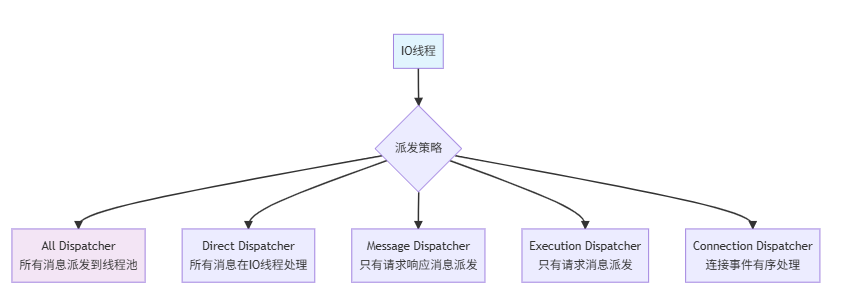
Dubbo提供了多种线程模型来处理网络I/O和业务逻辑:
5.2 线程池配置优化
# 线程池优化配置
dubbo:
  protocol:
    name: dubbo
    # 线程派发策略
    dispatcher: message              # 推荐使用message模式

    # 线程池配置
    threadpool: fixed                # 固定大小线程池
    threads: 500                     # 最大线程数
    corethreads: 100                 # 核心线程数
    queues: 1000                     # 队列大小
    alive: 60000                     # 线程空闲时间

  provider:
    # 提供者线程配置
    executes: 1000                   # 服务并发执行数限制
    actives: 100                     # 每消费者最大活跃调用数

  consumer:
    # 消费者线程配置
    actives: 50                      # 每提供者最大活跃调用数
5.3 自定义线程池实现
对于特殊场景,可以实现自定义线程池以获得更好的性能:
@Configuration
public class CustomThreadPoolConfig {

    /**
     * 自定义业务线程池
     */
    @Bean("customBusinessThreadPool")
    public ExecutorService customBusinessThreadPool() {
        return new ThreadPoolExecutor(
            // 核心参数
            50,                              // 核心线程数
            200,                             // 最大线程数
            60L,                             // 空闲线程存活时间
            TimeUnit.SECONDS,                // 时间单位

            // 工作队列 - 使用有界队列避免内存溢出
            new LinkedBlockingQueue<>(1000),

            // 线程工厂 - 自定义线程命名
            new NamedThreadFactory("dubbo-business", true),

            // 拒绝策略 - 自定义拒绝策略
            new CustomRejectionPolicy()
        );
    }

    /**
     * 自定义IO线程池
     */
    @Bean("customIoThreadPool")
    public ExecutorService customIoThreadPool() {
        return new ThreadPoolExecutor(
            4,                               // IO线程数,通常为CPU核数
            8,                               // 最大IO线程数
            10L,                             // 较短的空闲时间
            TimeUnit.SECONDS,
            new SynchronousQueue<>(),        // 同步移交队列
            new NamedThreadFactory("dubbo-io", true),
            new ThreadPoolExecutor.CallerRunsPolicy()
        );
    }

    /**
     * 自定义拒绝策略
     */
    private static class CustomRejectionPolicy implements RejectedExecutionHandler {
        private static final Logger logger = LoggerFactory.getLogger(CustomRejectionPolicy.class);

        @Override
        public void rejectedExecution(Runnable r, ThreadPoolExecutor executor) {
            // 记录拒绝的请求
            logger.warn("线程池任务被拒绝,活跃线程: {}, 队列大小: {}",
                       executor.getActiveCount(), executor.getQueue().size());

            if (!executor.isShutdown()) {
                // 尝试直接执行(调用者线程执行)
                logger.info("使用调用者线程执行被拒绝的任务");
                r.run();
            }
        }
    }

    /**
     * 线程池监控
     */
    @Component
    public class ThreadPoolMonitor {
        private final ScheduledExecutorService monitorScheduler =
            Executors.newScheduledThreadPool(1);

        @Autowired
        @Qualifier("customBusinessThreadPool")
        private ThreadPoolExecutor businessThreadPool;

        @PostConstruct
        public void startMonitoring() {
            // 每30秒监控一次线程池状态
            monitorScheduler.scheduleAtFixedRate(this::monitorThreadPool, 30, 30, TimeUnit.SECONDS);
        }

        private void monitorThreadPool() {
            int activeCount = businessThreadPool.getActiveCount();
            int poolSize = businessThreadPool.getPoolSize();
            int queueSize = businessThreadPool.getQueue().size();
            long completedCount = businessThreadPool.getCompletedTaskCount();

            // 记录线程池状态
            logger.info("线程池状态 - 活跃: {}, 池大小: {}, 队列: {}, 完成: {}",
                       activeCount, poolSize, queueSize, completedCount);

            // 预警机制
            if (activeCount >= poolSize && queueSize > 500) {
                logger.warn("线程池可能成为性能瓶颈,建议优化");
            }
        }
    }
}
六、高级优化技巧 🚀
6.1 零拷贝技术应用
利用零拷贝技术减少内存拷贝,提升I/O性能:
/**
 * 零拷贝优化示例
 * 使用FileRegion和CompositeByteBuf减少内存拷贝
 */
@Component
public class ZeroCopyOptimizer {

    /**
     * 文件传输零拷贝优化
     */
    public void sendFileWithZeroCopy(Channel channel, File file) throws IOException {
        try (RandomAccessFile raf = new RandomAccessFile(file, "r");
             FileChannel fileChannel = raf.getChannel()) {

            // 创建FileRegion实现零拷贝文件传输
            FileRegion region = new DefaultFileRegion(
                fileChannel, 0, file.length());

            // 发送文件数据
            ChannelFuture future = channel.writeAndFlush(region);
            future.addListener(f -> {
                if (f.isSuccess()) {
                    logger.info("文件发送成功: {}", file.getName());
                } else {
                    logger.error("文件发送失败", f.cause());
                }
            });
        }
    }

    /**
     * 复合缓冲区优化
     */
    public void compositeBufferOptimization() {
        // 创建复合缓冲区,避免多次内存拷贝
        CompositeByteBuf compositeBuf = Unpooled.compositeBuffer();

        // 添加多个缓冲区
        ByteBuf headerBuf = Unpooled.buffer(128);
        ByteBuf bodyBuf = Unpooled.buffer(1024);

        compositeBuf.addComponents(true, headerBuf, bodyBuf);

        // 使用复合缓冲区进行网络传输
        // 避免了将多个缓冲区合并为一个的内存拷贝开销
    }
}
6.2 批量请求处理
通过批量处理减少网络往返次数:
/**
 * 批量请求优化
 */
@Service
public class BatchRequestService {

    @Reference
    private UserService userService;

    /**
     * 批量获取用户信息
     */
    public CompletableFuture<Map<Long, User>> batchGetUsers(List<Long> userIds) {
        // 分批处理,避免单次请求数据量过大
        List<List<Long>> batches = Lists.partition(userIds, 100);

        List<CompletableFuture<Map<Long, User>>> futures = batches.stream()
            .map(this::batchGetUsersInternal)
            .collect(Collectors.toList());

        // 合并所有批次结果
        return CompletableFuture.allOf(futures.toArray(new CompletableFuture[0]))
            .thenApply(v -> futures.stream()
                .map(CompletableFuture::join)
                .flatMap(map -> map.entrySet().stream())
                .collect(Collectors.toMap(Map.Entry::getKey, Map.Entry::getValue)));
    }

    /**
     * 内部批量获取方法
     */
    private CompletableFuture<Map<Long, User>> batchGetUsersInternal(List<Long> userIds) {
        // 使用Dubbo的异步调用
        return userService.batchGetUsers(userIds)
            .thenApply(users -> users.stream()
                .collect(Collectors.toMap(User::getId, Function.identity())));
    }

    /**
     * 批量服务接口定义
     */
    public interface UserService {
        /**
         * 批量查询用户信息
         */
        CompletableFuture<List<User>> batchGetUsers(List<Long> userIds);

        /**
         * 单个查询用户信息(传统方式)
         */
        CompletableFuture<User> getUser(Long userId);
    }
}
6.3 连接预热与预建立
/**
 * 连接预热管理器
 * 在服务启动时预先建立连接,避免首次请求的连接建立延迟
 */
@Component
public class ConnectionWarmUpManager {

    @Autowired
    private RegistryDirectory directory;

    @EventListener(ContextRefreshedEvent.class)
    public void warmUpConnections() {
        logger.info("开始连接预热...");

        // 获取所有服务提供者
        List<Invoker<?>> invokers = directory.getAllInvokers();

        CompletableFuture<?>[] warmUpFutures = invokers.stream()
            .map(this::warmUpInvoker)
            .toArray(CompletableFuture[]::new);

        // 等待所有连接预热完成
        CompletableFuture.allOf(warmUpFutures)
            .thenRun(() -> logger.info("连接预热完成"))
            .exceptionally(throwable -> {
                logger.warn("连接预热出现异常", throwable);
                return null;
            });
    }

    private CompletableFuture<Void> warmUpInvoker(Invoker<?> invoker) {
        return CompletableFuture.runAsync(() -> {
            try {
                // 发送预热请求(如echo请求)
                String warmUpResult = (String) invoker.invoke(
                    new RpcInvocation("$echo", new Class[]{String.class},
                                    new Object[]{"warmup"})).get();

                logger.debug("连接预热成功: {}", invoker.getUrl());
            } catch (Exception e) {
                logger.warn("连接预热失败: {}", invoker.getUrl(), e);
            }
        });
    }
}
七、监控与调优工具 🔧
7.1 性能监控配置
建立完善的性能监控体系:
# 监控配置
management:
  endpoints:
    web:
      exposure:
        include: "health,metrics,prometheus"
  metrics:
    export:
      prometheus:
        enabled: true
    tags:
      application: ${spring.application.name}
      environment: ${spring.profiles.active}

# Dubbo指标配置
dubbo:
  metrics:
    enable: true
    protocol: prometheus
    port: 9090
  monitor:
    protocol: registry
  application:
    qos-enable: true
    qos-port: 22222
7.2 关键性能指标监控
/**
 * 网络通信性能监控
 */
@Component
public class NetworkPerformanceMonitor {

    private final MeterRegistry meterRegistry;
    private final Timer requestTimer;
    private final DistributionSummary payloadSizeSummary;
    private final Gauge connectionGauge;

    public NetworkPerformanceMonitor(MeterRegistry meterRegistry) {
        this.meterRegistry = meterRegistry;

        // 请求耗时监控
        this.requestTimer = Timer.builder("dubbo.network.request.duration")
            .description("Dubbo网络请求耗时")
            .publishPercentiles(0.5, 0.95, 0.99)  // 50%, 95%, 99%分位
            .register(meterRegistry);

        // 数据包大小监控
        this.payloadSizeSummary = DistributionSummary.builder("dubbo.network.payload.size")
            .description("Dubbo网络传输数据包大小")
            .baseUnit("bytes")
            .register(meterRegistry);

        // 连接数监控
        this.connectionGauge = Gauge.builder("dubbo.network.connections")
            .description("Dubbo网络连接数")
            .register(meterRegistry);
    }

    /**
     * 记录请求性能指标
     */
    public void recordRequest(String service, String method, long duration, int payloadSize) {
        // 记录请求耗时
        requestTimer.record(duration, TimeUnit.MILLISECONDS);

        // 记录数据包大小
        payloadSizeSummary.record(payloadSize);

        // 记录标签信息
        meterRegistry.counter("dubbo.network.requests",
            "service", service,
            "method", method
        ).increment();
    }

    /**
     * 更新连接数指标
     */
    public void updateConnectionCount(int count) {
        // 连接数指标需要自定义维护
        // 可以通过定时任务获取当前连接数
    }
}
7.3 实时诊断工具
/**
 * 网络通信实时诊断工具
 */
@Component
public class NetworkDiagnosticTool {

    @Autowired
    private DubboBootstrap dubboBootstrap;

    /**
     * 执行完整的网络诊断
     */
    public NetworkDiagnosisResult performNetworkDiagnosis() {
        NetworkDiagnosisResult result = new NetworkDiagnosisResult();

        // 1. 检查网络连接状态
        result.setConnectionStatus(checkConnectionStatus());

        // 2. 检查线程池状态
        result.setThreadPoolStatus(checkThreadPoolStatus());

        // 3. 检查内存使用情况
        result.setMemoryStatus(checkMemoryStatus());

        // 4. 检查I/O性能
        result.setIoPerformance(checkIoPerformance());

        // 5. 生成优化建议
        result.setOptimizationSuggestions(generateSuggestions(result));

        return result;
    }

    /**
     * 网络连接状态检查
     */
    private ConnectionStatus checkConnectionStatus() {
        ConnectionStatus status = new ConnectionStatus();

        try {
            // 获取所有活跃连接
            Collection<ExchangeClient> clients = getActiveClients();
            status.setActiveConnections(clients.size());

            // 检查连接健康状态
            long healthyCount = clients.stream()
                .filter(ExchangeClient::isConnected)
                .count();
            status.setHealthyConnections((int) healthyCount);

            // 计算连接健康率
            double healthRate = (double) healthyCount / clients.size();
            status.setHealthRate(healthRate);

        } catch (Exception e) {
            status.setError(e.getMessage());
        }

        return status;
    }

    @Data
    public static class NetworkDiagnosisResult {
        private ConnectionStatus connectionStatus;
        private ThreadPoolStatus threadPoolStatus;
        private MemoryStatus memoryStatus;
        private IoPerformance ioPerformance;
        private List<String> optimizationSuggestions;
    }

    @Data
    public static class ConnectionStatus {
        private int activeConnections;
        private int healthyConnections;
        private double healthRate;
        private String error;
    }
}
八、总结 📚
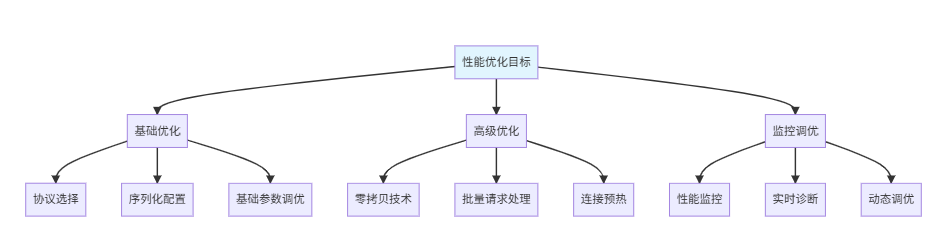
通过本文的全面学习,我们掌握了Dubbo网络通信性能优化的完整知识体系:
8.1 优化要点回顾
✅ 协议优化:选择合适的通信协议,配置合理的协议参数
✅ 序列化优化:使用高性能序列化方式,减少数据转换开销
✅ 网络I/O优化:调优Netty参数,优化连接管理
✅ 线程模型优化:合理配置线程池,避免资源竞争
✅ 高级技巧:应用零拷贝、批量处理、连接预热等高级优化
8.2 性能优化路线图
8.3 持续优化建议
- 基准测试:优化前后进行性能对比测试
- 监控告警:建立完善的监控和告警机制
- 渐进优化:每次只调整一个参数,观察效果
- 容量规划:基于业务增长进行容量规划
- 故障演练:定期进行性能相关的故障演练
🎯 架构启示:网络通信性能优化是一个系统工程,需要从协议、序列化、线程模型、连接管理等多个层面综合考虑。建立完善的监控体系和优化流程,才能持续提升系统性能。
参考资料 📖
架构师建议:网络通信优化需要结合具体的业务场景和系统特点。建议建立性能基线和监控告警,采用渐进式优化策略,确保每次优化都能带来实际的性能提升。
标签: Dubbo 网络通信 性能优化 微服务 Netty 序列化
更多推荐


 54
54 0
0- 0


 已为社区贡献31条内容

所有评论(0)