
dockerfile
·
dockerfile 构建过程
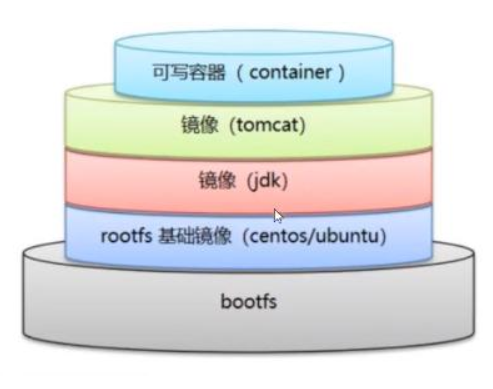
过程1、编写dockerfile文件2、dockerbuild 构建镜像3、docker run 运行容器4、docker push 上传镜像须知1、每个保留关键字(指令)都是大写字母2、执行顺序是 从上往下3、# 表示注释4、每一个指令都会提交一个新的镜像层。
dockerfile的指令
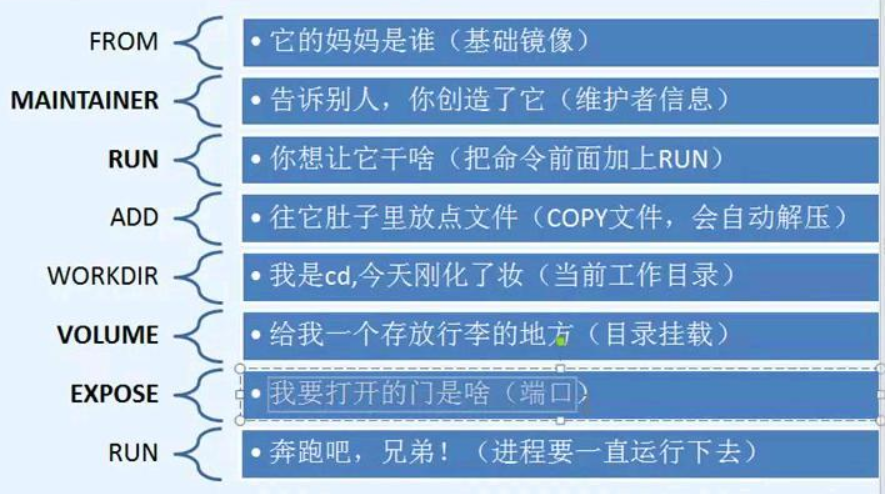
FROM # 基础镜像,一切从这里开始构建MAINTAINER # 镜像是哪位写的 姓名+邮箱RUN # 镜像构建的时候需要运行的命令ADD # copy内容到容器(压缩包,自动解压)COPY # 类似ADD 将文件copy到容器中WORKDIR # 指定镜像工作目录VOLUME # 设置容器卷EXPOSE # 指定暴露端口CMD # 指定这个容器启动的时候要运行的命令(只有最后一个会生效,可被代替)ENTRYPOINT # 指定这个容器启动的时候要运行的命令(可以追加命令)ONBUILD # 当构一个被继承的容器 dockerfile这个时候会运行ONBUILD 的指令 ,触发指定。ENV # 构建时设置环境变量
实践1 构建自己的centos版本
编写dockerfile脚本
[root@localhost volume-test]# mkdir /var/lib/docker/dockerfile
[root@localhost volume-test]# cd /var/lib/docker/dockerfile/
[root@localhost dockerfile]# vim dockerfile01
[root@localhost dockerfile]# cat dockerfile01
# 基础镜像为centOS7
FROM centos:7
MAINTAINER chenyun<chenyun12@163.com>
# 设置环境变量,并指定为容器工作目录
ENV MYPATH /usr/local
WORKDIR $MYPATH
# 构建容器时运行的命令
RUN yum -y install vim
RUN yum -y install net-tools
# 指定暴露端口
EXPOSE 80
# 指定这个容器启动的时候要运行的命令(只有最后一个会生效,可被代替)
CMD /bin/bash
docker build 构建镜像
命令:docker build -f 指定dockerfile路径 -t 镜像名字:tag .
docker build -f dockerfile01 -t qin1-centos:0.1 .
[root@localhost dockerfile]# docker build -f dockerfile01 -t qin1-centos:0.1 .


[+] Building 51.8s (9/9) FINISHED                                docker:default
 => [internal] load build definition from dockerfile01                     0.0s
 => => transferring dockerfile: 735B                                       0.0s
 => [internal] load metadata for docker.io/library/centos:7                0.0s
 => [internal] load .dockerignore                                          0.0s
 => => transferring context: 2B                                            0.0s
 => [1/5] FROM docker.io/library/centos:7                                  0.0s
 => CACHED [2/5] WORKDIR /usr/local                                        0.0s
 => [3/5] RUN rm -f /etc/yum.repos.d/*.repo &&      curl -o /etc/yum.rep  38.2s
 => [4/5] RUN yum -y install vim                                           8.5s
 => [5/5] RUN yum -y install net-tools                                     2.1s
 => exporting to image                                                     2.8s
 => => exporting layers                                                    2.7s
 => => writing image sha256:3053a7a3fea66ff38cc7a7d7a0177975449249c6ff96e  0.0s
 => => naming to docker.io/library/qin1-centos:0.1                         0.0s
[root@localhost dockerfile]#
使用刚构建的镜像运行容器
# 先查看是否存在
[root@localhost dockerfile]# docker images | grep qi

qin1-centos        0.1       3053a7a3fea6   2 minutes ago   1.23GB
qinziteng/centos   v1        b652183093ff   4 years ago     204MB

# 运行容器
[root@localhost dockerfile]# docker run -itd --name test-centos qin1-centos:0.1

7ff500d5bb0b81acabb2d4c600f032f18dd7d1bb6f4c28f94c28f5600666d4d2
测试
[root@localhost dockerfile]# docker run -it --name test-centos1 qin1-centos:0.1
[root@ed466c14935c local]# pwd
/usr/local
[root@ed466c14935c local]# vim a
[root@ed466c14935c local]# ifconfig
eth0: flags=4163<UP,BROADCAST,RUNNING,MULTICAST>  mtu 1500
        inet 172.17.0.9  netmask 255.255.0.0  broadcast 172.17.255.255
        ether 02:42:ac:11:00:09  txqueuelen 0  (Ethernet)
        RX packets 8  bytes 656 (656.0 B)
        RX errors 0  dropped 0  overruns 0  frame 0
        TX packets 0  bytes 0 (0.0 B)
        TX errors 0  dropped 0 overruns 0  carrier 0  collisions 0

lo: flags=73<UP,LOOPBACK,RUNNING>  mtu 65536
        inet 127.0.0.1  netmask 255.0.0.0
        inet6 ::1  prefixlen 128  scopeid 0x10<host>
        loop  txqueuelen 1000  (Local Loopback)
        RX packets 0  bytes 0 (0.0 B)
        RX errors 0  dropped 0  overruns 0  frame 0
        TX packets 0  bytes 0 (0.0 B)
        TX errors 0  dropped 0 overruns 0  carrier 0  collisions 0

[root@ed466c14935c local]#
使用 docker history 查看镜像构建过程
[root@localhost dockerfile]# docker history qin1-centos:0.1
IMAGE          CREATED          CREATED BY                                       SIZE      COMMENT
3053a7a3fea6   18 minutes ago   CMD ["/bin/sh" "-c" "/bin/bash"]                 0B        buildkit.dockerfile.v0
<missing>      18 minutes ago   EXPOSE map[80/tcp:{}]                            0B        buildkit.dockerfile.v0
<missing>      18 minutes ago   RUN /bin/sh -c yum -y install net-tools # bu…   221MB     buildkit.dockerfile.v0
<missing>      18 minutes ago   RUN /bin/sh -c yum -y install vim # buildkit     276MB     buildkit.dockerfile.v0
<missing>      18 minutes ago   RUN /bin/sh -c rm -f /etc/yum.repos.d/*.repo…   532MB     buildkit.dockerfile.v0
<missing>      25 minutes ago   WORKDIR /usr/local                               0B        buildkit.dockerfile.v0
<missing>      25 minutes ago   ENV MYPATH=/usr/local                            0B        buildkit.dockerfile.v0
<missing>      4 years ago      /bin/sh -c #(nop)  CMD ["/bin/bash"]             0B
<missing>      4 years ago      /bin/sh -c #(nop)  LABEL org.label-schema.sc…   0B
<missing>      4 years ago      /bin/sh -c #(nop) ADD file:b3ebbe8bd304723d4…   204MB
更多推荐
 3
3 0
0- 0


 已为社区贡献7条内容

所有评论(0)