
kubernetes 底层原理
一、控制面组件
1.底层原理复习
控制面
- kube-apiserver 入口 安全
- kube-scheduler 调度器 高级调度策略
- kube-controller-mananger 控制器 用户不能干预,自动执行
- etcd Raft 分布式共识算法 如何访问etcd ,灾备
数据面
- kubelet 节点大多数管理工作,CNI CRI CSI
- kube-proxy 讲过 SVC
- CR 容器运行时 CRI
2.Etcd的安装
注:有时候需要外网才能连接到(因为master节点上已经启动了etcd,所以我们切到worker节点)

(1)官网下载安装包

(2)安装etcd
[root@worker 15-etcd]# ll
总用量 20440
-rw-r--r-- 1 root root 20927601  3月 28  2025 etcd-v3.5.21-linux-amd64.tar.gz
[root@worker 15-etcd]# tar xvf etcd-v3.5.21-linux-amd64.tar.gz 

- 2379 client > server
- 2380 server <> server
(3)列出集群成员
[root@worker etcd-v3.5.21-linux-amd64]# ./etcdctl --endpoints=localhost:2379 member list --write-out=table
+------------------+---------+---------+-----------------------+-----------------------+------------+
|        ID        | STATUS  |  NAME   |      PEER ADDRS       |     CLIENT ADDRS      | IS LEARNER |
+------------------+---------+---------+-----------------------+-----------------------+------------+
| 8e9e05c52164694d | started | default | http://localhost:2380 | http://localhost:2379 |      false |
+------------------+---------+---------+-----------------------+-----------------------+------------+
(4)写入操作
# 写入数据
[root@worker etcd-v3.5.21-linux-amd64]# ./etcdctl --endpoints=localhost:2379 put /key1 val1
OK
# 读取数据
[root@worker etcd-v3.5.21-linux-amd64]# ./etcdctl --endpoints=localhost:2379 get /key1
/key1
val1
# 按 Key 的前缀查询数据
[root@worker etcd-v3.5.21-linux-amd64]# ./etcdctl --endpoints=localhost:2379 get --prefix /
/key1
val1
# 只显示键值
[root@worker etcd-v3.5.21-linux-amd64]# ./etcdctl --endpoints=localhost:2379 get --prefix / --keys-only
/key1
# 修改数据
[root@worker etcd-v3.5.21-linux-amd64]# ./etcdctl --endpoints=localhost:2379 put /key1 val-wal
OK
[root@worker etcd-v3.5.21-linux-amd64]# ./etcdctl --endpoints=localhost:2379 get /key1 val-wal
/key1
val-wal
# watch key 变化
[root@worker etcd-v3.5.21-linux-amd64]# ./etcdctl --endpoints=localhost:2379 watch --prefix /
[root@worker etcd-v3.5.21-linux-amd64]# ./etcdctl --endpoints=localhost:2379 put /name k1s
./etcdctl --endpoints=localhost:2379 put /name k2s
./etcdctl --endpoints=localhost:2379 put /name k3s
./etcdctl --endpoints=localhost:2379 put /name k4s
./etcdctl --endpoints=localhost:2379 get /name -wjson
OK
OK
OK
OK
{"header":{"cluster_id":14841639068965178418,"member_id":10276657743932975437,"revision":6,"raft_term":2},"kvs":[{"key":"L25hbWU=","create_revision":3,"mod_revision":6,"version":4,"value":"azRz4oCL"}],"count":1}
[root@worker etcd-v3.5.21-linux-amd64]# ./etcdctl --endpoints=localhost:2379 get /name -wjson
{"header":{"cluster_id":14841639068965178418,"member_id":10276657743932975437,"revision":6,"raft_term":2},"kvs":[{"key":"L25hbWU=","create_revision":3,"mod_revision":6,"version":4,"value":"azRz4oCL"}],"count":1}
[root@worker etcd-v3.5.21-linux-amd64]# ./etcdctl --endpoints=localhost:2379 watch --prefix /name --rev 1
PUT
/name
k1s
PUT
/name
k2s
PUT
/name
k3s
PUT
/name
k4s
# 删除数据
[root@worker etcd-v3.5.21-linux-amd64]# ./etcdctl --endpoints=localhost:2379 del /name
1
[root@worker etcd-v3.5.21-linux-amd64]# ./etcdctl --endpoints=localhost:2379 get /name
[root@worker etcd-v3.5.21-linux-amd64]# 注:etcd会保存一些老旧的数据,方便做数据回滚
知识点补充:
kube-scheduler watch key,调度器通过watch通知机制,知道是否有新的Pod 需要 调度
3.etcd的灾备
(1)备份
# 备份命令
export ETCDCTL_API=3
ENDPOINTS=localhost:2379
$ etcdctl --endpoints=${ENDPOINTS} snapshot save /data/etcd_backup_dir/etcd-snapshot.db
$ etcdctl --endpoints=${ENDPOINTS} snapshot restore snapshot.db
例:
[root@worker etcd-v3.5.21-linux-amd64]# ./etcdctl --endpoints=localhost:2379 snapshot save /data/etcd_backup_dir/etcd-snapshot.db
{"level":"info","ts":"2025-11-24T20:57:39.408160+0800","caller":"snapshot/v3_snapshot.go:65","msg":"created temporary db file","path":"/data/etcd_backup_dir/etcd-snapshot.db.part"}
{"level":"info","ts":"2025-11-24T20:57:39.411400+0800","logger":"client","caller":"v3@v3.5.21/maintenance.go:212","msg":"opened snapshot stream; downloading"}
{"level":"info","ts":"2025-11-24T20:57:39.411505+0800","caller":"snapshot/v3_snapshot.go:73","msg":"fetching snapshot","endpoint":"localhost:2379"}
{"level":"info","ts":"2025-11-24T20:57:39.413678+0800","logger":"client","caller":"v3@v3.5.21/maintenance.go:220","msg":"completed snapshot read; closing"}
{"level":"info","ts":"2025-11-24T20:57:39.420383+0800","caller":"snapshot/v3_snapshot.go:88","msg":"fetched snapshot","endpoint":"localhost:2379","size":"20 kB","took":"now"}
{"level":"info","ts":"2025-11-24T20:57:39.420578+0800","caller":"snapshot/v3_snapshot.go:97","msg":"saved","path":"/data/etcd_backup_dir/etcd-snapshot.db"}
Snapshot saved at /data/etcd_backup_dir/etcd-snapshot.db
[root@worker etcd-v3.5.21-linux-amd64]# ll /data/etcd_backup_dir/etcd-snapshot.db
-rw------- 1 root root 20512 11月 24 20:57 /data/etcd_backup_dir/etcd-snapshot.db
(2)恢复
# 恢复失败
[root@worker etcd-v3.5.21-linux-amd64]# ./etcdctl --endpoints=localhost:2379 snapshot restore snapshot.db
Deprecated: Use `etcdutl snapshot restore` instead.

Error: data-dir "default.etcd" not empty or could not be read
注:因为 当前目录下已经存在 default.etcd 目录,etcdctl 为了防止数据丢失,拒绝覆盖现有数据
推荐方法:
# 使用 etcdutl 工具,这是新版本推荐的方式
./etcdutl snapshot restore snapshot.db --data-dir ./restored-data --name default

# 或者如果要在原位置恢复
rm -rf default.etcd
./etcdutl snapshot restore snapshot.db --name default
4.k8s集群证书
(1)查看etcd中的keys
etcdctl --endpoints https://localhost:2379 --cert /etc/kubernetes/pki/etcd/server.crt --key /etc/kubernetes/pki/etcd/server.key --cacert /etc/kubernetes/pki/etcd/ca.crt get --keys-only --prefix /
[root@localhost ~]# ll /etc/kubernetes/pki/
总用量 56
-rw-r--r-- 1 root root 1281 11月 14 19:54 apiserver.crt
-rw-r--r-- 1 root root 1123 11月 14 19:54 apiserver-etcd-client.crt
-rw------- 1 root root 1679 11月 14 19:54 apiserver-etcd-client.key
-rw------- 1 root root 1679 11月 14 19:54 apiserver.key
-rw-r--r-- 1 root root 1176 11月 14 19:54 apiserver-kubelet-client.crt
-rw------- 1 root root 1679 11月 14 19:54 apiserver-kubelet-client.key
-rw-r--r-- 1 root root 1107 11月 14 19:54 ca.crt
-rw------- 1 root root 1675 11月 14 19:54 ca.key
drwxr-xr-x 2 root root  162 11月 14 19:54 etcd
-rw-r--r-- 1 root root 1123 11月 14 19:54 front-proxy-ca.crt
-rw------- 1 root root 1675 11月 14 19:54 front-proxy-ca.key
-rw-r--r-- 1 root root 1119 11月 14 19:54 front-proxy-client.crt
-rw------- 1 root root 1679 11月 14 19:54 front-proxy-client.key
-rw------- 1 root root 1679 11月 14 19:54 sa.key
-rw------- 1 root root  451 11月 14 19:54 sa.pub
注:k8s集群自身就是一个CA
(2)查看etcd中的values
注:/registry/pods/default/redis-pv-sts-0中存放着 创建 Pod yaml的信息 + 属性
etcdctl --endpoints https://localhost:2379 --cert /etc/kubernetes/pki/etcd/server.crt --key /etc/kubernetes/pki/etcd/server.key --cacert /etc/kubernetes/pki/etcd/ca.crt get /registry/pods/default/redis-pv-sts-0
(3)删除etcd中的pod信息
etcdctl --endpoints https://localhost:2379 --cert /etc/kubernetes/pki/etcd/server.crt --key /etc/kubernetes/pki/etcd/server.key --cacert /etc/kubernetes/pki/etcd/ca.crt del /registry/pods/default/redis-pv-sts-0注:若是在etc数据库中删除redis-pv-sts-0,则外边的容器也会被同时删除,后重建

5.kube-controller-mananger
通用控制器:


6.kube-scheduler

(1)node定义
[root@localhost ~]# kubectl get node
NAME      STATUS   ROLES           AGE     VERSION
master    Ready    control-plane   11d     v1.32.2
worker    Ready    <none>          5d21h   v1.32.2
worker2   Ready    <none>          5d21h   v1.32.2

# 查看node完整定义
[root@localhost ~]# kubectl get node worker -o yaml
 (2)pod所需资源计算

(3)调度算法

若有多个调度器,有3 个Pod需要调度
    kube-scheduler-01  Pod-1/2/3 只有一个实例 在工作
    kube-scheduler-02  热备
    kube-scheduler-03  热备

调度器是串行工作的,一次只能运行一个实例,其他两个作为热备

若集群中有1000个node,则调度时需要考虑效率问题:

    局部最优解 >=100,只会选择一百个作为调度预算
    全局最优解 <= 100,按照实际需求调度
(4)高级调度策略
- nodeSelector:将pod调度到特定的node上
- nodeAffinity:nodeSelector的升级版
- podAffinity :Pod 亲和性
- podAntiAffinity:Pod 反亲和性
- 污点(taint):使节点可以排斥特定的Pod
- 容忍度(toleration):是应用于Pod上的,允许调度器调度带有对应污点的Pod
查看node节点标签:
[root@localhost ~]# kubectl get node --show-labels
NAME      STATUS   ROLES           AGE     VERSION   LABELS
master    Ready    control-plane   11d     v1.32.2   beta.kubernetes.io/arch=amd64,beta.kubernetes.io/os=linux,kubernetes.io/arch=amd64,kubernetes.io/hostname=master,kubernetes.io/os=linux,node-role.kubernetes.io/control-plane=,node.kubernetes.io/exclude-from-external-load-balancers=
worker    Ready    <none>          5d21h   v1.32.2   beta.kubernetes.io/arch=amd64,beta.kubernetes.io/os=linux,kubernetes.io/arch=amd64,kubernetes.io/hostname=worker,kubernetes.io/os=linux
worker2   Ready    <none>          5d22h   v1.32.2   beta.kubernetes.io/arch=amd64,beta.kubernetes.io/os=linux,kubernetes.io/arch=amd64,kubernetes.io/hostname=worker2,kubernetes.io/os=linux
给node节点打标签:
[root@localhost ~]# kubectl label nodes worker node-type=gpu
node/worker labeled
验证nodeSelector

1. 创建测试容器
[root@localhost node-selector]# cat redis-deployment.yaml
apiVersion: apps/v1
kind: Deployment
metadata:
  name: redis-cache
spec:
  selector:
    matchLabels:
      app: redis
  replicas: 1
  template:
    metadata:
      labels:
        app: redis
    spec:
      containers:
      - name: redis-server
        image: registry.cn-beijing.aliyuncs.com/xxhf/redis:alpine
      nodeSelector:
        disktype: ssd    # 目标节点需要有ssd标签

[root@localhost node-selector]# kubectl apply -f redis-deployment.yaml
deployment.apps/redis-cache created
[root@localhost node-selector]# kubectl get pod
NAME                            READY   STATUS    RESTARTS      AGE

redis-cache-7c5d798f97-sxzlf    0/1     Pending   0             10s

2. 查看调度失败原因
[root@localhost node-selector]# kubectl describe pod redis-cache-7c5d798f97-sxzlf

Events:
  Type     Reason            Age   From               Message
  ----     ------            ----  ----               -------
  Warning  FailedScheduling  87s   default-scheduler  0/3 nodes are available: 3 node(s) didn't match Pod's node affinity/selector. preemption: 0/3 nodes are available: 3 Preemption is not helpful for scheduling.

3. 在其中一个节点打上标签,就可以成功调度
[root@localhost node-selector]# kubectl label nodes worker disktype=ssd
node/worker labeled
[root@localhost node-selector]# kubectl get pod
NAME                            READY   STATUS    RESTARTS      AGE

redis-cache-7c5d798f97-sxzlf    1/1     Running   0             3m35s
验证nodeAffinity

1. 创建测试容器——硬亲和
[root@localhost node-affinity]# cat redis-nodeselector-required.yaml
apiVersion: apps/v1
kind: Deployment
metadata:
  name: redis-cache
spec:
  selector:
    matchLabels:
      app: redis
  replicas: 1
  template:
    metadata:
      labels:
        app: redis
    spec:
      affinity:
        nodeAffinity:
          requiredDuringSchedulingIgnoredDuringExecution:
            nodeSelectorTerms:
            - matchExpressions:
              - key: disktype
                operator: In
                values:
                - ssd
                - scsi
      containers:
      - name: redis-server
        image: registry.cn-beijing.aliyuncs.com/xxhf/redis:alpine
        resources:
          limits:
            memory: 1Gi
            cpu: 2
          requests:
            memory: 256Mi
            cpu: 1

[root@localhost node-affinity]# kubectl apply -f redis-nodeselector-required.yaml
deployment.apps/redis-cache configured

2. 查看pod,发现成功调度在worker节点上
[root@localhost node-affinity]# kubectl get pod -o wide
NAME                           READY   STATUS    RESTARTS      AGE   IP              NODE      NOMINATED NODE   READINESS GATES
redis-cache-5fcc99ff45-kgrnw   1/1     Running   0             34s   172.17.171.72   worker    <none>           <none>

3. 即便耗尽worker节点的资源,也不会调度到worker2节点上
[root@localhost node-affinity]# kubectl scale deployment redis-cache --replicas 4
[root@localhost node-affinity]# kubectl get pod -o wide
NAME                           READY   STATUS    RESTARTS       AGE   IP               NODE      NOMINATED NODE   READINESS GATES
redis-cache-5dc8f996cb-cdrpp   1/1     Running   0              82s   172.17.171.111   worker    <none>           <none>
redis-cache-5dc8f996cb-kmqnv   0/1     Pending   0              69s   <none>           <none>    <none>           <none>
redis-cache-5dc8f996cb-mvc8g   0/1     Pending   0              69s   <none>           <none>    <none>           <none>
redis-cache-5dc8f996cb-q4lx4   0/1     Pending   0              70s   <none>           <none>    <none>           <none>

4. 创建测试容器——软亲和
[root@localhost node-affinity]# cat redis-nodeselector-preferred.yaml
apiVersion: apps/v1
kind: Deployment
metadata:
  name: redis-cache
spec:
  selector:
    matchLabels:
      app: redis
  replicas: 1
  template:
    metadata:
      labels:
        app: redis
    spec:
      affinity:
        nodeAffinity:
          preferredDuringSchedulingIgnoredDuringExecution:
          - weight: 1
            preference:
              matchExpressions:
              - key: disktype
                operator: In
                values:
                - ssd     # 有ssd标签打高分,没有打低分,高分节点耗尽,也可以去低分节点
      containers:
      - name: redis-server
        image: registry.cn-beijing.aliyuncs.com/xxhf/redis:alpine
        resources:
          limits:
            memory: 1Gi
            cpu: 2
          requests:
            memory: 256Mi
            cpu: 1000m
[root@localhost node-affinity]# kubectl apply -f redis-nodeselector-preferred.yaml
deployment.apps/redis-cache created

2. 查看pod调度,优先调度到worker节点
[root@localhost node-affinity]# kubectl get pod -o wide
NAME                           READY   STATUS    RESTARTS       AGE   IP               NODE      NOMINATED NODE   READINESS GATES
redis-cache-84d66ccb85-9t687   1/1     Running   0              2s    172.17.171.112   worker    <none>           <none>

3. 耗尽worker节点资源,再次查看pod调度信息
[root@localhost node-affinity]# kubectl scale deployment redis-cache --replicas 4
[root@localhost node-affinity]# kubectl get pod -o wide
NAME                           READY   STATUS    RESTARTS       AGE     IP               NODE      NOMINATED NODE   READINESS GATES

redis-cache-84d66ccb85-9t687   1/1     Running   0              2m36s   172.17.171.112   worker    <none>           <none>
redis-cache-84d66ccb85-bk9n8   1/1     Running   0              41s     172.17.189.65    worker2   <none>           <none>
验证podAffinity 
1. 创建测试容器——硬亲和
[root@localhost pod-affinity]# cat nginx-podaffinity-required.yaml
apiVersion: apps/v1
kind: Deployment
metadata:
  name: nginx-deployment
spec:
  replicas: 1
  selector:
    matchLabels:
      app: nginx
  template:
    metadata:
      labels:
        app: nginx
    spec:
      affinity:
        podAffinity:
          requiredDuringSchedulingIgnoredDuringExecution: # node pod label app=redis
          - labelSelector:
              matchExpressions:
              - key: app
                operator: In
                values:
                - redis
            topologyKey: "kubernetes.io/hostname"     # 主机名,代表了不同的拓扑域
      containers:
        - name: nginx
          image: registry.cn-beijing.aliyuncs.com/xxhf/nginx:1.22.1
          resources:
            limits:
              memory: 1Gi
              cpu: 1
            requests:
              memory: 256Mi
              cpu: 500m
# app: nginx  Pod 如果要调度成功, 就必须 和 app=redis 的 pod 运行在一起, 以 node 为单位
[root@localhost pod-affinity]# kubectl apply -f nginx-podaffinity-required.yaml
deployment.apps/nginx-deployment created

2. 查看pod调度信息,发现没有成功,查看事件原因
[root@localhost pod-affinity]# kubectl get pod -o wide
NAME                                READY   STATUS    RESTARTS       AGE   IP              NODE      NOMINATED NODE   READINESS GATES
nginx-deployment-649784d655-lwzdf   0/1     Pending   0              3s    <none>          <none>    <none>           <none>
[root@localhost pod-affinity]# kubectl describe pod nginx-deployment-649784d655-lwzdf

Events:
  Type     Reason            Age   From               Message
  ----     ------            ----  ----               -------
  Warning  FailedScheduling  20s   default-scheduler  0/3 nodes are available: 3 node(s) didn't match pod affinity rules. preemption: 0/3 nodes are available: 3 Preemption is not helpful for scheduling.

3. 找一个app=redis的pod容器,运行在node节点上
[root@localhost node-selector]# cat redis-deployment.yaml
apiVersion: apps/v1
kind: Deployment
metadata:
  name: redis-cache
spec:
  selector:
    matchLabels:
      app: redis
  replicas: 1
  template:
    metadata:
      labels:
        app: redis
    spec:
      containers:
      - name: redis-server
        image: registry.cn-beijing.aliyuncs.com/xxhf/redis:alpine
      nodeSelector:
        disktype: ssd
[root@localhost node-selector]# kubectl apply -f redis-deployment.yaml
deployment.apps/redis-cache created

4. 重新查看pod节点的调度信息,发现已经成功了
[root@localhost node-selector]# kubectl get pod -o wide
NAME                                READY   STATUS    RESTARTS       AGE    IP               NODE      NOMINATED NODE   READINESS GATES
nginx-deployment-649784d655-lwzdf   1/1     Running   0              4m3s   172.17.171.113   worker    <none>           <none>
redis-cache-7c5d798f97-ns85s        1/1     Running   0              5s     172.17.171.114   worker    <none>           <none>

5. 创建测试容器——软亲和
[root@localhost pod-affinity]# cat nginx-podaffinity-preferred.yaml
apiVersion: apps/v1
kind: Deployment
metadata:
  name: nginx-deployment
spec:
  replicas: 1
  selector:
    matchLabels:
      app: nginx
  template:
    metadata:
      labels:
        app: nginx
    spec:
      affinity:
        podAffinity:
          preferredDuringSchedulingIgnoredDuringExecution:
          - weight: 10
            podAffinityTerm:
              labelSelector:
                matchExpressions:
                - key: app
                  operator: In
                  values:
                  - redis
              topologyKey: "kubernetes.io/hostname"
      containers:
        - name: nginx
          image: registry.cn-beijing.aliyuncs.com/xxhf/nginx:1.22.1
          resources:
            limits:
              memory: 1Gi
              cpu: 2
            requests:
              memory: 256Mi
              cpu: 500m

[root@localhost pod-affinity]# kubectl delete -f nginx-podaffinity-required.yaml
deployment.apps "nginx-deployment" deleted
[root@localhost pod-affinity]# kubectl apply -f nginx-podaffinity-preferred.yaml
deployment.apps/nginx-deployment created
[root@localhost pod-affinity]# kubectl get pod -o wide
NAME                                READY   STATUS    RESTARTS       AGE     IP               NODE      NOMINATED NODE   READINESS GATES
nginx-deployment-6f4c648ccc-h29cx   1/1     Running   0              4s      172.17.171.120   worker    <none>           <none>
redis-cache-7c5d798f97-ns85s        1/1     Running   0              3m40s   172.17.171.114   worker    <none>           <none>

3. 耗尽worker节点的资源,再次查看pod,发现也可以在worker2节点上运行
[root@localhost pod-affinity]# kubectl scale deployment nginx-deployment --replicas 4
deployment.apps/nginx-deployment scaled
[root@localhost pod-affinity]# kubectl get pod -o wide
NAME                                READY   STATUS              RESTARTS       AGE    IP               NODE      NOMINATED NODE   READINESS GATES
nginx-deployment-6f4c648ccc-5fd84   0/1     ContainerCreating   0              2s     <none>           worker    <none>           <none>
nginx-deployment-6f4c648ccc-9c4zp   1/1     Running             0              2s     172.17.189.66    worker2   <none>           <none>
nginx-deployment-6f4c648ccc-jcmvm   1/1     Running             0              2s     172.17.171.65    worker    <none>           <none>
nginx-deployment-6f4c648ccc-pvpbk   1/1     Running             0              91s    172.17.171.64    worker    <none>           <none>
redis-cache-7c5d798f97-brjzg        1/1     Running             0              110s   172.17.171.127   worker    <none>           <none>
验证podAntiAffinity

1. 创建测试容器
[root@localhost pod-affinity]# cat nginx-podantiaffinity-required.yaml
apiVersion: apps/v1
kind: Deployment
metadata:
  name: nginx-deployment
spec:
  replicas: 1
  selector:
    matchLabels:
      app: nginx
  template:
    metadata:
      labels:
        app: nginx
    spec:
      affinity:
        podAntiAffinity:
          requiredDuringSchedulingIgnoredDuringExecution:
          - labelSelector:
              matchExpressions:
              - key: app
                operator: In
                values:
                - redis
            topologyKey: "kubernetes.io/hostname"
      containers:
        - name: nginx
          image: registry.cn-beijing.aliyuncs.com/xxhf/nginx:1.22.1
          resources:
            limits:
              memory: 1Gi
              cpu: 1
            requests:
              memory: 256Mi
              cpu: 500m

[root@localhost pod-affinity]# kubectl apply -f nginx-podantiaffinity-required.yaml
deployment.apps/nginx-deployment created

2. 查看pod调度信息,发现跟podAffinity完全相反
[root@localhost pod-affinity]# kubectl get pod -o wide
NAME                                READY   STATUS    RESTARTS       AGE     IP               NODE      NOMINATED NODE   READINESS GATES
nginx-deployment-7b59d5fff9-wgb6w   1/1     Running   0              7s      172.17.189.68    worker2   <none>           <none>
redis-cache-7c5d798f97-brjzg        1/1     Running   0              7m48s   172.17.171.127   worker    <none>           <none>

3. 创建反亲和自己的测试容器
[root@localhost pod-affinity]# cat nginx-dep-pod-both-required.yaml
apiVersion: apps/v1
kind: Deployment
metadata:
  name: nginx-deployment
spec:
  replicas: 1
  selector:
    matchLabels:
      app: nginx
  template:
    metadata:
      labels:
        app: nginx
    spec:
      affinity:
        podAffinity:
          requiredDuringSchedulingIgnoredDuringExecution:
          - labelSelector:
              matchExpressions:
              - key: app
                operator: In
                values:
                - redis
            topologyKey: "kubernetes.io/hostname"
        podAntiAffinity:
          requiredDuringSchedulingIgnoredDuringExecution:
          - labelSelector:
              matchExpressions:
              - key: app
                operator: In
                values:
                - nginx
            topologyKey: "kubernetes.io/hostname"
      containers:
        - name: nginx
          image: registry.cn-beijing.aliyuncs.com/xxhf/nginx:1.22.1
          resources:
            limits:
              memory: 1Gi
              cpu: 1
            requests:
              memory: 256Mi
              cpu: 100m
[root@localhost pod-affinity]# kubectl apply -f nginx-dep-pod-both-required.yaml
deployment.apps/nginx-deployment created
[root@localhost pod-affinity]# kubectl get pod -o wide
NAME                                READY   STATUS    RESTARTS       AGE   IP               NODE      NOMINATED NODE   READINESS GATES
nginx-deployment-76548d8c6d-8n85d   1/1     Running   0              2s    172.17.171.70    worker    <none>           <none>
redis-cache-7c5d798f97-brjzg        1/1     Running   0              14m   172.17.171.127   worker    <none>           <none>

4. 扩容pod,再次查看node节点信息,最终只有一个nginx能运行在worker节点上
[root@localhost pod-affinity]# kubectl scale deployment nginx-deployment --replicas 2
deployment.apps/nginx-deployment scaled
[root@localhost pod-affinity]# kubectl get pod -o wide
NAME                                READY   STATUS    RESTARTS       AGE   IP               NODE      NOMINATED NODE   READINESS GATES
nginx-deployment-76548d8c6d-8n85d   1/1     Running   0              97s   172.17.171.70    worker    <none>           <none>
nginx-deployment-76548d8c6d-pj9xr   0/1     Pending   0              18s   <none>           <none>    <none>           <none>
redis-cache-7c5d798f97-brjzg        1/1     Running   0              16m   172.17.171.127   worker    <none>           <none>
验证taint污点

1. 查看Node污点
[root@localhost taint-toleration]# kubectl describe node worker

Taints:             <none>

2. 污点组成
key=value:effect

3. effect组成
effect 有三种类型:

- NoSchedule: 新的Pod 不会调度到这个节点 ,正在运行的 Pod 不受影响

- PreferNoSchedule: 软版的 NoSchedule, 新的Pod 尽量不调度到这个节点, 正在运行的 Pod 不受影响

- NoExecute:  新的Pod 不会调度到这个节点,  驱逐 正在运行的 Pod

4. 为节点添加污点
[root@localhost taint-toleration]# kubectl taint node worker node-type=gpu:NoSchedule
node/worker tainted
[root@localhost taint-toleration]# kubectl describe node worker

Taints:             node-type=gpu:NoSchedule

[root@localhost taint-toleration]# kubectl get pod    # 现有的pod不受影响
NAME                           READY   STATUS    RESTARTS       AGE
redis-cache-7c5d798f97-brjzg   1/1     Running   0              28m

5.删除污点
[root@localhost taint-toleration]# kubectl taint node worker node-type-
node/worker untainted

6.创建测试容器
[root@localhost taint-toleration]# cat nginx-dep.yaml
apiVersion: apps/v1
kind: Deployment
metadata:
  name: nginx-deployment
spec:
  replicas: 1
  selector:
    matchLabels:
      app: nginx
  template:
    metadata:
      labels:
        app: nginx
    spec:
      containers:
        - name: nginx
          image: nginx:1.22.1
          resources:
            limits:
              memory: 1Gi
              cpu: 2
            requests:
              memory: 256Mi
              cpu: 500m
      tolerations:
      - key: "node-type"
        operator: "Equal"
        value: "gpu"
        effect: "NoSchedule"

[root@localhost taint-toleration]# kubectl apply -f nginx-dep.yaml
deployment.apps/nginx-deployment created

7. 查看pod调度信息,发现虽然可以容忍,但依旧优先去了worker2节点
[root@localhost taint-toleration]# kubectl get pod -o wide
NAME                               READY   STATUS    RESTARTS        AGE   IP               NODE      NOMINATED NODE   READINESS GATES
nginx-deployment-5457f854f-pztbq   1/1     Running   0               12s   172.17.189.72    worker2   <none>           <none>
redis-cache-7c5d798f97-brjzg       1/1     Running   0               52m   172.17.171.127   worker    <none>           <none>

8. 耗尽worker2资源,发现也会部署到worker节点上
[root@localhost taint-toleration]# kubectl scale deployment nginx-deployment --replicas 6
deployment.apps/nginx-deployment scaled
[root@localhost taint-toleration]# kubectl get pod -o wide
NAME                               READY   STATUS    RESTARTS        AGE    IP               NODE      NOMINATED NODE   READINESS GATES
nginx-deployment-5457f854f-4v8vv   1/1     Running   0               20s    172.17.189.74    worker2   <none>           <none>
nginx-deployment-5457f854f-9kd29   1/1     Running   0               20s    172.17.189.73    worker2   <none>           <none>
nginx-deployment-5457f854f-cmr7t   1/1     Running   0               20s    172.17.171.80    worker    <none>           <none>
nginx-deployment-5457f854f-kd7x2   1/1     Running   0               20s    172.17.171.91    worker    <none>           <none>
nginx-deployment-5457f854f-m524l   1/1     Running   0               20s    172.17.219.70    master    <none>           <none>
nginx-deployment-5457f854f-pztbq   1/1     Running   0               2m3s   172.17.189.72    worker2   <none>           <none>
redis-cache-7c5d798f97-brjzg       1/1     Running   0               54m    172.17.171.127   worker    <none>           <none>
补充污点命令
# 配置一个节点  临时不可调度
[root@localhost taint-toleration]# kubectl  cordon worker2
node/worker2 cordoned
[root@localhost taint-toleration]# kubectl get nodes
NAME      STATUS                     ROLES           AGE    VERSION
master    Ready                      control-plane   11d    v1.32.2
worker    Ready                      <none>          6d1h   v1.32.2
worker2   Ready,SchedulingDisabled   <none>          6d1h   v1.32.2
[root@localhost taint-toleration]# kubectl describe node worker2

Taints:             node.kubernetes.io/unschedulable:NoSchedule

# 恢复调度
[root@localhost taint-toleration]# kubectl  uncordon worker2
node/worker2 uncordoned

# 节点准备下线维护(先转为不可调度,再排空节点pod服务)
[root@localhost taint-toleration]# kubectl  drain worker2
[root@localhost taint-toleration]# kubectl  drain worker2
node/worker2 cordoned
error: unable to drain node "worker2" due to error: cannot delete DaemonSet-managed Pods (use --ignore-daemonsets to ignore): kube-system/calico-node-g4wp2, kube-system/kube-proxy-6cxdv, continuing command...
There are pending nodes to be drained:
 worker2
cannot delete DaemonSet-managed Pods (use --ignore-daemonsets to ignore): kube-system/calico-node-g4wp2, kube-system/kube-proxy-6cxdv
[root@localhost taint-toleration]# kubectl get nodes
NAME      STATUS                     ROLES           AGE    VERSION
master    Ready                      control-plane   11d    v1.32.2
worker    Ready                      <none>          6d1h   v1.32.2
worker2   Ready,SchedulingDisabled   <none>          6d1h   v1.32.2

# 发现有一个DaemonSet-pod是不需要驱逐的,因此修改命令
[root@localhost taint-toleration]# kubectl  drain worker2 --ignore-daemonsets
node/worker2 already cordoned
Warning: ignoring DaemonSet-managed Pods: kube-system/calico-node-g4wp2, kube-system/kube-proxy-6cxdv
evicting pod default/redis-pv-sts-1
evicting pod default/nginx-deployment-5457f854f-9kd29
evicting pod default/nginx-deployment-5457f854f-4v8vv
evicting pod default/nginx-deployment-5457f854f-pztbq
pod/nginx-deployment-5457f854f-4v8vv evicted
pod/nginx-deployment-5457f854f-pztbq evicted
pod/nginx-deployment-5457f854f-9kd29 evicted
pod/redis-pv-sts-1 evicted
node/worker2 drained
注:其他知识点自主学习——pod调度均匀分布;pod优先级:优先级高的在没有资源的情况下会挤占掉优先级低的pod服务
7.kube-apiserver集群安全

- Authentication 认证
- Authorization 授权 鉴权
- Admission: 准入(看YAML中的内容是否符合要求)(Mutating 、Validating)
- Mutating Admission 变形、修改 如: 若replicas>100 则设置 replicas=100
- Validating Admission 验证 若镜像不是来自image: reg.xxhf.cc/,则拒绝加入集群
注:每一个kubectl apply -f 请求都必须过Authentication>Authorization>Admission这三关
认证

# Kubernetes API Server 组件是 Kubernetes 集群资源操作的唯一入口,它通过 HTTP RESTful 的形式暴露服务,允许不同的用户、外部组件等访问它
# 使用 curl 命令去模拟访问 apisever 请求过程
[root@localhost 17-security]# curl https://192.168.5.110:6443/api/v1/namespaces -k
{
"kind": "Status",
"apiVersion": "v1",
"metadata": {},
"status": "Failure",
"message": "namespaces is forbidden: User \"system:anonymous\" cannot list resource \"namespaces\" in API group \"\" at the cluster scope",
"reason": "Forbidden",
"details": {
"kind": "namespaces"
},
"code": 403
# 从上面返回的结果可以看出:apiserver 识别这次请求的用户为 system:anonymous
# apiserver 禁止了该用户 list namespaces,并返回 403
所以通过上面的测试大致了解 apiserver 的工作机制:
# 首先,它会识别请求的用户是谁(AuthN)
# 然后,它会识别该用户具有什么样的权限(AuthZ)认证插件


service account
[root@localhost 17-security]# kubectl api-resources | grep serviceacc
serviceaccounts                     sa           v1                                  true         ServiceAccount

# 在k8s集群中创建账户
[root@localhost 17-security]# kubectl create sa sa-name
serviceaccount/sa-name created
[root@localhost 17-security]# kubectl get sa
NAME      SECRETS   AGE
default   0         12d
sa-name   0         4s
鉴权


- ABAC(Attribute-Based Access Control) 基于属性的访问控制
- RBAC(Role-Based Access Control) 基于角色的访问控制
查看k8s默认使用的插件:
[root@localhost ~]# vi /etc/kubernetes/manifests/kube-apiserver.yaml

    - --authorization-mode=Node,RBAC
RBAC插件


Role : rule——对哪些资源 执行 什么 动作
- resource: pods 、deployments、 daemonsets
- verbs: create \ update \ delete\ patch \ list \get \watch
步骤:创建用户(sa或X509)——>创建Role——>把用户绑定到Role上
相关对象:
[root@localhost ~]# kubectl api-resources | grep role
# 授权集群级别的资源
clusterrolebindings                              rbac.authorization.k8s.io/v1        false        ClusterRoleBinding
clusterroles                                     rbac.authorization.k8s.io/v1        false        ClusterRole
# 授权命名空间级别的资源
rolebindings                                     rbac.authorization.k8s.io/v1        true         RoleBinding
roles                                            rbac.authorization.k8s.io/v1        true         Role
实例一:创建X509用户
(1)创建一个 User Account,只能访问 dev-project 这个命名空间中的 pod 、 deployments、configmap (创建、查询、修改、不给删除权限),对应的用户信息如下所示:
username:   dev-user
group:      developer
namespace: dev-project
(2)给 dev-user 创建一个证书(k8s 集群 就是一个 CA)
1. 创建私钥
[root@localhost dev-project]# openssl genrsa -out dev-user.key 2048

2. 证书签发请求
[root@localhost dev-project]# openssl req -new -key dev-user.key -out dev-user.csr -subj "/CN=dev-user/O=developer"

3. 找CA签发证书
[root@localhost dev-project]# openssl x509 -req -in dev-user.csr -CA /etc/kubernetes/pki/ca.crt -CAkey /etc/kubernetes/pki/ca.key -CAcreateserial -out dev-user.crt -days 3650
Certificate request self-signature ok
subject=CN = dev-user, O = developer

4. 查看
# dev-user.crt    证书
# dev-user.key    私钥
(3)修改 $HOME/.kube/config
1. 添加一个用户
[root@localhost dev-project]# kubectl config set-credentials dev-user --client-certificate=dev-user.crt --client-key=dev-user.key
User "dev-user" set.

2.添加一个上下文
[root@localhost dev-project]# kubectl config set-context dev-user-context --cluster=kubernetes  --user=dev-user
Context "dev-user-context" created.
(4)切换上下文
1. 查看已有上下文
[root@localhost dev-project]# kubectl config get-contexts
CURRENT   NAME                          CLUSTER      AUTHINFO           NAMESPACE
          dev-user-context              kubernetes   dev-user
*         kubernetes-admin@kubernetes   kubernetes   kubernetes-admin

2. 切换上下文
[root@localhost dev-project]# kubectl  config  use-context  dev-user-context
Switched to context "dev-user-context".

[root@localhost dev-project]# kubectl config get-contexts
CURRENT   NAME                          CLUSTER      AUTHINFO           NAMESPACE
*         dev-user-context              kubernetes   dev-user
          kubernetes-admin@kubernetes   kubernetes   kubernetes-admin
注: 此时apiserver 知道 请求的用户是谁,但还没有做鉴权,依旧不能正常访问
(5)鉴权,把用户绑定到role上
1. 切回上下文,创建用户
[root@localhost user-account]# kubectl  config  use-context  kubernetes-admin@kubernetes
[root@localhost user-account]# cat dev-user-role.yaml
apiVersion: rbac.authorization.k8s.io/v1
kind: Role

metadata:
  name: dev-user-role
  namespace: dev-project

rules:
- apiGroups: ["", "apps"]  # group name
  resources: ["deployments", "replicasets", "pods","configmaps","daemonsets"] # resource name
  verbs: ["get", "list", "watch", "create", "update", "patch"]

[root@localhost user-account]# kubectl create ns dev-project
[root@localhost user-account]# kubectl apply -f dev-user-role.yaml
role.rbac.authorization.k8s.io/dev-user-role created

[root@localhost user-account]# kubectl -n dev-project get role
NAME            CREATED AT
dev-user-role   2025-11-26T13:17:12Z

2. 通过RoleBinding将用户绑到角色上
[root@localhost user-account]# cat dev-user-rolebinding.yaml
apiVersion: rbac.authorization.k8s.io/v1
kind: RoleBinding

metadata:
  name: dev-user-rolebinding
  namespace: dev-project

subjects:
- kind: User
  name: dev-user
  apiGroup: rbac.authorization.k8s.io

roleRef:
  kind: Role
  name: dev-user-role
  apiGroup: rbac.authorization.k8s.io
[root@localhost user-account]# kubectl apply -f dev-user-rolebinding.yaml
rolebinding.rbac.authorization.k8s.io/dev-user-rolebinding created

3. 切换上下文
[root@localhost user-account]# kubectl  config  use-context  dev-user-context
Switched to context "dev-user-context".
(6)测试
# 查看pod服务
[root@localhost user-account]# kubectl get pod
Error from server (Forbidden): pods is forbidden: User "dev-user" cannot list resource "pods" in API group "" in the namespace "default"

[root@localhost user-account]# kubectl get pod -n dev-project
No resources found in dev-project namespace.

# 若只有一个命名空间的权限,可以再次修改$HOME/.kube/config
- context:
    cluster: kubernetes
    namespace: dev-project    # 添加命名空间
    user: dev-user
  name: dev-user-context

[root@localhost user-account]# kubectl get pod
No resources found in dev-project namespace.

# 创建pod服务
[root@localhost deployment]# kubectl apply -f nginx-dep.yaml
deployment.apps/nginx-dep created

# 查看pod服务
[root@localhost deployment]# kubectl get pod -o wide
NAME                         READY   STATUS    RESTARTS   AGE   IP              NODE     NOMINATED NODE   READINESS GATES
nginx-dep-6c758d7589-djqsg   1/1     Running   0          15s   172.17.219.72   master   <none>           <none>
nginx-dep-6c758d7589-g54jl   1/1     Running   0          15s   172.17.219.73   master   <none>           <none>
nginx-dep-6c758d7589-mm6dm   1/1     Running   0          15s   172.17.219.74   master   <none>           <none>

# 无法删除
[root@localhost deployment]# kubectl delete pod nginx-dep-6c758d7589-djqsg
Error from server (Forbidden): pods "nginx-dep-6c758d7589-djqsg" is forbidden: User "dev-user" cannot delete resource "pods" in API group "" in the namespace "dev-project"
[root@localhost deployment]# kubectl get cm
NAME               DATA   AGE
kube-root-ca.crt   1      9m57s
[root@localhost deployment]# kubectl get secrets
Error from server (Forbidden): secrets is forbidden: User "dev-user" cannot list resource "secrets" in API group "" in the namespace "dev-project"
实例二:创建 service accounts
注:先创建一个命名空间的普通用户,再创建一个命名空间的管理员,最后创建一个集群管理员
(1)先创建sa
[root@localhost service-account-ns]# cat ns-user.yaml
apiVersion: v1
kind: ServiceAccount
metadata:
  name: ns-user
  namespace: default

[root@localhost service-account-ns]# kubectl apply -f ns-user.yaml
serviceaccount/ns-user created
[root@localhost service-account-ns]# kubectl get sa
NAME      SECRETS   AGE
default   0         12d
ns-user   0         32s
sa-name   0         93m

或
[root@localhost service-account-ns]# kubectl create sa ns-user
(2)创建 Role
[root@localhost service-account-ns]# cat ns-user-role.yaml
apiVersion: rbac.authorization.k8s.io/v1
kind: Role
metadata:
  namespace: default
  name: ns-user-role
rules:
- apiGroups: ["", "apps"]
  resources: ["deployments", "replicasets", "pods","pods/log","configmaps"]
  verbs: ["get", "list", "watch", "create", "update", "patch", "delete"]

[root@localhost service-account-ns]# kubectl apply -f ns-user-role.yaml
role.rbac.authorization.k8s.io/ns-user-role created
(3)创建 RoleBinding,把用户绑定到role上
[root@localhost service-account-ns]# cat ns-user-rolebinding.yaml
kind: RoleBinding
apiVersion: rbac.authorization.k8s.io/v1
metadata:
  name: namespace-user-rolebinding
  namespace: default

subjects:
- kind: ServiceAccount
  name: ns-user

roleRef:
  kind: Role
  name: ns-user-role
  apiGroup: rbac.authorization.k8s.io

[root@localhost service-account-ns]# kubectl apply -f ns-user-rolebinding.yaml
rolebinding.rbac.authorization.k8s.io/namespace-user-rolebinding created
(4)给 sa 创建 token , secret service-account-token
[root@localhost service-account-ns]# cat ns-user-secret.yaml
apiVersion: v1
kind: Secret
metadata:
  name: ns-user
  annotations:
    kubernetes.io/service-account.name: ns-user  # sa name
type: kubernetes.io/service-account-token
[root@localhost service-account-ns]# kubectl apply -f ns-user-secret.yaml
secret/ns-user created

[root@localhost service-account-ns]# kubectl get secrets
NAME                 TYPE                                  DATA   AGE
ns-user              kubernetes.io/service-account-token   3      24s
(5)修改 $HOME/.kube/config
# 通过这个脚本可以生成一个kubeconfig文件
[root@localhost service-account-ns]# cat sa-to-kubeconfig-user.sh
# The script returns a kubeconfig for the service account given
# you need to have kubectl on PATH with the context set to the cluster you want to create the config for

# Cosmetics for the created config
clusterName=kubernetes
# your server address goes here get it via `kubectl cluster-info`
server=https://192.168.5.110:6443
# the Namespace and ServiceAccount name that is used for the config
namespace=default
serviceAccount=ns-user
secretName=ns-user
######################
# actual script starts
set -o errexit

#secretName=$(kubectl --namespace $namespace get serviceAccount $serviceAccount -o jsonpath='{.secrets[0].name}')
ca=$(kubectl --namespace $namespace get secret/$secretName -o jsonpath='{.data.ca\.crt}')
token=$(kubectl --namespace $namespace get secret/$secretName -o jsonpath='{.data.token}' | base64 --decode)

echo "
---
apiVersion: v1
kind: Config
clusters:
  - name: ${clusterName}
    cluster:
      certificate-authority-data: ${ca}
      server: ${server}
contexts:
  - name: ${serviceAccount}@${clusterName}
    context:
      cluster: ${clusterName}
      namespace: ${namespace}
      user: ${serviceAccount}
users:
  - name: ${serviceAccount}
    user:
      token: ${token}
current-context: ${serviceAccount}@${clusterName}
"
[root@localhost service-account-ns]# sh sa-to-kubeconfig-user.sh
[root@localhost service-account-ns]# useradd zhangsan
useradd:用户“zhangsan”已存在
[root@localhost service-account-ns]# su - zhangsan
[zhangsan@localhost ~]$ mkdir .kube
[zhangsan@localhost ~]$ cd .kube/
# 将执行sh sa-to-kubeconfig-user.sh 产生的配置数据写入到config文件当中
[zhangsan@localhost .kube]$ vim config
[zhangsan@localhost .kube]$ kubectl get pod
NAME READY STATUS RESTARTS AGE
nginx-deployment-5457f854f-bx5lj 1/1 Running 0 134m
nginx-deployment-5457f854f-cmr7t 1/1 Running 0 144m
nginx-deployment-5457f854f-gzkh2 0/1 Pending 0 134m
nginx-deployment-5457f854f-hwlsh 0/1 Pending 0 134m
nginx-deployment-5457f854f-kd7x2 1/1 Running 0 144m
nginx-deployment-5457f854f-m524l 1/1 Running 0 144m
redis-cache-7c5d798f97-brjzg 1/1 Running 0 3h17m
redis-pv-sts-0 1/1 Running 1 (5h48m ago) 24h
redis-pv-sts-1 1/1 Running 0 133m
[zhangsan@localhost .kube]$ kubectl get secret
Error from server (Forbidden): secrets is forbidden: User "system:serviceaccount:default:ns-user" cannot list resource "secrets" in API group "" in the namespace "default"
# 不能够切换命名空间
[zhangsan@localhost .kube]$ kubectl get pod -n kube-system
Error from server (Forbidden): pods is forbidden: User "system:serviceaccount:default:ns-user" cannot list resource "pods" in API group "" in the namespace "kube-system"
(6)创建命名空间管理员
1. 创建sa
[root@localhost service-account-ns]# cat ns-admin.yaml
apiVersion: v1
kind: ServiceAccount
metadata:
  name: ns-admin
  namespace: default
[root@localhost service-account-ns]# kubectl apply -f ns-admin.yaml
serviceaccount/ns-admin created

2. 创建role
[root@localhost service-account-ns]# cat ns-admin-role.yaml
kind: Role
apiVersion: rbac.authorization.k8s.io/v1
metadata:
  namespace: default
  name: ns-admin-role

rules:
- apiGroups: ["*"]
  resources: ["*"]
  verbs: ["*"]
[root@localhost service-account-ns]# kubectl apply -f ns-admin-role.yaml
role.rbac.authorization.k8s.io/ns-admin-role created
[root@localhost service-account-ns]# kubectl get role
NAME            CREATED AT
ns-admin-role   2025-11-27T01:00:43Z
ns-user-role    2025-11-26T13:36:16Z

3. 创建rolebinding
[root@localhost service-account-ns]# cat ns-admin-rolebinding.yaml
kind: RoleBinding
apiVersion: rbac.authorization.k8s.io/v1
metadata:
  name: ns-admin-rolebinding
  namespace: default

subjects:
- kind: ServiceAccount
  name: ns-admin
roleRef:
  kind: Role
  name: ns-admin-role
  apiGroup: rbac.authorization.k8s.io
[root@localhost service-account-ns]# kubectl apply -f ns-admin-rolebinding.yaml
rolebinding.rbac.authorization.k8s.io/ns-admin-rolebinding created
[root@localhost service-account-ns]# kubectl get rolebindings.rbac.authorization.k8s.io
NAME                         ROLE                 AGE
namespace-user-rolebinding   Role/ns-user-role    11h
ns-admin-rolebinding         Role/ns-admin-role   15s

4. 给sa创建token
[root@localhost service-account-ns]# cat ns-admin-secret.yaml
apiVersion: v1
kind: Secret
metadata:
  name: ns-admin
  annotations:
    kubernetes.io/service-account.name: ns-admin
type: kubernetes.io/service-account-token
[root@localhost service-account-ns]# kubectl apply -f ns-admin-secret.yaml
secret/ns-admin created
[root@localhost service-account-ns]# kubectl get secrets
NAME                 TYPE                                  DATA   AGE
basic-auth           Opaque                                1      5d11h
cafe-secret          kubernetes.io/tls                     2      5d11h
my-registry-secret   kubernetes.io/dockerconfigjson        1      8d
ns-admin             kubernetes.io/service-account-token   3      20s
ns-user              kubernetes.io/service-account-token   3      11h
user                 Opaque                                3      8d

5. 修改 $HOME/.kube/config,用脚本编写kubeconfig配置文件,放入到普通用户的$HOME/.kube/config文件中
[root@localhost service-account-ns]# cat sa-to-kubeconfig-admin.sh
# The script returns a kubeconfig for the service account given
# you need to have kubectl on PATH with the context set to the cluster you want to create the config for

# Cosmetics for the created config
clusterName=kubernetes
# your server address goes here get it via `kubectl cluster-info`
server=https://192.168.5.110:6443    # 这里要改成自己的地址
# the Namespace and ServiceAccount name that is used for the config
namespace=default
serviceAccount=ns-admin
secretName=ns-admin

######################
# actual script starts
set -o errexit

#secretName=$(kubectl --namespace $namespace get serviceAccount $serviceAccount -o jsonpath='{.secrets[0].name}')
ca=$(kubectl --namespace $namespace get secret/$secretName -o jsonpath='{.data.ca\.crt}')
token=$(kubectl --namespace $namespace get secret/$secretName -o jsonpath='{.data.token}' | base64 --decode)

echo "
---
apiVersion: v1
kind: Config
clusters:
  - name: ${clusterName}
    cluster:
      certificate-authority-data: ${ca}
      server: ${server}
contexts:
  - name: ${serviceAccount}@${clusterName}
    context:
      cluster: ${clusterName}
      namespace: ${namespace}
      user: ${serviceAccount}
users:
  - name: ${serviceAccount}
    user:
      token: ${token}
current-context: ${serviceAccount}@${clusterName}
"

[root@localhost service-account-ns]# sh sa-to-kubeconfig-admin.sh
。。。。。

[zhangsan@localhost ~]$ vi .kube/config

6.测试
# 可以查看secret
[zhangsan@localhost ~]$ kubectl get secret
NAME                 TYPE                                  DATA   AGE
basic-auth           Opaque                                1      5d11h
cafe-secret          kubernetes.io/tls                     2      5d11h
my-registry-secret   kubernetes.io/dockerconfigjson        1      8d
ns-admin             kubernetes.io/service-account-token   3      6m25s
ns-user              kubernetes.io/service-account-token   3      11h
user                 Opaque                                3      8d

# 不能查看其他的命名空间
[zhangsan@localhost ~]$ kubectl get pod -n kube-system
Error from server (Forbidden): pods is forbidden: User "system:serviceaccount:default:ns-admin" cannot list resource "pods" in API group "" in the namespace "kube-system"
(7)创建集群管理员
1. 先创建sa
[root@localhost service-account-cs]# cat cs-admin.yaml
apiVersion: v1
kind: ServiceAccount
metadata:
  name: cs-admin
  namespace: default
[root@localhost service-account-cs]# kubectl apply -f cs-admin.yaml
serviceaccount/cs-admin created

2. 创建集群管理员role(这个角色集群本身就有)
[root@localhost service-account-cs]# kubectl get clusterrole cluster-admin -o yaml
apiVersion: rbac.authorization.k8s.io/v1
kind: ClusterRole
metadata:
  annotations:
    rbac.authorization.kubernetes.io/autoupdate: "true"
  creationTimestamp: "2025-11-14T11:54:54Z"
  labels:
    kubernetes.io/bootstrapping: rbac-defaults
  name: cluster-admin
  resourceVersion: "84"
  uid: bad525f5-a533-4bd7-8d0a-6d6da751293e
rules:
- apiGroups:
  - '*'
  resources:
  - '*'
  verbs:
  - '*'
- nonResourceURLs:
  - '*'
  verbs:
  - '*'

3. 创建ClusterRoleBinding
[root@localhost service-account-cs]# cat cs-admin-clusterolebinding.yaml
apiVersion: rbac.authorization.k8s.io/v1
kind: ClusterRoleBinding
metadata:
  name: cs-admin-clusterrolebinding

subjects:
- kind: ServiceAccount
  name: cs-admin
  namespace: default

roleRef:
  kind: ClusterRole
  name: cluster-admin
  apiGroup: rbac.authorization.k8s.io
[root@localhost service-account-cs]# kubectl apply -f cs-admin-clusterolebinding.yaml
clusterrolebinding.rbac.authorization.k8s.io/cs-admin-clusterrolebinding created

4. 创建secret
[root@localhost service-account-cs]# cat cs-admin-secret.yaml
apiVersion: v1
kind: Secret
metadata:
  name: cs-admin
  annotations:
    kubernetes.io/service-account.name: cs-admin
type: kubernetes.io/service-account-token

[root@localhost service-account-cs]# kubectl apply -f cs-admin-secret.yaml
secret/cs-admin created

5. 通过脚本生成配置文件
[root@localhost service-account-cs]# cat sa-to-kubeconfig.sh
# The script returns a kubeconfig for the service account given
# you need to have kubectl on PATH with the context set to the cluster you want to create the config for

# Cosmetics for the created config
clusterName=kubernetes
# your server address goes here get it via `kubectl cluster-info`
server=https://192.168.5.110:6443
# the Namespace and ServiceAccount name that is used for the config
namespace=default
serviceAccount=cs-admin
secretName=cs-admin

######################
# actual script starts
set -o errexit

#secretName=$(kubectl --namespace $namespace get serviceAccount $serviceAccount -o jsonpath='{.secrets[0].name}')
ca=$(kubectl --namespace $namespace get secret/$secretName -o jsonpath='{.data.ca\.crt}')
token=$(kubectl --namespace $namespace get secret/$secretName -o jsonpath='{.data.token}' | base64 --decode)

echo "
---
apiVersion: v1
kind: Config
clusters:
  - name: ${clusterName}
    cluster:
      certificate-authority-data: ${ca}
      server: ${server}
contexts:
  - name: ${serviceAccount}@${clusterName}
    context:
      cluster: ${clusterName}
      namespace: ${namespace}
      user: ${serviceAccount}
users:
  - name: ${serviceAccount}
    user:
      token: ${token}
current-context: ${serviceAccount}@${clusterName}
"

[root@localhost service-account-cs]# sh sa-to-kubeconfig.sh

# 将生成的配置数据写入到config文件当中
[zhangsan@localhost ~]$ vi .kube/config

6. 测试
[zhangsan@localhost ~]$ kubectl get pod
NAME                               READY   STATUS    RESTARTS      AGE
nginx-deployment-5457f854f-bx5lj   1/1     Running   1 (34m ago)   13h
nginx-deployment-5457f854f-cmr7t   1/1     Running   1 (34m ago)   14h
。。。。。。。。。。。

[zhangsan@localhost ~]$ kubectl get secret
NAME                 TYPE                                  DATA   AGE
basic-auth           Opaque                                1      5d11h
cafe-secret          kubernetes.io/tls                     2      5d11h
cs-admin             kubernetes.io/service-account-token   3      2m13s
my-registry-secret   kubernetes.io/dockerconfigjson        1      8d
...................

[zhangsan@localhost ~]$ kubectl get pod -n kube-system
NAME                                       READY   STATUS    RESTARTS       AGE
calico-kube-controllers-77969b7d87-4hb22   1/1     Running   2 (35m ago)    35h
calico-node-7thhz                          1/1     Running   2 (35m ago)    35h
。。。。。。。。。。。
多管理员问题
若想要创建多个命令空间的管理员该怎么办?
- 将sa绑定到多个命名空间的role上
- 将sa直接绑定到集群role上(成为集群管理员)
1. 首先创建多个命名空间
[root@localhost over-ns]# bash create-ns.sh
namespace/test created
namespace/test2 created
namespace/test3 created
namespace/test4 created

2. 创建一个sa账号
[root@localhost over-ns]# cat myaccount-sa.yaml
apiVersion: v1
kind: ServiceAccount
metadata:
  name: myaccount
  namespace: test
[root@localhost over-ns]# kubectl apply -f myaccount-sa.yaml
serviceaccount/myaccount created

3. 创建secret
[root@localhost over-ns]# cat myaccount-secret.yaml
apiVersion: v1
kind: Secret
metadata:
  name: myaccount
  namespace: test
  annotations:
    kubernetes.io/service-account.name: myaccount
type: kubernetes.io/service-account-token

[root@localhost over-ns]# kubectl apply -f myaccount-secret.yaml
secret/myaccount created

4. 创建role,绑定rolebinding
[root@localhost over-ns]# cat test-role.yaml
kind: Role
apiVersion: rbac.authorization.k8s.io/v1
metadata:
  namespace: test
  name: testadmin
rules:
- apiGroups: ["*"]
  resources: ["*"]
  verbs: ["*"]
[root@localhost over-ns]# kubectl apply -f test-role.yaml
role.rbac.authorization.k8s.io/testadmin created

[root@localhost over-ns]# cat test-role-bind.yaml
kind: RoleBinding
apiVersion: rbac.authorization.k8s.io/v1
metadata:
  name: testadminbinding
  namespace: test
subjects:
- kind: ServiceAccount
  name: myaccount
  apiGroup: ""
roleRef:
  kind: Role
  name: testadmin
  apiGroup: ""
[root@localhost over-ns]# kubectl apply -f test-role-bind.yaml
rolebinding.rbac.authorization.k8s.io/testadminbinding created

5. 通过上面的脚本生成mysconfige文件,发给用户覆写到$HOME/.kube/config文件中
[root@localhost 17-security]# sh sa-to-kubeconfig-user.sh

# 此时还不能切换命名空间
6. 创建test2的role ,rolebinding,绑定到test的sa上
[root@localhost over-ns]# cat test2-role.yaml
kind: Role
apiVersion: rbac.authorization.k8s.io/v1
metadata:
  namespace: test2
  name: testadmin
rules:
- apiGroups: ["*"]
  resources: ["*"]
  verbs: ["*"]

[root@localhost over-ns]# cat test2-roel-bind.yaml
kind: RoleBinding
apiVersion: rbac.authorization.k8s.io/v1
metadata:
  name: testadminbinding
  namespace: test2
subjects:
- kind: ServiceAccount
  name: myaccount
  namespace: test
  apiGroup: ""
roleRef:
  kind: Role
  name: testadmin
  apiGroup: ""

7. 或者直接绑定到集群的role上,变成集群管理员
[root@localhost over-ns]# cat cluster-role-binding.yaml
apiVersion: rbac.authorization.k8s.io/v1
kind: ClusterRoleBinding
metadata:
  name: testadminclusterbinding
subjects:
- kind: ServiceAccount
  name: myaccount
  apiGroup: ""
  namespace: test
roleRef:
  kind: ClusterRole
  name: cluster-admin
  apiGroup: ""
准入

k8s启用的准入控制插件

启用ResourceQuota插件
注:ResourceQuota 设置每个命名空间强制执行的聚合配额限制
    - --enable-admission-plugins=NodeRestriction,ResourceQuota

# 检测到配置文件修改后,集群会重启,此时无法查看
[root@localhost ~]# kubectl get pod
The connection to the server 192.168.5.110:6443 was refused - did you specify the right host or port?
# 只有把插件打开,这个对象才可以被调用
[root@localhost ~]# kubectl api-resources | grep resourcequo
resourcequotas quota v1 true ResourceQuota限制命名空间的资源:
[root@localhost admission]# cat quota-cm.yaml
apiVersion: v1
kind: ResourceQuota
metadata:
  name: object-counts
  namespace: default
spec:
  hard:
    configmaps: "2"
    services: "2"
[root@localhost admission]# kubectl apply -f quota-cm.yaml
resourcequota/object-counts created

# 已创建的不受影响,但之后再创建就不行了
[root@localhost admission]# kubectl get quota
NAME            AGE   REQUEST                          LIMIT
object-counts   27s   configmaps: 7/2, services: 3/2

或
[root@localhost admission]# cat quota-high-qos-limit-request.yaml
apiVersion: v1
kind: ResourceQuota
metadata:
  name: high-qos-limit-requests
  namespace: default
spec:
  hard:
    limits.cpu: 8
    limits.memory: 24Gi
    pods: "10"
    requests.cpu: 4
    requests.memory: 12Gi
  scopes:
  - NotBestEffort
[root@localhost admission]# kubectl apply -f quota-high-qos-limit-request.yaml
resourcequota/high-qos-limit-requests created

[root@localhost admission]# kubectl get quota
NAME                      AGE    REQUEST                                                  LIMIT
high-qos-limit-requests   2s     pods: 0/10, requests.cpu: 0/4, requests.memory: 0/12Gi   limits.cpu: 0/8, limits.memory: 0/24Gi
object-counts             108s   configmaps: 7/2, services: 3/2
二、kubelet 架构

1.监听端口
[root@localhost ~]# netstat -nlpt | grep kubelet
tcp        0      0 127.0.0.1:10248         0.0.0.0:*               LISTEN      1150/kubelet
tcp6       0      0 :::10250                :::*                    LISTEN      1150/kubelet

[root@localhost ~]# curl 127.0.0.1:10248/healthz
ok
[root@localhost ~]# curl 127.0.0.1:10248/healthz
ok[root@localhost ~]# curl https://127.0.0.1:10250/metrics
curl: (60) SSL certificate problem: self-signed certificate in certificate chain
More details here: https://curl.se/docs/sslcerts.html

curl failed to verify the legitimacy of the server and therefore could not
establish a secure connection to it. To learn more about this situation and
how to fix it, please visit the web page mentioned above.
2.CRI/CSI/CNI 介绍
- CRI:容器运行时接口——实现接口
- CNI:容器网络接口——给pod分配ip地址;解决路由问题
- CSI :容器存储接口
3.kubelet 功能

4.pod启动流程

步骤一:用户提交 Deployment 声明
- 用户执行kubectl apply -f deploy.yaml,向 API Server 提交 Deployment 配置(包含应用期望状态,如 2 个副本、nginx 镜像)
- API Server 校验配置合法性后,将 Deployment 信息写入 etcd,对应 etcd Key 为/registry/deployments/default/nginx-dep
步骤二:Deployment Controller 生成 ReplicaSet
- Deployment Controller 通过 Watch 机制监听 etcd 中 Deployment 的变化,发现新 Deployment 后
- 根据 Deployment 的副本数和 Pod 模板,生成对应的 ReplicaSet
- 将 ReplicaSet 信息写入 etcd,对应 Key 为/registry/replicasets/default/nginx-dep-hash值
步骤三:ReplicaSet Controller 生成 Pod
- ReplicaSet Controller 通过 Watch 机制监听 etcd 中 ReplicaSet 的变化,发现新 ReplicaSet 后
- 根据 ReplicaSet 的 Pod 模板,生成指定数量的 Pod(这里是 2 个副本)
- 将 Pod 信息写入 etcd,对应 Key 为/registry/pods/default/nginx-dep-hash值-随机字符串,此时 Pod 的nodeName字段为null(未调度)'
步骤四:Scheduler 为 Pod 调度节点
- Scheduler 通过 Watch 机制监听 etcd 中 “未调度的 Pod”(nodeName: null)
- 执行调度算法(筛选 + 打分),为 2 个 Pod 选择合适的节点(例如 worker-02)
- 将 Pod 的nodeName字段更新为 worker-02,并同步到 etcd
步骤五:worker-02 节点的 Kubelet 创建 Pod
- worker-02 上的 Kubelet 通过 Watch 机制监听 etcd 中 “绑定到当前节点的 Pod”
- 调用 CRI 创建 Pause 容器(作为 Pod 的网络沙箱)
- 调用 CNI 插件为 Pod 申请集群内唯一 IP,并配置 Pod 网络
- 调用 CRI 拉取容器镜像,创建并启动 Pod 内的其他业务容器
- 调用 CSI 插件配置 Pod 所需的存储卷
步骤六:更新 Pod 状态并反馈
- Kubelet 将 Pod 和容器的运行状态(如 Running)上报给 API Server
- API Server 将状态信息同步到 etcd
- 用户执行kubectl get pods时,API Server 从 etcd 读取 Pod 状态并返回
5.CNI网络插件
- CNI 即容器网络接口( Container Network Interface )
- 在 CNI 标准中,网络插件是独立的可执行文件,被上层的容器管理平台调用
- 网络插件只有两件事情要做:把容器加入网络或把容器从网络中删除
6.CNI插件-Flannel
注:Flannel 可以为容器提供跨节点网络服务,其模型为集群内所有容器使用一个网络,然后在每个主机上从该网络中划分一个子网
(1)工作原理
- flannel 通过在每一个节点上启动一个叫 flanneld 的进程,负责每一个节点上的子网划分
- 并将相关的配置信息(如各个节点的子网网段 、外部 IP 等)保存到 etcd 中
- 具体的网络包转发交给具体的 backend 实现
- Flanneld 可以在启动时通过配置文件指定不同的 backend 进行网络通信
- 目前比较成熟的 backend 有 UDP 、VXLAN 和 Host Gateway 三种

(2)安装Flannel-UDP模式
1.删除calico.yaml
[root@localhost ~]# kubectl delete -f calico.yaml
[root@localhost ~]# mv /etc/cni/net.d/10-calico.conflist  /tmp/    # 每个节点都要执行
[root@localhost ~]# reboot

[root@worker ~]# mv /etc/cni/net.d/10-calico.conflist /tmp/
[root@worker2 ~]# mv /etc/cni/net.d/10-calico.conflist /tmp/

2.部署Flannel
# kube-flannel-udp.yml文件可以去官网下载
# 例:kubectl apply -f https://github.com/flannel-io/flannel/releases/latest/download/kube-flannel.yml

[root@localhost ~]# cat kube-flannel-udp.yml

  net-conf.json: |
    {
      "Network": "172.17.0.0/16",    # 同kubeadm-config.yaml中的podSubnet一致
      "EnableNFTables": false,
      "Backend": {
        "Type": "udp"    # 改为udp
      }
    }

[root@localhost ~]# kubectl apply -f kube-flannel-udp.yml
若是启动过程中报错,则查看日志信息,显示有一个内核模块没有加载:

解决方法一: 一次性 重启就失效
# 手工加载内核模块
modprobe br_netfilter解决方法二:开机自动加载 ,重启
echo "br_netfilter" > /etc/modules-load.d/br_netfilter.conf注:必须每个节点都加载这个内核模块,才能够正常运行
(3)查看配置信息
子网配置信息:
# master节点
[root@localhost ~]# cat /run/flannel/subnet.env
FLANNEL_NETWORK=172.17.0.0/16
FLANNEL_SUBNET=172.17.0.1/24
FLANNEL_MTU=1472    # MTU 最大传输单元
FLANNEL_IPMASQ=true

# worker节点
[root@worker2 ~]# cat /run/flannel/subnet.env
FLANNEL_NETWORK=172.17.0.0/16
FLANNEL_SUBNET=172.17.3.1/24
FLANNEL_MTU=1472
FLANNEL_IPMASQ=true
注:二层帧传输最大不能超过1500
接口配置信息:
[root@localhost ~]# ip a

5: cni0: <BROADCAST,MULTICAST,UP,LOWER_UP> mtu 1472 qdisc noqueue state UP group default qlen 1000
    link/ether ae:4c:5a:c1:17:28 brd ff:ff:ff:ff:ff:ff
    inet 172.17.0.1/24 brd 172.17.0.255 scope global cni0
       valid_lft forever preferred_lft forever
    inet6 fe80::ac4c:5aff:fec1:1728/64 scope link
       valid_lft forever preferred_lft forever

10: flannel0: <POINTOPOINT,MULTICAST,NOARP,UP,LOWER_UP> mtu 1472 qdisc fq_codel state UNKNOWN group default qlen 500
    link/none
    inet 172.17.0.0/32 scope global flannel0
       valid_lft forever preferred_lft forever
    inet6 fe80::ecc:85be:3388:7c0e/64 scope link stable-privacy
       valid_lft forever preferred_lft forever
- cni0 网桥 , veth pair 连接到网桥 上 (类似 于 Docker0 )
- flannel0 归 flanneld 进程 管理
监听端口信息:
[root@localhost ~]# netstat -nlup | grep flannel
udp        0      0 192.168.5.110:8285      0.0.0.0:*                           36822/flanneld
(4)创建测试容器
[root@localhost ~]# cat nginx-master.yaml
apiVersion: apps/v1
kind: Deployment
metadata:
  name: nginx-master
spec:
  replicas: 1
  selector:
    matchLabels:
      app: nginx-master
  template:
    metadata:
      labels:
        app: nginx-master
    spec:
      containers:
      - name: nginx-master
        image: registry.cn-beijing.aliyuncs.com/xxhf/nginx:1.22.1-centos7
        ports:
        - containerPort: 80
      nodeName: master    # 与master节点一致
[root@localhost ~]# kubectl apply -f nginx-master.yaml
deployment.apps/nginx-master created
[root@localhost ~]# vi nginx-worker.yaml
[root@localhost ~]# cat nginx-worker.yaml
apiVersion: apps/v1
kind: Deployment
metadata:
  name: nginx-worker
spec:
  replicas: 2
  selector:
    matchLabels:
      app: nginx-worker
  template:
    metadata:
      labels:
        app: nginx-worker
    spec:
      containers:
      - name: nginx-worker
        image: registry.cn-beijing.aliyuncs.com/xxhf/nginx:1.22.1-centos7
        ports:
        - containerPort: 80
      nodeName: worker    # 与worker节点一致
[root@localhost ~]# kubectl apply -f nginx-worker.yaml
deployment.apps/nginx-worker created
[root@localhost ~]# kubectl get pod -o wide
NAME                            READY   STATUS    RESTARTS       AGE     IP               NODE     NOMINATED NODE   READINESS GATES
nginx-master-7f98b9cb6d-cpnh5   1/1     Running   0              82s     172.17.0.2       master   <none>           <none>
nginx-worker-6f7fbc664-kr9f7    1/1     Running   0              48s     172.17.3.2       worker   <none>           <none>
nginx-worker-6f7fbc664-tmgcn    1/1     Running   0              48s     172.17.3.3       worker   <none>           <none>
(5)跨主机通信实验

[root@localhost ~]# kubectl exec -it nginx-master-7f98b9cb6d-cpnh5 -- sh
sh-4.2# ping -c2 172.17.3.2
PING 172.17.3.2 (172.17.3.2) 56(84) bytes of data.
64 bytes from 172.17.3.2: icmp_seq=1 ttl=60 time=1.60 ms
64 bytes from 172.17.3.2: icmp_seq=2 ttl=60 time=3.00 ms

--- 172.17.3.2 ping statistics ---
2 packets transmitted, 2 received, 0% packet loss, time 1001ms
rtt min/avg/max/mdev = 1.603/2.303/3.004/0.702 ms
发现pod-A可以ping通pod-B,我们查看各自的路由表:
# 查看pod-A路由表
sh-4.2# route -n
Kernel IP routing table
Destination     Gateway         Genmask         Flags Metric Ref    Use Iface
0.0.0.0         172.17.0.1      0.0.0.0         UG    0      0        0 eth0
172.17.0.0      0.0.0.0         255.255.255.0   U     0      0        0 eth0
172.17.0.0      172.17.0.1      255.255.0.0     UG    0      0        0 eth0

# 查看master主机路由表
[root@localhost ~]# route -n
Kernel IP routing table
Destination     Gateway         Genmask         Flags Metric Ref    Use Iface
0.0.0.0         192.168.5.2     0.0.0.0         UG    100    0        0 ens160
10.4.0.0        0.0.0.0         255.255.255.0   U     0      0        0 nerdctl0
172.17.0.0      0.0.0.0         255.255.255.0   U     0      0        0 cni0
172.17.0.0      0.0.0.0         255.255.0.0     U     0      0        0 flannel0
192.168.5.0     0.0.0.0         255.255.255.0   U     100    0        0 ens160

# 查看worker主机路由表
[root@worker ~]# route -n
Kernel IP routing table
Destination     Gateway         Genmask         Flags Metric Ref    Use Iface
0.0.0.0         192.168.5.2     0.0.0.0         UG    100    0        0 ens160
172.17.0.0      0.0.0.0         255.255.0.0     U     0      0        0 flannel0
172.17.3.0      0.0.0.0         255.255.255.0   U     0      0        0 cni0
192.168.5.0     0.0.0.0         255.255.255.0   U     100    0        0 ens160
总结flannel UDP 模式跨主机通信实验步骤:
- 容器 A 发出 ICMP 请求报文,通过 IP 封装后的形式为 172.17.0.2 (源)→ 172.17.3.2 ( 目的 )。 此时通过容器 A 内的路由表匹配到应该将 IP 包发送到网关 172.17.0.1 ( cni0 网桥)
- 到达 cni0 的 IP 包目的地 IP 172.17.3.2,匹配到节点 A 上路由规则( 172.17.0. 0 ) , 内核通过查本机路由表知道应该将 IP 包发送给 flannel0 接口
- 发送给 flannel0 接口的 IP 包将被 flanneld 进程接收, flanneld 进程接收 IP 包后在原有的基础上进行 UDP 封包, UDP 封包的形式为 192.168.5.110:8285 → 192.168.5.120:8285
- flanneld 将封装好的 UDP 报文经 eth0 发出,从这里可以看出网络包在通过 eth0 发出前先是加上了 UDP 头( 8 个字节),再加上 IP 头( 20 个字节)进行封装,这也是 flannel0 的 MTU 要比 eth160 的 MTU 小 28 个字节的原因,即防止封包后的以太网帧超过 eth0 的 MTU, 而在经过 eth0 时被丢弃
- 网络包经过主机网络从节点 master 到达节点 worker
- 主机 worker 收到 UDP 报文后, Linux 内核通过 UDP 端口号 8285 将包交给正在监听的 flanneld
- 运行在 worker 中的 flanneld 将 UDP 包解封包后得到 IP 包:172.17.0.2 → 172.17.3.2
- 解封包后的 IP 包匹配到主机 worker上的路由规则 ( 172.17.3.0 ),内核通过查本机路由表知道应该将 IP 包发送到 cni0 网桥
- cni0 网桥将 IP 包转发给连接在该网桥上的容器 B ,至此整个流程结束 。 回程报文将按上面的数据流原路返回
(6)flanneld进程职责
- UDP 封包解包
- 节点上的路由表的动态更新
接口抓包分析:
# master cni0 接口抓包分析
tcpdump -nni cni0 -s0 -vv  -w flannel-udp-master-cni.pcap

# master eth160 接口抓包分析
tcpdump -nni ens160 -s0 -vv  -w flannel-udp-master-eth0.pcap
注:可以将抓包文件导出,通过Wireshark抓包工具查看抓包信息,这里就不演示了
缺点:
通过 UDP 这种 backend 实现的网络传输过程最明显的问题是网络数据包先通过 flannel0 设备从用户态复制到内核态,再由内核态复制到用户态的应用,仅一次网络传输就进行了两次用户态和内核态的切换,显然效率是不高的
Linux 内核本身也提供了比较成熟的网络封包/解包(隧道传输)实现方案 VXLAN
(7)安装Flannel-VXLAN模式
[root@localhost ~]# vi kube-flannel-vxlan.yml
  net-conf.json: |
    {
      "Network": "172.17.0.0/16",
      "EnableNFTables": false,
      "Backend": {
        "Type": "vxlan"
      }
    }

[root@localhost ~]# kubectl apply -f kube-flannel-vxlan.yml
查看 flannel Pod 状态:
[root@localhost ~]# kubectl -n kube-flannel get pod -o wide
NAME                    READY   STATUS    RESTARTS   AGE   IP              NODE     NOMINATED NODE   READINESS GATES
kube-flannel-ds-gjwnh   1/1     Running   0          33s   192.168.5.110   master   <none>           <none>
kube-flannel-ds-vsd6p   1/1     Running   0          33s   192.168.5.120   worker   <none>           <none>
验证当前运行模式:

查看子网配置信息:
[root@localhost ~]# cat /run/flannel/subnet.env
FLANNEL_NETWORK=172.17.0.0/16
FLANNEL_SUBNET=172.17.0.1/24
FLANNEL_MTU=1450    # 这里变成了1450
FLANNEL_IPMASQ=true
查看接口配置信息:
11: cni0: <BROADCAST,MULTICAST,UP,LOWER_UP> mtu 1472 qdisc noqueue state UP group default qlen 1000
    link/ether c6:bd:48:0f:ac:d5 brd ff:ff:ff:ff:ff:ff
    inet 172.17.0.1/24 brd 172.17.0.255 scope global cni0
       valid_lft forever preferred_lft forever
    inet6 fe80::c4bd:48ff:fe0f:acd5/64 scope link
       valid_lft forever preferred_lft forever
13: flannel.1: <BROADCAST,MULTICAST,UP,LOWER_UP> mtu 1450 qdisc noqueue state UNKNOWN group default
    link/ether b2:a7:7a:41:c3:a8 brd ff:ff:ff:ff:ff:ff
    inet 172.17.0.0/32 scope global flannel.1
       valid_lft forever preferred_lft forever
    inet6 fe80::b0a7:7aff:fe41:c3a8/64 scope link
       valid_lft forever preferred_lft forever
查看监听端口:
[root@localhost ~]# netstat -nlpu | grep 8472
udp        0      0 0.0.0.0:8472            0.0.0.0:*
创建测试容器:
[root@localhost ~]# kubectl get pod -o wide
NAME                            READY   STATUS    RESTARTS        AGE   IP               NODE     NOMINATED NODE   READINESS GATES
nginx-master-7f98b9cb6d-ndv4q   1/1     Running   0               66s   172.17.0.3       master   <none>           <none>
nginx-worker-6f7fbc664-88gll    1/1     Running   0               59s   172.17.3.2       worker   <none>           <none>
nginx-worker-6f7fbc664-j5pxg    1/1     Running   0               59s   172.17.3.3       worker   <none>           <none>
跨主机通信:

[root@localhost ~]# kubectl exec -it nginx-master-7f98b9cb6d-ndv4q -- sh
sh-4.2# ping -c2 172.17.3.4
PING 172.17.3.4 (172.17.3.4) 56(84) bytes of data.
64 bytes from 172.17.3.4: icmp_seq=1 ttl=62 time=1.07 ms
64 bytes from 172.17.3.4: icmp_seq=2 ttl=62 time=0.597 ms

--- 172.17.3.4 ping statistics ---
2 packets transmitted, 2 received, 0% packet loss, time 1001ms
rtt min/avg/max/mdev = 0.597/0.836/1.075/0.239 ms
查看路由表:
# 容器内路由表
sh-4.2# route -n
Kernel IP routing table
Destination     Gateway         Genmask         Flags Metric Ref    Use Iface
0.0.0.0         172.17.0.1      0.0.0.0         UG    0      0        0 eth0
172.17.0.0      0.0.0.0         255.255.255.0   U     0      0        0 eth0
172.17.0.0      172.17.0.1      255.255.0.0     UG    0      0        0 eth0

# master节点路由表
[root@localhost ~]# route -n
Kernel IP routing table
Destination     Gateway         Genmask         Flags Metric Ref    Use Iface
0.0.0.0         192.168.5.2     0.0.0.0         UG    100    0        0 ens160
172.17.0.0      0.0.0.0         255.255.255.0   U     0      0        0 cni0
172.17.3.0      172.17.3.0      255.255.255.0   UG    0      0        0 flannel.1
192.168.5.0     0.0.0.0         255.255.255.0   U     100    0        0 ens160

# worker节点路由表
[root@worker ~]# route -n
Kernel IP routing table
Destination     Gateway         Genmask         Flags Metric Ref    Use Iface
0.0.0.0         192.168.5.2     0.0.0.0         UG    100    0        0 ens160
172.17.0.0      172.17.0.0      255.255.255.0   UG    0      0        0 flannel.1
172.17.3.0      0.0.0.0         255.255.255.0   U     0      0        0 cni0
192.168.5.0     0.0.0.0         255.255.255.0   U     100    0        0 ens160
通信实验步骤:
- 同 UDP Backend 模式,容器 Pod-A(172.17.0.2)中的 IP 包通过 Pod-A 内的路由表被发送到 master 节点的 cni0(172.17.0.0/24)
- 到达 cni0 中的 IP 包,通过匹配 master 节点中的路由表,发现通往目标 Pod(比如 Pod-C 172.17.3.2)的 IP 包应该交给 flannel.1 接口
- flannel.1 收到报文后将按照配置进行封包
- 首先,通过 etcd 得知 172.17.3.2 属于 worker 节点,并得到 worker 节点的 IP(192.168.5.120)
- 然后,通过 master 节点中的转发表得到 worker 节点对应的 MAC 地址,根据 flannel.1 设备的设置参数进行 VXLAN 封包
- 通过 master(192.168.5.110)跟 worker(192.168.5.120)之间的网络连接,VXLAN 包到达 worker 节点的 NIC 接口
- 通过端口 8472,VXLAN 包被转发给 worker 节点的 flannel.1 进行解包
- 解封装后的 IP 包匹配 worker 节点中的路由表(172.17.3.0/24),内核将 IP 包转发给 worker 节点的 cni0(172.17.3.0/24)
- cni0 将 IP 包转发给连接在 cni0 上的目标容器(比如 Pod-C 172.17.3.2)
(8)Backend: HOST-GW
- 把主机当作网关实现跨节点网络通信的
- 集群中所有的节点必须处于同一个二层网络内
- 无法适用于集群规模较大且需要对节点进行网段划分的场景
7.CNI 插件-Calico
- Calico 在每个节点利用 Linux 内核实现了一个高效的 vRouter 负责数据转发
- 每个 vRouter 通过 BGP 把 自己运行的工作负载的路由信息 向整个 Calico 网络传播
- 两种工作模式:IPIP和BGP
- IPIP :默认 ip in ip 封装方式,兼容性更好
- BGP:性能最高的,用户有一定的复杂性
(1)组件
- Felix:负责刷新主机路由和 ACL 规则等,利用 Linux 内核原生的路由和 iptables 生成的规则
- BGP Client (BIRD ):把 Node 变成 vRouter,当 Felix 将路由插入 Linux 内核 FIB 时, BGP 客户端将接收它们,并将它们分发到集群中的其他工作节点
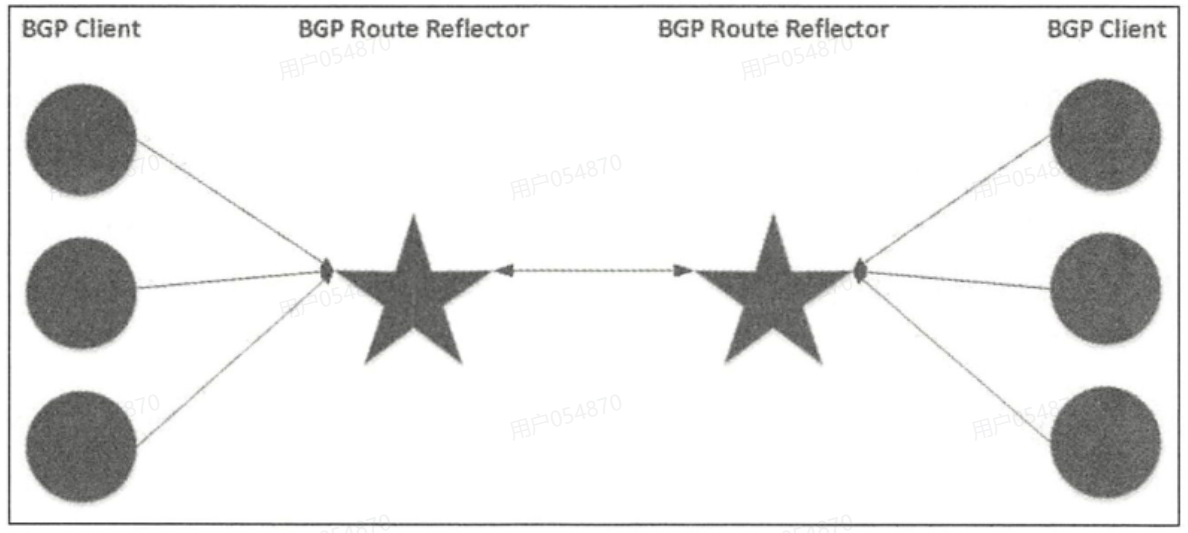
- Route Reflector:路由器反射器,在较大规模的部署中建议使用
注:vRouter 模式——直接使用物理机作为虚拟路由器,不再创建额外的隧道
(2)Calico-IPIP 隧道模式
- ipip 是在各节点之间 “架起” 一个隧道,通过隧道两端节点上的容器网络连接,实现机制简单说就是用 IP 包头封装原始 IP 报文
- 启用 ipip 模式时 ,Calico 将在各个节点上创建一个名为 tunl0 的虚拟网络接口,如下图所示

(3)部署 calico 网络插件
[root@localhost ~]# kubectl apply -f calico.yaml(4)验证运行模式
[root@localhost ~]# ip a

6: tunl0@NONE: <NOARP,UP,LOWER_UP> mtu 1480 qdisc noqueue state UNKNOWN group default qlen 1000
    link/ipip 0.0.0.0 brd 0.0.0.0
    inet 172.17.219.64/32 scope global tunl0
       valid_lft forever preferred_lft forever

[root@localhost ~]# kubectl get pod -o wide
NAME                            READY   STATUS    RESTARTS   AGE     IP               NODE      NOMINATED NODE   READINESS GATES
nginx-master-7f98b9cb6d-jdqwx   1/1     Running   0          113s    172.17.219.103   master    <none>           <none>
nginx-worker-6f7fbc664-kxcq2    1/1     Running   0          111s    172.17.171.116   worker    <none>           <none>
nginx-worker-6f7fbc664-nzj9j    1/1     Running   0          111s    172.17.171.117   worker    <none>           <none>
(5)跨主机通信实验
[root@localhost ~]# kubectl exec -it nginx-master-7f98b9cb6d-jdqwx -- sh
sh-4.2# ping -c2 172.17.171.116
PING 172.17.171.116 (172.17.171.116) 56(84) bytes of data.
64 bytes from 172.17.171.116: icmp_seq=1 ttl=62 time=1.21 ms
64 bytes from 172.17.171.116: icmp_seq=2 ttl=62 time=3.65 ms

--- 172.17.171.116 ping statistics ---
2 packets transmitted, 2 received, 0% packet loss, time 1001ms
rtt min/avg/max/mdev = 1.212/2.432/3.653/1.221 ms
sh-4.2# route -n
Kernel IP routing table
Destination     Gateway         Genmask         Flags Metric Ref    Use Iface
0.0.0.0         169.254.1.1     0.0.0.0         UG    0      0        0 eth0
169.254.1.1     0.0.0.0         255.255.255.255 UH    0      0        0 eth0
sh-4.2# arp -a
192-168-5-110.kubernetes.default.svc.cluster.local (192.168.5.110) at ee:ee:ee:ee:ee:ee [ether] on eth0
gateway (169.254.1.1) at ee:ee:ee:ee:ee:ee [ether] on eth0
注:我们发现,明明网关不对劲,但Master节点却可以ping通worker节点,因为宿主机的每一个veth-pair网卡的mac地址都是ee:ee:ee:ee:ee:ee,作为pod容器的网关,数据包从pod发出来,一定会进入到veth-pair网卡
我们查看各自的路由表:
# master节点
[root@localhost ~]# route -n
Kernel IP routing table
Destination     Gateway         Genmask         Flags Metric Ref    Use Iface
0.0.0.0         192.168.5.2     0.0.0.0         UG    100    0        0 ens160
172.17.171.64   192.168.5.120   255.255.255.192 UG    0      0        0 tunl0
172.17.189.64   192.168.5.130   255.255.255.192 UG    0      0        0 tunl0
172.17.219.64   0.0.0.0         255.255.255.192 U     0      0        0 *
172.17.219.86   0.0.0.0         255.255.255.255 UH    0      0        0 cali420549d00ea
172.17.219.87   0.0.0.0         255.255.255.255 UH    0      0        0 cali549d15860c1
172.17.219.88   0.0.0.0         255.255.255.255 UH    0      0        0 cali25f9acbd8e1
172.17.219.99   0.0.0.0         255.255.255.255 UH    0      0        0 cali42860353900
172.17.219.103  0.0.0.0         255.255.255.255 UH    0      0        0 cali2164dd6e4fc
192.168.5.0     0.0.0.0         255.255.255.0   U     100    0        0 ens160

# worker节点
[root@worker ~]# route -n
Kernel IP routing table
Destination     Gateway         Genmask         Flags Metric Ref    Use Iface
0.0.0.0         192.168.5.2     0.0.0.0         UG    100    0        0 ens160
172.17.171.64   0.0.0.0         255.255.255.192 U     0      0        0 *
172.17.171.115  0.0.0.0         255.255.255.255 UH    0      0        0 cali72bfd37c7e9
172.17.171.116  0.0.0.0         255.255.255.255 UH    0      0        0 cali4096c3f37e3
172.17.171.117  0.0.0.0         255.255.255.255 UH    0      0        0 calia30af0b0923
172.17.189.64   192.168.5.130   255.255.255.192 UG    0      0        0 tunl0
172.17.219.64   192.168.5.110   255.255.255.192 UG    0      0        0 tunl0
192.168.5.0     0.0.0.0         255.255.255.0   U     100    0        0 ens160
注:各路由信息都是通过BGP协议学习到的,虽然用的是IPIP模式,但也使用了BGP协议
通信流程如下:
- Pod-A 发往 Worker 节点 Pod(如 Pod-C)的包出 Pod
- Pod-A(172.17.219.103)内的 IP 包,通过自身路由表,发送到 Master 节点的 Veth pair 网关(Pod 与节点网络的虚拟网卡对)
- 包进入 Master 节点网络,匹配路由表
- Master 节点内核通过路由表识别:目标 Pod(172.17.171.116)属于 Worker 节点的网段,因此将包转发给 Master 节点的 tunl0 隧道设备
- tunl0 对 IP 包进行 IPIP 封装
- Calico 通过 etcd 得知:172.17.171.116 对应的节点是 Worker(IP:192.168.5.120)。
- tunl0 会将原 Pod 间的 IP 包,再封装一层 “节点间的 IP 头”(源:Master 节点 NIC IP 192.168.5.110;目标:Worker 节点 NIC IP 192.168.5.120),形成 IP-in-IP 包。
- 封装后的包通过节点物理网络传输
- IPIP 包通过 Master 节点的 NIC(192.168.5.110),经物理网络发送到 Worker 节点的 NIC(192.168.5.120)。
- Worker 节点接收并解封装
- Worker 节点的 NIC 收到包后,内核识别到这是 IPIP 包,将其转发给 Worker 节点的 tunl0 设备,由 tunl0 解去外层节点 IP 头,还原出原 Pod 间的 IP 包。
- 解封装后的包转发到目标 Pod
- Worker 节点内核通过路由表,将原包转发给 Worker 节点的 Veth pair 网关,最终送达目标 Pod-C(172.17.171.116)
(6)安装Calico-BGP模式
注:BGP模式不进行封装,也没有tunl0

修改配置文件calico.yaml

[root@localhost ~]# kubectl apply -f calico.yaml创建测试容器:
[root@localhost ~]# kubectl apply -f nginx-master.yaml
deployment.apps/nginx-master created
[root@localhost ~]# kubectl apply -f nginx-worker.yaml
deployment.apps/nginx-worker created
验证当前运行模式:
[root@localhost ~]# kubectl get pod -o wide
NAME                            READY   STATUS    RESTARTS   AGE    IP               NODE      NOMINATED NODE   READINESS GATES
nginx-master-7f98b9cb6d-88zsn   1/1     Running   0          2m2s   172.17.219.64    master    <none>           <none>
nginx-worker-6f7fbc664-5z69b    1/1     Running   0          118s   172.17.171.66    worker    <none>           <none>
nginx-worker-6f7fbc664-ghm9f    1/1     Running   0          119s   172.17.171.65    worker    <none>           <none>

[root@localhost ~]# route -n
Kernel IP routing table
Destination     Gateway         Genmask         Flags Metric Ref    Use Iface
0.0.0.0         192.168.5.2     0.0.0.0         UG    100    0        0 ens160
172.17.171.64   192.168.5.120   255.255.255.192 UG    0      0        0 ens160
172.17.189.91   192.168.5.130   255.255.255.255 UGH   0      0        0 ens160
172.17.219.64   0.0.0.0         255.255.255.255 UH    0      0        0 calif03d1b624f6
172.17.219.64   0.0.0.0         255.255.255.192 U     0      0        0 *
172.17.219.87   0.0.0.0         255.255.255.255 UH    0      0        0 cali549d15860c1
172.17.219.88   0.0.0.0         255.255.255.255 UH    0      0        0 cali25f9acbd8e1
172.17.219.99   0.0.0.0         255.255.255.255 UH    0      0        0 cali42860353900
192.168.5.0     0.0.0.0         255.255.255.0   U     100    0        0 ens160
跨主机通信实验:
[root@localhost ~]# kubectl exec -it nginx-master-7f98b9cb6d-88zsn -- sh
sh-4.2# ping -c2 172.17.171.66
PING 172.17.171.66 (172.17.171.66) 56(84) bytes of data.
64 bytes from 172.17.171.66: icmp_seq=1 ttl=62 time=1.75 ms
64 bytes from 172.17.171.66: icmp_seq=2 ttl=62 time=8.83 ms

--- 172.17.171.66 ping statistics ---
2 packets transmitted, 2 received, 0% packet loss, time 1002ms
rtt min/avg/max/mdev = 1.756/5.296/8.837/3.541 ms
sh-4.2# route -n
Kernel IP routing table
Destination     Gateway         Genmask         Flags Metric Ref    Use Iface
0.0.0.0         169.254.1.1     0.0.0.0         UG    0      0        0 eth0
169.254.1.1     0.0.0.0         255.255.255.255 UH    0      0        0 eth0
sh-4.2# arp -a
gateway (169.254.1.1) at ee:ee:ee:ee:ee:ee [ether] on eth0
192-168-5-110.kubernetes.default.svc.cluster.local (192.168.5.110) at ee:ee:ee:ee:ee:ee [ether] on eth0
通信流程如下:
- 节点间通过 BGP 同步路由
- Calico 在每个节点(Master/Worker)上运行 BGP 客户端(如bird),通过 BGP 协议向集群内其他节点宣告自身节点上的 Pod 网段
- Master 节点会向 Worker 节点宣告:172.17.219.0/24网段(Pod-A 所在网段)的路由下一跳是 Master 节点的 NIC IP(192.168.5.110)
- Worker 节点会向 Master 节点宣告:172.17.171.0/24网段(Pod-C/Pod-D 所在网段)的路由下一跳是 Worker 节点的 NIC IP(192.168.5.120)
- Pod-A 发往 Pod-C 的包出 Pod
- Pod-A(172.17.219.64)内的 IP 包,通过自身路由表发送到 Master 节点的Veth pair 网关(Pod 与节点网络的虚拟网卡对)
- Master 节点匹配 BGP 同步的路由
- Master 节点内核查询路由表,发现目标 Pod-C 的网段172.17.171.0/24对应的下一跳是 Worker 节点的 NIC IP(192.168.5.120),因此将包直接转发到 Master 节点的物理网卡 NIC(192.168.5.110)
- 包通过物理网络直达 Worker 节点
- Master 节点 NIC 将包(源:Pod-A 的 IP 172.17.219.64;目标:Pod-C 的 IP 172.17.171.66),通过物理网络(如交换机)直接发送到 Worker 节点的物理网卡 NIC(192.168.5.120)
- Worker 节点转发包到目标 Pod
- Worker 节点内核查询路由表,发现172.17.171.66属于自身节点的 Pod 网段,因此将包转发到 Worker 节点的 Veth pair 网关,最终送达目标 Pod-C。
知识点补充:
Flannel注意事项
- 默认跨命名空间的 Pod 在网络层面是不做隔离的;若项目之间需要做网络隔离,使用 network policy ,相当于在 ns 之间配置 iptables
- Flannel无法配置使用 network policy,但Calico可以使用
获取路由信息
——路由表
- 手工添加 静态路由
- 动态获取-学习 , 动态路由协议
BGP/host-gw区别
- BGP 模式,路由条目是学习到的
- host-gw 模式 路由条目是直接从 etcd 中获取的
CNI 插件目录
[root@localhost ~]# ll /opt/cni/bin/
总用量 206792
-rwxr-xr-x 1 root root  4438342 11月 14 20:15 bandwidth
-rwxr-xr-x 1 root root  3777952 12月 12  2024 bridge
-rwxr-xr-x 1 root root 68833735 11月 14 20:15 calico
-rwxr-xr-x 1 root root 68833735 11月 14 20:15 calico-ipam
-rwxr-xr-x 1 root root  9449208 12月 12  2024 dhcp
-rwxr-xr-x 1 root root  3446480 12月 12  2024 dummy
-rwxr-xr-x 1 root root  3789192 12月 12  2024 firewall
-rwxr-xr-x 1 root root  2789927 11月 14 20:15 flannel
-rwxr-xr-x 1 root root  3396776 12月 12  2024 host-device
-rwxr-xr-x 1 root root  3938771 11月 14 20:15 host-local
-rwxr-xr-x 1 root root  3459824 12月 12  2024 ipvlan
-rw-r--r-- 1 root root    11357 12月 12  2024 LICENSE
-rwxr-xr-x 1 root root  4010150 11月 14 20:15 loopback
-rwxr-xr-x 1 root root  3485960 12月 12  2024 macvlan
-rwxr-xr-x 1 root root  4494056 11月 14 20:15 portmap
-rwxr-xr-x 1 root root  3615264 12月 12  2024 ptp
-rw-r--r-- 1 root root     2343 12月 12  2024 README.md
-rwxr-xr-x 1 root root  3068152 12月 12  2024 sbr
-rwxr-xr-x 1 root root  2564560 12月 12  2024 static
-rwxr-xr-x 1 root root  3501048 12月 12  2024 tap
-rwxr-xr-x 1 root root  4160022 11月 14 20:15 tuning
-rwxr-xr-x 1 root root  3455344 12月 12  2024 vlan
-rwxr-xr-x 1 root root  3177696 12月 12  2024 vrf
CNI 配置文件目录
[root@localhost ~]# ll /etc/cni/net.d/
总用量 12
-rw-r--r-- 1 root root  657 11月 25 21:33 10-calico.conflist
-rw------- 1 root root 2800 11月 25 21:33 calico-kubeconfig
drwxr-xr-x 2 root root    6 11月 18 16:11 default
-rw-r--r-- 1 root root  860 11月 18 16:11 nerdctl-bridge.conflist
CSI插件管理

临时存储

注:临时存储 ,Pod被删除,emptyDir 也会被删除;hostPath:宿主机目录 ,不受 k8s 管理 , Pod 被删除 , 宿主机目录会被保留
传统安全领域3A
- Authentication 认证
- Authorization 授权 鉴权
- Audit 审计 日志
更多推荐

 34
34 0
0- 0


 已为社区贡献10条内容

所有评论(0)