
springboot配置嵌入式服务器及外置 Servlet 容器的使用和静态资源的映射
·
一. 配置嵌入式服务器
1 定制 Servlet 容器配置
通过application.properties修改服务器配置:
server.port=8081
server.servlet.context-path=/tx
server.tomcat.uri-encoding=UTF-8
2 注册 Servlet 三大组件
注册 Servlet:
@Bean
public ServletRegistrationBean myServlet() {
    return new ServletRegistrationBean(new MyServlet(), "/myServlet");
}
注册 Filter:
@Bean
public FilterRegistrationBean myFilter() {
    FilterRegistrationBean registrationBean = new FilterRegistrationBean();
    registrationBean.setFilter(new MyFilter());
    registrationBean.setUrlPatterns(Arrays.asList("/hello", "/myServlet"));
    return registrationBean;
}
注册 Listener:
@Bean
public ServletListenerRegistrationBean myListener() {
    return new ServletListenerRegistrationBean<>(new MyListener());
}
SpringMVC 前端控制器(DispatcherServlet)
SpringBoot 自动注册 DispatcherServlet,默认拦截/(所有请求,包含静态资源,不拦截 jsp),可通过server.servletPath修改拦截路径。其注册逻辑在DispatcherServletAutoConfiguration中实现。
二. 使用外置 Servlet 容器
嵌入式 vs 外置 Servlet 容器对比
- 嵌入式 Servlet 容器:应用打成可执行 jar 包,优点是简单便携;缺点是默认不支持 JSP,优化定制复杂。
- 外置 Servlet 容器:需外部安装 Tomcat,应用以 war 包方式打包部署。
步骤:
1.创建 war 项目
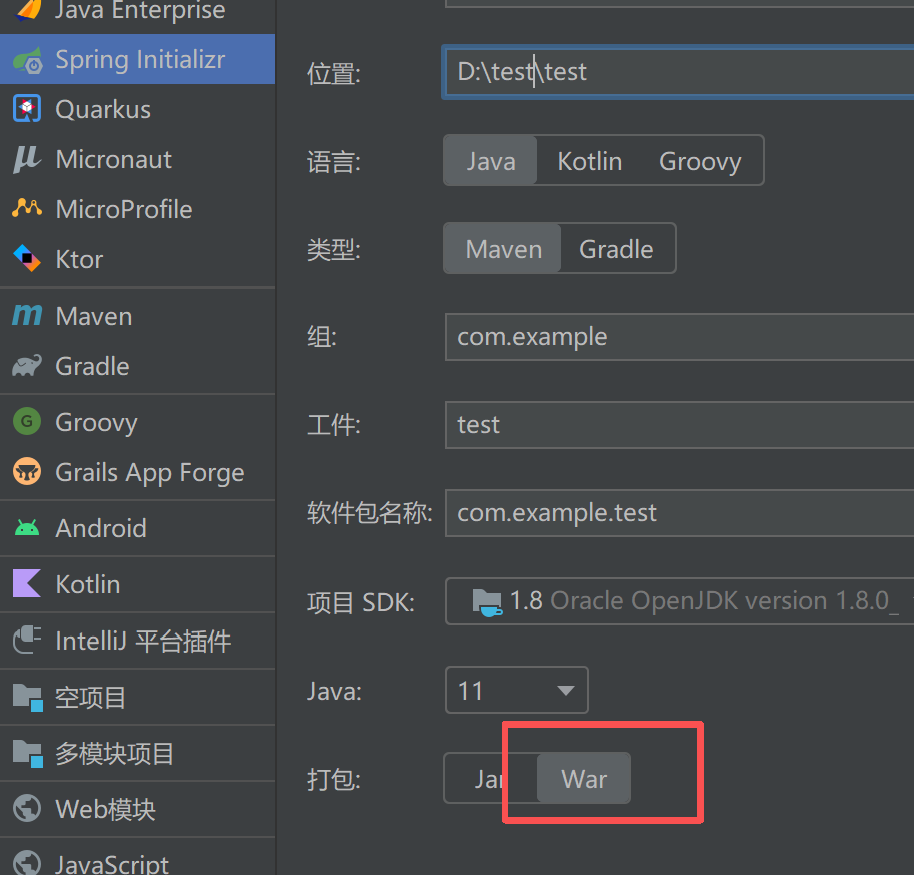
2.将嵌入式 Tomcat 设置为 provided:
<dependency>
    <groupId>org.springframework.boot</groupId>
    <artifactId>spring-boot-starter-tomcat</artifactId>
    <scope>provided</scope>
</dependency>
3.编写 SpringBootServletInitializer 子类:
public class ServletInitializer extends SpringBootServletInitializer {
    @Override
    protected SpringApplicationBuilder configure(SpringApplicationBuilder application) {
        return application.sources(Application.class);
    }
}
4.部署到外部 Tomcat并启动tomcat即可成功
不过该方法springboot项目一般不用
原理:
- jar 包:执行主类 main 方法,启动 IOC 容器和嵌入式容器
- war 包:外部服务器启动,通过 SpringBootServletInitializer 启动 IOC 容器
三、SpringBoot对静态资源的映射规则
@ConfigurationProperties(prefix = "spring.resources", ignoreUnknownFields = false)
public class ResourceProperties implements ResourceLoaderAware {
//可以设置和静态资源有关的参数,缓存时间等

WebMvcAuotConfiguration:
@Override
public void addResourceHandlers(ResourceHandlerRegistry registry) {
     if (!this.resourceProperties.isAddMappings()) {
           logger.debug("Default resource handling disabled");
           return;
      }

Integer cachePeriod = this.resourceProperties.getCachePeriod();
if (!registry.hasMappingForPattern("/webjars/**")) {
     customizeResourceHandlerRegistration(registry.addResourceHandler("/webjars/**").addResourceLocations("classpath:/META‐INF/resources/webjars/").setCachePeriod(cachePeriod));

}

String staticPathPattern = this.mvcProperties.getStaticPathPattern();
//静态资源文件夹映射
if (!registry.hasMappingForPattern(staticPathPattern)) {
      customizeResourceHandlerRegistration(registry.

addResourceHandler(staticPathPattern).addResourceLocations(this.resourceProperties.getStaticLocations()).setCachePeriod(cachePeriod));

}
} /
/配置欢迎页映射
@Bean
public WelcomePageHandlerMapping welcomePageHandlerMapping(
       ResourceProperties resourceProperties) {
       return new WelcomePageHandlerMapping(resourceProperties.getWelcomePage(),

this.mvcProperties.getStaticPathPattern());
}
//配置喜欢的图标
@Configuration
@ConditionalOnProperty(value = "spring.mvc.favicon.enabled", matchIfMissing = true)
public static class FaviconConfiguration {
       private final ResourceProperties resourceProperties;
       public FaviconConfiguration(ResourceProperties resourceProperties) {
            this.resourceProperties = resourceProperties;
}

 @Bean
public SimpleUrlHandlerMapping faviconHandlerMapping() {
       SimpleUrlHandlerMapping mapping = new SimpleUrlHandlerMapping();
       mapping.setOrder(Ordered.HIGHEST_PRECEDENCE + 1);
       //所有 **/favicon.ico
            mapping.setUrlMap(Collections.singletonMap("**/favicon.ico",

faviconRequestHandler());
return mapping;
}

@Bean
public ResourceHttpRequestHandler faviconRequestHandler() {
       ResourceHttpRequestHandler requestHandler = new ResourceHttpRequestHandler();
       requestHandler.setLocations(this.resourceProperties.getFaviconLocations());
       return requestHandler;
 }
}
1 /webjars/资源路径
所有 /webjars/** ,都会先去 classpath:/META-INF/resources/webjars/ 找资源
webjars:以jar包的方式引入静态资源;http://www.webjars.org/
localhost:8080/webjars/jquery/3.3.1/jquery.js
<!‐‐引入jquery‐webjar‐‐>在访问的时候只需要写webjars下面资源的名称即可
<dependency>
    <groupId>org.webjars</groupId>
    <artifactId>jquery</artifactId>
    <version>3.3.1</version>
</dependency>
2 "/**" 访问当前项目的任何资源
都去(静态资源的文件夹)找映射
"classpath:/META‐INF/resources/",
"classpath:/resources/",
"classpath:/static/",
"classpath:/public/"
"/":当前项目的根路径
localhost:8080/abc === 去静态资源文件夹里面找abc
3 欢迎页
静态资源文件夹下的所有index.html页面
被"/**"映射
localhost:8080/ 找index页面
更多推荐
 23
23 0
0- 0


 已为社区贡献6条内容

所有评论(0)