
Maven Reposilite 的 Docker Compose 私有化部署和使用
·
Reposilite 简介
Reposilite 是一个轻量级的 Maven 仓库管理器,适用于私有或团队内部的 Java 包管理。相比 Nexus 和 Artifactory,它更轻量、易用。
环境准备
- 确保已安装 Docker 和 Docker Compose。
- 检查系统资源(如磁盘空间)是否满足需求。
Docker Compose 配置文件
- 根据写稿日期的官网文档,提供
docker-compose.yml文件的基本结构示例:
version: '3.8'
services:
  reposilite:
    image: dzikoysk/reposilite:latest
    container_name: reposilite
    restart: unless-stopped
    ports:
      - "8081:8080"
    volumes:
      - /opt/soft/reposilite:/app/data
    environment:
      - JAVA_OPTS=-Xmx512m
      - REPOSILITE_OPTS=--port 8080 --token admin:123456
    stdin_open: true
    tty: true
以上配置文件详细说明
-
主机 8081 端口 → 容器 8080 端口
-
主机目录:
/opt/soft/reposilite -
容器目录:
/app/data -
--token admin:123456:管理员账号密码
启动 Reposilite 服务
- 运行命令
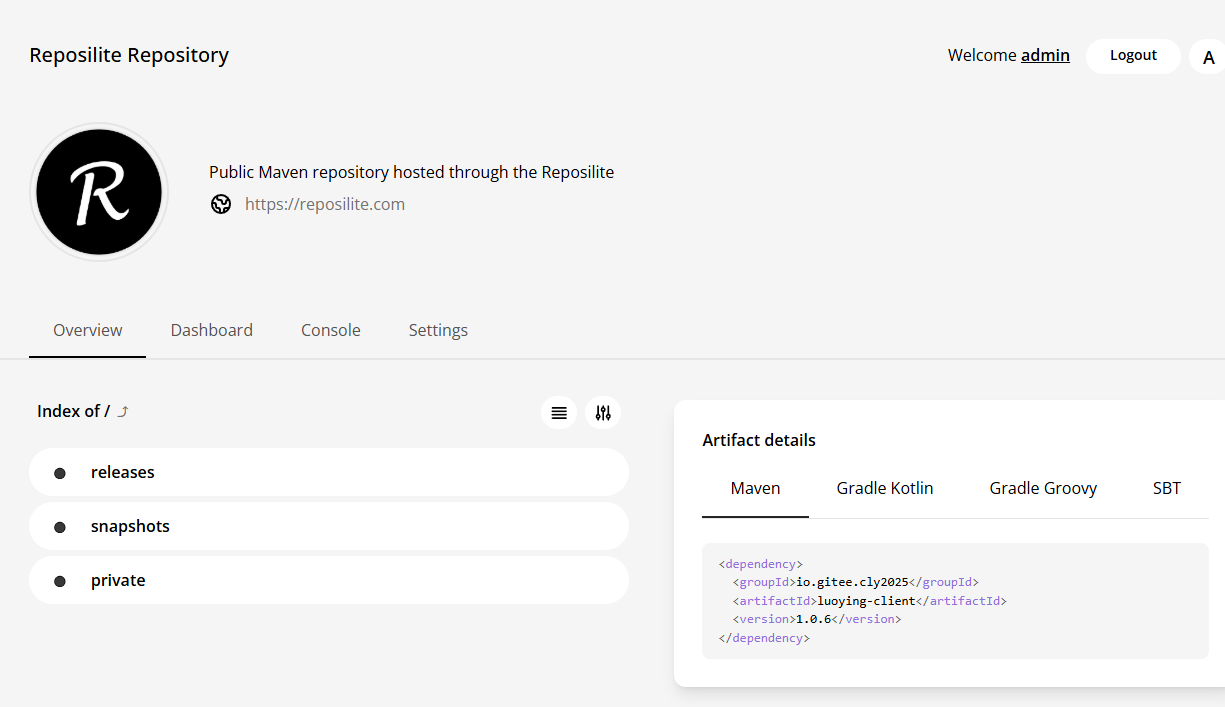
docker-compose up -d启动容器。 - 验证服务是否正常运行(通过
docker ps或访问http://localhost:8081)。

配置个性化功能
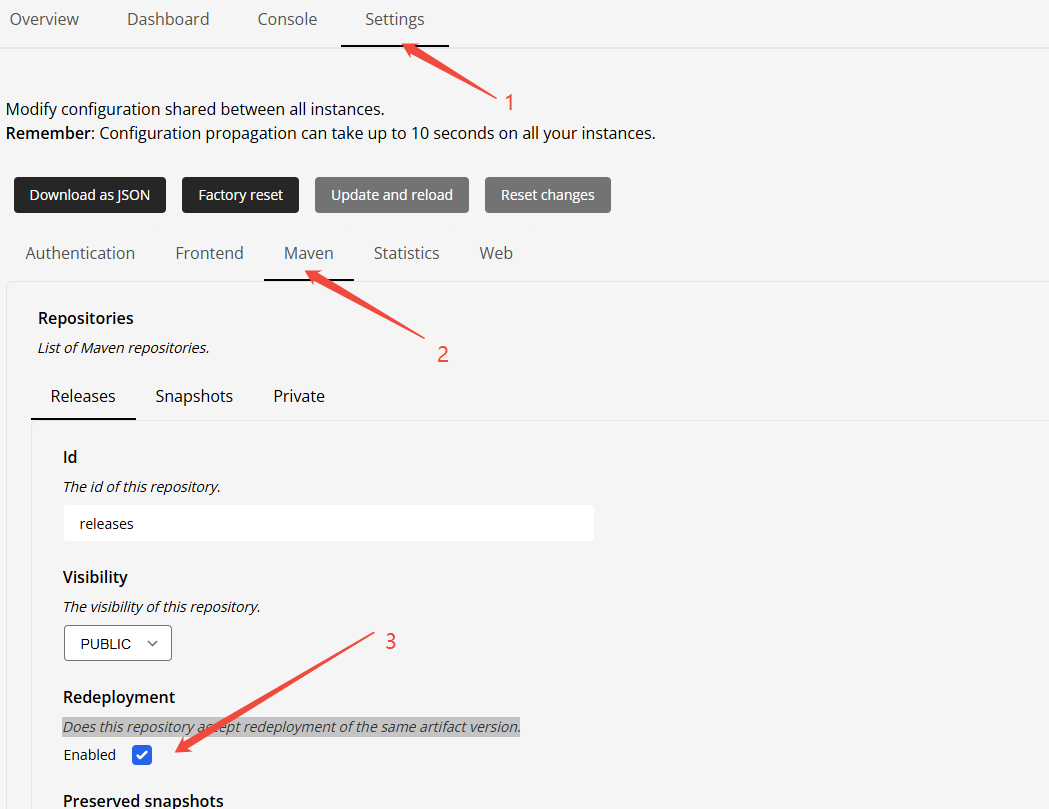
- 配置允许发布相同的版本号,避免每次小调整都要迭代新版本(个人建议是关闭)
Maven 客户端配置
<?xml version="1.0" encoding="UTF-8"?>
<settings xmlns="http://maven.apache.org/SETTINGS/1.2.0"
          xmlns:xsi="http://www.w3.org/2001/XMLSchema-instance"
          xsi:schemaLocation="http://maven.apache.org/SETTINGS/1.2.0 https://maven.apache.org/xsd/settings-1.2.0.xsd">
  <localRepository>D:/User/apache-maven-3.8.6/repository</localRepository>
  <servers>
    <!--发布中央仓库才用到,跟这篇文章无关
    <server>
		<id>ossrh</id>
		<username></username>
		<password></password>
	</server>
    -->
    <server>
      <id>reposilite</id>
      <username>your-username</username>
      <password>your-password</password>
    </server>
    <server>
      <id>reposilite-snapshots</id>
      <username>your-username</username>
      <password>your-password</password>
    </server>
  </servers>

  <mirrors>
     <mirror>
      <id>aliyunmaven</id>
      <name>阿里云公共仓库</name>
      <url>https://maven.aliyun.com/repository/public</url>
      <mirrorOf>central</mirrorOf>
    </mirror>
	<mirror>
      <id>mvnrepository</id>
      <name>MVN Repository Mirror</name>
      <url>https://repo1.maven.org/maven2/</url>
      <mirrorOf>central</mirrorOf>
    </mirror>
  </mirrors>

  <profiles>
    <profile>
      <id>ossrh</id>
      <activation>
        <activeByDefault>true</activeByDefault>
      </activation>
      <properties>
        <!--发布中央仓库才用到,跟这篇文章无关  这里填你安装的GnuPG位置
        <gpg.executable>F:/softmove/soft/GnuPG/bin/gpg.exe</gpg.executable>
        <gpg.passphrase>密码</gpg.passphrase>
        <gpg.homedir>C:/Users/Administrator/AppData/Roaming/gnupg</gpg.homedir>
        -->
      </properties>
	  <repositories>
        <!--发布中央仓库才用到,跟这篇文章无关  这里填你安装的GnuPG位置
		<repository>
			<id>central</id>
			<url>https://repo1.maven.org/maven2/</url>
			 <releases><enabled>true</enabled></releases>
             <snapshots><enabled>false</enabled></snapshots>
		</repository>
        -->
		<repository>
			 <id>reposilite</id>
             <!-- 注意换成自己的IP和端口号-->
			 <url>http://192.168.0.91:8081/releases</url>
			 <releases><enabled>true</enabled></releases>
             <snapshots><enabled>false</enabled></snapshots>
		</repository>
	  </repositories>
    </profile>
  </profiles>
  <activeProfiles>
    <activeProfile>ossrh</activeProfile>
  </activeProfiles>
</settings>
pom.xml 配置
<!--只列出相关部分-->
<repositories>

    <!--注意换成自己的IP和端口号-->
    <repository>
      <id>my-repo</id>
      <url>http://192.168.0.91:8081/releases</url>
      <releases>
        <enabled>true</enabled>
      </releases>
      <snapshots>
        <enabled>true</enabled>
        <updatePolicy>always</updatePolicy>
      </snapshots>
    </repository>


   <!--发布中央仓库才用到 以这篇文章无关
    <repository>
      <id>central</id>
      <url>https://repo1.maven.org/maven2</url>
    </repository>
   -->
  </repositories>

<distributionManagement>
    <!--注意换成自己的IP和端口号-->
  <repository>
    <id>reposilite</id>
    <name>Releases</name>
    <url>http://192.168.0.91:8081/releases</url>
  </repository>
  <snapshotRepository>
    <id>reposilite-snapshots</id>
    <name>Snapshots</name>
    <url>http://192.168.0.91:8081/snapshots</url>
  </snapshotRepository>
</distributionManagement>

  <!--项目用到的打包插件-->
<build>
    <plugins>
      <!-- 打开发布到中央仓库-->
<!--      <plugin>-->
<!--        <groupId>org.sonatype.central</groupId>-->
<!--        <artifactId>central-publishing-maven-plugin</artifactId>-->
<!--        <version>0.9.0</version>-->
<!--        <extensions>true</extensions>-->
<!--        <configuration>-->
<!--          <publishingServerId>ossrh</publishingServerId>-->
<!--          <autoPublish>false</autoPublish>-->
<!--          <waitUntil>uploaded</waitUntil>-->
<!--        </configuration>-->
<!--      </plugin>-->


      <plugin>
        <groupId>org.codehaus.mojo</groupId>
        <artifactId>flatten-maven-plugin</artifactId>
        <version>1.5.0</version>
        <configuration>
          <updatePomFile>true</updatePomFile>
          <flattenMode>resolveCiFriendliesOnly</flattenMode>
        </configuration>
        <executions>
          <execution>
            <id>flatten</id>
            <phase>process-resources</phase>
            <goals>
              <goal>flatten</goal>
            </goals>
          </execution>
          <execution>
            <id>flatten.clean</id>
            <phase>clean</phase>
            <goals>
              <goal>clean</goal>
            </goals>
          </execution>
        </executions>
      </plugin>


      <!-- 源代码插件 -->
      <plugin>
        <groupId>org.apache.maven.plugins</groupId>
        <artifactId>maven-source-plugin</artifactId>
        <version>3.3.0</version>
        <executions>
          <execution>
            <id>attach-sources</id>
            <goals>
              <goal>jar-no-fork</goal>
            </goals>
          </execution>
        </executions>
      </plugin>

      <!-- Javadoc 插件 -->
      <plugin>
        <groupId>org.apache.maven.plugins</groupId>
        <artifactId>maven-javadoc-plugin</artifactId>
        <version>3.6.3</version>
        <executions>
          <execution>
            <id>attach-javadocs</id>
            <goals>
              <goal>jar</goal>
            </goals>
            <configuration>
              <doclint>none</doclint>
            </configuration>
          </execution>
        </executions>
      </plugin>

      <!-- GPG 签名插件 -->
      <plugin>
        <groupId>org.apache.maven.plugins</groupId>
        <artifactId>maven-gpg-plugin</artifactId>
        <version>3.1.0</version>
        <executions>
          <execution>
            <id>sign-artifacts</id>
            <phase>verify</phase>
            <goals>
              <goal>sign</goal>
            </goals>
            <configuration>
              <gpgArguments>
                <arg>--pinentry-mode</arg>
                <arg>loopback</arg>
              </gpgArguments>
            </configuration>
          </execution>
        </executions>
      </plugin>

      <!-- 编译插件 -->
      <plugin>
        <groupId>org.apache.maven.plugins</groupId>
        <artifactId>maven-compiler-plugin</artifactId>
        <version>3.11.0</version>
        <configuration>
          <source>8</source>
          <target>8</target>
          <encoding>UTF-8</encoding>
        </configuration>
      </plugin>


    </plugins>
  </build>
如何发布
## 或者直接设置固定版本
mvn versions:set -DnewVersion=1.0.1

## 删除备份的POM版本文件
mvn versions:commit

## 直接发布
mvn clean deploy -DskipTests
常见问题
包拉不下来,可能是由于 Maven 版本较低导致。建议先更新 Maven 版本,编辑 Maven 的 settings.xml 配置文件,找到如下配置节:
<mirror>
   <id>maven-default-http-blocker</id>
   <mirrorOf>external:http:*</mirrorOf>
   <name>Pseudo repository to mirror external repositories initially using HTTP.</name>
   <url>http://0.0.0.0/</url>
   <blocked>true</blocked>
</mirror>
将其删除或注释掉即可。这是由于 Maven 默认禁止使用 HTTP 协议访问外部仓库,强制要求使用 HTTPS 所致。
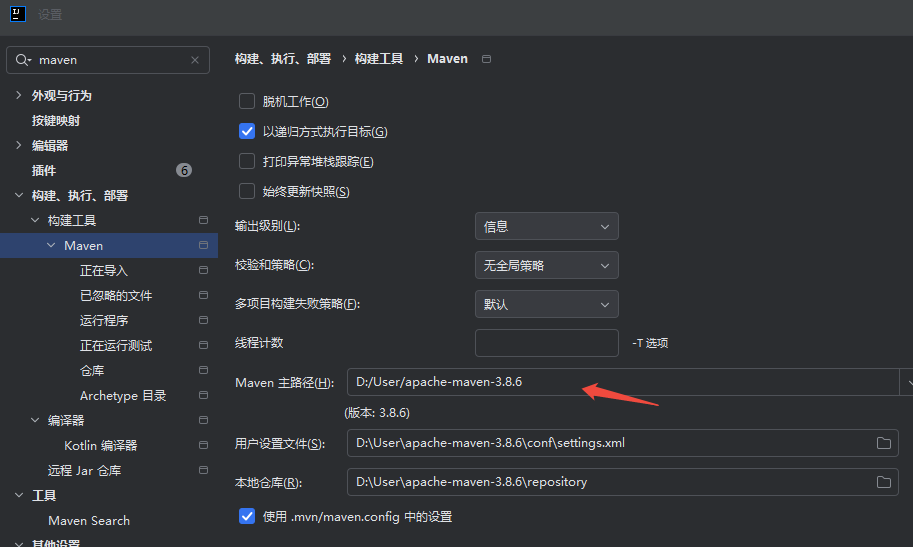
如果问题仍未解决,请进一步检查 IDEA 中的 Maven 设置。Maven主路径不能是默认(改成你的maven安装目录)。IDEA自带的Maven可能版本也过低,并检查配置文件是否指向正确。
参考资源
- 官方文档链接与社区支持渠道。
更多推荐


 3
3 0
0- 0


 已为社区贡献2条内容

所有评论(0)