
<span class=“js_title_inner“>九坤量化开源IQuest-Coder-V1,代码大模型进入“流式”训练时代</span>
来源:魔搭社区
2026第一天,由九坤投资创始团队成立的至知创新研究院(IQuest Research)开源了其最新工作 IQuest-Coder-V1 系列代码大模型,包含从 7B 到 40B 参数规模的模型,并提供标准版和 Loop 版本,并覆盖不同使用场景:
-
每个参数规模都提供Base、Instruct和Thinking三个版本
-
40B版本额外提供Loop变体,专为高效部署优化
-
所有模型均支持128K上下文长度,使用分组查询注意力(GQA)架构
|
模型 |
参数量 |
层数 |
隐藏层维度 |
注意力头数 (Q/KV) |
上下文长度 |
|
IQuest-Coder-V1-7B-Instruct |
7B |
14 |
5120 |
40/8 |
128K |
|
IQuest-Coder-V1-7B-Thinking |
7B |
14 |
5120 |
40/8 |
128K |
|
IQuest-Coder-V1-14B-Instruct |
14B |
28 |
5120 |
40/8 |
128K |
|
IQuest-Coder-V1-14B-Thinking |
14B |
28 |
5120 |
40/8 |
128K |
|
IQuest-Coder-V1-40B-Instruct |
40B |
80 |
5120 |
40/8 |
128K |
|
IQuest-Coder-V1-40B-Thinking |
40B |
80 |
5120 |
40/8 |
128K |
|
IQuest-Coder-V1-40B-Loop-Instruct |
40B |
80(2 次迭代) |
5120 |
40/8 |
128K |
|
IQuest-Coder-V1-40B-Loop-Thinking |
40B |
80(2 次迭代) |
5120 |
40/8 |
128K |
IQuest 团队不仅开源了最终模型,还发布了从预训练到后训练的全阶段 checkpoint,为社区提供可追溯、可研究的“白盒”训练链条,兼顾研究、本地部署与云端应用需求。
技术报告:
https://github.com/IQuestLab/IQuest-Coder-V1/blob/main/papers/IQuest_Coder_Technical_Report.pdf
GitHub:
https://github.com/IQuestLab/IQuest-Coder-V1
模型合集:
https://modelscope.cn/collections/IQuestLab/IQuest-Coder
01研究背景当前代码大模型在长程推理与复杂多文件代码库理解方面,仍与 Claude 4.5、GPT-5.1 等闭源领先模型存在明显差距。传统训练方法多基于静态代码快照,难以捕捉软件开发的动态演进过程,导致模型在实际工程任务中表现受限。
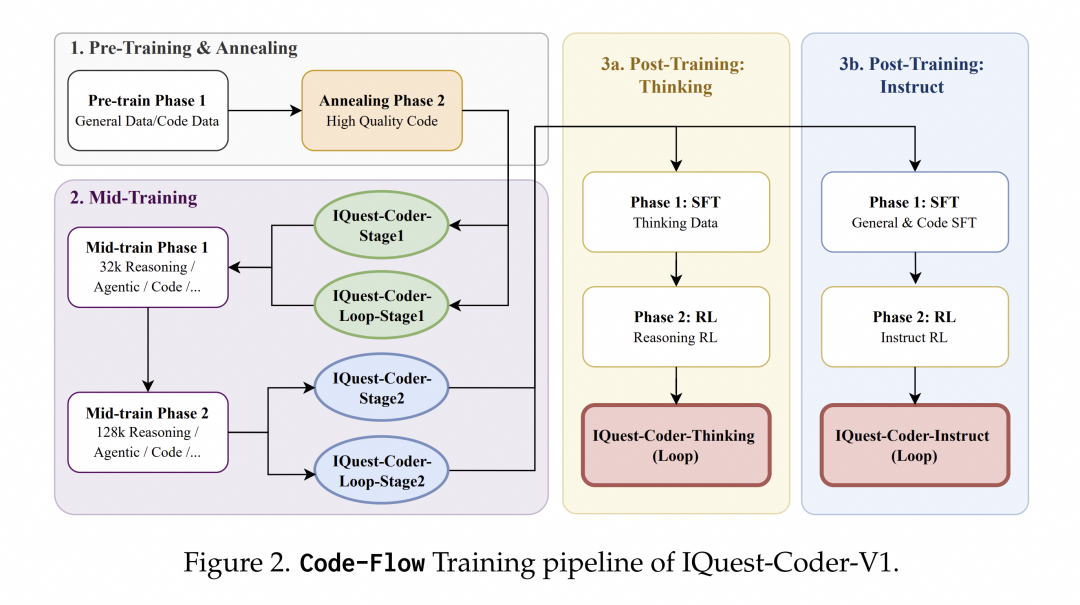
IQuest-Coder-V1 提出 Code-Flow 训练范式,通过模拟代码从提交、演化和完成的完整流程,让模型学习“代码是如何一步步写出来的”,而不仅仅是“代码长什么样”。
02研究亮点创新的Code-Flow训练范式
IQuest-Coder-V1放弃了传统的静态代码训练模式,转而采用创新的Code-Flow多阶段训练范式。该模型通过学习代码库的历史演变和Commit记录,掌握了软件开发的动态逻辑,而非仅仅学习静态代码片段。具体训练流程分为四个核心阶段:
-
预训练与高质量退火:从通用数据和代码数据开始,经过高质量精选代码的退火阶段,确保模型基础表征为后续复杂逻辑任务做好准备
-
双阶段中间训练:在32k上下文环境中融入推理、代理轨迹和代码任务,再扩展到128k上下文进行仓库级训练
-
分叉后训练:提供两条专业化路径 - Thinking路径(使用基于推理的强化学习)和Instruct路径(优化通用辅助能力)
-
高效架构设计:Loop模型引入循环机制,在现实部署约束下优化模型容量与部署足迹之间的权衡

关键技术发现
研究团队通过系统性实验发现了几个重要规律:
-
仓库转换数据(提交流程)相比静态快照文件,能提供更优越的任务规划信号
-
在高质量代码退火后、后训练前注入32k推理和代理轨迹,可作为关键逻辑脚手架,稳定模型在分布偏移下的表现
-
Thinking路径(使用RL)能触发长距离任务中自主错误恢复的涌现能力,这在标准Instruct SFT后训练路径中基本不存在
LoopCoder架构创新
LoopCoder采用循环transformer设计,其中共享参数的transformer块执行两次固定迭代:
-
第一次迭代:通过位置偏移的隐藏状态处理输入嵌入
-
第二次迭代:计算两种注意力 - 全局注意力(查询关注第一次迭代的所有键值对)和局部注意力(查询仅关注第二次迭代中前面的token)
-
通过基于查询表示的学习门控机制组合两种注意力输出,控制全局上下文细化和局部因果依赖的加权混合
这种架构使IQuest-Coder-V1可以在性能稍好的消费级硬件上运行,而不需要专业数据中心级别算力。从预训练的科学配比,到架构的递归进化,再到Agent能力的工具化和自我合成,形成了一个完美的闭环。
03模型评测表现全面领先的基准测试结果
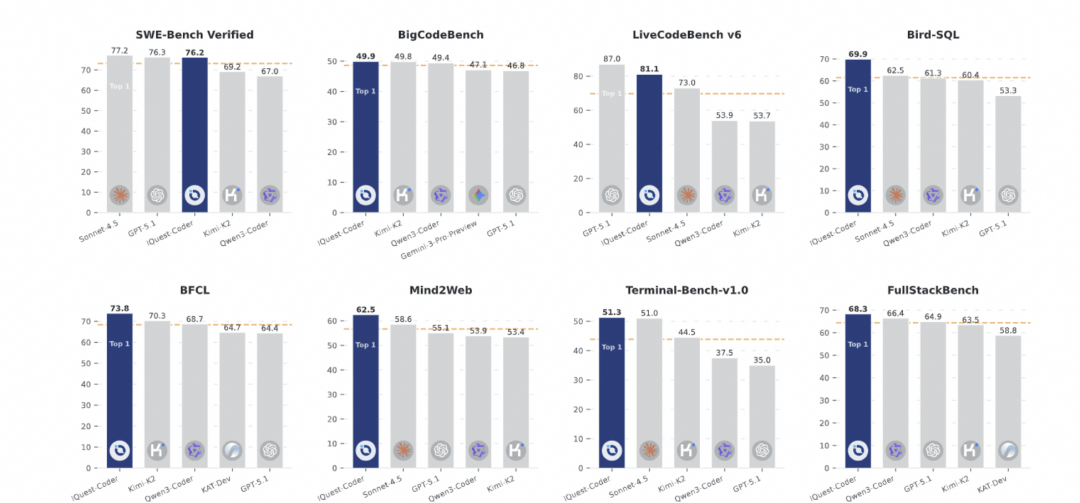
IQuest-Coder-V1在多项权威基准测试中展现出色性能:
-
SWE-Bench Verified:达到76.2分,在相同参数量下,领先其他开源模型
-
BigCodeBench:获得49.9分,超越同类开源模型
-
LiveCodeBench v6:IQuest-Coder-V1-40B-Loop-Thinking模型达到87.0分
-
Bird-SQL:得分73.8,显著优于其他开源方案
-
终端任务:在Terminal-Bench-v1.0上达到68.3分,展示强大的命令行工具使用能力
-
全栈开发:在FullStackBench上表现优异,证明其处理复杂工程任务的能力
特定任务优势
在代码效率评估中,IQuest-Coder-V1-40B-Instruct在Mercury基准上达到83.6分(Pass@1)和95.3分(Beyond@1),表明其不仅能生成正确代码,还能产生运行时间高效的结果;在Text-to-SQL任务中,该模型在Bird基准上达到70.5分,在Spider基准上达到92.2分,显示出卓越的语义解析和查询生成能力。
在代理编码任务中,IQuest-Coder-V1-40B-Loop-Instruct在SWE-Bench Verified上达到76.2分,在Terminal-Bench上达到51.3分,证明其在真实软件工程场景中的实用价值;在通用工具使用任务中,该模型在Mind2Web和BFCL V3基准上也表现突出,分别达到62.5分和73.9分。
04模型实践实践使用 Transformers 推理
建议使用 transformers>=4.52.4,以IQuest-Coder-V1-40B-Instruct为例
from modelscope import AutoModelForCausalLM, AutoTokenizermodel_name = "IQuestLab/IQuest-Coder-V1-40B-Instruct"# Load the tokenizer and modeltokenizer = AutoTokenizer.from_pretrained(model_name)model = AutoModelForCausalLM.from_pretrained( model_name, torch_dtype="auto", device_map="auto")# Prepare the inputprompt = "Write a Python function to calculate the Fibonacci sequence using dynamic programming."messages = [ {"role": "user", "content": prompt}]text = tokenizer.apply_chat_template( messages, tokenize=False, add_generation_prompt=True)model_inputs = tokenizer([text], return_tensors="pt").to(model.device)# Generate responsegenerated_ids = model.generate( **model_inputs, max_new_tokens=8192)generated_ids = generated_ids[0][len(model_inputs.input_ids[0]):]response = tokenizer.decode(generatd_ids, skip_special_tokens=True)print(response)使用 vLLM 部署推理
VLLM_USE_MODELSCOPE=true vllm serve IQuest/IQuest-Coder-V1-40B-Instruct --tensor-parallel-size 8对于支持推理的 Thinking 模型:
VLLM_USE_MODELSCOPE=true vllm serve IQuest/IQuest-Coder-V1-40B-Thinking --reasoning-parser qwen3 --tensor-parallel-size 8使用 ms-swift 微调
ms-swift支持了对 IQuest-Coder 的微调。ms-swift是魔搭社区官方提供的大模型与多模态大模型训练部署框架。ms-swift开源地址:https://github.com/modelscope/ms-swift
在开始微调之前,请确保您的环境已准备妥当。
pip install "transformers==4.52.4"# pip install git+https://github.com/modelscope/ms-swift.gitgit clone https://github.com/modelscope/ms-swift.gitcd ms-swiftpip install -e .自定义数据集格式如下,并在命令行中设置`--dataset train.jsonl --val_dataset val.jsonl`,验证集为可选。
{"messages": [{"role": "system", "content": "<system>"}, {"role": "user", "content": "<query1>"}, {"role": "assistant", "content": "<response1>"}, {"role": "user", "content": "<query2>"}, {"role": "assistant", "content": "<response2>"}]}以下提供可直接运行的微调脚本,显存占用2 * 50GiB:PYTORCH_CUDA_ALLOC_CONF='expandable_segments:True' \NPROC_PER_NODE=2 \CUDA_VISIBLE_DEVICES=0,1 \swift sft \ --model IQuestLab/IQuest-Coder-V1-40B-Instruct \ --dataset 'AI-ModelScope/alpaca-gpt4-data-zh#500' \ 'AI-ModelScope/alpaca-gpt4-data-en#500' \ 'swift/self-cognition#500' \ --load_from_cache_file true \ --split_dataset_ratio 0.01 \ --train_type lora \ --torch_dtype bfloat16 \ --num_train_epochs 1 \ --per_device_train_batch_size 8 \ --per_device_eval_batch_size 8 \ --learning_rate 1e-4 \ --lora_rank 8 \ --lora_alpha 32 \ --target_modules all-linear \ --gradient_checkpointing true \ --gradient_accumulation_steps 1 \ --eval_steps 100 \ --save_steps 100 \ --save_total_limit 2 \ --logging_steps 5 \ --max_length 2048 \ --output_dir output \ --warmup_ratio 0.05 \ --dataset_num_proc 4 \ --model_author swift \ --model_name swift-robot \ --deepspeed zero3 \ --dataloader_num_workers 4训练结束后,我们使用以下脚本进行推理:PYTORCH_CUDA_ALLOC_CONF='expandable_segments:True' \CUDA_VISIBLE_DEVICES=0,1 \swift infer \ --adapters output/vx-xxx/checkpoint-xxx \ --stream true \ --max_new_tokens 2048推送模型到ModelScope:swift export \ --adapters output/vx-xxx/checkpoint-xxx \ --push_to_hub true \ --hub_model_id '<your-model-id>' \ --hub_token '<your-sdk-token>'END
分享
收藏
点赞
在看

更多推荐
 0
0 0
0- 0


 已为社区贡献8条内容

所有评论(0)