
云原生高级课——高可用集群KEEPALIVED
一、keepalived介绍
Keepalived 是一个基于 VRRP(虚拟路由冗余协议)的开源软件,主要提供:
负载均衡器高可用性(配合 LVS/HAProxy/Nginx)
IP地址故障切换
服务健康检查
主要功能
1. VRRP 协议实现
创建虚拟IP地址(VIP)
主备服务器间心跳检测
主节点故障时自动切换到备用节点
2. 健康检查
支持对后端服务的TCP/HTTP/HTTPS检查
可执行自定义脚本检查应用状态
根据检查结果决定是否接管VIP
二、实验
实验环境
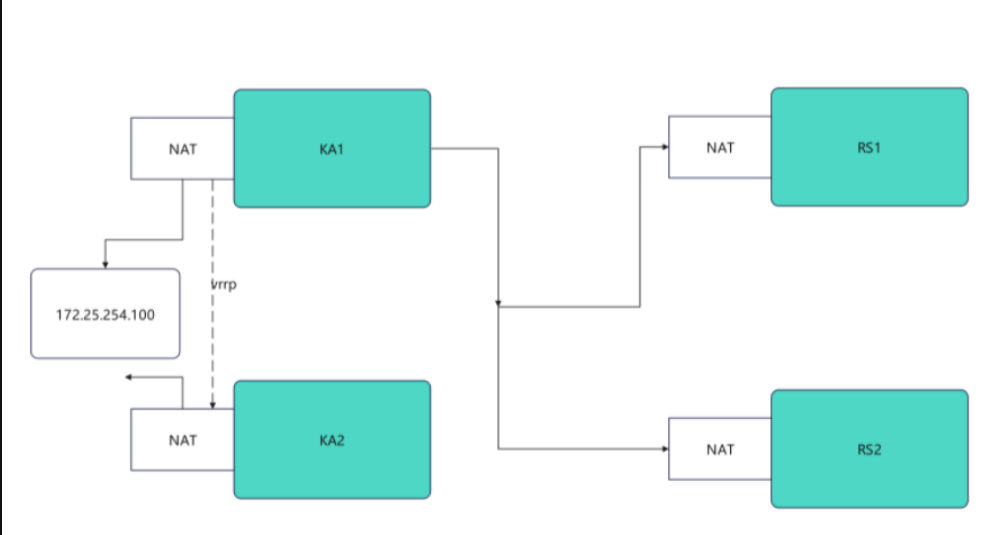
keepalived安装
[root@KA1 ~]# dnf install keepalived-2.2.8-4.el9.x86_64 -y
[root@KA2 ~]# dnf install keepalived-2.2.8-4.el9.x86_64 -y
配置虚拟路由
KA1
[root@KA1 ~]# vim /etc/keepalived/keepalived.conf
# 全局配置
global_defs {
   notification_email {
     1095760060@qq.com
   }
   notification_email_from 1095760060@qq.com
   smtp_server 127.0.0.1
   smtp_connect_timeout 30
   router_id KA1
   vrrp_skip_check_adv_addr
   #vrrp_strict
   vrrp_garp_interval 1
   vrrp_gna_interval 1
   vrrp_mcast_group4 224.0.0.44
}
# 虚拟路由配置
vrrp_instance WEB_VIP {
    state MASTER
    interface eth0
    virtual_router_id 51
    priority 100
    advert_int 1
    authentication {
        auth_type PASS
        auth_pass 1111
    }
    virtual_ipaddress {
        172.25.254.100/24 dev eth0 label eth0:0
    }
    #accpet
}
[root@KA1 ~]# systemctl enable --now keepalived.service
Created symlink /etc/systemd/system/multi-user.target.wants/keepalived.service → /usr/lib/systemd/system/keepalived.service.
KA2
[root@KA2 ~]# vim /etc/keepalived/keepalived.conf
global_defs {
   notification_email {
     1095760060@qq.com
   }
   notification_email_from 1095760060@qq.com
   smtp_server 127.0.0.1
   smtp_connect_timeout 30
   router_id KA1
   vrrp_skip_check_adv_addr
   #vrrp_strict
   vrrp_garp_interval 1
   vrrp_gna_interval 1
   vrrp_mcast_group4 224.0.0.44
}
# 虚拟路由配置
vrrp_instance WEB_VIP {
    state BACKUP
    interface eth0
    virtual_router_id 51
    priority 80
    advert_int 1
    authentication {
        auth_type PASS
        auth_pass 1111
    }
    virtual_ipaddress {
        172.25.254.100/24 dev eth0 label eth0:0
    }
    #accpet
}
[root@KA2 ~]# systemctl enable --now keepalived.service
Created symlink /etc/systemd/system/multi-user.target.wants/keepalived.service → /usr/lib/systemd/system/keepalived.service.
测试
[root@KA1 ~]# tcpdump -i eth0 -nn host 224.0.0.44
dropped privs to tcpdump
tcpdump: verbose output suppressed, use -v[v]... for full protocol decode
listening on eth0, link-type EN10MB (Ethernet), snapshot length 262144 bytes
11:38:14.143975 IP 172.25.254.50 > 224.0.0.44: VRRPv2, Advertisement, vrid 51, prio 100, authtype simple, intvl 1s, length 20
11:38:15.144325 IP 172.25.254.50 > 224.0.0.44: VRRPv2, Advertisement, vrid 51, prio 100, authtype simple, intvl 1s, length 20
[root@KA1 ~]# ifconfig
eth0: flags=4163<UP,BROADCAST,RUNNING,MULTICAST>  mtu 1500
        inet 172.25.254.50  netmask 255.255.255.0  broadcast 172.25.254.255
        inet6 fe80::8127:6803:fad1:925f  prefixlen 64  scopeid 0x20<link>
        ether 00:0c:29:1a:23:1f  txqueuelen 1000  (Ethernet)
        RX packets 8793  bytes 660277 (644.8 KiB)
        RX errors 0  dropped 0  overruns 0  frame 0
        TX packets 14303  bytes 1603200 (1.5 MiB)
        TX errors 0  dropped 0 overruns 0  carrier 0  collisions 0

eth0:0: flags=4163<UP,BROADCAST,RUNNING,MULTICAST>  mtu 1500
        inet 172.25.254.100  netmask 255.255.255.0  broadcast 0.0.0.0
        ether 00:0c:29:1a:23:1f  txqueuelen 1000  (Ethernet)

lo: flags=73<UP,LOOPBACK,RUNNING>  mtu 65536
        inet 127.0.0.1  netmask 255.0.0.0
        inet6 ::1  prefixlen 128  scopeid 0x10<host>
        loop  txqueuelen 1000  (Local Loopback)
        RX packets 22  bytes 1556 (1.5 KiB)
        RX errors 0  dropped 0  overruns 0  frame 0
        TX packets 22  bytes 1556 (1.5 KiB)
        TX errors 0  dropped 0 overruns 0  carrier 0  collisions 0
检测故障
[root@rs1 ~]# tcpdump -i eth0 -nn host 224.0.0.44
13:45:21.663919 IP 172.25.254.50 > 224.0.0.44: VRRPv2, Advertisement, vrid 51, prio 100, authtype simple, intvl 1s, length 20
13:45:22.664860 IP 172.25.254.50 > 224.0.0.44: VRRPv2, Advertisement, vrid 51, prio 100, authtype simple, intvl 1s, length 20
在ka1中模拟故障
[root@KA1 ~]# systemctl stop keepalived.service
# 停止之后就会迁移到172.25.254.60
13:56:35.518346 IP 172.25.254.50 > 224.0.0.44: VRRPv2, Advertisement, vrid 51, prio 0, authtype simple, intvl 1s, length 20
13:56:36.206888 IP 172.25.254.60 > 224.0.0.44: VRRPv2, Advertisement, vrid 51, prio 80, authtype simple, intvl 1s, length 20
13:56:37.207194 IP 172.25.254.60 > 224.0.0.44: VRRPv2, Advertisement, vrid 51, prio 80, authtype simple, intvl 1s, length 20
在KA2中看vip是否被迁移到当前主机
[root@KA2 ~]# ifconfig
eth0: flags=4163<UP,BROADCAST,RUNNING,MULTICAST>  mtu 1500
        inet 172.25.254.60  netmask 255.255.255.0  broadcast 172.25.254.255
        inet6 fe80::d733:30ed:b212:cfa7  prefixlen 64  scopeid 0x20<link>
        ether 00:0c:29:2c:be:55  txqueuelen 1000  (Ethernet)
        RX packets 5540  bytes 407113 (397.5 KiB)
        RX errors 0  dropped 0  overruns 0  frame 0
        TX packets 7046  bytes 743818 (726.3 KiB)
        TX errors 0  dropped 0 overruns 0  carrier 0  collisions 0

eth0:0: flags=4163<UP,BROADCAST,RUNNING,MULTICAST>  mtu 1500
        inet 172.25.254.100  netmask 255.255.255.0  broadcast 0.0.0.0
        ether 00:0c:29:2c:be:55  txqueuelen 1000  (Ethernet)

lo: flags=73<UP,LOOPBACK,RUNNING>  mtu 65536
        inet 127.0.0.1  netmask 255.0.0.0
        inet6 ::1  prefixlen 128  scopeid 0x10<host>
        loop  txqueuelen 1000  (Local Loopback)
        RX packets 46  bytes 3768 (3.6 KiB)
        RX errors 0  dropped 0  overruns 0  frame 0
        TX packets 46  bytes 3768 (3.6 KiB)
        TX errors 0  dropped 0 overruns 0  carrier 0  collisions 0
启动keepalived之后,就可以看到eth0:0又回到KA1(50主机)中
[root@KA1 ~]# systemctl start keepalived.service
[root@KA1 ~]# ifconfig
eth0: flags=4163<UP,BROADCAST,RUNNING,MULTICAST>  mtu 1500
        inet 172.25.254.50  netmask 255.255.255.0  broadcast 172.25.254.255
        inet6 fe80::8127:6803:fad1:925f  prefixlen 64  scopeid 0x20<link>
        ether 00:0c:29:1a:23:1f  txqueuelen 1000  (Ethernet)
        RX packets 12438  bytes 911875 (890.5 KiB)
        RX errors 0  dropped 0  overruns 0  frame 0
        TX packets 21808  bytes 2357826 (2.2 MiB)
        TX errors 0  dropped 0 overruns 0  carrier 0  collisions 0

eth0:0: flags=4163<UP,BROADCAST,RUNNING,MULTICAST>  mtu 1500
        inet 172.25.254.100  netmask 255.255.255.0  broadcast 0.0.0.0
        ether 00:0c:29:1a:23:1f  txqueuelen 1000  (Ethernet)

lo: flags=73<UP,LOOPBACK,RUNNING>  mtu 65536
        inet 127.0.0.1  netmask 255.0.0.0
        inet6 ::1  prefixlen 128  scopeid 0x10<host>
        loop  txqueuelen 1000  (Local Loopback)
        RX packets 32  bytes 2056 (2.0 KiB)
        RX errors 0  dropped 0  overruns 0  frame 0
        TX packets 32  bytes 2056 (2.0 KiB)
        TX errors 0  dropped 0 overruns 0  carrier 0  collisions 0
Keepalived日志分离
默认情况下,keepalived的日志会被保存在/ver/log/messages文件中,这个文件中除了含有keepalived的日志外,还有其他服务的日志信息,这样不利于keepalived的日志进行查看
[root@KA1 ~]# vim /etc/sysconfig/keepalived
KEEPALIVED_OPTIONS="-D -S 6"
[root@KA1 ~]# systemctl restart keepalived.service
[root@KA1 ~]# vim /etc/rsyslog.conf
local6.*                                                /var/log/keepalived.log
[root@KA1 ~]# systemctl restart rsyslog.service

# 测试:
[root@KA1 ~]# ls -l /var/log/keepalived.log
ls: 无法访问 '/var/log/keepalived.log': 没有那个文件或目录
[root@KA1 log]# ls keepalived.log
keepalived.log
Keepalived的子配置文件设定
[root@KA1 ~]# vim /etc/keepalived/keepalived.conf
! Configuration File for keepalived

global_defs {
   notification_email {
     timinglee_zln@163.com
   }
   notification_email_from timinglee_zln@163.com
   smtp_server 127.0.0.1
   smtp_connect_timeout 30
   router_id KA1
   vrrp_skip_check_adv_addr
   #vrrp_strict
   vrrp_garp_interval 1
   vrrp_gna_interval 1
   vrrp_mcast_group4 224.0.0.44
}

include /etc/keepalived/conf.d/.conf			# 指定独立子配置文件

[root@KA1 ~]# mkdir  /etc/keepalived/conf.d -p
[root@KA1 ~]# vim /etc/keepalived/conf.d/webvip.conf
vrrp_instance WEB_VIP {
    state MASTER
    interface eth0
    virtual_router_id 51
    priority 100
    advert_int 1
    authentication {
        auth_type PASS
        auth_pass 1111
    }
    virtual_ipaddress {
        172.25.254.100/24 dev eth0 label eth0:0
    }
}

[root@KA1 ~]# keepalived -t -f /etc/keepalived/keepalived.conf
[root@KA1 ~]# systemctl restart keepalived.service
[root@KA1 ~]# ifconfig
eth0: flags=4163<UP,BROADCAST,RUNNING,MULTICAST>  mtu 1500
        inet 172.25.254.50  netmask 255.255.255.0  broadcast 172.25.254.255
        inet6 fe80::3901:aeea:786a:7227  prefixlen 64  scopeid 0x20<link>
        ether 00:0c:29:26:33:d9  txqueuelen 1000  (Ethernet)
        RX packets 17383  bytes 1417554 (1.3 MiB)
        RX errors 0  dropped 0  overruns 0  frame 0
        TX packets 32593  bytes 3135052 (2.9 MiB)
        TX errors 0  dropped 0 overruns 0  carrier 0  collisions 0

eth0:0: flags=4163<UP,BROADCAST,RUNNING,MULTICAST>  mtu 1500
        inet 172.25.254.100  netmask 255.255.255.0  broadcast 0.0.0.0
        ether 00:0c:29:26:33:d9  txqueuelen 1000  (Ethernet)

lo: flags=73<UP,LOOPBACK,RUNNING>  mtu 65536
        inet 127.0.0.1  netmask 255.0.0.0
        inet6 ::1  prefixlen 128  scopeid 0x10<host>
        loop  txqueuelen 1000  (Local Loopback)
        RX packets 118  bytes 6828 (6.6 KiB)
        RX errors 0  dropped 0  overruns 0  frame 0
        TX packets 118  bytes 6828 (6.6 KiB)
        TX errors 0  dropped 0 overruns 0  carrier 0  collisions 0
抢占模式
抢占模式:默认的,谁优先级高就把vip放到哪里
非抢占模式
延迟抢占
1.非抢占模式
持有vip只要vrrp通告正常就不做vip迁移
KA1配置
[root@KA1 ~]# vim /etc/keepalived/keepalived.conf
vrrp_instance WEB_VIP {
    state BACKUP   # 非抢占模式互为BACKUP
    interface eth0
    virtual_router_id 51
    nopreempt  # 启动非抢占模式
    priority 100
    advert_int 1
    authentication {
        auth_type PASS
        auth_pass 1111
    }
    virtual_ipaddress {
        172.25.254.100/24 dev eth0 label eth0:0
    }
    #accpet
}
[root@KA1 ~]# systemctl stop keepalived.service
KA2配置
[root@KA2 ~]# vim /etc/keepalived/keepalived.conf
vrrp_instance WEB_VIP {
    state BACKUP
    interface eth0
    virtual_router_id 51
    nopreempt # 开启非抢占模式
    priority 80
    advert_int 1
    authentication {
        auth_type PASS
        auth_pass 1111
    }
    virtual_ipaddress {
        172.25.254.100/24 dev eth0 label eth0:0
    }
                #accpet
}
[root@KA2 ~]# systemctl stop keepalived.service
测试
[root@KA1 ~]# systemctl start keepalived.service
[root@KA2 ~]# systemctl start keepalived.service
[root@KA1 ~]# ifconfig
eth0: flags=4163<UP,BROADCAST,RUNNING,MULTICAST>  mtu 1500
        inet 172.25.254.50  netmask 255.255.255.0  broadcast 172.25.254.255
        inet6 fe80::8127:6803:fad1:925f  prefixlen 64  scopeid 0x20<link>
        ether 00:0c:29:1a:23:1f  txqueuelen 1000  (Ethernet)
        RX packets 11593  bytes 844530 (824.7 KiB)
        RX errors 0  dropped 0  overruns 0  frame 0
        TX packets 22135  bytes 2140388 (2.0 MiB)
        TX errors 0  dropped 0 overruns 0  carrier 0  collisions 0

eth0:0: flags=4163<UP,BROADCAST,RUNNING,MULTICAST>  mtu 1500
        inet 172.25.254.100  netmask 255.255.255.0  broadcast 0.0.0.0
        ether 00:0c:29:1a:23:1f  txqueuelen 1000  (Ethernet)

lo: flags=73<UP,LOOPBACK,RUNNING>  mtu 65536
        inet 127.0.0.1  netmask 255.0.0.0
        inet6 ::1  prefixlen 128  scopeid 0x10<host>
        loop  txqueuelen 1000  (Local Loopback)
        RX packets 60  bytes 3000 (2.9 KiB)
        RX errors 0  dropped 0  overruns 0  frame 0
        TX packets 60  bytes 3000 (2.9 KiB)
        TX errors 0  dropped 0 overruns 0  carrier 0  collisions 0


[root@KA1 ~]# systemctl stop keepalived.service
[root@KA2 ~]# ifconfig
eth0: flags=4163<UP,BROADCAST,RUNNING,MULTICAST>  mtu 1500
        inet 172.25.254.60  netmask 255.255.255.0  broadcast 172.25.254.255
        inet6 fe80::d733:30ed:b212:cfa7  prefixlen 64  scopeid 0x20<link>
        ether 00:0c:29:2c:be:55  txqueuelen 1000  (Ethernet)
        RX packets 7674  bytes 511782 (499.7 KiB)
        RX errors 0  dropped 0  overruns 0  frame 0
        TX packets 7396  bytes 628122 (613.4 KiB)
        TX errors 0  dropped 0 overruns 0  carrier 0  collisions 0

eth0:0: flags=4163<UP,BROADCAST,RUNNING,MULTICAST>  mtu 1500
        inet 172.25.254.100  netmask 255.255.255.0  broadcast 0.0.0.0
        ether 00:0c:29:2c:be:55  txqueuelen 1000  (Ethernet)

lo: flags=73<UP,LOOPBACK,RUNNING>  mtu 65536
        inet 127.0.0.1  netmask 255.0.0.0
        inet6 ::1  prefixlen 128  scopeid 0x10<host>
        loop  txqueuelen 1000  (Local Loopback)
        RX packets 30  bytes 1500 (1.4 KiB)
        RX errors 0  dropped 0  overruns 0  frame 0
        TX packets 30  bytes 1500 (1.4 KiB)
        TX errors 0  dropped 0 overruns 0  carrier 0  collisions 0

#开启KA1的服务ip,不会被抢占到1中
[root@KA1 ~]# systemctl start keepalived.service
[root@KA1 ~]# ifconfig
eth0: flags=4163<UP,BROADCAST,RUNNING,MULTICAST>  mtu 1500
        inet 172.25.254.50  netmask 255.255.255.0  broadcast 172.25.254.255
        inet6 fe80::8127:6803:fad1:925f  prefixlen 64  scopeid 0x20<link>
        ether 00:0c:29:1a:23:1f  txqueuelen 1000  (Ethernet)
        RX packets 12096  bytes 881288 (860.6 KiB)
        RX errors 0  dropped 0  overruns 0  frame 0
        TX packets 22948  bytes 2224662 (2.1 MiB)
        TX errors 0  dropped 0 overruns 0  carrier 0  collisions 0

lo: flags=73<UP,LOOPBACK,RUNNING>  mtu 65536
        inet 127.0.0.1  netmask 255.0.0.0
        inet6 ::1  prefixlen 128  scopeid 0x10<host>
        loop  txqueuelen 1000  (Local Loopback)
        RX packets 80  bytes 4000 (3.9 KiB)
        RX errors 0  dropped 0  overruns 0  frame 0
        TX packets 80  bytes 4000 (3.9 KiB)
        TX errors 0  dropped 0 overruns 0  carrier 0  collisions 0

# 在KA2中
[root@KA2 ~]# ifconfig
eth0: flags=4163<UP,BROADCAST,RUNNING,MULTICAST>  mtu 1500
        inet 172.25.254.60  netmask 255.255.255.0  broadcast 172.25.254.255
        inet6 fe80::d733:30ed:b212:cfa7  prefixlen 64  scopeid 0x20<link>
        ether 00:0c:29:2c:be:55  txqueuelen 1000  (Ethernet)
        RX packets 8121  bytes 547210 (534.3 KiB)
        RX errors 0  dropped 0  overruns 0  frame 0
        TX packets 8298  bytes 721876 (704.9 KiB)
        TX errors 0  dropped 0 overruns 0  carrier 0  collisions 0

eth0:0: flags=4163<UP,BROADCAST,RUNNING,MULTICAST>  mtu 1500
        inet 172.25.254.100  netmask 255.255.255.0  broadcast 0.0.0.0
        ether 00:0c:29:2c:be:55  txqueuelen 1000  (Ethernet)

lo: flags=73<UP,LOOPBACK,RUNNING>  mtu 65536
        inet 127.0.0.1  netmask 255.0.0.0
        inet6 ::1  prefixlen 128  scopeid 0x10<host>
        loop  txqueuelen 1000  (Local Loopback)
        RX packets 30  bytes 1500 (1.4 KiB)
        RX errors 0  dropped 0  overruns 0  frame 0
        TX packets 30  bytes 1500 (1.4 KiB)
        TX errors 0  dropped 0 overruns 0  carrier 0  collisions 0
延迟抢占
KA1
[root@KA1 ~]# vim /etc/keepalived/keepalived.conf
vrrp_instance WEB_VIP {
    state BACKUP
    interface eth0
    virtual_router_id 51
    #nopreempt
    priority 100
    preempt_delay 10 # 启动延迟抢占,延迟10s抢占
    advert_int 1
    authentication {
        auth_type PASS
        auth_pass 1111
    }
    virtual_ipaddress {
        172.25.254.100/24 dev eth0 label eth0:0
    }
    #accpet
}
KA2
[root@KA2 ~]# vim /etc/keepalived/keepalived.conf
vrrp_instance WEB_VIP {
    state BACKUP
    interface eth0
    virtual_router_id 51
    #nopreempt
    priority 80
    preempt_delay 10 # 启动延迟抢占,延迟10s抢占
    advert_int 1
    authentication {
        auth_type PASS
        auth_pass 1111
    }
    virtual_ipaddress {
        172.25.254.100/24 dev eth0 label eth0:0
    }
    #accpet
}
测试
[root@KA1 ~]# systemctl stop keepalived.service
[root@KA1 ~]# systemctl start keepalived.service
[root@KA1 ~]# ifconfig
eth0: flags=4163<UP,BROADCAST,RUNNING,MULTICAST>  mtu 1500
        inet 172.25.254.50  netmask 255.255.255.0  broadcast 172.25.254.255
        inet6 fe80::8127:6803:fad1:925f  prefixlen 64  scopeid 0x20<link>
        ether 00:0c:29:1a:23:1f  txqueuelen 1000  (Ethernet)
        RX packets 14571  bytes 1054578 (1.0 MiB)
        RX errors 0  dropped 0  overruns 0  frame 0
        TX packets 26423  bytes 2598120 (2.4 MiB)
        TX errors 0  dropped 0 overruns 0  carrier 0  collisions 0

eth0:0: flags=4163<UP,BROADCAST,RUNNING,MULTICAST>  mtu 1500
        inet 172.25.254.100  netmask 255.255.255.0  broadcast 0.0.0.0
        ether 00:0c:29:1a:23:1f  txqueuelen 1000  (Ethernet)

lo: flags=73<UP,LOOPBACK,RUNNING>  mtu 65536
        inet 127.0.0.1  netmask 255.0.0.0
        inet6 ::1  prefixlen 128  scopeid 0x10<host>
        loop  txqueuelen 1000  (Local Loopback)
        RX packets 100  bytes 5000 (4.8 KiB)
        RX errors 0  dropped 0  overruns 0  frame 0
        TX packets 100  bytes 5000 (4.8 KiB)
        TX errors 0  dropped 0 overruns 0  carrier 0  collisions 0
Keepalived的单播模式
启用vrrp_strict时,不能启动单播
KA1
[root@KA1 ~]# vim /etc/keepalived/keepalived.conf
   #vrrp_mcast_group4 224.0.0.44
}

vrrp_instance WEB_VIP{
    state MASTER
    interface eth0
    virtual_router_id 51
    #nopreempt
    priority 100
    advert_int 1
    unicast_src_ip 172.25.254.50
    unicast_peer {
        172.25.254.60
    }
    authentication {
        auth_type PASS
        auth_pass 1111
    }
    virtual_ipaddress {
        172.25.254.100/24 dev eth0 label eth0:0
    }
    #accpet
}
[root@KA1 ~]# systemctl restart keepalived.service
KA2
[root@KA2 ~]# vim /etc/keepalived/keepalived.conf
   #vrrp_mcast_group4 224.0.0.44
}

vrrp_instance WEB_VIP {
    state BACKUP
    interface eth0
    virtual_router_id 51
    #nopreempt
    priority 80
    advert_int 1
    unicast_src_ip 172.25.254.60
    unicast_peer{
        172.25.254.50
    }
    authentication {
        auth_type PASS
        auth_pass 1111
    }
    virtual_ipaddress {
        172.25.254.100/24 dev eth0 label eth0:0
    }
                #accpet
}
[root@KA2 ~]# systemctl restart keepalived.service
测试
[root@KA1 ~]# tcpdump -i eth0 -nn host 172.25.254.50 and dst 172.25.254.60
dropped privs to tcpdump
tcpdump: verbose output suppressed, use -v[v]... for full protocol decode
listening on eth0, link-type EN10MB (Ethernet), snapshot length 262144 bytes
14:25:21.832998 IP 172.25.254.50 > 172.25.254.60: VRRPv2, Advertisement, vrid 51, prio 100, authtype simple, intvl 1s, length 20
14:25:22.833680 IP 172.25.254.50 > 172.25.254.60: VRRPv2, Advertisement, vrid 51, prio 100, authtype simple, intvl 1s, length 20
当关掉KA1时,因为优先级VIP被KA2抢占,所以就是从50->60变成60->50
[root@KA1 ~]# systemctl stop keepalived.service
[root@KA2 ~]# tcpdump -i eth0 -nn host 172.25.254.60 and dst 172.25.254.50
dropped privs to tcpdump
tcpdump: verbose output suppressed, use -v[v]... for full protocol decode
listening on eth0, link-type EN10MB (Ethernet), snapshot length 262144 bytes
14:35:19.606112 IP 172.25.254.60 > 172.25.254.50: VRRPv2, Advertisement, vrid 51, prio 80, authtype simple, intvl 1s, length 20
14:35:20.606656 IP 172.25.254.60 > 172.25.254.50: VRRPv2, Advertisement, vrid 51, prio 80, authtype simple, intvl 1s, length 20

[root@KA1 ~]# systemctl start keepalived.service
[root@KA1 ~]# tcpdump -i eth0 -nn host 172.25.254.50 and dst 172.25.254.60
dropped privs to tcpdump
tcpdump: verbose output suppressed, use -v[v]... for full protocol decode
listening on eth0, link-type EN10MB (Ethernet), snapshot length 262144 bytes
14:35:41.219353 IP 172.25.254.50 > 172.25.254.60: VRRPv2, Advertisement, vrid 51, prio 100, authtype simple, intvl 1s, length 20
14:35:42.219889 IP 172.25.254.50 > 172.25.254.60: VRRPv2, Advertisement, vrid 51, prio 100, authtype simple, intvl 1s, length 20
Keepalived业务迁移告警
# 1、安装邮件软件
[root@KA1 ~]# dnf install s-nail sendmail -y
[root@KA2 ~]# dnf install s-nail sendmail -y

# 2、启动邮件代理
[root@KA1 ~]# systemctl start sendmail.service
[root@KA2 ~]# systemctl start sendmail.service

# 3、查看25端口是否启动(1和2中都可以查看)
[root@KA2 ~]# netstat -antlupe | grep 25
tcp        0      0 127.0.0.1:25            0.0.0.0:*               LISTEN      0          58548      7871/sendmail: acce
tcp        0     64 172.25.254.60:22        172.25.254.1:59807      ESTABLISHED 0          39638      3474/sshd: root [pr
tcp        0      0 172.25.254.60:22        172.25.254.1:59808      ESTABLISHED 0          37628      3478/sshd: root [pr
tcp        0      1 172.25.254.60:39718     192.168.200.5:1358      SYN_SENT    0          59505      5842/keepalived
tcp        0      1 172.25.254.60:56258     192.168.200.4:1358      SYN_SENT    0          59511      5842/keepalived

# 4、设定sendmail可以通过公网邮箱发送邮件
# 1、在linux主机中配置mailrc(1和2都要进行配置)
[root@KA1 ~]# vim /etc/mail.rc
set smtp=smtp.163.com
set smtp-auth=login
set smtp-auth-user=1095760060@qq.com
set smtp-auth-password=EGfRt38jjUZFmRG5
set from=1095760060@qq.com
set ssl-verify=ignore
[root@KA2 ~]# vim /etc/mail.rc
set smtp=1095760060@qq.com
set smtp-auth=login
set smtp-auth-user=1095760060@qq.com
set smtp-auth-password=EGfRt38jjUZFmRG5
set from=1095760060@qq.com
set ssl-verify=ignore

# 2、测试邮件,可以发送成功(使用sendmail)
[root@KA1 ~]# echo test message | mail -s test 1095760060@qq.com
[root@KA2 ~]# echo test message | mail -s test 1095760060@qq.com

# 3、查看邮件队列
[root@KA1 ~]# mailq
/var/spool/mqueue is empty
                Total requests: 0
[root@KA2 ~]# mailq
/var/spool/mqueue is empty
                Total requests: 0

# 4、查看是否又退信(No就是没有)
[root@KA1 ~]# mail
s-nail: No mail for root at /var/spool/mail/root
s-nail: /var/spool/mail/root: No such entry, file or directory
[root@KA2 ~]# mail
s-nail: No mail for root at /var/spool/mail/root
s-nail: /var/spool/mail/root: No such entry, file or directory

设定keepalived告警脚本
[root@KA1 ~]# mkdir  -p /etc/keepalived/scripts
[root@KA2 ~]# mkdir  -p /etc/keepalived/scripts

# 1、编写告警脚本
[root@KA1 ~]# vim /etc/keepalived/scripts/waring.sh
#!/bin/bash
mail_dest='1095760060@qq.com'

mail_send()
{
    mail_subj="$HOSTNAME to be $1 vip 转移"
    mail_mess="`date +%F\ %T`: vrrp 转移,$HOSTNAME 变为 $1"
    echo "$mail_mess" | mail -s "$mail_subj" $mail_dest
}
case $1 in
    master)
    mail_send master
    ;;
    backup)
    mail_send backup
    ;;
    fault)
    mail_send fault
    ;;
    *)
    exit 1
    ;;
esac

[root@KA2 ~]# vim /etc/keepalived/scripts/waring.sh
#!/bin/bash
mail_dest='1095760060@qq.com'

mail_send()
{
    mail_subj="$HOSTNAME to be $1 vip 转移"
    mail_mess="`date +%F\ %T`: vrrp 转移,$HOSTNAME 变为 $1"
    echo "$mail_mess" | mail -s "$mail_subj" $mail_dest
}
case $1 in
    master)
    mail_send master
    ;;
    backup)
    mail_send backup
    ;;
    fault)
    mail_send fault
    ;;
    *)
    exit 1
    ;;
esac

# 2、添加权限
[root@KA1 ~]# chmod  +x /etc/keepalived/scripts/waring.sh
[root@KA2 ~]# chmod  +x /etc/keepalived/scripts/waring.sh

# 3、对应邮箱中会出现邮件
[root@KA1 ~]# /etc/keepalived/scripts/waring.sh master
# 1、前面的一些单播配置就可以注释掉
# 在KA1和KA2中设定配置文件
[root@KA1 ~]# vim /etc/keepalived/keepalived.conf
global_defs {
   notification_email {
     1095760060@qq.com
   }
   notification_email_from 1095760060@qq.com
   smtp_server 127.0.0.1
   smtp_connect_timeout 30
   router_id KA1
   vrrp_skip_check_adv_addr
   #vrrp_strict
   vrrp_garp_interval 1
   vrrp_gna_interval 1
   vrrp_mcast_group4 224.0.0.44
   enable_script_security
   script_user root
}
vrrp_instance WEB_VIP {
    state MASTER
    interface eth0
    virtual_router_id 51
    priority 100
    advert_int 1
  # unicast_src_ip 172.25.254.50
  # unicast_peer {
  #   172.25.254.60
#   }
    authentication {
        auth_type PASS
        auth_pass 1111
    }
    virtual_ipaddress {
        172.25.254.100/24 dev eth0 label eth0:0
    }
    notify_master "/etc/keepalived/scripts/waring.sh master"
    notify_backup "/etc/keepalived/scripts/waring.sh backup"
    notify_fault "/etc/keepalived/scripts/waring.sh fault"
}

[root@KA2 ~]# vim /etc/keepalived/keepalived.conf
global_defs {
   notification_email {
     1095760060@qq.com
   }
   notification_email_from 1095760060@qq.com
   smtp_server 127.0.0.1
   smtp_connect_timeout 30
   router_id KA2
   vrrp_skip_check_adv_addr
   #vrrp_strict
   vrrp_garp_interval 1
   vrrp_gna_interval 1
   vrrp_mcast_group4 224.0.0.44
   enable_script_security
   script_user root
}
vrrp_instance WEB_VIP {
    state BACKUP
    interface eth0
    virtual_router_id 51
    #nopreempt
    priority 80
    advert_int 1
    #unicast_src_ip 172.25.254.60
    #unicast_peer{
    #    172.25.254.50
    #}
    authentication {
        auth_type PASS
        auth_pass 1111
    }
    virtual_ipaddress {
        172.25.254.100/24 dev eth0 label eth0:0
    }
    #accpet
    notify_master "/etc/keepalived/scripts/waring.sh master"
    notify_backup "/etc/keepalived/scripts/waring.sh backup"
    notify_fault "/etc/keepalived/scripts/waring.sh fault"
}

[root@KA1 ~]# systemctl restart keepalived.service
[root@KA2 ~]# systemctl restart keepalived.service

# 2、测试
[root@KA1 ~]# systemctl stop keepalived.service		#停止服务后查看邮件
[root@KA1 ~]# systemctl start keepalived.service	#开启服务后查看邮件

Keepalived双主模式
[root@KA1 ~]# vim /etc/keepalived/keepalived.conf
vrrp_instance WEB_VIP{   # 第一个虚拟路由,由master身份设定
    state MASTER
    interface eth0
    virtual_router_id 51
    #nopreempt
    priority 100
    advert_int 1
    authentication {
        auth_type PASS
        auth_pass 1111
    }
    virtual_ipaddress {
        172.25.254.100/24 dev eth0 label eth0:0
    }
    #accpet
}
vrrp_instance DB_VIP{   # 第二个虚拟路由,由backup身份设定
    state BACKUP
    interface eth0
    virtual_router_id 52
    #nopreempt
    priority 80
    advert_int 1
    authentication {
        auth_type PASS
        auth_pass 1111
    }
    virtual_ipaddress {
        172.25.254.200/24 dev eth0 label eth0:1
    }
    #accpet
}

#

vrrp_instance WEB_VIP {
    state BACKUP
    interface eth0
    virtual_router_id 51
    #nopreempt
    priority 80
    advert_int 1
    authentication {
        auth_type PASS
        auth_pass 1111
    }
    virtual_ipaddress {
        172.25.254.100/24 dev eth0 label eth0:0
    }
    #accpet
}

vrrp_instance DB_VIP {
    state MASTER
    interface eth0
    virtual_router_id 52
    #nopreempt
    priority 100
    advert_int 1
    authentication {
        auth_type PASS
        auth_pass 1111
    }
    virtual_ipaddress {
        172.25.254.200/24 dev eth0 label eth0:1
    }
    #accpet
}

[root@KA1 ~]# systemctl restart keepalived.service
[root@KA2 ~]# systemctl restart keepalived.service

# 1、测试:
[root@KA1 ~]# ifconfig
eth0: flags=4163<UP,BROADCAST,RUNNING,MULTICAST>  mtu 1500
        inet 172.25.254.50  netmask 255.255.255.0  broadcast 172.25.254.255
        inet6 fe80::8127:6803:fad1:925f  prefixlen 64  scopeid 0x20<link>
        ether 00:0c:29:1a:23:1f  txqueuelen 1000  (Ethernet)
        RX packets 11593  bytes 821636 (802.3 KiB)
        RX errors 0  dropped 0  overruns 0  frame 0
        TX packets 22077  bytes 2301956 (2.1 MiB)
        TX errors 0  dropped 0 overruns 0  carrier 0  collisions 0

eth0:0: flags=4163<UP,BROADCAST,RUNNING,MULTICAST>  mtu 1500
        inet 172.25.254.100  netmask 255.255.255.0  broadcast 0.0.0.0
        ether 00:0c:29:1a:23:1f  txqueuelen 1000  (Ethernet)

lo: flags=73<UP,LOOPBACK,RUNNING>  mtu 65536
        inet 127.0.0.1  netmask 255.0.0.0
        inet6 ::1  prefixlen 128  scopeid 0x10<host>
        loop  txqueuelen 1000  (Local Loopback)
        RX packets 40  bytes 2000 (1.9 KiB)
        RX errors 0  dropped 0  overruns 0  frame 0
        TX packets 40  bytes 2000 (1.9 KiB)
        TX errors 0  dropped 0 overruns 0  carrier 0  collisions 0
[root@KA2 ~]# ifconfig
eth0: flags=4163<UP,BROADCAST,RUNNING,MULTICAST>  mtu 1500
        inet 172.25.254.60  netmask 255.255.255.0  broadcast 172.25.254.255
        inet6 fe80::d733:30ed:b212:cfa7  prefixlen 64  scopeid 0x20<link>
        ether 00:0c:29:2c:be:55  txqueuelen 1000  (Ethernet)
        RX packets 5934  bytes 415884 (406.1 KiB)
        RX errors 0  dropped 0  overruns 0  frame 0
        TX packets 6222  bytes 587926 (574.1 KiB)
        TX errors 0  dropped 0 overruns 0  carrier 0  collisions 0

eth0:1: flags=4163<UP,BROADCAST,RUNNING,MULTICAST>  mtu 1500
        inet 172.25.254.200  netmask 255.255.255.0  broadcast 0.0.0.0
        ether 00:0c:29:2c:be:55  txqueuelen 1000  (Ethernet)

lo: flags=73<UP,LOOPBACK,RUNNING>  mtu 65536
        inet 127.0.0.1  netmask 255.0.0.0
        inet6 ::1  prefixlen 128  scopeid 0x10<host>
        loop  txqueuelen 1000  (Local Loopback)
        RX packets 30  bytes 1500 (1.4 KiB)
        RX errors 0  dropped 0  overruns 0  frame 0
        TX packets 30  bytes 1500 (1.4 KiB)
        TX errors 0  dropped 0 overruns 0  carrier 0  collisions 0

# 关闭KA1
[root@KA1 ~]# systemctl stop keepalived.service
[root@KA2 ~]# ifconfig
eth0: flags=4163<UP,BROADCAST,RUNNING,MULTICAST>  mtu 1500
        inet 172.25.254.60  netmask 255.255.255.0  broadcast 172.25.254.255
        inet6 fe80::d733:30ed:b212:cfa7  prefixlen 64  scopeid 0x20<link>
        ether 00:0c:29:2c:be:55  txqueuelen 1000  (Ethernet)
        RX packets 6078  bytes 425868 (415.8 KiB)
        RX errors 0  dropped 0  overruns 0  frame 0
        TX packets 6480  bytes 613050 (598.6 KiB)
        TX errors 0  dropped 0 overruns 0  carrier 0  collisions 0

eth0:0: flags=4163<UP,BROADCAST,RUNNING,MULTICAST>  mtu 1500
        inet 172.25.254.100  netmask 255.255.255.0  broadcast 0.0.0.0
        ether 00:0c:29:2c:be:55  txqueuelen 1000  (Ethernet)

eth0:1: flags=4163<UP,BROADCAST,RUNNING,MULTICAST>  mtu 1500
        inet 172.25.254.200  netmask 255.255.255.0  broadcast 0.0.0.0
        ether 00:0c:29:2c:be:55  txqueuelen 1000  (Ethernet)

lo: flags=73<UP,LOOPBACK,RUNNING>  mtu 65536
        inet 127.0.0.1  netmask 255.0.0.0
        inet6 ::1  prefixlen 128  scopeid 0x10<host>
        loop  txqueuelen 1000  (Local Loopback)
        RX packets 30  bytes 1500 (1.4 KiB)
        RX errors 0  dropped 0  overruns 0  frame 0
        TX packets 30  bytes 1500 (1.4 KiB)
        TX errors 0  dropped 0 overruns 0  carrier 0  collisions 0

# 关闭KA2
[root@KA1 ~]# systemctl start keepalived.service
[root@KA2 ~]# systemctl stop keepalived.service
[root@KA1 ~]# ifconfig
eth0: flags=4163<UP,BROADCAST,RUNNING,MULTICAST>  mtu 1500
        inet 172.25.254.50  netmask 255.255.255.0  broadcast 172.25.254.255
        inet6 fe80::8127:6803:fad1:925f  prefixlen 64  scopeid 0x20<link>
        ether 00:0c:29:1a:23:1f  txqueuelen 1000  (Ethernet)
        RX packets 11961  bytes 848542 (828.6 KiB)
        RX errors 0  dropped 0  overruns 0  frame 0
        TX packets 22593  bytes 2353124 (2.2 MiB)
        TX errors 0  dropped 0 overruns 0  carrier 0  collisions 0

eth0:0: flags=4163<UP,BROADCAST,RUNNING,MULTICAST>  mtu 1500
        inet 172.25.254.100  netmask 255.255.255.0  broadcast 0.0.0.0
        ether 00:0c:29:1a:23:1f  txqueuelen 1000  (Ethernet)

eth0:1: flags=4163<UP,BROADCAST,RUNNING,MULTICAST>  mtu 1500
        inet 172.25.254.200  netmask 255.255.255.0  broadcast 0.0.0.0
        ether 00:0c:29:1a:23:1f  txqueuelen 1000  (Ethernet)

lo: flags=73<UP,LOOPBACK,RUNNING>  mtu 65536
        inet 127.0.0.1  netmask 255.0.0.0
        inet6 ::1  prefixlen 128  scopeid 0x10<host>
        loop  txqueuelen 1000  (Local Loopback)
        RX packets 50  bytes 2500 (2.4 KiB)
        RX errors 0  dropped 0  overruns 0  frame 0
        TX packets 50  bytes 2500 (2.4 KiB)
        TX errors 0  dropped 0 overruns 0  carrier 0  collisions 0
实现IPVS的高性能
配置KA1
[root@KA1 ~]# vim /etc/keepalived/keepalived.conf
virtual_server 172.25.254.100 80 {
    delay_loop 6
    lb_algo rr
    lb_kind DR
    #persistence_timeout 50
    protocol TCP

    real_server 172.25.254.10 80 {
        weight 1
        HTTP_GET {
            url {
              path /
              status_code 200
            }
            connect_timeout 1
            retry 3
            delay_before_retry 1
        }
    }

    real_server 172.25.254.20 80 {
        weight 1
        TCP_CHECK {
            connect_timeout 5
            retry 3
            delay_before_retry 1
            connect_port 80
        }
    }
}

# 2、重启测试:
[root@KA1 ~]# keepalived -t -f /etc/keepalived/keepalived.conf
[root@KA1 ~]# systemctl restart keepalived.service
[root@KA2 ~]# keepalived -t -f /etc/keepalived/keepalived.conf
[root@KA2 ~]# systemctl restart keepalived.service
测试
#不要再KA1和KA2中访问vip,会检测不出效果

#在ka1中开启独立的shell
[root@KA1 ~]# watch -n 1 ipvsadm -Ln

#在RS1中关闭wen服务查看lvs策略是否变化,变化了
[root@rs1 ~]# systemctl stop httpd

#把ka1中的keepalived关闭查看ka2中是否自动生成lvs策略,可以在KA2中看到
[root@KA1 ~]# systemctl stop keepalived.service
[root@KA2 ~]# watch -n 1 ipvsadm -Ln
双主模式代理
实验环境
#在rs中设定lo添加vip2 172.25.254.200、32
#在rs中搭建数据库
[root@rs1 ~]# dnf install mariadb-server -y
[root@rs2 ~]# dnf install mariadb-server -y

[root@rs1 ~]# systemctl enable --now mariadb
Created symlink /etc/systemd/system/mysql.service → /usr/lib/systemd/system/mariadb.service.
Created symlink /etc/systemd/system/mysqld.service → /usr/lib/systemd/system/mariadb.service.
Created symlink /etc/systemd/system/multi-user.target.wants/mariadb.service → /usr/lib/systemd/system/mariadb.service.
[root@rs2 ~]# systemctl enable --now mariadb
Created symlink /etc/systemd/system/mysql.service → /usr/lib/systemd/system/mariadb.service.
Created symlink /etc/systemd/system/mysqld.service → /usr/lib/systemd/system/mariadb.service.
Created symlink /etc/systemd/system/multi-user.target.wants/mariadb.service → /usr/lib/systemd/system/mariadb.service.

[root@rs1 ~]# mysql
Welcome to the MariaDB monitor.  Commands end with ; or \g.
Your MariaDB connection id is 3
Server version: 10.5.27-MariaDB MariaDB Server
Copyright (c) 2000, 2018, Oracle, MariaDB Corporation Ab and others.
Type 'help;' or '\h' for help. Type '\c' to clear the current input statement.

MariaDB [(none)]> create user lee@'%' identified by 'lee';
Query OK, 0 rows affected (0.001 sec)

MariaDB [(none)]> grant all on *.* to lee@'%';
Query OK, 0 rows affected (0.000 sec)

[root@rs2 ~]# mysql
Welcome to the MariaDB monitor.  Commands end with ; or \g.
Your MariaDB connection id is 3
Server version: 10.5.27-MariaDB MariaDB Server
Copyright (c) 2000, 2018, Oracle, MariaDB Corporation Ab and others.
Type 'help;' or '\h' for help. Type '\c' to clear the current input statement.

MariaDB [(none)]> create user lee@'%' identified by 'lee';
Query OK, 0 rows affected (0.001 sec)

MariaDB [(none)]> grant all on *.* to lee@'%';
Query OK, 0 rows affected (0.001 sec)
# 2、测试成功:
[root@rs1 ~]# mysql -ulee -plee -h172.25.254.10
Welcome to the MariaDB monitor.  Commands end with ; or \g.
Your MariaDB connection id is 4
Server version: 10.5.27-MariaDB MariaDB Server
Copyright (c) 2000, 2018, Oracle, MariaDB Corporation Ab and others.
Type 'help;' or '\h' for help. Type '\c' to clear the current input statement.

MariaDB [(none)]>
[root@rs2 ~]# mysql -ulee -plee -h172.25.254.20
Welcome to the MariaDB monitor.  Commands end with ; or \g.
Your MariaDB connection id is 4
Server version: 10.5.27-MariaDB MariaDB Server
Copyright (c) 2000, 2018, Oracle, MariaDB Corporation Ab and others.
Type 'help;' or '\h' for help. Type '\c' to clear the current input statement.

MariaDB [(none)]>
实现不同VIP代理不同业务
KA1与KA2配置相同
[root@KA1 ~]# vim /etc/keepalived/keepalived.conf
include /etc/keepalived/conf.d/webserver.conf
include /etc/keepalived/conf.d/datebase.conf

[root@KA1 ~]# vim /etc/keepalived/conf.d/webserver.conf
virtual_server 172.25.254.100 80 {
    delay_loop 6
    lb_algo rr
    lb_kind DR
    protocol TCP

    real_server 172.25.254.10 80 {
        weight 1
        HTTP_GET {
            url {
              path /
              status_code 200
            }
            connect_timeout 1
            retry 3
            delay_before_retry 1
      }
    }

    real_server 172.25.254.20 80 {
        weight 1
        TCP_CHECK {
          connect_timeout 5
          retry 3
          delay_before_retry 3
          connect_port 80
      }
    }
}

[root@KA1 ~]# vim /etc/keepalived/conf.d/datebase.conf
virtual_server 172.25.254.200 3306 {
    delay_loop 6
    lb_algo rr
    lb_kind DR
    protocol TCP

    real_server 172.25.254.10 3306 {
        weight 1
        TCP_CHECK {
          connect_timeout 5
          retry 3
          delay_before_retry 3
          connect_port 3306
      }
    }

    real_server 172.25.254.20 3306 {
        weight 1
        TCP_CHECK {
          connect_timeout 5
          retry 3
          delay_before_retry 3
          connect_port 3306
      }
    }
}

# 2、测试是否出现报错
[root@KA1 ~]# keepalived -t -f /etc/keepalived/keepalived.conf
[root@KA1 ~]# systemctl restart keepalived.service
[root@KA2 ~]# keepalived -t -f /etc/keepalived/keepalived.conf
[root@KA2 ~]# systemctl restart keepalived.service
测试
# 编写配置文件
[root@rs1 ~]# vim /etc/NetworkManager/system-connections/lo.nmconnection
[connection]
id=lo
type=loopback
interface-name=lo

[ipv4]
method=manual
address1=127.0.0.1/8
address2=172.25.254.100/32
address3=172.25.254.200/32
[root@rs1 ~]# nmcli connection reload
[root@rs1 ~]# nmcli connection up lo
连接已成功激活(D-Bus 活动路径:/org/freedesktop/NetworkManager/ActiveConnection/6)

[root@rs2 ~]# vim /etc/NetworkManager/system-connections/lo.nmconnection
[connection]
id=lo
type=loopback
interface-name=lo

[ipv4]
method=manual
address1=127.0.0.1/8
address2=172.25.254.100/32
address3=172.25.254.200/32
[root@rs2 ~]# nmcli connection reload
[root@rs2 ~]# nmcli connection up lo
连接已成功激活(D-Bus 活动路径:/org/freedesktop/NetworkManager/ActiveConnection/6)

# 检测
[root@rs1 ~]# ip a
1: lo: <LOOPBACK,UP,LOWER_UP> mtu 65536 qdisc noqueue state UNKNOWN group default qlen 1000
    link/loopback 00:00:00:00:00:00 brd 00:00:00:00:00:00
    inet 127.0.0.1/8 scope host lo
       valid_lft forever preferred_lft forever
    inet 172.25.254.100/32 scope global lo
       valid_lft forever preferred_lft forever
    inet 172.25.254.200/32 scope global lo
       valid_lft forever preferred_lft forever
    inet6 ::1/128 scope host
       valid_lft forever preferred_lft forever
2: eth0: <BROADCAST,MULTICAST,UP,LOWER_UP> mtu 1500 qdisc mq state UP group default qlen 1000
    link/ether 00:0c:29:9b:9a:0f brd ff:ff:ff:ff:ff:ff
    altname enp3s0
    altname ens160
    inet 172.25.254.10/24 brd 172.25.254.255 scope global noprefixroute eth0
       valid_lft forever preferred_lft forever
    inet6 fe80::fa79:a6db:ba1a:97ac/64 scope link noprefixroute
       valid_lft forever preferred_lft forever

[root@rs2 ~]# ip a
1: lo: <LOOPBACK,UP,LOWER_UP> mtu 65536 qdisc noqueue state UNKNOWN group default qlen 1000
    link/loopback 00:00:00:00:00:00 brd 00:00:00:00:00:00
    inet 127.0.0.1/8 scope host lo
       valid_lft forever preferred_lft forever
    inet 172.25.254.100/32 scope global lo
       valid_lft forever preferred_lft forever
    inet 172.25.254.200/32 scope global lo
       valid_lft forever preferred_lft forever
    inet6 ::1/128 scope host
       valid_lft forever preferred_lft forever
2: eth0: <BROADCAST,MULTICAST,UP,LOWER_UP> mtu 1500 qdisc mq state UP group default qlen 1000[root@rs2 ~]# mysql -ulee  -plee  -h172.25.254.200
Welcome to the MariaDB monitor.  Commands end with ; or \g.
Your MariaDB connection id is 109
Server version: 10.5.27-MariaDB MariaDB Server
Copyright (c) 2000, 2018, Oracle, MariaDB Corporation Ab and others.
Type 'help;' or '\h' for help. Type '\c' to clear the current input statement.

MariaDB [(none)]>

    link/ether 00:0c:29:b1:2f:af brd ff:ff:ff:ff:ff:ff
    altname enp3s0
    altname ens160
    inet 172.25.254.20/24 brd 172.25.254.255 scope global noprefixroute eth0
       valid_lft forever preferred_lft forever
    inet6 fe80::466e:fe26:7640:7ea3/64 scope link noprefixroute
       valid_lft forever preferred_lft forever

# 测试:
[root@rs2 ~]# mysql -ulee  -plee  -h172.25.254.200
Welcome to the MariaDB monitor.  Commands end with ; or \g.
Your MariaDB connection id is 109
Server version: 10.5.27-MariaDB MariaDB Server
Copyright (c) 2000, 2018, Oracle, MariaDB Corporation Ab and others.
Type 'help;' or '\h' for help. Type '\c' to clear the current input statement.

MariaDB [(none)]>
利用VRRP Script 实现全能高可用
KA1
# 1、在KA1上
[root@KA1 ~]# vim /etc/keepalived/scripts/test.sh
#!/bin/bash
[ ! -f "/mnt/lee" ]
[root@KA1 ~]# echo $?
0
[root@KA1 ~]# vim /etc/keepalived/keepalived.conf
vrrp_script check_lee {
    script "/etc/keepalived/scripts/test.sh"
    interval 1
    weight -30
    fall 2
    rise 2
    timeout 2
    user root
}
vrrp_instance WEB_VIP{
    state MASTER
    interface eth0
    virtual_router_id 51
    #nopreempt
    priority 100
    advert_int 1
    authentication {
        auth_type PASS
        auth_pass 1111
    }
    virtual_ipaddress {
        172.25.254.100/24 dev eth0 label eth0:0
    }
    track_script {
        check_test
    }
    #accpet
}
#include /etc/keepalived/conf.d/webserver.conf
#include /etc/keepalived/conf.d/datebase.conf

[root@KA1 ~]# systemctl restart keepalived.service
测试
[root@KA1 ~]# ifconfig
eth0: flags=4163<UP,BROADCAST,RUNNING,MULTICAST>  mtu 1500
        inet 172.25.254.50  netmask 255.255.255.0  broadcast 172.25.254.255
        inet6 fe80::3901:aeea:786a:7227  prefixlen 64  scopeid 0x20<link>
        ether 00:0c:29:26:33:d9  txqueuelen 1000  (Ethernet)
        RX packets 98198  bytes 9235557 (8.8 MiB)
        RX errors 0  dropped 0  overruns 0  frame 0
        TX packets 145101  bytes 12247386 (11.6 MiB)
        TX errors 0  dropped 9 overruns 0  carrier 0  collisions 0

eth0:0: flags=4163<UP,BROADCAST,RUNNING,MULTICAST>  mtu 1500
        inet 172.25.254.100  netmask 255.255.255.0  broadcast 0.0.0.0
        ether 00:0c:29:26:33:d9  txqueuelen 1000  (Ethernet)

lo: flags=73<UP,LOOPBACK,RUNNING>  mtu 65536
        inet 127.0.0.1  netmask 255.0.0.0
        inet6 ::1  prefixlen 128  scopeid 0x10<host>
        loop  txqueuelen 1000  (Local Loopback)
        RX packets 932  bytes 72195 (70.5 KiB)
        RX errors 0  dropped 0  overruns 0  frame 0
        TX packets 932  bytes 72195 (70.5 KiB)
        TX errors 0  dropped 0 overruns 0  carrier 0  collisions 0

[root@KA1 ~]# touch /mnt/lee

[root@KA1 ~]# ifconfig
eth0: flags=4163<UP,BROADCAST,RUNNING,MULTICAST>  mtu 1500
        inet 172.25.254.50  netmask 255.255.255.0  broadcast 172.25.254.255
        inet6 fe80::3901:aeea:786a:7227  prefixlen 64  scopeid 0x20<link>
        ether 00:0c:29:26:33:d9  txqueuelen 1000  (Ethernet)
        RX packets 97968  bytes 9216259 (8.7 MiB)
        RX errors 0  dropped 0  overruns 0  frame 0
        TX packets 144858  bytes 12219108 (11.6 MiB)
        TX errors 0  dropped 9 overruns 0  carrier 0  collisions 0

lo: flags=73<UP,LOOPBACK,RUNNING>  mtu 65536
        inet 127.0.0.1  netmask 255.0.0.0
        inet6 ::1  prefixlen 128  scopeid 0x10<host>
        loop  txqueuelen 1000  (Local Loopback)
        RX packets 932  bytes 72195 (70.5 KiB)
        RX errors 0  dropped 0  overruns 0  frame 0
        TX packets 932  bytes 72195 (70.5 KiB)
        TX errors 0  dropped 0 overruns 0  carrier 0  collisions 0

[root@KA1 ~]# rm -fr /mnt/lee

[root@KA1 ~]# ifconfig
eth0: flags=4163<UP,BROADCAST,RUNNING,MULTICAST>  mtu 1500
        inet 172.25.254.50  netmask 255.255.255.0  broadcast 172.25.254.255
        inet6 fe80::3901:aeea:786a:7227  prefixlen 64  scopeid 0x20<link>
        ether 00:0c:29:26:33:d9  txqueuelen 1000  (Ethernet)
        RX packets 98198  bytes 9235557 (8.8 MiB)
        RX errors 0  dropped 0  overruns 0  frame 0
        TX packets 145101  bytes 12247386 (11.6 MiB)
        TX errors 0  dropped 9 overruns 0  carrier 0  collisions 0

eth0:0: flags=4163<UP,BROADCAST,RUNNING,MULTICAST>  mtu 1500
        inet 172.25.254.100  netmask 255.255.255.0  broadcast 0.0.0.0
        ether 00:0c:29:26:33:d9  txqueuelen 1000  (Ethernet)

lo: flags=73<UP,LOOPBACK,RUNNING>  mtu 65536
        inet 127.0.0.1  netmask 255.0.0.0
        inet6 ::1  prefixlen 128  scopeid 0x10<host>
        loop  txqueuelen 1000  (Local Loopback)
        RX packets 932  bytes 72195 (70.5 KiB)
        RX errors 0  dropped 0  overruns 0  frame 0
        TX packets 932  bytes 72195 (70.5 KiB)
        TX errors 0  dropped 0 overruns 0  carrier 0  collisions 0
keepalived + haproxy
[root@KA1 ~]# vim /etc/keepalived/scripts/haproxy_check.sh
#!/bin/bash
killall -0 haproxy &> /dev/null

[root@KA1 ~]# systemctl restart haproxy.service
[root@KA1 ~]# chmod +x /etc/keepalived/scripts/haproxy_check.sh
编写配置 在KA1上
[root@KA1 ~]# vim /etc/keepalived/keepalived.conf
vrrp_script haproxy_check {
        script "/etc/keepalived/scripts/haproxy_check.sh"
        interval 1
        weight -30
        fall 2
        rise 2
        timeout 2
        user root
}
vrrp_instance WEB_VIP{
    state MASTER
    interface eth0
    virtual_router_id 51
    #nopreempt
    priority 100
    advert_int 1
    authentication {
        auth_type PASS
        auth_pass 1111
    }
    virtual_ipaddress {
        172.25.254.100/24 dev eth0 label eth0:0
    }
    track_script {
        haproxy_check
    }
    #accpet
}
[root@KA1 ~]# systemctl restart keepalived.service
测试
[root@KA1 ~]# ifconfig
eth0: flags=4163<UP,BROADCAST,RUNNING,MULTICAST>  mtu 1500
        inet 172.25.254.50  netmask 255.255.255.0  broadcast 172.25.254.255
        inet6 fe80::8127:6803:fad1:925f  prefixlen 64  scopeid 0x20<link>
        ether 00:0c:29:1a:23:1f  txqueuelen 1000  (Ethernet)
        RX packets 74923  bytes 5765913 (5.4 MiB)
        RX errors 0  dropped 0  overruns 0  frame 0
        TX packets 114896  bytes 11135851 (10.6 MiB)
        TX errors 0  dropped 2 overruns 0  carrier 0  collisions 0

eth0:0: flags=4163<UP,BROADCAST,RUNNING,MULTICAST>  mtu 1500
        inet 172.25.254.100  netmask 255.255.255.0  broadcast 0.0.0.0
        ether 00:0c:29:1a:23:1f  txqueuelen 1000  (Ethernet)

lo: flags=73<UP,LOOPBACK,RUNNING>  mtu 65536
        inet 127.0.0.1  netmask 255.0.0.0
        inet6 ::1  prefixlen 128  scopeid 0x10<host>
        loop  txqueuelen 1000  (Local Loopback)
        RX packets 54  bytes 2700 (2.6 KiB)
        RX errors 0  dropped 0  overruns 0  frame 0
        TX packets 54  bytes 2700 (2.6 KiB)
        TX errors 0  dropped 0 overruns 0  carrier 0  collisions 0
[root@KA1 ~]# systemctl stop haproxy.service
[root@KA1 ~]# ifconfig
eth0: flags=4163<UP,BROADCAST,RUNNING,MULTICAST>  mtu 1500
        inet 172.25.254.50  netmask 255.255.255.0  broadcast 172.25.254.255
        inet6 fe80::8127:6803:fad1:925f  prefixlen 64  scopeid 0x20<link>
        ether 00:0c:29:1a:23:1f  txqueuelen 1000  (Ethernet)
        RX packets 75249  bytes 5789283 (5.5 MiB)
        RX errors 0  dropped 0  overruns 0  frame 0
        TX packets 115310  bytes 11181699 (10.6 MiB)
        TX errors 0  dropped 2 overruns 0  carrier 0  collisions 0

lo: flags=73<UP,LOOPBACK,RUNNING>  mtu 65536
        inet 127.0.0.1  netmask 255.0.0.0
        inet6 ::1  prefixlen 128  scopeid 0x10<host>
        loop  txqueuelen 1000  (Local Loopback)
        RX packets 54  bytes 2700 (2.6 KiB)
        RX errors 0  dropped 0  overruns 0  frame 0
        TX packets 54  bytes 2700 (2.6 KiB)
        TX errors 0  dropped 0 overruns 0  carrier 0  collisions 0
更多推荐

 20
20 0
0- 0


 已为社区贡献5条内容

所有评论(0)