
前端微服务架构下的路由共享机制设计与实践
·
前端微服务架构下的路由共享机制设计与实践
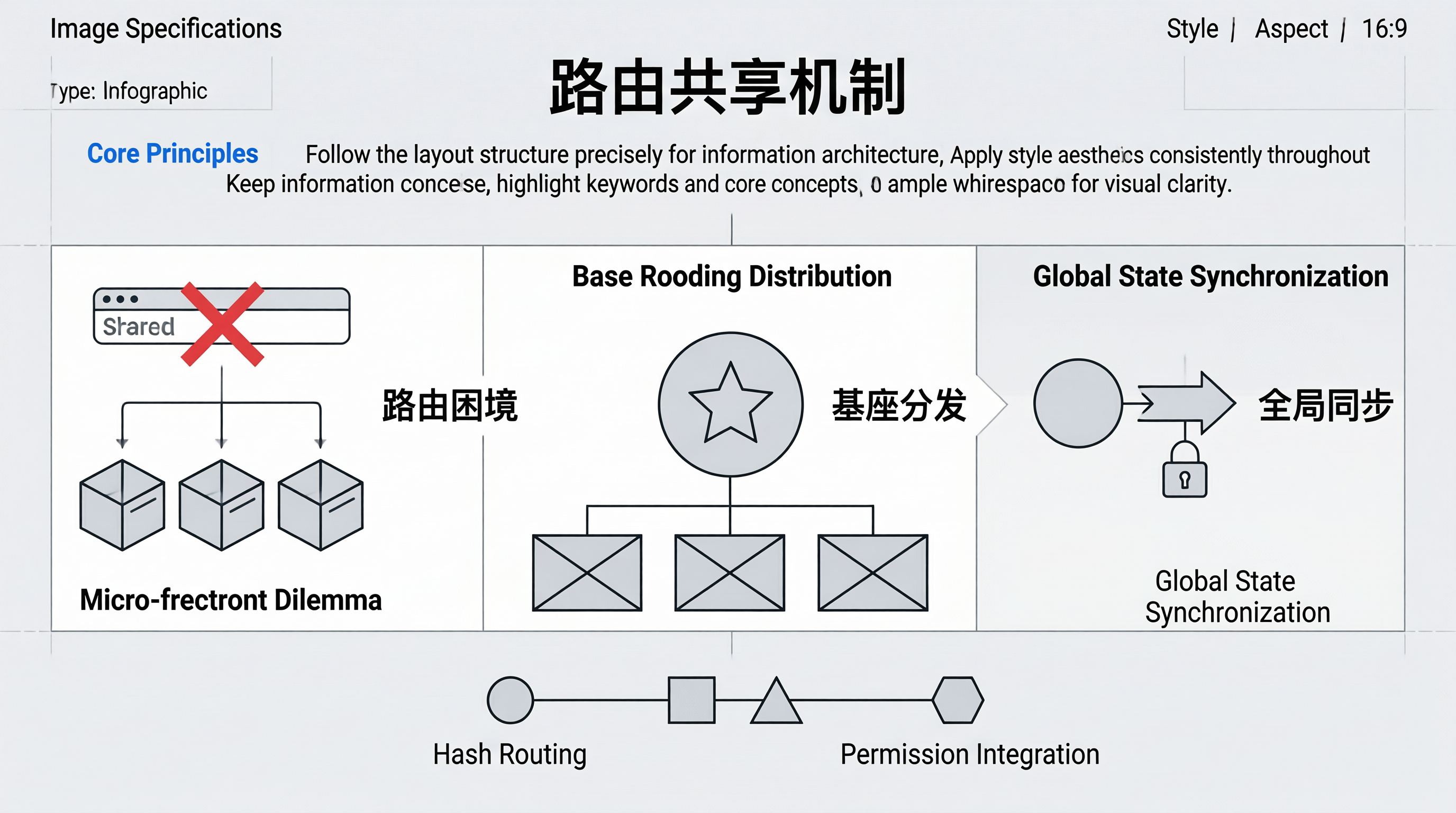
一、 微前端的路由困境
微前端架构的核心优势是独立开发、独立部署。但当多个子应用组合成一个完整的用户体验时,路由管理就变得复杂起来。每个子应用有自己的路由体系,而主框架需要统一管理整个应用的路由状态。
核心难题在于:如何让多个独立的应用共享同一个 URL 地址栏?当用户在子应用之间导航时,如何保持路由状态一致?
二、 路由架构方案对比
| 方案 | 实现原理 | 子应用感知 | 通信复杂度 | 适用场景 |
|---|---|---|---|---|
| Hash 路由 | URL Hash 分段 | 不需要改造 | 低 | 简单聚合 |
| 基座路由分发 | 基座统一注册路由 | 需要适配 | 中 | 企业级平台 |
| 状态共享 | 全局路由状态同步 | 需要改造 | 高 | 复杂交互 |
| iframe 路由 | iframe 独立管理 | 完全隔离 | 低 | 遗留系统集成 |
三、 基座路由分发方案
3.1 主应用路由配置
// 主应用 routes.js
import { registerMicroApps, start } from 'qiankun';
import { createRouter, createWebHistory } from 'vue-router';

// 主应用路由表
const mainRouter = createRouter({
  history: createWebHistory('/'),
  routes: [
    {
      path: '/',
      component: () => import('./views/Home.vue')
    },
    {
      path: '/app1/*',
      component: () => import('./views/AppContainer.vue'),
      meta: { microApp: 'app1' }
    },
    {
      path: '/app2/*',
      component: () => import('./views/AppContainer.vue'),
      meta: { microApp: 'app2' }
    },
    {
      path: '/app3/*',
      component: () => import('./views/AppContainer.vue'),
      meta: { microApp: 'app3' }
    }
  ]
});

// 微应用注册
registerMicroApps([
  {
    name: 'app1',
    entry: '//localhost:3001',
    container: '#micro-app-container',
    activeRule: '/app1',
    props: {
      baseRouter: mainRouter,
      basePath: '/app1'
    }
  },
  {
    name: 'app2',
    entry: '//localhost:3002',
    container: '#micro-app-container',
    activeRule: '/app2',
    props: {
      baseRouter: mainRouter,
      basePath: '/app2'
    }
  }
]);

start({
  sandbox: { experimentalStyleIsolation: true }
});
3.2 子应用路由适配
// 子应用 router.js
function createMicroAppRouter(basePath, baseRouter) {
  const router = createRouter({
    history: createWebHistory(basePath),
    routes: [
      {
        path: '/',
        redirect: '/dashboard'
      },
      {
        path: '/dashboard',
        component: () => import('./views/Dashboard.vue')
      },
      {
        path: '/settings',
        component: () => import('./views/Settings.vue')
      },
      {
        path: '/users/:id',
        component: () => import('./views/UserDetail.vue')
      }
    ]
  });

  // 路由守卫:确保主应用路由同步
  router.beforeEach((to, from, next) => {
    if (baseRouter) {
      // 同步路由状态到主应用
      baseRouter.push(to.fullPath).catch(() => {});
    }
    next();
  });

  return router;
}

// 子应用入口
let appRouter = null;

export async function mount(props) {
  const { basePath, baseRouter, container } = props;

  appRouter = createMicroAppRouter(basePath, baseRouter);

  const app = createApp(App);
  app.use(appRouter);
  app.mount(container ? container.querySelector('#app') : '#app');
}

export async function unmount() {
  if (appRouter) {
    appRouter = null;
  }
}
四、 Hash 路由共存方案
// 适用于简单场景:各子应用使用独立 hash 段
// URL 格式:http://example.com/#/app1/dashboard

class HashRouterManager {
  constructor() {
    this.apps = new Map();
    this.currentApp = null;
    this.setupListener();
  }

  registerApp(name, routes) {
    this.apps.set(name, {
      routes,
      currentRoute: '/'
    });
  }

  setupListener() {
    window.addEventListener('hashchange', () => {
      const hash = window.location.hash.slice(1);
      const { app, path } = this.parseHash(hash);

      if (app && app !== this.currentApp) {
        this.switchApp(app, path);
      } else if (app) {
        this.updateAppRoute(app, path);
      }
    });
  }

  parseHash(hash) {
    const segments = hash.split('/').filter(Boolean);
    const app = segments[0];
    const path = '/' + segments.slice(1).join('/');
    return { app, path };
  }

  switchApp(appName, path) {
    if (this.currentApp) {
      this.apps.get(this.currentApp).currentRoute =
        this.getCurrentHash();
    }

    this.currentApp = appName;
    this.apps.get(appName).currentRoute = path;
    this.renderApp(appName, path);
  }

  getCurrentHash() {
    return window.location.hash.slice(1);
  }

  navigate(appName, path) {
    window.location.hash = `#/${appName}${path}`;
  }

  renderApp(appName, path) {
    const app = this.apps.get(appName);
    const container = document.getElementById('micro-app-container');

    container.innerHTML = '';
    const component = app.routes[path] || app.routes['/'];
    if (component) {
      container.appendChild(component());
    }
  }
}
五、 全局状态同步方案
5.1 路由状态 Store
// shared/route-store.js
class RouteStore {
  constructor() {
    this.state = {
      currentApp: null,
      currentPath: '/',
      history: [],
      appRoutes: {}
    };
    this.listeners = new Set();
    this.setupCommunication();
  }

  setupCommunication() {
    window.addEventListener('message', (event) => {
      if (event.data.type === 'ROUTE_CHANGE') {
        const { app, path } = event.data.payload;
        this.updateRoute(app, path, 'external');
      }
    });
  }

  registerApp(name, routes) {
    this.state.appRoutes[name] = routes;
    this.notify();
  }

  navigate(app, path, trigger = 'internal') {
    this.updateRoute(app, path, trigger);
    this.syncBrowserUrl(app, path);

    if (trigger === 'internal') {
      this.notifyOtherApps(app, path);
    }
  }

  updateRoute(app, path, trigger) {
    const previous = {
      app: this.state.currentApp,
      path: this.state.currentPath
    };

    this.state.currentApp = app;
    this.state.currentPath = path;
    this.state.history.push({
      from: previous,
      to: { app, path },
      trigger,
      timestamp: Date.now()
    });

    if (this.state.history.length > 50) {
      this.state.history.shift();
    }

    this.notify();
  }

  syncBrowserUrl(app, path) {
    const url = `/${app}${path}`;
    window.history.pushState({ app, path }, '', url);
  }

  notifyOtherApps(app, path) {
    const apps = Object.keys(this.state.appRoutes).filter(a => a !== app);

    for (const appName of apps) {
      const iframe = document.querySelector(`[data-app="${appName}"]`);
      if (iframe?.contentWindow) {
        iframe.contentWindow.postMessage({
          type: 'ROUTE_CHANGE',
          payload: { app, path }
        }, '*');
      }
    }
  }

  subscribe(callback) {
    this.listeners.add(callback);
    return () => this.listeners.delete(callback);
  }

  notify() {
    for (const listener of this.listeners) {
      listener(this.state);
    }
  }

  getRouteForApp(appName) {
    if (appName === this.state.currentApp) {
      return this.state.currentPath;
    }
    return '/';
  }

  getState() {
    return { ...this.state };
  }
}

export const routeStore = new RouteStore();
5.2 子应用路由同步 Hook
// React 子应用路由同步
import { useEffect, useCallback } from 'react';
import { useHistory, useLocation } from 'react-router-dom';
import { routeStore } from '../shared/route-store';

function useMicroAppRoute(appName) {
  const history = useHistory();
  const location = useLocation();

  useEffect(() => {
    const unsubscribe = routeStore.subscribe((state) => {
      if (state.currentApp === appName) {
        const currentPath = location.pathname;
        if (state.currentPath !== currentPath) {
          history.push(state.currentPath);
        }
      }
    });

    return unsubscribe;
  }, [appName, history, location]);

  const navigate = useCallback((path) => {
    routeStore.navigate(appName, path, 'internal');
  }, [appName]);

  return {
    navigate,
    currentPath: location.pathname,
    routeState: routeStore.getState()
  };
}

// Vue 子应用路由同步
import { watch } from 'vue';
import { useRouter, useRoute } from 'vue-router';
import { routeStore } from '../shared/route-store';

function useMicroAppRouteVue(appName) {
  const router = useRouter();
  const route = useRoute();

  watch(() => route.fullPath, (newPath) => {
    if (routeStore.getState().currentApp !== appName) {
      routeStore.navigate(appName, newPath, 'external');
    }
  });

  routeStore.subscribe((state) => {
    if (state.currentApp === appName) {
      const currentPath = route.fullPath;
      if (state.currentPath !== currentPath) {
        router.push(state.currentPath);
      }
    }
  });

  return {
    navigate: (path) => routeStore.navigate(appName, path, 'internal'),
    currentPath: route.fullPath
  };
}
六、 路由缓存与预加载
class RouteCacheManager {
  constructor() {
    this.cache = new Map();
    this.maxCacheSize = 5;
  }

  async navigateWithCache(appName, path) {
    const key = `${appName}:${path}`;

    if (this.cache.has(key)) {
      const cached = this.cache.get(key);
      if (Date.now() - cached.timestamp < 300000) {
        return cached.component;
      }
      this.cache.delete(key);
    }

    const component = await this.loadComponent(appName, path);
    this.setCache(key, component);

    return component;
  }

  setCache(key, component) {
    if (this.cache.size >= this.maxCacheSize) {
      const oldestKey = this.cache.keys().next().value;
      this.cache.delete(oldestKey);
    }

    this.cache.set(key, {
      component,
      timestamp: Date.now()
    });
  }

  async preloadRoutes(appName, routes) {
    for (const route of routes) {
      const key = `${appName}:${route.path}`;
      if (!this.cache.has(key)) {
        this.loadComponent(appName, route.path).then(component => {
          this.setCache(key, component);
        });
      }
    }
  }

  async loadComponent(appName, path) {
    const app = document.querySelector(`[data-app="${appName}"]`);
    if (app && app.contentWindow) {
      app.contentWindow.postMessage({
        type: 'LOAD_ROUTE',
        payload: { path }
      }, '*');
    }
  }
}
七、 路由权限集成
class AuthenticatedRouteManager {
  constructor(routeStore, authService) {
    this.routeStore = routeStore;
    this.authService = authService;
    this.setupGuards();
  }

  setupGuards() {
    this.routeStore.subscribe((state) => {
      const { currentApp, currentPath } = state;

      if (currentApp && !this.checkAccess(currentApp, currentPath)) {
        this.routeStore.navigate('auth', '/login');
      }
    });
  }

  checkAccess(appName, path) {
    const user = this.authService.getCurrentUser();
    if (!user) return false;

    const permissions = this.getRoutePermissions(appName, path);
    if (!permissions || permissions.length === 0) return true;

    return permissions.some(p => user.permissions.includes(p));
  }

  getRoutePermissions(appName, path) {
    const permissionMap = {
      'admin': {
        '/dashboard': ['admin.dashboard.view'],
        '/users': ['admin.users.view'],
        '/settings': ['admin.settings.view']
      },
      'dashboard': {
        '/reports': ['report.view']
      }
    };

    return permissionMap[appName]?.[path];
  }

  wrapRoute(appName, path, component) {
    return () => {
      if (!this.checkAccess(appName, path)) {
        return { redirect: '/login' };
      }
      return component();
    };
  }
}
总结
| 实践 | 说明 | 优先级 |
|---|---|---|
| 基座统一路由 | 主应用管理 URL,子应用不感知 | P0 |
| 路由命名空间 | 子应用路由加前缀防止冲突 | P0 |
| 状态同步机制 | 子应用切换时保持路由状态 | P1 |
更多推荐
 7
7 0
0- 0


 已为社区贡献58条内容

所有评论(0)