
Ambari 大数据环境搭建利器——从入门到模拟实战
一、Ambari 是什么?
Ambari 是一个开源软件,目标是让 Hadoop 以及相关的大数据软件更容易使用。你可以把它想象成一位“集群管家”——通过一个网页界面,就能完成整个大数据集群的安装、配置、监控和管理。
Ambari 采用 C/S 架构(Server/Client 模式),由两部分组成:
-
Ambari Server:中央控制节点,提供 Web 控制台,负责下发指令。
-
Ambari Agent:安装在集群每台机器上,负责执行命令并上报状态。
简单来说,Server 是大脑,Agent 是手脚。
二、Ambari 能做什么?
1. 一键部署 Hadoop 集群
以前搭建 Hadoop 集群需要手动下载、配置、调试,耗时费力。Ambari 提供了安装向导,你只需:
-
填写机器 IP 列表
-
选择要安装的服务(HDFS、YARN、Spark、HBase 等)
-
点击下一步,Ambari 自动完成安装、配置和启动
整个过程就像安装手机 App 一样简单。
2. 全方位监控
Ambari 的仪表盘可以实时查看:
-
集群整体健康状态
-
每台机器的 CPU、内存、磁盘使用率
-
服务的运行状态
-
热力图(Heatmap)直观显示负载分布
-
告警系统:服务异常时自动通知
3. 集中管理
-
启动/停止整个集群或单个服务
-
修改配置并一键生效,支持版本回退
-
自动创建 Hadoop 所需的 Linux 用户
-
提供 REST API 方便集成
4. 辅助工具
-
HDFS 文件管理:可视化浏览、上传、下载文件
-
Quick Links:快速跳转到各组件的原生 Web UI(如 NameNode UI、ResourceManager UI)
三、Ambari 安装简要步骤
以下是在 CentOS 7 上安装 Ambari 的简化流程(实际生产环境需更多准备):
-
环境准备:安装 JDK 8,配置主机名和 hosts,关闭防火墙和 SELinux,设置 SSH 免密登录。
-
配置 Yum 源:下载 Ambari 的 repo 文件放入
/etc/yum.repos.d/。 -
安装 Ambari Server:
yum install ambari-server -
初始化配置:
ambari-server setup(一般使用默认内嵌 PostgreSQL) -
启动:
ambari-server start -
浏览器访问:
http://你的IP:8080,默认账号 admin/admin -
通过安装向导部署 HDP:命名集群 -> 选择版本 -> 添加主机 -> 选择服务 -> 分配角色 -> 开始安装
四、Ambari 与 CDH 对比
|
维度 |
Ambari (Hortonworks) |
CDH (Cloudera) |
|---|---|---|
|
开源性 |
完全开源免费 |
商业版需付费 |
|
社区支持 |
活跃 |
企业支持强 |
|
易用性 |
较易用 |
非常易用 |
|
稳定性 |
较稳定 |
极高 |
|
市场占有率 |
较高 |
高 |
对于学习和中小规模集群,Ambari 是完全足够的选择。
五、模拟器:动手体验 Ambari
为了帮助大家更直观地理解 Ambari 的工作方式,我编写了一个简单的 HTML 模拟器。它模拟了集群节点管理、服务启停、故障告警等功能。你可以直接在浏览器中打开运行。
下面是完整的模拟器代码(保存为 .html文件即可使用):
<!DOCTYPE html>
<html lang="zh-CN">
<head>
<meta charset="UTF-8">
<meta name="viewport" content="width=device-width, initial-scale=1.0">
<title>Ambari 模拟器 · 大数据集群管家</title>
<style>
* { margin: 0; padding: 0; box-sizing: border-box; }
body {
font-family: 'Segoe UI', system-ui, sans-serif;
background: #e9eef3;
min-height: 100vh;
display: flex;
align-items: center;
justify-content: center;
padding: 24px;
}
.simulator {
max-width: 1100px;
width: 100%;
background: white;
border-radius: 42px;
box-shadow: 0 25px 45px -12px rgba(0,20,40,0.25);
padding: 28px 32px 32px;
}
.header {
display: flex;
justify-content: space-between;
align-items: center;
flex-wrap: wrap;
gap: 16px;
margin-bottom: 22px;
}
.header h1 {
font-size: 1.9rem;
font-weight: 650;
color: #0b2b44;
display: flex;
align-items: center;
gap: 10px;
}
.header h1 small {
font-size: 0.65em;
font-weight: 400;
background: #dee9f2;
padding: 4px 14px;
border-radius: 999px;
color: #1f4662;
}
.status-badge {
background: #dcfce7;
color: #15803d;
padding: 8px 18px;
border-radius: 90px;
font-weight: 600;
font-size: 0.95rem;
display: flex;
align-items: center;
gap: 8px;
border: 1px solid #bbf7d0;
}
.status-badge .dot {
width: 12px; height: 12px;
background: #22c55e;
border-radius: 50%;
animation: pulse-dot 1.8s infinite;
}
@keyframes pulse-dot {
0%,100% { opacity:1; transform:scale(1); }
50% { opacity:0.5; transform:scale(0.85); }
}
.dashboard-grid {
display: grid;
grid-template-columns: repeat(auto-fit, minmax(150px,1fr));
gap: 16px;
margin-bottom: 28px;
}
.metric-card {
background: #f8fafc;
border-radius: 24px;
padding: 18px 14px 14px;
text-align: center;
border: 1px solid #e9edf2;
}
.metric-label {
font-size: 0.8rem;
text-transform: uppercase;
letter-spacing: 0.04em;
color: #64748b;
font-weight: 600;
}
.metric-value {
font-size: 2.2rem;
font-weight: 680;
color: #0f172a;
line-height: 1.2;
}
.metric-sub { font-size: 0.78rem; color: #94a3b8; }
.cluster-section { margin-bottom: 26px; }
.section-header {
display: flex;
justify-content: space-between;
align-items: center;
margin-bottom: 14px;
}
.section-header h2 { font-size: 1.3rem; font-weight: 620; color: #1e293b; }
.action-buttons { display: flex; gap: 12px; flex-wrap: wrap; }
.btn {
background: white;
border: 1px solid #cbd5e1;
padding: 6px 17px;
border-radius: 70px;
font-weight: 570;
font-size: 0.88rem;
cursor: pointer;
transition: all 0.13s;
color: #1e293b;
display: inline-flex;
align-items: center;
gap: 6px;
}
.btn-primary { background: #2563eb; border-color: #2563eb; color: white; }
.btn-primary:hover { background: #1d4ed8; }
.btn-warning { background: #f97316; border-color: #f97316; color: white; }
.btn-warning:hover { background: #ea580c; }
.btn-outline { background: transparent; border-color: #94a3b8; }
.btn-outline:hover { background: #f1f5f9; }
.btn-danger { background: #ef4444; border-color: #ef4444; color: white; }
.btn-danger:hover { background: #dc2626; }
.node-grid {
display: grid;
grid-template-columns: repeat(auto-fill, minmax(210px,1fr));
gap: 18px;
}
.node-card {
background: #ffffff;
border-radius: 24px;
padding: 18px 16px 14px;
box-shadow: 0 4px 10px rgba(0,0,0,0.02);
border: 1px solid #e2e8f0;
position: relative;
}
.node-card.alarm { border-left: 6px solid #ef4444; background: #fef2f2; }
.node-card.healthy { border-left: 6px solid #22c55e; }
.node-name {
font-weight: 660;
font-size: 1.05rem;
color: #0f172a;
display: flex;
justify-content: space-between;
align-items: center;
}
.node-status {
font-size: 0.72rem;
background: #e2e8f0;
padding: 2px 12px;
border-radius: 66px;
font-weight: 560;
}
.node-status.up { background: #bbf7d0; color: #166534; }
.node-status.down { background: #fecaca; color: #991b1b; }
.node-services {
margin-top: 12px;
display: flex;
flex-wrap: wrap;
gap: 6px;
}
.service-tag {
background: #eef2ff;
padding: 3px 11px;
border-radius: 56px;
font-size: 0.73rem;
font-weight: 540;
color: #1e3a8a;
border: 1px solid #c7d2fe;
}
.service-tag.stopped { background: #f1f5f9; color: #64748b; border-color: #d1d5db; }
.node-metrics {
margin-top: 12px;
font-size: 0.76rem;
color: #475569;
display: flex;
gap: 12px;
flex-wrap: wrap;
}
.node-metrics span { background: #f1f5f9; padding: 2px 10px; border-radius: 46px; }
.node-actions { margin-top: 14px; display: flex; gap: 8px; flex-wrap: wrap; }
.node-actions .btn { padding: 2px 12px; font-size: 0.74rem; }
.alert-panel {
background: #fef9c3;
border: 1px solid #fde047;
border-radius: 24px;
padding: 14px 22px;
margin-top: 16px;
display: flex;
align-items: center;
flex-wrap: wrap;
gap: 12px 20px;
}
.alert-panel.hidden { display: none; }
.alert-text { font-weight: 520; color: #854d0e; flex: 1; }
.alert-text strong { font-weight: 670; }
.footer-bar {
display: flex;
justify-content: space-between;
align-items: center;
margin-top: 22px;
flex-wrap: wrap;
gap: 12px;
border-top: 1px solid #e2e8f0;
padding-top: 18px;
}
.log-area {
background: #0f172a;
color: #cbd5e1;
border-radius: 64px;
padding: 8px 20px;
font-family: monospace;
font-size: 0.82rem;
flex: 1;
min-width: 200px;
overflow: hidden;
white-space: nowrap;
text-overflow: ellipsis;
}
.reset-btn {
background: #334155;
color: white;
border: none;
padding: 6px 22px;
border-radius: 68px;
font-weight: 530;
cursor: pointer;
}
.reset-btn:hover { background: #1e293b; }
@media (max-width: 640px) {
.simulator { padding: 18px 14px; }
.header h1 { font-size: 1.4rem; }
.metric-value { font-size: 1.6rem; }
.node-grid { grid-template-columns: 1fr; }
}
</style>
</head>
<body>
<div id="app" class="simulator">
<div class="header">
<h1>Ambari 模拟器 <small>实践版</small></h1>
<div class="status-badge">
<span class="dot"></span>
集群在线 {{ onlineCount }} / {{ nodes.length }} 节点运行
</div>
</div>
<div class="dashboard-grid">
<div class="metric-card">
<div class="metric-label">总节点</div>
<div class="metric-value">{{ nodes.length }}</div>
<div class="metric-sub">物理机</div>
</div>
<div class="metric-card">
<div class="metric-label">健康节点</div>
<div class="metric-value" style="color:#16a34a;">{{ healthyCount }}</div>
<div class="metric-sub">正常运行</div>
</div>
<div class="metric-card">
<div class="metric-label">服务实例</div>
<div class="metric-value">{{ totalServices }}</div>
<div class="metric-sub">已部署</div>
</div>
<div class="metric-card">
<div class="metric-label">告警数</div>
<div class="metric-value" style="color:#dc2626;">{{ alerts.length }}</div>
<div class="metric-sub">需关注</div>
</div>
</div>
<div class="cluster-section">
<div class="section-header">
<h2>集群节点 ({{ nodes.length }})</h2>
<div class="action-buttons">
<button class="btn btn-primary" @click="addNode">添加节点</button>
<button class="btn btn-warning" @click="randomFailure">随机故障</button>
<button class="btn btn-outline" @click="stopAllServices">全部停服</button>
<button class="btn btn-outline" @click="startAllServices">全部启动</button>
</div>
</div>
<div class="node-grid">
<div v-for="(node, idx) in nodes" :key="node.id"
class="node-card"
:class="{ alarm: node.status==='down', healthy: node.status==='up' }">
<div class="node-name">
{{ node.name }}
<span class="node-status" :class="node.status==='up'?'up':'down'">
{{ node.status==='up' ? '运行中' : '离线' }}
</span>
</div>
<div class="node-services">
<span v-for="svc in node.services" :key="svc.name"
class="service-tag"
:class="{ stopped: !svc.running }">
{{ svc.name }} {{ svc.running ? '运行' : '停止' }}
</span>
</div>
<div class="node-metrics">
<span>CPU {{ node.cpu }}%</span>
<span>内存 {{ node.mem }}%</span>
<span>磁盘 {{ node.disk }}%</span>
</div>
<div class="node-actions">
<button class="btn btn-primary" @click="toggleNode(node)">重启</button>
<button class="btn btn-danger" @click="removeNode(idx)">移除</button>
<button class="btn btn-outline" @click="toggleService(node,'HDFS')">HDFS</button>
<button class="btn btn-outline" @click="toggleService(node,'YARN')">YARN</button>
</div>
</div>
</div>
</div>
<div class="alert-panel" :class="{ hidden: alerts.length===0 }">
<span style="font-size:1.5rem;">!</span>
<span class="alert-text">
<strong>{{ alerts.length }} 条告警</strong>:
<span v-for="(a,i) in alerts" :key="i">
{{ a }}<span v-if="i < alerts.length-1">;</span>
</span>
</span>
<button class="btn btn-warning" @click="clearAlerts">清除告警</button>
</div>
<div class="footer-bar">
<div class="log-area">日志:{{ lastLog }}</div>
<button class="reset-btn" @click="resetCluster">重置集群</button>
</div>
</div>
<script src="https://cdn.jsdelivr.net/npm/vue@2.7.14/dist/vue.js"></script>
<script>
new Vue({
el: '#app',
data: {
nodes: [],
alerts: [],
lastLog: ''
},
computed: {
onlineCount() { return this.nodes.filter(n=>n.status==='up').length; },
healthyCount() { return this.onlineCount; },
totalServices() {
let c=0;
this.nodes.forEach(n=>n.services.forEach(s=>{if(s.running)c++;}));
return c;
}
},
created() { this.initCluster(); },
methods: {
initCluster() {
const names=['node-master-01','node-worker-02','node-worker-03','node-edge-04'];
this.nodes = names.map((name,i)=>({
id:'n_'+Date.now()+'_'+i,
name: name,
status: 'up',
cpu: Math.floor(Math.random()*41+20),
mem: Math.floor(Math.random()*31+30),
disk: Math.floor(Math.random()*21+40),
services: [
{name:'HDFS',running:true},
{name:'YARN',running:true},
{name:'Spark',running:Math.random()>0.3}
]
}));
this.alerts=[];
this.log('集群初始化完成');
},
addNode() {
const num=this.nodes.length+1;
const newName='node-'+(num<10?'0':'')+num;
this.nodes.push({
id:'n_'+Date.now(),
name:newName,
status:'up',
cpu:Math.floor(Math.random()*51+15),
mem:Math.floor(Math.random()*41+25),
disk:Math.floor(Math.random()*31+35),
services:[
{name:'HDFS',running:true},
{name:'YARN',running:true},
{name:'Spark',running:false}
]
});
this.log('添加节点 '+newName);
},
removeNode(index) {
const name=this.nodes[index].name;
this.nodes.splice(index,1);
this.log('移除节点 '+name);
},
toggleNode(node) {
node.status='down';
this.addAlert(node.name+' 正在重启...');
setTimeout(()=>{
node.status='up';
node.cpu=Math.floor(Math.random()*30+10);
node.mem=Math.floor(Math.random()*25+20);
node.disk=Math.floor(Math.random()*20+30);
this.removeAlert(node.name+' 正在重启...');
this.log(node.name+' 重启完成');
},1200);
this.log('重启 '+node.name);
},
toggleService(node,serviceName) {
const svc=node.services.find(s=>s.name===serviceName);
if(!svc) return;
svc.running=!svc.running;
const action=svc.running?'启动':'停止';
this.log(action+' '+node.name+' 上的 '+serviceName);
if(!svc.running) this.addAlert(node.name+' 的 '+serviceName+' 已停止');
else this.removeAlert(node.name+' 的 '+serviceName+' 已停止');
},
randomFailure() {
const downIndex=Math.floor(Math.random()*this.nodes.length);
const node=this.nodes[downIndex];
if(!node||node.status==='down') {
this.nodes.forEach(n=>{if(n.status==='up'){n.status='down';this.addAlert(n.name+' 发生故障离线');}});
return;
}
node.status='down';
this.addAlert(node.name+' 发生故障离线');
this.log('随机故障: '+node.name+' 宕机');
},
stopAllServices() {
this.nodes.forEach(n=>{n.services.forEach(s=>{s.running=false;});});
this.addAlert('所有服务已停止');
this.log('全部服务停止');
},
startAllServices() {
this.nodes.forEach(n=>{n.services.forEach(s=>{s.running=true;});});
this.clearAlerts();
this.log('全部服务启动');
},
resetCluster() {
this.initCluster();
this.clearAlerts();
this.log('集群已重置');
},
addAlert(msg) { if(!this.alerts.includes(msg)) this.alerts.push(msg); },
removeAlert(msg) { const idx=this.alerts.indexOf(msg); if(idx!==-1) this.alerts.splice(idx,1); },
clearAlerts() { this.alerts=[]; this.log('告警已清除'); },
log(msg) { this.lastLog=msg; }
},
watch: {
nodes: {
deep: true,
handler() {
this.alerts=this.alerts.filter(a=>!a.includes('离线')&&!a.includes('故障'));
this.nodes.forEach(n=>{
if(n.status==='down') {
const msg=n.name+' 离线';
if(!this.alerts.includes(msg)) this.alerts.push(msg);
}
});
}
}
}
});
</script>
</body>
</html>
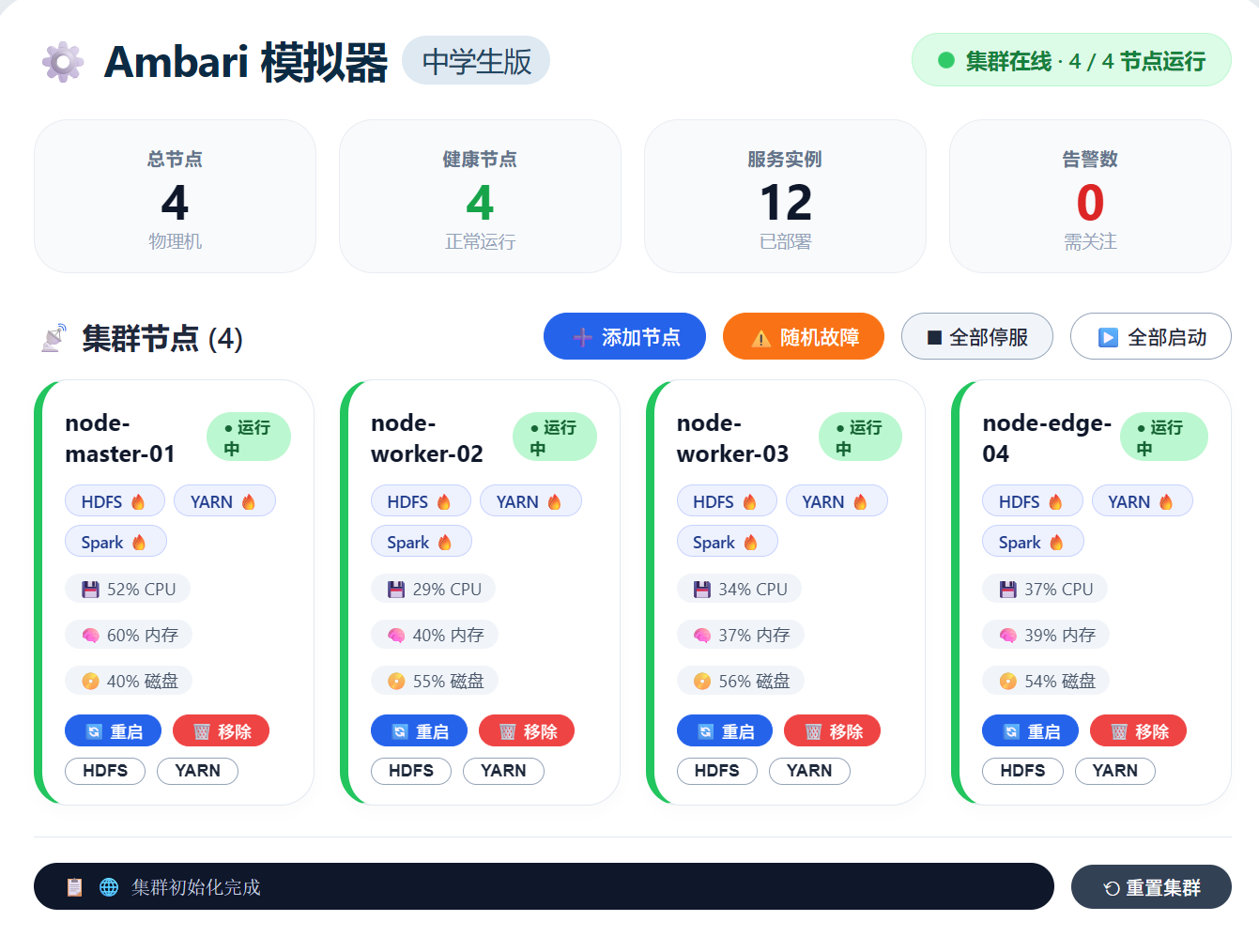
模拟器使用说明
-
打开 HTML 文件即可看到一个模拟的 Ambari 仪表盘。
-
点击“添加节点”可增加一台虚拟机器。
-
点击“随机故障”会使某台机器离线,并触发告警。
-
每个节点卡片上可以单独重启节点、移除节点,或开关 HDFS/YARN 服务。
-
“全部停服”和“全部启动”模拟批量操作。
-
右侧日志栏会记录每一步操作。
通过这个模拟器,你可以直观感受到 Ambari 对集群的集中管理能力。
六、总结
Ambari 极大地降低了大数据平台的搭建和维护难度。无论是学习还是生产环境,它都是一个值得掌握的利器。配合本文提供的模拟器,即使没有真实集群,也能快速理解其核心思想。
希望这篇文章能帮助你迈入大数据运维的大门
更多推荐
 4
4 0
0- 0


 已为社区贡献5条内容

所有评论(0)