
多模态大模型本地部署(InternVL3_5-8B)
·
1.模型选型
- 服务器信息:NVIDIA T4 * 2 16G * 2 Driver Version: 535.154.05 CUDA Version: 12.2
- 模型选择InternVL3_5-8B,速度非常快,毫秒级响应
2.模型下载
docker run --rm -it \
    --gpus all \
    --entrypoint /bin/bash \
    --pids-limit -1 \
    --security-opt seccomp=unconfined \
    -v /root/lipengcheng/models2:/models \
    -e OMP_NUM_THREADS=8 \
    vllm/vllm-openai:latest \
    -c "pip install modelscope && python3 -c \"from modelscope import snapshot_download; snapshot_download('OpenGVLab/InternVL3_5-8B', cache_dir='/models/internvl')\""
3.容器下载
docker pull openmmlab/lmdeploy:latest
4.启动容器加载模型
docker run --gpus all -d \
    --restart unless-stopped \
    -p 8000:23333 \
    --name internvl-3.5-8b-lmdeploy \
    --ipc=host \
    --pids-limit -1 \
    --security-opt seccomp=unconfined \
    -e NCCL_P2P_DISABLE=1 \
    -e NCCL_IB_DISABLE=1 \
    -e NCCL_WIN_ENABLE=0 \
    -v /root/lipengcheng/models2/internvl/OpenGVLab/InternVL3_5-8B:/model \
    openmmlab/lmdeploy:latest \
    lmdeploy serve api_server /model \
    --backend pytorch \
    --server-name 0.0.0.0 \
    --server-port 23333 \
    --tp 2 \
    --dtype float16
- 参数解释
# docker run: 启动容器的基础指令。
--gpus all: 【核心算力透传】将宿主机的所有 GPU(即两块 Tesla T4)全部映射给容器使用。

-d: (Detached)后台守护模式运行,不会霸占当前终端窗口。

--restart unless-stopped: 【高可用策略】进程守护参数。无论是 Docker 服务重启、宿主机意外重启,还是容器内部进程崩溃,Docker 引擎都会自动把它拉起来,除非人工手动执行 docker stop。

-p 8000:23333: 端口映射。将宿主机的 8000 端口映射到容器内部的 23333 端口。前端业务代码直接请求宿主机的 8000 即可。

--name internvl-3.5-8b-lmdeploy: 给容器起一个语义化的名字,方便后续看日志(docker logs)或运维管理。

# 宿主机系统级权限解封
--ipc=host: 【极度重要】让容器直接使用宿主机的进程间通信(IPC)命名空间和共享内存。因为大模型切分到两张卡后,需要极其频繁地在内存中交换庞大的张量数据,不加这个参数极易报 Bus error 或内存不足。

--pids-limit -1: 解除容器内部进程和线程数量的限制(-1 代表无限制)。PyTorch 推理时会拉起大量底层线程,默认限制会导致线程饥饿。

--security-opt seccomp=unconfined: 关闭 Docker 默认的 Seccomp 安全沙箱。较新的内核策略较严,会拦截某些老版本 CUDA 的底层系统调用,导致无端报错。

# 双 T4 显卡“防暴毙”环境变量 (NCCL 补丁)
这部分是专门为没有 NVLink 物理桥接线的双 T4 显卡量身定制的“保命符”:

-e NCCL_P2P_DISABLE=1: 禁用 PCIe 点对点(Peer-to-Peer)直接通信。强制双卡通过主板共享内存来交换数据,解决老架构显卡在 PCIe 握手时触发的段错误(Segmentation fault)。

-e NCCL_IB_DISABLE=1: 禁用 InfiniBand 网络通信尝试(因为服务器没有这种极其昂贵的网卡),缩短初始化时间并避免系统底层无意义的报错。

-e NCCL_WIN_ENABLE=0: 关闭特定版本 NCCL 通信库的 Window registration 功能,彻底解决日志中疯狂弹出的显存泄漏(Memory Leak)警告。

# 路径挂载与运行环境
-v /root/lipengcheng/models2/internvl/OpenGVLab/InternVL3_5-8B:/model: 将宿主机上已经下载好的物理模型目录,只读映射到容器内的 /model 路径下,避免重复下载。

openmmlab/lmdeploy:latest: 采用官方的 LMDeploy 最新稳定版镜像。

# LMDeploy 推理引擎核心控制
lmdeploy serve api_server /model: 启动兼容 OpenAI 规范的 API 服务端,加载刚才映射的 /model。

--backend pytorch: 【底层避坑神技】强制抛弃默认的 C++ TurboMind 引擎,使用原生的 PyTorch 引擎。完美包容 T4 显卡缺失某些最新硬件指令集的短板,用极小部分的性能损耗换取 100% 的兼容不宕机。

--server-name 0.0.0.0: 允许容器内部的所有网卡监听请求。

--server-port 23333: 容器内部服务绑定的端口(与前面的 -p 呼应)。

--tp 2: (Tensor Parallelism) 张量并行度。明确告诉引擎:“我切一半模型给显卡 0,另一半给显卡 1,你们俩协同计算”。

--dtype float16: 【硬件鸿沟填补】强制精度转换。InternVL 3.5 默认出厂是 BF16(BFloat16)精度,而 T4 芯片物理上不支持 BF16。这个参数会在加载时动态将模型强转为 T4 完美支持的 FP16(Float16),这是它能“复活”的核心所在
- –backend pytorch 针对NVIDIA T4显卡框架比较老,更换推理引擎为原生pytorch(在没有增加参数时,加载模型后调用,容器就崩溃退出了)
为什么换成 PyTorch 引擎它就活了?这背后其实是软件优化与物理硬件之间的“代沟”问题。

TurboMind (C++) 引擎太“傲慢”了
LMDeploy 默认使用的是自己用 C++ 和 CUDA 手写的 TurboMind 引擎。这个引擎就像一台极其暴力的 F1 赛车,它为了追求极致的推理速度,在底层写死了大量依赖最新显卡(Ampere、Hopper 架构,比如 A100、H100)的专属硬件指令(比如原生的 BFloat16 矩阵乘法、FlashAttention-2 等)。
当它在你的 T4(较老的 Turing 架构)上运行时,它闭着眼睛去调用这些 T4 根本没有的物理电路。芯片一懵,直接抛出“非法指令”的底层硬件级异常(Segmentation fault)。C++ 的报错机制极其硬核,不给你留任何面子,直接拉闸死机。

PyTorch 引擎的“包容性”
当我们加上 --backend pytorch 后,推理引擎切换回了原生的 PyTorch 框架。PyTorch 就像一台极其可靠的全地形越野车。当收到 --dtype float16 指令时,它会动态扫描你的 T4 显卡,老老实实地调用 T4 物理上完美支持的 FP16 Tensor Core(张量核心)去进行数学计算,避开了所有 T4 不支持的新特性。
虽然极致并发速度比不上 TurboMind,但它的兼容性和容错率是无敌的,完美填平了老架构显卡跑最新 3.5 代模型的鸿沟。
- 启动日志
[root@localhost lipengcheng]# docker logs -f internvl-3.5-8b-lmdeploy
The tokenizer you are loading from '/model' with an incorrect regex pattern: https://huggingface.co/mistralai/Mistral-Small-3.1-24B-Instruct-2503/discussions/84#69121093e8b480e709447d5e. This will lead to incorrect tokenization. You should set the `fix_mistral_regex=True` flag when loading this tokenizer to fix this issue.
The tokenizer you are loading from '/model' with an incorrect regex pattern: https://huggingface.co/mistralai/Mistral-Small-3.1-24B-Instruct-2503/discussions/84#69121093e8b480e709447d5e. This will lead to incorrect tokenization. You should set the `fix_mistral_regex=True` flag when loading this tokenizer to fix this issue.
The tokenizer you are loading from '/model' with an incorrect regex pattern: https://huggingface.co/mistralai/Mistral-Small-3.1-24B-Instruct-2503/discussions/84#69121093e8b480e709447d5e. This will lead to incorrect tokenization. You should set the `fix_mistral_regex=True` flag when loading this tokenizer to fix this issue.
The tokenizer you are loading from '/model' with an incorrect regex pattern: https://huggingface.co/mistralai/Mistral-Small-3.1-24B-Instruct-2503/discussions/84#69121093e8b480e709447d5e. This will lead to incorrect tokenization. You should set the `fix_mistral_regex=True` flag when loading this tokenizer to fix this issue.
2026-05-08 05:45:31,286 - lmdeploy - WARNING - transformers.py:22 - LMDeploy requires transformers version: [4.33.0 ~ 5.3.0], but found version: 5.5.0
2026-05-08 05:45:39,378	INFO worker.py:2013 -- Started a local Ray instance.
/opt/py3/lib/python3.12/site-packages/ray/_private/worker.py:2052: FutureWarning: Tip: In future versions of Ray, Ray will no longer override accelerator visible devices env var if num_gpus=0 or num_gpus=None (default). To enable this behavior and turn off this error message, set RAY_ACCEL_ENV_VAR_OVERRIDE_ON_ZERO=0
  warnings.warn(
(RayWorkerWrapper pid=704) The tokenizer you are loading from '/model' with an incorrect regex pattern: https://huggingface.co/mistralai/Mistral-Small-3.1-24B-Instruct-2503/discussions/84#69121093e8b480e709447d5e. This will lead to incorrect tokenization. You should set the `fix_mistral_regex=True` flag when loading this tokenizer to fix this issue.
Loading weights from safetensors:   0%|          | 0/4 [00:00<?, ?it/s]
Loading weights from safetensors:  25%|██▌       | 1/4 [00:04<00:13,  4.59s/it]
(RayWorkerWrapper pid=571) The tokenizer you are loading from '/model' with an incorrect regex pattern: https://huggingface.co/mistralai/Mistral-Small-3.1-24B-Instruct-2503/discussions/84#69121093e8b480e709447d5e. This will lead to incorrect tokenization. You should set the `fix_mistral_regex=True` flag when loading this tokenizer to fix this issue.
Loading weights from safetensors:  50%|█████     | 2/4 [00:07<00:07,  3.78s/it]
Loading weights from safetensors:  75%|███████▌  | 3/4 [00:09<00:02,  2.95s/it]
Loading weights from safetensors: 100%|██████████| 4/4 [00:11<00:00,  2.85s/it]
HINT:    Please open http://0.0.0.0:23333 in a browser for detailed api usage!!!
HINT:    Please open http://0.0.0.0:23333 in a browser for detailed api usage!!!
HINT:    Please open http://0.0.0.0:23333 in a browser for detailed api usage!!!
INFO:     Started server process [1]
INFO:     Waiting for application startup.
INFO:     Application startup complete.
INFO:     Uvicorn running on http://0.0.0.0:23333 (Press CTRL+C to quit)
5.测试大模型
[root@localhost lipengcheng]# curl http://localhost:8000/v1/chat/completions \
>   -H "Content-Type: application/json" \
>   -d '{
>     "model": "/model",
>     "messages": [
>       {"role": "user", "content": "你好!收到请回复,并做一个一句话的自我介绍。"}
>     ],
>     "max_tokens": 50,
>     "temperature": 0.1
>   }'
{"id":"1","object":"chat.completion","created":1778219229,"model":"/model","choices":[{"index":0,"message":{"role":"assistant","content":"你好!我是Intern-S1,来自上海人工智能实验室,很高兴为你提供帮助!","gen_tokens":null,"reasoning_content":null,"tool_calls":null},"logprobs":null,"finish_reason":"stop"}],"usage":{"prompt_tokens":20,"total_tokens":37,"complet
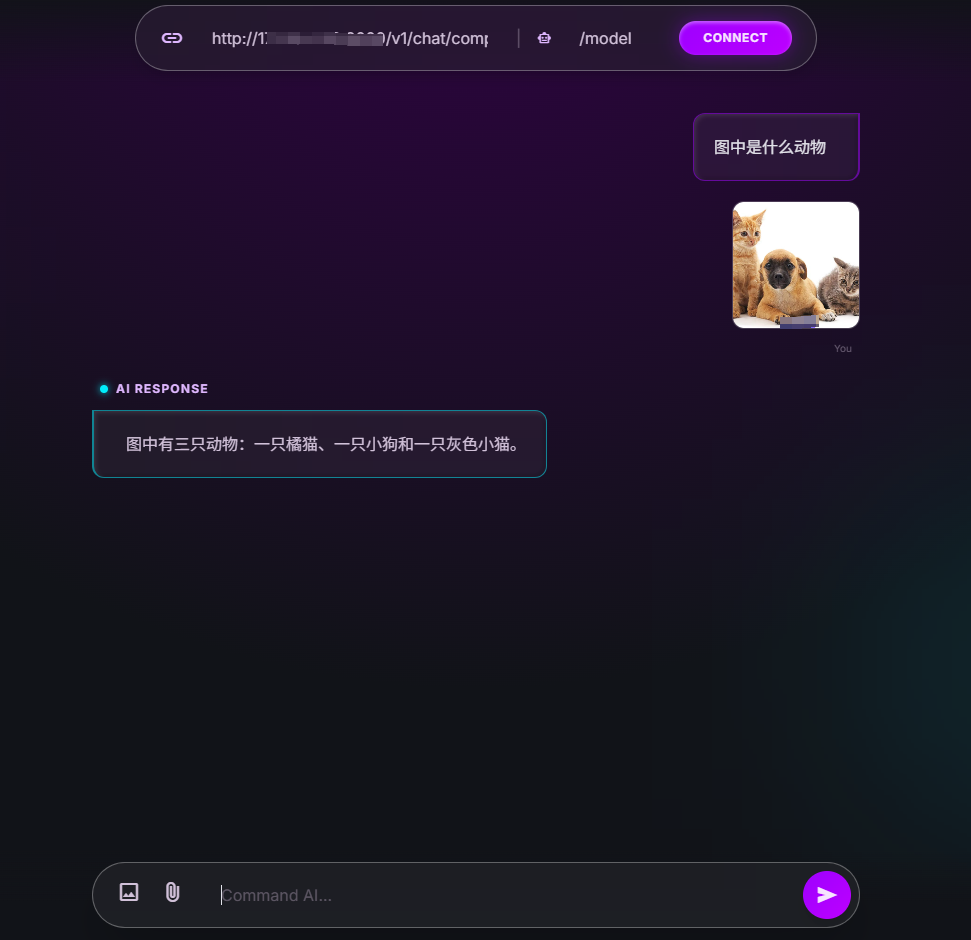
6.测试模型页面html
- 页面展示,单个html页面,直接双击运行,如果有喜欢的,可以私信我
更多推荐


 16
16 0
0- 0


 已为社区贡献31条内容

所有评论(0)