
HarmonyOS ArkTS API 24深蓝停车出行服务 App 通过回调函数(callback)机制实现子组件与父组件之间的通信,弹窗(Dialog)采用条件渲染方式叠加在 Stack 容器中
导读: 本文将以一个完整的"深蓝停车"出行服务 App 为案例,逐段拆解其 HarmonyOS ArkTS 源码。该应用涵盖了接口定义、响应式数据模型、配置管理、Mock 数据、工具函数、多 Tab 页架构、弹窗交互等典型开发模式。无论你是刚入门 HarmonyOS 的开发者,还是希望深入了解 ArkTS 声明式 UI 最佳实践的工程师,本文都将提供详尽的分析与启发。
一、项目概览与技术架构
本项目是一个停车出行服务类 App,采用 HarmonyOS ArkTS 声明式 UI 范式开发。应用整体架构可概括为以下几个层次:
- 数据层(Data Layer):包括 TypeScript 接口定义(
interface)、@Observed响应式数据模型类、全局配置对象以及 Mock 数据数组,构成整个应用的数据基石。 - 工具层(Utility Layer):提供格式化、颜色计算、渐变构建等全局工具函数,为 UI 渲染提供辅助支持。
- 组件层(Component Layer):以
@Entry @Component修饰的主入口组件为核心,下挂五个@Component子组件(对应五个 Tab 页),每个子组件内部通过@Builder装饰器拆分出多个 UI 构建函数,实现模块化渲染。 - 交互层(Interaction Layer):通过回调函数(
callback)机制实现子组件与父组件之间的通信,弹窗(Dialog)采用条件渲染方式叠加在Stack容器中。
整个源码文件约 1042 行,代码组织清晰、分区明确,是学习 HarmonyOS ArkTS 声明式开发的一份优秀范例。
二、接口定义区:TypeScript 强类型约束
interface ParkingLotInfo {
  id: string; name: string; address: string; distance: number;
  availableSpaces: number; totalSpaces: number; pricePerHour: number;
  maxPrice: number; type: string; rating: number; isOpen: boolean;
  latitude: number; longitude: number; features: string[];
}
代码深度解析:
ParkingLotInfo 是整个应用最核心的数据接口,它描述了一个停车场实体的完整信息模型。让我们逐字段分析其设计考量:
id: string:唯一标识符,采用字符串类型而非数字类型,这在实际项目中非常常见。字符串 ID 可以更好地支持分布式场景下的 ID 生成策略(如 UUID、雪花算法等),同时也便于与后端 RESTful API 的资源路径进行映射。name / address:停车场的名称与地址,使用string类型。地址字段的文本长度通常不确定,在 UI 渲染时需要配合maxLines(1)和textOverflow({ overflow: TextOverflow.Ellipsis })来处理文本溢出,这在后续的 UI 组件中有充分的体现。distance: number:表示停车场与当前位置之间的距离,单位为公里(km)。这个数值将传入工具函数formatDistance()进行格式化展示——当距离小于 1km 时转换为"米"的显示方式,增强用户体验。availableSpaces / totalSpaces:分别表示可用车位数与总车位数。两个数值配合可以计算出"占用率"(occupancy rate),这是停车场应用中最核心的指标之一。UI 层会通过占用率的数值区间来动态设置进度条颜色(红色表示紧张、橙色表示不足、蓝色表示充裕)。pricePerHour / maxPrice:描述了停车场的计费模式——每小时单价和每日封顶价格。这个双价格模型非常贴近真实业务场景,用户可以一目了然地评估停车成本。type: string:停车场类型(室内、地下、露天、机械)。虽然用字符串存储,但在 UI 渲染时会通过getTypeColor()函数映射为不同的颜色标签,实现视觉上的快速区分。rating: number:用户评分,通常为 1.0 到 5.0 之间的浮点数。UI 中以"★"符号配合数值展示,遵循了移动端评分展示的常见设计范式。isOpen: boolean:营业状态标识。在 UI 中会根据此字段渲染"营业中"(绿色)或"已关闭"(灰色)的状态标签,同时影响空位数显示的颜色逻辑。latitude / longitude: number:经纬度坐标,为后续地图导航功能预留的数据接口。虽然在当前 UI 中未直接展示地图组件,但这一字段的存在体现了架构设计的前瞻性。features: string[]:特色服务标签数组(充电桩、24小时、监控、洗车等)。在 UI 中以小标签的形式水平排列展示,让用户快速了解停车场的服务能力。
整体来看,ParkingLotInfo 接口的设计遵循了"面向展示"的数据建模思路——字段粒度与 UI 展示需求高度对齐,避免了过度抽象或不足抽象的问题。
interface VehicleInfo {
  id: string; plateNumber: string; brand: string; model: string; color: string;
  year: number; insuranceExpiry: string; inspectionExpiry: string;
  violationCount: number; isDefault: boolean;
}
代码深度解析:
VehicleInfo 接口描述了用户的车辆信息模型,包含了车辆的基本属性(品牌、型号、颜色、年份)和业务属性(保险到期日、年检到期日、违章记录数)。
特别值得注意的是 isDefault: boolean 字段的设计。在多车辆场景下,用户通常有一辆"默认车辆"——即最常用的那辆车。这个字段在 UI 层的体现是:默认车辆的车牌号旁会显示一个橙色的"默认"标签。这种设计模式在"账户管理"类应用中非常普遍(如默认收货地址、默认支付方式等),本质上是"多选一"的偏好设置。
insuranceExpiry / inspectionExpiry 两个字段采用了字符串格式的日期(如 '2027-06-15'),而非 Date 对象或时间戳。这种设计在展示型场景中非常实用——可以直接在 UI 上显示,同时由于 ISO 8601 格式的日期字符串天然支持字典序比较('2027-06-15' > '2026-07-24' 为 true),所以可以直接用于过期判断而无需额外的日期解析操作。这在后续的 VehicleModel 类中有明确的体现。
interface ParkingRecordInfo {
  id: string; lotName: string; lotAddress: string; plateNumber: string;
  entryTime: string; exitTime: string; duration: number; fee: number;
  paymentMethod: string; status: string;
}
代码深度解析:
ParkingRecordInfo 接口描述了停车记录的数据模型。一条停车记录关联了"哪个停车场"、“哪辆车”、“什么时间进/出”、“停了多久”、“花了多少钱”、“怎么付的"以及"当前状态”。
duration: number 字段的单位是分钟(而非小时),这是一个值得注意的设计决策。选择分钟作为基本单位的好处是:可以避免浮点数精度问题,同时在 UI 展示时可以灵活地格式化为"X小时Y分钟"的形式。例如 195 分钟可展示为"3小时15分钟",而不是 3.25 小时。
status: string 字段目前有两个取值:'已完成' 和 '停车中'。当状态为"停车中"时,exitTime 为空字符串、duration 为 0、fee 为 0、paymentMethod 为空字符串——这种"空值表示未完成"的设计简洁直观,UI 层通过条件判断来分别处理两种状态的展示逻辑。
interface FavoriteLotInfo {
  id: string; lotId: string; name: string; address: string; distance: number;
  pricePerHour: number; availableSpaces: number; addedDate: string;
}
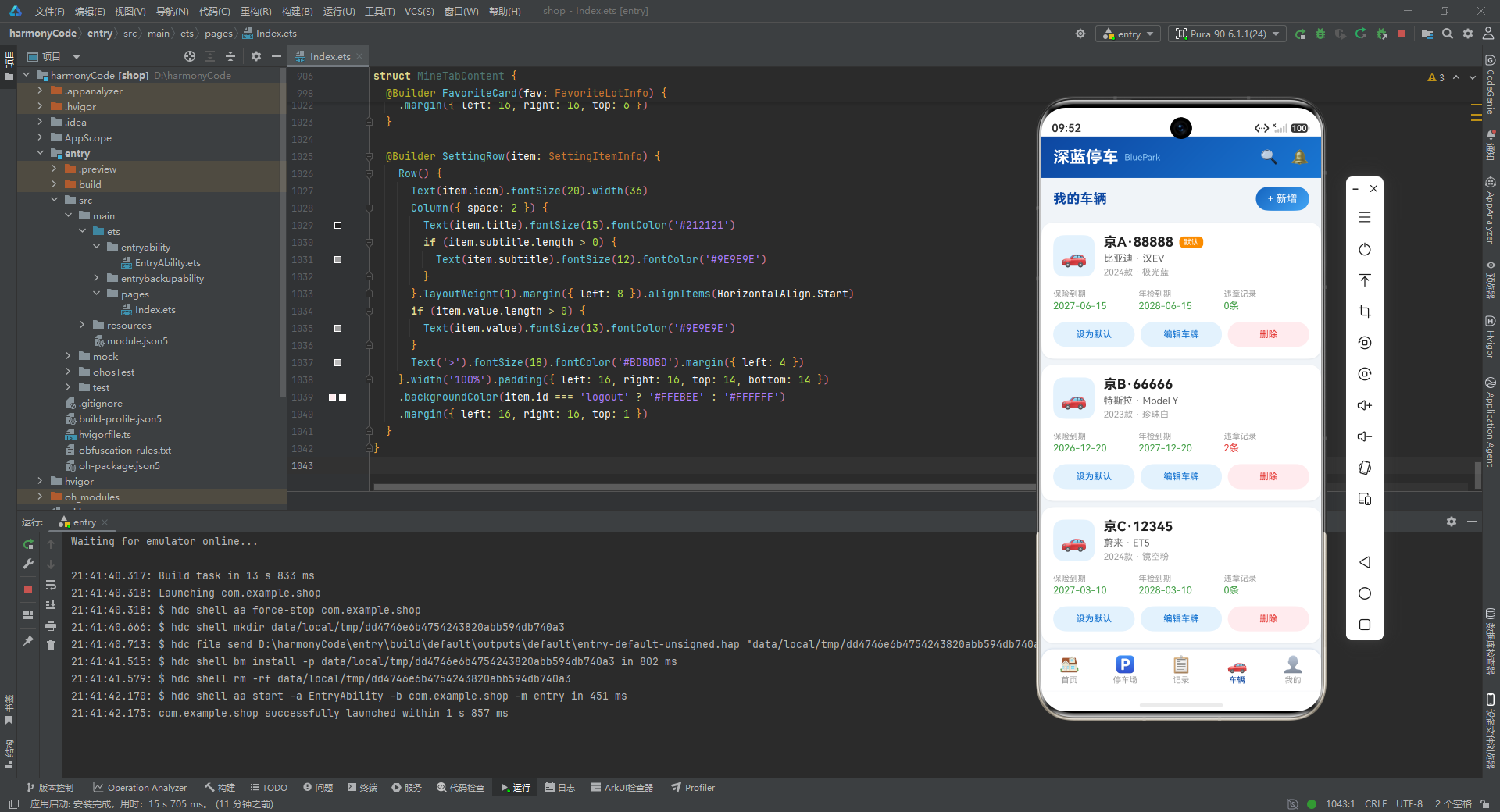
代码深度解析:
FavoriteLotInfo 是用户收藏停车场的轻量级数据模型。与完整的 ParkingLotInfo 相比,它省略了评分、经纬度、特色标签等"详情页才需要"的信息,只保留了列表页展示所需的核心字段(名称、地址、距离、价格、空位数)。
这种"按需裁剪"的数据模型设计体现了 DTO(Data Transfer Object)模式 的思想:不同页面/场景使用不同粒度的数据模型,既节省了内存占用,又避免了不必要的数据传输。lotId 字段 作为与原始停车场数据的关联键,为后续"查看详情"功能提供了数据跳转的锚点。
interface MonthlyStatInfo {
  month: string; totalFee: number; totalCount: number; avgDuration: number;
}
interface ParkingTypeInfo {
  type: string; count: number; percentage: number; color: string;
}
interface DurationStatInfo { range: string; count: number; percentage: number; }
interface SettingItemInfo {
  id: string; title: string; subtitle: string; icon: string; value: string;
}
interface UserProfileInfo {
  name: string; phone: string; avatar: string; memberLevel: string;
  totalParking: number; totalSpent: number; points: number;
}
interface TabItemInfo { name: string; title: string; icon: string; }
代码深度解析:
剩余的六个接口分别服务于不同的业务场景:
MonthlyStatInfo:月度统计信息,为"记录"Tab 页的费用趋势图提供数据支撑。avgDuration字段以分钟为单位存储平均停车时长,方便 UI 层进行格式化转换。ParkingTypeInfo:停车场类型偏好统计,带有color字段用于直接绑定到 UI 进度条的颜色,体现了"数据驱动颜色"的设计思路——统计数据的展示颜色由数据本身决定,而非硬编码在 UI 中。DurationStatInfo:停车时长分布统计,结构与ParkingTypeInfo类似但缺少color字段(因为所有时长区间共用同一颜色主题),这体现了"最小必要字段"原则。SettingItemInfo:设置项数据模型,采用通用的五字段结构(id、标题、副标题、图标、当前值),可以统一描述不同类型的设置项。value字段为空字符串时表示该设置项无需显示当前值(如"发票管理"、“关于我们”),这是一种优雅的可选值处理方式。UserProfileInfo:用户档案信息,聚合了个人基本信息和累计统计数据。memberLevel字段用于展示会员等级标签(如"蓝钻会员"),points字段与totalSpent保持一致(消费1元积1分),体现了积分体系的业务规则。TabItemInfo:底部 Tab 栏的配置接口,name字段作为内部路由标识,title用于 UI 展示,icon使用 emoji 字符实现轻量级图标方案。这种将配置数据与 UI 组件分离的做法,使得 Tab 的增减只需修改配置对象,而无需改动 UI 代码。
三、@Observed 数据模型类:响应式状态的核心
@Observed
class ParkingModel {
  id: string; name: string; address: string; distance: number;
  availableSpaces: number; totalSpaces: number; pricePerHour: number;
  maxPrice: number; type: string; rating: number; isOpen: boolean;
  latitude: number; longitude: number; features: string[];
  constructor(info: ParkingLotInfo) {
    this.id = info.id; this.name = info.name; this.address = info.address;
    this.distance = info.distance; this.availableSpaces = info.availableSpaces;
    this.totalSpaces = info.totalSpaces; this.pricePerHour = info.pricePerHour;
    this.maxPrice = info.maxPrice; this.type = info.type; this.rating = info.rating;
    this.isOpen = info.isOpen; this.latitude = info.latitude; this.longitude = info.longitude;
    this.features = info.features;
  }
  getOccupancyRate(): number {
    if (this.totalSpaces === 0) { return 0; }
    return Math.round((1 - this.availableSpaces / this.totalSpaces) * 100);
  }
  getAvailabilityColor(): string {
    if (this.availableSpaces === 0) { return '#E53935'; }
    else if (this.availableSpaces < 20) { return '#FB8C00'; }
    else { return '#43A047'; }
  }
}
代码深度解析:
ParkingModel 类是 ArkTS 响应式状态管理的关键组成部分。@Observed 装饰器 是 HarmonyOS ArkUI 框架提供的核心能力之一,它使得类实例的属性变化可以被框架自动追踪,当属性值发生变化时,依赖这些属性的 UI 组件会自动重新渲染。
为什么需要 @Observed 类而不仅仅是 @State 变量? 答案在于对象属性级别的细粒度响应。@State 只能追踪基本类型或对象引用的变化——如果对象的某个深层属性发生变化(如 availableSpaces 从 156 变为 155),@State 是无法感知到的。而 @Observed 类则可以追踪到属性级别,配合 @ObjectLink 装饰器使用时,可以实现深层属性变化的自动 UI 更新。
构造函数的设计 接收一个 ParkingLotInfo 接口对象,逐字段赋值。这种"接口 -> 类"的转换模式在 ArkTS 开发中非常常见——接口用于定义数据契约(特别是从网络获取的数据),而 @Observed 类则提供响应式能力和业务计算方法。
getOccupancyRate() 方法 计算停车场的占用率百分比。关键细节在于 totalSpaces === 0 的边界保护——避免除零错误,返回 0%。计算逻辑为 (1 - 可用/总数) * 100,即"已占用比例"。使用 Math.round() 四舍五入取整,符合百分比展示的惯例。
getAvailabilityColor() 方法 根据可用车位数返回颜色值,采用三级阈值判断:
- 0 个空位:红色
#E53935(表示"已满") - 1-19 个空位:橙色
#FB8C00(表示"紧张") - 20 个以上:绿色
#43A047(表示"充裕")
这三个颜色值对应了 Material Design 色板中的 Red 600、Orange 600 和 Green 600,体现了对 Material Design 色彩规范的遵循。阈值 20 的选择是一个业务经验值——在大型停车场(数百个车位)中,20 个以下的空位确实意味着"即将满位",需要引起用户注意。
@Observed
class VehicleModel {
  id: string; plateNumber: string; brand: string; model: string; color: string;
  year: number; insuranceExpiry: string; inspectionExpiry: string;
  violationCount: number; isDefault: boolean;
  constructor(info: VehicleInfo) {
    this.id = info.id; this.plateNumber = info.plateNumber; this.brand = info.brand;
    this.model = info.model; this.color = info.color; this.year = info.year;
    this.insuranceExpiry = info.insuranceExpiry; this.inspectionExpiry = info.inspectionExpiry;
    this.violationCount = info.violationCount; this.isDefault = info.isDefault;
  }
  isInsuranceValid(): boolean { return this.insuranceExpiry > '2026-07-24'; }
  isInspectionValid(): boolean { return this.inspectionExpiry > '2026-07-24'; }
}
代码深度解析:
VehicleModel 类同样使用 @Observed 装饰器,提供了两个业务验证方法:
isInsuranceValid() 和 isInspectionValid() 方法通过字符串比较来判断保险和年检是否在有效期内。正如前文所述,由于日期采用 ISO 8601 格式(YYYY-MM-DD),字符串的字典序比较等价于日期的先后比较。当前硬编码的基准日期 '2026-07-24' 是"今天"的模拟值;在实际项目中,应替换为动态获取的当前日期(如 new Date().toISOString().split('T')[0])。
这两个方法的设计体现了 “业务规则内聚到模型” 的面向对象设计原则——"保险是否有效"是车辆自身的属性,而非 UI 层的逻辑。这样做的好处是:如果判断规则发生变化(比如需要考虑宽限期),只需修改模型类,而无需在多个 UI 组件中逐一修改。
@Observed
class RecordModel {
  id: string; lotName: string; lotAddress: string; plateNumber: string;
  entryTime: string; exitTime: string; duration: number; fee: number;
  paymentMethod: string; status: string;
  constructor(info: ParkingRecordInfo) {
    this.id = info.id; this.lotName = info.lotName; this.lotAddress = info.lotAddress;
    this.plateNumber = info.plateNumber; this.entryTime = info.entryTime;
    this.exitTime = info.exitTime; this.duration = info.duration; this.fee = info.fee;
    this.paymentMethod = this.paymentMethod; this.status = this.status;
  }
  getDurationText(): string {
    const h = Math.floor(this.duration / 60);
    const m = this.duration % 60;
    if (h > 0) { return `${h}小时${m}分钟`; }
    return `${m}分钟`;
  }
}
代码深度解析:
RecordModel 类的 getDurationText() 方法 展示了一种常见的数值格式化模式——将原始的"分钟数"转换为用户友好的中文时间文本。
- 使用
Math.floor(this.duration / 60)计算小时部分,确保整数除法向下取整。 - 使用
this.duration % 60计算剩余的分钟数。 - 当小时为 0 时,只显示"X分钟"(避免显示"0小时15分钟"的冗余信息),这是一种细节上的用户体验优化。
- 使用模板字符串(template literal)
${h}小时${m}分钟实现动态拼接。
这种方法将格式化逻辑封装在模型内部,而非散落在 UI 组件的构建方法中,遵循了 DRY(Don’t Repeat Yourself)原则。在应用的多个地方(如记录列表卡片、统计摘要等)如果都需要展示时长文本,直接调用该方法即可。
四、配置对象:数据驱动的 UI 配置化
const TabConfig: Record<string, TabItemInfo> = {
  'home': { name: 'home', title: '首页', icon: '🏠' },
  'parking': { name: 'parking', title: '停车场', icon: '🅿' },
  'record': { name: 'record', title: '记录', icon: '📋' },
  'vehicle': { name: 'vehicle', title: '车辆', icon: '🚗' },
  'mine': { name: 'mine', title: '我的', icon: '👤' }
};
代码深度解析:
TabConfig 使用 Record<string, TabItemInfo> 类型定义,即一个键为字符串、值为 TabItemInfo 接口的字典对象。这种配置方式有三个显著优势:
- 数据与 UI 分离:Tab 的所有可变信息(标题、图标)都集中在配置对象中,UI 组件只需遍历渲染即可。如果未来要修改某个 Tab 的标题或图标,只需修改配置对象,无需触碰 UI 代码。
- 支持遍历渲染:在底部 Tab 栏的
@Builder中,通过Object.values(TabConfig)将字典转换为数组,再使用ForEach进行遍历渲染,避免了硬编码五个 Tab 项。 - 支持路由映射:
name字段同时作为内部路由标识,在onClick回调中通过if-else链映射到对应的BottomTab枚举值。虽然在当前实现中使用的是简单的字符串比较,但未来可以轻松替换为路由表映射。
值得注意的是,图标使用 emoji 字符 而非图片资源。这种选择在原型开发阶段非常高效——无需准备多套分辨率的图标资源,且 emoji 在 HarmonyOS 系统中渲染效果良好。当然,在生产环境中通常会替换为矢量图标或图片资源,以获得更精确的视觉控制。
const ParkingTypeConfig: Record<string, ParkingTypeInfo> = {
  'indoor': { type: '室内停车场', count: 8, percentage: 40, color: '#0D47A1' },
  'outdoor': { type: '露天停车场', count: 6, percentage: 30, color: '#42A5F5' },
  'underground': { type: '地下停车场', count: 4, percentage: 20, color: '#1976D2' },
  'mechanical': { type: '机械车库', count: 2, percentage: 10, color: '#90CAF9' }
};
const DurationStatConfig: Record<string, DurationStatInfo> = {
  'short': { range: '0-1小时', count: 35, percentage: 35 },
  'medium': { range: '1-3小时', count: 45, percentage: 45 },
  'long': { range: '3-6小时', count: 15, percentage: 15 },
  'overnight': { range: '6小时以上', count: 5, percentage: 5 }
};
代码深度解析:
ParkingTypeConfig 和 DurationStatConfig 是两组统计图表的配置数据。
ParkingTypeConfig 的每个条目都带有 color 字段,且四个颜色值 #0D47A1、#42A5F5、#1976D2、#90CAF9 恰好取自应用主题色板中深蓝到浅蓝的四个梯度。这种"同一色系、不同明度"的配色策略使得统计图表既有多样性又保持了视觉统一性。percentage 字段直接作为水平进度条的宽度百分比使用,形成了一种"数据即布局"的声明式设计——数据值的百分比直接映射到 UI 组件的宽度比例。
DurationStatConfig 的时长分段(短途 0-1h、中途 1-3h、长途 3-6h、过夜 6h+)覆盖了城市停车的典型场景。count 和 percentage 的配对提供了"绝对数量+相对占比"的双重信息维度,UI 中两列同时展示,满足不同用户的信息偏好。
const SettingConfig: Record<string, SettingItemInfo> = {
  'payment': { id: 'payment', title: '支付管理', subtitle: '管理支付方式', icon: '💳', value: '微信支付' },
  'notify': { id: 'notify', title: '消息通知', subtitle: '推送设置', icon: '🔔', value: '已开启' },
  'plate': { id: 'plate', title: '车牌识别', subtitle: '自动识别设置', icon: '📷', value: '自动' },
  'invoice': { id: 'invoice', title: '发票管理', subtitle: '电子发票', icon: '🧾', value: '' },
  'coupon': { id: 'coupon', title: '优惠券', subtitle: '可用券3张', icon: '🎫', value: '3张' },
  'help': { id: 'help', title: '帮助中心', subtitle: '常见问题', icon: '❓', value: '' },
  'about': { id: 'about', title: '关于我们', subtitle: '版本信息', icon: 'ℹ', value: 'v2.6.0' },
  'logout': { id: 'logout', title: '退出登录', subtitle: '', icon: '🚪', value: '' }
};
代码深度解析:
SettingConfig 是"我的"Tab 页设置列表的完整数据源,包含 8 个设置项。这 8 个设置项涵盖了停车 App 的典型功能入口:支付管理、通知设置、车牌识别、发票管理、优惠券、帮助中心、关于我们、退出登录。
特别值得关注的细节:
subtitle字段作为辅助说明:每个设置项都有一个简短的副标题,向用户解释该设置的功能或显示当前状态摘要。例如"支付管理"的副标题是"管理支付方式",“优惠券"的副标题是"可用券3张”——后者将动态数据直接嵌入到副标题中,提高了信息密度。value字段的可选性设计:部分设置项有value(如"微信支付"、“已开启”、“v2.6.0”),部分为空字符串。UI 中通过if (item.value.length > 0)条件判断来决定是否渲染右侧的值文本。这种"空字符串表示无值"的策略比使用undefined或null更简洁,避免了空值判断的额外开销。id: 'logout'的特殊处理:在设置行的 UI 构建器中,item.id === 'logout'时背景色设为#FFEBEE(浅红色),视觉上与其他白色背景的设置项区分开来。这是一种"危险操作视觉预警"的设计模式——退出登录是不可逆的操作,通过颜色提示降低误触风险。
五、Mock 数据数组:构建逼真的数据场景
const ParkingLotData: ParkingLotInfo[] = [
  { id: 'p001', name: '深蓝环球中心停车场', address: '海淀区中关村大街1号', distance: 0.3, availableSpaces: 156, totalSpaces: 500, pricePerHour: 8, maxPrice: 80, type: '室内停车场', rating: 4.8, isOpen: true, latitude: 39.9847, longitude: 116.3076, features: ['充电桩', '24小时', '监控'] },
  // ... 共 20 条数据
];
代码深度解析:
ParkingLotData 数组包含 20 条停车场数据,覆盖了北京市多个城区的真实地点(海淀区、朝阳区、西城区、东城区、大兴区、昌平区、房山区),数据设计非常用心:
- 距离分布合理:从 0.3km 到 6.0km,模拟了"由近及远"的真实搜索结果排序。
- 类型分布多样:包含室内停车场(8个)、地下停车场(6个)、露天停车场(3个)、机械车库(2个),还有未开放的停车场(2个
isOpen: false),以及已满的停车场(2个availableSpaces: 0)。 - 价格梯度真实:从每小时 3 元到 12 元,封顶从 30 元到 120 元,符合北京市停车场的实际价格区间。
- 特色标签组合丰富:充电桩、24小时、监控、电梯、洗车等服务标签的各种组合,模拟了真实停车场的服务差异化。
- 边界情况覆盖:数据中刻意包含了"已关闭"(p004、p014)和"已满"(p004、p014)的极端情况,确保 UI 的条件渲染逻辑(状态标签颜色、空位数显示)能够被完整测试。
const VehicleData: VehicleInfo[] = [
  { id: 'v001', plateNumber: '京A·88888', brand: '比亚迪', model: '汉EV', color: '极光蓝', year: 2024, ... },
  // ... 共 5 条数据
];

const ParkingRecordData: ParkingRecordInfo[] = [
  { id: 'r001', lotName: '深蓝环球中心停车场', ... status: '已完成' },
  // ... 共 15 条数据,其中 r013 status 为 '停车中'
];
代码深度解析:
VehicleData 包含 5 辆车,品牌涵盖比亚迪、特斯拉、蔚来、小鹏、理想等主流新能源汽车品牌,车型包括汉EV、Model Y、ET5、G9、L9。颜色使用了具有辨识度的命名(极光蓝、珍珠白、镜空粉、星爵灰、星空蓝),体现了对汽车行业命名习惯的尊重。其中只有 v001 被设为默认车辆(isDefault: true)。
ParkingRecordData 包含 15 条记录,时间跨度覆盖 7 月 10 日至 24 日(约两周),停车时长从 90 分钟到 780 分钟(13小时,模拟过夜停车),费用从 9 元到 50 元不等。特别值得注意的是 r013 记录的状态为"停车中"——这是唯一一条"未完成"的记录,exitTime、duration、fee、paymentMethod 均为空/零值,用于测试 UI 中"停车中"状态的特殊展示逻辑(显示"计费中"而非具体费用)。
六、全局工具函数:UI 渲染的辅助引擎
function formatDistance(km: number): string {
  if (km < 1) { return `${Math.round(km * 1000)}m`; }
  return `${km.toFixed(1)}km`;
}
function getOccupancyColor(rate: number): string {
  if (rate >= 90) { return '#E53935'; }
  else if (rate >= 70) { return '#FB8C00'; }
  else { return '#1976D2'; }
}
function getTypeColor(type: string): string {
  if (type === '室内停车场') { return '#0D47A1'; }
  else if (type === '地下停车场') { return '#1976D2'; }
  else if (type === '露天停车场') { return '#42A5F5'; }
  else { return '#90CAF9'; }
}
function getAvailabilityText(available: number): string {
  if (available === 0) { return '已满'; }
  else if (available < 20) { return '紧张'; }
  else if (available < 100) { return '充足'; }
  else { return '充裕'; }
}
function getStatusColor(status: string): string {
  if (status === '停车中') { return '#1976D2'; }
  else if (status === '已完成') { return '#43A047'; }
  else { return '#757575'; }
}
function buildGradient(c1: string, c2: string): LinearGradient {
  return { angle: 135, direction: GradientDirection.RightBottom, colors: [[c1, 0.0], [c2, 1.0]] };
}
代码深度解析:
这组工具函数构成了 UI 渲染的"色彩与格式化引擎",每个函数都承担一个明确的职责:
-
formatDistance():距离格式化。小于 1km 时转为米(乘以 1000 并四舍五入),大于等于 1km 时保留一位小数加"km"后缀。这使得 0.3km 显示为"300m",1.5km 显示为"1.5km",符合用户对距离的直观感知习惯。 -
getOccupancyColor():占用率颜色映射。90% 以上为红色(危急),70%-89% 为橙色(警告),70% 以下为蓝色(正常)。三级阈值的设计覆盖了停车场占用率的典型业务分级。 -
getTypeColor():停车场类型颜色映射。四种类型对应四种蓝色梯度——从最深蓝(室内)到最浅蓝(机械),实现了"类型 -> 颜色"的一对一映射。这组颜色恰好来自应用的主题色板,保证了整体视觉的一致性。 -
getAvailabilityText():空位数文本描述。四级分级(已满/紧张/充足/充裕),比颜色映射多一个层级,因为文本描述需要更细的粒度来传达信息。阈值 20 和 100 的选择是业务经验值。 -
getStatusColor():停车记录状态颜色。停车中为蓝色(进行态),已完成为绿色(终态),其他为灰色(未知态)。 -
buildGradient():线性渐变构建器。统一封装了渐变参数——135 度角、从左上到右下方向、两色渐变。整个应用中的渐变效果(顶部状态栏、费用卡片、个人中心卡片等)都通过这个函数生成,确保了渐变风格的全局一致性。如果未来需要调整渐变角度或方向,只需修改这一个函数即可。
这种将"纯函数式的 UI 辅助逻辑"抽取为全局工具函数的做法,体现了 “关注点分离”(Separation of Concerns) 的设计原则——UI 组件只负责布局和组合,数据转换和格式化逻辑交给工具函数处理。
七、底部 Tab 枚举与主入口组件
enum BottomTab { HOME = 0, PARKING = 1, RECORD = 2, VEHICLE = 3, MINE = 4 }
代码深度解析:
BottomTab 枚举定义了五个 Tab 页的索引值(0-4),使用枚举而非魔术数字(magic number)是 TypeScript 的最佳实践。枚举值与 @State currentTab: number 配合使用,在 if-else 条件判断中提供语义化的分支识别。例如 this.currentTab === BottomTab.HOME 比 this.currentTab === 0 更具可读性和可维护性。
@Entry
@Component
struct ParkingApp {
  @State currentTab: number = BottomTab.HOME;
  @State showAddVehicleDialog: boolean = false;
  @State showDeleteConfirmDialog: boolean = false;
  @State showEditPlateDialog: boolean = false;
  @State deleteTargetId: string = '';
  @State editTargetId: string = '';
  @State newPlateInput: string = '';
  @State newBrandInput: string = '';
  @State newColorInput: string = '';
  @State editPlateInput: string = '';
  // ...
代码深度解析:
ParkingApp 是整个应用的根组件,使用 @Entry 和 @Component 双装饰器标记。@Entry 表示这是应用的入口页面,@Component 表示这是一个可复用的自定义组件。
状态变量的设计体现了"集中式状态管理"的思路:所有弹窗的显示/隐藏状态(showAddVehicleDialog、showDeleteConfirmDialog、showEditPlateDialog)都由根组件统一管理。这意味着子组件不能直接打开弹窗,而是通过回调函数通知根组件来切换弹窗状态。这种"状态上提"(State Hoisting)模式确保了弹窗的显示逻辑有一个唯一的控制源,避免了状态不一致的问题。
deleteTargetId / editTargetId 两个状态变量用于在确认弹窗中记录"要操作的目标 ID"。当用户在子组件中点击"删除"或"编辑"时,子组件通过回调将目标 ID 传递给根组件,根组件将其存入状态变量,然后打开对应的确认弹窗。这种"先记录目标,再弹窗确认"的两步操作模式,是"确认型操作"的标准实现范式。
三个输入框的状态变量(newPlateInput、newBrandInput、newColorInput、editPlateInput)采用"受控输入"模式——TextInput 组件的 text 属性绑定到状态变量,onChange 回调更新状态变量,弹窗关闭时重置为空字符串。这确保了输入数据的生命周期由组件状态完全控制。
  build() {
    Stack({ alignContent: Alignment.TopStart }) {
      Column() {
        this.TopStatusBar()
        Column() {
          if (this.currentTab === BottomTab.HOME) {
            HomeTabContent()
          } else if (this.currentTab === BottomTab.PARKING) {
            ParkingTabContent()
          } else if (this.currentTab === BottomTab.RECORD) {
            RecordTabContent()
          } else if (this.currentTab === BottomTab.VEHICLE) {
            VehicleTabContent({ onAddVehicle: () => { this.showAddVehicleDialog = true; } })
          } else {
            MineTabContent({
              onDeleteFavorite: (id: string) => { this.deleteTargetId = id; this.showDeleteConfirmDialog = true; },
              onEditPlate: (id: string) => { this.editTargetId = id; this.showEditPlateDialog = true; }
            })
          }
        }.layoutWeight(1).width('100%')
        this.BottomTabBar()
      }.width('100%').height('100%')
      if (this.showAddVehicleDialog) { this.AddVehicleDialog() }
      if (this.showDeleteConfirmDialog) { this.DeleteConfirmDialog() }
      if (this.showEditPlateDialog) { this.EditPlateDialog() }
    }.width('100%').height('100%').backgroundColor('#F0F4F8')
  }
代码深度解析:
build() 方法是 ArkTS 声明式 UI 的核心——它描述了组件的完整 UI 树结构。让我们逐层分析:
最外层是 Stack 容器,alignContent: Alignment.TopStart 使子元素从左上角开始堆叠。Stack 的关键作用是实现"弹窗覆盖"效果——主内容区域(Column)铺满全屏,弹窗通过 position({ x: 0, y: 0 }) 和全屏半透明背景覆盖在主内容之上。
Stack > Column 是主布局骨架,自上而下排列:
TopStatusBar()—— 顶部标题栏(固定高度 56vp)Column()—— 中间内容区域(.layoutWeight(1)占据剩余空间),根据currentTab条件渲染不同的 Tab 内容BottomTabBar()—— 底部导航栏(固定高度 56vp)
条件渲染(Conditional Rendering) 使用 if-else if-else 链实现 Tab 切换。当 currentTab 变化时,ArkUI 框架会销毁旧的组件树并创建新的组件树。这种方式简单直接,但需要注意:切换 Tab 时组件状态不会保留(因为组件被销毁重建了)。对于有大量用户输入的页面,可能需要配合 @Provide/@Consume 或 AppStorage 来持久化状态。
父子组件通信机制:VehicleTabContent 和 MineTabContent 在实例化时通过构造参数传入回调函数(onAddVehicle、onDeleteFavorite、onEditPlate)。这是 ArkTS 中最常用的"子 -> 父"通信方式——子组件在特定事件触发时调用回调,父组件在回调中修改自身状态,从而触发弹窗显示。这种模式等价于 React 中的"props callback"模式。
弹窗的条件渲染 三个 if 语句位于 Stack 的第二层,当对应的布尔状态为 true 时,弹窗 UI 才会被创建并叠加到主内容之上。弹窗关闭时(状态设为 false),弹窗组件被销毁,同时输入框状态被重置。
backgroundColor('#F0F4F8') 是整个应用的背景色——一种极浅的蓝灰色,与深蓝色主题形成柔和的视觉反差,避免了纯白背景的单调感。
  @Builder BottomTabBar() {
    Row() {
      ForEach(Object.values(TabConfig), (item: TabItemInfo) => {
        Column() {
          Text(item.icon).fontSize(22)
          Text(item.title).fontSize(11).margin({ top: 2 }).fontColor(this.getTabColor(item.name))
        }.layoutWeight(1).height(56).justifyContent(FlexAlign.Center)
        .onClick(() => {
          if (item.name === 'home') { this.currentTab = BottomTab.HOME; }
          // ...
        })
      })
    }.width('100%').height(56).backgroundColor('#FFFFFF')
    .borderRadius({ topLeft: 16, topRight: 16 })
    .shadow({ radius: 10, color: 'rgba(13,71,161,0.15)', offsetX: 0, offsetY: -2 })
  }
代码深度解析:
底部 Tab 栏采用 Row 横向布局,内部通过 ForEach 遍历 TabConfig 渲染 5 个等宽 Tab 项。每个 Tab 项是一个纵向排列的 Column,包含图标(emoji,22fp)和标题文字(11fp),通过 .layoutWeight(1) 实现等宽分配。
getTabColor() 方法 通过 item.name === 'home' && this.currentTab === BottomTab.HOME 的组合条件判断当前 Tab 是否被选中——选中时返回深蓝 #0D47A1,未选中时返回灰色 #9E9E9E。这种双重判断(名称匹配 + 索引匹配)虽然略显冗余,但确保了配置数据与枚举值之间的正确映射。
视觉设计细节:
.borderRadius({ topLeft: 16, topRight: 16 }):顶部圆角 16vp,使 Tab 栏与页面背景之间有柔和的过渡,避免了矩形边缘的生硬感。.shadow({ radius: 10, color: 'rgba(13,71,161,0.15)', offsetY: -2 }):阴影向上偏移 2vp(负值),模拟 Tab 栏"悬浮"在内容区域之上的视觉效果。阴影颜色使用了主题色的低透明度版本(15% 透明度),保持了视觉上的色彩一致性。
八、弹窗 Builder:模态交互的三种形态
8.1 新增车辆弹窗
  @Builder AddVehicleDialog() {
    Stack({ alignContent: Alignment.Center }) {
      Column() {
        Column() {
          Text('新增车辆').fontSize(20).fontWeight(FontWeight.Bold).fontColor('#0D47A1')
          Column({ space: 16 }) {
            Column({ space: 8 }) {
              Text('车牌号').fontSize(14).fontColor('#616161')
              TextInput({ placeholder: '如:京A·12345', text: this.newPlateInput })
                .fontSize(16).height(44).borderRadius(10).backgroundColor('#F5F5F5')
                .onChange((v: string) => { this.newPlateInput = v; })
            }.width('100%')
            // ... 车型输入、颜色输入
          }
          Row({ space: 12 }) {
            Button('取消').backgroundColor('#EEEEEE')
            Button('确认添加').linearGradient(buildGradient('#1565C0', '#42A5F5'))
          }
        }.width('86%').borderRadius(20).backgroundColor('#FFFFFF')
      }.width('100%')
    }.width('100%').height('100%').backgroundColor('rgba(0,0,0,0.5)').position({ x: 0, y: 0 })
  }
代码深度解析:
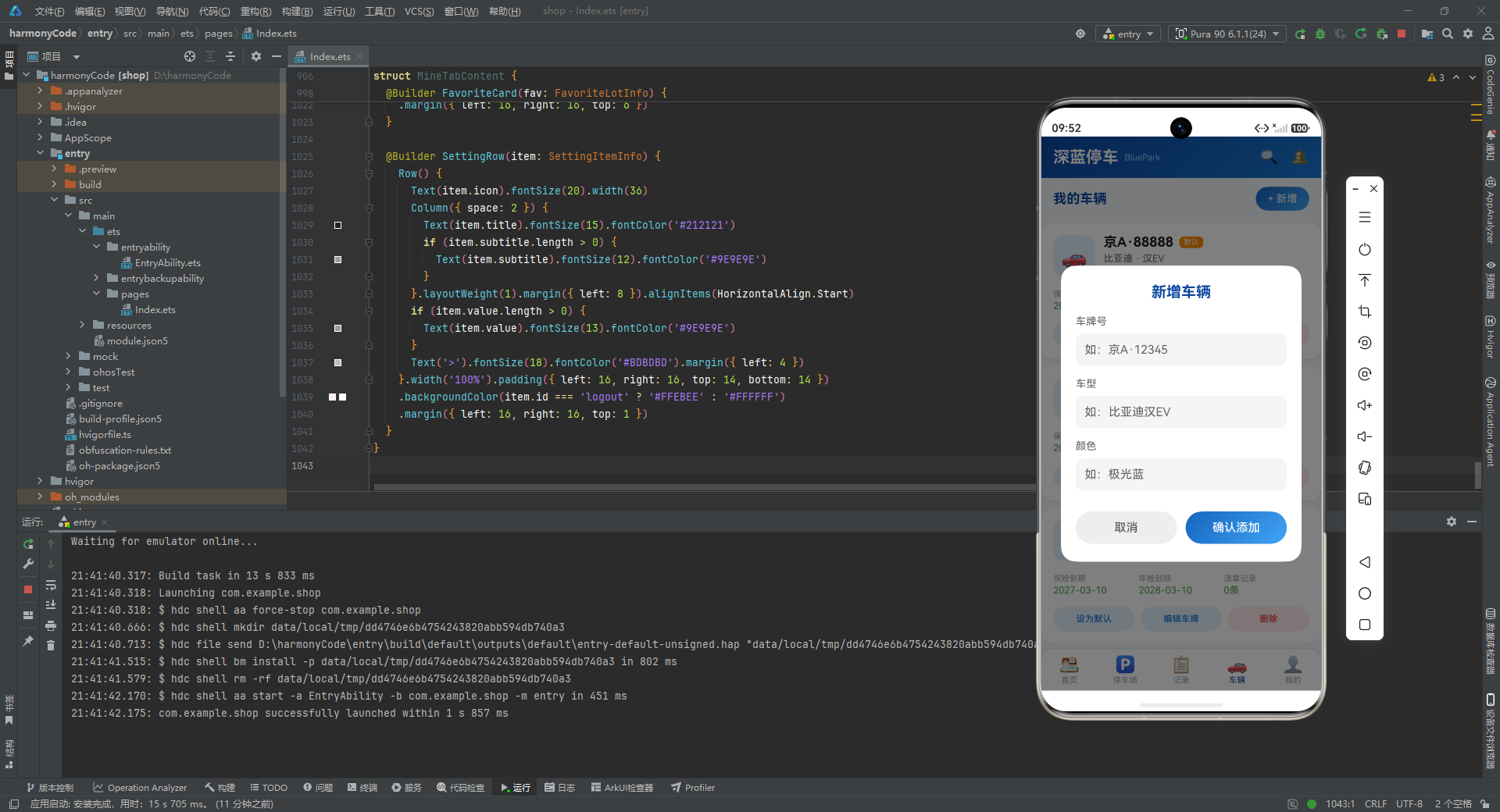
这是一个完整的自定义模态弹窗,没有使用系统提供的 CustomDialogController,而是完全通过声明式 UI 构建。这种实现方式的优势在于:弹窗的样式可以完全自定义,且与主 UI 使用相同的设计语言(颜色、圆角、阴影等)。
弹窗的层级结构:
- 最外层
Stack:全屏定位(position({ x: 0, y: 0 })),背景色为半透明黑色(rgba(0,0,0,0.5)),实现遮罩效果。 - 中间层
Column:100% 宽度的垂直居中容器,将内容推到垂直中心。 - 最内层
Column:86% 宽度的白色卡片,圆角 20vp,承载实际的表单内容。
表单设计 采用 Column({ space: 16 }) 垂直等间距排列三个输入组(车牌号、车型、颜色),每组包含标签(Text)和输入框(TextInput)。输入框高度统一为 44vp(符合触摸目标最小 44px 的无障碍设计标准),圆角 10vp,浅灰色背景 #F5F5F5。
按钮设计:
- "取消"按钮:灰色背景
#EEEEEE,灰色文字。点击后关闭弹窗并重置所有输入状态。 - "确认添加"按钮:使用主题渐变色(
buildGradient('#1565C0', '#42A5F5')),白色文字,视觉上更突出,引导用户完成添加操作。
这种"取消弱化 + 确认强化"的按钮设计是移动端弹窗的通用设计范式——减少用户误操作确认的概率,同时引导用户执行主要操作。
8.2 删除确认弹窗与编辑弹窗
删除确认弹窗和编辑车牌弹窗的结构与新增弹窗基本一致,核心区别在于:
- 删除弹窗的标题为红色(
#E53935),"确认删除"按钮也为红色,传达危险操作的警示感。 - 编辑弹窗只有一个输入框,结构更简洁,宽度为 80%(比新增弹窗的 86% 更窄,因为内容更少)。
三个弹窗共享相同的设计骨架(遮罩层 + 居中卡片 + 表单/内容 + 操作按钮),形成了统一的视觉语言。
九、Tab1 首页:信息聚合与附近推荐
@Component
struct HomeTabContent {
  @State nearbyList: ParkingLotInfo[] = ParkingLotData.slice(0, 15);
代码深度解析:
首页组件使用 .slice(0, 15) 从 20 条停车场数据中截取前 15 条作为"附近停车场"的数据源。这模拟了"按距离排序取前 N 条"的搜索逻辑——实际项目中应通过排序算法实现,但 Mock 数据已按距离升序排列,所以直接截取即可。
  @Builder LocationCard() {
    Column() {
      Row() {
        Column() {
          Row() { Text('📍').fontSize(18); Text('当前位置').fontSize(13).fontColor('#90CAF9') }
          Text('海淀区中关村大街1号').fontSize(17).fontWeight(FontWeight.Bold).fontColor('#FFFFFF')
        }.layoutWeight(1)
        Column() { Text('晴 28°'); Text('适宜停车') }
      }
      Divider().color('rgba(255,255,255,0.2)')
      Row() {
        Column() { Text('附近'); Text('20'); Text('停车场') }
        Column() { Text('可用'); Text('3,478'); Text('车位') }
        Column() { Text('均价'); Text('¥6.5'); Text('每小时') }
      }
    }.linearGradient(buildGradient('#0D47A1', '#1976D2'))
  }
代码深度解析:
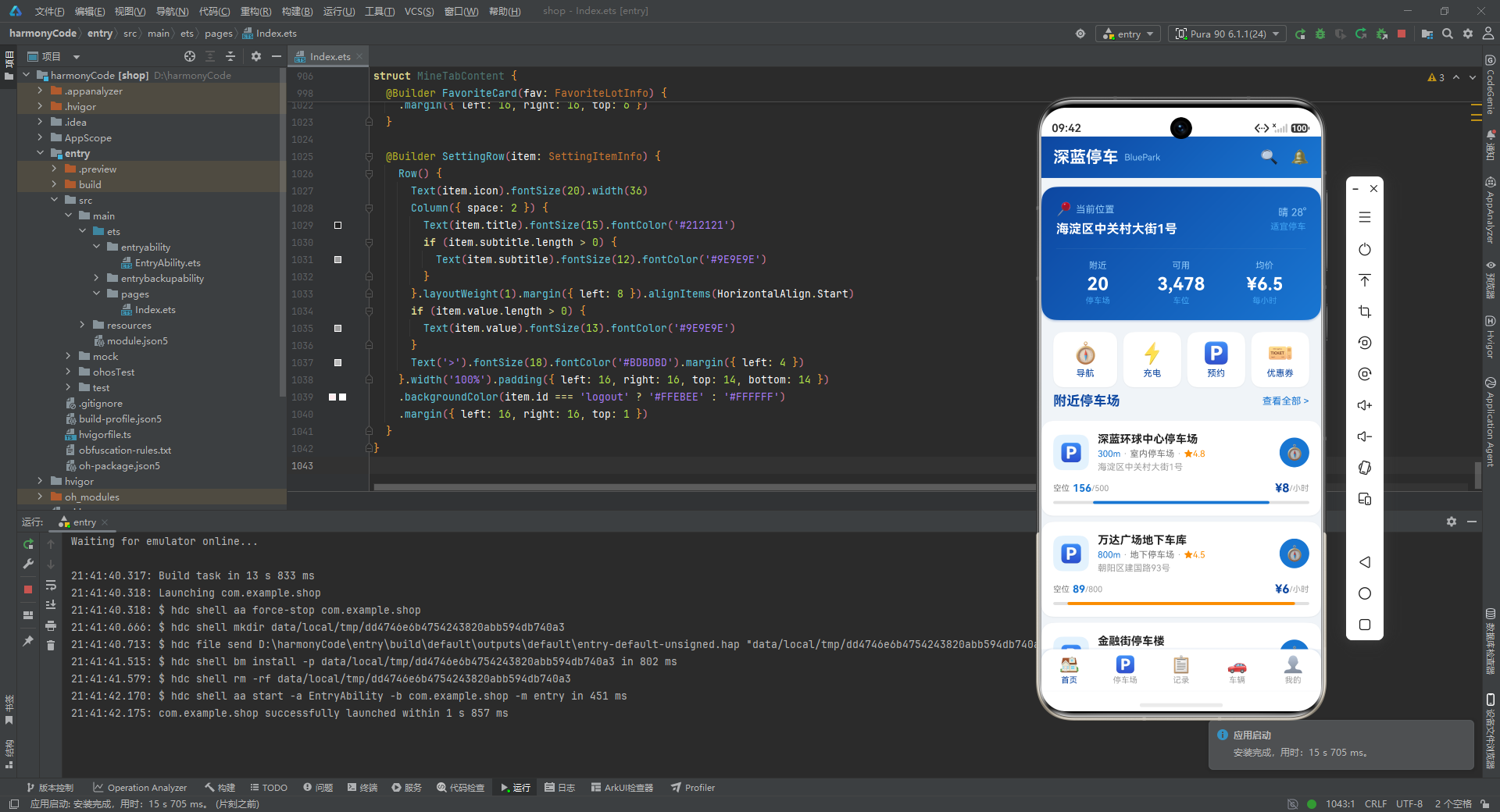
LocationCard 是首页的核心信息卡片,采用了"大卡片 + 渐变背景"的设计模式。
第一行:左侧显示定位图标 + "当前位置"标签 + 详细地址;右侧显示天气信息和停车适宜度提示。这种"左信息 + 右辅助"的布局是信息卡片的常见范式。
分割线:使用 Divider 组件,颜色为白色 20% 透明度(rgba(255,255,255,0.2)),在深色渐变背景上形成微妙的分隔效果,比完全不透明的分割线更加柔和优雅。
第二行:三列等宽统计信息(附近停车场数 20、可用车位数 3,478、均价 6.5 元),每列采用"小标签 + 大数字 + 小单位"的三行纵向布局。数字使用 24fp Bold,形成强烈的视觉锚点,让用户一眼获取关键数据。
整个卡片使用与顶部状态栏相同的渐变配色(#0D47A1 -> #1976D2),保持了"首屏信息区"的色彩连贯性。
  @Builder QuickActionsRow() {
    Row() {
      Column() { Text('🧭').fontSize(28); Text('导航') }.backgroundColor('#FFFFFF').borderRadius(14)
      Column() { Text('⚡').fontSize(28); Text('充电') }.backgroundColor('#FFFFFF').borderRadius(14)
      Column() { Text('🅿').fontSize(28); Text('预约') }.backgroundColor('#FFFFFF').borderRadius(14)
      Column() { Text('🎫').fontSize(28); Text('优惠券') }.backgroundColor('#FFFFFF').borderRadius(14)
    }
  }
代码深度解析:
快捷操作栏提供了四个高频功能的入口:导航、充电、预约、优惠券。采用等宽 Row 布局,每个入口是一个白色圆角卡片(borderRadius(14)),内部纵向排列 emoji 图标(28fp,大尺寸便于点击)和文字标签。
卡片之间通过 margin({ left: 8 }) 设置间距(第一个除外),保持统一的视觉节奏。每张卡片带有轻微阴影(radius: 4, color: 'rgba(0,0,0,0.06)'),营造出"悬浮"的层次感。
  @Builder NearbyParkingCard(lot: ParkingLotInfo) {
    Column() {
      Row() {
        Column() { Text('🅿').fontSize(24) }.width(48).height(48).borderRadius(12).backgroundColor('#E3F2FD')
        Column({ space: 4 }) {
          Text(lot.name).fontWeight(FontWeight.Bold).maxLines(1).textOverflow({ overflow: TextOverflow.Ellipsis })
          Row() {
            Text(formatDistance(lot.distance)); Text(' · '); Text(lot.type); Text(' · '); Text('★' + lot.rating.toFixed(1))
          }
          Text(lot.address).maxLines(1).textOverflow({ overflow: TextOverflow.Ellipsis })
        }.layoutWeight(1)
        Column() { Text('🧭').fontSize(20) }.width(40).height(40).borderRadius(20).backgroundColor('#1976D2')
      }
      Row() {
        Row() { Text('空位'); Text(lot.availableSpaces.toString()).fontWeight(FontWeight.Bold); Text('/' + lot.totalSpaces) }
        Row() { Text('¥' + lot.pricePerHour); Text('/小时') }
      }
      Row() {
        Column() {
          Row().width(`${(1 - lot.availableSpaces / lot.totalSpaces) * 100}%`).height(4)
            .backgroundColor(getOccupancyColor(...))
        }.width('100%').height(4).backgroundColor('#E0E0E0')
      }
    }.backgroundColor('#FFFFFF').borderRadius(16).shadow({ radius: 6, color: 'rgba(0,0,0,0.06)' })
  }
代码深度解析:
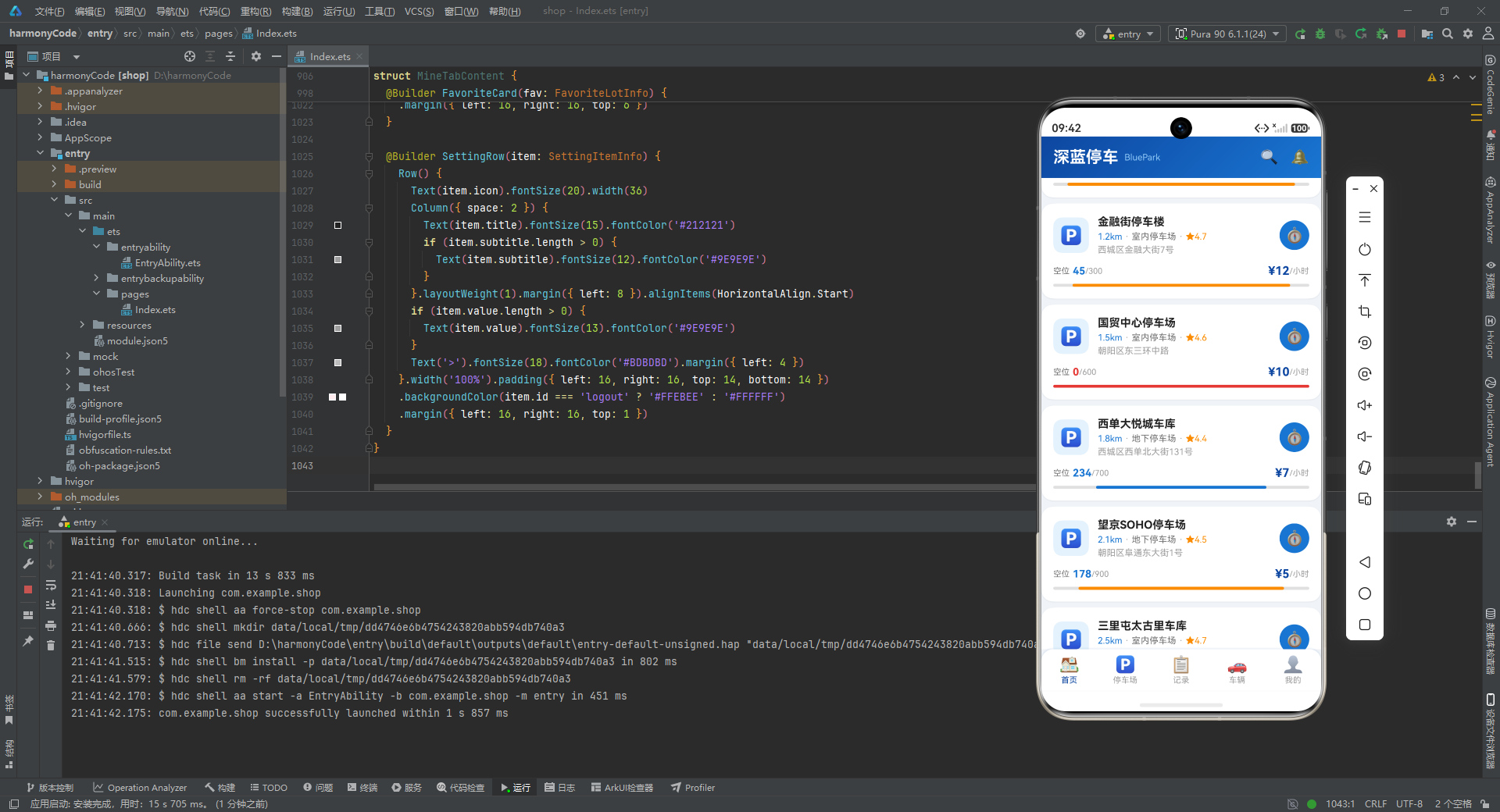
NearbyParkingCard 是停车场列表的核心卡片组件,信息密度高、层次分明。
第一行(头部):左侧蓝色图标区域(48x48vp,圆角 12vp,浅蓝背景)+ 中间信息区(名称 + 距离/类型/评分 + 地址)+ 右侧导航按钮(40x40vp 圆形,主题蓝背景)。.textOverflow({ overflow: TextOverflow.Ellipsis }) 配合 .maxLines(1) 实现了文本溢出时的省略号截断,这是列表卡片中文本展示的标准处理方式。
第二行(数据行):左侧显示空位数(可用/总数),右侧显示价格。可用数字体加粗且根据营业状态着色(营业中为蓝色,已关闭为红色)。
第三行(进度条):使用"外层背景 + 内层前景"的双层 Row 实现水平进度条。外层高度 4vp、浅灰色背景 #E0E0E0;内层宽度为占用率百分比(使用模板字符串动态计算),颜色通过 getOccupancyColor() 函数根据占用率动态设置。这种内联进度条实现方式无需额外的图表组件库,非常轻量高效。
十、Tab2 停车场:筛选、排序与详情展示
@Component
struct ParkingTabContent {
  @State allParkingList: ParkingLotInfo[] = ParkingLotData;
  @State filterType: string = '全部';
  @State sortBy: string = '距离';
代码深度解析:
停车场 Tab 组件维护三个状态变量:完整停车场列表、当前筛选类型、当前排序方式。filterType 和 sortBy 的组合构成了这个页面的"查询条件"——虽然当前代码中筛选和排序的条件渲染逻辑尚未完全实现(filterType 和 sortBy 的变化没有触发列表的重新过滤/排序),但状态变量的声明已经为后续完善预留了接口。
  @Builder FilterBar() {
    Scroll() {
      Row() {
        this.FilterChip('全部'); this.FilterChip('室内'); this.FilterChip('地下');
        this.FilterChip('露天'); this.FilterChip('机械'); this.FilterChip('充电桩'); this.FilterChip('24小时')
      }.padding({ left: 16, right: 16 })
    }.scrollable(ScrollDirection.Horizontal).scrollBar(BarState.Off).height(48)
  }

  @Builder FilterChip(label: string) {
    Text(label).fontColor(this.filterType === label ? '#FFFFFF' : '#1976D2')
      .backgroundColor(this.filterType === label ? '#0D47A1' : '#E3F2FD')
      .onClick(() => { this.filterType = label; })
  }
代码深度解析:
筛选栏采用水平滚动的 Scroll + Row 布局,内含 7 个筛选标签。每个标签(FilterChip)根据是否被选中显示不同的颜色方案:
- 选中态:深蓝背景
#0D47A1+ 白色文字 —— "填充式选中"效果 - 未选中态:浅蓝背景
#E3F2FD+ 蓝色文字 —— "描边式未选中"效果
这种"填充 vs 描边"的选中/未选中视觉对比是移动端筛选标签的经典设计范式,用户可以快速识别当前激活的筛选条件。.scrollable(ScrollDirection.Horizontal) 使标签栏在标签过多时可以水平滚动,.scrollBar(BarState.Off) 隐藏滚动条以保持界面整洁。
  @Builder ParkingDetailCard(lot: ParkingLotInfo) {
    // 完整的停车场详情卡片,包含:
    // 1. 名称 + 营业状态标签
    // 2. 地址 + 距离
    // 3. 类型标签 + 评分 + 特色服务标签(ForEach 渲染)
    // 4. 空位信息 + 占用率进度条
    // 5. 价格信息 + 操作按钮
  }
代码深度解析:
ParkingDetailCard 是整个应用中信息量最大的卡片组件,五层信息纵向堆叠。与首页的 NearbyParkingCard 相比,它提供了更丰富的细节:
- 营业状态标签:
lot.isOpen ? '营业中' : '已关闭',绿色或灰色胶囊标签,是用户选择停车场的第一决策依据。 - 类型标签:使用
getTypeColor()函数为不同类型的停车场分配不同的背景色,形成快速视觉分类。 - 特色服务标签:通过
ForEach(lot.features, ...)动态渲染,每个标签采用浅蓝背景的药丸样式。features数组的不同长度意味着每张卡片的服务标签数量可能不同,ForEach的动态渲染能力恰好应对了这种数据驱动的不确定性。 - 占用率信息:不仅显示空位数量,还显示"可用性文本"(getAvailabilityText)和"使用率百分比",为用户提供多维度的车位信息。
- 操作按钮:底部左侧"详情"按钮(浅蓝描边样式)和右侧"导航"按钮(主题渐变填充样式),"弱化次要操作 + 强化主要操作"的设计延续了弹窗中的按钮设计策略。
十一、Tab3 记录:费用统计与历史查询
@Component
struct RecordTabContent {
  @State recordList: ParkingRecordInfo[] = ParkingRecordData;
  @State totalFee: number = 265;
  @State totalCount: number = 15;
代码深度解析:
记录 Tab 维护三个状态变量:停车记录列表、本月总费用、本月停车次数。虽然 totalFee 和 totalCount 可以通过 recordList 动态计算得出,但这里选择了硬编码的方式。在实际项目中,这两个值应当通过 aboutToAppear() 生命周期回调中的计算逻辑来初始化,并随着记录的增删而更新。
  @Builder FeeSummaryCard() {
    Column() {
      Row() {
        Text('本月停车'); Text('7月').padding(...).backgroundColor('rgba(255,255,255,0.2)')
      }
      Row() {
        Text('¥').fontSize(18); Text(this.totalFee.toString()).fontSize(40).fontWeight(FontWeight.Bold)
      }
      Row() {
        Column() { Text('停车次数'); Text(this.totalCount + '次') }
        Column() { Text('平均费用'); Text('¥' + (this.totalFee / this.totalCount).toFixed(1)) }
        Column() { Text('较上月'); Text('-36.9%').fontColor('#43A047') }
      }
    }.linearGradient(buildGradient('#0D47A1', '#1565C0'))
  }
代码深度解析:
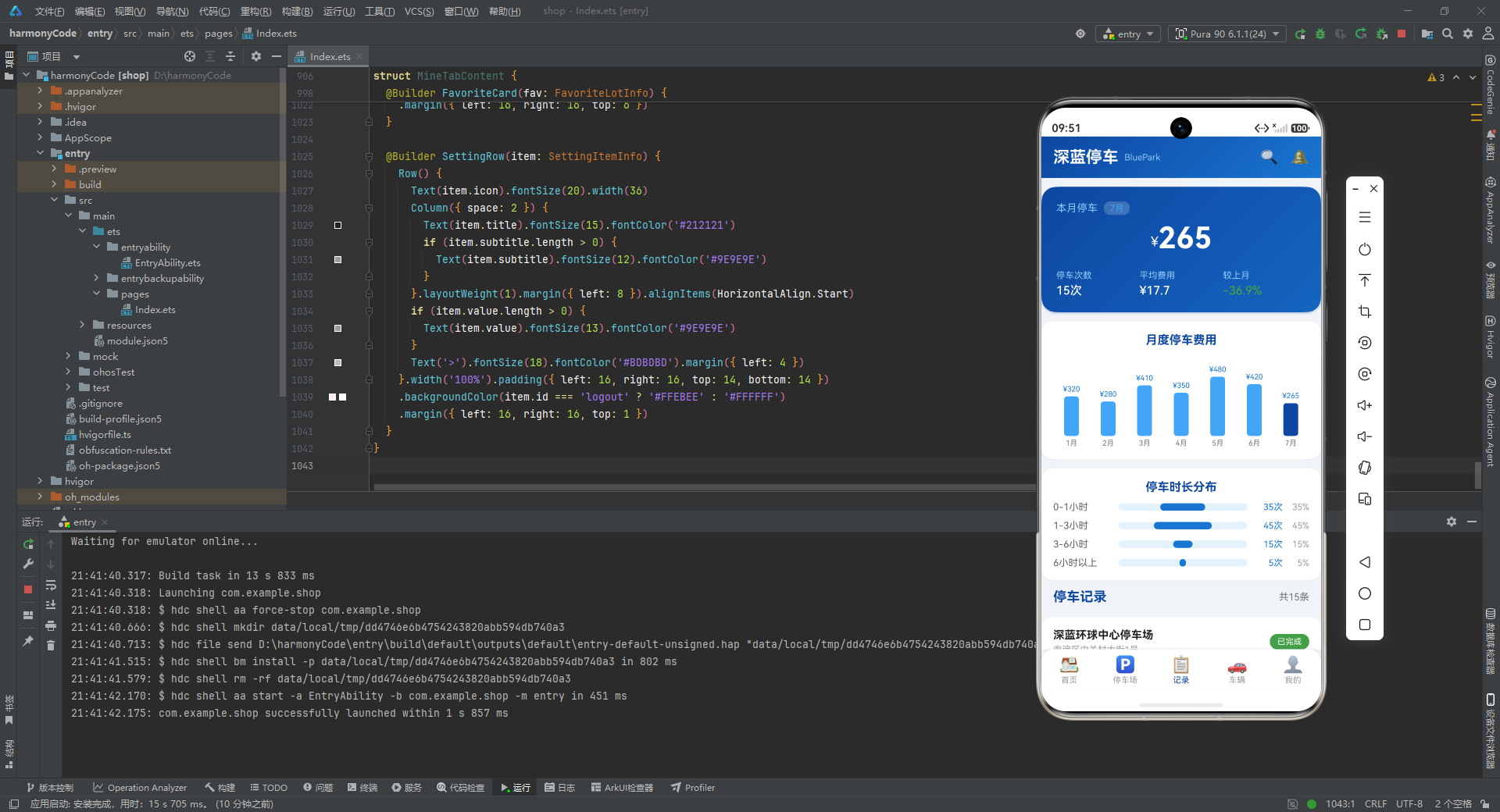
费用摘要卡片是记录 Tab 的"首屏视觉焦点",采用了大数字 + 渐变背景的强视觉设计:
- 核心数字:
¥265使用 40fp Bold 的超大字号,配合¥符号的 18fp 字号形成大小对比,引导用户第一眼关注本月消费总额。 - 三项辅助指标:停车次数(15次)、平均费用(¥17.7)、较上月变化(-36.9%)。平均费用通过
totalFee / totalCount实时计算,较上月变化使用绿色文字(#43A047)表示"消费下降"的好消息。 - 月份标签:使用白色 20% 透明度的背景色(
rgba(255,255,255,0.2)),在深蓝渐变上形成微妙的"磨砂玻璃"效果。
  @Builder MonthlyFeeChart() {
    Column() {
      ForEach(MonthlyStatData, (stat: MonthlyStatInfo) => {
        Column() {
          Text('¥' + stat.totalFee); Column().height(stat.totalFee / 6).backgroundColor(stat.month === '7月' ? '#0D47A1' : '#42A5F5')
          Text(stat.month)
        }.layoutWeight(1).alignItems(HorizontalAlign.Center)
      })
    }.alignItems(VerticalAlign.Bottom)
  }
代码深度解析:
月度费用柱状图是一个纯声明式实现的轻量级图表组件。每根柱子的高度为 stat.totalFee / 6(将最大值约 480 映射到约 80vp 的高度),当月(7月)使用深蓝色,其他月份使用浅蓝色,通过颜色对比突出当前月份。
.alignItems(VerticalAlign.Bottom) 使所有柱子底部对齐,这是柱状图的标准对齐方式——底部代表零值基线,柱子向上延伸表示数值大小。整个图表容器高度固定为 120vp,通过 alignItems(VerticalAlign.Bottom) 约束柱子的增长方向。
  @Builder RecordCard(record: ParkingRecordInfo) {
    // 记录卡片包含:
    // 1. 停车场名称 + 状态标签
    // 2. 入场/出场时间 + 停车时长
    // 3. 车牌号 + 支付方式 + 费用
  }
代码深度解析:
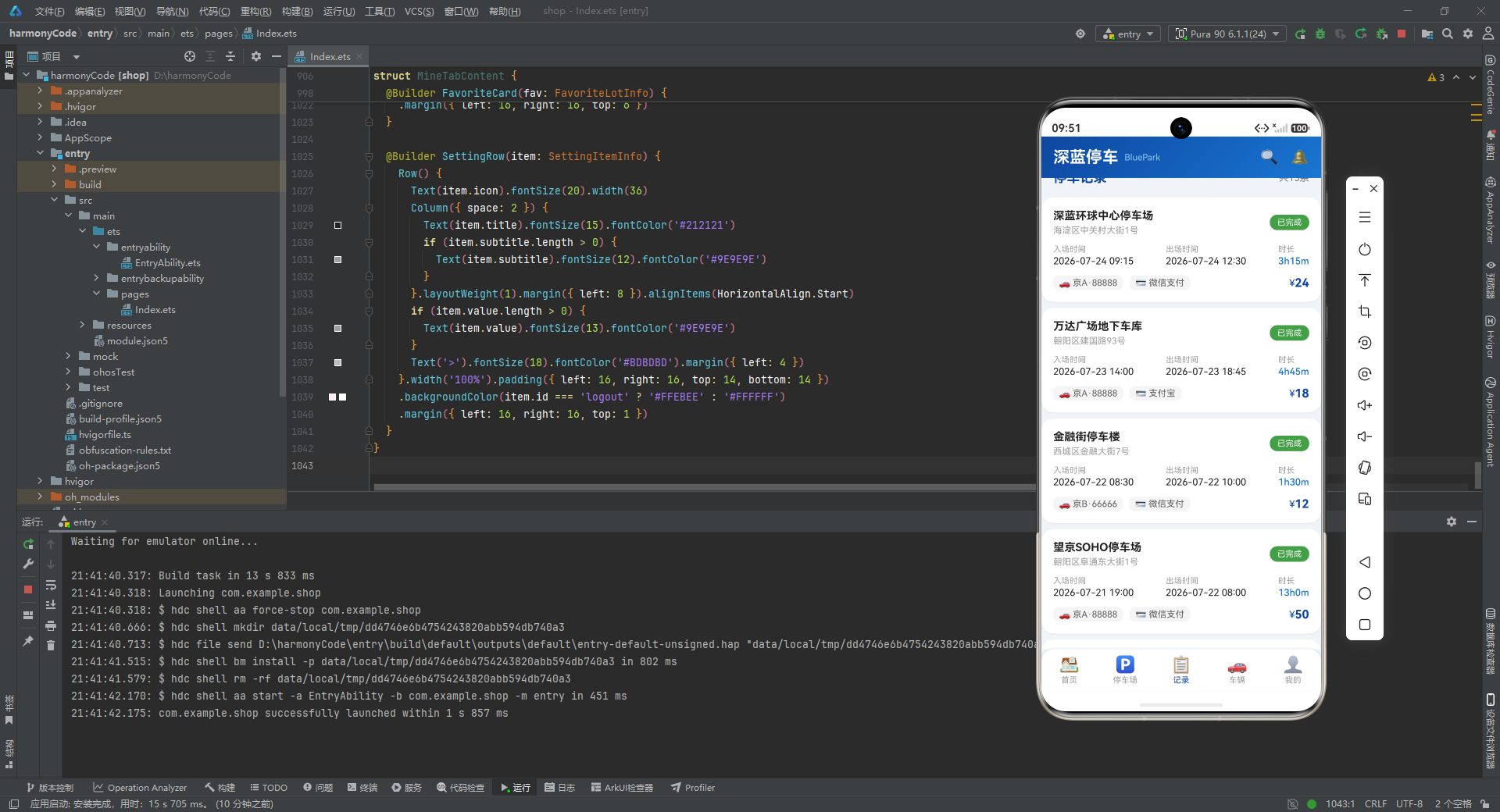
记录卡片的信息层次非常清晰:标题行(名称+状态)-> 时间行(入/出+时长)-> 底部行(车牌+支付+费用)。
状态条件渲染是这张卡片的关键逻辑:当 record.exitTime.length > 0 时显示实际出场时间,否则显示"—“;当 record.paymentMethod.length > 0 时显示支付方式标签,否则不渲染;当 record.fee > 0 时显示具体费用,否则显示"计费中”。这种多层条件判断确保了"已完成"和"停车中"两种状态的记录都能正确展示。
费用区域的对齐方式:使用 .layoutWeight(1).justifyContent(FlexAlign.End) 将费用推到右侧,与左侧的车牌号和支付方式标签形成视觉平衡,体现了"信息密度均匀分布"的布局原则。
十二、Tab4 车辆:车辆管理与类型偏好
@Component
struct VehicleTabContent {
  @State vehicleList: VehicleInfo[] = VehicleData;
  onAddVehicle: (() => void) | null = null;
代码深度解析:
车辆 Tab 组件通过 onAddVehicle 回调属性与父组件通信。(() => void) | null 类型声明表示这是一个可选的回调函数(可能为 null),使用前需要通过 if (this.onAddVehicle) 进行空值检查。这种"可选回调"模式在 ArkTS 中是处理子组件事件的推荐方式。
  @Builder VehicleCard(vehicle: VehicleInfo) {
    // 车辆卡片包含:
    // 1. 车辆图标 + 车牌号(含"默认"标签)+ 品牌型号 + 年款颜色
    // 2. 保险到期 + 年检到期 + 违章记录(三项均带颜色状态指示)
    // 3. 操作按钮:设为默认 / 编辑车牌 / 删除
  }
代码深度解析:
车辆卡片是信息密度最高的卡片之一,包含了车辆的完整画像。
"默认"标签:通过 if (vehicle.isDefault) 条件渲染,只在默认车辆上显示橙色标签。这种"视觉标识 + 条件渲染"的组合让用户无需阅读即可识别默认车辆。
三项日期/数量指标的颜色逻辑:
- 保险/年检到期日 > 基准日期 -> 绿色(有效)
- 保险/年检到期日 <= 基准日期 -> 红色(即将过期或已过期)
- 违章数 > 0 -> 红色(有违章)
- 违章数 = 0 -> 绿色(无违章)
这种"红绿二值颜色"的方案让用户快速扫描所有车辆的健康状态,无需逐一阅读具体日期。
操作按钮行:三个等宽按钮分别对应"设为默认"、“编辑车牌”、"删除"三个操作。"删除"按钮使用红色文字 + 浅红背景(#FFEBEE),延续了"危险操作红色预警"的设计语言。
十三、Tab5 我的:个人中心与收藏管理
@Component
struct MineTabContent {
  @State favoriteList: FavoriteLotInfo[] = FavoriteLotData;
  @State settings: SettingItemInfo[] = Object.values(SettingConfig);
  onDeleteFavorite: ((id: string) => void) | null = null;
  onEditPlate: ((id: string) => void) | null = null;
代码深度解析:
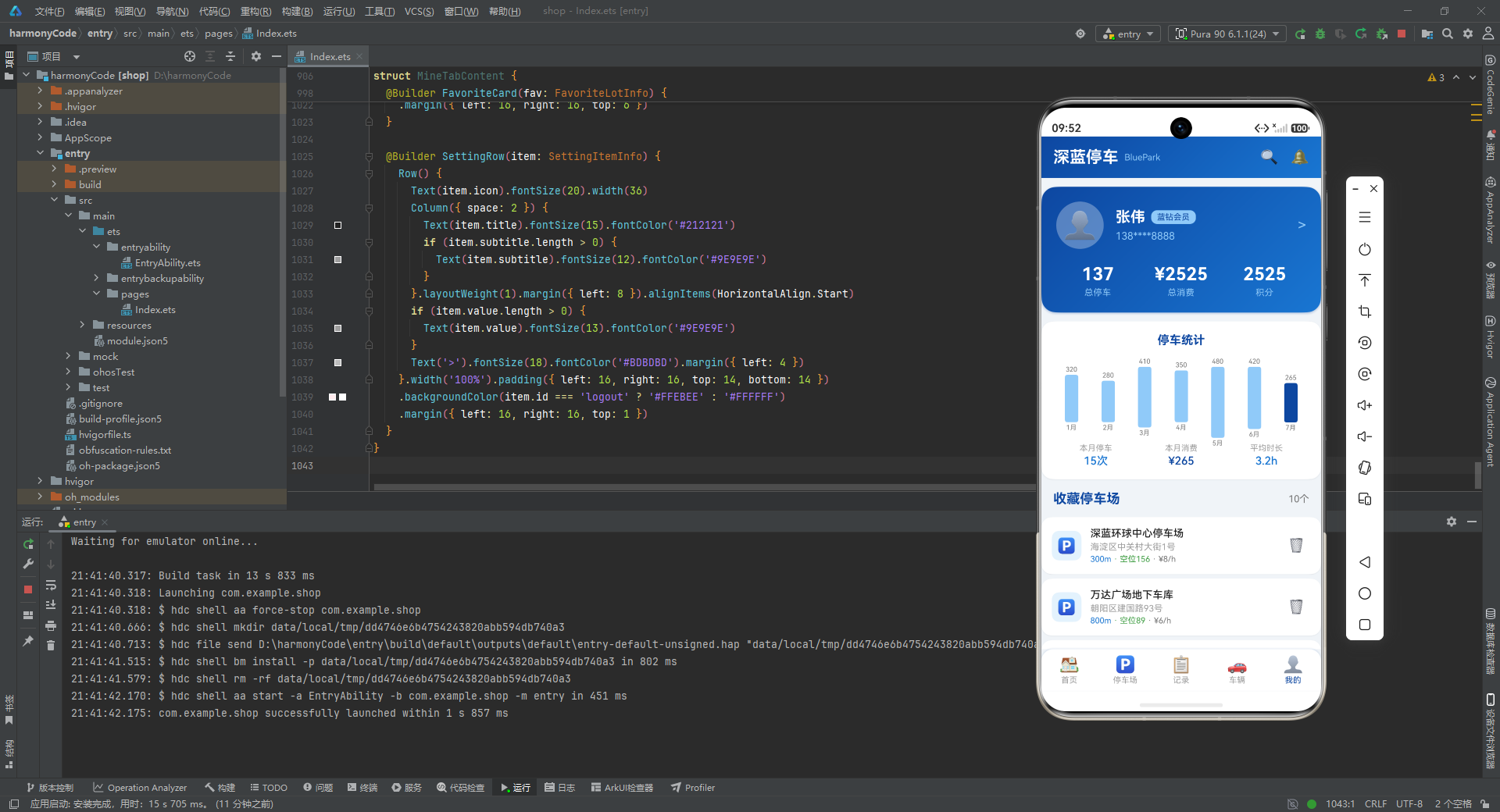
"我的"Tab 是功能最丰富的页面,包含四个主要区块:个人档案卡片、停车统计图表、收藏停车场列表、设置项列表。组件通过两个回调(onDeleteFavorite 和 onEditPlate)与父组件通信,分别处理收藏删除和车牌编辑的弹窗触发。
settings 状态变量的初始化 使用 Object.values(SettingConfig) 将字典对象转换为数组,便于 ForEach 遍历渲染。这种"字典定义 + 转数组渲染"的模式在配置化 UI 开发中非常实用。
  @Builder ProfileCard() {
    Column() {
      Row() {
        Column() { Text(UserProfile.avatar).fontSize(36) }.width(64).height(64).borderRadius(32)
        Column({ space: 6 }) {
          Row() {
            Text(UserProfile.name).fontSize(20).fontWeight(FontWeight.Bold)
            Text(UserProfile.memberLevel).padding(...).backgroundColor('#90CAF9')
          }
          Text(UserProfile.phone).fontSize(14).fontColor('#90CAF9')
        }
        Text('>').fontSize(20).fontColor('#90CAF9')
      }
      Row() {
        Column() { Text(UserProfile.totalParking); Text('总停车') }
        Column() { Text('¥' + UserProfile.totalSpent); Text('总消费') }
        Column() { Text(UserProfile.points); Text('积分') }
      }
    }.linearGradient(buildGradient('#0D47A1', '#1976D2'))
  }
代码深度解析:
个人档案卡片使用了与首页 LocationCard、记录页 FeeSummaryCard 相同的"渐变大卡片"设计模式,形成了跨 Tab 页的视觉统一性。
头像区域:64x64vp 的正方形,圆角 32vp(即完全圆形),使用半透明白色背景(rgba(255,255,255,0.3))。emoji 头像在圆形浅色背景上的显示效果类似于"字母头像"(Letter Avatar),是一种无需真实头像图片的轻量化方案。
会员等级标签:使用浅蓝背景 #90CAF9 + 深蓝文字 #0D47A1 的配色,与白色文字形成对比,突出会员身份。
三项统计数据:总停车次数(137)、总消费金额(2525元)、积分(2525),与记录页 FeeSummaryCard 的"本月统计"形成"全局 vs 当月"的互补视角。
  @Builder FavoriteCard(fav: FavoriteLotInfo) {
    Column() {
      Row() {
        Column() { Text('🅿').fontSize(20) }.width(40).height(40).borderRadius(10).backgroundColor('#E3F2FD')
        Column({ space: 3 }) {
          Text(fav.name).fontWeight(FontWeight.Medium)
          Text(fav.address).fontColor('#9E9E9E')
          Row() { Text(formatDistance(fav.distance)); Text(' · 空位' + fav.availableSpaces); Text(' · ¥' + fav.pricePerHour + '/h') }
        }.layoutWeight(1)
        Column() { Text('🗑').fontSize(18).padding(8).onClick(() => { if (this.onDeleteFavorite) { this.onDeleteFavorite(fav.id); } }) }
      }
    }
  }
代码深度解析:
收藏卡片相比首页的停车场卡片更加紧凑——省略了进度条和价格大字展示,只保留核心信息(名称、地址、距离、空位数、单价),适合列表场景下的快速浏览。
删除操作 通过垃圾桶 emoji 图标(18fp,带 8vp 内边距增大点击区域)触发,点击后调用 onDeleteFavorite 回调通知父组件弹出确认弹窗。这种"列表内触发 + 弹窗确认"的两步操作模式既提供了操作入口,又防止了误删。
  @Builder SettingRow(item: SettingItemInfo) {
    Row() {
      Text(item.icon).fontSize(20).width(36)
      Column({ space: 2 }) {
        Text(item.title)
        if (item.subtitle.length > 0) { Text(item.subtitle).fontSize(12).fontColor('#9E9E9E') }
      }.layoutWeight(1)
      if (item.value.length > 0) { Text(item.value).fontColor('#9E9E9E') }
      Text('>').fontSize(18).fontColor('#BDBDBD')
    }.backgroundColor(item.id === 'logout' ? '#FFEBEE' : '#FFFFFF')
  }
代码深度解析:
设置行组件是一个高度通用的列表项构建器——通过一个 SettingItemInfo 对象驱动全部 UI 渲染,无需任何硬编码的逻辑分支。
布局结构:图标(固定 36vp 宽)+ 标题/副标题(自适应宽度)+ 右侧值(可选)+ 箭头指示符。这是移动端设置列表的"标准四段式"布局。
副标题的条件渲染 if (item.subtitle.length > 0) 确保了没有副标题的设置项(如"退出登录"的 subtitle 为空字符串)不会留下多余的空白区域。
退出登录的特殊背景:通过 item.id === 'logout' 的判断为退出登录行设置浅红色背景(#FFEBEE),与其他白色行形成视觉隔离,强化"危险操作"的警示。
箭头指示符 >:使用灰色(#BDBDBD)的右箭头,暗示该设置项可以点击进入二级页面。这是 iOS 和 Android 设置页面的通用设计惯例。
十四、设计模式与架构总结
通过以上逐段分析,我们可以提炼出本项目采用的若干关键设计模式和最佳实践:
- 配置驱动 UI:Tab 栏、设置列表、统计图表等 UI 元素都通过配置对象驱动渲染,实现了数据与 UI 的分离。
- @Observed + @State 双层响应式:模型类使用
@Observed支持深层属性响应式,组件使用@State管理视图状态。 - 回调通信模式:子组件通过可选回调函数(
(() => void) | null)向父组件传递事件,实现了单向数据流。 - 条件渲染策略:通过
if-else实现状态相关的 UI 变化(如弹窗显隐、Tab 切换、空值处理)。 - Builder 拆分:将复杂组件拆分为多个
@Builder函数,每个函数负责一个独立的 UI 区块,提高可读性和可维护性。 - 统一设计语言:通过
buildGradient()、getOccupancyColor()等工具函数统一管理颜色和视觉效果。 - 防御性编程:除零保护、空值检查、可选回调判断等防御性代码确保了边界情况下的安全运行。
安装DevEco Studio程序

选择目标安装目录:

设置环境变量,但是需要重启一下:

新建一个空白模板:

设置API为24的模板项目:

初始化项目,自动下载相关依赖:

完整代码:
// 深蓝停车出行服务App - 鸿蒙ArkTS
// 深蓝色系(#0D47A1, #1565C0, #1976D2, #42A5F5, #90CAF9)地图卡片布局
// ==================== 1. 接口定义区 ====================
interface ParkingLotInfo {
id: string; name: string; address: string; distance: number;
availableSpaces: number; totalSpaces: number; pricePerHour: number;
maxPrice: number; type: string; rating: number; isOpen: boolean;
latitude: number; longitude: number; features: string[];
}
interface VehicleInfo {
id: string; plateNumber: string; brand: string; model: string; color: string;
year: number; insuranceExpiry: string; inspectionExpiry: string;
violationCount: number; isDefault: boolean;
}
interface ParkingRecordInfo {
id: string; lotName: string; lotAddress: string; plateNumber: string;
entryTime: string; exitTime: string; duration: number; fee: number;
paymentMethod: string; status: string;
}
interface FavoriteLotInfo {
id: string; lotId: string; name: string; address: string; distance: number;
pricePerHour: number; availableSpaces: number; addedDate: string;
}
interface MonthlyStatInfo {
month: string; totalFee: number; totalCount: number; avgDuration: number;
}
interface ParkingTypeInfo {
type: string; count: number; percentage: number; color: string;
}
interface DurationStatInfo { range: string; count: number; percentage: number; }
interface SettingItemInfo {
id: string; title: string; subtitle: string; icon: string; value: string;
}
interface UserProfileInfo {
name: string; phone: string; avatar: string; memberLevel: string;
totalParking: number; totalSpent: number; points: number;
}
interface TabItemInfo { name: string; title: string; icon: string; }
// ==================== 2. @Observed 数据模型类 ====================
@Observed
class ParkingModel {
id: string; name: string; address: string; distance: number;
availableSpaces: number; totalSpaces: number; pricePerHour: number;
maxPrice: number; type: string; rating: number; isOpen: boolean;
latitude: number; longitude: number; features: string[];
constructor(info: ParkingLotInfo) {
this.id = info.id; this.name = info.name; this.address = info.address;
this.distance = info.distance; this.availableSpaces = info.availableSpaces;
this.totalSpaces = info.totalSpaces; this.pricePerHour = info.pricePerHour;
this.maxPrice = info.maxPrice; this.type = info.type; this.rating = info.rating;
this.isOpen = info.isOpen; this.latitude = info.latitude; this.longitude = info.longitude;
this.features = info.features;
}
getOccupancyRate(): number {
if (this.totalSpaces === 0) { return 0; }
return Math.round((1 - this.availableSpaces / this.totalSpaces) * 100);
}
getAvailabilityColor(): string {
if (this.availableSpaces === 0) { return '#E53935'; }
else if (this.availableSpaces < 20) { return '#FB8C00'; }
else { return '#43A047'; }
}
}
@Observed
class VehicleModel {
id: string; plateNumber: string; brand: string; model: string; color: string;
year: number; insuranceExpiry: string; inspectionExpiry: string;
violationCount: number; isDefault: boolean;
constructor(info: VehicleInfo) {
this.id = info.id; this.plateNumber = info.plateNumber; this.brand = info.brand;
this.model = info.model; this.color = info.color; this.year = info.year;
this.insuranceExpiry = info.insuranceExpiry; this.inspectionExpiry = info.inspectionExpiry;
this.violationCount = info.violationCount; this.isDefault = info.isDefault;
}
isInsuranceValid(): boolean { return this.insuranceExpiry > '2026-07-24'; }
isInspectionValid(): boolean { return this.inspectionExpiry > '2026-07-24'; }
}
@Observed
class RecordModel {
id: string; lotName: string; lotAddress: string; plateNumber: string;
entryTime: string; exitTime: string; duration: number; fee: number;
paymentMethod: string; status: string;
constructor(info: ParkingRecordInfo) {
this.id = info.id; this.lotName = info.lotName; this.lotAddress = info.lotAddress;
this.plateNumber = info.plateNumber; this.entryTime = info.entryTime;
this.exitTime = info.exitTime; this.duration = info.duration; this.fee = info.fee;
this.paymentMethod = info.paymentMethod; this.status = info.status;
}
getDurationText(): string {
const h = Math.floor(this.duration / 60);
const m = this.duration % 60;
if (h > 0) { return `${h}小时${m}分钟`; }
return `${m}分钟`;
}
}
// ==================== 3. 配置对象 ====================
const TabConfig: Record<string, TabItemInfo> = {
'home': { name: 'home', title: '首页', icon: '🏠' },
'parking': { name: 'parking', title: '停车场', icon: '🅿' },
'record': { name: 'record', title: '记录', icon: '📋' },
'vehicle': { name: 'vehicle', title: '车辆', icon: '🚗' },
'mine': { name: 'mine', title: '我的', icon: '👤' }
};
const ParkingTypeConfig: Record<string, ParkingTypeInfo> = {
'indoor': { type: '室内停车场', count: 8, percentage: 40, color: '#0D47A1' },
'outdoor': { type: '露天停车场', count: 6, percentage: 30, color: '#42A5F5' },
'underground': { type: '地下停车场', count: 4, percentage: 20, color: '#1976D2' },
'mechanical': { type: '机械车库', count: 2, percentage: 10, color: '#90CAF9' }
};
const DurationStatConfig: Record<string, DurationStatInfo> = {
'short': { range: '0-1小时', count: 35, percentage: 35 },
'medium': { range: '1-3小时', count: 45, percentage: 45 },
'long': { range: '3-6小时', count: 15, percentage: 15 },
'overnight': { range: '6小时以上', count: 5, percentage: 5 }
};
const SettingConfig: Record<string, SettingItemInfo> = {
'payment': { id: 'payment', title: '支付管理', subtitle: '管理支付方式', icon: '💳', value: '微信支付' },
'notify': { id: 'notify', title: '消息通知', subtitle: '推送设置', icon: '🔔', value: '已开启' },
'plate': { id: 'plate', title: '车牌识别', subtitle: '自动识别设置', icon: '📷', value: '自动' },
'invoice': { id: 'invoice', title: '发票管理', subtitle: '电子发票', icon: '🧾', value: '' },
'coupon': { id: 'coupon', title: '优惠券', subtitle: '可用券3张', icon: '🎫', value: '3张' },
'help': { id: 'help', title: '帮助中心', subtitle: '常见问题', icon: '❓', value: '' },
'about': { id: 'about', title: '关于我们', subtitle: '版本信息', icon: 'ℹ', value: 'v2.6.0' },
'logout': { id: 'logout', title: '退出登录', subtitle: '', icon: '🚪', value: '' }
};
// ==================== 4. Mock 数据数组 ====================
const ParkingLotData: ParkingLotInfo[] = [
{ id: 'p001', name: '深蓝环球中心停车场', address: '海淀区中关村大街1号', distance: 0.3, availableSpaces: 156, totalSpaces: 500, pricePerHour: 8, maxPrice: 80, type: '室内停车场', rating: 4.8, isOpen: true, latitude: 39.9847, longitude: 116.3076, features: ['充电桩', '24小时', '监控'] },
{ id: 'p002', name: '万达广场地下车库', address: '朝阳区建国路93号', distance: 0.8, availableSpaces: 89, totalSpaces: 800, pricePerHour: 6, maxPrice: 60, type: '地下停车场', rating: 4.5, isOpen: true, latitude: 39.9087, longitude: 116.4635, features: ['充电桩', '电梯', '监控'] },
{ id: 'p003', name: '金融街停车楼', address: '西城区金融大街7号', distance: 1.2, availableSpaces: 45, totalSpaces: 300, pricePerHour: 12, maxPrice: 120, type: '室内停车场', rating: 4.7, isOpen: true, latitude: 39.9156, longitude: 116.3632, features: ['充电桩', '24小时', '洗车'] },
{ id: 'p004', name: '国贸中心停车场', address: '朝阳区东三环中路', distance: 1.5, availableSpaces: 0, totalSpaces: 600, pricePerHour: 10, maxPrice: 100, type: '室内停车场', rating: 4.6, isOpen: false, latitude: 39.9089, longitude: 116.4587, features: ['充电桩', '电梯'] },
{ id: 'p005', name: '西单大悦城车库', address: '西城区西单北大街131号', distance: 1.8, availableSpaces: 234, totalSpaces: 700, pricePerHour: 7, maxPrice: 70, type: '地下停车场', rating: 4.4, isOpen: true, latitude: 39.9098, longitude: 116.3723, features: ['充电桩', '电梯', '监控'] },
{ id: 'p006', name: '望京SOHO停车场', address: '朝阳区阜通东大街1号', distance: 2.1, availableSpaces: 178, totalSpaces: 900, pricePerHour: 5, maxPrice: 50, type: '地下停车场', rating: 4.5, isOpen: true, latitude: 39.9931, longitude: 116.4735, features: ['充电桩', '24小时', '洗车'] },
{ id: 'p007', name: '三里屯太古里车库', address: '朝阳区三里屯路19号', distance: 2.5, availableSpaces: 12, totalSpaces: 400, pricePerHour: 10, maxPrice: 100, type: '室内停车场', rating: 4.7, isOpen: true, latitude: 39.9361, longitude: 116.4551, features: ['充电桩', '电梯', '监控'] },
{ id: 'p008', name: '王府井大街停车场', address: '东城区王府井大街', distance: 2.8, availableSpaces: 67, totalSpaces: 250, pricePerHour: 8, maxPrice: 80, type: '室内停车场', rating: 4.3, isOpen: true, latitude: 39.9145, longitude: 116.4103, features: ['监控', '24小时'] },
{ id: 'p009', name: '奥林匹克公园停车场', address: '朝阳区北辰东路', distance: 3.0, availableSpaces: 345, totalSpaces: 1000, pricePerHour: 4, maxPrice: 40, type: '露天停车场', rating: 4.2, isOpen: true, latitude: 39.9928, longitude: 116.3974, features: ['充电桩', '24小时'] },
{ id: 'p010', name: '蓝色港湾停车场', address: '朝阳区朝阳公园路6号', distance: 3.2, availableSpaces: 89, totalSpaces: 600, pricePerHour: 6, maxPrice: 60, type: '室内停车场', rating: 4.5, isOpen: true, latitude: 39.9447, longitude: 116.4752, features: ['充电桩', '电梯', '洗车'] },
{ id: 'p011', name: '五棵松华熙LIVE车库', address: '海淀区复兴路69号', distance: 3.5, availableSpaces: 256, totalSpaces: 800, pricePerHour: 5, maxPrice: 50, type: '地下停车场', rating: 4.4, isOpen: true, latitude: 39.9067, longitude: 116.2845, features: ['充电桩', '24小时', '监控'] },
{ id: 'p012', name: '合生汇停车场', address: '朝阳区西大望路', distance: 3.8, availableSpaces: 34, totalSpaces: 500, pricePerHour: 7, maxPrice: 70, type: '室内停车场', rating: 4.6, isOpen: true, latitude: 39.9123, longitude: 116.4856, features: ['充电桩', '电梯'] },
{ id: 'p013', name: '颐堤港停车场', address: '朝阳区酒仙桥路18号', distance: 4.0, availableSpaces: 412, totalSpaces: 1200, pricePerHour: 6, maxPrice: 60, type: '地下停车场', rating: 4.7, isOpen: true, latitude: 39.9689, longitude: 116.4923, features: ['充电桩', '电梯', '监控', '洗车'] },
{ id: 'p014', name: '朝阳大悦城车库', address: '朝阳区朝阳北路101号', distance: 4.2, availableSpaces: 0, totalSpaces: 700, pricePerHour: 6, maxPrice: 60, type: '地下停车场', rating: 4.5, isOpen: false, latitude: 39.9234, longitude: 116.5067, features: ['充电桩', '电梯'] },
{ id: 'p015', name: '世纪金源停车场', address: '海淀区远大路1号', distance: 4.5, availableSpaces: 567, totalSpaces: 1500, pricePerHour: 4, maxPrice: 40, type: '室内停车场', rating: 4.3, isOpen: true, latitude: 39.9567, longitude: 116.2890, features: ['充电桩', '24小时'] },
{ id: 'p016', name: '荟聚中心停车场', address: '大兴区欣宁街15号', distance: 5.0, availableSpaces: 678, totalSpaces: 2000, pricePerHour: 3, maxPrice: 30, type: '室内停车场', rating: 4.4, isOpen: true, latitude: 39.8056, longitude: 116.3423, features: ['充电桩', '电梯', '监控'] },
{ id: 'p017', name: '龙德广场停车场', address: '昌平区立汤路186号', distance: 5.5, availableSpaces: 123, totalSpaces: 600, pricePerHour: 5, maxPrice: 50, type: '露天停车场', rating: 4.2, isOpen: true, latitude: 40.0567, longitude: 116.4123, features: ['充电桩', '24小时'] },
{ id: 'p018', name: '首创奥特莱斯车库', address: '房山区长阳镇', distance: 6.0, availableSpaces: 345, totalSpaces: 800, pricePerHour: 3, maxPrice: 30, type: '露天停车场', rating: 4.1, isOpen: true, latitude: 39.7456, longitude: 116.2234, features: ['充电桩', '监控'] },
{ id: 'p019', name: '中关村e世界停车场', address: '海淀区中关村大街11号', distance: 0.5, availableSpaces: 23, totalSpaces: 200, pricePerHour: 10, maxPrice: 100, type: '机械车库', rating: 4.0, isOpen: true, latitude: 39.9812, longitude: 116.3112, features: ['监控', '24小时'] },
{ id: 'p020', name: '数码大厦停车场', address: '海淀区南大街9号', distance: 1.0, availableSpaces: 45, totalSpaces: 180, pricePerHour: 8, maxPrice: 80, type: '机械车库', rating: 3.9, isOpen: true, latitude: 39.9756, longitude: 116.3201, features: ['监控'] }
];
const VehicleData: VehicleInfo[] = [
{ id: 'v001', plateNumber: '京A·88888', brand: '比亚迪', model: '汉EV', color: '极光蓝', year: 2024, insuranceExpiry: '2027-06-15', inspectionExpiry: '2028-06-15', violationCount: 0, isDefault: true },
{ id: 'v002', plateNumber: '京B·66666', brand: '特斯拉', model: 'Model Y', color: '珍珠白', year: 2023, insuranceExpiry: '2026-12-20', inspectionExpiry: '2027-12-20', violationCount: 2, isDefault: false },
{ id: 'v003', plateNumber: '京C·12345', brand: '蔚来', model: 'ET5', color: '镜空粉', year: 2024, insuranceExpiry: '2027-03-10', inspectionExpiry: '2028-03-10', violationCount: 0, isDefault: false },
{ id: 'v004', plateNumber: '京D·77777', brand: '小鹏', model: 'G9', color: '星爵灰', year: 2023, insuranceExpiry: '2026-09-25', inspectionExpiry: '2027-09-25', violationCount: 1, isDefault: false },
{ id: 'v005', plateNumber: '京E·55555', brand: '理想', model: 'L9', color: '星空蓝', year: 2024, insuranceExpiry: '2027-08-30', inspectionExpiry: '2028-08-30', violationCount: 0, isDefault: false }
];
const ParkingRecordData: ParkingRecordInfo[] = [
{ id: 'r001', lotName: '深蓝环球中心停车场', lotAddress: '海淀区中关村大街1号', plateNumber: '京A·88888', entryTime: '2026-07-24 09:15', exitTime: '2026-07-24 12:30', duration: 195, fee: 24, paymentMethod: '微信支付', status: '已完成' },
{ id: 'r002', lotName: '万达广场地下车库', lotAddress: '朝阳区建国路93号', plateNumber: '京A·88888', entryTime: '2026-07-23 14:00', exitTime: '2026-07-23 18:45', duration: 285, fee: 18, paymentMethod: '支付宝', status: '已完成' },
{ id: 'r003', lotName: '金融街停车楼', lotAddress: '西城区金融大街7号', plateNumber: '京B·66666', entryTime: '2026-07-22 08:30', exitTime: '2026-07-22 10:00', duration: 90, fee: 12, paymentMethod: '微信支付', status: '已完成' },
{ id: 'r004', lotName: '望京SOHO停车场', lotAddress: '朝阳区阜通东大街1号', plateNumber: '京A·88888', entryTime: '2026-07-21 19:00', exitTime: '2026-07-22 08:00', duration: 780, fee: 50, paymentMethod: '微信支付', status: '已完成' },
{ id: 'r005', lotName: '西单大悦城车库', lotAddress: '西城区西单北大街131号', plateNumber: '京C·12345', entryTime: '2026-07-20 13:20', exitTime: '2026-07-20 16:50', duration: 210, fee: 14, paymentMethod: '会员卡', status: '已完成' },
{ id: 'r006', lotName: '三里屯太古里车库', lotAddress: '朝阳区三里屯路19号', plateNumber: '京A·88888', entryTime: '2026-07-19 20:00', exitTime: '2026-07-19 23:30', duration: 210, fee: 20, paymentMethod: '微信支付', status: '已完成' },
{ id: 'r007', lotName: '奥林匹克公园停车场', lotAddress: '朝阳区北辰东路', plateNumber: '京D·77777', entryTime: '2026-07-18 15:00', exitTime: '2026-07-18 19:00', duration: 240, fee: 16, paymentMethod: '支付宝', status: '已完成' },
{ id: 'r008', lotName: '蓝色港湾停车场', lotAddress: '朝阳区朝阳公园路6号', plateNumber: '京A·88888', entryTime: '2026-07-17 11:00', exitTime: '2026-07-17 14:15', duration: 195, fee: 18, paymentMethod: '微信支付', status: '已完成' },
{ id: 'r009', lotName: '五棵松华熙LIVE车库', lotAddress: '海淀区复兴路69号', plateNumber: '京E·55555', entryTime: '2026-07-16 18:30', exitTime: '2026-07-16 22:00', duration: 210, fee: 20, paymentMethod: '会员卡', status: '已完成' },
{ id: 'r010', lotName: '合生汇停车场', lotAddress: '朝阳区西大望路', plateNumber: '京A·88888', entryTime: '2026-07-15 10:00', exitTime: '2026-07-15 13:00', duration: 180, fee: 21, paymentMethod: '微信支付', status: '已完成' },
{ id: 'r011', lotName: '颐堤港停车场', lotAddress: '朝阳区酒仙桥路18号', plateNumber: '京B·66666', entryTime: '2026-07-14 16:00', exitTime: '2026-07-14 20:30', duration: 270, fee: 18, paymentMethod: '支付宝', status: '已完成' },
{ id: 'r012', lotName: '世纪金源停车场', lotAddress: '海淀区远大路1号', plateNumber: '京A·88888', entryTime: '2026-07-13 09:00', exitTime: '2026-07-13 12:00', duration: 180, fee: 12, paymentMethod: '微信支付', status: '已完成' },
{ id: 'r013', lotName: '深蓝环球中心停车场', lotAddress: '海淀区中关村大街1号', plateNumber: '京C·12345', entryTime: '2026-07-24 08:00', exitTime: '', duration: 0, fee: 0, paymentMethod: '', status: '停车中' },
{ id: 'r014', lotName: '荟聚中心停车场', lotAddress: '大兴区欣宁街15号', plateNumber: '京D·77777', entryTime: '2026-07-11 14:00', exitTime: '2026-07-11 17:45', duration: 225, fee: 9, paymentMethod: '微信支付', status: '已完成' },
{ id: 'r015', lotName: '中关村e世界停车场', lotAddress: '海淀区中关村大街11号', plateNumber: '京A·88888', entryTime: '2026-07-10 13:00', exitTime: '2026-07-10 15:30', duration: 150, fee: 20, paymentMethod: '微信支付', status: '已完成' }
];
const FavoriteLotData: FavoriteLotInfo[] = [
{ id: 'f001', lotId: 'p001', name: '深蓝环球中心停车场', address: '海淀区中关村大街1号', distance: 0.3, pricePerHour: 8, availableSpaces: 156, addedDate: '2026-06-01' },
{ id: 'f002', lotId: 'p002', name: '万达广场地下车库', address: '朝阳区建国路93号', distance: 0.8, pricePerHour: 6, availableSpaces: 89, addedDate: '2026-06-05' },
{ id: 'f003', lotId: 'p003', name: '金融街停车楼', address: '西城区金融大街7号', distance: 1.2, pricePerHour: 12, availableSpaces: 45, addedDate: '2026-06-10' },
{ id: 'f004', lotId: 'p005', name: '西单大悦城车库', address: '西城区西单北大街131号', distance: 1.8, pricePerHour: 7, availableSpaces: 234, addedDate: '2026-06-15' },
{ id: 'f005', lotId: 'p006', name: '望京SOHO停车场', address: '朝阳区阜通东大街1号', distance: 2.1, pricePerHour: 5, availableSpaces: 178, addedDate: '2026-06-20' },
{ id: 'f006', lotId: 'p009', name: '奥林匹克公园停车场', address: '朝阳区北辰东路', distance: 3.0, pricePerHour: 4, availableSpaces: 345, addedDate: '2026-06-25' },
{ id: 'f007', lotId: 'p010', name: '蓝色港湾停车场', address: '朝阳区朝阳公园路6号', distance: 3.2, pricePerHour: 6, availableSpaces: 89, addedDate: '2026-07-01' },
{ id: 'f008', lotId: 'p013', name: '颐堤港停车场', address: '朝阳区酒仙桥路18号', distance: 4.0, pricePerHour: 6, availableSpaces: 412, addedDate: '2026-07-05' },
{ id: 'f009', lotId: 'p015', name: '世纪金源停车场', address: '海淀区远大路1号', distance: 4.5, pricePerHour: 4, availableSpaces: 567, addedDate: '2026-07-10' },
{ id: 'f010', lotId: 'p016', name: '荟聚中心停车场', address: '大兴区欣宁街15号', distance: 5.0, pricePerHour: 3, availableSpaces: 678, addedDate: '2026-07-15' }
];
const MonthlyStatData: MonthlyStatInfo[] = [
{ month: '1月', totalFee: 320, totalCount: 18, avgDuration: 165 },
{ month: '2月', totalFee: 280, totalCount: 15, avgDuration: 180 },
{ month: '3月', totalFee: 410, totalCount: 22, avgDuration: 155 },
{ month: '4月', totalFee: 350, totalCount: 19, avgDuration: 170 },
{ month: '5月', totalFee: 480, totalCount: 25, avgDuration: 160 },
{ month: '6月', totalFee: 420, totalCount: 23, avgDuration: 175 },
{ month: '7月', totalFee: 265, totalCount: 15, avgDuration: 190 }
];
const UserProfile: UserProfileInfo = {
name: '张伟', phone: '138****8888', avatar: '👤', memberLevel: '蓝钻会员',
totalParking: 137, totalSpent: 2525, points: 2525
};
// ==================== 5. 全局工具函数 ====================
function formatDistance(km: number): string {
if (km < 1) { return `${Math.round(km * 1000)}m`; }
return `${km.toFixed(1)}km`;
}
function getOccupancyColor(rate: number): string {
if (rate >= 90) { return '#E53935'; }
else if (rate >= 70) { return '#FB8C00'; }
else { return '#1976D2'; }
}
function getTypeColor(type: string): string {
if (type === '室内停车场') { return '#0D47A1'; }
else if (type === '地下停车场') { return '#1976D2'; }
else if (type === '露天停车场') { return '#42A5F5'; }
else { return '#90CAF9'; }
}
function getAvailabilityText(available: number): string {
if (available === 0) { return '已满'; }
else if (available < 20) { return '紧张'; }
else if (available < 100) { return '充足'; }
else { return '充裕'; }
}
function getStatusColor(status: string): string {
if (status === '停车中') { return '#1976D2'; }
else if (status === '已完成') { return '#43A047'; }
else { return '#757575'; }
}
function buildGradient(c1: string, c2: string): LinearGradient {
return { angle: 135, direction: GradientDirection.RightBottom, colors: [[c1, 0.0], [c2, 1.0]] };
}
// ==================== 6. 底部Tab枚举 ====================
enum BottomTab { HOME = 0, PARKING = 1, RECORD = 2, VEHICLE = 3, MINE = 4 }
// ==================== 7. @Entry 主入口组件 ====================
@Entry
@Component
struct ParkingApp {
@State currentTab: number = BottomTab.HOME;
@State showAddVehicleDialog: boolean = false;
@State showDeleteConfirmDialog: boolean = false;
@State showEditPlateDialog: boolean = false;
@State deleteTargetId: string = '';
@State editTargetId: string = '';
@State newPlateInput: string = '';
@State newBrandInput: string = '';
@State newColorInput: string = '';
@State editPlateInput: string = '';
build() {
Stack({ alignContent: Alignment.TopStart }) {
Column() {
this.TopStatusBar()
Column() {
if (this.currentTab === BottomTab.HOME) {
HomeTabContent()
} else if (this.currentTab === BottomTab.PARKING) {
ParkingTabContent()
} else if (this.currentTab === BottomTab.RECORD) {
RecordTabContent()
} else if (this.currentTab === BottomTab.VEHICLE) {
VehicleTabContent({ onAddVehicle: () => { this.showAddVehicleDialog = true; } })
} else {
MineTabContent({
onDeleteFavorite: (id: string) => { this.deleteTargetId = id; this.showDeleteConfirmDialog = true; },
onEditPlate: (id: string) => { this.editTargetId = id; this.showEditPlateDialog = true; }
})
}
}.layoutWeight(1).width('100%')
this.BottomTabBar()
}.width('100%').height('100%')
if (this.showAddVehicleDialog) { this.AddVehicleDialog() }
if (this.showDeleteConfirmDialog) { this.DeleteConfirmDialog() }
if (this.showEditPlateDialog) { this.EditPlateDialog() }
}.width('100%').height('100%').backgroundColor('#F0F4F8')
}
getTabColor(name: string): string {
if ((name === 'home' && this.currentTab === BottomTab.HOME) ||
(name === 'parking' && this.currentTab === BottomTab.PARKING) ||
(name === 'record' && this.currentTab === BottomTab.RECORD) ||
(name === 'vehicle' && this.currentTab === BottomTab.VEHICLE) ||
(name === 'mine' && this.currentTab === BottomTab.MINE)) {
return '#0D47A1';
}
return '#9E9E9E';
}
@Builder TopStatusBar() {
Row() {
Row() {
Text('深蓝停车').fontSize(22).fontWeight(FontWeight.Bold).fontColor('#FFFFFF')
Text('BluePark').fontSize(12).fontColor('#90CAF9').margin({ left: 8 })
}.layoutWeight(1)
Row() {
Text('🔍').fontSize(20).margin({ right: 16 })
Text('🔔').fontSize(20)
}
}.width('100%').height(56).padding({ left: 16, right: 16 })
.linearGradient(buildGradient('#0D47A1', '#1976D2'))
}
@Builder BottomTabBar() {
Row() {
ForEach(Object.values(TabConfig), (item: TabItemInfo) => {
Column() {
Text(item.icon).fontSize(22)
Text(item.title).fontSize(11).margin({ top: 2 }).fontColor(this.getTabColor(item.name))
}.layoutWeight(1).height(56).justifyContent(FlexAlign.Center)
.onClick(() => {
if (item.name === 'home') { this.currentTab = BottomTab.HOME; }
else if (item.name === 'parking') { this.currentTab = BottomTab.PARKING; }
else if (item.name === 'record') { this.currentTab = BottomTab.RECORD; }
else if (item.name === 'vehicle') { this.currentTab = BottomTab.VEHICLE; }
else { this.currentTab = BottomTab.MINE; }
})
})
}.width('100%').height(56).backgroundColor('#FFFFFF')
.borderRadius({ topLeft: 16, topRight: 16 })
.shadow({ radius: 10, color: 'rgba(13,71,161,0.15)', offsetX: 0, offsetY: -2 })
}
@Builder AddVehicleDialog() {
Stack({ alignContent: Alignment.Center }) {
Column() {
Column() {
Text('新增车辆').fontSize(20).fontWeight(FontWeight.Bold).fontColor('#0D47A1').margin({ top: 24, bottom: 20 })
Column({ space: 16 }) {
Column({ space: 8 }) {
Text('车牌号').fontSize(14).fontColor('#616161').alignSelf(ItemAlign.Start)
TextInput({ placeholder: '如:京A·12345', text: this.newPlateInput })
.fontSize(16).height(44).borderRadius(10).backgroundColor('#F5F5F5')
.padding({ left: 12, right: 12 }).onChange((v: string) => { this.newPlateInput = v; })
}.width('100%')
Column({ space: 8 }) {
Text('车型').fontSize(14).fontColor('#616161').alignSelf(ItemAlign.Start)
TextInput({ placeholder: '如:比亚迪汉EV', text: this.newBrandInput })
.fontSize(16).height(44).borderRadius(10).backgroundColor('#F5F5F5')
.padding({ left: 12, right: 12 }).onChange((v: string) => { this.newBrandInput = v; })
}.width('100%')
Column({ space: 8 }) {
Text('颜色').fontSize(14).fontColor('#616161').alignSelf(ItemAlign.Start)
TextInput({ placeholder: '如:极光蓝', text: this.newColorInput })
.fontSize(16).height(44).borderRadius(10).backgroundColor('#F5F5F5')
.padding({ left: 12, right: 12 }).onChange((v: string) => { this.newColorInput = v; })
}.width('100%')
}.width('100%').padding({ left: 20, right: 20 })
Row({ space: 12 }) {
Button('取消').fontSize(16).fontColor('#616161').layoutWeight(1).height(44).borderRadius(22)
.backgroundColor('#EEEEEE').onClick(() => {
this.showAddVehicleDialog = false;
this.newPlateInput = ''; this.newBrandInput = ''; this.newColorInput = '';
})
Button('确认添加').fontSize(16).fontColor('#FFFFFF').layoutWeight(1).height(44).borderRadius(22)
.linearGradient(buildGradient('#1565C0', '#42A5F5')).onClick(() => {
this.showAddVehicleDialog = false;
this.newPlateInput = ''; this.newBrandInput = ''; this.newColorInput = '';
})
}.width('100%').padding({ left: 20, right: 20, top: 28, bottom: 24 })
}.width('86%').borderRadius(20).backgroundColor('#FFFFFF')
}.width('100%')
}.width('100%').height('100%').backgroundColor('rgba(0,0,0,0.5)').position({ x: 0, y: 0 })
}
@Builder DeleteConfirmDialog() {
Stack({ alignContent: Alignment.Center }) {
Column() {
Column() {
Text('确认删除').fontSize(20).fontWeight(FontWeight.Bold).fontColor('#E53935').margin({ top: 24, bottom: 16 })
Text('确定要删除这个收藏的停车场吗?删除后无法恢复。')
.fontSize(14).fontColor('#616161').textAlign(TextAlign.Center).lineHeight(22)
.padding({ left: 20, right: 20 }).margin({ bottom: 24 })
Row({ space: 12 }) {
Button('取消').fontSize(16).fontColor('#616161').layoutWeight(1).height(44).borderRadius(22)
.backgroundColor('#EEEEEE').onClick(() => { this.showDeleteConfirmDialog = false; this.deleteTargetId = ''; })
Button('确认删除').fontSize(16).fontColor('#FFFFFF').layoutWeight(1).height(44).borderRadius(22)
.backgroundColor('#E53935').onClick(() => { this.showDeleteConfirmDialog = false; this.deleteTargetId = ''; })
}.width('100%').padding({ left: 20, right: 20, bottom: 24 })
}.width('80%').borderRadius(20).backgroundColor('#FFFFFF')
}.width('100%')
}.width('100%').height('100%').backgroundColor('rgba(0,0,0,0.5)').position({ x: 0, y: 0 })
}
@Builder EditPlateDialog() {
Stack({ alignContent: Alignment.Center }) {
Column() {
Column() {
Text('编辑车牌号').fontSize(20).fontWeight(FontWeight.Bold).fontColor('#0D47A1').margin({ top: 24, bottom: 20 })
Column({ space: 8 }) {
Text('新车牌号').fontSize(14).fontColor('#616161').alignSelf(ItemAlign.Start)
TextInput({ placeholder: '请输入新车牌号', text: this.editPlateInput })
.fontSize(16).height(44).borderRadius(10).backgroundColor('#F5F5F5')
.padding({ left: 12, right: 12 }).onChange((v: string) => { this.editPlateInput = v; })
}.width('100%').padding({ left: 20, right: 20 })
Row({ space: 12 }) {
Button('取消').fontSize(16).fontColor('#616161').layoutWeight(1).height(44).borderRadius(22)
.backgroundColor('#EEEEEE').onClick(() => {
this.showEditPlateDialog = false; this.editTargetId = ''; this.editPlateInput = '';
})
Button('保存').fontSize(16).fontColor('#FFFFFF').layoutWeight(1).height(44).borderRadius(22)
.linearGradient(buildGradient('#1565C0', '#42A5F5')).onClick(() => {
this.showEditPlateDialog = false; this.editTargetId = ''; this.editPlateInput = '';
})
}.width('100%').padding({ left: 20, right: 20, top: 28, bottom: 24 })
}.width('80%').borderRadius(20).backgroundColor('#FFFFFF')
}.width('100%')
}.width('100%').height('100%').backgroundColor('rgba(0,0,0,0.5)').position({ x: 0, y: 0 })
}
}
// ==================== 8. Tab1: 首页 ====================
@Component
struct HomeTabContent {
@State nearbyList: ParkingLotInfo[] = ParkingLotData.slice(0, 15);
build() {
Scroll() {
Column() {
this.LocationCard()
this.QuickActionsRow()
Row() {
Text('附近停车场').fontSize(18).fontWeight(FontWeight.Bold).fontColor('#0D47A1').layoutWeight(1)
Text('查看全部 >').fontSize(13).fontColor('#1976D2')
}.width('100%').padding({ left: 16, right: 16, top: 8, bottom: 8 })
ForEach(this.nearbyList, (lot: ParkingLotInfo) => { this.NearbyParkingCard(lot) })
Column().width('100%').height(20)
}.width('100%')
}.width('100%').height('100%').scrollBar(BarState.Off).edgeEffect(EdgeEffect.Spring)
}
@Builder LocationCard() {
Column() {
Row() {
Column() {
Row() {
Text('📍').fontSize(18)
Text('当前位置').fontSize(13).fontColor('#90CAF9').margin({ left: 4 })
}
Text('海淀区中关村大街1号').fontSize(17).fontWeight(FontWeight.Bold).fontColor('#FFFFFF').margin({ top: 6 })
}.alignItems(HorizontalAlign.Start).layoutWeight(1)
Column() {
Text('晴 28°').fontSize(14).fontColor('#90CAF9')
Text('适宜停车').fontSize(12).fontColor('#42A5F5').margin({ top: 4 })
}.alignItems(HorizontalAlign.End)
}.width('100%')
Divider().color('rgba(255,255,255,0.2)').margin({ top: 16, bottom: 16 })
Row() {
Column() {
Text('附近').fontSize(12).fontColor('#90CAF9')
Text('20').fontSize(24).fontWeight(FontWeight.Bold).fontColor('#FFFFFF').margin({ top: 4 })
Text('停车场').fontSize(11).fontColor('#42A5F5').margin({ top: 2 })
}.layoutWeight(1).alignItems(HorizontalAlign.Center)
Column() {
Text('可用').fontSize(12).fontColor('#90CAF9')
Text('3,478').fontSize(24).fontWeight(FontWeight.Bold).fontColor('#FFFFFF').margin({ top: 4 })
Text('车位').fontSize(11).fontColor('#42A5F5').margin({ top: 2 })
}.layoutWeight(1).alignItems(HorizontalAlign.Center)
Column() {
Text('均价').fontSize(12).fontColor('#90CAF9')
Text('¥6.5').fontSize(24).fontWeight(FontWeight.Bold).fontColor('#FFFFFF').margin({ top: 4 })
Text('每小时').fontSize(11).fontColor('#42A5F5').margin({ top: 2 })
}.layoutWeight(1).alignItems(HorizontalAlign.Center)
}.width('100%')
}.width('100%').padding(20).borderRadius(20)
.linearGradient(buildGradient('#0D47A1', '#1976D2'))
.shadow({ radius: 12, color: 'rgba(13,71,161,0.3)', offsetX: 0, offsetY: 4 })
.margin({ left: 16, right: 16, top: 12 })
}
@Builder QuickActionsRow() {
Row() {
Column() {
Text('🧭').fontSize(28)
Text('导航').fontSize(12).fontColor('#0D47A1').margin({ top: 4 })
}.layoutWeight(1).padding({ top: 12, bottom: 12 }).backgroundColor('#FFFFFF').borderRadius(14)
.shadow({ radius: 4, color: 'rgba(0,0,0,0.06)', offsetX: 0, offsetY: 2 })
Column() {
Text('⚡').fontSize(28)
Text('充电').fontSize(12).fontColor('#0D47A1').margin({ top: 4 })
}.layoutWeight(1).padding({ top: 12, bottom: 12 }).backgroundColor('#FFFFFF').borderRadius(14)
.shadow({ radius: 4, color: 'rgba(0,0,0,0.06)', offsetX: 0, offsetY: 2 }).margin({ left: 8 })
Column() {
Text('🅿').fontSize(28)
Text('预约').fontSize(12).fontColor('#0D47A1').margin({ top: 4 })
}.layoutWeight(1).padding({ top: 12, bottom: 12 }).backgroundColor('#FFFFFF').borderRadius(14)
.shadow({ radius: 4, color: 'rgba(0,0,0,0.06)', offsetX: 0, offsetY: 2 }).margin({ left: 8 })
Column() {
Text('🎫').fontSize(28)
Text('优惠券').fontSize(12).fontColor('#0D47A1').margin({ top: 4 })
}.layoutWeight(1).padding({ top: 12, bottom: 12 }).backgroundColor('#FFFFFF').borderRadius(14)
.shadow({ radius: 4, color: 'rgba(0,0,0,0.06)', offsetX: 0, offsetY: 2 }).margin({ left: 8 })
}.width('100%').padding({ left: 16, right: 16, top: 16 })
}
@Builder NearbyParkingCard(lot: ParkingLotInfo) {
Column() {
Row() {
Column() { Text('🅿').fontSize(24) }
.width(48).height(48).borderRadius(12).backgroundColor('#E3F2FD')
.justifyContent(FlexAlign.Center).alignItems(HorizontalAlign.Center)
Column({ space: 4 }) {
Text(lot.name).fontSize(15).fontWeight(FontWeight.Bold).fontColor('#212121')
.maxLines(1).textOverflow({ overflow: TextOverflow.Ellipsis })
Row() {
Text(formatDistance(lot.distance)).fontSize(12).fontColor('#1976D2')
Text(' · ').fontSize(12).fontColor('#9E9E9E')
Text(lot.type).fontSize(12).fontColor('#757575')
Text(' · ').fontSize(12).fontColor('#9E9E9E')
Text('★' + lot.rating.toFixed(1)).fontSize(12).fontColor('#FB8C00')
}
Text(lot.address).fontSize(12).fontColor('#9E9E9E')
.maxLines(1).textOverflow({ overflow: TextOverflow.Ellipsis })
}.layoutWeight(1).margin({ left: 12 }).alignItems(HorizontalAlign.Start)
Column() { Text('🧭').fontSize(20) }
.width(40).height(40).borderRadius(20).backgroundColor('#1976D2')
.justifyContent(FlexAlign.Center).alignItems(HorizontalAlign.Center)
}.width('100%')
Row() {
Row() {
Text('空位').fontSize(11).fontColor('#757575')
Text(lot.availableSpaces.toString()).fontSize(14).fontWeight(FontWeight.Bold)
.fontColor(lot.isOpen ? '#1976D2' : '#E53935').margin({ left: 4 })
Text('/' + lot.totalSpaces).fontSize(11).fontColor('#9E9E9E')
}.layoutWeight(1)
Row() {
Text('¥' + lot.pricePerHour).fontSize(16).fontWeight(FontWeight.Bold).fontColor('#0D47A1')
Text('/小时').fontSize(11).fontColor('#9E9E9E')
}
}.width('100%').margin({ top: 12 })
Row() {
Column() {
Row().width(lot.totalSpaces > 0 ? `${(1 - lot.availableSpaces / lot.totalSpaces) * 100}%` : '100%')
.height(4).borderRadius(2)
.backgroundColor(getOccupancyColor(lot.totalSpaces > 0 ? Math.round((1 - lot.availableSpaces / lot.totalSpaces) * 100) : 100))
}.width('100%').height(4).borderRadius(2).backgroundColor('#E0E0E0')
}.width('100%').margin({ top: 8 })
}.width('100%').padding(16).borderRadius(16).backgroundColor('#FFFFFF')
.shadow({ radius: 6, color: 'rgba(0,0,0,0.06)', offsetX: 0, offsetY: 2 })
.margin({ left: 16, right: 16, top: 8 })
}
}
// ==================== 9. Tab2: 停车场 ====================
@Component
struct ParkingTabContent {
@State allParkingList: ParkingLotInfo[] = ParkingLotData;
@State filterType: string = '全部';
@State sortBy: string = '距离';
build() {
Scroll() {
Column() {
this.FilterBar()
this.SortBar()
ForEach(this.allParkingList, (lot: ParkingLotInfo) => { this.ParkingDetailCard(lot) })
Column().width('100%').height(20)
}.width('100%')
}.width('100%').height('100%').scrollBar(BarState.Off).edgeEffect(EdgeEffect.Spring)
}
@Builder FilterBar() {
Scroll() {
Row() {
this.FilterChip('全部')
this.FilterChip('室内')
this.FilterChip('地下')
this.FilterChip('露天')
this.FilterChip('机械')
this.FilterChip('充电桩')
this.FilterChip('24小时')
}.padding({ left: 16, right: 16 })
}.scrollable(ScrollDirection.Horizontal).scrollBar(BarState.Off).height(48).width('100%')
}
@Builder FilterChip(label: string) {
Text(label).fontSize(13).fontColor(this.filterType === label ? '#FFFFFF' : '#1976D2')
.padding({ left: 16, right: 16, top: 8, bottom: 8 }).margin({ right: 8 }).borderRadius(20)
.backgroundColor(this.filterType === label ? '#0D47A1' : '#E3F2FD')
.onClick(() => { this.filterType = label; })
}
@Builder SortBar() {
Row() {
Text('共' + this.allParkingList.length.toString() + '个停车场').fontSize(13).fontColor('#757575').layoutWeight(1)
Row({ space: 4 }) {
Text(this.sortBy).fontSize(13).fontColor('#1976D2')
Text('⇅').fontSize(14).fontColor('#1976D2')
}.onClick(() => {
if (this.sortBy === '距离') { this.sortBy = '价格'; }
else if (this.sortBy === '价格') { this.sortBy = '评分'; }
else { this.sortBy = '距离'; }
})
}.width('100%').padding({ left: 16, right: 16, top: 4, bottom: 8 })
}
@Builder ParkingDetailCard(lot: ParkingLotInfo) {
Column() {
Row() {
Text(lot.name).fontSize(16).fontWeight(FontWeight.Bold).fontColor('#212121').layoutWeight(1)
.maxLines(1).textOverflow({ overflow: TextOverflow.Ellipsis })
Text(lot.isOpen ? '营业中' : '已关闭').fontSize(11).fontColor('#FFFFFF')
.padding({ left: 8, right: 8, top: 3, bottom: 3 }).borderRadius(10)
.backgroundColor(lot.isOpen ? '#43A047' : '#9E9E9E')
}.width('100%')
Row() {
Text('📍 ' + lot.address).fontSize(13).fontColor('#757575').layoutWeight(1)
.maxLines(1).textOverflow({ overflow: TextOverflow.Ellipsis })
Text(formatDistance(lot.distance)).fontSize(13).fontColor('#1976D2').fontWeight(FontWeight.Medium)
}.width('100%').margin({ top: 8 })
Row() {
Text(lot.type).fontSize(12).fontColor('#FFFFFF').padding({ left: 8, right: 8, top: 3, bottom: 3 })
.borderRadius(8).backgroundColor(getTypeColor(lot.type))
Text('★ ' + lot.rating.toFixed(1)).fontSize(12).fontColor('#FB8C00').margin({ left: 8 })
Row() {
ForEach(lot.features, (feat: string) => {
Text(feat).fontSize(11).fontColor('#1976D2').padding({ left: 6, right: 6, top: 2, bottom: 2 })
.margin({ right: 4 }).borderRadius(6).backgroundColor('#E3F2FD')
})
}.margin({ left: 8 }).layoutWeight(1)
}.width('100%').margin({ top: 10 })
Column({ space: 6 }) {
Row() {
Text('空位').fontSize(12).fontColor('#616161')
Text(lot.availableSpaces.toString()).fontSize(13).fontWeight(FontWeight.Bold)
.fontColor(lot.availableSpaces > 0 ? '#1976D2' : '#E53935').margin({ left: 4 })
Text(' / ' + lot.totalSpaces.toString()).fontSize(12).fontColor('#9E9E9E')
Text(' (' + getAvailabilityText(lot.availableSpaces) + ')').fontSize(12)
.fontColor(lot.availableSpaces > 0 ? '#43A047' : '#E53935')
Text(lot.totalSpaces > 0 ? '使用率' + Math.round((1 - lot.availableSpaces / lot.totalSpaces) * 100).toString() + '%' : '已满')
.fontSize(12).fontColor('#9E9E9E').layoutWeight(1).textAlign(TextAlign.End)
}.width('100%')
Column() {
Row().width(lot.totalSpaces > 0 ? `${(1 - lot.availableSpaces / lot.totalSpaces) * 100}%` : '100%')
.height(6).borderRadius(3)
.backgroundColor(getOccupancyColor(lot.totalSpaces > 0 ? Math.round((1 - lot.availableSpaces / lot.totalSpaces) * 100) : 100))
}.width('100%').height(6).borderRadius(3).backgroundColor('#E0E0E0')
}.width('100%').margin({ top: 12 })
Row() {
Column() {
Text('¥' + lot.pricePerHour + '/小时').fontSize(15).fontWeight(FontWeight.Bold).fontColor('#0D47A1')
Text('封顶 ¥' + lot.maxPrice + '/天').fontSize(11).fontColor('#9E9E9E').margin({ top: 2 })
}.alignItems(HorizontalAlign.Start).layoutWeight(1)
Row({ space: 8 }) {
Button('详情').fontSize(13).fontColor('#1976D2').height(36).borderRadius(18).backgroundColor('#E3F2FD')
Button('导航').fontSize(13).fontColor('#FFFFFF').height(36).borderRadius(18)
.linearGradient(buildGradient('#1565C0', '#42A5F5'))
}
}.width('100%').margin({ top: 14 })
}.width('100%').padding(16).borderRadius(16).backgroundColor('#FFFFFF')
.shadow({ radius: 6, color: 'rgba(0,0,0,0.06)', offsetX: 0, offsetY: 2 })
.margin({ left: 16, right: 16, top: 8 })
}
}
// ==================== 10. Tab3: 记录 ====================
@Component
struct RecordTabContent {
@State recordList: ParkingRecordInfo[] = ParkingRecordData;
@State totalFee: number = 265;
@State totalCount: number = 15;
build() {
Scroll() {
Column() {
this.FeeSummaryCard()
this.MonthlyFeeChart()
this.DurationStatCard()
Row() {
Text('停车记录').fontSize(18).fontWeight(FontWeight.Bold).fontColor('#0D47A1').layoutWeight(1)
Text('共' + this.recordList.length.toString() + '条').fontSize(13).fontColor('#757575')
}.width('100%').padding({ left: 16, right: 16, top: 12, bottom: 8 })
ForEach(this.recordList, (record: ParkingRecordInfo) => { this.RecordCard(record) })
Column().width('100%').height(20)
}.width('100%')
}.width('100%').height('100%').scrollBar(BarState.Off).edgeEffect(EdgeEffect.Spring)
}
@Builder FeeSummaryCard() {
Column() {
Row() {
Text('本月停车').fontSize(14).fontColor('#90CAF9')
Text('7月').fontSize(12).fontColor('#42A5F5').padding({ left: 8, right: 8, top: 2, bottom: 2 })
.borderRadius(8).backgroundColor('rgba(255,255,255,0.2)').margin({ left: 8 })
}.width('100%')
Row() {
Text('¥').fontSize(18).fontColor('#FFFFFF').margin({ bottom: 8 })
Text(this.totalFee.toString()).fontSize(40).fontWeight(FontWeight.Bold).fontColor('#FFFFFF')
}.margin({ top: 8 }).alignItems(VerticalAlign.Bottom)
Row() {
Column() {
Text('停车次数').fontSize(12).fontColor('#90CAF9')
Text(this.totalCount.toString() + '次').fontSize(16).fontWeight(FontWeight.Medium).fontColor('#FFFFFF').margin({ top: 4 })
}.layoutWeight(1).alignItems(HorizontalAlign.Start)
Column() {
Text('平均费用').fontSize(12).fontColor('#90CAF9')
Text('¥' + (this.totalFee / this.totalCount).toFixed(1)).fontSize(16).fontWeight(FontWeight.Medium).fontColor('#FFFFFF').margin({ top: 4 })
}.layoutWeight(1).alignItems(HorizontalAlign.Start)
Column() {
Text('较上月').fontSize(12).fontColor('#90CAF9')
Text('-36.9%').fontSize(16).fontWeight(FontWeight.Medium).fontColor('#43A047').margin({ top: 4 })
}.layoutWeight(1).alignItems(HorizontalAlign.Start)
}.width('100%').margin({ top: 20 })
}.width('100%').padding(20).borderRadius(20)
.linearGradient(buildGradient('#0D47A1', '#1565C0'))
.shadow({ radius: 12, color: 'rgba(13,71,161,0.3)', offsetX: 0, offsetY: 4 })
.margin({ left: 16, right: 16, top: 12 })
}
@Builder MonthlyFeeChart() {
Column() {
Text('月度停车费用').fontSize(16).fontWeight(FontWeight.Bold).fontColor('#0D47A1')
Row() {
ForEach(MonthlyStatData, (stat: MonthlyStatInfo) => {
Column() {
Text('¥' + stat.totalFee.toString()).fontSize(10).fontColor('#1976D2').margin({ bottom: 4 })
Column().width(20).height(stat.totalFee / 6).borderRadius(4)
.backgroundColor(stat.month === '7月' ? '#0D47A1' : '#42A5F5')
Text(stat.month).fontSize(10).fontColor('#757575').margin({ top: 4 })
}.layoutWeight(1).alignItems(HorizontalAlign.Center)
})
}.width('100%').height(120).margin({ top: 16 }).alignItems(VerticalAlign.Bottom)
}.width('100%').padding(16).borderRadius(16).backgroundColor('#FFFFFF')
.shadow({ radius: 6, color: 'rgba(0,0,0,0.06)', offsetX: 0, offsetY: 2 })
.margin({ left: 16, right: 16, top: 12 })
}
@Builder DurationStatCard() {
Column() {
Text('停车时长分布').fontSize(16).fontWeight(FontWeight.Bold).fontColor('#0D47A1')
ForEach(Object.values(DurationStatConfig), (stat: DurationStatInfo) => {
Row() {
Text(stat.range).fontSize(13).fontColor('#616161').width(80)
Column() {
Row().width(`${stat.percentage}%`).height(10).borderRadius(5).backgroundColor('#1976D2')
}.layoutWeight(1).height(10).borderRadius(5).backgroundColor('#E3F2FD').margin({ left: 8, right: 8 })
Text(stat.count.toString() + '次').fontSize(12).fontColor('#1976D2').width(40).textAlign(TextAlign.End)
Text(stat.percentage.toString() + '%').fontSize(12).fontColor('#9E9E9E').width(36).textAlign(TextAlign.End)
}.width('100%').margin({ top: 10 })
})
}.width('100%').padding(16).borderRadius(16).backgroundColor('#FFFFFF')
.shadow({ radius: 6, color: 'rgba(0,0,0,0.06)', offsetX: 0, offsetY: 2 })
.margin({ left: 16, right: 16, top: 12 })
}
@Builder RecordCard(record: ParkingRecordInfo) {
Column() {
Row() {
Column() {
Text(record.lotName).fontSize(15).fontWeight(FontWeight.Bold).fontColor('#212121')
.maxLines(1).textOverflow({ overflow: TextOverflow.Ellipsis })
Text(record.lotAddress).fontSize(12).fontColor('#9E9E9E').margin({ top: 4 })
.maxLines(1).textOverflow({ overflow: TextOverflow.Ellipsis })
}.layoutWeight(1).alignItems(HorizontalAlign.Start).margin({ right: 8 })
Text(record.status).fontSize(11).fontColor('#FFFFFF')
.padding({ left: 10, right: 10, top: 4, bottom: 4 }).borderRadius(10)
.backgroundColor(getStatusColor(record.status))
}.width('100%')
Row() {
Column() {
Text('入场时间').fontSize(11).fontColor('#9E9E9E')
Text(record.entryTime).fontSize(13).fontColor('#212121').margin({ top: 2 })
}.alignItems(HorizontalAlign.Start).layoutWeight(1)
Column() {
Text('出场时间').fontSize(11).fontColor('#9E9E9E')
Text(record.exitTime.length > 0 ? record.exitTime : '—').fontSize(13).fontColor('#212121').margin({ top: 2 })
}.alignItems(HorizontalAlign.Start).layoutWeight(1)
Column() {
Text('时长').fontSize(11).fontColor('#9E9E9E')
Text(record.duration > 0 ? `${Math.floor(record.duration / 60)}h${record.duration % 60}m` : '—')
.fontSize(13).fontColor('#1976D2').fontWeight(FontWeight.Medium).margin({ top: 2 })
}.alignItems(HorizontalAlign.Start)
}.width('100%').margin({ top: 12 })
Row() {
Text('🚗 ' + record.plateNumber).fontSize(12).fontColor('#616161')
.padding({ left: 8, right: 8, top: 3, bottom: 3 }).borderRadius(8).backgroundColor('#F5F5F5')
if (record.paymentMethod.length > 0) {
Text('💳 ' + record.paymentMethod).fontSize(12).fontColor('#616161')
.padding({ left: 8, right: 8, top: 3, bottom: 3 }).borderRadius(8).backgroundColor('#F5F5F5').margin({ left: 8 })
}
Row() {
if (record.fee > 0) {
Text('¥').fontSize(13).fontColor('#0D47A1')
Text(record.fee.toString()).fontSize(16).fontWeight(FontWeight.Bold).fontColor('#0D47A1')
} else {
Text('计费中').fontSize(14).fontWeight(FontWeight.Bold).fontColor('#1976D2')
}
}.layoutWeight(1).justifyContent(FlexAlign.End)
}.width('100%').margin({ top: 12 }).alignItems(VerticalAlign.Center)
}.width('100%').padding(16).borderRadius(16).backgroundColor('#FFFFFF')
.shadow({ radius: 6, color: 'rgba(0,0,0,0.06)', offsetX: 0, offsetY: 2 })
.margin({ left: 16, right: 16, top: 8 })
}
}
// ==================== 11. Tab4: 车辆 ====================
@Component
struct VehicleTabContent {
@State vehicleList: VehicleInfo[] = VehicleData;
onAddVehicle: (() => void) | null = null;
build() {
Scroll() {
Column() {
Row() {
Text('我的车辆').fontSize(18).fontWeight(FontWeight.Bold).fontColor('#0D47A1').layoutWeight(1)
Row() {
Text('+ 新增').fontSize(14).fontColor('#FFFFFF')
}.padding({ left: 16, right: 16, top: 8, bottom: 8 }).borderRadius(20)
.linearGradient(buildGradient('#1565C0', '#42A5F5'))
.onClick(() => { if (this.onAddVehicle) { this.onAddVehicle(); } })
}.width('100%').padding({ left: 16, right: 16, top: 12, bottom: 8 })
ForEach(this.vehicleList, (vehicle: VehicleInfo) => { this.VehicleCard(vehicle) })
this.ParkingTypeChart()
Column().width('100%').height(20)
}.width('100%')
}.width('100%').height('100%').scrollBar(BarState.Off).edgeEffect(EdgeEffect.Spring)
}
@Builder VehicleCard(vehicle: VehicleInfo) {
Column() {
Row() {
Column() { Text('🚗').fontSize(28) }
.width(56).height(56).borderRadius(14).backgroundColor('#E3F2FD')
.justifyContent(FlexAlign.Center).alignItems(HorizontalAlign.Center)
Column({ space: 4 }) {
Row() {
Text(vehicle.plateNumber).fontSize(18).fontWeight(FontWeight.Bold).fontColor('#212121')
if (vehicle.isDefault) {
Text('默认').fontSize(10).fontColor('#FFFFFF').padding({ left: 6, right: 6, top: 2, bottom: 2 })
.borderRadius(6).backgroundColor('#FB8C00').margin({ left: 8 })
}
}
Text(vehicle.brand + ' · ' + vehicle.model).fontSize(13).fontColor('#616161')
Text(vehicle.year.toString() + '款 · ' + vehicle.color).fontSize(12).fontColor('#9E9E9E')
}.layoutWeight(1).margin({ left: 12 }).alignItems(HorizontalAlign.Start)
}.width('100%')
Row() {
Column() {
Text('保险到期').fontSize(11).fontColor('#9E9E9E')
Text(vehicle.insuranceExpiry).fontSize(13)
.fontColor(vehicle.insuranceExpiry > '2026-07-24' ? '#43A047' : '#E53935').margin({ top: 2 })
}.layoutWeight(1).alignItems(HorizontalAlign.Start)
Column() {
Text('年检到期').fontSize(11).fontColor('#9E9E9E')
Text(vehicle.inspectionExpiry).fontSize(13)
.fontColor(vehicle.inspectionExpiry > '2026-07-24' ? '#43A047' : '#E53935').margin({ top: 2 })
}.layoutWeight(1).alignItems(HorizontalAlign.Start)
Column() {
Text('违章记录').fontSize(11).fontColor('#9E9E9E')
Text(vehicle.violationCount.toString() + '条').fontSize(13)
.fontColor(vehicle.violationCount > 0 ? '#E53935' : '#43A047').margin({ top: 2 })
}.layoutWeight(1).alignItems(HorizontalAlign.Start)
}.width('100%').margin({ top: 16 })
Row({ space: 8 }) {
Button('设为默认').fontSize(12).fontColor('#1976D2').layoutWeight(1).height(34).borderRadius(17).backgroundColor('#E3F2FD')
Button('编辑车牌').fontSize(12).fontColor('#1976D2').layoutWeight(1).height(34).borderRadius(17).backgroundColor('#E3F2FD')
Button('删除').fontSize(12).fontColor('#E53935').layoutWeight(1).height(34).borderRadius(17).backgroundColor('#FFEBEE')
}.width('100%').margin({ top: 14 })
}.width('100%').padding(16).borderRadius(16).backgroundColor('#FFFFFF')
.shadow({ radius: 6, color: 'rgba(0,0,0,0.06)', offsetX: 0, offsetY: 2 })
.margin({ left: 16, right: 16, top: 8 })
}
@Builder ParkingTypeChart() {
Column() {
Text('停车场类型偏好').fontSize(16).fontWeight(FontWeight.Bold).fontColor('#0D47A1').margin({ bottom: 12 })
ForEach(Object.values(ParkingTypeConfig), (item: ParkingTypeInfo) => {
Row() {
Text(item.type).fontSize(13).fontColor('#616161').width(100)
Column() {
Row().width(`${item.percentage}%`).height(14).borderRadius(7).backgroundColor(item.color)
}.layoutWeight(1).height(14).borderRadius(7).backgroundColor('#F0F0F0').margin({ left: 8, right: 8 })
Text(item.count.toString() + '次').fontSize(12).fontColor('#1976D2').width(40).textAlign(TextAlign.End)
Text(item.percentage.toString() + '%').fontSize(12).fontColor('#9E9E9E').width(36).textAlign(TextAlign.End)
}.width('100%').margin({ top: 10 }).alignItems(VerticalAlign.Center)
})
}.width('100%').padding(16).borderRadius(16).backgroundColor('#FFFFFF')
.shadow({ radius: 6, color: 'rgba(0,0,0,0.06)', offsetX: 0, offsetY: 2 })
.margin({ left: 16, right: 16, top: 12 })
}
}
// ==================== 12. Tab5: 我的 ====================
@Component
struct MineTabContent {
@State favoriteList: FavoriteLotInfo[] = FavoriteLotData;
@State settings: SettingItemInfo[] = Object.values(SettingConfig);
onDeleteFavorite: ((id: string) => void) | null = null;
onEditPlate: ((id: string) => void) | null = null;
build() {
Scroll() {
Column() {
this.ProfileCard()
this.ParkingStatsCard()
Row() {
Text('收藏停车场').fontSize(18).fontWeight(FontWeight.Bold).fontColor('#0D47A1').layoutWeight(1)
Text(this.favoriteList.length.toString() + '个').fontSize(13).fontColor('#757575')
}.width('100%').padding({ left: 16, right: 16, top: 16, bottom: 8 })
ForEach(this.favoriteList, (fav: FavoriteLotInfo) => { this.FavoriteCard(fav) })
Text('设置').fontSize(18).fontWeight(FontWeight.Bold).fontColor('#0D47A1')
.width('100%').padding({ left: 16, top: 16, bottom: 8 })
ForEach(this.settings, (item: SettingItemInfo) => { this.SettingRow(item) })
Column().width('100%').height(20)
}.width('100%')
}.width('100%').height('100%').scrollBar(BarState.Off).edgeEffect(EdgeEffect.Spring)
}
@Builder ProfileCard() {
Column() {
Row() {
Column() { Text(UserProfile.avatar).fontSize(36) }
.width(64).height(64).borderRadius(32).backgroundColor('rgba(255,255,255,0.3)')
.justifyContent(FlexAlign.Center).alignItems(HorizontalAlign.Center)
Column({ space: 6 }) {
Row() {
Text(UserProfile.name).fontSize(20).fontWeight(FontWeight.Bold).fontColor('#FFFFFF')
Text(UserProfile.memberLevel).fontSize(11).fontColor('#0D47A1')
.padding({ left: 8, right: 8, top: 3, bottom: 3 }).borderRadius(8).backgroundColor('#90CAF9').margin({ left: 8 })
}
Text(UserProfile.phone).fontSize(14).fontColor('#90CAF9')
}.layoutWeight(1).margin({ left: 16 }).alignItems(HorizontalAlign.Start)
Text('>').fontSize(20).fontColor('#90CAF9')
}.width('100%')
Row() {
Column() {
Text(UserProfile.totalParking.toString()).fontSize(24).fontWeight(FontWeight.Bold).fontColor('#FFFFFF')
Text('总停车').fontSize(12).fontColor('#90CAF9').margin({ top: 4 })
}.layoutWeight(1).alignItems(HorizontalAlign.Center)
Column() {
Text('¥' + UserProfile.totalSpent.toString()).fontSize(24).fontWeight(FontWeight.Bold).fontColor('#FFFFFF')
Text('总消费').fontSize(12).fontColor('#90CAF9').margin({ top: 4 })
}.layoutWeight(1).alignItems(HorizontalAlign.Center)
Column() {
Text(UserProfile.points.toString()).fontSize(24).fontWeight(FontWeight.Bold).fontColor('#FFFFFF')
Text('积分').fontSize(12).fontColor('#90CAF9').margin({ top: 4 })
}.layoutWeight(1).alignItems(HorizontalAlign.Center)
}.width('100%').margin({ top: 20 })
}.width('100%').padding(20).borderRadius(20)
.linearGradient(buildGradient('#0D47A1', '#1976D2'))
.shadow({ radius: 12, color: 'rgba(13,71,161,0.3)', offsetX: 0, offsetY: 4 })
.margin({ left: 16, right: 16, top: 12 })
}
@Builder ParkingStatsCard() {
Column() {
Text('停车统计').fontSize(16).fontWeight(FontWeight.Bold).fontColor('#0D47A1')
Row() {
ForEach(MonthlyStatData, (stat: MonthlyStatInfo) => {
Column() {
Text(stat.totalFee.toString()).fontSize(9).fontColor('#757575').margin({ bottom: 2 })
Column().width(18).height(stat.totalFee / 5).borderRadius(3)
.backgroundColor(stat.month === '7月' ? '#0D47A1' : '#90CAF9')
Text(stat.month).fontSize(9).fontColor('#757575').margin({ top: 2 })
}.layoutWeight(1).alignItems(HorizontalAlign.Center)
})
}.width('100%').height(100).margin({ top: 14 }).alignItems(VerticalAlign.Bottom)
Row() {
Column() {
Text('本月停车').fontSize(11).fontColor('#9E9E9E')
Text('15次').fontSize(15).fontWeight(FontWeight.Medium).fontColor('#1976D2').margin({ top: 2 })
}.layoutWeight(1).alignItems(HorizontalAlign.Center)
Column() {
Text('本月消费').fontSize(11).fontColor('#9E9E9E')
Text('¥265').fontSize(15).fontWeight(FontWeight.Medium).fontColor('#0D47A1').margin({ top: 2 })
}.layoutWeight(1).alignItems(HorizontalAlign.Center)
Column() {
Text('平均时长').fontSize(11).fontColor('#9E9E9E')
Text('3.2h').fontSize(15).fontWeight(FontWeight.Medium).fontColor('#1976D2').margin({ top: 2 })
}.layoutWeight(1).alignItems(HorizontalAlign.Center)
}.width('100%').margin({ top: 16 })
}.width('100%').padding(16).borderRadius(16).backgroundColor('#FFFFFF')
.shadow({ radius: 6, color: 'rgba(0,0,0,0.06)', offsetX: 0, offsetY: 2 })
.margin({ left: 16, right: 16, top: 12 })
}
@Builder FavoriteCard(fav: FavoriteLotInfo) {
Column() {
Row() {
Column() { Text('🅿').fontSize(20) }
.width(40).height(40).borderRadius(10).backgroundColor('#E3F2FD')
.justifyContent(FlexAlign.Center).alignItems(HorizontalAlign.Center)
Column({ space: 3 }) {
Text(fav.name).fontSize(14).fontWeight(FontWeight.Medium).fontColor('#212121')
.maxLines(1).textOverflow({ overflow: TextOverflow.Ellipsis })
Text(fav.address).fontSize(12).fontColor('#9E9E9E')
.maxLines(1).textOverflow({ overflow: TextOverflow.Ellipsis })
Row() {
Text(formatDistance(fav.distance)).fontSize(11).fontColor('#1976D2')
Text(' · 空位' + fav.availableSpaces.toString()).fontSize(11).fontColor('#43A047')
Text(' · ¥' + fav.pricePerHour.toString() + '/h').fontSize(11).fontColor('#757575')
}
}.layoutWeight(1).margin({ left: 12 }).alignItems(HorizontalAlign.Start)
Column() {
Text('🗑').fontSize(18).padding(8)
.onClick(() => { if (this.onDeleteFavorite) { this.onDeleteFavorite(fav.id); } })
}
}.width('100%').alignItems(VerticalAlign.Center)
}.width('100%').padding(14).borderRadius(14).backgroundColor('#FFFFFF')
.shadow({ radius: 4, color: 'rgba(0,0,0,0.05)', offsetX: 0, offsetY: 2 })
.margin({ left: 16, right: 16, top: 6 })
}
@Builder SettingRow(item: SettingItemInfo) {
Row() {
Text(item.icon).fontSize(20).width(36)
Column({ space: 2 }) {
Text(item.title).fontSize(15).fontColor('#212121')
if (item.subtitle.length > 0) {
Text(item.subtitle).fontSize(12).fontColor('#9E9E9E')
}
}.layoutWeight(1).margin({ left: 8 }).alignItems(HorizontalAlign.Start)
if (item.value.length > 0) {
Text(item.value).fontSize(13).fontColor('#9E9E9E')
}
Text('>').fontSize(18).fontColor('#BDBDBD').margin({ left: 4 })
}.width('100%').padding({ left: 16, right: 16, top: 14, bottom: 14 })
.backgroundColor(item.id === 'logout' ? '#FFEBEE' : '#FFFFFF')
.margin({ left: 16, right: 16, top: 1 })
}
}
十五、各模块关键技术点对比总结
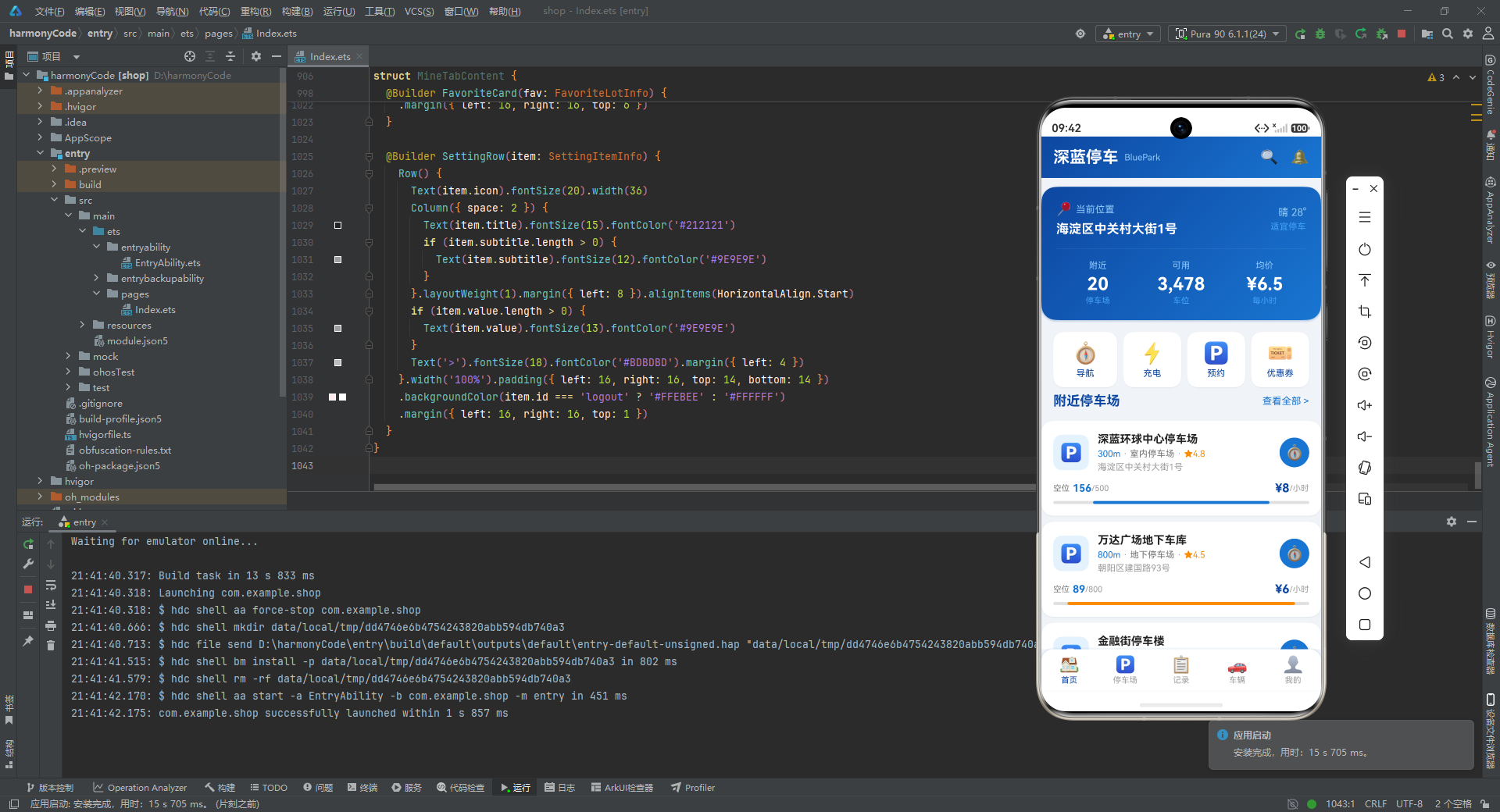
| 维度 | 首页(HomeTabContent) | 停车场(ParkingTabContent) | 记录(RecordTabContent) | 车辆(VehicleTabContent) | 我的(MineTabContent) |
|---|---|---|---|---|---|
| 核心功能 | 位置展示 + 附近停车场推荐 + 快捷入口 | 全部停车场列表 + 类型筛选 + 多维排序 | 月度费用统计 + 时长分布 + 历史记录查询 | 车辆信息管理 + 保险/年检状态监控 | 个人档案 + 收藏管理 + 应用设置 |
| 状态管理要点 | nearbyList(@State,15条截取数据) | allParkingList + filterType + sortBy(三个 @State 协同) | recordList + totalFee + totalCount(统计值与列表分离) | vehicleList(@State) | favoriteList + settings(两个 @State 分别管理) |
| 关键组件 | LocationCard、QuickActionsRow、NearbyParkingCard | FilterBar、SortBar、ParkingDetailCard | FeeSummaryCard、MonthlyFeeChart、DurationStatCard、RecordCard | VehicleCard、ParkingTypeChart | ProfileCard、ParkingStatsCard、FavoriteCard、SettingRow |
| 数据可视化 | 三列统计数据(数字卡片) | 水平进度条(占用率) | 柱状图(月度费用)、水平进度条(时长分布)、大数字摘要 | 水平进度条(类型偏好) | 柱状图(月度统计)、三列统计数据 |
| 交互设计 | 纯展示,无用户操作 | 筛选切换、排序切换、详情/导航按钮 | 纯展示,无用户操作 | 新增车辆回调、设为默认、编辑车牌、删除 | 删除收藏回调(触发确认弹窗)、设置行点击 |
| 父子通信 | 无(无回调参数) | 无(无回调参数) | 无(无回调参数) | onAddVehicle 回调 -> 父组件弹窗 | onDeleteFavorite + onEditPlate 双回调 |
| 条件渲染 | 无特殊条件逻辑 | isOpen 营业状态、features 动态标签、空位数颜色 | status 区分"已完成/停车中"、exitTime/fee 空值处理 | isDefault 默认标签、insuranceExpiry/inspectionExpiry 日期颜色、violationCount 数量颜色 | subtitle/value 空值判断、logout 特殊背景色 |
| 设计模式 | 数据截取展示、渐变信息卡片 | 配置驱动筛选、动态进度条颜色 | 数据驱动图表高度、多层条件展示 | 可选回调模式、多指标颜色预警 | 通用列表项构建器、字典转数组遍历 |
| 使用的全局工具函数 | formatDistance、getOccupancyColor、buildGradient | formatDistance、getTypeColor、getAvailabilityText、getOccupancyColor、buildGradient | getStatusColor、buildGradient | buildGradient | formatDistance、buildGradient |
| 布局特征 | Scroll 纵向滚动 + ForEach 列表 | Scroll 纵向滚动 + 水平 Scroll 筛选栏 + ForEach 列表 | Scroll 纵向滚动 + ForEach 图表/列表 | Scroll 纵向滚动 + ForEach 列表 + 图表 | Scroll 纵向滚动 + ForEach 列表 + 静态配置列表 |
总结: 实现了一个功能完备的停车出行服务 App,涵盖了 HarmonyOS ArkTS 声明式 UI 开发的核心模式——接口定义、响应式状态管理、配置驱动渲染、条件分支逻辑、父子组件通信、自定义弹窗等。通过统一的设计语言(深蓝色系)、一致的布局范式(卡片 + 阴影 + 圆角)和模块化的代码组织(@Builder 拆分 + @Component 封装),展现了高质量 ArkTS 工程代码的典型范式。希望这篇逐段解析能够帮助读者深入理解 HarmonyOS ArkTS 的设计理念与实践技巧。
更多推荐

 6
6 0
0- 0


 已为社区贡献9条内容

所有评论(0)