
复古理发馆预约基于HarmonyOS API 24使用Stack布局(层叠布局)作为容器,点击时触发onClose关闭弹窗,position({ x: 0, y: 0 })确保遮罩从屏幕左上角开始铺满
一、引言:传统理发行业的数字化转型
理发行业是一个拥有悠久历史的传统服务行业。从街边老式理发铺到现代连锁美发沙龙,理发服务始终是人们日常生活中不可或缺的一部分。然而,长期以来,许多理发店依然依赖纸质登记本、电话沟通、口头预约等传统方式管理客户预约和门店运营。这种模式存在诸多痛点:预约信息容易遗漏、发型师排班混乱、客户偏好难以沉淀、营业数据无法量化分析、会员体系形同虚设。
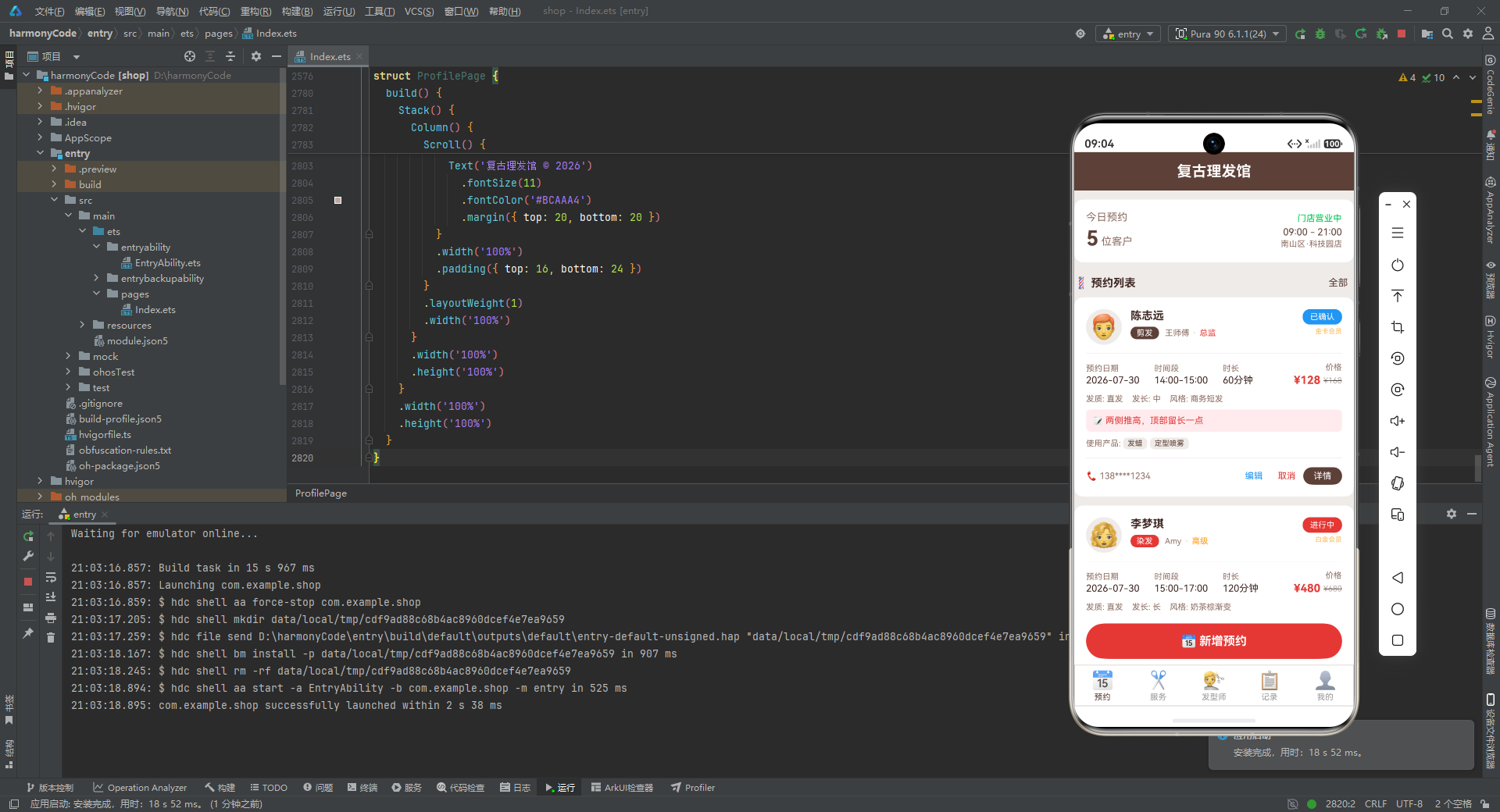
随着移动互联网的深入普及和智能终端的快速发展,将理发店的日常经营管理搬到移动端已经成为一种不可逆转的趋势。一款设计精良的预约管理应用,不仅能够帮助门店高效地调度发型师资源、减少客户等待时间,还能够系统性地沉淀客户画像、追踪服务效果、量化经营数据,从而为门店的精细化运营和长期发展提供坚实的数据支撑。
本文将深入剖析一款"复古理发馆"主题的预约管理应用的完整源码。该应用采用了 ArkUI 声明式 UI 开发框架构建,整体风格融合了复古棕色调与理发红配色,营造出一种兼具绅士格调与匠人气息的视觉氛围。应用涵盖了预约管理、服务展示、发型师团队、数据统计和个人中心五大核心功能模块,是一个结构完整、逻辑清晰、可直接运行的完整业务系统。
通过对这份源码的逐段拆解,读者将全面了解如何运用 ArkUI 的状态管理、组件化构建、条件渲染、列表渲染、自定义构建器等核心能力,打造一个贴近真实业务场景的移动端管理应用。无论你是刚接触声明式 UI 开发的新手,还是希望系统学习复杂业务页面组织方式的有一定经验的开发者,都能从中获得有价值的参考。
二、整体架构概览
在深入代码细节之前,我们首先从宏观层面把握整个应用的结构。该应用采用了"单文件多组件"的组织方式,将所有业务逻辑和界面构建集中在一个入口文件中,通过组件间的数据传递和事件回调实现模块间的协作。
整个应用的架构可以划分为以下几个层次:
- 类型定义层:使用 TypeScript 接口定义所有业务实体的数据结构,包括预约记录、服务项目、发型师信息、评价记录等,为整个应用提供严格的类型约束。
- 数据模型层:使用
@Observed装饰器构建可观察的数据模型类,为未来的数据响应式扩展打下基础。 - 静态配置层:将状态颜色映射、标签栏配置、服务类型配色、发质配色、发型师等级配色等设计规范以常量字典的形式集中管理,实现配置与逻辑的解耦。
- Mock 数据层:提供丰富的模拟数据,包括 18 条预约记录、12 项服务、8 位发型师、8 条评价以及多组统计数据,使应用在无后端的情况下也能完整运行。
- 主入口组件层:
BarberShopApp作为应用根组件,负责顶部标题栏、底部标签栏、内容区切换以及各类弹窗的全局管理。 - 业务页面层:包含
BookingPage(预约页)、ServicePage(服务页)、BarberPage(发型师页)、RecordPage(记录页)、ProfilePage(我的页)五个独立组件,各自负责一个功能模块的界面构建与交互逻辑。
这种分层架构使得每一层各司其职,代码职责清晰,便于维护和扩展。接下来,我们将逐层深入剖析每一部分的具体实现。
三、类型定义层:构建严谨的数据契约
3.1 预约记录接口
应用的第一步是定义清楚所有业务实体的数据结构。在 TypeScript 中,接口(interface)是一种非常合适的方式,它只描述数据的形状而不包含实现逻辑,能够在编译期提供类型检查,同时在运行时不会产生额外的开销。
首先是预约记录接口,它是整个应用最核心的数据结构:
interface HaircutItem {
  id: number
  customerName: string
  customerPhone: string
  serviceType: string
  barberName: string
  barberAvatar: string
  barberLevel: string
  date: string
  timeSlot: string
  duration: number
  price: number
  originalPrice: number
  discount: number
  status: string
  hairType: string
  hairLength: string
  preferredStyle: string
  notes: string
  rating: number
  review: string
  beforePhoto: string
  afterPhoto: string
  products: string[]
  isMember: boolean
  memberLevel: string
}
逐行解析:
id: number—— 预约记录的唯一标识符,使用数字类型,便于排序和定位。customerName: string—— 客户姓名,用于在预约卡片中展示。customerPhone: string—— 客户联系电话,采用脱敏格式存储(如138****1234),兼顾展示需求与隐私保护。serviceType: string—— 服务类型,取值为"剪发"“染发”"烫发"等中文标签,与配置字典中的键对应。barberName: string—— 发型师姓名。barberAvatar: string—— 发型师头像,这里使用 Emoji 表情符号代替真实图片资源,既节省资源又增添趣味性。barberLevel: string—— 发型师等级,取值为"初级"“中级”“高级”“总监”。date: string—— 预约日期,格式为YYYY-MM-DD。timeSlot: string—— 预约时间段,格式为HH:MM-HH:MM。duration: number—— 服务时长,以分钟为单位。price: number—— 实际价格,即折后价。originalPrice: number—— 原价,用于展示划线价效果。discount: number—— 折扣力度,以"折"为单位(如 76 表示 7.6 折)。status: string—— 预约状态,取值为"待确认"“已确认”“进行中”“已完成”“已取消”。hairType: string—— 发质类型,取值为"直发"“卷发”“油性”“干性”“中性”。hairLength: string—— 发长,取值为"短"“中”“长”。preferredStyle: string—— 偏好风格,为自由文本,如"商务短发""韩式中分"等。notes: string—— 备注信息,记录客户的特殊要求。rating: number—— 客户评分,取值范围 0-5,0 表示尚未评价。review: string—— 客户评价文字内容。beforePhoto: string和afterPhoto: string—— 服务前后的对比照片占位符。products: string[]—— 本次服务使用的产品列表,为字符串数组。isMember: boolean—— 是否为会员。memberLevel: string—— 会员等级,如"金卡会员""白金会员"等。
这个接口的设计非常贴近真实业务场景,涵盖了从预约创建到服务完成再到评价反馈的完整生命周期。
3.2 服务项目接口
interface ServiceItem {
  id: number
  name: string
  icon: string
  price: number
  originalPrice: number
  duration: number
  description: string
  popular: boolean
}
逐行解析:
id: number—— 服务项目的唯一标识。name: string—— 服务名称,如"男士剪发""植物染发"等。icon: string—— 服务图标,同样使用 Emoji。price: number—— 当前售价。originalPrice: number—— 原价,用于展示优惠信息。duration: number—— 预计服务时长(分钟)。description: string—— 服务描述,向客户说明服务内容和特点。popular: boolean—— 是否为热门服务,用于在列表中标注"热门"标签。
3.3 发型师接口
interface BarberItem {
  id: number
  name: string
  avatar: string
  level: string
  rating: number
  reviewCount: number
  experience: number
  specialties: string[]
  totalServices: number
  intro: string
}
逐行解析:
id: number—— 发型师唯一标识。name: string—— 发型师姓名。avatar: string—— 头像 Emoji。level: string—— 职级,与等级配置字典对应。rating: number—— 综合评分,支持小数(如 4.9)。reviewCount: number—— 收到的评价总数。experience: number—— 从业年限(年)。specialties: string[]—— 擅长领域列表。totalServices: number—— 历史总服务次数。intro: string—— 个人简介。
3.4 评价、配置与统计接口
应用还定义了若干辅助接口,分别用于评价展示、标签配置和数据统计:
interface ReviewItem {
  id: number
  customerName: string
  barberName: string
  serviceType: string
  rating: number
  content: string
  date: string
  avatar: string
}

interface TabConfig {
  label: string
  icon: string
  activeColor: string
}

interface ServiceStat {
  type: string
  count: number
  color: string
}

interface BarberStat {
  name: string
  count: number
  revenue: number
  color: string
}

interface MenuRowItem {
  icon: string
  label: string
  value: string
  showArrow: boolean
}
逐行解析:
ReviewItem定义了客户评价的数据结构,包含评价者、被评价的发型师、服务类型、评分、评价内容、日期和头像。TabConfig定义了底部标签栏每一项的配置,包括文字标签、图标和激活时的颜色。ServiceStat用于记录统计页中各服务类型的数量和对应的展示颜色。BarberStat用于记录各发型师的接单数量和营收金额。MenuRowItem用于"我的"页面中菜单列表每一行的配置,包含图标、标签、右侧值和是否显示箭头。
这一系列接口构成了整个应用的类型契约体系,确保了数据在各组件间传递时的类型安全性。
四、可观察数据模型:为响应式扩展预留空间
在接口定义之后,应用定义了一个使用 @Observed 装饰器修饰的数据模型类:
@Observed
class HaircutModel {
  id: number = 0
  customerName: string = ''
  customerPhone: string = ''
  serviceType: string = ''
  barberName: string = ''
  barberAvatar: string = ''
  barberLevel: string = ''
  date: string = ''
  timeSlot: string = ''
  duration: number = 0
  price: number = 0
  originalPrice: number = 0
  discount: number = 0
  status: string = ''
  hairType: string = ''
  hairLength: string = ''
  preferredStyle: string = ''
  notes: string = ''
  rating: number = 0
  review: string = ''
  beforePhoto: string = ''
  afterPhoto: string = ''
  products: string[] = []
  isMember: boolean = false
  memberLevel: string = ''

  constructor(data: HaircutItem) {
    this.id = data.id
    this.customerName = data.customerName
    this.customerPhone = data.customerPhone
    this.serviceType = data.serviceType
    this.barberName = data.barberName
    this.barberAvatar = data.barberAvatar
    this.barberLevel = data.barberLevel
    this.date = data.date
    this.timeSlot = data.timeSlot
    this.duration = data.duration
    this.price = data.price
    this.originalPrice = data.originalPrice
    this.discount = data.discount
    this.status = data.status
    this.hairType = data.hairType
    this.hairLength = data.hairLength
    this.preferredStyle = data.preferredStyle
    this.notes = data.notes
    this.rating = data.rating
    this.review = data.review
    this.beforePhoto = data.beforePhoto
    this.afterPhoto = data.afterPhoto
    this.products = data.products
    this.isMember = data.isMember
    this.memberLevel = data.memberLevel
  }
}
逐段解析:
@Observed 是 ArkUI 框架提供的一个类装饰器,它的作用是将一个普通类标记为"可观察"的。被标记后,该类的实例在其属性发生变化时,能够通知到依赖这些属性的 UI 组件,从而触发界面的自动刷新。这种机制是声明式 UI 响应式编程的核心。
在这个类中,每一个属性都被赋予了默认初始值(如空字符串、0、空数组、false 等),这是一种良好的编程习惯,能够避免在实例化过程中出现 undefined 导致的潜在问题。
构造函数接收一个 HaircutItem 类型的参数,将接口对象的所有字段逐一拷贝到模型实例中。这种"从接口到模型"的转换方式,使得原始数据(来自后端接口或 Mock 数据)能够被包装成可观察的模型实例,为后续的深度响应式扩展(如双向绑定、嵌套对象观察等)预留了空间。
虽然在当前实现中,列表数据主要使用 HaircutItem 接口数组直接传递,但 HaircutModel 的存在体现了开发者对架构扩展性的考量——当未来需要实现更细粒度的状态追踪(例如单条预约的状态实时变更触发局部刷新)时,可以平滑地将数据源切换为 HaircutModel 实例数组。
五、静态配置系统:设计规范的集中管理
5.1 状态颜色映射
一个好的应用应当将视觉设计规范与业务逻辑分离。本应用通过一系列 Record<string, string> 类型的常量字典来实现这一目标。首先是预约状态的配色映射:
const STATUS_CONFIG: Record<string, string> = {
  '待确认': '#FF9800',
  '已确认': '#2196F3',
  '进行中': '#E53935',
  '已完成': '#00C853',
  '已取消': '#9E9E9E'
}
逐行解析:
'待确认': '#FF9800'—— 橙色,传达"等待中、需关注"的语义。'已确认': '#2196F3'—— 蓝色,传达"已安排、正常进行"的语义。'进行中': '#E53935'—— 红色(与理发红主色一致),传达"正在进行、重点关注"的语义。'已完成': '#00C853'—— 绿色,传达"已完成、成功"的语义。'已取消': '#9E9E9E'—— 灰色,传达"已失效、弱化"的语义。
这种以业务状态为键、颜色值为值的字典设计,使得在 UI 中渲染状态标签时只需一行代码 STATUS_CONFIG[item.status] 即可获取对应颜色,无需编写繁琐的 if-else 或 switch 分支。
5.2 标签栏与服务类型配置
const TAB_CONFIG: Record<string, TabConfig> = {
  'booking': { label: '预约', icon: '📅', activeColor: '#5D4037' },
  'service': { label: '服务', icon: '✂️', activeColor: '#5D4037' },
  'barber': { label: '发型师', icon: '💇', activeColor: '#5D4037' },
  'record': { label: '记录', icon: '📋', activeColor: '#5D4037' },
  'profile': { label: '我的', icon: '👤', activeColor: '#5D4037' }
}

const SERVICE_CONFIG: Record<string, string> = {
  '剪发': '#5D4037',
  '染发': '#E53935',
  '烫发': '#FF9800',
  '造型': '#2196F3',
  '洗吹': '#00C853',
  '护理': '#9C27B0',
  '剃须': '#607D8B'
}
逐行解析:
TAB_CONFIG 定义了五个底部标签项,每一项包含文字标签、Emoji 图标和激活颜色。所有标签的激活颜色统一为复古棕 #5D4037,保持了视觉风格的一致性。标签的键名使用英文(booking、service 等),与枚举值形成语义对应。
SERVICE_CONFIG 为七种服务类型各分配了一种主题色。剪发使用棕色(与主色调呼应),染发使用理发红(染色业务的视觉联想),烫发使用橙色(热度联想),造型使用蓝色(创意联想),洗吹使用绿色(清新联想),护理使用紫色(养护联想),剃须使用蓝灰色(沉稳联想)。每种颜色的选择都经过了语义化的考量。
5.3 发质与等级配置
const HAIR_TYPE_CONFIG: Record<string, string> = {
  '直发': '#5D4037',
  '卷发': '#FF9800',
  '油性': '#42A5F5',
  '干性': '#FFB74D',
  '中性': '#66BB6A'
}

const BARBER_LEVEL_CONFIG: Record<string, string> = {
  '初级': '#9E9E9E',
  '中级': '#2196F3',
  '高级': '#FF9800',
  '总监': '#E53935'
}
逐行解析:
HAIR_TYPE_CONFIG 为五种发质类型分配了颜色。直发用棕色(最常见、基础),卷发用橙色(形态活泼),油性用浅蓝(湿润感),干性用暖橙(干燥感),中性用绿色(健康平衡)。
BARBER_LEVEL_CONFIG 为四个发型师等级分配了颜色,形成了一个从低到高的色彩梯度:初级为灰色(低调),中级为蓝色(进阶),高级为橙色(资深),总监为红色(顶级、醒目)。这种渐进式的配色设计,让用户在浏览发型师列表时能够直观地感受到等级差异。
5.4 时间段配置
const TIME_SLOTS: string[] = [
  '09:00-10:00', '10:00-11:00', '11:00-12:00',
  '12:00-13:00', '13:00-14:00', '14:00-15:00',
  '15:00-16:00', '16:00-17:00', '17:00-18:00',
  '18:00-19:00', '19:00-20:00', '20:00-21:00'
]
逐行解析:
TIME_SLOTS 定义了门店从上午 9 点到晚上 9 点共 12 个一小时为单位的时间段。这是一个全局常量,可在预约弹窗、编辑弹窗等多处复用。将时间段集中定义的好处是,当门店营业时间调整时,只需修改这一处即可全局生效。
六、Mock 数据层:构建逼真的业务数据
6.1 预约记录数据
应用提供了 18 条详尽的预约记录模拟数据,每条记录都包含完整的字段信息。这里展示前两条作为代表:
const MOCK_HAIRCUTS: HaircutItem[] = [
{
id: 1,
customerName: '陈志远',
customerPhone: '138****1234',
serviceType: '剪发',
barberName: '王师傅',
barberAvatar: '👨🦰',
barberLevel: '总监',
date: '2026-07-30',
timeSlot: '14:00-15:00',
duration: 60,
price: 128,
originalPrice: 168,
discount: 76,
status: '已确认',
hairType: '直发',
hairLength: '中',
preferredStyle: '商务短发',
notes: '两侧推高,顶部留长一点',
rating: 0,
review: '',
beforePhoto: '📷',
afterPhoto: '📷',
products: ['发蜡', '定型喷雾'],
isMember: true,
memberLevel: '金卡会员'
},
{
id: 2,
customerName: '李梦琪',
customerPhone: '139****5678',
serviceType: '染发',
barberName: 'Amy',
barberAvatar: '👩🦱',
barberLevel: '高级',
date: '2026-07-30',
timeSlot: '15:00-17:00',
duration: 120,
price: 480,
originalPrice: 680,
discount: 71,
status: '进行中',
hairType: '直发',
hairLength: '长',
preferredStyle: '奶茶棕渐变',
notes: '不要漂太多次,发质比较脆弱',
rating: 0,
review: '',
beforePhoto: '📷',
afterPhoto: '📷',
products: ['染发膏', '护发素', '锁色精华'],
isMember: true,
memberLevel: '白金会员'
}
// ... 共18条记录,覆盖剪发、染发、烫发、造型、洗吹、护理、剃须全部服务类型
]
逐段解析:
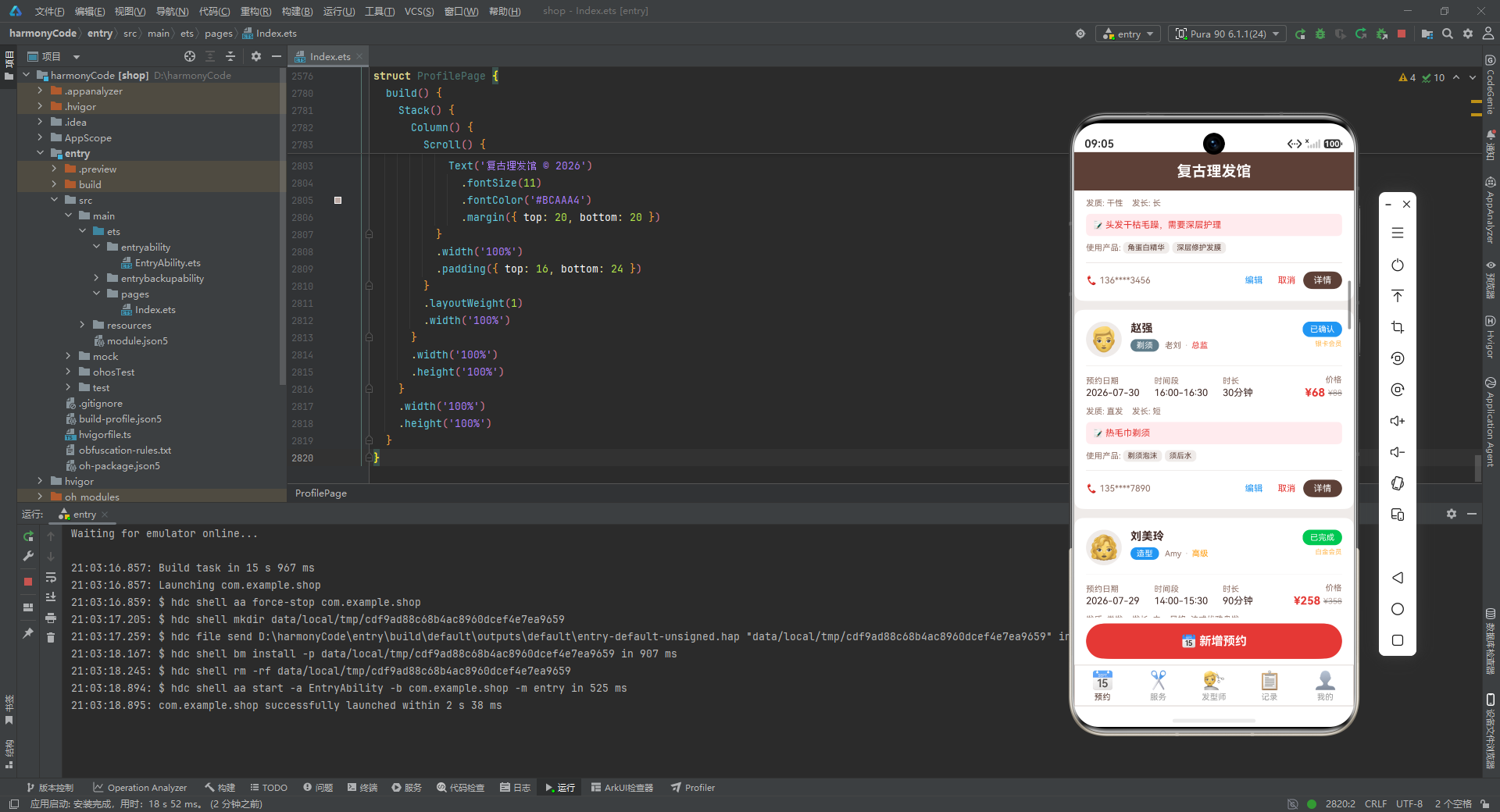
第一条记录描述了一位名叫"陈志远"的金卡会员客户,预约了总监"王师傅"的剪发服务。预约日期为 2026 年 7 月 30 日下午 2 点至 3 点,时长 60 分钟。实际价格 128 元(原价 168 元,7.6 折)。状态为"已确认"。客户偏好"商务短发",备注要求"两侧推高,顶部留长一点"。使用了发蜡和定型喷雾两款产品。
第二条记录描述了一位名叫"李梦琪"的白金会员客户,预约了高级发型师"Amy"的染发服务。时段为下午 3 点至 5 点(2 小时),实际价格 480 元(原价 680 元,7.1 折)。状态为"进行中"。偏好"奶茶棕渐变"发型,备注提醒"不要漂太多次,发质比较脆弱",体现了客户对发质保护的重视。
18 条记录覆盖了全部 7 种服务类型、5 种状态、5 种发质、3 种发长,以及会员与非会员的不同情况,数据分布均衡且贴近真实。这种高质量的 Mock 数据使得应用在无后端的环境下也能呈现出丰富、真实的界面效果。
6.2 服务项目数据
const MOCK_SERVICES: ServiceItem[] = [
  { id: 1, name: '男士剪发', icon: '✂️', price: 88, originalPrice: 128, duration: 60, description: '专业发型设计+剪裁+洗吹造型', popular: true },
  { id: 2, name: '女士剪发', icon: '✂️', price: 128, originalPrice: 168, duration: 60, description: '个性化发型设计+剪裁+吹造型', popular: true },
  { id: 3, name: '植物染发', icon: '🎨', price: 380, originalPrice: 580, duration: 120, description: '天然植物染剂,温和不伤头皮', popular: true },
  { id: 4, name: '时尚染发', icon: '🎨', price: 580, originalPrice: 880, duration: 150, description: '进口染剂,个性化调色,渐变可选', popular: false },
  { id: 5, name: '韩式烫发', icon: '🌀', price: 388, originalPrice: 588, duration: 120, description: '韩式冷烫,自然卷度,持久定型', popular: true },
  { id: 6, name: '数码烫发', icon: '〰️', price: 588, originalPrice: 788, duration: 150, description: '日本数码烫,损伤小,弹性好', popular: false },
  { id: 7, name: '新娘造型', icon: '👰', price: 588, originalPrice: 888, duration: 120, description: '婚礼专属造型,含试妆一次', popular: true },
  { id: 8, name: '晚宴造型', icon: '💃', price: 258, originalPrice: 358, duration: 90, description: '宴会派对造型,优雅大气', popular: false },
  { id: 9, name: '深层洗吹', icon: '🧴', price: 38, originalPrice: 58, duration: 30, description: '深层清洁+头皮按摩+吹造型', popular: true },
  { id: 10, name: '角蛋白护理', icon: '💧', price: 268, originalPrice: 358, duration: 60, description: '深层修复,补充角蛋白,顺滑发丝', popular: true },
  { id: 11, name: '热毛巾剃须', icon: '🪒', price: 68, originalPrice: 88, duration: 30, description: '老式热毛巾剃须,含须后护理', popular: false },
  { id: 12, name: '头皮SPA', icon: '🧖', price: 198, originalPrice: 298, duration: 60, description: '深层清洁+精油按摩+营养导入', popular: false }
]
逐行解析:
服务项目共 12 项,涵盖了剪发(男士/女士)、染发(植物/时尚)、烫发(韩式/数码)、造型(新娘/晚宴)、洗吹、护理(角蛋白/头皮SPA)、剃须等理发店常见服务。每项服务都标注了价格、原价、时长、描述和是否热门。
值得注意的是,价格区间从最低 38 元(深层洗吹)到最高 588 元(时尚染发/数码烫发/新娘造型),跨度较大,能够满足不同消费层次的客户需求。热门标记共有 7 项,占比约 58%,这些热门服务在列表中会以红色"热门"标签醒目标注,帮助客户快速识别受欢迎的服务。
6.3 发型师团队数据
const MOCK_BARBERS: BarberItem[] = [
{
id: 1,
name: '王师傅',
avatar: '👨🦰',
level: '总监',
rating: 4.9,
reviewCount: 868,
experience: 15,
specialties: ['男士剪发', '日系烫发', '复古油头'],
totalServices: 3268,
intro: '从业15年,擅长各类男士造型与日系烫发,多次获得行业大奖。'
},
{
id: 2,
name: 'Amy',
avatar: '👩🦱',
level: '高级',
rating: 4.8,
reviewCount: 652,
experience: 8,
specialties: ['时尚染发', '新娘造型', '女士剪发'],
totalServices: 2156,
intro: '韩国进修归来的染发专家,擅长个性化调色与潮流造型。'
}
// ... 共8位发型师
]
逐段解析:
发型师团队共 8 人,涵盖了总监(王师傅、老刘、老陈)、高级(Amy、阿杰、Linda)、中级(小林、Tony)三个等级。每位发型师都有完整的个人资料:评分(4.4-4.9)、评价数(286-1180)、从业年限(3-25 年)、擅长领域(3 项)、总服务次数(980-6820)和个人简介。
以"王师傅"为例:评分 4.9(团队最高),868 条评价,从业 15 年,总服务 3268 次,擅长男士剪发、日系烫发和复古油头。简介中提到"多次获得行业大奖",塑造了一位资深、专业的总监形象。
以"老陈"为例(最后一位):从业 25 年(团队最长),总服务 6820 次(团队最多),1180 条评价,评分布 4.8。简介"二十五年的老手艺人,传统理发技艺精湛,老顾客络绎不绝",塑造了一位坚守传统手艺的匠人形象。这种差异化的人物设定让整个发型师团队更加立体、真实。
6.4 评价与统计数据
const MOCK_REVIEWS: ReviewItem[] = [
  { id: 1, customerName: '陈志远', barberName: '王师傅', serviceType: '剪发', rating: 5, content: '王师傅的手艺真的没话说,每次剪完都很满意,环境也很有复古范儿。', date: '2026-07-27', avatar: '👨' },
  { id: 2, customerName: '李梦琪', barberName: 'Amy', serviceType: '染发', rating: 5, content: '奶茶棕染得特别好看,很显白,朋友都问我在哪染的!', date: '2026-07-26', avatar: '👩' }
  // ... 共8条评价
]

const MOCK_SERVICE_STATS: ServiceStat[] = [
  { type: '剪发', count: 86, color: '#5D4037' },
  { type: '染发', count: 42, color: '#E53935' },
  { type: '烫发', count: 38, color: '#FF9800' },
  { type: '造型', count: 28, color: '#2196F3' },
  { type: '护理', count: 35, color: '#9C27B0' },
  { type: '洗吹', count: 62, color: '#00C853' },
  { type: '剃须', count: 24, color: '#607D8B' }
]

const MOCK_BARBER_STATS: BarberStat[] = [
  { name: '王师傅', count: 68, revenue: 8704, color: '#E53935' },
  { name: 'Amy', count: 52, revenue: 12480, color: '#FF9800' },
  { name: '老刘', count: 75, revenue: 5100, color: '#5D4037' },
  { name: '阿杰', count: 45, revenue: 3960, color: '#2196F3' },
  { name: '小林', count: 38, revenue: 2888, color: '#00C853' },
  { name: 'Linda', count: 42, revenue: 8400, color: '#9C27B0' }
]
逐段解析:
评价数据共 8 条,每条都包含真实的客户反馈文字,评分以 4-5 星为主,内容涉及手艺、颜色效果、服务态度、等待时间等多个维度,既有正面评价也有建设性意见(如"等的时间有点长"),增加了真实感。
服务类型统计数据显示剪发(86 次)和洗吹(62 次)是最高频的服务,这与实际理发店的经营规律一致。发型师业绩统计则展示了每位发型师的接单数和营收额,其中 Amy 虽然接单数(52)不是最多,但营收(12480 元)却最高,反映了染发等高客单价服务对营收的贡献。
七、枚举定义与主入口组件
7.1 底部标签枚举
enum BottomTab {
  BOOKING = 0,
  SERVICE = 1,
  BARBER = 2,
  RECORD = 3,
  PROFILE = 4
}
逐行解析:
BottomTab 枚举定义了底部标签栏五个页面的索引值。使用枚举而非魔法数字(如直接写 0、1、2)的好处是显而易见的:代码可读性大幅提升,BottomTab.BOOKING 比 0 更能表达语义;同时枚举值集中定义,修改时只需改一处。在后续的 contentArea 构建器和 bottomTabItem 点击事件中,都会引用这些枚举值进行页面切换判断。
7.2 主入口组件的状态声明
@Entry
@Component
struct BarberShopApp {
  @State activeTab: number = BottomTab.BOOKING
  @State showNewBookingModal: boolean = false
  @State showEditModal: boolean = false
  @State showDeleteModal: boolean = false
  @State editTargetId: number = 0
  @State deleteTargetId: number = 0
  @State newCustomerName: string = ''
  @State newCustomerPhone: string = ''
  @State newServiceType: string = '剪发'
  @State newBarberName: string = '王师傅'
  @State newDate: string = '2026-07-30'
  @State newTimeSlot: string = '14:00-15:00'
  @State newNotes: string = ''
  @State newHairType: string = '直发'
  @State newHairLength: string = '短'
  @State newPreferredStyle: string = ''
  @State editNotes: string = ''
  @State editTimeSlot: string = ''
  @State editPreferredStyle: string = ''
  @State haircuts: HaircutItem[] = MOCK_HAIRCUTS
逐行解析:
@Entry 装饰器标记 BarberShopApp 为应用的入口组件,即整个应用的根节点。@Component 装饰器声明这是一个自定义组件。
@State 装饰器用于声明组件内部的可变状态变量。当这些变量的值发生变化时,框架会自动重新渲染依赖这些变量的 UI 部分。这里是所有状态变量的详细说明:
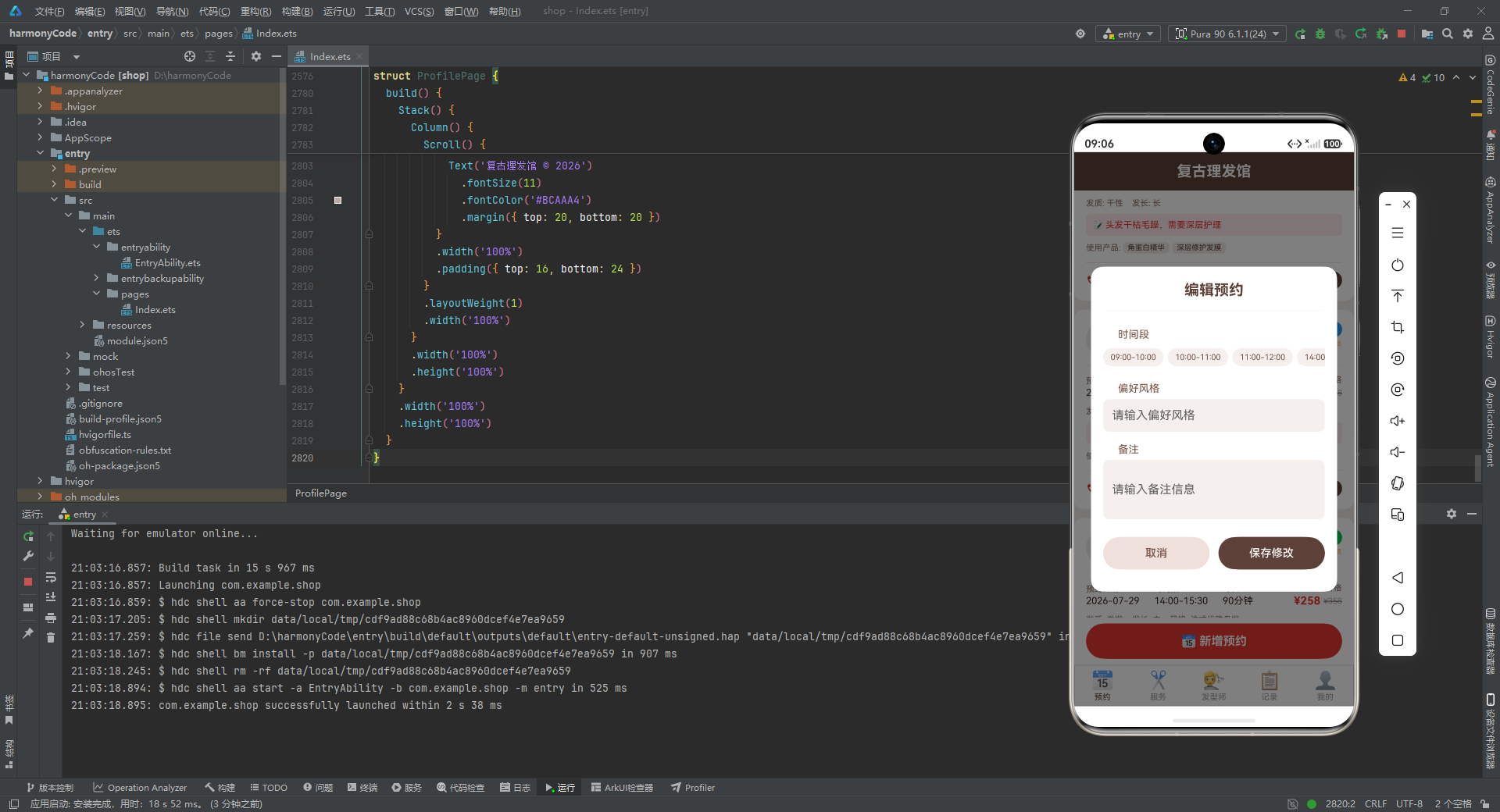
activeTab—— 当前激活的标签页索引,初始值为预约页(0)。showNewBookingModal、showEditModal、showDeleteModal—— 三个布尔值,分别控制新增预约弹窗、编辑弹窗、删除确认弹窗的显示与隐藏。editTargetId、deleteTargetId—— 记录当前正在编辑或删除的预约记录 ID。newCustomerName到newPreferredStyle—— 新增预约表单中各字段的值,初始值预设了合理的默认值(如服务类型默认"剪发"、发型师默认"王师傅"、日期默认当天)。editNotes、editTimeSlot、editPreferredStyle—— 编辑弹窗中三个可编辑字段的值。haircuts—— 预约记录数组,初始值为 Mock 数据,是整个应用的核心数据源。
7.3 弹窗遮罩构建器
@Builder
modalOverlay(onClose: () => void) {
  Stack() {
    Column()
      .width('100%')
      .height('100%')
      .backgroundColor('rgba(0,0,0,0.5)')
      .onClick(() => {
        onClose()
      })
  }
  .width('100%')
  .height('100%')
  .position({ x: 0, y: 0 })
}
逐行解析:
@Builder 是 ArkUI 的构建器装饰器,用于定义可复用的 UI 片段。modalOverlay 是一个通用的弹窗遮罩构建器,接收一个 onClose 回调函数作为参数。
内部使用 Stack 布局(层叠布局)作为容器,其中放置一个全屏的 Column,背景色设为半透明黑色 rgba(0,0,0,0.5),点击时触发 onClose 回调关闭弹窗。position({ x: 0, y: 0 }) 确保遮罩从屏幕左上角开始铺满。
这个构建器被新增预约、编辑预约、删除确认三个弹窗复用,体现了良好的代码复用设计。
7.4 新增预约弹窗
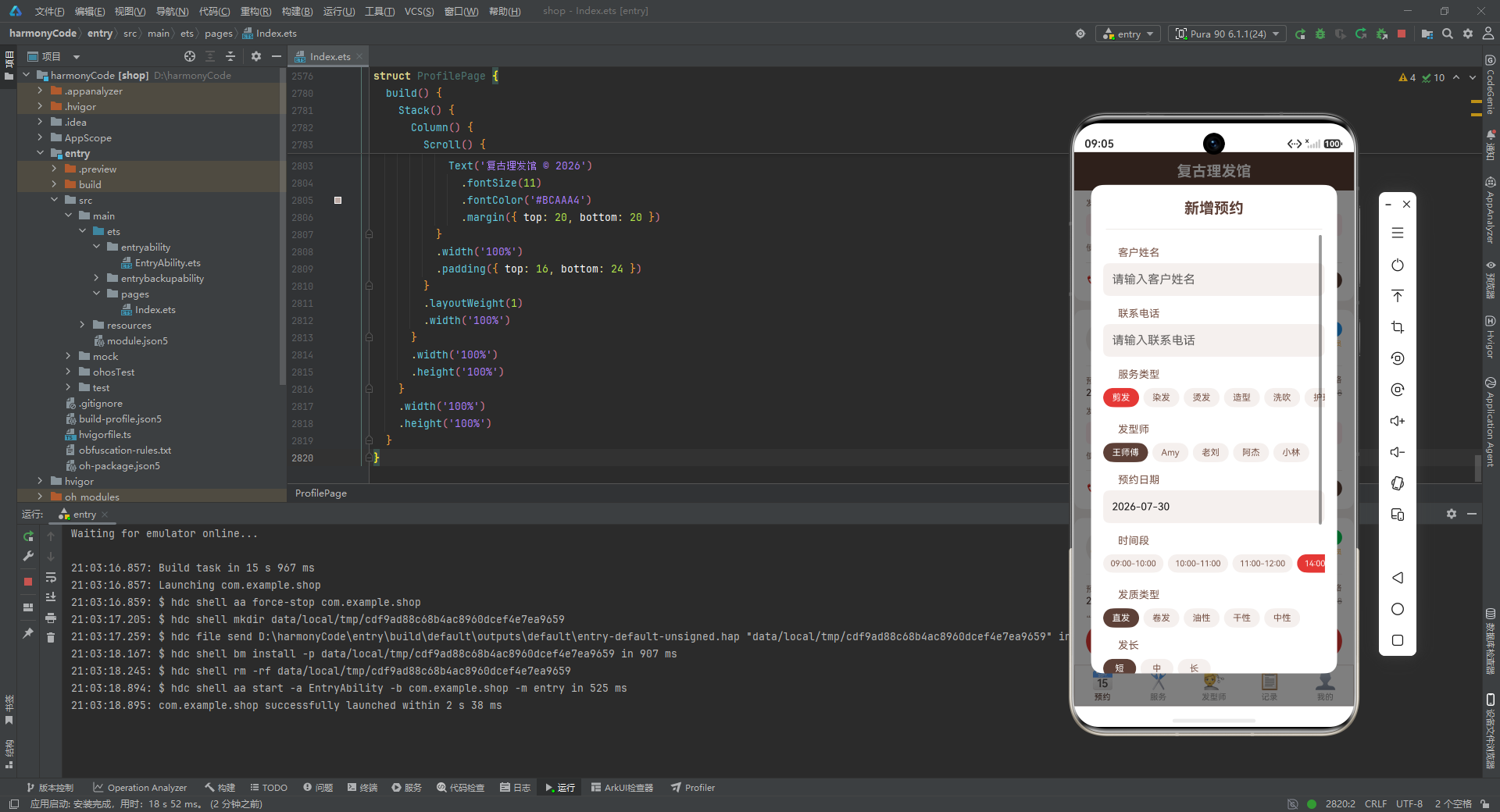
新增预约弹窗是应用中最复杂的表单界面之一,包含了客户姓名、联系电话、服务类型、发型师、预约日期、时间段、发质类型、发长、偏好风格和备注共 10 个表单字段。我们截取其中服务类型选择部分进行分析:
@Builder
newBookingModal() {
  Stack() {
    this.modalOverlay(() => {
      this.showNewBookingModal = false
    })
    Column() {
      Text('新增预约')
        .fontSize(20)
        .fontWeight(FontWeight.Bold)
        .fontColor('#5D4037')
        .margin({ top: 20, bottom: 16 })

      Divider().color('#D7CCC8').margin({ left: 20, right: 20 })

      Scroll() {
        Column() {
          Text('服务类型')
            .fontSize(14)
            .fontColor('#795548')
            .alignSelf(ItemAlign.Start)
            .margin({ top: 16, left: 20, bottom: 6 })

          Row() {
            ForEach(['剪发', '染发', '烫发', '造型', '洗吹', '护理', '剃须'], (stype: string) => {
              Text(stype)
                .fontSize(12)
                .fontColor(this.newServiceType === stype ? '#FFFFFF' : '#795548')
                .backgroundColor(this.newServiceType === stype ? '#E53935' : '#F5F0EE')
                .borderRadius(14)
                .padding({ left: 12, right: 12, top: 6, bottom: 6 })
                .margin({ right: 6, bottom: 6 })
                .onClick(() => {
                  this.newServiceType = stype
                })
            })
          }
          .width('90%')
          .margin({ top: 4 })
        }
      }
      .constraintSize({ maxHeight: '80%' })
      .margin({ top: 8 })
    }
    .width('88%')
    .backgroundColor('#FFFFFF')
    .borderRadius(16)
  }
  .width('100%')
  .height('100%')
}
逐行解析:
弹窗整体使用 Stack 层叠布局,底层是 modalOverlay 遮罩(点击关闭弹窗),上层是白色圆角卡片容器。
卡片顶部是"新增预约"标题,使用 20 号粗体字、复古棕色,上下各有间距。下方是一条分隔线(Divider),颜色为浅棕色 #D7CCC8。
由于表单内容较多,使用 Scroll 可滚动容器包裹,并通过 constraintSize({ maxHeight: '80%' }) 限制最大高度为屏幕的 80%,超出部分可滚动查看。
服务类型选择使用 Row + ForEach 渲染 7 个可点击的标签胶囊。每个标签的字体颜色和背景色根据是否为当前选中项动态切换:选中时为白字红底(#E53935),未选中时为棕字浅底(#F5F0EE)。点击时通过 onClick 回调将 this.newServiceType 更新为被点击的值,由于这是一个 @State 变量,UI 会自动刷新,被选中的标签立即变为高亮状态。
这种"标签胶囊选择器"的模式在发型师选择、时间段选择、发质选择、发长选择等字段中都被复用,保持了交互方式的一致性。
7.5 删除确认弹窗
@Builder
deleteConfirmModal() {
  Stack() {
    this.modalOverlay(() => {
      this.showDeleteModal = false
    })
    Column() {
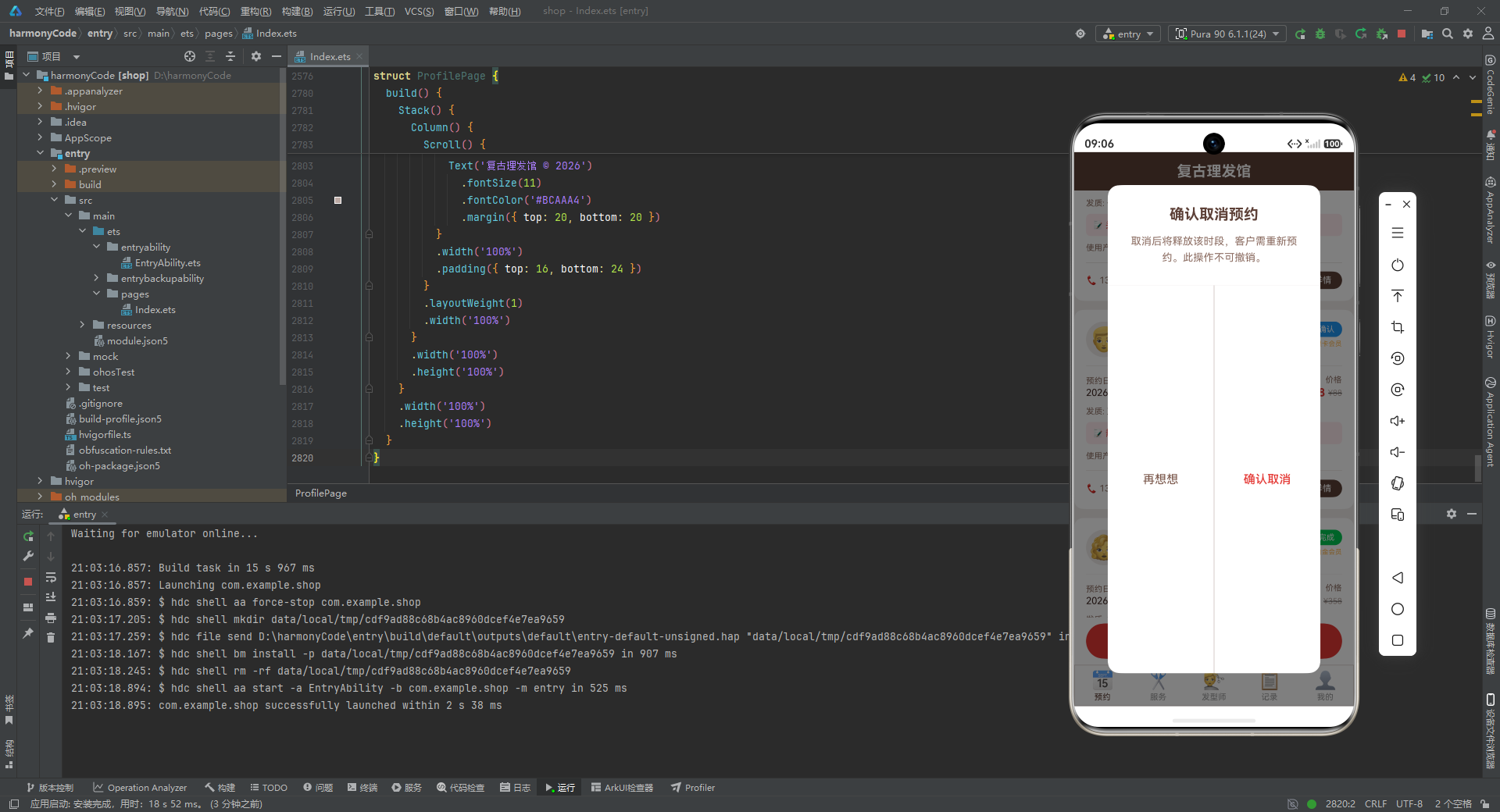
      Text('确认取消预约')
        .fontSize(20)
        .fontWeight(FontWeight.Bold)
        .fontColor('#5D4037')
        .margin({ top: 28, bottom: 12 })

      Text('取消后将释放该时段,客户需重新预约。此操作不可撤销。')
        .fontSize(14)
        .fontColor('#8D6E63')
        .textAlign(TextAlign.Center)
        .margin({ left: 30, right: 30, bottom: 28 })
        .lineHeight(22)

      Divider().color('#D7CCC8')

      Row() {
        Text('再想想')
          .fontSize(16)
          .fontColor('#795548')
          .layoutWeight(1)
          .textAlign(TextAlign.Center)
          .padding({ top: 16, bottom: 16 })
          .onClick(() => {
            this.showDeleteModal = false
          })

        Column()
          .width(1)
          .height('70%')
          .backgroundColor('#D7CCC8')

        Text('确认取消')
          .fontSize(16)
          .fontColor('#E53935')
          .fontWeight(FontWeight.Medium)
          .layoutWeight(1)
          .textAlign(TextAlign.Center)
          .padding({ top: 16, bottom: 16 })
          .onClick(() => {
            this.showDeleteModal = false
          })
      }
      .width('100%')
    }
    .width('76%')
    .backgroundColor('#FFFFFF')
    .borderRadius(16)
  }
  .width('100%')
  .height('100%')
}
逐行解析:
删除确认弹窗采用了经典的"双按钮对话框"设计模式。标题"确认取消预约"使用粗体棕色字。下方提示文字明确告知用户操作的后果和不可撤销性,使用居中对齐和 22 的行高保证可读性。
分隔线下方是两个等宽按钮,通过 layoutWeight(1) 实现平分布局。"再想想"按钮使用棕色文字(取消操作),"确认取消"按钮使用红色粗体文字(确认操作),两个按钮之间用一条竖线分隔。这种设计在移动端应用中非常常见,用户能够快速理解并做出选择。
7.6 底部标签项构建器
@Builder
bottomTabItem(index: number, config: TabConfig) {
  Column() {
    Text(config.icon)
      .fontSize(24)
    Text(config.label)
      .fontSize(11)
      .fontColor(this.activeTab === index ? config.activeColor : '#999999')
      .margin({ top: 2 })
  }
  .layoutWeight(1)
  .padding({ top: 6, bottom: 6 })
  .onClick(() => {
    this.activeTab = index
  })
}
逐行解析:
bottomTabItem 是底部标签栏单个标签的构建器,接收标签索引 index 和配置对象 config 两个参数。
内部是一个纵向排列的 Column:上方是 24 号字体的 Emoji 图标,下方是 11 号字体的文字标签。文字颜色根据 this.activeTab === index 判断:如果当前标签是激活状态,使用配置中的 activeColor(复古棕);否则使用灰色 #999999。
layoutWeight(1) 使五个标签平分底部栏的宽度。点击时将 this.activeTab 设置为当前索引,触发页面切换。
7.7 内容区切换构建器
@Builder
contentArea() {
  if (this.activeTab === BottomTab.BOOKING) {
    BookingPage({
      haircuts: this.haircuts,
      onNewBooking: () => {
        this.showNewBookingModal = true
      },
      onEdit: (id: number) => {
        this.editTargetId = id
        this.showEditModal = true
      },
      onDelete: (id: number) => {
        this.deleteTargetId = id
        this.showDeleteModal = true
      }
    })
  } else if (this.activeTab === BottomTab.SERVICE) {
    ServicePage()
  } else if (this.activeTab === BottomTab.BARBER) {
    BarberPage()
  } else if (this.activeTab === BottomTab.RECORD) {
    RecordPage({ haircuts: this.haircuts })
  } else if (this.activeTab === BottomTab.PROFILE) {
    ProfilePage()
  }
}
逐行解析:
contentArea 是内容区的切换构建器,根据 this.activeTab 的值条件渲染不同的业务页面组件。这是 ArkUI 条件渲染能力的典型应用。
值得注意的是 BookingPage 组件的传参方式:除了传入 haircuts 数据源外,还传入了三个回调函数 onNewBooking、onEdit、onDelete。这种"子组件触发事件、父组件处理逻辑"的设计模式,使得子组件不需要知道弹窗的具体实现,只需在合适时机调用回调即可,实现了组件间的松耦合。父组件在回调中设置相应的状态变量(如 showNewBookingModal = true),从而控制弹窗的显示。
RecordPage 也接收了 haircuts 数据源,用于展示历史记录和统计数据。
7.8 主构建函数
build() {
  Stack() {
    Column() {
      Column() {
        Text('复古理发馆')
          .fontSize(20)
          .fontWeight(FontWeight.Bold)
          .fontColor('#FFFFFF')
      }
      .width('100%')
      .height(52)
      .backgroundColor('#5D4037')
      .justifyContent(FlexAlign.Center)

      Column() {
        this.contentArea()
      }
      .layoutWeight(1)
      .width('100%')
      .backgroundColor('#EFEBE9')

      Row() {
        this.bottomTabItem(BottomTab.BOOKING, TAB_CONFIG['booking'])
        this.bottomTabItem(BottomTab.SERVICE, TAB_CONFIG['service'])
        this.bottomTabItem(BottomTab.BARBER, TAB_CONFIG['barber'])
        this.bottomTabItem(BottomTab.RECORD, TAB_CONFIG['record'])
        this.bottomTabItem(BottomTab.PROFILE, TAB_CONFIG['profile'])
      }
      .width('100%')
      .height(56)
      .backgroundColor('#FFFFFF')
      .borderWidth(1)
      .borderColor('#D7CCC8')
    }
    .width('100%')
    .height('100%')

    if (this.showNewBookingModal) {
      this.newBookingModal()
    }
    if (this.showEditModal) {
      this.editBookingModal()
    }
    if (this.showDeleteModal) {
      this.deleteConfirmModal()
    }
  }
  .width('100%')
  .height('100%')
}
逐行解析:
build() 是每个组件必须实现的核心构建函数,定义了组件的 UI 结构。
最外层是 Stack 层叠布局,包含两层内容:底层是应用主体(标题栏 + 内容区 + 底部标签栏),顶层是条件渲染的三个弹窗。
主体使用纵向 Column 布局,分为三个部分:
第一部分是标题栏:高度 52,背景色为复古棕 #5D4037,内部居中显示白色粗体文字"复古理发馆"。
第二部分是内容区:使用 layoutWeight(1) 占据剩余空间,背景色为浅棕 #EFEBE9,内部调用 contentArea() 构建器渲染当前激活的页面。
第三部分是底部标签栏:高度 56,白色背景,顶部有 1 像素的浅棕色边框线。内部使用 Row 横向排列五个标签项。
三个弹窗通过 if 条件渲染,只有当对应的状态变量为 true 时才会出现在 Stack 的顶层。由于 Stack 是层叠布局,弹窗会自然地覆盖在主体内容之上,而遮罩的半透明背景则营造出"聚焦弹窗"的视觉效果。
八、预约管理页:核心业务的首屏体验
8.1 组件声明与属性
@Component
struct BookingPage {
  haircuts: HaircutItem[] = []
  onNewBooking: () => void = () => {}
  onEdit: (id: number) => void = () => {}
  onDelete: (id: number) => void = () => {}
逐行解析:
BookingPage 是预约管理页组件,声明了四个属性:haircuts 是从父组件传入的预约数据数组,三个回调函数 onNewBooking、onEdit、onDelete 分别在用户点击"新增预约"“编辑”"取消"时被调用。所有属性都赋予了默认值(空数组和空函数),确保组件在未传参时也能正常渲染,不会崩溃。
8.2 预约卡片构建器
预约卡片是预约页的核心 UI 单元,信息密度较高。我们分段分析关键部分:
@Builder
bookingItemBuilder(item: HaircutItem) {
  Column() {
    Row() {
      Column() {
        Text(item.barberAvatar)
          .fontSize(32)
      }
      .width(48)
      .height(48)
      .backgroundColor('#EFEBE9')
      .borderRadius(24)
      .justifyContent(FlexAlign.Center)

      Column() {
        Text(item.customerName)
          .fontSize(15)
          .fontWeight(FontWeight.Bold)
          .fontColor('#3E2723')
        Row() {
          Text(item.serviceType)
            .fontSize(11)
            .fontColor('#FFFFFF')
            .backgroundColor(SERVICE_CONFIG[item.serviceType] || '#5D4037')
            .borderRadius(8)
            .padding({ left: 8, right: 8, top: 2, bottom: 2 })
          Text(item.barberName)
            .fontSize(11)
            .fontColor('#8D6E63')
            .margin({ left: 8 })
          Text('·')
            .fontSize(11)
            .fontColor('#BCAAA4')
            .margin({ left: 4, right: 4 })
          Text(item.barberLevel)
            .fontSize(11)
            .fontColor(BARBER_LEVEL_CONFIG[item.barberLevel] || '#999999')
        }
        .margin({ top: 6 })
        .alignItems(VerticalAlign.Center)
      }
      .alignItems(HorizontalAlign.Start)
      .margin({ left: 12 })
      .layoutWeight(1)

      Column() {
        Text(item.status)
          .fontSize(11)
          .fontColor('#FFFFFF')
          .backgroundColor(STATUS_CONFIG[item.status] || '#999999')
          .borderRadius(10)
          .padding({ left: 10, right: 10, top: 4, bottom: 4 })
        if (item.isMember) {
          Text(item.memberLevel)
            .fontSize(9)
            .fontColor('#FFB74D')
            .margin({ top: 4 })
        }
      }
      .alignItems(HorizontalAlign.End)
    }
    .width('100%')
    .alignItems(VerticalAlign.Top)
逐行解析:
卡片头部使用 Row 横向布局,分为三部分:左侧头像、中间信息、右侧状态。
左侧头像是 48x48 的圆形容器(borderRadius(24)),背景色为浅棕 #EFEBE9,内部居中显示 32 号字体的发型师 Emoji 头像。
中间信息区使用 Column 纵向布局,通过 layoutWeight(1) 占据剩余空间。第一行是 15 号粗体的客户姓名,颜色为深棕 #3E2723。第二行是一个 Row,横向排列四个元素:服务类型标签(使用 SERVICE_CONFIG 字典获取对应颜色作为背景,白色文字,圆角胶囊样式)、发型师姓名、分隔点、发型师等级(使用 BARBER_LEVEL_CONFIG 获取对应颜色)。这里使用 || '#5D4037' 和 || '#999999' 提供默认值,防止字典中未定义的键返回 undefined。
右侧状态区使用 Column 纵向布局,右对齐。上方是状态标签(使用 STATUS_CONFIG 获取颜色),下方通过 if (item.isMember) 条件判断,如果是会员则显示会员等级标签(金色文字 #FFB74D)。
8.3 预约详情信息行
    Row() {
      Column() {
        Text('预约日期')
          .fontSize(11)
          .fontColor('#8D6E63')
        Text(item.date)
          .fontSize(13)
          .fontColor('#3E2723')
          .margin({ top: 2 })
      }
      .alignItems(HorizontalAlign.Start)

      Column().width(20)

      Column() {
        Text('时间段')
          .fontSize(11)
          .fontColor('#8D6E63')
        Text(item.timeSlot)
          .fontSize(13)
          .fontColor('#3E2723')
          .margin({ top: 2 })
      }
      .alignItems(HorizontalAlign.Start)

      Column().width(20)

      Column() {
        Text('时长')
          .fontSize(11)
          .fontColor('#8D6E63')
        Text(item.duration + '分钟')
          .fontSize(13)
          .fontColor('#3E2723')
          .margin({ top: 2 })
      }
      .alignItems(HorizontalAlign.Start)

      Column().layoutWeight(1)

      Column() {
        Text('价格')
          .fontSize(11)
          .fontColor('#8D6E63')
        Row() {
          Text('¥' + item.price)
            .fontSize(15)
            .fontWeight(FontWeight.Bold)
            .fontColor('#E53935')
          Text('¥' + item.originalPrice)
            .fontSize(11)
            .fontColor('#BCAAA4')
            .decoration({ type: TextDecorationType.LineThrough })
            .margin({ left: 4, bottom: 2 })
        }
        .alignItems(VerticalAlign.Bottom)
        .margin({ top: 2 })
      }
      .alignItems(HorizontalAlign.End)
    }
    .width('100%')
逐行解析:
这一行展示了预约的四个关键信息:日期、时间段、时长和价格。前三项使用相同的布局模式——一个 Column 包含标签(11 号灰色字)和值(13 号深棕色字),之间用宽度为 20 的空 Column 作为间距。
价格部分最为复杂:使用 Row 横向排列实际价格和原价。实际价格使用 15 号粗体红色字(#E53935),原价使用 11 号浅灰色字(#BCAAA4),并通过 decoration({ type: TextDecorationType.LineThrough }) 添加删除线效果,直观地展示优惠信息。两个价格底部对齐(VerticalAlign.Bottom),视觉上更加协调。
8.4 条件渲染的备注与产品
    if (item.notes.length > 0) {
      Row() {
        Text('📝 ' + item.notes)
          .fontSize(12)
          .fontColor('#E53935')
          .maxLines(2)
          .textOverflow({ overflow: TextOverflow.Ellipsis })
      }
      .width('100%')
      .margin({ top: 8 })
      .backgroundColor('#FFEBEE')
      .borderRadius(6)
      .padding(8)
    }

    if (item.products.length > 0) {
      Row() {
        Text('使用产品: ')
          .fontSize(11)
          .fontColor('#8D6E63')
        ForEach(item.products, (prod: string) => {
          Text(prod)
            .fontSize(10)
            .fontColor('#5D4037')
            .backgroundColor('#EFEBE9')
            .borderRadius(6)
            .padding({ left: 6, right: 6, top: 2, bottom: 2 })
            .margin({ right: 4 })
        })
      }
      .width('100%')
      .margin({ top: 8 })
      .alignItems(VerticalAlign.Center)
    }
逐行解析:
备注信息使用 if (item.notes.length > 0) 条件判断,只有当备注非空时才渲染。备注区块使用浅红色背景(#FFEBEE),文字颜色为理发红,前面加上"📝"图标。maxLines(2) 限制最多显示 2 行,textOverflow({ overflow: TextOverflow.Ellipsis }) 在超出时显示省略号,防止过长的备注撑破卡片布局。
产品列表同样使用条件判断,只有当 products 数组非空时才渲染。使用 ForEach 遍历产品数组,每个产品渲染为一个浅棕色背景的小标签胶囊。这种标签式展示方式在移动端非常常见,既节省空间又视觉清晰。
8.5 操作按钮行
    Row() {
      Text('📞 ' + item.customerPhone)
        .fontSize(12)
        .fontColor('#8D6E63')
      Column().layoutWeight(1)

      if (item.status === '待确认' || item.status === '已确认') {
        Text('编辑')
          .fontSize(12)
          .fontColor('#2196F3')
          .padding({ left: 10, right: 10, top: 5, bottom: 5 })
          .onClick(() => {
            this.onEdit(item.id)
          })

        Text('取消')
          .fontSize(12)
          .fontColor('#E53935')
          .padding({ left: 10, right: 10, top: 5, bottom: 5 })
          .onClick(() => {
            this.onDelete(item.id)
          })
      }

      Text('详情')
        .fontSize(12)
        .fontColor('#FFFFFF')
        .backgroundColor('#5D4037')
        .borderRadius(12)
        .padding({ left: 14, right: 14, top: 5, bottom: 5 })
    }
    .width('100%')
    .alignItems(VerticalAlign.Center)
  }
  .width('100%')
  .backgroundColor('#FFFFFF')
  .borderRadius(12)
  .padding(16)
  .margin({ left: 12, right: 12, bottom: 12 })
逐行解析:
操作按钮行左侧显示联系电话(带电话图标),中间使用 layoutWeight(1) 的空 Column 将左右内容推开。
"编辑"和"取消"按钮使用条件判断,只有当状态为"待确认"或"已确认"时才显示——这意味着已完成、进行中、已取消的预约不可编辑或取消,符合业务逻辑。编辑按钮为蓝色文字,取消按钮为红色文字,点击分别调用 this.onEdit(item.id) 和 this.onDelete(item.id) 回调。
"详情"按钮始终显示,使用复古棕背景、白色文字、圆角胶囊样式,视觉上比文字按钮更加突出,引导用户查看详细信息。
卡片整体使用白色背景、12 的圆角、16 的内边距,左右各有 12 的外边距,底部有 12 的间距,形成卡片之间的视觉分隔。
8.6 页面头部与底部新增按钮
@Builder
headerBuilder() {
  Column() {
    Row() {
      Column() {
        Text('今日预约')
          .fontSize(14)
          .fontColor('#8D6E63')
        Row() {
          Text('5')
            .fontSize(28)
            .fontWeight(FontWeight.Bold)
            .fontColor('#5D4037')
          Text(' 位客户')
            .fontSize(14)
            .fontColor('#8D6E63')
            .margin({ bottom: 4 })
        }
        .alignItems(VerticalAlign.Bottom)
        .margin({ top: 4 })
      }
      .alignItems(HorizontalAlign.Start)
      .layoutWeight(1)

      Column() {
        Text('门店营业中')
          .fontSize(12)
          .fontColor('#00C853')
        Text('09:00 - 21:00')
          .fontSize(13)
          .fontColor('#5D4037')
          .margin({ top: 4 })
        Text('南山区·科技园店')
          .fontSize(11)
          .fontColor('#8D6E63')
          .margin({ top: 2 })
      }
      .alignItems(HorizontalAlign.End)
    }
    .width('100%')
    .padding(16)
    .backgroundColor('#FFFFFF')
    .borderRadius(12)
逐行解析:
页面头部使用白色圆角卡片,左侧展示"今日预约"的大数字统计(28 号粗体棕色"5"加"位客户"),右侧展示门店状态信息:绿色"门店营业中"标识、营业时间、门店地址。这种"左侧数据 + 右侧状态"的头部布局在管理类应用中非常实用,用户一眼就能获取关键信息。
  build() {
    Stack() {
      Column() {
        Scroll() {
          Column() {
            this.headerBuilder()

            ForEach(this.haircuts, (item: HaircutItem) => {
              this.bookingItemBuilder(item)
            })
          }
          .width('100%')
          .padding({ top: 12, bottom: 24 })
        }
        .layoutWeight(1)
        .width('100%')

        Row() {
          Column() {
            Text('📅 新增预约')
              .fontSize(16)
              .fontWeight(FontWeight.Bold)
              .fontColor('#FFFFFF')
          }
          .layoutWeight(1)
          .height(48)
          .backgroundColor('#E53935')
          .borderRadius(24)
          .justifyContent(FlexAlign.Center)
          .onClick(() => {
            this.onNewBooking()
          })
        }
        .width('100%')
        .padding({ left: 16, right: 16, top: 8, bottom: 8 })
        .backgroundColor('#FFFFFF')
      }
      .width('100%')
      .height('100%')
    }
    .width('100%')
    .height('100%')
  }
逐行解析:
页面整体使用 Column 纵向布局,上方是可滚动的列表区域(Scroll 包裹头部和 ForEach 渲染的预约卡片列表),下方是固定的"新增预约"按钮。
新增预约按钮是一个理发红背景、白色粗体文字、48 高、24 圆角的胶囊形按钮,占满宽度。点击时调用 this.onNewBooking() 回调,触发父组件显示新增预约弹窗。按钮区域有白色背景,与上方的浅棕色内容区形成视觉分隔。
九、服务项目页:清晰的服务展示
9.1 服务卡片构建
@Component
struct ServicePage {
  @State services: ServiceItem[] = MOCK_SERVICES

  @Builder
  serviceItemBuilder(item: ServiceItem) {
    Column() {
      Row() {
        Column() {
          Text(item.icon)
            .fontSize(28)
        }
        .width(52)
        .height(52)
        .backgroundColor('#EFEBE9')
        .borderRadius(12)
        .justifyContent(FlexAlign.Center)

        Column() {
          Row() {
            Text(item.name)
              .fontSize(15)
              .fontWeight(FontWeight.Bold)
              .fontColor('#3E2723')
            if (item.popular) {
              Text('🔥 热门')
                .fontSize(10)
                .fontColor('#FFFFFF')
                .backgroundColor('#E53935')
                .borderRadius(8)
                .padding({ left: 6, right: 6, top: 2, bottom: 2 })
                .margin({ left: 8 })
            }
          }
          .alignItems(VerticalAlign.Center)

          Text(item.description)
            .fontSize(12)
            .fontColor('#8D6E63')
            .margin({ top: 4 })
            .maxLines(2)
            .textOverflow({ overflow: TextOverflow.Ellipsis })

          Row() {
            Column() {
              Text('⏱ ' + item.duration + '分钟')
                .fontSize(11)
                .fontColor('#8D6E63')
            }
            Column().width(16)
            Column() {
              Row() {
                Text('¥' + item.price)
                  .fontSize(16)
                  .fontWeight(FontWeight.Bold)
                  .fontColor('#E53935')
                Text('¥' + item.originalPrice)
                  .fontSize(11)
                  .fontColor('#BCAAA4')
                  .decoration({ type: TextDecorationType.LineThrough })
                  .margin({ left: 4, bottom: 2 })
              }
              .alignItems(VerticalAlign.Bottom)
            }
            Column().layoutWeight(1)
            Text('预约')
              .fontSize(13)
              .fontColor('#FFFFFF')
              .backgroundColor('#5D4037')
              .borderRadius(14)
              .padding({ left: 16, right: 16, top: 6, bottom: 6 })
          }
          .width('100%')
          .margin({ top: 8 })
          .alignItems(VerticalAlign.Center)
        }
        .alignItems(HorizontalAlign.Start)
        .margin({ left: 12 })
        .layoutWeight(1)
      }
      .width('100%')
      .alignItems(VerticalAlign.Top)
    }
    .width('100%')
    .backgroundColor('#FFFFFF')
    .borderRadius(12)
    .padding(16)
    .margin({ left: 12, right: 12, bottom: 12 })
  }
逐行解析:
ServicePage 组件持有 services 状态变量,初始值为 Mock 服务数据。
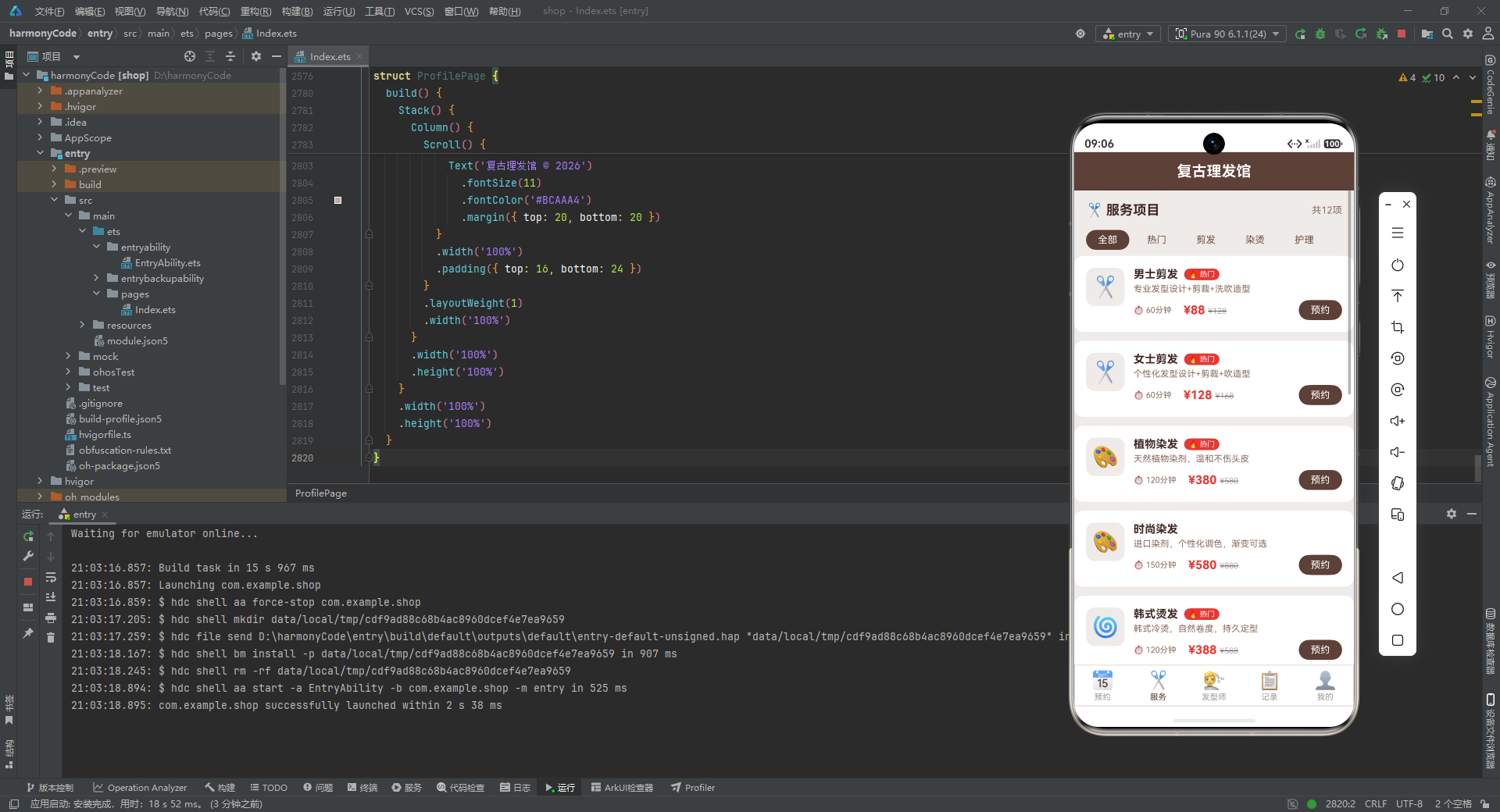
服务卡片的布局与预约卡片类似,使用 Row 横向布局:左侧是 52x52 的圆角方形图标容器(borderRadius(12)),内部居中显示 28 号字体的 Emoji 图标。右侧是信息区,通过 layoutWeight(1) 占据剩余空间。
信息区第一行是服务名称和热门标签。热门标签使用 if (item.popular) 条件判断,只有 popular 为 true 的服务才显示红色"🔥 热门"胶囊标签,让用户快速识别受欢迎的服务。
第二行是服务描述,使用 12 号灰色字,最多 2 行,超出显示省略号。
第三行是时长、价格和预约按钮的组合。时长前加上"⏱"图标,价格区域同样使用"实际价 + 划线原价"的模式。最右侧是"预约"按钮,使用复古棕背景的胶囊样式。
9.2 筛选标签与页面构建
  build() {
    Stack() {
      Column() {
        Scroll() {
          Column() {
            Row() {
              Text('✂️ 服务项目')
                .fontSize(18)
                .fontWeight(FontWeight.Bold)
                .fontColor('#3E2723')
              Column().layoutWeight(1)
              Text('共' + this.services.length + '项')
                .fontSize(13)
                .fontColor('#8D6E63')
            }
            .width('100%')
            .padding(16)

            Row() {
              ForEach(['全部', '热门', '剪发', '染烫', '护理'], (filter: string) => {
                Text(filter)
                  .fontSize(13)
                  .fontColor(filter === '全部' ? '#FFFFFF' : '#795548')
                  .backgroundColor(filter === '全部' ? '#5D4037' : '#EFEBE9')
                  .borderRadius(14)
                  .padding({ left: 16, right: 16, top: 6, bottom: 6 })
                  .margin({ right: 8 })
              })
            }
            .width('100%')
            .padding({ left: 16, right: 16, bottom: 8 })

            ForEach(this.services, (item: ServiceItem) => {
              this.serviceItemBuilder(item)
            })
          }
          .width('100%')
          .padding({ bottom: 24 })
        }
        .layoutWeight(1)
        .width('100%')
      }
      .width('100%')
      .height('100%')
    }
    .width('100%')
    .height('100%')
  }
逐行解析:
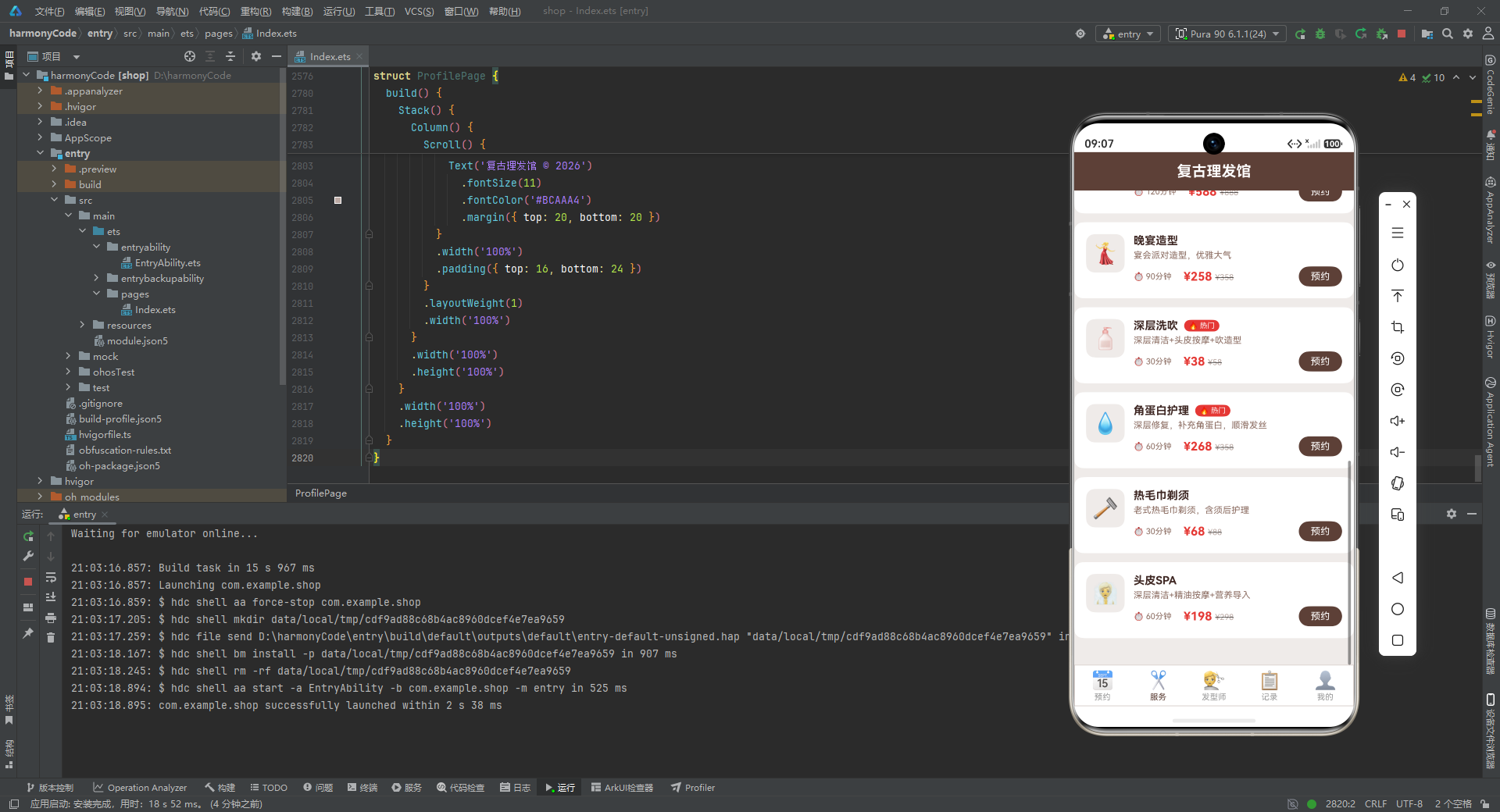
页面顶部是标题行,左侧"✂️ 服务项目"标题,右侧显示服务总数。下方是筛选标签行,包含"全部"“热门”“剪发”“染烫”"护理"五个筛选项,使用标签胶囊样式。当前"全部"为选中状态(白字棕底),其余为未选中状态(棕字浅底)。虽然当前实现中筛选标签的样式是静态的,但其布局结构已经为未来的交互式筛选功能做好了准备。
筛选标签下方使用 ForEach 遍历所有服务项目,调用 serviceItemBuilder 逐个渲染服务卡片。整个列表包裹在 Scroll 可滚动容器中,确保内容超出屏幕时可以滚动浏览。
十、发型师展示页:人物形象与评价体系
10.1 评分条构建器
@Component
struct BarberPage {
  @State barbers: BarberItem[] = MOCK_BARBERS
  @State reviews: ReviewItem[] = MOCK_REVIEWS

  @Builder
  ratingBarBuilder(rating: number) {
    Row() {
      ForEach([1, 2, 3, 4, 5], (star: number) => {
        Text(star <= rating ? '⭐' : '☆')
          .fontSize(10)
          .margin({ right: 1 })
      })
    }
  }
逐行解析:
ratingBarBuilder 是一个可复用的评分条构建器,接收一个 rating 参数(0-5 的整数)。内部使用 ForEach 遍历数组 [1, 2, 3, 4, 5],对于每个 star 值,如果 star <= rating 则显示实心星"⭐",否则显示空心星"☆"。这样就构成了一个直观的五星评分条。
这个构建器在发型师卡片和评价卡片中都被复用,体现了 DRY(Don’t Repeat Yourself)原则。
10.2 发型师卡片
@Builder
barberItemBuilder(item: BarberItem) {
  Column() {
    Row() {
      Column() {
        Text(item.avatar)
          .fontSize(40)
      }
      .width(64)
      .height(64)
      .backgroundColor('#EFEBE9')
      .borderRadius(32)
      .justifyContent(FlexAlign.Center)

      Column() {
        Row() {
          Text(item.name)
            .fontSize(16)
            .fontWeight(FontWeight.Bold)
            .fontColor('#3E2723')
          Text(item.level)
            .fontSize(10)
            .fontColor('#FFFFFF')
            .backgroundColor(BARBER_LEVEL_CONFIG[item.level] || '#999999')
            .borderRadius(8)
            .padding({ left: 6, right: 6, top: 2, bottom: 2 })
            .margin({ left: 8 })
        }
        .alignItems(VerticalAlign.Center)

        Row() {
          this.ratingBarBuilder(Math.floor(item.rating))
          Text(item.rating.toFixed(1))
            .fontSize(12)
            .fontColor('#FF9800')
            .fontWeight(FontWeight.Bold)
            .margin({ left: 6 })
          Text('(' + item.reviewCount + '评)')
            .fontSize(11)
            .fontColor('#8D6E63')
            .margin({ left: 4 })
        }
        .margin({ top: 6 })
        .alignItems(VerticalAlign.Center)

        Text(item.intro)
          .fontSize(11)
          .fontColor('#8D6E63')
          .margin({ top: 4 })
          .maxLines(2)
          .textOverflow({ overflow: TextOverflow.Ellipsis })
      }
      .alignItems(HorizontalAlign.Start)
      .margin({ left: 12 })
      .layoutWeight(1)

      Column() {
        Text('从业')
          .fontSize(10)
          .fontColor('#8D6E63')
        Text(item.experience + '年')
          .fontSize(16)
          .fontWeight(FontWeight.Bold)
          .fontColor('#5D4037')
        Text('总服务' + item.totalServices)
          .fontSize(10)
          .fontColor('#8D6E63')
          .margin({ top: 4 })
      }
      .alignItems(HorizontalAlign.End)
    }
    .width('100%')
    .alignItems(VerticalAlign.Top)

    Divider().color('#D7CCC8').margin({ top: 12, bottom: 12 })

    Row() {
      Text('擅长: ')
        .fontSize(11)
        .fontColor('#8D6E63')
      ForEach(item.specialties, (spec: string) => {
        Text(spec)
          .fontSize(10)
          .fontColor('#5D4037')
          .backgroundColor('#EFEBE9')
          .borderRadius(6)
          .padding({ left: 8, right: 8, top: 3, bottom: 3 })
          .margin({ right: 6 })
      })
    }
    .width('100%')
    .alignItems(VerticalAlign.Center)

    Row() {
      Text('预约')
        .fontSize(13)
        .fontColor('#FFFFFF')
        .backgroundColor('#E53935')
        .borderRadius(14)
        .padding({ left: 20, right: 20, top: 8, bottom: 8 })
      Column().layoutWeight(1)
      Text('查看评价')
        .fontSize(13)
        .fontColor('#5D4037')
        .borderWidth(1)
        .borderColor('#5D4037')
        .borderRadius(14)
        .padding({ left: 20, right: 20, top: 7, bottom: 7 })
    }
    .width('100%')
    .margin({ top: 12 })
    .alignItems(VerticalAlign.Center)
  }
  .width('100%')
  .backgroundColor('#FFFFFF')
  .borderRadius(12)
  .padding(16)
  .margin({ left: 12, right: 12, bottom: 12 })
}
逐行解析:
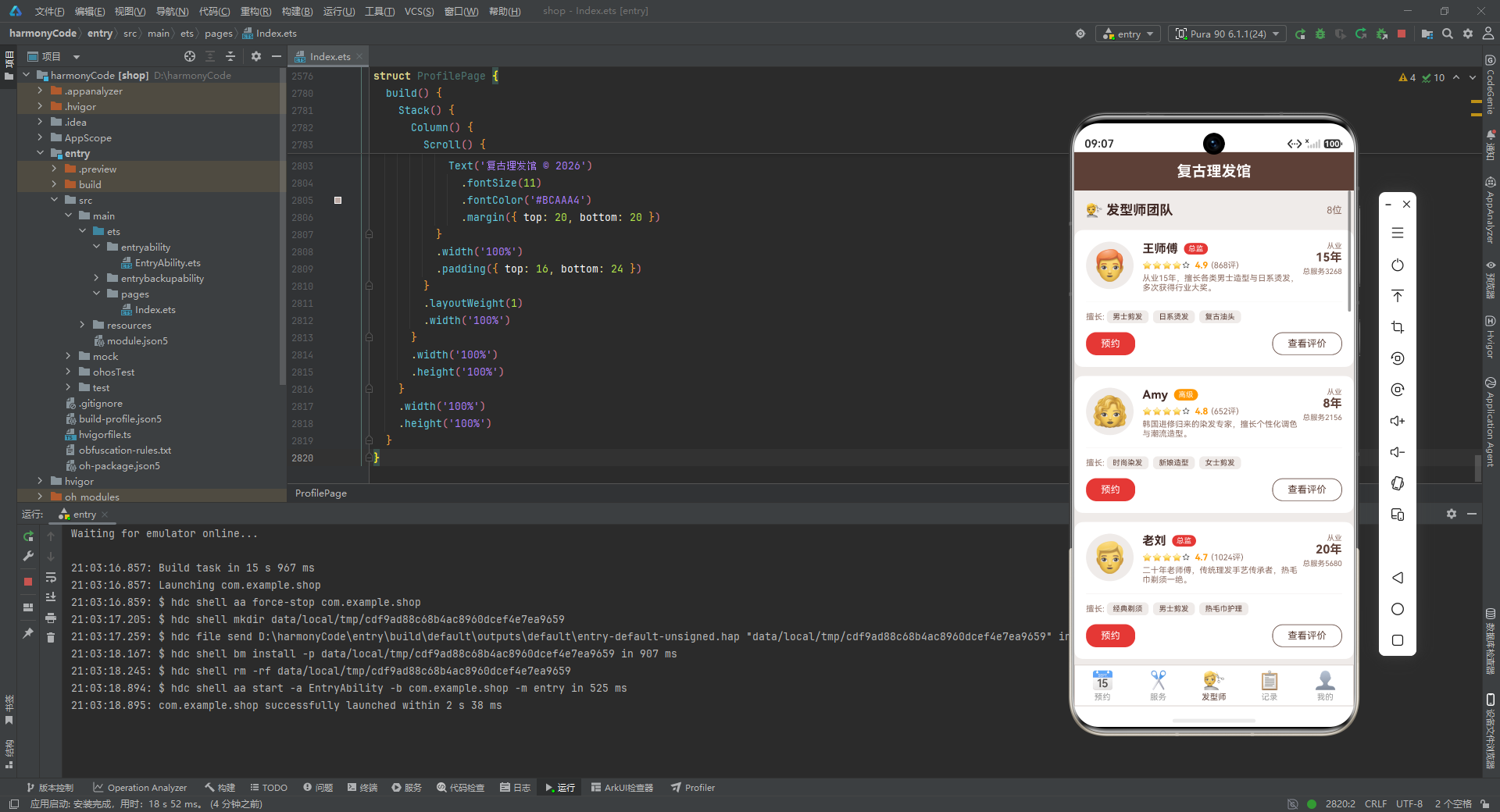
发型师卡片的布局比预约卡片更加丰富。头部 Row 分为三部分:
左侧是 64x64 的圆形头像容器(borderRadius(32)),显示 40 号字体的 Emoji 头像。
中间信息区包含三行内容:第一行是姓名(16 号粗体)和等级标签(使用 BARBER_LEVEL_CONFIG 获取颜色);第二行是评分条(调用 ratingBarBuilder,传入 Math.floor(item.rating) 取整)、数值评分(item.rating.toFixed(1) 保留一位小数,橙色粗体)和评价数;第三行是个人简介,最多 2 行。
右侧统计区纵向显示"从业"标签、从业年限(16 号粗体棕色)和总服务次数。
分隔线下方是擅长领域标签行,使用 ForEach 遍历 specialties 数组,每个擅长领域渲染为浅棕色胶囊标签。
底部是两个操作按钮:"预约"按钮使用理发红背景填充样式(主操作),"查看评价"按钮使用复古棕边框镂空样式(次操作)。主次操作的视觉区分通过填充与镂空的对比来实现,引导用户优先关注主操作。
10.3 评价卡片与页面组装
@Builder
reviewItemBuilder(item: ReviewItem) {
  Column() {
    Row() {
      Column() {
        Text(item.avatar)
          .fontSize(24)
      }
      .width(36)
      .height(36)
      .backgroundColor('#EFEBE9')
      .borderRadius(18)
      .justifyContent(FlexAlign.Center)

      Column() {
        Text(item.customerName)
          .fontSize(13)
          .fontWeight(FontWeight.Medium)
          .fontColor('#3E2723')
        Text(item.barberName + ' · ' + item.serviceType)
          .fontSize(11)
          .fontColor('#8D6E63')
          .margin({ top: 2 })
      }
      .alignItems(HorizontalAlign.Start)
      .margin({ left: 8 })
      .layoutWeight(1)

      Column() {
        this.ratingBarBuilder(item.rating)
        Text(item.date)
          .fontSize(10)
          .fontColor('#BCAAA4')
          .margin({ top: 2 })
      }
      .alignItems(HorizontalAlign.End)
    }
    .width('100%')
    .alignItems(VerticalAlign.Top)

    Text(item.content)
      .fontSize(12)
      .fontColor('#5D4037')
      .margin({ top: 8 })
      .lineHeight(20)
  }
  .width('100%')
  .backgroundColor('#FFFFFF')
  .borderRadius(10)
  .padding(14)
  .margin({ left: 12, right: 12, bottom: 8 })
}
逐行解析:
评价卡片比发型师卡片更加紧凑。头部 Row 包含 36x36 的小圆形头像、客户姓名和服务信息("发型师 · 服务类型"格式),以及右侧的评分条和日期。下方是评价正文,使用 12 号棕色字,20 的行高保证阅读舒适度。
页面 build 函数中,先渲染发型师列表,再渲染"💬 最新评价"标题和评价列表,让用户在一个页面内既能了解发型师团队,又能看到真实客户评价。
十一、数据统计记录页:可视化数据呈现
11.1 数据处理方法
@Component
struct RecordPage {
  haircuts: HaircutItem[] = []
  @State serviceStats: ServiceStat[] = MOCK_SERVICE_STATS
  @State barberStats: BarberStat[] = MOCK_BARBER_STATS

  getCompletedRecords(): HaircutItem[] {
    let result: HaircutItem[] = []
    for (let i = 0; i < this.haircuts.length; i++) {
      if (this.haircuts[i].status === '已完成' || this.haircuts[i].status === '已取消') {
        result.push(this.haircuts[i])
      }
    }
    return result
  }

  getMaxServiceCount(): number {
    let max: number = 0
    for (let i = 0; i < this.serviceStats.length; i++) {
      if (this.serviceStats[i].count > max) {
        max = this.serviceStats[i].count
      }
    }
    return max
  }

  getMaxBarberCount(): number {
    let max: number = 0
    for (let i = 0; i < this.barberStats.length; i++) {
      if (this.barberStats[i].count > max) {
        max = this.barberStats[i].count
      }
    }
    return max
  }

  getMaxBarberRevenue(): number {
    let max: number = 0
    for (let i = 0; i < this.barberStats.length; i++) {
      if (this.barberStats[i].revenue > max) {
        max = this.barberStats[i].revenue
      }
    }
    return max
  }
逐行解析:
RecordPage 组件包含四个数据处理方法,这些方法体现了组件内的业务逻辑处理能力:
getCompletedRecords() 遍历预约数组,筛选出状态为"已完成"或"已取消"的记录,返回一个新的数组。这些记录将在历史记录列表中展示。
getMaxServiceCount()、getMaxBarberCount()、getMaxBarberRevenue() 三个方法分别获取服务类型统计中的最大次数、发型师统计中的最大接单数和最大营收额。这些最大值用于在条形图中计算各条目的相对宽度——以最大值为 100%,其他值按比例缩放。这是实现简单条形图的关键计算逻辑。
11.2 服务类型条形图
@Builder
serviceChartBuilder() {
  Column() {
    Text('本月各服务类型数量')
      .fontSize(15)
      .fontWeight(FontWeight.Bold)
      .fontColor('#3E2723')
      .alignSelf(ItemAlign.Start)

    Text('总服务次数: 315次')
      .fontSize(12)
      .fontColor('#8D6E63')
      .margin({ top: 6 })

    Column() {
      ForEach(this.serviceStats, (stat: ServiceStat) => {
        Row() {
          Text(stat.type)
            .fontSize(12)
            .fontColor('#5D4037')
            .width(42)

          Row() {
            Column()
              .width((stat.count / this.getMaxServiceCount()) * 100 + '%')
              .height(18)
              .backgroundColor(stat.color)
              .borderRadius({ topLeft: 4, topRight: 4, bottomLeft: 4, bottomRight: 4 })
          }
          .layoutWeight(1)
          .height(18)

          Text(stat.count + '次')
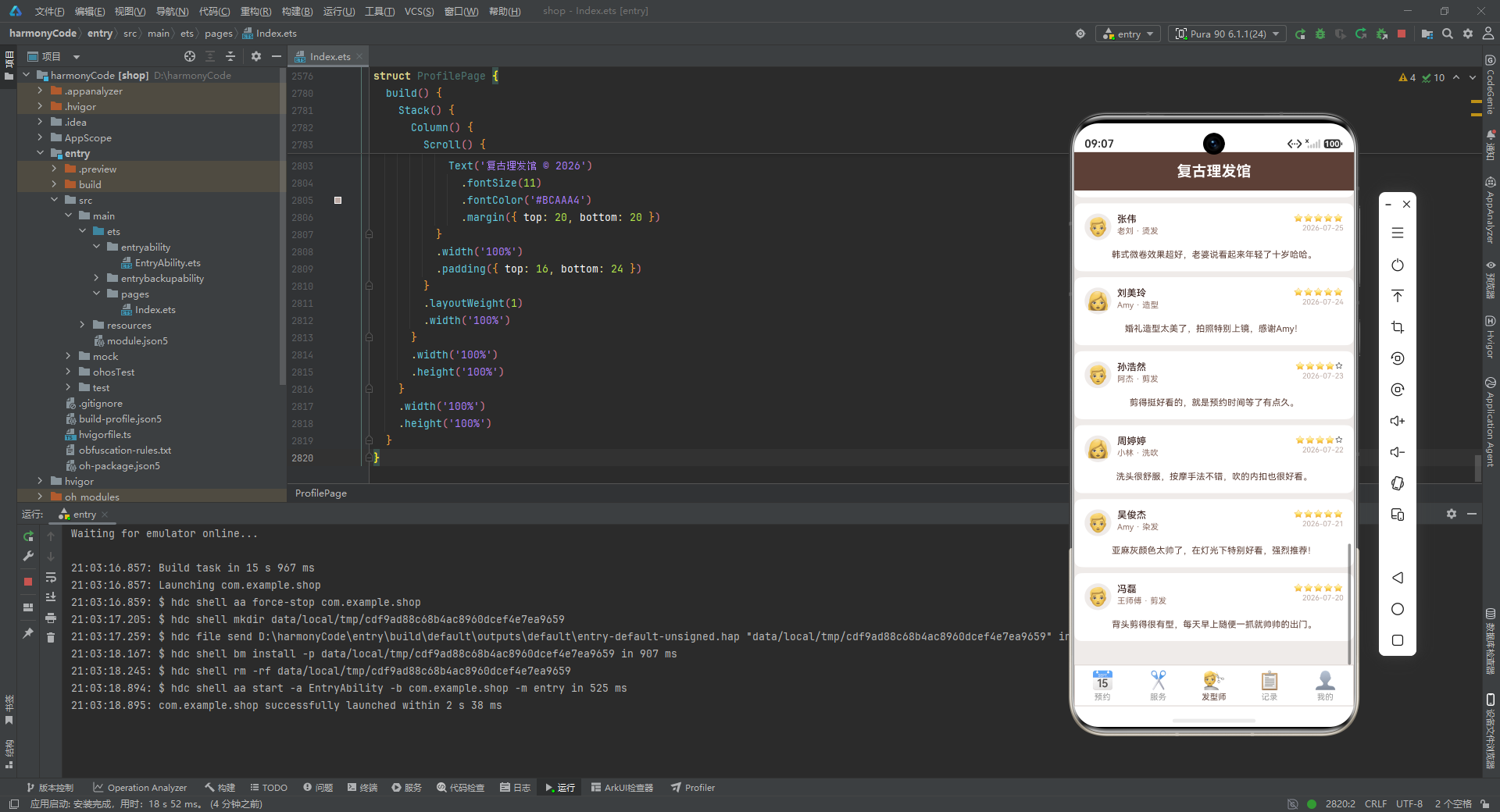
            .fontSize(11)
            .fontColor('#5D4037')
            .width(40)
            .textAlign(TextAlign.End)
        }
        .width('100%')
        .margin({ top: 8 })
        .alignItems(VerticalAlign.Center)
      })
    }
    .width('100%')
    .margin({ top: 16 })
  }
  .width('100%')
  .backgroundColor('#FFFFFF')
  .borderRadius(12)
  .padding(16)
  .margin({ left: 12, right: 12, bottom: 12 })
}
逐行解析:
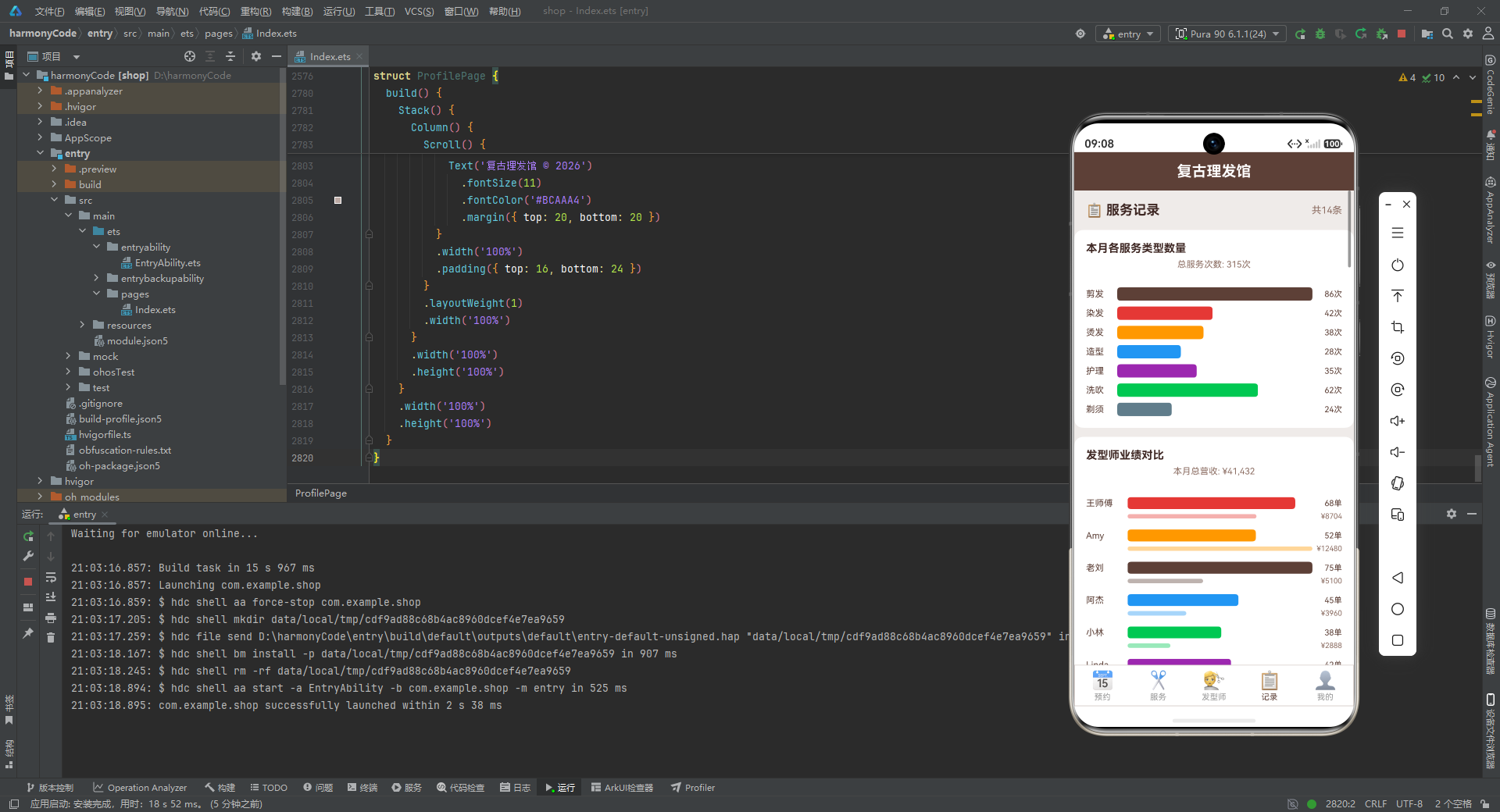
这是一个纯 CSS 实现的水平条形图,无需引入任何图表库。标题"本月各服务类型数量"和副标题"总服务次数: 315次"位于顶部。
图表主体使用 ForEach 遍历 serviceStats 数组,每一行包含三个部分:左侧是 42 宽度的服务类型名称,中间是条形图主体(layoutWeight(1) 占据剩余空间),右侧是 40 宽度的数值。
条形图的精髓在于中间部分的宽度计算:.width((stat.count / this.getMaxServiceCount()) * 100 + '%')。以最大值为基准,当前值除以最大值得到一个 0-1 之间的小数,乘以 100 转换为百分比字符串。例如,如果最大值是 86(剪发),当前值是 42(染发),则宽度为 (42/86)*100 ≈ 48.8%。条形高度为 18,颜色使用 stat.color(与配置字典中的颜色一致),四角圆角为 4。
这种"百分比宽度"的条形图实现方式简洁高效,完全利用 ArkUI 的布局能力,无需任何额外的渲染引擎。
11.3 发型师业绩对比图
@Builder
barberChartBuilder() {
  Column() {
    Text('发型师业绩对比')
      .fontSize(15)
      .fontWeight(FontWeight.Bold)
      .fontColor('#3E2723')
      .alignSelf(ItemAlign.Start)

    Text('本月总营收: ¥41,432')
      .fontSize(12)
      .fontColor('#8D6E63')
      .margin({ top: 6 })

    Column() {
      ForEach(this.barberStats, (stat: BarberStat) => {
        Column() {
          Row() {
            Text(stat.name)
              .fontSize(12)
              .fontColor('#5D4037')
              .width(56)

            Row() {
              Column()
                .width((stat.count / this.getMaxBarberCount()) * 100 + '%')
                .height(16)
                .backgroundColor(stat.color)
                .borderRadius({ topLeft: 4, topRight: 4, bottomLeft: 4, bottomRight: 4 })
            }
            .layoutWeight(1)
            .height(16)

            Text(stat.count + '单')
              .fontSize(11)
              .fontColor('#5D4037')
              .width(40)
              .textAlign(TextAlign.End)
          }
          .width('100%')
          .alignItems(VerticalAlign.Center)

          Row() {
            Text('')
              .width(56)

            Row() {
              Column()
                .width((stat.revenue / this.getMaxBarberRevenue()) * 100 + '%')
                .height(6)
                .backgroundColor(stat.color)
                .opacity(0.4)
                .borderRadius(3)
            }
            .layoutWeight(1)
            .height(6)

            Text('¥' + stat.revenue)
              .fontSize(10)
              .fontColor('#8D6E63')
              .width(40)
              .textAlign(TextAlign.End)
          }
          .width('100%')
          .margin({ top: 4 })
          .alignItems(VerticalAlign.Center)
        }
        .width('100%')
        .margin({ top: 12 })
      })
    }
    .width('100%')
    .margin({ top: 16 })
  }
  .width('100%')
  .backgroundColor('#FFFFFF')
  .borderRadius(12)
  .padding(16)
  .margin({ left: 12, right: 12, bottom: 12 })
}
逐行解析:
发型师业绩对比图比服务类型图更加复杂,每位发型师显示两行数据:上方是接单数条形图(高度 16),下方是营收额条形图(高度 6,opacity(0.4) 半透明效果)。
接单数条形的宽度计算方式与服务类型图相同:(stat.count / this.getMaxBarberCount()) * 100 + '%'。营收额条形的宽度计算类似:(stat.revenue / this.getMaxBarberRevenue()) * 100 + '%'。
营收条形使用半透明效果(opacity(0.4)),与上方的接单数条形形成视觉层次——主条形饱满醒目,辅助条形轻柔低调。这种"双条形对比"的设计让用户能够同时了解每位发型师的接单量和营收能力,发现"接单多但营收低"或"接单少但营收高"的洞察。
11.4 历史记录卡片与页面组装
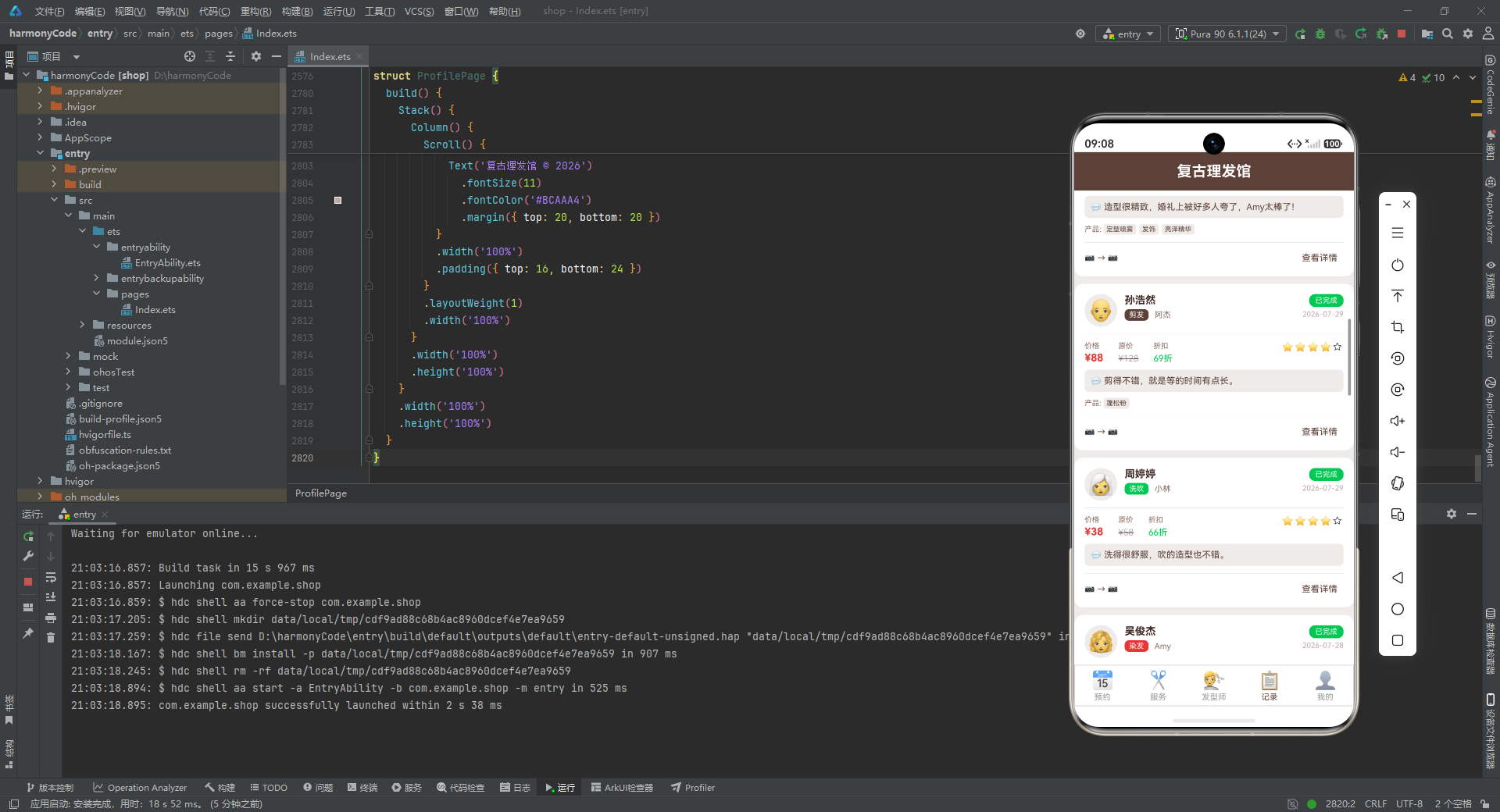
历史记录卡片(recordItemBuilder)与预约卡片类似,但增加了价格对比信息(实际价、原价、折扣)和评价展示。当记录状态为"已完成"且评分大于 0 时,会显示评分条。评价内容使用浅棕色背景的圆角区块展示。
页面 build 函数中,依次渲染标题行、服务类型条形图、发型师业绩对比图、历史记录标题和历史记录列表,构成一个完整的数据统计与记录回顾页面。
十二、个人中心页:门店信息与功能入口
12.1 门店信息头部
@Component
struct ProfilePage {
  @State totalRevenue: number = 41432
  @State totalCustomers: number = 326
  @State avgRating: number = 4.7
  @State totalServices: number = 22634

  @Builder
  profileHeaderBuilder() {
    Column() {
      Row() {
        Column() {
          Text('💈')
            .fontSize(40)
        }
        .width(64)
        .height(64)
        .backgroundColor('#D7CCC8')
        .borderRadius(32)
        .justifyContent(FlexAlign.Center)

        Column() {
          Text('复古理发馆')
            .fontSize(18)
            .fontWeight(FontWeight.Bold)
            .fontColor('#3E2723')
          Text('南山区·科技园店')
            .fontSize(12)
            .fontColor('#8D6E63')
            .margin({ top: 4 })
          Row() {
            Text('⭐ 4.7')
              .fontSize(12)
              .fontColor('#FF9800')
            Text('·')
              .fontSize(12)
              .fontColor('#BCAAA4')
              .margin({ left: 4, right: 4 })
            Text('营业中')
              .fontSize(12)
              .fontColor('#00C853')
          }
          .margin({ top: 4 })
          .alignItems(VerticalAlign.Center)
        }
        .alignItems(HorizontalAlign.Start)
        .margin({ left: 16 })
        .layoutWeight(1)

        Column() {
          Text('编辑')
            .fontSize(13)
            .fontColor('#5D4037')
            .padding({ left: 12, right: 12, top: 6, bottom: 6 })
        }
        .alignItems(HorizontalAlign.End)
      }
      .width('100%')
      .alignItems(VerticalAlign.Center)
    }
    .width('100%')
    .backgroundColor('#FFFFFF')
    .borderRadius(12)
    .padding(20)
    .margin({ left: 12, right: 12 })
  }
逐行解析:
ProfilePage 组件持有四个统计数据状态变量:总营收、总客户数、平均评分和总服务次数。
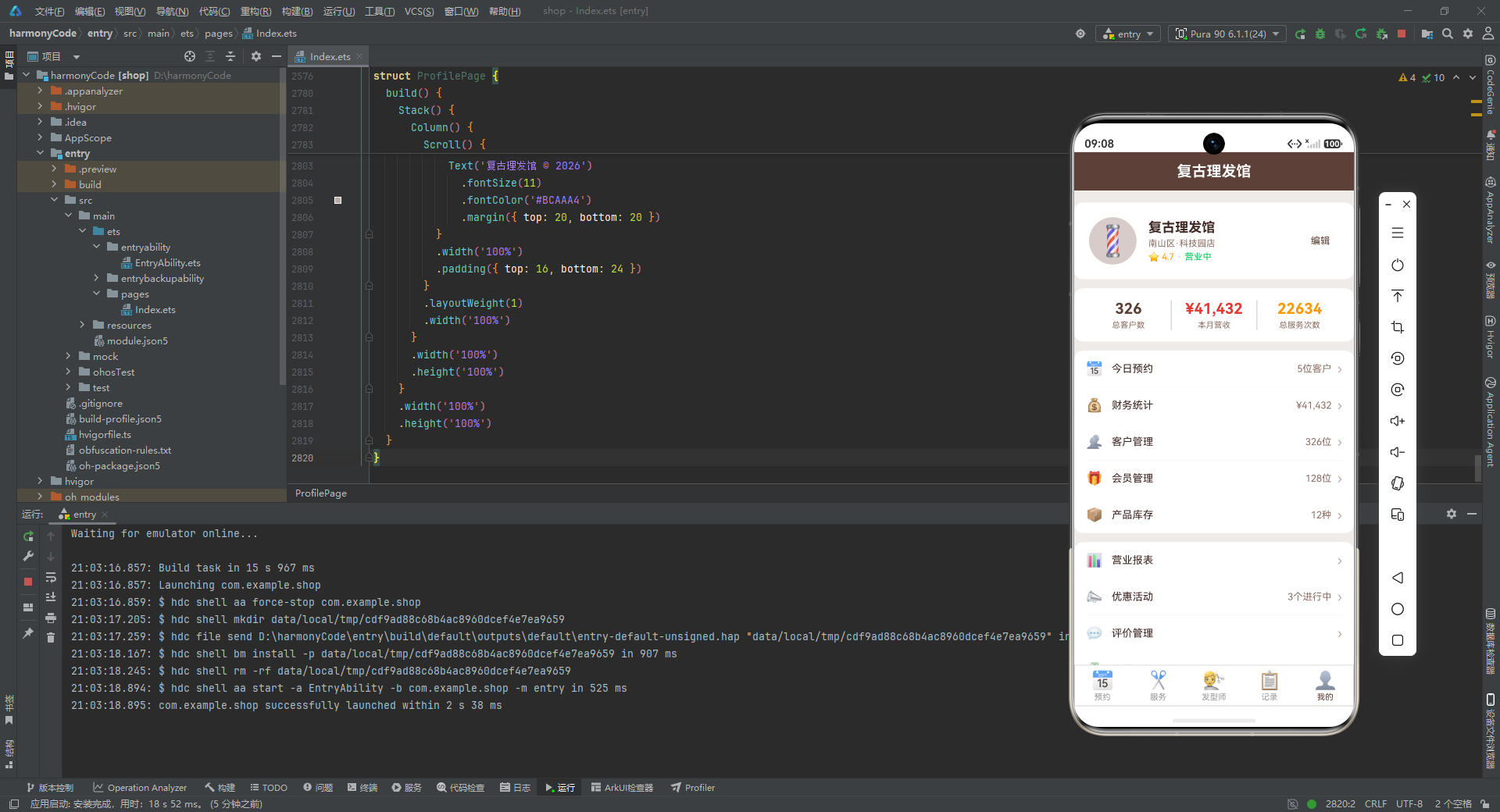
门店信息头部使用白色圆角卡片,左侧是 64x64 的圆形"💈"理发灯图标,中间是门店名称、地址和评分/营业状态信息,右侧是"编辑"文字按钮。布局清晰,信息层次分明。
12.2 统计卡片
@Builder
statCardBuilder() {
  Row() {
    Column() {
      Text(this.totalCustomers.toString())
        .fontSize(20)
        .fontWeight(FontWeight.Bold)
        .fontColor('#5D4037')
      Text('总客户数')
        .fontSize(11)
        .fontColor('#8D6E63')
        .margin({ top: 4 })
    }
    .layoutWeight(1)

    Column()
      .width(1)
      .height(40)
      .backgroundColor('#D7CCC8')

    Column() {
      Text('¥' + this.totalRevenue.toLocaleString())
        .fontSize(20)
        .fontWeight(FontWeight.Bold)
        .fontColor('#E53935')
      Text('本月营收')
        .fontSize(11)
        .fontColor('#8D6E63')
        .margin({ top: 4 })
    }
    .layoutWeight(1)

    Column()
      .width(1)
      .height(40)
      .backgroundColor('#D7CCC8')

    Column() {
      Text(this.totalServices.toString())
        .fontSize(20)
        .fontWeight(FontWeight.Bold)
        .fontColor('#FF9800')
      Text('总服务次数')
        .fontSize(11)
        .fontColor('#8D6E63')
        .margin({ top: 4 })
    }
    .layoutWeight(1)
  }
  .width('100%')
  .backgroundColor('#FFFFFF')
  .borderRadius(12)
  .padding(16)
  .margin({ left: 12, right: 12, top: 12 })
}
逐行解析:
统计卡片使用三等分布局(每个 Column 使用 layoutWeight(1)),三组数据之间用 1 像素宽、40 高的竖线分隔。三组数据分别使用不同的颜色:总客户数为棕色、本月营收为红色(带 ¥ 符号和 toLocaleString() 千分位格式化)、总服务次数为橙色。每组数据上方是大号粗体数值,下方是小号灰色标签。
12.3 菜单列表与页面组装
@Builder
menuRowBuilder(icon: string, label: string, value: string, showArrow: boolean) {
  Row() {
    Text(icon)
      .fontSize(18)
    Text(label)
      .fontSize(14)
      .fontColor('#3E2723')
      .margin({ left: 12 })
    Column().layoutWeight(1)
    if (value.length > 0) {
      Text(value)
        .fontSize(13)
        .fontColor('#8D6E63')
    }
    if (showArrow) {
      Text('›')
        .fontSize(18)
        .fontColor('#BCAAA4')
        .margin({ left: 8 })
    }
  }
  .width('100%')
  .padding({ top: 14, bottom: 14, left: 16, right: 16 })
  .alignItems(VerticalAlign.Center)
}
逐行解析:
menuRowBuilder 是一个通用的菜单行构建器,接收图标、标签、右侧值和是否显示箭头四个参数。左侧是 Emoji 图标,中间是菜单标签,右侧根据条件显示值文本和右箭头"›"。这种"图标 + 标签 + 值 + 箭头"的菜单行模式在移动端设置页面中极为常见。
应用定义了三个菜单分组构建器(menuSection1Builder、menuSection2Builder、menuSection3Builder),分别包含经营类功能(今日预约、财务统计、客户管理、会员管理、产品库存)、运营类功能(营业报表、优惠活动、评价管理、门店设置)和系统类功能(消息通知、使用教程、系统设置、帮助与反馈、关于我们)。每个分组使用白色圆角卡片包裹,行与行之间用浅色分隔线隔开。
页面底部还有一个红色的"退出登录"按钮和版权信息"复古理发馆 © 2026",完成了个人中心页的完整布局。
十三、关键特性对比总结
下面通过一张表格,系统对比应用中各核心模块的关键特性:
| 模块 | 核心功能 | 关键技术点 | 数据来源 | 交互方式 |
|---|---|---|---|---|
| 类型定义层 | 定义全部业务实体结构 | TypeScript interface、Record 字典 | 静态声明 | 无(基础支撑) |
| 可观察模型 | 预约数据响应式包装 | @Observed 装饰器、构造函数注入 | 接口转换 | 预留响应式扩展 |
| 静态配置层 | 集中管理配色与标签映射 | Record<string, string>、Record<string, TabConfig> | 常量字典 | 全局引用 |
| Mock 数据层 | 提供逼真业务数据 | 数组字面量、多类型覆盖 | 内置常量 | 无(数据供给) |
| 主入口组件 | 全局状态与弹窗管理 | @Entry、@State、@Builder、条件渲染 | 状态驱动 | Tab 切换、弹窗开关 |
| 预约管理页 | 预约列表展示与操作 | ForEach、条件渲染、回调传参 | 父组件传入 | 新增、编辑、取消、详情 |
| 服务项目页 | 服务展示与筛选 | ForEach、标签胶囊、热门标记 | Mock 数据 | 筛选、预约 |
| 发型师展示页 | 团队展示与评价 | 可复用 Builder、评分条、标签列表 | Mock 数据 | 预约、查看评价 |
| 数据统计记录页 | 可视化图表与历史记录 | 百分比宽度条形图、数据处理方法 | Mock + 传入 | 浏览统计、查看记录 |
| 个人中心页 | 门店信息与功能入口 | 三等分布局、菜单分组、千分位格式化 | 状态变量 | 编辑、菜单导航 |
| 弹窗系统 | 新增、编辑、删除确认 | Stack 层叠、遮罩复用、表单交互 | 状态控制 | 表单填写、确认取消 |
| 底部标签栏 | 五模块导航 | 枚举索引、layoutWeight 平分、动态配色 | Tab 配置 | 点击切换 |
安装DevEco Studio程序

选择目标安装目录:

设置环境变量,但是需要重启一下:

新建一个空白模板:

设置API为24的模板项目:

初始化项目,自动下载相关依赖:

完整代码:
// ============================================================
// 文件: 306.ets
// 场景: 理发店预约管理APP
// 主题色: 复古棕 #5D4037 + 理发红 #E53935, 背景 #EFEBE9
// 风格: 复古理发店风格, 条纹背景装饰, 剪刀图标, 绅士风格卡片
// ============================================================
// ==================== 接口定义 ====================
interface HaircutItem {
id: number
customerName: string
customerPhone: string
serviceType: string
barberName: string
barberAvatar: string
barberLevel: string
date: string
timeSlot: string
duration: number
price: number
originalPrice: number
discount: number
status: string
hairType: string
hairLength: string
preferredStyle: string
notes: string
rating: number
review: string
beforePhoto: string
afterPhoto: string
products: string[]
isMember: boolean
memberLevel: string
}
interface ServiceItem {
id: number
name: string
icon: string
price: number
originalPrice: number
duration: number
description: string
popular: boolean
}
interface BarberItem {
id: number
name: string
avatar: string
level: string
rating: number
reviewCount: number
experience: number
specialties: string[]
totalServices: number
intro: string
}
interface ReviewItem {
id: number
customerName: string
barberName: string
serviceType: string
rating: number
content: string
date: string
avatar: string
}
interface TabConfig {
label: string
icon: string
activeColor: string
}
interface ServiceStat {
type: string
count: number
color: string
}
interface BarberStat {
name: string
count: number
revenue: number
color: string
}
interface MenuRowItem {
icon: string
label: string
value: string
showArrow: boolean
}
// ==================== 数据模型 ====================
@Observed
class HaircutModel {
id: number = 0
customerName: string = ''
customerPhone: string = ''
serviceType: string = ''
barberName: string = ''
barberAvatar: string = ''
barberLevel: string = ''
date: string = ''
timeSlot: string = ''
duration: number = 0
price: number = 0
originalPrice: number = 0
discount: number = 0
status: string = ''
hairType: string = ''
hairLength: string = ''
preferredStyle: string = ''
notes: string = ''
rating: number = 0
review: string = ''
beforePhoto: string = ''
afterPhoto: string = ''
products: string[] = []
isMember: boolean = false
memberLevel: string = ''
constructor(data: HaircutItem) {
this.id = data.id
this.customerName = data.customerName
this.customerPhone = data.customerPhone
this.serviceType = data.serviceType
this.barberName = data.barberName
this.barberAvatar = data.barberAvatar
this.barberLevel = data.barberLevel
this.date = data.date
this.timeSlot = data.timeSlot
this.duration = data.duration
this.price = data.price
this.originalPrice = data.originalPrice
this.discount = data.discount
this.status = data.status
this.hairType = data.hairType
this.hairLength = data.hairLength
this.preferredStyle = data.preferredStyle
this.notes = data.notes
this.rating = data.rating
this.review = data.review
this.beforePhoto = data.beforePhoto
this.afterPhoto = data.afterPhoto
this.products = data.products
this.isMember = data.isMember
this.memberLevel = data.memberLevel
}
}
// ==================== 静态配置 ====================
const STATUS_CONFIG: Record<string, string> = {
'待确认': '#FF9800',
'已确认': '#2196F3',
'进行中': '#E53935',
'已完成': '#00C853',
'已取消': '#9E9E9E'
}
const TAB_CONFIG: Record<string, TabConfig> = {
'booking': { label: '预约', icon: '📅', activeColor: '#5D4037' },
'service': { label: '服务', icon: '✂️', activeColor: '#5D4037' },
'barber': { label: '发型师', icon: '💇', activeColor: '#5D4037' },
'record': { label: '记录', icon: '📋', activeColor: '#5D4037' },
'profile': { label: '我的', icon: '👤', activeColor: '#5D4037' }
}
const SERVICE_CONFIG: Record<string, string> = {
'剪发': '#5D4037',
'染发': '#E53935',
'烫发': '#FF9800',
'造型': '#2196F3',
'洗吹': '#00C853',
'护理': '#9C27B0',
'剃须': '#607D8B'
}
const HAIR_TYPE_CONFIG: Record<string, string> = {
'直发': '#5D4037',
'卷发': '#FF9800',
'油性': '#42A5F5',
'干性': '#FFB74D',
'中性': '#66BB6A'
}
const BARBER_LEVEL_CONFIG: Record<string, string> = {
'初级': '#9E9E9E',
'中级': '#2196F3',
'高级': '#FF9800',
'总监': '#E53935'
}
const TIME_SLOTS: string[] = [
'09:00-10:00', '10:00-11:00', '11:00-12:00',
'12:00-13:00', '13:00-14:00', '14:00-15:00',
'15:00-16:00', '16:00-17:00', '17:00-18:00',
'18:00-19:00', '19:00-20:00', '20:00-21:00'
]
// ==================== Mock数据 - 预约记录 ====================
const MOCK_HAIRCUTS: HaircutItem[] = [
{
id: 1,
customerName: '陈志远',
customerPhone: '138****1234',
serviceType: '剪发',
barberName: '王师傅',
barberAvatar: '👨🦰',
barberLevel: '总监',
date: '2026-07-30',
timeSlot: '14:00-15:00',
duration: 60,
price: 128,
originalPrice: 168,
discount: 76,
status: '已确认',
hairType: '直发',
hairLength: '中',
preferredStyle: '商务短发',
notes: '两侧推高,顶部留长一点',
rating: 0,
review: '',
beforePhoto: '📷',
afterPhoto: '📷',
products: ['发蜡', '定型喷雾'],
isMember: true,
memberLevel: '金卡会员'
},
{
id: 2,
customerName: '李梦琪',
customerPhone: '139****5678',
serviceType: '染发',
barberName: 'Amy',
barberAvatar: '👩🦱',
barberLevel: '高级',
date: '2026-07-30',
timeSlot: '15:00-17:00',
duration: 120,
price: 480,
originalPrice: 680,
discount: 71,
status: '进行中',
hairType: '直发',
hairLength: '长',
preferredStyle: '奶茶棕渐变',
notes: '不要漂太多次,发质比较脆弱',
rating: 0,
review: '',
beforePhoto: '📷',
afterPhoto: '📷',
products: ['染发膏', '护发素', '锁色精华'],
isMember: true,
memberLevel: '白金会员'
},
{
id: 3,
customerName: '张伟',
customerPhone: '137****9012',
serviceType: '烫发',
barberName: '老刘',
barberAvatar: '👨',
barberLevel: '总监',
date: '2026-07-30',
timeSlot: '10:00-12:00',
duration: 120,
price: 388,
originalPrice: 588,
discount: 66,
status: '已完成',
hairType: '直发',
hairLength: '短',
preferredStyle: '韩式微卷',
notes: '',
rating: 5,
review: '老刘手艺一如既往的好,卷度自然,非常满意!',
beforePhoto: '📷',
afterPhoto: '📷',
products: ['弹力素', '卷发精华'],
isMember: true,
memberLevel: '金卡会员'
},
{
id: 4,
customerName: '王秀英',
customerPhone: '136****3456',
serviceType: '护理',
barberName: '小林',
barberAvatar: '👩🦳',
barberLevel: '中级',
date: '2026-07-30',
timeSlot: '11:00-12:00',
duration: 60,
price: 198,
originalPrice: 258,
discount: 77,
status: '待确认',
hairType: '干性',
hairLength: '长',
preferredStyle: '',
notes: '头发干枯毛躁,需要深层护理',
rating: 0,
review: '',
beforePhoto: '📷',
afterPhoto: '📷',
products: ['角蛋白精华', '深层修护发膜'],
isMember: false,
memberLevel: ''
},
{
id: 5,
customerName: '赵强',
customerPhone: '135****7890',
serviceType: '剃须',
barberName: '老刘',
barberAvatar: '👨',
barberLevel: '总监',
date: '2026-07-30',
timeSlot: '16:00-16:30',
duration: 30,
price: 68,
originalPrice: 88,
discount: 77,
status: '已确认',
hairType: '直发',
hairLength: '短',
preferredStyle: '',
notes: '热毛巾剃须',
rating: 0,
review: '',
beforePhoto: '📷',
afterPhoto: '📷',
products: ['剃须泡沫', '须后水'],
isMember: true,
memberLevel: '银卡会员'
},
{
id: 6,
customerName: '刘美玲',
customerPhone: '138****2345',
serviceType: '造型',
barberName: 'Amy',
barberAvatar: '👩🦱',
barberLevel: '高级',
date: '2026-07-29',
timeSlot: '14:00-15:30',
duration: 90,
price: 258,
originalPrice: 358,
discount: 72,
status: '已完成',
hairType: '卷发',
hairLength: '中',
preferredStyle: '法式优雅盘发',
notes: '参加婚礼需要',
rating: 5,
review: '造型很精致,婚礼上被好多人夸了,Amy太棒了!',
beforePhoto: '📷',
afterPhoto: '📷',
products: ['定型喷雾', '发饰', '亮泽精华'],
isMember: true,
memberLevel: '白金会员'
},
{
id: 7,
customerName: '孙浩然',
customerPhone: '137****6789',
serviceType: '剪发',
barberName: '阿杰',
barberAvatar: '👨🦲',
barberLevel: '高级',
date: '2026-07-29',
timeSlot: '15:00-16:00',
duration: 60,
price: 88,
originalPrice: 128,
discount: 69,
status: '已完成',
hairType: '油性',
hairLength: '短',
preferredStyle: '碎发刘海',
notes: '刘海不要太短',
rating: 4,
review: '剪得不错,就是等的时间有点长。',
beforePhoto: '📷',
afterPhoto: '📷',
products: ['蓬松粉'],
isMember: false,
memberLevel: ''
},
{
id: 8,
customerName: '周婷婷',
customerPhone: '135****1234',
serviceType: '洗吹',
barberName: '小林',
barberAvatar: '👩🦳',
barberLevel: '中级',
date: '2026-07-29',
timeSlot: '10:30-11:00',
duration: 30,
price: 38,
originalPrice: 58,
discount: 66,
status: '已完成',
hairType: '中性',
hairLength: '中',
preferredStyle: '内扣',
notes: '',
rating: 4,
review: '洗得很舒服,吹的造型也不错。',
beforePhoto: '📷',
afterPhoto: '📷',
products: [],
isMember: false,
memberLevel: ''
},
{
id: 9,
customerName: '吴俊杰',
customerPhone: '136****5678',
serviceType: '染发',
barberName: 'Amy',
barberAvatar: '👩🦱',
barberLevel: '高级',
date: '2026-07-28',
timeSlot: '13:00-15:00',
duration: 120,
price: 580,
originalPrice: 780,
discount: 74,
status: '已完成',
hairType: '直发',
hairLength: '短',
preferredStyle: '亚麻灰',
notes: '颜色要均匀',
rating: 5,
review: '颜色非常好看,Amy很专业,推荐!',
beforePhoto: '📷',
afterPhoto: '📷',
products: ['染发膏', '锁色精华', '护色洗发水'],
isMember: true,
memberLevel: '金卡会员'
},
{
id: 10,
customerName: '郑佳怡',
customerPhone: '138****9012',
serviceType: '烫发',
barberName: '小林',
barberAvatar: '👩🦳',
barberLevel: '中级',
date: '2026-07-28',
timeSlot: '15:00-17:30',
duration: 150,
price: 358,
originalPrice: 488,
discount: 73,
status: '已完成',
hairType: '直发',
hairLength: '长',
preferredStyle: '羊毛卷',
notes: '卷度要明显一点',
rating: 4,
review: '效果还行,卷度可能比预期大了点,但整体不错。',
beforePhoto: '📷',
afterPhoto: '📷',
products: ['弹力素', '卷发慕斯'],
isMember: false,
memberLevel: ''
},
{
id: 11,
customerName: '冯磊',
customerPhone: '137****3456',
serviceType: '剪发',
barberName: '王师傅',
barberAvatar: '👨🦰',
barberLevel: '总监',
date: '2026-07-27',
timeSlot: '11:00-12:00',
duration: 60,
price: 128,
originalPrice: 168,
discount: 76,
status: '已完成',
hairType: '直发',
hairLength: '短',
preferredStyle: '背头',
notes: '两侧渐变',
rating: 5,
review: '王师傅剪的背头太帅了,以后就找他了!',
beforePhoto: '📷',
afterPhoto: '📷',
products: ['发蜡', '定型喷雾', '蓬松粉'],
isMember: true,
memberLevel: '金卡会员'
},
{
id: 12,
customerName: '何雪',
customerPhone: '135****7890',
serviceType: '护理',
barberName: 'Amy',
barberAvatar: '👩🦱',
barberLevel: '高级',
date: '2026-07-27',
timeSlot: '14:00-15:00',
duration: 60,
price: 268,
originalPrice: 358,
discount: 75,
status: '已完成',
hairType: '干性',
hairLength: '长',
preferredStyle: '',
notes: '染后修复',
rating: 5,
review: '护理后头发柔顺了很多,非常满意。',
beforePhoto: '📷',
afterPhoto: '📷',
products: ['角蛋白精华', '深层修护发膜', '护色精华'],
isMember: true,
memberLevel: '白金会员'
},
{
id: 13,
customerName: '黄涛',
customerPhone: '136****2345',
serviceType: '剪发',
barberName: '阿杰',
barberAvatar: '👨🦲',
barberLevel: '高级',
date: '2026-07-26',
timeSlot: '16:00-17:00',
duration: 60,
price: 88,
originalPrice: 128,
discount: 69,
status: '已取消',
hairType: '直发',
hairLength: '短',
preferredStyle: '寸头',
notes: '临时有事取消',
rating: 0,
review: '',
beforePhoto: '📷',
afterPhoto: '📷',
products: [],
isMember: false,
memberLevel: ''
},
{
id: 14,
customerName: '林晓月',
customerPhone: '138****6789',
serviceType: '造型',
barberName: 'Amy',
barberAvatar: '👩🦱',
barberLevel: '高级',
date: '2026-07-26',
timeSlot: '10:00-11:30',
duration: 90,
price: 258,
originalPrice: 358,
discount: 72,
status: '已完成',
hairType: '直发',
hairLength: '长',
preferredStyle: '大波浪卷',
notes: '约会造型',
rating: 5,
review: '造型很美,约会非常成功!',
beforePhoto: '📷',
afterPhoto: '📷',
products: ['卷发棒', '定型喷雾', '亮泽精华'],
isMember: true,
memberLevel: '银卡会员'
},
{
id: 15,
customerName: '罗建军',
customerPhone: '137****1234',
serviceType: '剃须',
barberName: '老刘',
barberAvatar: '👨',
barberLevel: '总监',
date: '2026-07-25',
timeSlot: '09:00-09:30',
duration: 30,
price: 68,
originalPrice: 88,
discount: 77,
status: '已完成',
hairType: '直发',
hairLength: '短',
preferredStyle: '',
notes: '',
rating: 4,
review: '手法很老练,就是价格稍贵。',
beforePhoto: '📷',
afterPhoto: '📷',
products: ['剃须泡沫', '须后水'],
isMember: false,
memberLevel: ''
},
{
id: 16,
customerName: '高美华',
customerPhone: '135****5678',
serviceType: '染发',
barberName: 'Amy',
barberAvatar: '👩🦱',
barberLevel: '高级',
date: '2026-07-24',
timeSlot: '13:00-15:30',
duration: 150,
price: 680,
originalPrice: 880,
discount: 77,
status: '已完成',
hairType: '卷发',
hairLength: '中',
preferredStyle: '冷棕色',
notes: '遮盖白发',
rating: 5,
review: '遮白效果很好,颜色也很自然,满意!',
beforePhoto: '📷',
afterPhoto: '📷',
products: ['染发膏', '护色洗发水', '锁色精华'],
isMember: true,
memberLevel: '白金会员'
},
{
id: 17,
customerName: '马天宇',
customerPhone: '136****9012',
serviceType: '剪发',
barberName: '阿杰',
barberAvatar: '👨🦲',
barberLevel: '高级',
date: '2026-07-23',
timeSlot: '17:00-18:00',
duration: 60,
price: 88,
originalPrice: 128,
discount: 69,
status: '已完成',
hairType: '油性',
hairLength: '中',
preferredStyle: '韩式中分',
notes: '中分刘海',
rating: 4,
review: '剪得挺潮流的,适合年轻人。',
beforePhoto: '📷',
afterPhoto: '📷',
products: ['发蜡', '蓬松粉'],
isMember: false,
memberLevel: ''
},
{
id: 18,
customerName: '谢雅芳',
customerPhone: '138****3456',
serviceType: '烫发',
barberName: '王师傅',
barberAvatar: '👨🦰',
barberLevel: '总监',
date: '2026-07-22',
timeSlot: '14:00-16:30',
duration: 150,
price: 588,
originalPrice: 788,
discount: 75,
status: '已完成',
hairType: '直发',
hairLength: '长',
preferredStyle: '日系自然卷',
notes: '要自然一点的卷度',
rating: 5,
review: '王师傅烫的日系卷太自然了,朋友都以为我天生的!',
beforePhoto: '📷',
afterPhoto: '📷',
products: ['弹力素', '卷发精华', '保湿喷雾'],
isMember: true,
memberLevel: '金卡会员'
}
]
// ==================== Mock数据 - 服务项目 ====================
const MOCK_SERVICES: ServiceItem[] = [
{ id: 1, name: '男士剪发', icon: '✂️', price: 88, originalPrice: 128, duration: 60, description: '专业发型设计+剪裁+洗吹造型', popular: true },
{ id: 2, name: '女士剪发', icon: '✂️', price: 128, originalPrice: 168, duration: 60, description: '个性化发型设计+剪裁+吹造型', popular: true },
{ id: 3, name: '植物染发', icon: '🎨', price: 380, originalPrice: 580, duration: 120, description: '天然植物染剂,温和不伤头皮', popular: true },
{ id: 4, name: '时尚染发', icon: '🎨', price: 580, originalPrice: 880, duration: 150, description: '进口染剂,个性化调色,渐变可选', popular: false },
{ id: 5, name: '韩式烫发', icon: '🌀', price: 388, originalPrice: 588, duration: 120, description: '韩式冷烫,自然卷度,持久定型', popular: true },
{ id: 6, name: '数码烫发', icon: '〰️', price: 588, originalPrice: 788, duration: 150, description: '日本数码烫,损伤小,弹性好', popular: false },
{ id: 7, name: '新娘造型', icon: '👰', price: 588, originalPrice: 888, duration: 120, description: '婚礼专属造型,含试妆一次', popular: true },
{ id: 8, name: '晚宴造型', icon: '💃', price: 258, originalPrice: 358, duration: 90, description: '宴会派对造型,优雅大气', popular: false },
{ id: 9, name: '深层洗吹', icon: '🧴', price: 38, originalPrice: 58, duration: 30, description: '深层清洁+头皮按摩+吹造型', popular: true },
{ id: 10, name: '角蛋白护理', icon: '💧', price: 268, originalPrice: 358, duration: 60, description: '深层修复,补充角蛋白,顺滑发丝', popular: true },
{ id: 11, name: '热毛巾剃须', icon: '🪒', price: 68, originalPrice: 88, duration: 30, description: '老式热毛巾剃须,含须后护理', popular: false },
{ id: 12, name: '头皮SPA', icon: '🧖', price: 198, originalPrice: 298, duration: 60, description: '深层清洁+精油按摩+营养导入', popular: false }
]
// ==================== Mock数据 - 发型师 ====================
const MOCK_BARBERS: BarberItem[] = [
{
id: 1,
name: '王师傅',
avatar: '👨🦰',
level: '总监',
rating: 4.9,
reviewCount: 868,
experience: 15,
specialties: ['男士剪发', '日系烫发', '复古油头'],
totalServices: 3268,
intro: '从业15年,擅长各类男士造型与日系烫发,多次获得行业大奖。'
},
{
id: 2,
name: 'Amy',
avatar: '👩🦱',
level: '高级',
rating: 4.8,
reviewCount: 652,
experience: 8,
specialties: ['时尚染发', '新娘造型', '女士剪发'],
totalServices: 2156,
intro: '韩国进修归来的染发专家,擅长个性化调色与潮流造型。'
},
{
id: 3,
name: '老刘',
avatar: '👨',
level: '总监',
rating: 4.7,
reviewCount: 1024,
experience: 20,
specialties: ['经典剃须', '男士剪发', '热毛巾护理'],
totalServices: 5680,
intro: '二十年老师傅,传统理发手艺传承者,热毛巾剃须一绝。'
},
{
id: 4,
name: '阿杰',
avatar: '👨🦲',
level: '高级',
rating: 4.6,
reviewCount: 456,
experience: 6,
specialties: ['韩式剪发', '潮流造型', '男士烫发'],
totalServices: 1860,
intro: '年轻潮流发型师,擅长韩式风格与个性造型设计。'
},
{
id: 5,
name: '小林',
avatar: '👩🦳',
level: '中级',
rating: 4.5,
reviewCount: 328,
experience: 4,
specialties: ['女士剪发', '基础护理', '洗吹造型'],
totalServices: 1280,
intro: '认真细致的发型师,擅长日常发型设计与头发护理。'
},
{
id: 6,
name: 'Tony',
avatar: '👨🦱',
level: '中级',
rating: 4.4,
reviewCount: 286,
experience: 3,
specialties: ['男士剪发', '烫发', '造型'],
totalServices: 980,
intro: '新生代发型师,擅长时尚男士造型与日常烫发。'
},
{
id: 7,
name: 'Linda',
avatar: '👩',
level: '高级',
rating: 4.7,
reviewCount: 512,
experience: 7,
specialties: ['女士烫发', '染发', '护理'],
totalServices: 2050,
intro: '专注于女士烫染护理,手法温柔细致,深受顾客喜爱。'
},
{
id: 8,
name: '老陈',
avatar: '👴',
level: '总监',
rating: 4.8,
reviewCount: 1180,
experience: 25,
specialties: ['传统剪发', '剃须', '刮脸'],
totalServices: 6820,
intro: '二十五年的老手艺人,传统理发技艺精湛,老顾客络绎不绝。'
}
]
// ==================== Mock数据 - 评价 ====================
const MOCK_REVIEWS: ReviewItem[] = [
{ id: 1, customerName: '陈志远', barberName: '王师傅', serviceType: '剪发', rating: 5, content: '王师傅的手艺真的没话说,每次剪完都很满意,环境也很有复古范儿。', date: '2026-07-27', avatar: '👨' },
{ id: 2, customerName: '李梦琪', barberName: 'Amy', serviceType: '染发', rating: 5, content: '奶茶棕染得特别好看,很显白,朋友都问我在哪染的!', date: '2026-07-26', avatar: '👩' },
{ id: 3, customerName: '张伟', barberName: '老刘', serviceType: '烫发', rating: 5, content: '韩式微卷效果超好,老婆说看起来年轻了十岁哈哈。', date: '2026-07-25', avatar: '👨' },
{ id: 4, customerName: '刘美玲', barberName: 'Amy', serviceType: '造型', rating: 5, content: '婚礼造型太美了,拍照特别上镜,感谢Amy!', date: '2026-07-24', avatar: '👩' },
{ id: 5, customerName: '孙浩然', barberName: '阿杰', serviceType: '剪发', rating: 4, content: '剪得挺好看的,就是预约时间等了有点久。', date: '2026-07-23', avatar: '👨' },
{ id: 6, customerName: '周婷婷', barberName: '小林', serviceType: '洗吹', rating: 4, content: '洗头很舒服,按摩手法不错,吹的内扣也很好看。', date: '2026-07-22', avatar: '👩' },
{ id: 7, customerName: '吴俊杰', barberName: 'Amy', serviceType: '染发', rating: 5, content: '亚麻灰颜色太帅了,在灯光下特别好看,强烈推荐!', date: '2026-07-21', avatar: '👨' },
{ id: 8, customerName: '冯磊', barberName: '王师傅', serviceType: '剪发', rating: 5, content: '背头剪得很有型,每天早上随便一抓就帅帅的出门。', date: '2026-07-20', avatar: '👨' }
]
// ==================== Mock数据 - 统计 ====================
const MOCK_SERVICE_STATS: ServiceStat[] = [
{ type: '剪发', count: 86, color: '#5D4037' },
{ type: '染发', count: 42, color: '#E53935' },
{ type: '烫发', count: 38, color: '#FF9800' },
{ type: '造型', count: 28, color: '#2196F3' },
{ type: '护理', count: 35, color: '#9C27B0' },
{ type: '洗吹', count: 62, color: '#00C853' },
{ type: '剃须', count: 24, color: '#607D8B' }
]
const MOCK_BARBER_STATS: BarberStat[] = [
{ name: '王师傅', count: 68, revenue: 8704, color: '#E53935' },
{ name: 'Amy', count: 52, revenue: 12480, color: '#FF9800' },
{ name: '老刘', count: 75, revenue: 5100, color: '#5D4037' },
{ name: '阿杰', count: 45, revenue: 3960, color: '#2196F3' },
{ name: '小林', count: 38, revenue: 2888, color: '#00C853' },
{ name: 'Linda', count: 42, revenue: 8400, color: '#9C27B0' }
]
// ==================== Enum ====================
enum BottomTab {
BOOKING = 0,
SERVICE = 1,
BARBER = 2,
RECORD = 3,
PROFILE = 4
}
// ==================== 主入口组件 ====================
@Entry
@Component
struct BarberShopApp {
@State activeTab: number = BottomTab.BOOKING
@State showNewBookingModal: boolean = false
@State showEditModal: boolean = false
@State showDeleteModal: boolean = false
@State editTargetId: number = 0
@State deleteTargetId: number = 0
@State newCustomerName: string = ''
@State newCustomerPhone: string = ''
@State newServiceType: string = '剪发'
@State newBarberName: string = '王师傅'
@State newDate: string = '2026-07-30'
@State newTimeSlot: string = '14:00-15:00'
@State newNotes: string = ''
@State newHairType: string = '直发'
@State newHairLength: string = '短'
@State newPreferredStyle: string = ''
@State editNotes: string = ''
@State editTimeSlot: string = ''
@State editPreferredStyle: string = ''
@State haircuts: HaircutItem[] = MOCK_HAIRCUTS
@Builder
modalOverlay(onClose: () => void) {
Stack() {
Column()
.width('100%')
.height('100%')
.backgroundColor('rgba(0,0,0,0.5)')
.onClick(() => {
onClose()
})
}
.width('100%')
.height('100%')
.position({ x: 0, y: 0 })
}
@Builder
newBookingModal() {
Stack() {
this.modalOverlay(() => {
this.showNewBookingModal = false
})
Column() {
Text('新增预约')
.fontSize(20)
.fontWeight(FontWeight.Bold)
.fontColor('#5D4037')
.margin({ top: 20, bottom: 16 })
Divider().color('#D7CCC8').margin({ left: 20, right: 20 })
Scroll() {
Column() {
Text('客户姓名')
.fontSize(14)
.fontColor('#795548')
.alignSelf(ItemAlign.Start)
.margin({ top: 16, left: 20, bottom: 6 })
TextInput({ text: this.newCustomerName, placeholder: '请输入客户姓名' })
.width('90%')
.height(44)
.fontSize(14)
.borderRadius(8)
.backgroundColor('#F5F0EE')
.padding({ left: 12, right: 12 })
.onChange((val: string) => {
this.newCustomerName = val
})
Text('联系电话')
.fontSize(14)
.fontColor('#795548')
.alignSelf(ItemAlign.Start)
.margin({ top: 16, left: 20, bottom: 6 })
TextInput({ text: this.newCustomerPhone, placeholder: '请输入联系电话' })
.width('90%')
.height(44)
.fontSize(14)
.borderRadius(8)
.backgroundColor('#F5F0EE')
.padding({ left: 12, right: 12 })
.type(InputType.PhoneNumber)
.onChange((val: string) => {
this.newCustomerPhone = val
})
Text('服务类型')
.fontSize(14)
.fontColor('#795548')
.alignSelf(ItemAlign.Start)
.margin({ top: 16, left: 20, bottom: 6 })
Row() {
ForEach(['剪发', '染发', '烫发', '造型', '洗吹', '护理', '剃须'], (stype: string) => {
Text(stype)
.fontSize(12)
.fontColor(this.newServiceType === stype ? '#FFFFFF' : '#795548')
.backgroundColor(this.newServiceType === stype ? '#E53935' : '#F5F0EE')
.borderRadius(14)
.padding({ left: 12, right: 12, top: 6, bottom: 6 })
.margin({ right: 6, bottom: 6 })
.onClick(() => {
this.newServiceType = stype
})
})
}
.width('90%')
.margin({ top: 4 })
Text('发型师')
.fontSize(14)
.fontColor('#795548')
.alignSelf(ItemAlign.Start)
.margin({ top: 16, left: 20, bottom: 6 })
Row() {
ForEach(['王师傅', 'Amy', '老刘', '阿杰', '小林'], (bname: string) => {
Text(bname)
.fontSize(12)
.fontColor(this.newBarberName === bname ? '#FFFFFF' : '#795548')
.backgroundColor(this.newBarberName === bname ? '#5D4037' : '#F5F0EE')
.borderRadius(14)
.padding({ left: 12, right: 12, top: 6, bottom: 6 })
.margin({ right: 6 })
.onClick(() => {
this.newBarberName = bname
})
})
}
.width('90%')
.margin({ top: 4 })
Text('预约日期')
.fontSize(14)
.fontColor('#795548')
.alignSelf(ItemAlign.Start)
.margin({ top: 16, left: 20, bottom: 6 })
TextInput({ text: this.newDate, placeholder: '如 2026-07-30' })
.width('90%')
.height(44)
.fontSize(14)
.borderRadius(8)
.backgroundColor('#F5F0EE')
.padding({ left: 12, right: 12 })
.onChange((val: string) => {
this.newDate = val
})
Text('时间段')
.fontSize(14)
.fontColor('#795548')
.alignSelf(ItemAlign.Start)
.margin({ top: 16, left: 20, bottom: 6 })
Row() {
ForEach(['09:00-10:00', '10:00-11:00', '11:00-12:00', '14:00-15:00', '15:00-16:00', '16:00-17:00'], (slot: string) => {
Text(slot)
.fontSize(11)
.fontColor(this.newTimeSlot === slot ? '#FFFFFF' : '#795548')
.backgroundColor(this.newTimeSlot === slot ? '#E53935' : '#F5F0EE')
.borderRadius(14)
.padding({ left: 10, right: 10, top: 6, bottom: 6 })
.margin({ right: 6, bottom: 6 })
.onClick(() => {
this.newTimeSlot = slot
})
})
}
.width('90%')
.margin({ top: 4 })
Text('发质类型')
.fontSize(14)
.fontColor('#795548')
.alignSelf(ItemAlign.Start)
.margin({ top: 16, left: 20, bottom: 6 })
Row() {
ForEach(['直发', '卷发', '油性', '干性', '中性'], (htype: string) => {
Text(htype)
.fontSize(12)
.fontColor(this.newHairType === htype ? '#FFFFFF' : '#795548')
.backgroundColor(this.newHairType === htype ? '#5D4037' : '#F5F0EE')
.borderRadius(14)
.padding({ left: 12, right: 12, top: 6, bottom: 6 })
.margin({ right: 6 })
.onClick(() => {
this.newHairType = htype
})
})
}
.width('90%')
.margin({ top: 4 })
Text('发长')
.fontSize(14)
.fontColor('#795548')
.alignSelf(ItemAlign.Start)
.margin({ top: 16, left: 20, bottom: 6 })
Row() {
ForEach(['短', '中', '长'], (hlen: string) => {
Text(hlen)
.fontSize(12)
.fontColor(this.newHairLength === hlen ? '#FFFFFF' : '#795548')
.backgroundColor(this.newHairLength === hlen ? '#5D4037' : '#F5F0EE')
.borderRadius(14)
.padding({ left: 16, right: 16, top: 6, bottom: 6 })
.margin({ right: 6 })
.onClick(() => {
this.newHairLength = hlen
})
})
}
.width('90%')
.margin({ top: 4 })
Text('偏好风格')
.fontSize(14)
.fontColor('#795548')
.alignSelf(ItemAlign.Start)
.margin({ top: 16, left: 20, bottom: 6 })
TextInput({ text: this.newPreferredStyle, placeholder: '如 商务短发、韩式中分等' })
.width('90%')
.height(44)
.fontSize(14)
.borderRadius(8)
.backgroundColor('#F5F0EE')
.padding({ left: 12, right: 12 })
.onChange((val: string) => {
this.newPreferredStyle = val
})
Text('备注')
.fontSize(14)
.fontColor('#795548')
.alignSelf(ItemAlign.Start)
.margin({ top: 16, left: 20, bottom: 6 })
TextInput({ text: this.newNotes, placeholder: '特殊要求请备注' })
.width('90%')
.height(80)
.fontSize(14)
.borderRadius(8)
.backgroundColor('#F5F0EE')
.padding({ left: 12, right: 12, top: 8, bottom: 8 })
.onChange((val: string) => {
this.newNotes = val
})
Row() {
Button('取消')
.fontSize(15)
.fontColor('#795548')
.backgroundColor('#F0E0DC')
.borderRadius(22)
.height(44)
.layoutWeight(1)
.onClick(() => {
this.showNewBookingModal = false
})
Column().width(12)
Button('确认预约')
.fontSize(15)
.fontColor('#FFFFFF')
.backgroundColor('#E53935')
.borderRadius(22)
.height(44)
.layoutWeight(1)
.onClick(() => {
this.showNewBookingModal = false
})
}
.width('90%')
.margin({ top: 24, bottom: 30 })
}
}
.constraintSize({ maxHeight: '80%' })
.margin({ top: 8 })
}
.width('88%')
.backgroundColor('#FFFFFF')
.borderRadius(16)
}
.width('100%')
.height('100%')
}
@Builder
editBookingModal() {
Stack() {
this.modalOverlay(() => {
this.showEditModal = false
})
Column() {
Text('编辑预约')
.fontSize(20)
.fontWeight(FontWeight.Bold)
.fontColor('#5D4037')
.margin({ top: 20, bottom: 16 })
Divider().color('#D7CCC8').margin({ left: 20, right: 20 })
Scroll() {
Column() {
Text('时间段')
.fontSize(14)
.fontColor('#795548')
.alignSelf(ItemAlign.Start)
.margin({ top: 16, left: 20, bottom: 6 })
Row() {
ForEach(['09:00-10:00', '10:00-11:00', '11:00-12:00', '14:00-15:00', '15:00-16:00', '16:00-17:00'], (slot: string) => {
Text(slot)
.fontSize(11)
.fontColor(this.editTimeSlot === slot ? '#FFFFFF' : '#795548')
.backgroundColor(this.editTimeSlot === slot ? '#E53935' : '#F5F0EE')
.borderRadius(14)
.padding({ left: 10, right: 10, top: 6, bottom: 6 })
.margin({ right: 6, bottom: 6 })
.onClick(() => {
this.editTimeSlot = slot
})
})
}
.width('90%')
.margin({ top: 4 })
Text('偏好风格')
.fontSize(14)
.fontColor('#795548')
.alignSelf(ItemAlign.Start)
.margin({ top: 16, left: 20, bottom: 6 })
TextInput({ text: this.editPreferredStyle, placeholder: '请输入偏好风格' })
.width('90%')
.height(44)
.fontSize(14)
.borderRadius(8)
.backgroundColor('#F5F0EE')
.padding({ left: 12, right: 12 })
.onChange((val: string) => {
this.editPreferredStyle = val
})
Text('备注')
.fontSize(14)
.fontColor('#795548')
.alignSelf(ItemAlign.Start)
.margin({ top: 16, left: 20, bottom: 6 })
TextInput({ text: this.editNotes, placeholder: '请输入备注信息' })
.width('90%')
.height(80)
.fontSize(14)
.borderRadius(8)
.backgroundColor('#F5F0EE')
.padding({ left: 12, right: 12, top: 8, bottom: 8 })
.onChange((val: string) => {
this.editNotes = val
})
Row() {
Button('取消')
.fontSize(15)
.fontColor('#795548')
.backgroundColor('#F0E0DC')
.borderRadius(22)
.height(44)
.layoutWeight(1)
.onClick(() => {
this.showEditModal = false
})
Column().width(12)
Button('保存修改')
.fontSize(15)
.fontColor('#FFFFFF')
.backgroundColor('#5D4037')
.borderRadius(22)
.height(44)
.layoutWeight(1)
.onClick(() => {
this.showEditModal = false
})
}
.width('90%')
.margin({ top: 24, bottom: 30 })
}
}
.constraintSize({ maxHeight: '80%' })
.margin({ top: 8 })
}
.width('88%')
.backgroundColor('#FFFFFF')
.borderRadius(16)
}
.width('100%')
.height('100%')
}
@Builder
deleteConfirmModal() {
Stack() {
this.modalOverlay(() => {
this.showDeleteModal = false
})
Column() {
Text('确认取消预约')
.fontSize(20)
.fontWeight(FontWeight.Bold)
.fontColor('#5D4037')
.margin({ top: 28, bottom: 12 })
Text('取消后将释放该时段,客户需重新预约。此操作不可撤销。')
.fontSize(14)
.fontColor('#8D6E63')
.textAlign(TextAlign.Center)
.margin({ left: 30, right: 30, bottom: 28 })
.lineHeight(22)
Divider().color('#D7CCC8')
Row() {
Text('再想想')
.fontSize(16)
.fontColor('#795548')
.layoutWeight(1)
.textAlign(TextAlign.Center)
.padding({ top: 16, bottom: 16 })
.onClick(() => {
this.showDeleteModal = false
})
Column()
.width(1)
.height('70%')
.backgroundColor('#D7CCC8')
Text('确认取消')
.fontSize(16)
.fontColor('#E53935')
.fontWeight(FontWeight.Medium)
.layoutWeight(1)
.textAlign(TextAlign.Center)
.padding({ top: 16, bottom: 16 })
.onClick(() => {
this.showDeleteModal = false
})
}
.width('100%')
}
.width('76%')
.backgroundColor('#FFFFFF')
.borderRadius(16)
}
.width('100%')
.height('100%')
}
@Builder
bottomTabItem(index: number, config: TabConfig) {
Column() {
Text(config.icon)
.fontSize(24)
Text(config.label)
.fontSize(11)
.fontColor(this.activeTab === index ? config.activeColor : '#999999')
.margin({ top: 2 })
}
.layoutWeight(1)
.padding({ top: 6, bottom: 6 })
.onClick(() => {
this.activeTab = index
})
}
@Builder
contentArea() {
if (this.activeTab === BottomTab.BOOKING) {
BookingPage({
haircuts: this.haircuts,
onNewBooking: () => {
this.showNewBookingModal = true
},
onEdit: (id: number) => {
this.editTargetId = id
this.showEditModal = true
},
onDelete: (id: number) => {
this.deleteTargetId = id
this.showDeleteModal = true
}
})
} else if (this.activeTab === BottomTab.SERVICE) {
ServicePage()
} else if (this.activeTab === BottomTab.BARBER) {
BarberPage()
} else if (this.activeTab === BottomTab.RECORD) {
RecordPage({ haircuts: this.haircuts })
} else if (this.activeTab === BottomTab.PROFILE) {
ProfilePage()
}
}
build() {
Stack() {
Column() {
Column() {
Text('复古理发馆')
.fontSize(20)
.fontWeight(FontWeight.Bold)
.fontColor('#FFFFFF')
}
.width('100%')
.height(52)
.backgroundColor('#5D4037')
.justifyContent(FlexAlign.Center)
Column() {
this.contentArea()
}
.layoutWeight(1)
.width('100%')
.backgroundColor('#EFEBE9')
Row() {
this.bottomTabItem(BottomTab.BOOKING, TAB_CONFIG['booking'])
this.bottomTabItem(BottomTab.SERVICE, TAB_CONFIG['service'])
this.bottomTabItem(BottomTab.BARBER, TAB_CONFIG['barber'])
this.bottomTabItem(BottomTab.RECORD, TAB_CONFIG['record'])
this.bottomTabItem(BottomTab.PROFILE, TAB_CONFIG['profile'])
}
.width('100%')
.height(56)
.backgroundColor('#FFFFFF')
.borderWidth(1)
.borderColor('#D7CCC8')
}
.width('100%')
.height('100%')
if (this.showNewBookingModal) {
this.newBookingModal()
}
if (this.showEditModal) {
this.editBookingModal()
}
if (this.showDeleteModal) {
this.deleteConfirmModal()
}
}
.width('100%')
.height('100%')
}
}
// ==================== 预约页 ====================
@Component
struct BookingPage {
haircuts: HaircutItem[] = []
onNewBooking: () => void = () => {}
onEdit: (id: number) => void = () => {}
onDelete: (id: number) => void = () => {}
@Builder
bookingItemBuilder(item: HaircutItem) {
Column() {
Row() {
Column() {
Text(item.barberAvatar)
.fontSize(32)
}
.width(48)
.height(48)
.backgroundColor('#EFEBE9')
.borderRadius(24)
.justifyContent(FlexAlign.Center)
Column() {
Text(item.customerName)
.fontSize(15)
.fontWeight(FontWeight.Bold)
.fontColor('#3E2723')
Row() {
Text(item.serviceType)
.fontSize(11)
.fontColor('#FFFFFF')
.backgroundColor(SERVICE_CONFIG[item.serviceType] || '#5D4037')
.borderRadius(8)
.padding({ left: 8, right: 8, top: 2, bottom: 2 })
Text(item.barberName)
.fontSize(11)
.fontColor('#8D6E63')
.margin({ left: 8 })
Text('·')
.fontSize(11)
.fontColor('#BCAAA4')
.margin({ left: 4, right: 4 })
Text(item.barberLevel)
.fontSize(11)
.fontColor(BARBER_LEVEL_CONFIG[item.barberLevel] || '#999999')
}
.margin({ top: 6 })
.alignItems(VerticalAlign.Center)
}
.alignItems(HorizontalAlign.Start)
.margin({ left: 12 })
.layoutWeight(1)
Column() {
Text(item.status)
.fontSize(11)
.fontColor('#FFFFFF')
.backgroundColor(STATUS_CONFIG[item.status] || '#999999')
.borderRadius(10)
.padding({ left: 10, right: 10, top: 4, bottom: 4 })
if (item.isMember) {
Text(item.memberLevel)
.fontSize(9)
.fontColor('#FFB74D')
.margin({ top: 4 })
}
}
.alignItems(HorizontalAlign.End)
}
.width('100%')
.alignItems(VerticalAlign.Top)
Divider().color('#D7CCC8').margin({ top: 12, bottom: 12 })
Row() {
Column() {
Text('预约日期')
.fontSize(11)
.fontColor('#8D6E63')
Text(item.date)
.fontSize(13)
.fontColor('#3E2723')
.margin({ top: 2 })
}
.alignItems(HorizontalAlign.Start)
Column().width(20)
Column() {
Text('时间段')
.fontSize(11)
.fontColor('#8D6E63')
Text(item.timeSlot)
.fontSize(13)
.fontColor('#3E2723')
.margin({ top: 2 })
}
.alignItems(HorizontalAlign.Start)
Column().width(20)
Column() {
Text('时长')
.fontSize(11)
.fontColor('#8D6E63')
Text(item.duration + '分钟')
.fontSize(13)
.fontColor('#3E2723')
.margin({ top: 2 })
}
.alignItems(HorizontalAlign.Start)
Column().layoutWeight(1)
Column() {
Text('价格')
.fontSize(11)
.fontColor('#8D6E63')
Row() {
Text('¥' + item.price)
.fontSize(15)
.fontWeight(FontWeight.Bold)
.fontColor('#E53935')
Text('¥' + item.originalPrice)
.fontSize(11)
.fontColor('#BCAAA4')
.decoration({ type: TextDecorationType.LineThrough })
.margin({ left: 4, bottom: 2 })
}
.alignItems(VerticalAlign.Bottom)
.margin({ top: 2 })
}
.alignItems(HorizontalAlign.End)
}
.width('100%')
Row() {
Column() {
Text('发质: ' + item.hairType)
.fontSize(11)
.fontColor('#8D6E63')
}
Column().width(12)
Column() {
Text('发长: ' + item.hairLength)
.fontSize(11)
.fontColor('#8D6E63')
}
Column().width(12)
if (item.preferredStyle.length > 0) {
Column() {
Text('风格: ' + item.preferredStyle)
.fontSize(11)
.fontColor('#8D6E63')
}
}
}
.width('100%')
.margin({ top: 10 })
.alignItems(VerticalAlign.Center)
if (item.notes.length > 0) {
Row() {
Text('📝 ' + item.notes)
.fontSize(12)
.fontColor('#E53935')
.maxLines(2)
.textOverflow({ overflow: TextOverflow.Ellipsis })
}
.width('100%')
.margin({ top: 8 })
.backgroundColor('#FFEBEE')
.borderRadius(6)
.padding(8)
}
if (item.products.length > 0) {
Row() {
Text('使用产品: ')
.fontSize(11)
.fontColor('#8D6E63')
ForEach(item.products, (prod: string) => {
Text(prod)
.fontSize(10)
.fontColor('#5D4037')
.backgroundColor('#EFEBE9')
.borderRadius(6)
.padding({ left: 6, right: 6, top: 2, bottom: 2 })
.margin({ right: 4 })
})
}
.width('100%')
.margin({ top: 8 })
.alignItems(VerticalAlign.Center)
}
Divider().color('#D7CCC8').margin({ top: 12, bottom: 12 })
Row() {
Text('📞 ' + item.customerPhone)
.fontSize(12)
.fontColor('#8D6E63')
Column().layoutWeight(1)
if (item.status === '待确认' || item.status === '已确认') {
Text('编辑')
.fontSize(12)
.fontColor('#2196F3')
.padding({ left: 10, right: 10, top: 5, bottom: 5 })
.onClick(() => {
this.onEdit(item.id)
})
Text('取消')
.fontSize(12)
.fontColor('#E53935')
.padding({ left: 10, right: 10, top: 5, bottom: 5 })
.onClick(() => {
this.onDelete(item.id)
})
}
Text('详情')
.fontSize(12)
.fontColor('#FFFFFF')
.backgroundColor('#5D4037')
.borderRadius(12)
.padding({ left: 14, right: 14, top: 5, bottom: 5 })
}
.width('100%')
.alignItems(VerticalAlign.Center)
}
.width('100%')
.backgroundColor('#FFFFFF')
.borderRadius(12)
.padding(16)
.margin({ left: 12, right: 12, bottom: 12 })
}
@Builder
headerBuilder() {
Column() {
Row() {
Column() {
Text('今日预约')
.fontSize(14)
.fontColor('#8D6E63')
Row() {
Text('5')
.fontSize(28)
.fontWeight(FontWeight.Bold)
.fontColor('#5D4037')
Text(' 位客户')
.fontSize(14)
.fontColor('#8D6E63')
.margin({ bottom: 4 })
}
.alignItems(VerticalAlign.Bottom)
.margin({ top: 4 })
}
.alignItems(HorizontalAlign.Start)
.layoutWeight(1)
Column() {
Text('门店营业中')
.fontSize(12)
.fontColor('#00C853')
Text('09:00 - 21:00')
.fontSize(13)
.fontColor('#5D4037')
.margin({ top: 4 })
Text('南山区·科技园店')
.fontSize(11)
.fontColor('#8D6E63')
.margin({ top: 2 })
}
.alignItems(HorizontalAlign.End)
}
.width('100%')
.padding(16)
.backgroundColor('#FFFFFF')
.borderRadius(12)
Row() {
Text('💈 预约列表')
.fontSize(15)
.fontWeight(FontWeight.Bold)
.fontColor('#3E2723')
Column().layoutWeight(1)
Text('全部')
.fontSize(13)
.fontColor('#5D4037')
.padding({ left: 8, right: 8, top: 4, bottom: 4 })
}
.width('100%')
.margin({ top: 16, bottom: 8, left: 4, right: 4 })
}
}
build() {
Stack() {
Column() {
Scroll() {
Column() {
this.headerBuilder()
ForEach(this.haircuts, (item: HaircutItem) => {
this.bookingItemBuilder(item)
})
}
.width('100%')
.padding({ top: 12, bottom: 24 })
}
.layoutWeight(1)
.width('100%')
Row() {
Column() {
Text('📅 新增预约')
.fontSize(16)
.fontWeight(FontWeight.Bold)
.fontColor('#FFFFFF')
}
.layoutWeight(1)
.height(48)
.backgroundColor('#E53935')
.borderRadius(24)
.justifyContent(FlexAlign.Center)
.onClick(() => {
this.onNewBooking()
})
}
.width('100%')
.padding({ left: 16, right: 16, top: 8, bottom: 8 })
.backgroundColor('#FFFFFF')
}
.width('100%')
.height('100%')
}
.width('100%')
.height('100%')
}
}
// ==================== 服务页 ====================
@Component
struct ServicePage {
@State services: ServiceItem[] = MOCK_SERVICES
@Builder
serviceItemBuilder(item: ServiceItem) {
Column() {
Row() {
Column() {
Text(item.icon)
.fontSize(28)
}
.width(52)
.height(52)
.backgroundColor('#EFEBE9')
.borderRadius(12)
.justifyContent(FlexAlign.Center)
Column() {
Row() {
Text(item.name)
.fontSize(15)
.fontWeight(FontWeight.Bold)
.fontColor('#3E2723')
if (item.popular) {
Text('🔥 热门')
.fontSize(10)
.fontColor('#FFFFFF')
.backgroundColor('#E53935')
.borderRadius(8)
.padding({ left: 6, right: 6, top: 2, bottom: 2 })
.margin({ left: 8 })
}
}
.alignItems(VerticalAlign.Center)
Text(item.description)
.fontSize(12)
.fontColor('#8D6E63')
.margin({ top: 4 })
.maxLines(2)
.textOverflow({ overflow: TextOverflow.Ellipsis })
Row() {
Column() {
Text('⏱ ' + item.duration + '分钟')
.fontSize(11)
.fontColor('#8D6E63')
}
Column().width(16)
Column() {
Row() {
Text('¥' + item.price)
.fontSize(16)
.fontWeight(FontWeight.Bold)
.fontColor('#E53935')
Text('¥' + item.originalPrice)
.fontSize(11)
.fontColor('#BCAAA4')
.decoration({ type: TextDecorationType.LineThrough })
.margin({ left: 4, bottom: 2 })
}
.alignItems(VerticalAlign.Bottom)
}
Column().layoutWeight(1)
Text('预约')
.fontSize(13)
.fontColor('#FFFFFF')
.backgroundColor('#5D4037')
.borderRadius(14)
.padding({ left: 16, right: 16, top: 6, bottom: 6 })
}
.width('100%')
.margin({ top: 8 })
.alignItems(VerticalAlign.Center)
}
.alignItems(HorizontalAlign.Start)
.margin({ left: 12 })
.layoutWeight(1)
}
.width('100%')
.alignItems(VerticalAlign.Top)
}
.width('100%')
.backgroundColor('#FFFFFF')
.borderRadius(12)
.padding(16)
.margin({ left: 12, right: 12, bottom: 12 })
}
build() {
Stack() {
Column() {
Scroll() {
Column() {
Row() {
Text('✂️ 服务项目')
.fontSize(18)
.fontWeight(FontWeight.Bold)
.fontColor('#3E2723')
Column().layoutWeight(1)
Text('共' + this.services.length + '项')
.fontSize(13)
.fontColor('#8D6E63')
}
.width('100%')
.padding(16)
Row() {
ForEach(['全部', '热门', '剪发', '染烫', '护理'], (filter: string) => {
Text(filter)
.fontSize(13)
.fontColor(filter === '全部' ? '#FFFFFF' : '#795548')
.backgroundColor(filter === '全部' ? '#5D4037' : '#EFEBE9')
.borderRadius(14)
.padding({ left: 16, right: 16, top: 6, bottom: 6 })
.margin({ right: 8 })
})
}
.width('100%')
.padding({ left: 16, right: 16, bottom: 8 })
ForEach(this.services, (item: ServiceItem) => {
this.serviceItemBuilder(item)
})
}
.width('100%')
.padding({ bottom: 24 })
}
.layoutWeight(1)
.width('100%')
}
.width('100%')
.height('100%')
}
.width('100%')
.height('100%')
}
}
// ==================== 发型师页 ====================
@Component
struct BarberPage {
@State barbers: BarberItem[] = MOCK_BARBERS
@State reviews: ReviewItem[] = MOCK_REVIEWS
@Builder
ratingBarBuilder(rating: number) {
Row() {
ForEach([1, 2, 3, 4, 5], (star: number) => {
Text(star <= rating ? '⭐' : '☆')
.fontSize(10)
.margin({ right: 1 })
})
}
}
@Builder
barberItemBuilder(item: BarberItem) {
Column() {
Row() {
Column() {
Text(item.avatar)
.fontSize(40)
}
.width(64)
.height(64)
.backgroundColor('#EFEBE9')
.borderRadius(32)
.justifyContent(FlexAlign.Center)
Column() {
Row() {
Text(item.name)
.fontSize(16)
.fontWeight(FontWeight.Bold)
.fontColor('#3E2723')
Text(item.level)
.fontSize(10)
.fontColor('#FFFFFF')
.backgroundColor(BARBER_LEVEL_CONFIG[item.level] || '#999999')
.borderRadius(8)
.padding({ left: 6, right: 6, top: 2, bottom: 2 })
.margin({ left: 8 })
}
.alignItems(VerticalAlign.Center)
Row() {
this.ratingBarBuilder(Math.floor(item.rating))
Text(item.rating.toFixed(1))
.fontSize(12)
.fontColor('#FF9800')
.fontWeight(FontWeight.Bold)
.margin({ left: 6 })
Text('(' + item.reviewCount + '评)')
.fontSize(11)
.fontColor('#8D6E63')
.margin({ left: 4 })
}
.margin({ top: 6 })
.alignItems(VerticalAlign.Center)
Text(item.intro)
.fontSize(11)
.fontColor('#8D6E63')
.margin({ top: 4 })
.maxLines(2)
.textOverflow({ overflow: TextOverflow.Ellipsis })
}
.alignItems(HorizontalAlign.Start)
.margin({ left: 12 })
.layoutWeight(1)
Column() {
Text('从业')
.fontSize(10)
.fontColor('#8D6E63')
Text(item.experience + '年')
.fontSize(16)
.fontWeight(FontWeight.Bold)
.fontColor('#5D4037')
Text('总服务' + item.totalServices)
.fontSize(10)
.fontColor('#8D6E63')
.margin({ top: 4 })
}
.alignItems(HorizontalAlign.End)
}
.width('100%')
.alignItems(VerticalAlign.Top)
Divider().color('#D7CCC8').margin({ top: 12, bottom: 12 })
Row() {
Text('擅长: ')
.fontSize(11)
.fontColor('#8D6E63')
ForEach(item.specialties, (spec: string) => {
Text(spec)
.fontSize(10)
.fontColor('#5D4037')
.backgroundColor('#EFEBE9')
.borderRadius(6)
.padding({ left: 8, right: 8, top: 3, bottom: 3 })
.margin({ right: 6 })
})
}
.width('100%')
.alignItems(VerticalAlign.Center)
Row() {
Text('预约')
.fontSize(13)
.fontColor('#FFFFFF')
.backgroundColor('#E53935')
.borderRadius(14)
.padding({ left: 20, right: 20, top: 8, bottom: 8 })
Column().layoutWeight(1)
Text('查看评价')
.fontSize(13)
.fontColor('#5D4037')
.borderWidth(1)
.borderColor('#5D4037')
.borderRadius(14)
.padding({ left: 20, right: 20, top: 7, bottom: 7 })
}
.width('100%')
.margin({ top: 12 })
.alignItems(VerticalAlign.Center)
}
.width('100%')
.backgroundColor('#FFFFFF')
.borderRadius(12)
.padding(16)
.margin({ left: 12, right: 12, bottom: 12 })
}
@Builder
reviewItemBuilder(item: ReviewItem) {
Column() {
Row() {
Column() {
Text(item.avatar)
.fontSize(24)
}
.width(36)
.height(36)
.backgroundColor('#EFEBE9')
.borderRadius(18)
.justifyContent(FlexAlign.Center)
Column() {
Text(item.customerName)
.fontSize(13)
.fontWeight(FontWeight.Medium)
.fontColor('#3E2723')
Text(item.barberName + ' · ' + item.serviceType)
.fontSize(11)
.fontColor('#8D6E63')
.margin({ top: 2 })
}
.alignItems(HorizontalAlign.Start)
.margin({ left: 8 })
.layoutWeight(1)
Column() {
this.ratingBarBuilder(item.rating)
Text(item.date)
.fontSize(10)
.fontColor('#BCAAA4')
.margin({ top: 2 })
}
.alignItems(HorizontalAlign.End)
}
.width('100%')
.alignItems(VerticalAlign.Top)
Text(item.content)
.fontSize(12)
.fontColor('#5D4037')
.margin({ top: 8 })
.lineHeight(20)
}
.width('100%')
.backgroundColor('#FFFFFF')
.borderRadius(10)
.padding(14)
.margin({ left: 12, right: 12, bottom: 8 })
}
build() {
Stack() {
Column() {
Scroll() {
Column() {
Row() {
Text('💇 发型师团队')
.fontSize(18)
.fontWeight(FontWeight.Bold)
.fontColor('#3E2723')
Column().layoutWeight(1)
Text(this.barbers.length + '位')
.fontSize(13)
.fontColor('#8D6E63')
}
.width('100%')
.padding(16)
ForEach(this.barbers, (item: BarberItem) => {
this.barberItemBuilder(item)
})
Text('💬 最新评价')
.fontSize(16)
.fontWeight(FontWeight.Bold)
.fontColor('#3E2723')
.alignSelf(ItemAlign.Start)
.margin({ left: 16, top: 8, bottom: 8 })
ForEach(this.reviews, (item: ReviewItem) => {
this.reviewItemBuilder(item)
})
}
.width('100%')
.padding({ bottom: 24 })
}
.layoutWeight(1)
.width('100%')
}
.width('100%')
.height('100%')
}
.width('100%')
.height('100%')
}
}
// ==================== 记录页 ====================
@Component
struct RecordPage {
haircuts: HaircutItem[] = []
@State serviceStats: ServiceStat[] = MOCK_SERVICE_STATS
@State barberStats: BarberStat[] = MOCK_BARBER_STATS
getCompletedRecords(): HaircutItem[] {
let result: HaircutItem[] = []
for (let i = 0; i < this.haircuts.length; i++) {
if (this.haircuts[i].status === '已完成' || this.haircuts[i].status === '已取消') {
result.push(this.haircuts[i])
}
}
return result
}
getMaxServiceCount(): number {
let max: number = 0
for (let i = 0; i < this.serviceStats.length; i++) {
if (this.serviceStats[i].count > max) {
max = this.serviceStats[i].count
}
}
return max
}
getMaxBarberCount(): number {
let max: number = 0
for (let i = 0; i < this.barberStats.length; i++) {
if (this.barberStats[i].count > max) {
max = this.barberStats[i].count
}
}
return max
}
getMaxBarberRevenue(): number {
let max: number = 0
for (let i = 0; i < this.barberStats.length; i++) {
if (this.barberStats[i].revenue > max) {
max = this.barberStats[i].revenue
}
}
return max
}
@Builder
ratingBarBuilder(rating: number) {
Row() {
ForEach([1, 2, 3, 4, 5], (star: number) => {
Text(star <= rating ? '⭐' : '☆')
.fontSize(12)
.margin({ right: 2 })
})
}
}
@Builder
serviceChartBuilder() {
Column() {
Text('本月各服务类型数量')
.fontSize(15)
.fontWeight(FontWeight.Bold)
.fontColor('#3E2723')
.alignSelf(ItemAlign.Start)
Text('总服务次数: 315次')
.fontSize(12)
.fontColor('#8D6E63')
.margin({ top: 6 })
Column() {
ForEach(this.serviceStats, (stat: ServiceStat) => {
Row() {
Text(stat.type)
.fontSize(12)
.fontColor('#5D4037')
.width(42)
Row() {
Column()
.width((stat.count / this.getMaxServiceCount()) * 100 + '%')
.height(18)
.backgroundColor(stat.color)
.borderRadius({ topLeft: 4, topRight: 4, bottomLeft: 4, bottomRight: 4 })
}
.layoutWeight(1)
.height(18)
Text(stat.count + '次')
.fontSize(11)
.fontColor('#5D4037')
.width(40)
.textAlign(TextAlign.End)
}
.width('100%')
.margin({ top: 8 })
.alignItems(VerticalAlign.Center)
})
}
.width('100%')
.margin({ top: 16 })
}
.width('100%')
.backgroundColor('#FFFFFF')
.borderRadius(12)
.padding(16)
.margin({ left: 12, right: 12, bottom: 12 })
}
@Builder
barberChartBuilder() {
Column() {
Text('发型师业绩对比')
.fontSize(15)
.fontWeight(FontWeight.Bold)
.fontColor('#3E2723')
.alignSelf(ItemAlign.Start)
Text('本月总营收: ¥41,432')
.fontSize(12)
.fontColor('#8D6E63')
.margin({ top: 6 })
Column() {
ForEach(this.barberStats, (stat: BarberStat) => {
Column() {
Row() {
Text(stat.name)
.fontSize(12)
.fontColor('#5D4037')
.width(56)
Row() {
Column()
.width((stat.count / this.getMaxBarberCount()) * 100 + '%')
.height(16)
.backgroundColor(stat.color)
.borderRadius({ topLeft: 4, topRight: 4, bottomLeft: 4, bottomRight: 4 })
}
.layoutWeight(1)
.height(16)
Text(stat.count + '单')
.fontSize(11)
.fontColor('#5D4037')
.width(40)
.textAlign(TextAlign.End)
}
.width('100%')
.alignItems(VerticalAlign.Center)
Row() {
Text('')
.width(56)
Row() {
Column()
.width((stat.revenue / this.getMaxBarberRevenue()) * 100 + '%')
.height(6)
.backgroundColor(stat.color)
.opacity(0.4)
.borderRadius(3)
}
.layoutWeight(1)
.height(6)
Text('¥' + stat.revenue)
.fontSize(10)
.fontColor('#8D6E63')
.width(40)
.textAlign(TextAlign.End)
}
.width('100%')
.margin({ top: 4 })
.alignItems(VerticalAlign.Center)
}
.width('100%')
.margin({ top: 12 })
})
}
.width('100%')
.margin({ top: 16 })
}
.width('100%')
.backgroundColor('#FFFFFF')
.borderRadius(12)
.padding(16)
.margin({ left: 12, right: 12, bottom: 12 })
}
@Builder
recordItemBuilder(item: HaircutItem) {
Column() {
Row() {
Column() {
Text(item.barberAvatar)
.fontSize(28)
}
.width(44)
.height(44)
.backgroundColor('#EFEBE9')
.borderRadius(22)
.justifyContent(FlexAlign.Center)
Column() {
Text(item.customerName)
.fontSize(14)
.fontWeight(FontWeight.Bold)
.fontColor('#3E2723')
Row() {
Text(item.serviceType)
.fontSize(10)
.fontColor('#FFFFFF')
.backgroundColor(SERVICE_CONFIG[item.serviceType] || '#5D4037')
.borderRadius(6)
.padding({ left: 6, right: 6, top: 2, bottom: 2 })
Text(item.barberName)
.fontSize(11)
.fontColor('#8D6E63')
.margin({ left: 8 })
}
.margin({ top: 4 })
.alignItems(VerticalAlign.Center)
}
.alignItems(HorizontalAlign.Start)
.margin({ left: 10 })
.layoutWeight(1)
Column() {
Text(item.status)
.fontSize(10)
.fontColor('#FFFFFF')
.backgroundColor(STATUS_CONFIG[item.status] || '#999999')
.borderRadius(8)
.padding({ left: 8, right: 8, top: 3, bottom: 3 })
Text(item.date)
.fontSize(10)
.fontColor('#BCAAA4')
.margin({ top: 4 })
}
.alignItems(HorizontalAlign.End)
}
.width('100%')
.alignItems(VerticalAlign.Top)
Divider().color('#D7CCC8').margin({ top: 10, bottom: 10 })
Row() {
Column() {
Text('价格')
.fontSize(10)
.fontColor('#8D6E63')
Text('¥' + item.price)
.fontSize(14)
.fontWeight(FontWeight.Bold)
.fontColor('#E53935')
.margin({ top: 2 })
}
.alignItems(HorizontalAlign.Start)
Column().width(20)
Column() {
Text('原价')
.fontSize(10)
.fontColor('#8D6E63')
Text('¥' + item.originalPrice)
.fontSize(12)
.fontColor('#BCAAA4')
.decoration({ type: TextDecorationType.LineThrough })
.margin({ top: 4 })
}
.alignItems(HorizontalAlign.Start)
Column().width(20)
Column() {
Text('折扣')
.fontSize(10)
.fontColor('#8D6E63')
Text(item.discount + '折')
.fontSize(12)
.fontColor('#00C853')
.margin({ top: 4 })
}
.alignItems(HorizontalAlign.Start)
Column().layoutWeight(1)
if (item.status === '已完成' && item.rating > 0) {
Column() {
this.ratingBarBuilder(item.rating)
}
.alignItems(HorizontalAlign.End)
}
}
.width('100%')
.alignItems(VerticalAlign.Top)
if (item.review.length > 0) {
Row() {
Text('💬 ' + item.review)
.fontSize(12)
.fontColor('#5D4037')
.maxLines(3)
.textOverflow({ overflow: TextOverflow.Ellipsis })
}
.width('100%')
.margin({ top: 8 })
.backgroundColor('#EFEBE9')
.borderRadius(6)
.padding(8)
}
if (item.products.length > 0) {
Row() {
Text('产品: ')
.fontSize(10)
.fontColor('#8D6E63')
ForEach(item.products, (prod: string) => {
Text(prod)
.fontSize(9)
.fontColor('#5D4037')
.backgroundColor('#EFEBE9')
.borderRadius(4)
.padding({ left: 4, right: 4, top: 2, bottom: 2 })
.margin({ right: 4 })
})
}
.width('100%')
.margin({ top: 8 })
.alignItems(VerticalAlign.Center)
}
Divider().color('#D7CCC8').margin({ top: 10, bottom: 10 })
Row() {
Text(item.beforePhoto)
.fontSize(11)
.fontColor('#8D6E63')
Text(' → ')
.fontSize(11)
.fontColor('#5D4037')
Text(item.afterPhoto)
.fontSize(11)
.fontColor('#8D6E63')
Column().layoutWeight(1)
Text('查看详情')
.fontSize(12)
.fontColor('#5D4037')
.padding({ left: 8, right: 8, top: 4, bottom: 4 })
}
.width('100%')
.alignItems(VerticalAlign.Center)
}
.width('100%')
.backgroundColor('#FFFFFF')
.borderRadius(12)
.padding(14)
.margin({ left: 12, right: 12, bottom: 10 })
}
build() {
Stack() {
Column() {
Scroll() {
Column() {
Row() {
Text('📋 服务记录')
.fontSize(18)
.fontWeight(FontWeight.Bold)
.fontColor('#3E2723')
Column().layoutWeight(1)
Text('共' + this.getCompletedRecords().length + '条')
.fontSize(13)
.fontColor('#8D6E63')
}
.width('100%')
.padding(16)
this.serviceChartBuilder()
this.barberChartBuilder()
Row() {
Text('历史记录')
.fontSize(15)
.fontWeight(FontWeight.Bold)
.fontColor('#3E2723')
Column().layoutWeight(1)
Text('按时间排序')
.fontSize(12)
.fontColor('#8D6E63')
}
.width('100%')
.padding({ left: 16, right: 16, top: 8, bottom: 8 })
ForEach(this.getCompletedRecords(), (item: HaircutItem) => {
this.recordItemBuilder(item)
})
}
.width('100%')
.padding({ bottom: 24 })
}
.layoutWeight(1)
.width('100%')
}
.width('100%')
.height('100%')
}
.width('100%')
.height('100%')
}
}
// ==================== 我的页 ====================
@Component
struct ProfilePage {
@State totalRevenue: number = 41432
@State totalCustomers: number = 326
@State avgRating: number = 4.7
@State totalServices: number = 22634
@Builder
profileHeaderBuilder() {
Column() {
Row() {
Column() {
Text('💈')
.fontSize(40)
}
.width(64)
.height(64)
.backgroundColor('#D7CCC8')
.borderRadius(32)
.justifyContent(FlexAlign.Center)
Column() {
Text('复古理发馆')
.fontSize(18)
.fontWeight(FontWeight.Bold)
.fontColor('#3E2723')
Text('南山区·科技园店')
.fontSize(12)
.fontColor('#8D6E63')
.margin({ top: 4 })
Row() {
Text('⭐ 4.7')
.fontSize(12)
.fontColor('#FF9800')
Text('·')
.fontSize(12)
.fontColor('#BCAAA4')
.margin({ left: 4, right: 4 })
Text('营业中')
.fontSize(12)
.fontColor('#00C853')
}
.margin({ top: 4 })
.alignItems(VerticalAlign.Center)
}
.alignItems(HorizontalAlign.Start)
.margin({ left: 16 })
.layoutWeight(1)
Column() {
Text('编辑')
.fontSize(13)
.fontColor('#5D4037')
.padding({ left: 12, right: 12, top: 6, bottom: 6 })
}
.alignItems(HorizontalAlign.End)
}
.width('100%')
.alignItems(VerticalAlign.Center)
}
.width('100%')
.backgroundColor('#FFFFFF')
.borderRadius(12)
.padding(20)
.margin({ left: 12, right: 12 })
}
@Builder
statCardBuilder() {
Row() {
Column() {
Text(this.totalCustomers.toString())
.fontSize(20)
.fontWeight(FontWeight.Bold)
.fontColor('#5D4037')
Text('总客户数')
.fontSize(11)
.fontColor('#8D6E63')
.margin({ top: 4 })
}
.layoutWeight(1)
Column()
.width(1)
.height(40)
.backgroundColor('#D7CCC8')
Column() {
Text('¥' + this.totalRevenue.toLocaleString())
.fontSize(20)
.fontWeight(FontWeight.Bold)
.fontColor('#E53935')
Text('本月营收')
.fontSize(11)
.fontColor('#8D6E63')
.margin({ top: 4 })
}
.layoutWeight(1)
Column()
.width(1)
.height(40)
.backgroundColor('#D7CCC8')
Column() {
Text(this.totalServices.toString())
.fontSize(20)
.fontWeight(FontWeight.Bold)
.fontColor('#FF9800')
Text('总服务次数')
.fontSize(11)
.fontColor('#8D6E63')
.margin({ top: 4 })
}
.layoutWeight(1)
}
.width('100%')
.backgroundColor('#FFFFFF')
.borderRadius(12)
.padding(16)
.margin({ left: 12, right: 12, top: 12 })
}
@Builder
menuRowBuilder(icon: string, label: string, value: string, showArrow: boolean) {
Row() {
Text(icon)
.fontSize(18)
Text(label)
.fontSize(14)
.fontColor('#3E2723')
.margin({ left: 12 })
Column().layoutWeight(1)
if (value.length > 0) {
Text(value)
.fontSize(13)
.fontColor('#8D6E63')
}
if (showArrow) {
Text('›')
.fontSize(18)
.fontColor('#BCAAA4')
.margin({ left: 8 })
}
}
.width('100%')
.padding({ top: 14, bottom: 14, left: 16, right: 16 })
.alignItems(VerticalAlign.Center)
}
@Builder
menuSection1Builder() {
Column() {
this.menuRowBuilder('📅', '今日预约', '5位客户', true)
Divider().color('#F5F0EE').margin({ left: 16, right: 16 })
this.menuRowBuilder('💰', '财务统计', '¥41,432', true)
Divider().color('#F5F0EE').margin({ left: 16, right: 16 })
this.menuRowBuilder('👥', '客户管理', '326位', true)
Divider().color('#F5F0EE').margin({ left: 16, right: 16 })
this.menuRowBuilder('🎁', '会员管理', '128位', true)
Divider().color('#F5F0EE').margin({ left: 16, right: 16 })
this.menuRowBuilder('📦', '产品库存', '12种', true)
}
.width('100%')
.backgroundColor('#FFFFFF')
.borderRadius(12)
.margin({ left: 12, right: 12, top: 12 })
}
@Builder
menuSection2Builder() {
Column() {
this.menuRowBuilder('📊', '营业报表', '', true)
Divider().color('#F5F0EE').margin({ left: 16, right: 16 })
this.menuRowBuilder('📣', '优惠活动', '3个进行中', true)
Divider().color('#F5F0EE').margin({ left: 16, right: 16 })
this.menuRowBuilder('💬', '评价管理', '', true)
Divider().color('#F5F0EE').margin({ left: 16, right: 16 })
this.menuRowBuilder('🏪', '门店设置', '', true)
}
.width('100%')
.backgroundColor('#FFFFFF')
.borderRadius(12)
.margin({ left: 12, right: 12, top: 12 })
}
@Builder
menuSection3Builder() {
Column() {
this.menuRowBuilder('🔔', '消息通知', '', true)
Divider().color('#F5F0EE').margin({ left: 16, right: 16 })
this.menuRowBuilder('📖', '使用教程', '', true)
Divider().color('#F5F0EE').margin({ left: 16, right: 16 })
this.menuRowBuilder('⚙️', '系统设置', '', true)
Divider().color('#F5F0EE').margin({ left: 16, right: 16 })
this.menuRowBuilder('❓', '帮助与反馈', '', true)
Divider().color('#F5F0EE').margin({ left: 16, right: 16 })
this.menuRowBuilder('ℹ️', '关于我们', 'v2.5.1', false)
}
.width('100%')
.backgroundColor('#FFFFFF')
.borderRadius(12)
.margin({ left: 12, right: 12, top: 12 })
}
build() {
Stack() {
Column() {
Scroll() {
Column() {
this.profileHeaderBuilder()
this.statCardBuilder()
this.menuSection1Builder()
this.menuSection2Builder()
this.menuSection3Builder()
Row() {
Text('退出登录')
.fontSize(14)
.fontColor('#E53935')
}
.width('100%')
.height(48)
.backgroundColor('#FFFFFF')
.borderRadius(12)
.justifyContent(FlexAlign.Center)
.margin({ left: 12, right: 12, top: 12 })
Text('复古理发馆 © 2026')
.fontSize(11)
.fontColor('#BCAAA4')
.margin({ top: 20, bottom: 20 })
}
.width('100%')
.padding({ top: 16, bottom: 24 })
}
.layoutWeight(1)
.width('100%')
}
.width('100%')
.height('100%')
}
.width('100%')
.height('100%')
}
}
十四、详细总结
通过对这份完整源码的逐段深入剖析,我们可以清晰地看到一个结构完整、设计精良的理发店预约管理应用是如何基于 ArkUI 声明式开发框架构建的。
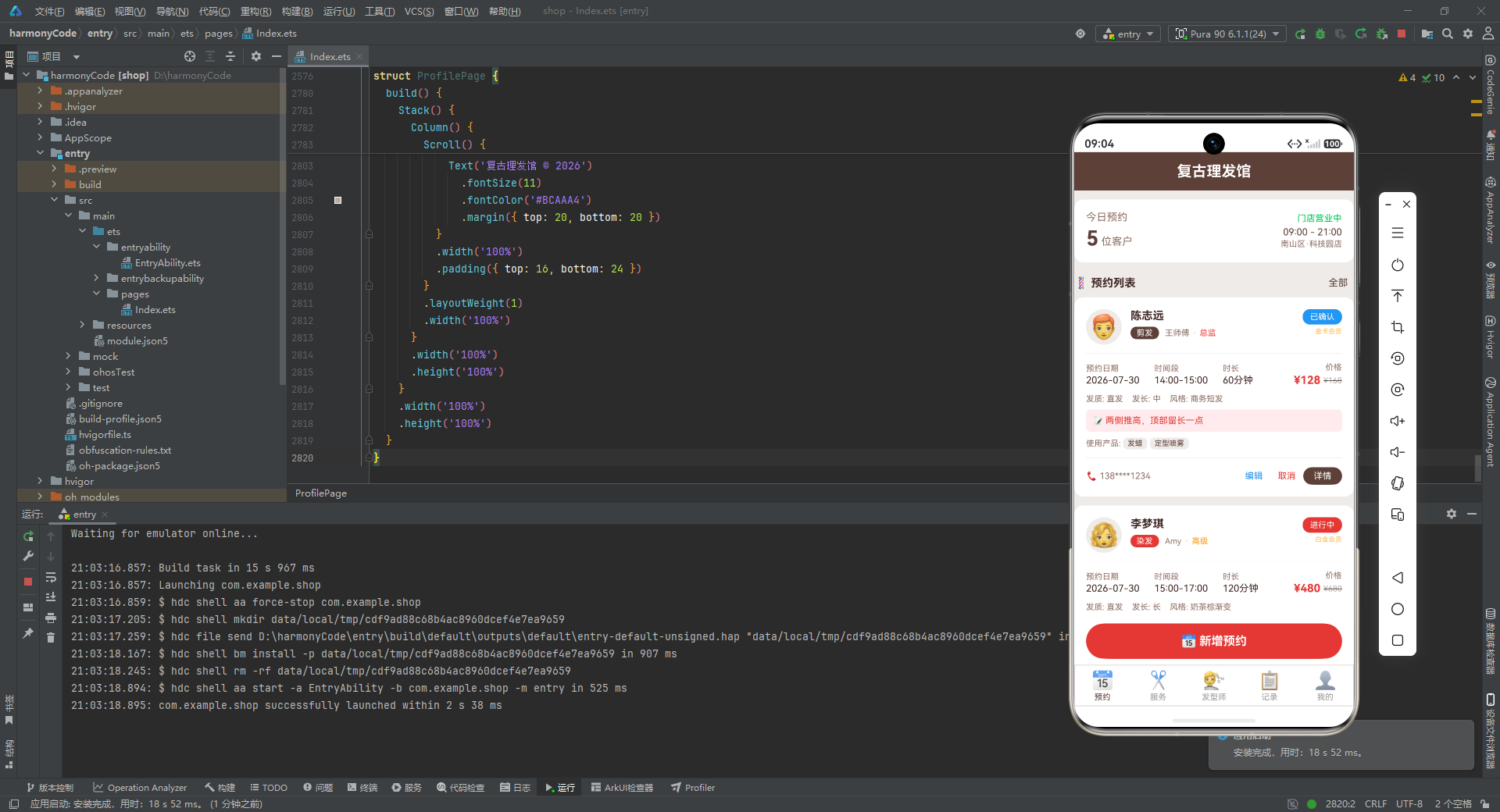
从架构设计的角度来看,该应用采用了清晰的分层架构:类型定义层提供严格的类型约束,确保数据在编译期的安全性;静态配置层将设计规范(颜色映射、标签配置)与业务逻辑分离,使得视觉风格的调整只需修改配置字典即可全局生效;Mock 数据层提供了覆盖全部业务场景的丰富模拟数据,使应用在无后端依赖的情况下也能完整运行和演示。
从组件设计的角度来看,应用充分利用了 ArkUI 的组件化能力。主入口组件 BarberShopApp 作为全局状态中心,通过 @State 管理所有弹窗状态和表单数据,通过回调函数将事件处理委托给子组件,实现了父子组件间的松耦合。五个业务页面各自独立,职责单一,通过 @Builder 构建器将复杂的 UI 拆分为可复用的片段(如评分条、菜单行、条形图等),有效避免了代码重复。
从 UI 实现的角度来看,应用展现了多种实用的界面构建技巧。标签胶囊选择器通过 ForEach 和动态样式实现了一致的交互模式;条件渲染(if)被广泛用于根据数据状态显示或隐藏内容(如备注、产品列表、编辑按钮、热门标签等);纯 CSS 条形图通过百分比宽度计算实现了轻量级数据可视化,无需引入第三方图表库;Scroll 可滚动容器配合 constraintSize 限制了弹窗内容的最大高度,保证了长表单在小屏设备上的可用性。
从视觉设计的角度来看,应用以复古棕(#5D4037)和理发红(#E53935)为主色调,搭配浅棕背景(#EFEBE9),营造出复古理发店的氛围。所有业务实体(状态、服务类型、发质、等级)都有专属的颜色映射,既增强了视觉识别度,又保证了配色的一致性。Emoji 图标的广泛使用为应用增添了趣味性,同时避免了图片资源的依赖。
从可扩展性的角度来看,@Observed 数据模型的预留、筛选标签的结构化布局、回调式的事件处理机制、集中式的配置管理,都为应用未来的功能扩展(如接入真实后端、实现交互式筛选、添加更细粒度的状态追踪等)打下了良好的基础。
更多推荐

 6
6 0
0- 0


 已为社区贡献3条内容

所有评论(0)