
植物图鉴与识别记录应用基于HarmonyOS API 24实战解析Column容器使用layoutWeight(1)占据剩余的全部垂直空间,确保内容区域能够填满屏幕减去底部导航栏后的剩余高度
一、行业背景与应用价值
在数字化转型浪潮席卷各行各业的今天,移动互联网已经深度渗透到人们生活的方方面面。植物爱好者群体作为城市中一个不断增长的细分人群,对植物知识获取、识别记录、养护管理等方面的需求日益旺盛。传统的植物识别方式依赖于厚重的图鉴书籍或零散的网页搜索,这种碎片化的信息获取方式已经难以满足现代用户对即时性、系统性和互动性的追求。植物图鉴与识别记录应用正是在这样的时代背景下应运而生,它通过整合AI图像识别技术、结构化数据管理和个性化养护记录功能,为植物爱好者打造了一个全方位的数字植物管家。
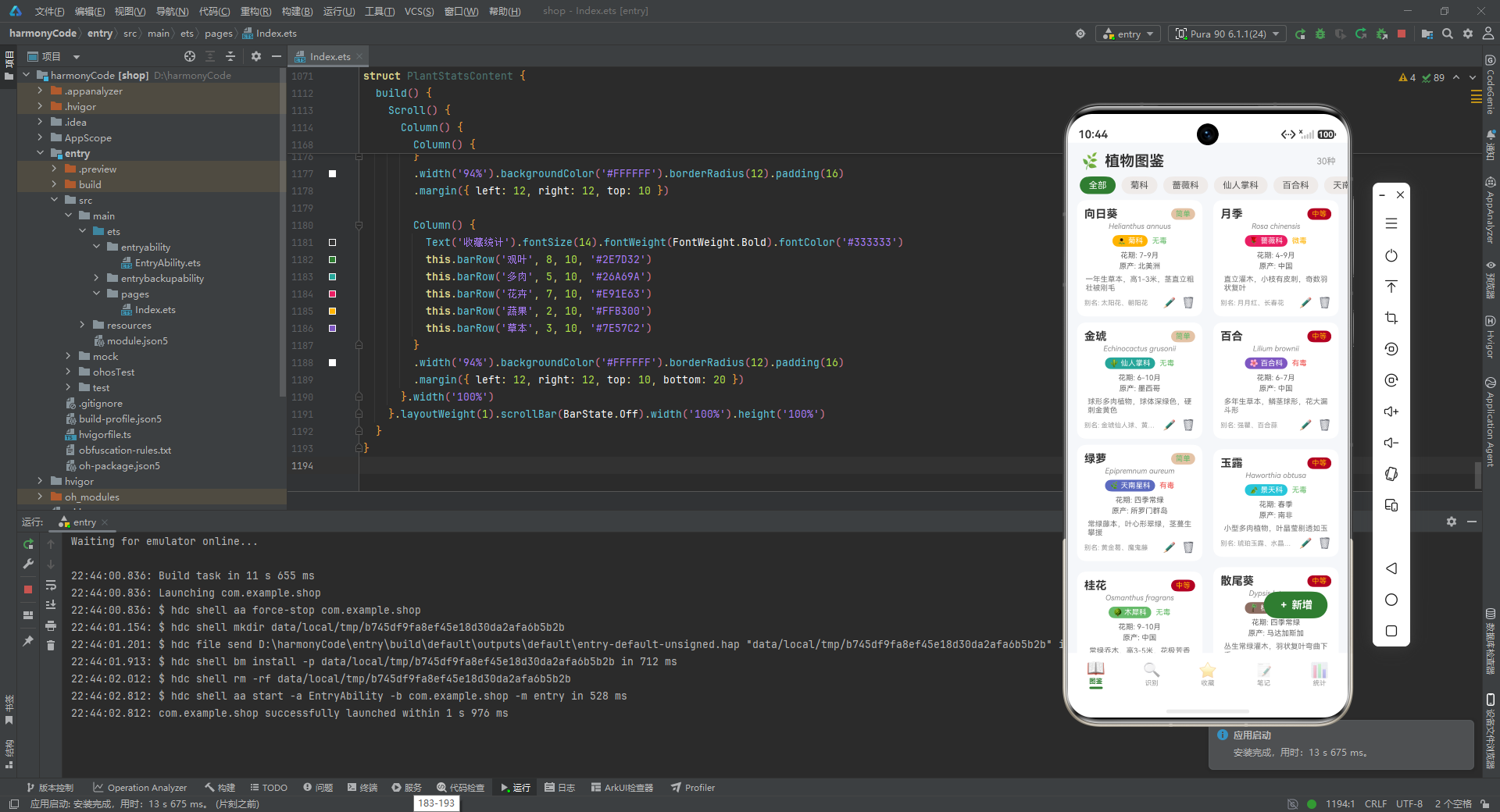
从技术架构的角度来看,此类应用面临着多重挑战。首先,植物数据的结构化存储需要处理复杂的分类体系,包括科属分类、形态特征、毒性等级等多维度信息。其次,用户交互体验要求界面既要信息丰富又要简洁直观,这对UI组件的复用性和布局灵活性提出了较高要求。再者,识别记录、收藏管理、养护笔记等功能模块之间的数据关联和状态同步,需要一套高效的状态管理方案。HarmonyOS ArkTS作为华为推出的新一代应用开发框架,凭借其声明式UI、响应式状态管理和原生跨设备能力,为解决这些技术难题提供了理想的解决方案。
ArkTS语言在TypeScript基础上进行了深度优化和扩展,引入了装饰器驱动的状态管理机制、声明式的UI描述方式以及高效的渲染管线。与传统的命令式UI框架相比,ArkTS的声明式编程模型使得开发者能够以更贴近业务逻辑的方式描述界面,而框架底层的差异化更新算法则确保了界面变化的高性能渲染。在植物图鉴这类数据密集型应用中,ArkTS的响应式系统能够自动追踪数据变化并精准更新受影响的UI节点,避免了传统手动DOM操作带来的性能开销和代码复杂度。这种技术特性使得开发者可以专注于业务逻辑的实现,而将UI更新的细节交由框架智能处理。
本应用的设计充分考虑了植物爱好者的实际使用场景。图鉴浏览功能支持按科属筛选和双列卡片式布局,既保证了信息的完整展示又优化了视觉体验。识别记录模块通过时间轴的形式呈现历史识别结果,并标注置信度和收藏状态,帮助用户建立个人植物认知档案。收藏管理功能允许用户对喜爱的植物进行分类标记和养护频率设置,配合浇水提醒等实用功能。养护笔记则支持按养护类型筛选记录,形成系统化的植物养护知识库。这种模块化的功能设计体现了以用户为中心的产品理念,同时也为代码的可维护性和可扩展性奠定了良好基础。
二、类型定义层:数据契约与接口规范
在任何健壮的软件系统中,类型定义都是构建可靠数据模型的基石。本应用在代码的起始位置定义了8个核心接口,这些接口不仅规定了数据结构的具体形态,更在编译时提供了类型检查保障,确保数据流动的类型安全性。这种前置的类型设计策略体现了"类型优先"的架构思维,有助于在开发早期发现潜在的数据不一致问题。
2.1 PlantFamilyMeta 接口分析
interface PlantFamilyMeta { label: string; color: string; icon: string }
这是本应用中最基础的元数据接口之一,专门用于描述植物科属的展示属性。该接口采用单行紧凑定义形式,包含三个属性字段:label表示科属的显示名称,color定义了该科属在UI中使用的主题色,icon则存储了对应的emoji图标符号。这种设计体现了数据与表现分离的原则,将科属的分类学属性与其视觉呈现属性解耦,使得同一科属可以在不同场景下以不同视觉风格呈现。
从工程实践角度分析,使用emoji作为图标方案虽然简单直观,但在生产环境中可能需要考虑跨平台兼容性和可访问性问题。emoji在不同操作系统和设备上的渲染效果存在差异,且对于视觉障碍用户缺乏有效的替代文本。然而对于原型开发或内部工具而言,这种方案极大地简化了资源管理,无需引入额外的图标字体或图片资源。接口中将所有字段定义为必选属性,这意味着任何科属配置对象都必须完整提供这三个信息,这种严格性有助于避免运行时因属性缺失导致的显示异常。
2.2 CareTypeMeta 接口分析
interface CareTypeMeta { label: string; color: string; icon: string }
该接口与PlantFamilyMeta具有完全相同的结构定义,专门用于描述养护类型的元数据信息。养护类型包括浇水、施肥、修剪、换盆、病虫害防治等植物管理活动,每种类型都需要在界面上有独特的视觉标识以便用户快速识别。这种接口复用模式体现了面向对象设计中的接口隔离原则,尽管结构相同,但语义上的区分使得代码具有更强的可读性和自文档化能力。
在架构层面,这种结构复用也为后续的功能扩展预留了空间。如果未来需要为养护类型添加专属属性(如建议频率、最佳时段等),可以在不破坏现有代码的前提下进行接口扩展。TypeScript的接口合并特性允许通过多次声明来扩展接口定义,这种渐进式增强的能力对于长期维护的项目尤为重要。同时,统一的结构也使得配置数据可以进行统一处理,例如编写通用的渲染函数来展示任何符合这种三元组结构的元数据项。
2.3 FavCategoryMeta 接口分析
interface FavCategoryMeta { label: string; color: string; icon: string }
收藏分类元数据接口同样遵循了三元组结构,用于定义收藏植物的分类维度。收藏分类包括观叶、多肉、花卉、蔬果、草本五大类别,每个类别代表了用户不同的兴趣偏好和养护需求。与科属分类不同,收藏分类更加贴近用户的主观偏好而非植物学的客观分类,这种设计体现了功能性与用户体验的平衡。
从技术实现角度看,三个元数据接口的结构一致性使得可以编写通用的配置处理逻辑。例如,可以创建一个通用的配置渲染组件,通过泛型参数接受任何符合这种结构的配置对象。这种泛化能力减少了代码重复,提高了组件的可复用性。同时,配置对象的外置化设计使得视觉风格的调整变得异常简单,修改配色或图标只需要更新配置常量,而无需触及业务逻辑代码。
2.4 DifficultyMeta 接口分析
interface DifficultyMeta { label: string; color: string; icon: string }
养护难度元数据接口为简单、中等、困难三个等级提供了视觉配置。难度等级的颜色编码采用了直观的语义化配色:绿色代表简单,黄色代表中等,红色代表困难。这种配色方案符合用户的心理预期,能够快速传达难度信息。图标设计采用了表情符号的形式,笑脸、中性脸、苦恼脸分别对应三个难度等级,增强了界面的亲和力和趣味性。
在数据建模层面,将难度配置外置化而非硬编码在组件中,体现了配置驱动开发(Configuration-Driven Development)的理念。这种设计使得难度等级的调整或扩展变得轻而易举,比如未来可以新增"极难"等级而无需修改组件代码。接口定义的结构化也为类型安全提供了保障,任何尝试访问不存在难度等级的代码都会在编译时被捕获。
2.5 PlantItem 接口分析
interface PlantItem {
  id: number
  name: string
  scientificName: string
  family: string
  alias: string
  morphology: string
  flowerPeriod: string
  origin: string
  difficulty: string
  toxic: string
}
PlantItem接口定义了植物图鉴中单个植物条目的完整数据结构,这是整个应用最核心的数据契约之一。该接口包含了10个属性字段,涵盖了植物的基本信息、分类信息、形态特征和养护属性。id字段作为唯一标识符,采用number类型而非string,这在关系型数据映射和索引性能方面具有优势。name和scientificName分别存储植物的俗名和学名,满足了不同用户群体的认知习惯。
family字段存储科属信息,与FAMILY_CONFIG配置对象形成外键关联。这种设计允许在运行时动态查找科属的元数据信息,实现数据与展示的解耦。alias字段存储植物的别名列表,morphology描述形态特征,flowerPeriod记录花期信息,origin标注原产地,这些字段共同构成了植物的完整知识画像。difficulty和toxic字段分别表示养护难度和毒性等级,为用户的养护决策提供参考依据。
2.6 RecognRecord 接口分析
interface RecognRecord {
  id: number
  date: string
  result: string
  confidence: number
  location: string
  photoDesc: string
  weather: string
  favorited: boolean
}
识别记录接口定义了植物识别功能的数据模型,记录了每次识别活动的完整上下文信息。id字段唯一标识一次识别记录,date字段以字符串形式存储识别日期,采用ISO 8601格式的日期字符串便于排序和比较。result字段存储识别结果(植物名称),confidence字段以number类型存储置信度百分比,这是AI识别系统的核心指标。
location字段记录识别时的地理位置,photoDesc字段描述拍摄照片的内容特征,weather字段记录天气状况,这三个字段共同构成了识别场景的多维上下文。favorited布尔字段标记该识别结果是否被用户收藏,这种标记机制与收藏功能形成数据关联。接口设计考虑了识别记录的完整追溯需求,用户不仅可以查看识别结果,还可以回顾识别时的时间、地点和环境条件。
2.7 FavoritePlant 接口分析
interface FavoritePlant {
  id: number
  name: string
  favoriteDate: string
  remark: string
  tag: string
  careFrequency: string
  lastWatering: string
  category: string
}
收藏植物接口定义了用户收藏夹中植物条目的数据结构,体现了从"图鉴数据"到"用户数据"的转化。除了基本的id和name字段外,favoriteDate记录收藏时间,remark存储用户备注,tag支持自定义标签分类,这些字段赋予了用户对收藏数据的个性化表达能力。careFrequency字段以字符串形式存储浇水频率(如"3天/次"),lastWatering记录上次浇水日期,这两个字段共同支撑了浇水提醒功能。
category字段关联FAV_CATEGORY_CONFIG配置,实现了收藏分类功能。这种设计与科属分类形成互补,用户既可以按植物学分类浏览,也可以按个人兴趣分类管理。接口设计体现了功能性与情感化的结合,收藏不仅是简单的标记,更是用户与植物之间建立情感连接的载体。
2.8 CareNote 接口分析
interface CareNote {
  id: number
  date: string
  plantName: string
  content: string
  imageDesc: string
  careType: string
}
养护笔记接口定义了用户记录植物养护活动的数据结构,是应用知识沉淀功能的核心。plantName字段关联具体植物,content字段存储养护笔记的正文内容,imageDesc描述配图信息,careType字段关联CARE_TYPE_CONFIG配置实现分类筛选。这种设计使得养护笔记与植物实体形成多对一的关联关系,用户可以针对同一植物记录多次养护活动。
date字段记录笔记创建日期,支持时间轴式的浏览体验。接口设计的简洁性使得养护记录功能易于使用,用户只需填写核心内容即可创建有价值的养护记录。长期来看,这些积累的数据可以形成个人的植物养护知识库,甚至可以通过数据分析提供个性化的养护建议。
三、数据模型层:响应式状态管理
3.1 PlantItemModel 类分析
@Observed
export class PlantItemModel {
  id: number = 0
  name: string = ''
  scientificName: string = ''
  family: string = ''
  alias: string = ''
  morphology: string = ''
  flowerPeriod: string = ''
  origin: string = ''
  difficulty: string = ''
  toxic: string = ''
  constructor(id: number, name: string, scientificName: string, family: string, alias: string,
    morphology: string, flowerPeriod: string, origin: string, difficulty: string, toxic: string) {
    this.id = id
    this.name = name
    this.scientificName = scientificName
    this.family = family
    this.alias = alias
    this.morphology = morphology
    this.flowerPeriod = flowerPeriod
    this.origin = origin
    this.difficulty = difficulty
    this.toxic = toxic
  }
}
PlantItemModel类是PlantItem接口的模型实现,采用面向对象的方式封装了植物条目的数据和行为。@Observed装饰器是该类的核心特性,它向ArkTS框架声明该类的实例需要被观察,任何属性的变更都会触发相关的UI更新。这种响应式编程模型是ArkTS区别于传统命令式框架的关键特性,它使得数据与UI之间建立了自动的依赖关系。
类的属性定义采用了类型注解和默认值的组合方式,这既提供了类型安全,又确保了实例在未完全初始化时具有合理的默认状态。所有属性都被显式地声明为public(默认访问修饰符),这是因为模型数据通常需要被多个组件共享访问。构造函数的参数列表与属性完全对应,采用了传统的赋值方式而非TypeScript的参数属性语法,这种写法虽然略显冗长,但具有更好的可读性和兼容性。
export关键字表明该类可以被其他模块导入使用,这在大型项目中支持模块化的代码组织。类的设计遵循了贫血模型(Anemic Domain Model)模式,即模型类只包含数据而不包含业务逻辑,业务逻辑被委托给服务层或组件处理。这种设计简化了模型类的复杂度,但也在一定程度上牺牲了面向对象封装的完整性。
3.2 RecognRecordModel 类分析
@Observed
export class RecognRecordModel {
  id: number = 0
  date: string = ''
  result: string = ''
  confidence: number = 0
  location: string = ''
  photoDesc: string = ''
  weather: string = ''
  favorited: boolean = false
  constructor(id: number, date: string, result: string, confidence: number, location: string,
    photoDesc: string, weather: string, favorited: boolean) {
    this.id = id
    this.date = date
    this.result = result
    this.confidence = confidence
    this.location = location
    this.photoDesc = photoDesc
    this.weather = weather
    this.favorited = favorited
  }
}
RecognRecordModel类实现了识别记录的数据模型,同样采用了@Observed装饰器以支持响应式更新。值得注意的是,confidence和favorited字段分别采用了number和boolean原始类型,这与接口定义保持一致。在ArkTS的响应式系统中,原始类型的变更能够被精确追踪,而复杂对象的变更则需要遵循特定的更新模式。
favorited字段的默认值设为false,这符合识别记录的初始状态假设。构造函数保持了与属性列表的严格对应,确保了实例创建的完整性。从架构演进的角度看,如果未来需要支持识别记录的编辑功能(修改收藏状态等),@Observed装饰器将确保这些变更能够即时反映在UI上,而无需手动触发重渲染。
3.3 FavoritePlantModel 类分析
@Observed
export class FavoritePlantModel {
  id: number = 0
  name: string = ''
  favoriteDate: string = ''
  remark: string = ''
  tag: string = ''
  careFrequency: string = ''
  lastWatering: string = ''
  category: string = ''
  constructor(id: number, name: string, favoriteDate: string, remark: string, tag: string,
    careFrequency: string, lastWatering: string, category: string) {
    this.id = id
    this.name = name
    this.favoriteDate = favoriteDate
    this.remark = remark
    this.tag = tag
    this.careFrequency = careFrequency
    this.lastWatering = lastWatering
    this.category = category
  }
}
FavoritePlantModel类实现了收藏植物的数据模型,特别关注了与养护管理相关的属性。careFrequency和lastWatering字段的设计体现了功能驱动数据建模的思路,这两个字段直接支撑了浇水提醒功能的实现。如果采用更严格的设计,可以考虑将浇水相关的字段抽取为独立的CareSchedule对象,以表达更清晰的概念边界。
模型类的设计保持了与其他模型类的一致性,这种一致性降低了开发者的认知负担,使得代码更易于理解和维护。从持久化的角度考虑,这些模型类可以直接映射为数据库表的行记录,构造函数的设计也与ORM(对象关系映射)模式的实例化方式兼容。
3.4 CareNoteModel 类分析
@Observed
export class CareNoteModel {
  id: number = 0
  date: string = ''
  plantName: string = ''
  content: string = ''
  imageDesc: string = ''
  careType: string = ''
  constructor(id: number, date: string, plantName: string, content: string, imageDesc: string, careType: string) {
    this.id = id
    this.date = date
    this.plantName = plantName
    this.content = content
    this.imageDesc = imageDesc
    this.careType = careType
  }
}
CareNoteModel类实现了养护笔记的数据模型,是本应用中结构相对简单的模型类。plantName字段采用字符串而非外键关联,这种设计简化了数据模型但牺牲了一定的数据完整性。在生产环境中,可能需要考虑使用植物ID替代植物名称,以避免因重名导致的关联错误。
四个模型类的设计展现了ArkTS响应式系统的核心用法。@Observed装饰器的使用使得这些模型实例可以被安全地引用在@State装饰的状态变量中,任何属性的变更都会自动触发依赖该属性的UI更新。这种机制大大简化了状态管理的复杂度,开发者无需手动维护订阅关系或调用更新方法。
四、设计令牌与配置层
4.1 主题色彩定义
const PLANT_THEME_COLOR: string = '#2E7D32'
const PLANT_THEME_COLOR_LIGHT: string = '#E8F5E9'
const EARTH_BROWN: string = '#795548'
const EARTH_BROWN_LIGHT: string = '#EFEBE9'
const BG_COLOR: string = '#F5F7FA'
设计令牌(Design Tokens)是现代UI设计系统的核心概念,它将设计决策抽象为可复用的变量,确保视觉一致性并支持主题切换。本应用定义了5个核心色彩令牌,构成了完整的色彩体系。
PLANT_THEME_COLOR采用植物绿色(#2E7D32)作为主色调,这种颜色传达了自然、生长、环保的品牌意象。PLANT_THEME_COLOR_LIGHT定义了主色的浅色调,用于背景、悬停状态等次要视觉层级。EARTH_BROWN(#795548)作为辅助色,代表了土壤、大地,与植物主题形成语义呼应。EARTH_BROWN_LIGHT是辅助色的浅色调,用于需要温暖感但不过于突出的场景。BG_COLOR(#F5F7FA)定义了页面背景色,采用中性灰色调以避免与内容抢夺视觉焦点。
这种分层色彩体系体现了色彩设计的系统性思维。主色用于强调和重要操作,辅助色用于分类和差异化,中性色用于背景和边框。每个色彩令牌都有明确的语义职责,避免了随意取色导致的视觉混乱。类型注解: string的使用虽然在此场景下可以由类型推断自动确定,但显式标注增强了代码的清晰度和自文档化能力。
4.2 科属配置对象
const FAMILY_CONFIG: Record<string, PlantFamilyMeta> = {
  '菊科': { label: '菊科', color: '#FFB300', icon: '🌻' },
  '蔷薇科': { label: '蔷薇科', color: '#E91E63', icon: '🌹' },
  '仙人掌科': { label: '仙人掌科', color: '#26A69A', icon: '🌵' },
  '百合科': { label: '百合科', color: '#7E57C2', icon: '🌸' },
  '天南星科': { label: '天南星科', color: '#5C6BC0', icon: '🌿' },
  '景天科': { label: '景天科', color: '#26C6DA', icon: '🍃' },
  '木犀科': { label: '木犀科', color: '#66BB6A', icon: '🌳' },
  '棕榈科': { label: '棕榈科', color: '#8D6E63', icon: '🌴' }
}
FAMILY_CONFIG常量使用TypeScript的Record工具类型定义了一个从字符串键到PlantFamilyMeta值的对象映射。这种类型定义确保了配置对象的键和值都符合预期的类型约束,在编译时就能捕获键名错误或值类型不匹配的问题。
配置对象包含了8个植物科属的元数据,每个科属都有独特的配色方案和图标标识。配色方案的选择体现了视觉设计的差异化策略:菊科采用金黄色呼应向日葵,蔷薇科采用粉红色呼应玫瑰,仙人掌科采用青绿色呼应多肉植物,百合科采用紫色呼应优雅的花卉意象。这种语义化配色增强了用户对科属分类的视觉记忆。
图标全部采用emoji符号,这种设计决策在简化资源管理的同时也带来了跨平台一致性的挑战。不同的操作系统和设备对emoji的渲染可能存在差异,但在移动应用的原生环境中,这种差异通常可以接受。配置对象的外置化设计使得添加新科属或调整现有配置变得轻而易举,无需修改组件代码。
4.3 养护类型配置
const CARE_TYPE_CONFIG: Record<string, CareTypeMeta> = {
  '浇水': { label: '浇水', color: '#42A5F5', icon: '💧' },
  '施肥': { label: '施肥', color: '#8D6E63', icon: '🌱' },
  '修剪': { label: '修剪', color: '#EF5350', icon: '✂️' },
  '换盆': { label: '换盆', color: '#7E57C2', icon: '🪴' },
  '病虫害': { label: '病虫害', color: '#FF7043', icon: '🐛' }
}
CARE_TYPE_CONFIG定义了五种养护类型的视觉配置。浇水采用蓝色(#42A5F5)和水滴图标,直观地传达了水分相关的操作。施肥采用棕色(#8D6E63)和萌芽图标,象征土壤营养和植物生长。修剪采用红色(#EF5350)和剪刀图标,警示这是需要谨慎操作的养护活动。换盆采用紫色(#7E57C2)和盆栽图标,代表对植物生长环境的改变。病虫害采用橙色(#FF7043)和昆虫图标,提醒用户注意植物健康问题。
这种配置设计支持养护笔记功能中的分类筛选和视觉标识。当用户查看养护历史时,可以通过颜色和图标快速识别养护类型,提高信息浏览的效率。配置结构的一致性也使得可以编写通用的渲染逻辑来处理所有类型的元数据展示。
4.4 收藏分类配置
const FAV_CATEGORY_CONFIG: Record<string, FavCategoryMeta> = {
  '观叶': { label: '观叶', color: '#2E7D32', icon: '🌿' },
  '多肉': { label: '多肉', color: '#26A69A', icon: '🌵' },
  '花卉': { label: '花卉', color: '#E91E63', icon: '🌸' },
  '蔬果': { label: '蔬果', color: '#FFB300', icon: '🥕' },
  '草本': { label: '草本', color: '#7E57C2', icon: '🌾' }
}
FAV_CATEGORY_CONFIG定义了收藏功能的五种分类维度。观叶分类采用与主题色一致的植物绿色,代表以观赏叶片为主的植物类型。多肉分类采用青绿色和仙人掌图标,准确地传达了多肉植物的品类特征。花卉分类采用粉红色和樱花图标,体现了观赏花卉的浪漫属性。蔬果分类采用橙色和胡萝卜图标,代表了可食用植物的实用价值。草本分类采用紫色和麦穗图标,涵盖了草本植物这一广泛类别。
这种分类体系既覆盖了主流的植物兴趣领域,又保持了分类的简洁性,避免了过多分类导致的决策困难。每个分类的配色都与其主题植物的自然色彩或文化意象相呼应,形成了协调而有辨识度的视觉系统。
4.5 难度等级配置
const DIFFICULTY_CONFIG: Record<string, DifficultyMeta> = {
  '简单': { label: '简单', color: '#66BB6A', icon: '😊' },
  '中等': { label: '中等', color: '#FFB300', icon: '😐' },
  '困难': { label: '困难', color: '#EF5350', icon: '😣' }
}
DIFFICULTY_CONFIG定义了三个养护难度等级的视觉配置。简单等级采用绿色(#66BB6A)和笑脸图标,传达了低门槛和愉悦的养护体验。中等等级采用黄色(#FFB300)和中性表情图标,提示用户需要一定的养护知识。困难等级采用红色(#EF5350)和苦恼表情图标,警示这类植物需要专业的养护技能。
这种设计采用了交通信号灯的色彩语义,绿色代表"通行/安全",黄色代表"注意/谨慎",红色代表"停止/危险"。表情图标的使用增加了界面的情感化表达,使得难度信息不仅易于理解,还能引发用户的情感共鸣。配置的外置化使得难度等级的调整或扩展非常方便,例如可以新增"极难"等级而无需修改UI组件代码。
五、模拟数据层
5.1 植物图鉴数据
const mockPlants: PlantItemModel[] = [
  new PlantItemModel(1, '向日葵', 'Helianthus annuus', '菊科', '太阳花、朝阳花', '一年生草本,高1-3米,茎直立粗壮被刚毛', '7-9月', '北美洲', '简单', '无毒'),
  new PlantItemModel(2, '月季', 'Rosa chinensis', '蔷薇科', '月月红、长春花', '直立灌木,小枝有皮刺,奇数羽状复叶', '4-9月', '中国', '中等', '微毒'),
  // ... 共30条数据
]
mockPlants常量定义了30种植物的图鉴数据,使用PlantItemModel类的实例数组形式组织。数据涵盖了8个科属的代表性植物,从常见的室内绿植到观赏花卉,从多肉植物到庭院树木,形成了丰富的植物知识库。每条数据都完整地填充了模型定义的所有字段,确保了展示信息的完整性。
数据编排体现了从简单到复杂的渐进逻辑:前几项包含了向日葵、月季等大众熟悉的植物,易于用户建立认知连接;后几项则包含了黑法师、量天尺等特色植物,满足了资深植物爱好者的探索需求。科属分布相对均衡,菊科、蔷薇科、仙人掌科等各占3-4种,体现了数据设计的代表性考量。
学名的使用体现了科学性,如向日葵的学名"Helianthus annuus"准确地标注了其在生物分类学中的位置。形态描述字段控制在50字以内,既传达了关键特征又避免了信息过载。花期和原产地信息为用户的养护决策提供了参考依据,毒性标注则关乎家居安全。
5.2 识别记录数据
const mockRecords: RecognRecordModel[] = [
  new RecognRecordModel(1, '2026-07-25', '月季', 96, '小区花园', '粉色月季花朵特写', '晴 28℃', true),
  new RecognRecordModel(2, '2026-07-23', '向日葵', 92, '公园花坛', '高茎黄色大花', '晴 31℃', true),
  // ... 共28条数据
]
mockRecords常量定义了28条识别记录数据,模拟了用户在一个月内使用识别功能的历史。日期字段从2026年7月25日倒序排列到6月1日,形成了完整的时间轴。识别结果覆盖了mockPlants中的大部分植物,体现了功能的实用性。置信度数值分布在78-96之间,既有高置信度的成功识别,也有较低置信度的边缘案例,模拟了真实的使用场景。
地理位置信息涵盖了小区花园、公园花坛、办公室、花卉市场等常见场景,展示了识别功能在不同环境下的适用性。照片描述字段简洁地概括了拍摄内容,帮助用户回忆识别时的具体情境。天气信息包含了温度数据,为识别结果的验证提供了环境上下文。收藏标记的分布模拟了用户的选择行为,约40%的记录被标记为收藏。
5.3 收藏植物数据
const mockFavorites: FavoritePlantModel[] = [
  new FavoritePlantModel(1, '月季', '2026-06-15', '阳台明星,花期超长', '阳台', '3天/次', '2026-07-24', '花卉'),
  new FavoritePlantModel(2, '向日葵', '2026-06-10', '阳光担当,向阳而生', '花园', '2天/次', '2026-07-23', '花卉'),
  // ... 共25条数据
]
mockFavorites常量定义了25条收藏记录,与mockPlants中的植物形成多对一的关联关系。收藏日期分布在2026年1月至6月,体现了用户长期积累的过程。remark字段记录了用户对每种植物的个性化评价,如"阳台明星,花期超长"、"晶莹剔透,颜值担当"等,展现了收藏功能承载情感表达的价值。
tag字段用于标记植物的摆放位置,如"阳台"、“客厅”、"书房"等,支持用户按空间维度管理植物。careFrequency字段定义了浇水频率,从2天/次到20天/次不等,反映了不同植物的需水特性差异。lastWatering字段记录了最近浇水日期,为提醒功能提供了数据基础。category字段的分布展示了用户的兴趣偏好,观叶和花卉类占比较高。
5.4 养护笔记数据
const mockNotes: CareNoteModel[] = [
  new CareNoteModel(1, '2026-07-25', '月季', '今天给月季浇透水,花苞饱满', '月季花苞特写', '浇水'),
  new CareNoteModel(2, '2026-07-24', '绿萝', '叶片有些发黄,追加少量氮肥', '发黄叶片近景', '施肥'),
  // ... 共26条数据
]
mockNotes常量定义了26条养护笔记,记录了用户在一个月内的植物养护活动。笔记内容涵盖了浇水、施肥、修剪、换盆、病虫害防治等全部养护类型,每种类型的分布相对均衡。内容字段以第一人称记录具体的养护操作和观察,如"浇透水"、“追加氮肥”、"清除介壳虫"等,语言自然亲切。
照片描述字段记录了用户拍摄的图片内容,支持视觉化的养护记录。从数据设计可以看出,养护笔记功能鼓励用户形成规律的养护习惯,并通过记录积累植物养护经验。日期分布显示用户几乎每天都会有养护活动,体现了植物养护作为日常生活方式的特点。
六、核心架构层
6.1 Tab导航枚举
enum PlantTab { TAB1 = 0, TAB2 = 1, TAB3 = 2, TAB4 = 3, TAB5 = 4 }
PlantTab枚举定义了底部导航栏的五个标签页,采用显式数值赋值确保枚举值与索引位置的对应关系。这种设计使得枚举不仅可以用于类型约束,还可以直接用于数组索引计算。枚举的使用相比魔法数字(magic numbers)具有更强的类型安全性,任何不在枚举定义范围内的值都会导致编译错误。
枚举命名采用了功能中性的TAB1、TAB2等形式,而非Encyclopedia、Recognize等功能性名称。这种设计在功能模块可能调整的场景下提供了更好的适应性,但也在一定程度上牺牲了代码的可读性。在实际项目中,可以考虑采用更具语义的命名,如TAB_ENCYCLOPEDIA、TAB_RECOGNIZE等。
6.2 入口组件PlantApp
@Entry
@Component
struct PlantApp {
  @State activeTab: PlantTab = PlantTab.TAB1
PlantApp是应用的入口组件,使用@Entry装饰器标识这是页面的入口点,使用@Component装饰器标识这是一个UI组件。@State装饰器声明了activeTab状态变量,初始值为PlantTab.TAB1(图鉴页)。@State是ArkTS中最基础的状态装饰器,它使得变量的变更能够触发依赖该变量的UI重新渲染。
状态变量的类型注解PlantTab确保了只能赋值有效的标签页枚举值,这在编译时就防止了非法状态的进入。初始值的选择反映了产品的默认视图策略,将图鉴作为首屏内容符合用户探索植物知识的核心需求。
6.3 内容区域Builder
  @Builder contentArea() {
    Column() {
      if (this.activeTab === PlantTab.TAB1) {
        EncyclopediaContent()
      } else if (this.activeTab === PlantTab.TAB2) {
        RecognizeContent()
      } else if (this.activeTab === PlantTab.TAB3) {
        FavoriteContent()
      } else if (this.activeTab === PlantTab.TAB4) {
        NoteContent()
      } else {
        PlantStatsContent()
      }
    }.layoutWeight(1)
  }
contentArea是一个@Builder装饰的构建函数,负责根据当前激活的标签页渲染对应的内容组件。@Builder是ArkTS中用于封装可复用UI片段的装饰器,它与普通函数的区别在于可以直接使用组件构建语法。函数内部使用if-else链式判断来实现条件渲染,根据activeTab的值决定实例化哪个内容组件。
这种实现方式简单直观,但当标签页数量增多时,if-else链的可维护性会下降。在更复杂的场景下,可以考虑使用配置表驱动的方式,将标签页与组件的映射关系外置化。Column容器使用layoutWeight(1)占据剩余的全部垂直空间,确保内容区域能够填满屏幕减去底部导航栏后的剩余高度。
6.4 底部Tab项Builder
  @Builder bottomTabItem(icon: string, label: string, tab: PlantTab) {
    Column() {
      Text(icon).fontSize(20).opacity(this.activeTab === tab ? 1.0 : 0.45)
      Text(label).fontSize(9)
        .fontColor(this.activeTab === tab ? PLANT_THEME_COLOR : '#999999')
        .fontWeight(this.activeTab === tab ? FontWeight.Bold : FontWeight.Normal)
        .margin({ top: 1 })
      if (this.activeTab === tab) {
        Column().width(18).height(3).backgroundColor(PLANT_THEME_COLOR).borderRadius(2).margin({ top: 2 })
      }
    }
    .layoutWeight(1).alignItems(HorizontalAlign.Center)
    .padding({ top: 5, bottom: 5 })
    .onClick(() => { this.activeTab = tab })
  }
bottomTabItem是一个参数化的@Builder函数,接收图标、标签和标签页枚举值三个参数,渲染单个底部导航项。函数内部采用Column垂直布局,依次放置图标、标签和激活指示条。图标使用Text组件渲染emoji,根据激活状态设置不透明度(激活1.0,未激活0.45),形成明显的视觉层级。
标签文本的样式根据激活状态动态变化:激活时使用主题色和粗体,未激活时使用灰色和普通字重。这种差异化设计提供了清晰的导航反馈。当标签项处于激活状态时,底部会渲染一个高度为3、圆角为2的小横条作为激活指示器,增强了当前位置的感知。
layoutWeight(1)使得五个Tab项在水平方向上均匀分布,alignItems(HorizontalAlign.Center)确保内容居中对齐。onClick事件处理器更新activeTab状态,触发内容区域的重新渲染。这种声明式的交互处理方式避免了命令式DOM操作的繁琐,状态变更自动驱动UI更新。
6.5 主构建函数
  build() {
    Column() {
      this.contentArea()
      Row() {
        this.bottomTabItem('📖', '图鉴', PlantTab.TAB1)
        this.bottomTabItem('🔍', '识别', PlantTab.TAB2)
        this.bottomTabItem('⭐', '收藏', PlantTab.TAB3)
        this.bottomTabItem('📝', '笔记', PlantTab.TAB4)
        this.bottomTabItem('📊', '统计', PlantTab.TAB5)
      }
      .width('100%').backgroundColor('#FFFFFF').padding({ top: 4, bottom: 6 })
    }
    .width('100%').height('100%').backgroundColor(BG_COLOR)
  }
}
build()是组件的渲染入口函数,必须返回一个UI描述结构。函数内部使用Column作为根容器,依次排列内容区域和底部导航栏。内容区域通过this.contentArea()调用Builder函数渲染,底部导航栏使用Row水平布局,依次调用bottomTabItem创建五个导航项。
底部导航栏设置白色背景和内边距,与内容区域形成视觉分隔。根容器设置全屏尺寸和背景色,确保应用占据整个可用空间。这种布局结构清晰直观,内容区域使用layoutWeight(1)占据剩余空间,底部导航栏高度自适应内容,形成了经典的"内容+导航"移动应用布局模式。
七、图鉴模块深度解析
7.1 状态变量定义
@Component
struct EncyclopediaContent {
  @State showAddModal: boolean = false
  @State showEditModal: boolean = false
  @State showDeleteConfirm: boolean = false
  @State selectedFamily: string = '全部'
  @State editPlantId: number = 0
  @State deletePlantId: number = 0
EncyclopediaContent组件管理了6个状态变量,分别控制不同的UI状态。showAddModal、showEditModal、showDeleteConfirm三个布尔值控制三个模态框的显示与隐藏,采用独立的变量而非联合状态,使得每个模态框可以独立控制。selectedFamily存储当前选中的科属筛选条件,初始值为"全部"表示不过滤。editPlantId和deletePlantId分别记录当前正在编辑和待删除的植物ID,为模态框提供上下文数据。
这种细粒度的状态管理策略使得组件的行为预测变得简单,每个状态变量都有明确的职责边界。但也需要注意状态数量的增长可能带来的维护复杂度,在更复杂的场景下可以考虑使用状态管理库(如Pinia、Redux)来集中管理相关状态。
7.2 模态遮罩Builder
  @Builder modalOverlay(onClose: () => void) {
    Column().width('100%').height('100%')
      .backgroundColor('rgba(0,0,0,0.5)').onClick(onClose)
  }
modalOverlay是一个可复用的遮罩层Builder,接收一个无参无返回值的回调函数作为关闭处理器。函数创建一个全屏的半透明黑色遮罩,点击时触发关闭回调。这种抽象使得所有模态框都可以复用相同的遮罩逻辑,避免了代码重复。
函数类型标注(onClose: () => void)明确声明了回调函数的签名,这是TypeScript类型安全的体现。回调模式而非直接操作状态的设计增强了函数的通用性,调用方可以决定关闭时的具体行为(关闭单个模态框或关闭全部)。
7.3 科属筛选Chip Builder
  @Builder familyChip(label: string) {
    Text(label).fontSize(12)
      .fontColor(this.selectedFamily === label ? '#FFFFFF' : '#555555')
      .backgroundColor(this.selectedFamily === label ? PLANT_THEME_COLOR : EARTH_BROWN_LIGHT)
      .borderRadius(14).padding({ left: 12, right: 12, top: 5, bottom: 5 })
      .margin({ right: 8 })
      .onClick(() => { this.selectedFamily = label })
  }
familyChip Builder渲染单个科属筛选标签,采用胶囊形状(圆角14)设计。样式根据选中状态动态变化:选中时使用主题色背景和白色文字,未选中时使用浅棕色背景和深灰色文字。这种对比强烈的视觉反馈使得当前筛选条件一目了然。
onClick处理器直接修改selectedFamily状态,触发重新渲染并更新筛选结果。标签之间通过margin({ right: 8 })保持间距,整体在Scroll容器中实现水平滚动。这种设计模式在移动端的筛选场景中非常常见,既节省了垂直空间,又保持了所有选项的可访问性。
7.4 植物卡片Builder
  @Builder plantCard(plant: PlantItemModel) {
    Column() {
      Row() {
        Text(plant.name).fontSize(15).fontWeight(FontWeight.Bold).fontColor('#333333')
        Blank()
        Text(plant.difficulty).fontSize(10)
          .fontColor(DIFFICULTY_CONFIG[plant.difficulty] ? DIFFICULTY_CONFIG[plant.difficulty].color : '#999999')
          .backgroundColor(this.difficultyBg(plant.difficulty))
          .borderRadius(8).padding({ left: 6, right: 6, top: 2, bottom: 2 })
      }.width('100%')

      Text(plant.scientificName).fontSize(10).fontColor('#888888').fontStyle(FontStyle.Italic)
        .margin({ top: 2 })

      Row() {
        Text(this.familyLabel(plant.family)).fontSize(10)
          .fontColor('#FFFFFF').backgroundColor(this.familyColor(plant.family))
          .borderRadius(8).padding({ left: 6, right: 6, top: 2, bottom: 2 })
        Text(plant.toxic).fontSize(10)
          .fontColor(this.toxicColor(plant.toxic))
          .margin({ left: 6 })
      }.margin({ top: 6 })

      Row() {
        Text('花期: ' + plant.flowerPeriod).fontSize(10).fontColor('#666666')
      }.margin({ top: 6 })

      Row() {
        Text('原产: ' + plant.origin).fontSize(10).fontColor('#666666')
      }.margin({ top: 3 })

      Text(plant.morphology).fontSize(10).fontColor('#777777').maxLines(2)
        .textOverflow({ overflow: TextOverflow.Ellipsis })
        .margin({ top: 6 })

      Row() {
        Text('别名: ' + plant.alias).fontSize(9).fontColor('#999999').layoutWeight(1)
          .maxLines(1).textOverflow({ overflow: TextOverflow.Ellipsis })
        Text('✏️').fontSize(14).margin({ left: 8 })
          .onClick(() => { this.editPlantId = plant.id; this.showEditModal = true })
        Text('🗑').fontSize(14).margin({ left: 8 })
          .onClick(() => { this.deletePlantId = plant.id; this.showDeleteConfirm = true })
      }.margin({ top: 6 }).width('100%')
    }
    .width('48%').backgroundColor('#FFFFFF').borderRadius(12).padding(10)
    .margin({ bottom: 8 })
  }
plantCard是本应用中最复杂的UI构建函数之一,负责渲染单个植物的信息卡片。卡片采用垂直布局,从上到下依次展示:植物名称与难度标签、学名、科属与毒性标签、花期、原产地、形态描述、别名与操作按钮。
名称行使用Row布局,左侧显示粗体植物名称,右侧使用Blank()占据中间空间,最右侧显示难度标签。难度标签通过DIFFICULTY_CONFIG查找对应的颜色配置,并使用difficultyBg辅助函数获取背景色,实现了配置的动态解析。学名使用斜体字样式(FontStyle.Italic),符合学术规范。
科属标签使用familyColor和familyLabel辅助函数获取配置信息,以彩色胶囊形式展示。毒性文本使用toxicColor辅助函数根据毒性等级设置不同颜色(有毒红色、微毒黄色、无毒绿色),提供了重要的安全提示。花期和原产地信息以标签前缀的形式展示,增强了可读性。
形态描述限制为最多两行,超出部分显示省略号,避免了卡片高度不一致的问题。别名行使用layoutWeight(1)让别名文本占据剩余空间,右侧依次放置编辑和删除按钮。编辑按钮点击时设置editPlantId并显示编辑模态框,删除按钮点击时设置deletePlantId并显示确认对话框。
卡片整体宽度设为48%,为双列布局留出间隙。白色背景和12圆角形成卡片效果,底部外边距确保行间距。
7.5 植物行Builders
  @Builder plantRow(p1: PlantItemModel, p2: PlantItemModel) {
    Row() {
      this.plantCard(p1)
      Blank()
      this.plantCard(p2)
    }.width('100%').padding({ left: 12, right: 12 })
  }

  @Builder plantRowSingle(p: PlantItemModel) {
    Row() {
      this.plantCard(p)
      Blank()
    }.width('100%').padding({ left: 12, right: 12 })
  }
plantRow和plantRowSingle两个Builder实现了双列网格布局的辅助渲染。plantRow接收两个PlantItemModel参数,在一行中并排渲染两个植物卡片,中间使用Blank()占据间隙。plantRowSingle处理奇数数据时的最后一行,只渲染一个卡片并保持左侧对齐。
这种显式的行列构建方式相比使用Grid组件更加灵活,可以精确控制每行的内容。但也带来了维护复杂度的提升,需要调用方确保数据的正确配对。padding设置为左右各12,与卡片的宽度计算相配合,形成了统一的外边距。
7.6 新增模态框Builder
  @Builder addModal() {
    Column() {
      this.modalOverlay(() => { this.showAddModal = false })
      Column() {
        Row() {
          Text('新增植物').fontSize(18).fontWeight(FontWeight.Bold).fontColor('#333333')
          Blank()
          Text('✕').fontSize(18).fontColor('#999999')
            .onClick(() => { this.showAddModal = false })
        }
        .width('100%').padding({ left: 20, right: 20, top: 18, bottom: 12 })

        Scroll() {
          Column() {
            Text('植物名称').fontSize(13).fontColor('#666666').margin({ top: 8 })
            TextInput({ placeholder: '如: 月季' }).fontSize(14)
              .border({ width: 1, color: '#E0E0E0' }).borderRadius(8)
              .margin({ top: 4 }).padding({ left: 8, right: 8 })

            Text('学名').fontSize(13).fontColor('#666666').margin({ top: 12 })
            TextInput({ placeholder: '如: Rosa chinensis' }).fontSize(14)
              .border({ width: 1, color: '#E0E0E0' }).borderRadius(8)
              .margin({ top: 4 }).padding({ left: 8, right: 8 })

            Text('科属').fontSize(13).fontColor('#666666').margin({ top: 12 })
            TextInput({ placeholder: '如: 蔷薇科' }).fontSize(14)
              .border({ width: 1, color: '#E0E0E0' }).borderRadius(8)
              .margin({ top: 4 }).padding({ left: 8, right: 8 })

            Text('别名').fontSize(13).fontColor('#666666').margin({ top: 12 })
            TextInput({ placeholder: '如: 月月红' }).fontSize(14)
              .border({ width: 1, color: '#E0E0E0' }).borderRadius(8)
              .margin({ top: 4 }).padding({ left: 8, right: 8 })

            Text('形态特征').fontSize(13).fontColor('#666666').margin({ top: 12 })
            TextInput({ placeholder: '描述植物形态' }).fontSize(14)
              .border({ width: 1, color: '#E0E0E0' }).borderRadius(8)
              .margin({ top: 4 }).padding({ left: 8, right: 8 })

            Text('花期').fontSize(13).fontColor('#666666').margin({ top: 12 })
            TextInput({ placeholder: '如: 4-9月' }).fontSize(14)
              .border({ width: 1, color: '#E0E0E0' }).borderRadius(8)
              .margin({ top: 4 }).padding({ left: 8, right: 8 })

            Text('原产地').fontSize(13).fontColor('#666666').margin({ top: 12 })
            TextInput({ placeholder: '如: 中国' }).fontSize(14)
              .border({ width: 1, color: '#E0E0E0' }).borderRadius(8)
              .margin({ top: 4 }).padding({ left: 8, right: 8 })

            Text('养护难度').fontSize(13).fontColor('#666666').margin({ top: 12 })
            Row() {
              Text('简单').fontSize(12).fontColor('#555555').backgroundColor(EARTH_BROWN_LIGHT).borderRadius(8)
                .padding({ left: 10, right: 10, top: 4, bottom: 4 }).margin({ right: 8 })
              Text('中等').fontSize(12).fontColor('#555555').backgroundColor(EARTH_BROWN_LIGHT).borderRadius(8)
                .padding({ left: 10, right: 10, top: 4, bottom: 4 }).margin({ right: 8 })
              Text('困难').fontSize(12).fontColor('#555555').backgroundColor(EARTH_BROWN_LIGHT).borderRadius(8)
                .padding({ left: 10, right: 10, top: 4, bottom: 4 })
            }.margin({ top: 4 })

            Text('毒性').fontSize(13).fontColor('#666666').margin({ top: 12 })
            Row() {
              Text('无毒').fontSize(12).fontColor('#555555').backgroundColor(EARTH_BROWN_LIGHT).borderRadius(8)
                .padding({ left: 10, right: 10, top: 4, bottom: 4 }).margin({ right: 8 })
              Text('微毒').fontSize(12).fontColor('#555555').backgroundColor(EARTH_BROWN_LIGHT).borderRadius(8)
                .padding({ left: 10, right: 10, top: 4, bottom: 4 }).margin({ right: 8 })
              Text('有毒').fontSize(12).fontColor('#555555').backgroundColor(EARTH_BROWN_LIGHT).borderRadius(8)
                .padding({ left: 10, right: 10, top: 4, bottom: 4 })
            }.margin({ top: 4 })
          }.padding({ left: 20, right: 20, bottom: 20 })
        }.layoutWeight(1).scrollBar(BarState.Off)

        Row() {
          Text('取消').fontSize(15).fontColor('#666666')
            .layoutWeight(1).textAlign(TextAlign.Center)
            .padding({ top: 12, bottom: 12 })
            .onClick(() => { this.showAddModal = false })
          Text('保存').fontSize(15).fontColor('#FFFFFF').backgroundColor(PLANT_THEME_COLOR)
            .layoutWeight(1).textAlign(TextAlign.Center)
            .padding({ top: 12, bottom: 12 }).borderRadius({ bottomLeft: 16 })
            .onClick(() => { this.showAddModal = false })
        }.width('100%')
      }
      .constraintSize({ maxHeight: '80%' })
      .backgroundColor('#FFFFFF').borderRadius(16)
      .alignItems(HorizontalAlign.Center)
      .position({ x: '5%', y: '12%' })
    }
    .width('100%').height('100%').position({ x: 0, y: 0 }).zIndex(999)
  }
addModal Builder实现了新增植物的表单模态框,是本应用中最为复杂的UI组件之一。模态框采用全屏遮罩+居中内容弹窗的设计模式,遮罩层通过modalOverlay Builder复用,点击可关闭模态框。
内容区域使用Column垂直布局,从上到下依次包含:标题栏(含关闭按钮)、可滚动的表单区域、底部操作按钮。标题栏使用Row布局,左侧显示"新增植物"标题,右侧放置关闭按钮。表单区域包裹在Scroll组件中,以支持小屏幕设备的滚动查看。
表单包含8个输入项,每项由标签文本和TextInput输入框组成。输入框采用统一的样式:边框宽度1、颜色#E0E0E0、圆角8。placeholder属性提供了输入提示,帮助用户理解应填写的内容。养护难度和毒性两个字段采用了选项按钮组而非输入框,用户可以直接点击选择,简化了输入操作。
底部按钮区域使用Row布局,包含取消和保存两个按钮,各占50%宽度。取消按钮无背景色,保存按钮使用主题色背景。按钮点击时关闭模态框(实际项目中应包含表单验证和数据提交逻辑)。
模态框整体使用position定位居中显示,宽度为屏幕的90%(左右各5%边距),最大高度为屏幕的80%。zIndex(999)确保模态框浮于所有其他内容之上。白色背景和16圆角形成标准的弹窗视觉效果。
7.7 编辑模态框Builder
  @Builder editModal() {
    Column() {
      this.modalOverlay(() => { this.showEditModal = false })
      Column() {
        Row() {
          Text('编辑植物').fontSize(18).fontWeight(FontWeight.Bold).fontColor('#333333')
          Blank()
          Text('✕').fontSize(18).fontColor('#999999')
            .onClick(() => { this.showEditModal = false })
        }
        .width('100%').padding({ left: 20, right: 20, top: 18, bottom: 12 })

        Scroll() {
          Column() {
            Text('植物名称').fontSize(13).fontColor('#666666').margin({ top: 8 })
            TextInput({ placeholder: '植物名称' }).fontSize(14)
              .border({ width: 1, color: '#E0E0E0' }).borderRadius(8)
              .margin({ top: 4 }).padding({ left: 8, right: 8 })

            Text('学名').fontSize(13).fontColor('#666666').margin({ top: 12 })
            TextInput({ placeholder: '学名' }).fontSize(14)
              .border({ width: 1, color: '#E0E0E0' }).borderRadius(8)
              .margin({ top: 4 }).padding({ left: 8, right: 8 })

            Text('科属').fontSize(13).fontColor('#666666').margin({ top: 12 })
            TextInput({ placeholder: '科属' }).fontSize(14)
              .border({ width: 1, color: '#E0E0E0' }).borderRadius(8)
              .margin({ top: 4 }).padding({ left: 8, right: 8 })

            Text('别名').fontSize(13).fontColor('#666666').margin({ top: 12 })
            TextInput({ placeholder: '别名' }).fontSize(14)
              .border({ width: 1, color: '#E0E0E0' }).borderRadius(8)
              .margin({ top: 4 }).padding({ left: 8, right: 8 })

            Text('形态特征').fontSize(13).fontColor('#666666').margin({ top: 12 })
            TextInput({ placeholder: '形态特征' }).fontSize(14)
              .border({ width: 1, color: '#E0E0E0' }).borderRadius(8)
              .margin({ top: 4 }).padding({ left: 8, right: 8 })

            Text('花期').fontSize(13).fontColor('#666666').margin({ top: 12 })
            TextInput({ placeholder: '花期' }).fontSize(14)
              .border({ width: 1, color: '#E0E0E0' }).borderRadius(8)
              .margin({ top: 4 }).padding({ left: 8, right: 8 })

            Text('原产地').fontSize(13).fontColor('#666666').margin({ top: 12 })
            TextInput({ placeholder: '原产地' }).fontSize(14)
              .border({ width: 1, color: '#E0E0E0' }).borderRadius(8)
              .margin({ top: 4 }).padding({ left: 8, right: 8 })
          }.padding({ left: 20, right: 20, bottom: 20 })
        }.layoutWeight(1).scrollBar(BarState.Off)

        Row() {
          Text('取消').fontSize(15).fontColor('#666666')
            .layoutWeight(1).textAlign(TextAlign.Center)
            .padding({ top: 12, bottom: 12 })
            .onClick(() => { this.showEditModal = false })
          Text('保存').fontSize(15).fontColor('#FFFFFF').backgroundColor(PLANT_THEME_COLOR)
            .layoutWeight(1).textAlign(TextAlign.Center)
            .padding({ top: 12, bottom: 12 }).borderRadius({ bottomLeft: 16 })
            .onClick(() => { this.showEditModal = false })
        }.width('100%')
      }
      .constraintSize({ maxHeight: '80%' })
      .backgroundColor('#FFFFFF').borderRadius(16)
      .alignItems(HorizontalAlign.Center)
      .position({ x: '5%', y: '12%' })
    }
    .width('100%').height('100%').position({ x: 0, y: 0 }).zIndex(999)
  }
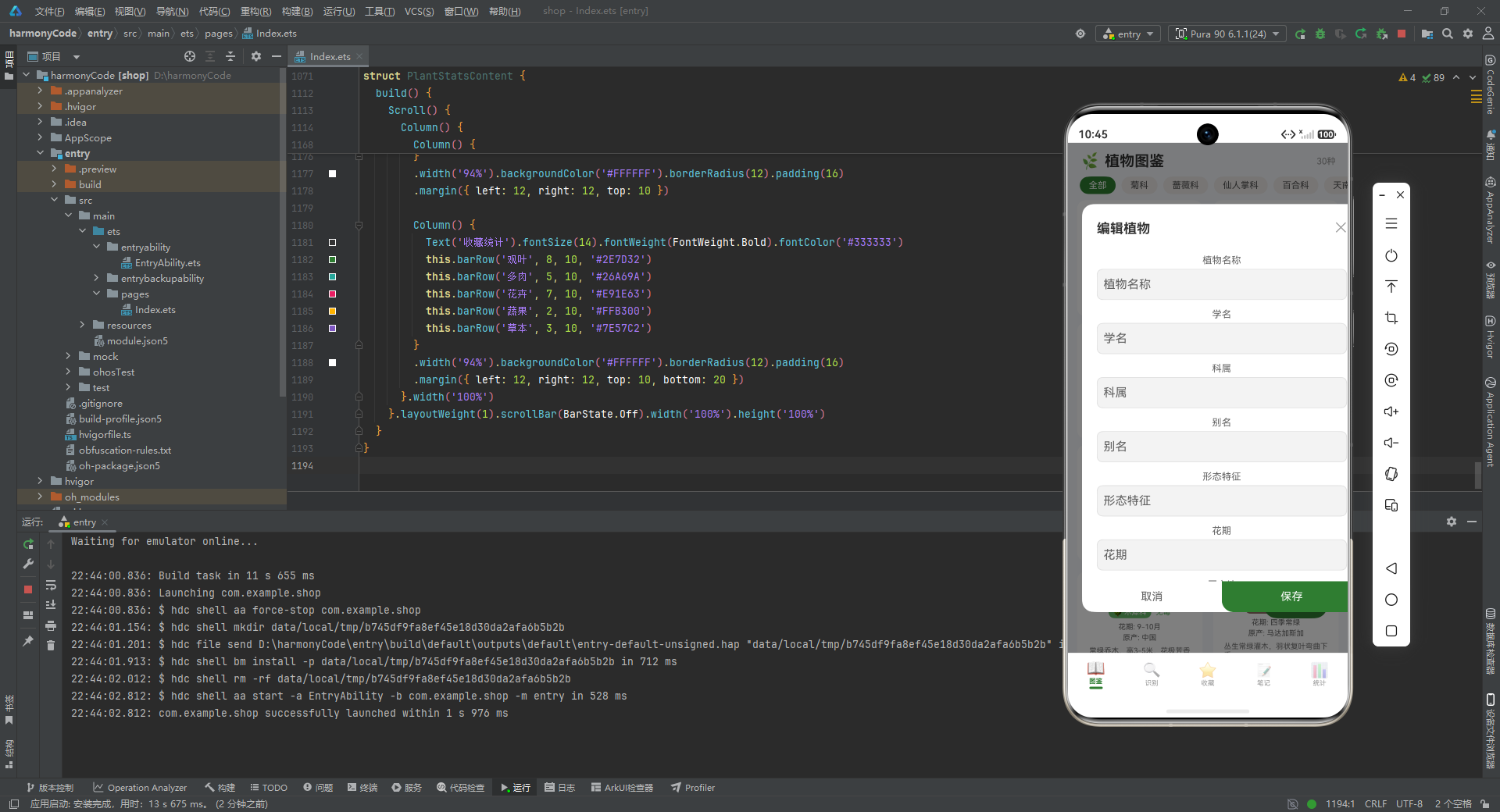
editModal Builder实现了编辑植物的表单模态框,结构与addModal高度相似,主要区别在于标题文本和缺少难度、毒性选择项。这种代码重复在实际项目中可以通过组件化抽象来消除,例如创建一个通用的PlantForm组件,通过props控制显示字段。
需要注意的是,当前实现中编辑表单的初始值没有预填充,这在实际使用中会带来体验问题。完整的实现应该根据editPlantId查找对应的植物数据,并在打开模态框时填充到各个输入框中。保存操作也应该执行更新逻辑而非简单的关闭模态框。
7.8 删除确认模态框Builder
  @Builder deleteModal() {
    Column() {
      this.modalOverlay(() => { this.showDeleteConfirm = false })
      Column() {
        Text('确认删除').fontSize(18).fontWeight(FontWeight.Bold).fontColor('#333333')
          .margin({ top: 24 })
        Text('确定要删除该植物图鉴记录吗?此操作不可撤销。').fontSize(13).fontColor('#888888')
          .margin({ top: 8, left: 20, right: 20 }).textAlign(TextAlign.Center)

        Row() {
          Text('取消').fontSize(15).fontColor('#666666')
            .layoutWeight(1).textAlign(TextAlign.Center)
            .padding({ top: 14, bottom: 14 })
            .onClick(() => { this.showDeleteConfirm = false })
          Text('删除').fontSize(15).fontColor('#FFFFFF').backgroundColor('#EF5350')
            .layoutWeight(1).textAlign(TextAlign.Center)
            .padding({ top: 14, bottom: 14 }).borderRadius({ bottomRight: 16 })
            .onClick(() => { this.showDeleteConfirm = false })
        }.width('100%').margin({ top: 20 })
      }
      .width('70%').backgroundColor('#FFFFFF').borderRadius(16)
      .alignItems(HorizontalAlign.Center)
      .position({ x: '15%', y: '35%' })
    }
    .width('100%').height('100%').position({ x: 0, y: 0 }).zIndex(999)
  }
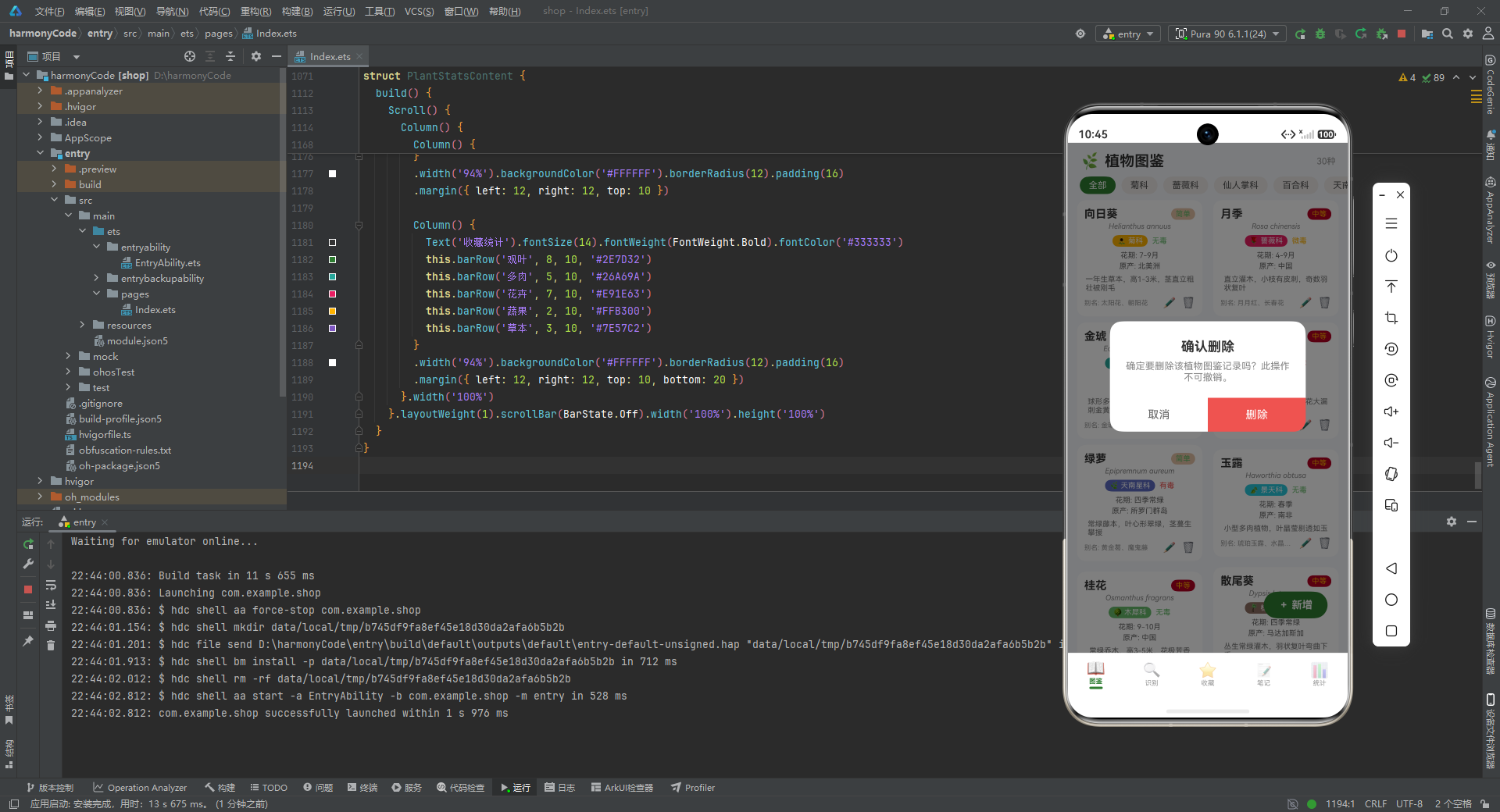
deleteModal Builder实现了删除确认的提示模态框,采用紧凑的对话框设计。与表单模态框不同,确认对话框只包含标题、提示文本和操作按钮,宽度设为屏幕的70%,垂直居中偏上(y: ‘35%’)。
提示文本明确告知用户"此操作不可撤销",这是删除操作的标准安全提示。删除按钮使用红色(#EF5350)背景,警示用户这是一个破坏性操作。按钮布局与表单模态框略有不同,删除按钮的圆角只设置了bottomRight,形成了微妙的视觉差异。
7.9 辅助方法
  difficultyBg(diff: string): string {
    if (DIFFICULTY_CONFIG[diff]) {
      return DIFFICULTY_CONFIG[diff].color + '22'
    }
    return '#EEEEEE'
    }

  familyColor(family: string): string {
    if (FAMILY_CONFIG[family]) {
      return FAMILY_CONFIG[family].color
    }
    return '#999999'
  }

  familyLabel(family: string): string {
    if (FAMILY_CONFIG[family]) {
      return FAMILY_CONFIG[family].icon + ' ' + FAMILY_CONFIG[family].label
    }
    return family
  }

  toxicColor(toxic: string): string {
    if (toxic === '有毒') { return '#EF5350' }
    if (toxic === '微毒') { return '#FFB300' }
    return '#66BB6A'
  }
四个辅助方法负责从配置对象中解析视觉属性,处理配置不存在时的降级逻辑。difficultyBg方法返回难度标签的背景色,通过在原色后追加’22’(十六进制的34/255,约13%不透明度)生成半透明的浅色背景。familyColor方法返回科属的主题色,未配置时返回灰色。familyLabel方法返回带图标的完整科属标签文本。toxicColor方法根据毒性等级返回对应的颜色编码。
这些方法体现了防御式编程的思想,都包含了对配置对象存在性的检查,避免因数据不完整导致的运行时错误。但如果在多处使用相同的降级值,可以考虑提取为常量以提高可维护性。
7.10 主构建函数
  build() {
    Stack() {
      Column() {
        Row() {
          Text('🌿').fontSize(22)
          Text('植物图鉴').fontSize(20).fontWeight(FontWeight.Bold).fontColor('#333333')
            .margin({ left: 6 })
          Blank()
          Text('30种').fontSize(12).fontColor('#999999')
        }.width('100%').padding({ left: 16, right: 16, top: 12, bottom: 8 })

        Scroll() {
          Row() {
            this.familyChip('全部')
            this.familyChip('菊科')
            this.familyChip('蔷薇科')
            this.familyChip('仙人掌科')
            this.familyChip('百合科')
            this.familyChip('天南星科')
            this.familyChip('景天科')
            this.familyChip('木犀科')
            this.familyChip('棕榈科')
          }.padding({ left: 16, right: 16, bottom: 8 })
        }.scrollable(ScrollDirection.Horizontal).scrollBar(BarState.Off).width('100%')

        Scroll() {
          Column() {
            this.plantRow(mockPlants[0], mockPlants[1])
            this.plantRow(mockPlants[2], mockPlants[3])
            this.plantRow(mockPlants[4], mockPlants[5])
            this.plantRow(mockPlants[6], mockPlants[7])
            this.plantRow(mockPlants[8], mockPlants[9])
            this.plantRow(mockPlants[10], mockPlants[11])
            this.plantRow(mockPlants[12], mockPlants[13])
            this.plantRow(mockPlants[14], mockPlants[15])
            this.plantRow(mockPlants[16], mockPlants[17])
            this.plantRow(mockPlants[18], mockPlants[19])
            this.plantRow(mockPlants[20], mockPlants[21])
            this.plantRow(mockPlants[22], mockPlants[23])
            this.plantRow(mockPlants[24], mockPlants[25])
            this.plantRow(mockPlants[26], mockPlants[27])
            this.plantRow(mockPlants[28], mockPlants[29])
          }.padding({ bottom: 20 })
        }.layoutWeight(1).scrollBar(BarState.Off)
      }.width('100%').height('100%')

      Row() {
        Text('+ 新增').fontSize(14).fontColor('#FFFFFF').fontWeight(FontWeight.Bold)
      }
      .backgroundColor(PLANT_THEME_COLOR).borderRadius(28)
      .padding({ left: 20, right: 20, top: 10, bottom: 10 })
      .position({ x: '70%', y: '88%' })
      .onClick(() => { this.showAddModal = true })

      if (this.showAddModal) { this.addModal() }
      if (this.showEditModal) { this.editModal() }
      if (this.showDeleteConfirm) { this.deleteModal() }
    }.width('100%').height('100%')
  }
}
build()函数使用Stack作为根容器,支持子元素的层叠布局。第一层是主内容Column,包含标题栏、科属筛选区、植物卡片网格。第二层是悬浮的新增按钮,使用position定位在右下角。第三层是条件渲染的三个模态框。
标题栏包含emoji图标、标题文本和植物数量统计。科属筛选区使用水平滚动的Scroll容器,内部依次渲染9个筛选标签。植物卡片网格使用垂直Scroll容器,内部手动配对调用plantRow Builder渲染15行双列卡片。
悬浮按钮采用胶囊形状(圆角28),使用主题色背景,点击时显示新增模态框。三个模态框使用if条件渲染,只有当对应的状态变量为true时才挂载到组件树中,这种条件渲染模式确保了未显示的模态框不会占用渲染资源。
八、识别记录模块解析
8.1 置信度颜色方法
@Component
struct RecognizeContent {
  confidenceColor(conf: number): string {
    if (conf >= 90) { return '#66BB6A' }
    if (conf >= 85) { return '#FFB300' }
    return '#EF5350'
  }
confidenceColor方法根据置信度数值返回对应的颜色编码,采用分段阈值策略:90%以上返回绿色(高置信度),85%-90%返回黄色(中等置信度),85%以下返回红色(低置信度)。这种颜色编码直观地传达了识别结果的可靠性,帮助用户判断是否需要重新识别。
8.2 记录项Builder
  @Builder recordItem(record: RecognRecordModel) {
    Row() {
      Column() {
        Text(record.date).fontSize(12).fontColor('#999999')
        Column().width(2).layoutWeight(1).backgroundColor(PLANT_THEME_COLOR_LIGHT).margin({ top: 4 })
      }.alignItems(HorizontalAlign.Center).height(80)

      Column() {
        Row() {
          Text(record.result).fontSize(15).fontWeight(FontWeight.Bold).fontColor('#333333')
          Blank()
          Text(record.confidence + '%').fontSize(13).fontWeight(FontWeight.Bold)
            .fontColor(this.confidenceColor(record.confidence))
        }.width('100%')

        Row() {
          Text('📷 ' + record.photoDesc).fontSize(11).fontColor('#777777').layoutWeight(1)
            .maxLines(1).textOverflow({ overflow: TextOverflow.Ellipsis })
        }.margin({ top: 4 })

        Row() {
          Text('📍 ' + record.location).fontSize(11).fontColor('#888888')
          Text('  ' + record.weather).fontSize(11).fontColor('#888888')
          Blank()
          Text(record.favorited ? '⭐' : '☆').fontSize(14)
        }.margin({ top: 4 }).width('100%')
      }
      .layoutWeight(1).backgroundColor('#FFFFFF').borderRadius(10).padding(12)
      .margin({ left: 8 })
    }
    .width('100%').padding({ left: 12, right: 12, top: 4 })
  }
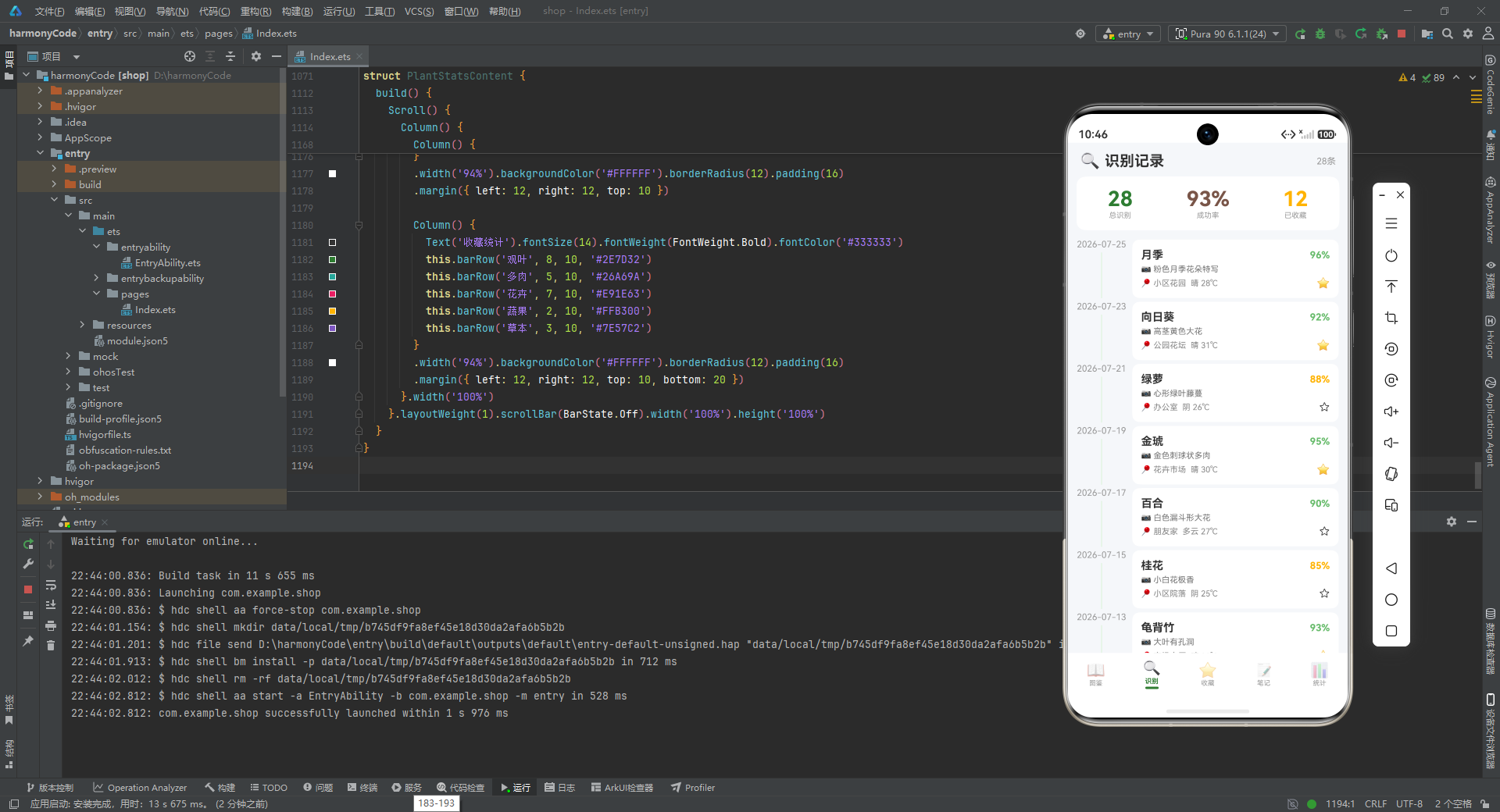
recordItem Builder实现了识别记录列表的单项渲染,采用时间轴风格设计。整体使用Row水平布局,左侧是日期和时间线,右侧是内容卡片。
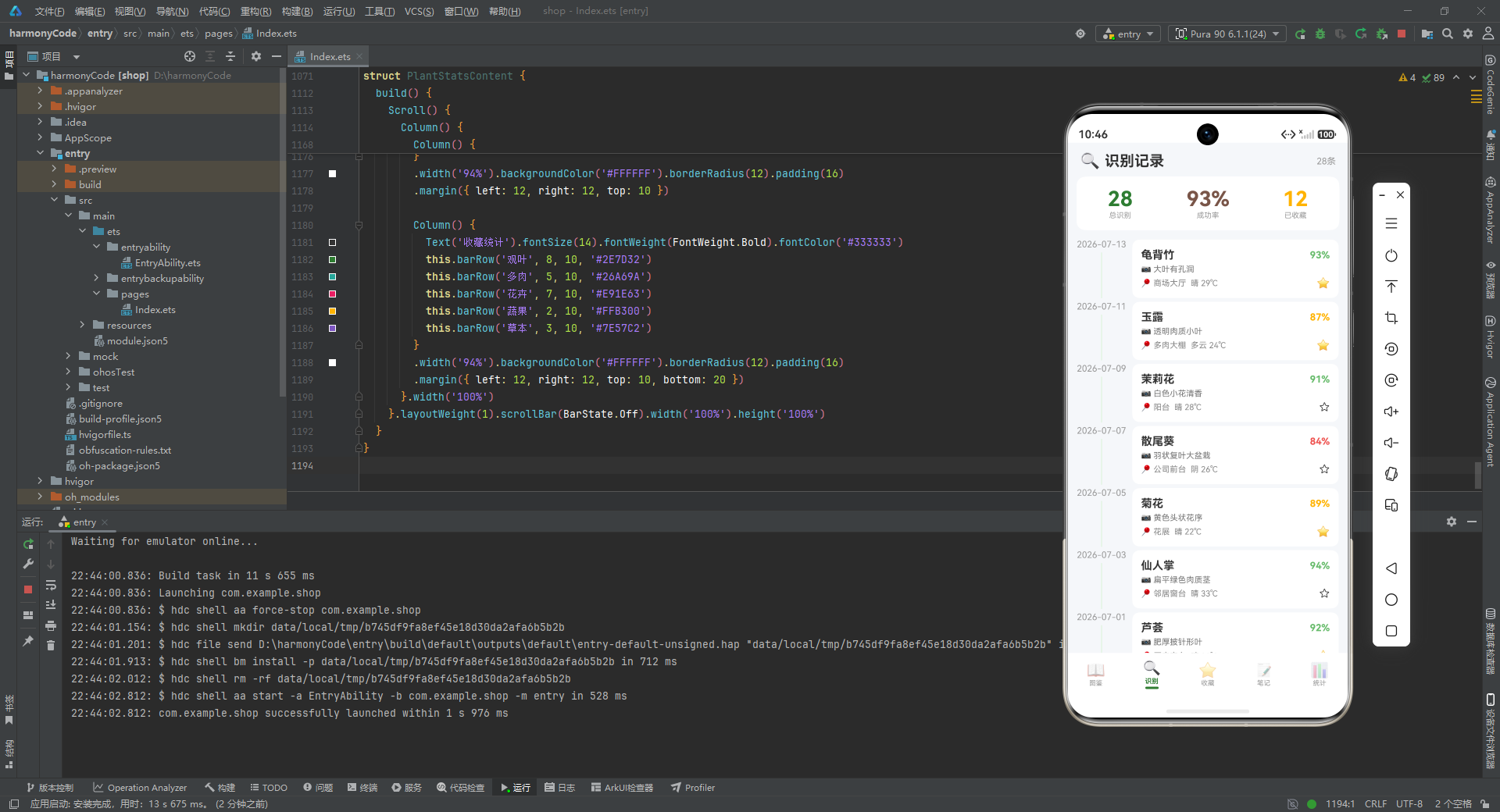
左侧Column包含日期文本和垂直的时间线(高度使用layoutWeight(1)自适应),时间线使用2像素宽的主题色浅色调,与卡片内容形成视觉连接。右侧Column使用白色背景和圆角,包含三行内容:第一行是识别结果和置信度(置信度使用动态颜色),第二行是照片描述,第三行是位置、天气和收藏状态。
收藏状态使用emoji星星表示,已收藏显示实心星(⭐),未收藏显示空心星(☆),这种直观的视觉符号使得收藏状态一目了然。照片描述使用maxLines(1)和ellipsis截断,确保卡片高度的一致性。
8.3 主构建函数
  build() {
    Column() {
      Row() {
        Text('🔍').fontSize(22)
        Text('识别记录').fontSize(20).fontWeight(FontWeight.Bold).fontColor('#333333')
          .margin({ left: 6 })
        Blank()
        Text('28条').fontSize(12).fontColor('#999999')
      }.width('100%').padding({ left: 16, right: 16, top: 12, bottom: 8 })

      Row() {
        Column() {
          Text('28').fontSize(28).fontWeight(FontWeight.Bold).fontColor(PLANT_THEME_COLOR)
          Text('总识别').fontSize(10).fontColor('#999999')
        }.alignItems(HorizontalAlign.Center).layoutWeight(1)

        Column() {
          Text('93%').fontSize(28).fontWeight(FontWeight.Bold).fontColor(EARTH_BROWN)
          Text('成功率').fontSize(10).fontColor('#999999')
        }.alignItems(HorizontalAlign.Center).layoutWeight(1)

        Column() {
          Text('12').fontSize(28).fontWeight(FontWeight.Bold).fontColor('#FFB300')
          Text('已收藏').fontSize(10).fontColor('#999999')
        }.alignItems(HorizontalAlign.Center).layoutWeight(1)
      }
      .width('94%').backgroundColor('#FFFFFF').borderRadius(12).padding({ top: 14, bottom: 14 })
      .margin({ left: 12, right: 12, bottom: 8 })

      Scroll() {
        Column() {
          this.recordItem(mockRecords[0])
          this.recordItem(mockRecords[1])
          // ... 共28条记录
        }.padding({ bottom: 20 })
      }.layoutWeight(1).scrollBar(BarState.Off)
    }.width('100%').height('100%')
  }
}
build()函数实现了识别记录页面的完整布局。顶部是标题栏,包含图标、标题和记录数量统计。中间是统计卡片区域,使用Row水平布局展示总识别数、成功率和收藏数三个核心指标,每个指标使用不同的主题色进行视觉区分。
底部是记录列表,使用Scroll容器包裹Column,依次渲染28条识别记录。layoutWeight(1)确保列表占据剩余的全部垂直空间,scrollBar(BarState.Off)隐藏滚动条以保持界面简洁。
九、收藏模块解析
9.1 分类颜色与图标方法
@Component
struct FavoriteContent {
  @State selectedCategory: string = '全部'

  categoryColor(cat: string): string {
    if (FAV_CATEGORY_CONFIG[cat]) {
      return FAV_CATEGORY_CONFIG[cat].color
    }
    return '#999999'
  }

  categoryIcon(cat: string): string {
    if (FAV_CATEGORY_CONFIG[cat]) {
      return FAV_CATEGORY_CONFIG[cat].icon
    }
    return '🌿'
  }
categoryColor和categoryIcon两个辅助方法负责从FAV_CATEGORY_CONFIG配置中解析收藏分类的视觉属性。方法包含防御性检查,当传入的分类不存在时返回默认值。这种设计使得即使数据中出现未配置的分类,UI也能优雅降级而非报错。
9.2 分类筛选Chip Builder
  @Builder categoryChip(label: string) {
    Text(label).fontSize(12)
      .fontColor(this.selectedCategory === label ? '#FFFFFF' : '#555555')
      .backgroundColor(this.selectedCategory === label ? PLANT_THEME_COLOR : EARTH_BROWN_LIGHT)
      .borderRadius(14).padding({ left: 12, right: 12, top: 5, bottom: 5 })
      .margin({ right: 8 })
      .onClick(() => { this.selectedCategory = label })
  }
categoryChip Builder与familyChip结构完全一致,只是绑定到selectedCategory状态变量。这种高度一致的实现模式使得代码易于理解和维护,但也提示了组件化抽象的可能性——可以创建一个通用的FilterChip组件来统一处理筛选标签的渲染逻辑。
9.3 收藏项Builder
  @Builder favoriteItem(item: FavoritePlantModel) {
    Row() {
      Column() {
        Text(this.categoryIcon(item.category)).fontSize(28)
      }.width(48).height(48).backgroundColor(this.categoryColor(item.category) + '22').borderRadius(12)
      .justifyContent(FlexAlign.Center).alignItems(HorizontalAlign.Center)

      Column() {
        Row() {
          Text(item.name).fontSize(15).fontWeight(FontWeight.Bold).fontColor('#333333')
          Blank()
          Text(item.category).fontSize(10)
            .fontColor('#FFFFFF').backgroundColor(this.categoryColor(item.category))
            .borderRadius(8).padding({ left: 6, right: 6, top: 2, bottom: 2 })
        }.width('100%')

        Text(item.remark).fontSize(11).fontColor('#777777').margin({ top: 3 })
          .maxLines(1).textOverflow({ overflow: TextOverflow.Ellipsis })

        Row() {
          Text('📅 ' + item.favoriteDate).fontSize(10).fontColor('#999999')
          Text('  💧 ' + item.careFrequency).fontSize(10).fontColor('#999999')
          Blank()
          Text('最近浇水: ' + item.lastWatering).fontSize(9).fontColor('#AAAAAA')
        }.margin({ top: 4 }).width('100%')

        Row() {
          Text('#' + item.tag).fontSize(9).fontColor(PLANT_THEME_COLOR)
            .backgroundColor(PLANT_THEME_COLOR_LIGHT).borderRadius(6)
            .padding({ left: 6, right: 6, top: 2, bottom: 2 })
        }.margin({ top: 4 })
      }.layoutWeight(1).margin({ left: 10 })
    }
    .width('100%').backgroundColor('#FFFFFF').borderRadius(10).padding(12)
    .margin({ left: 12, right: 12, top: 5 })
  }
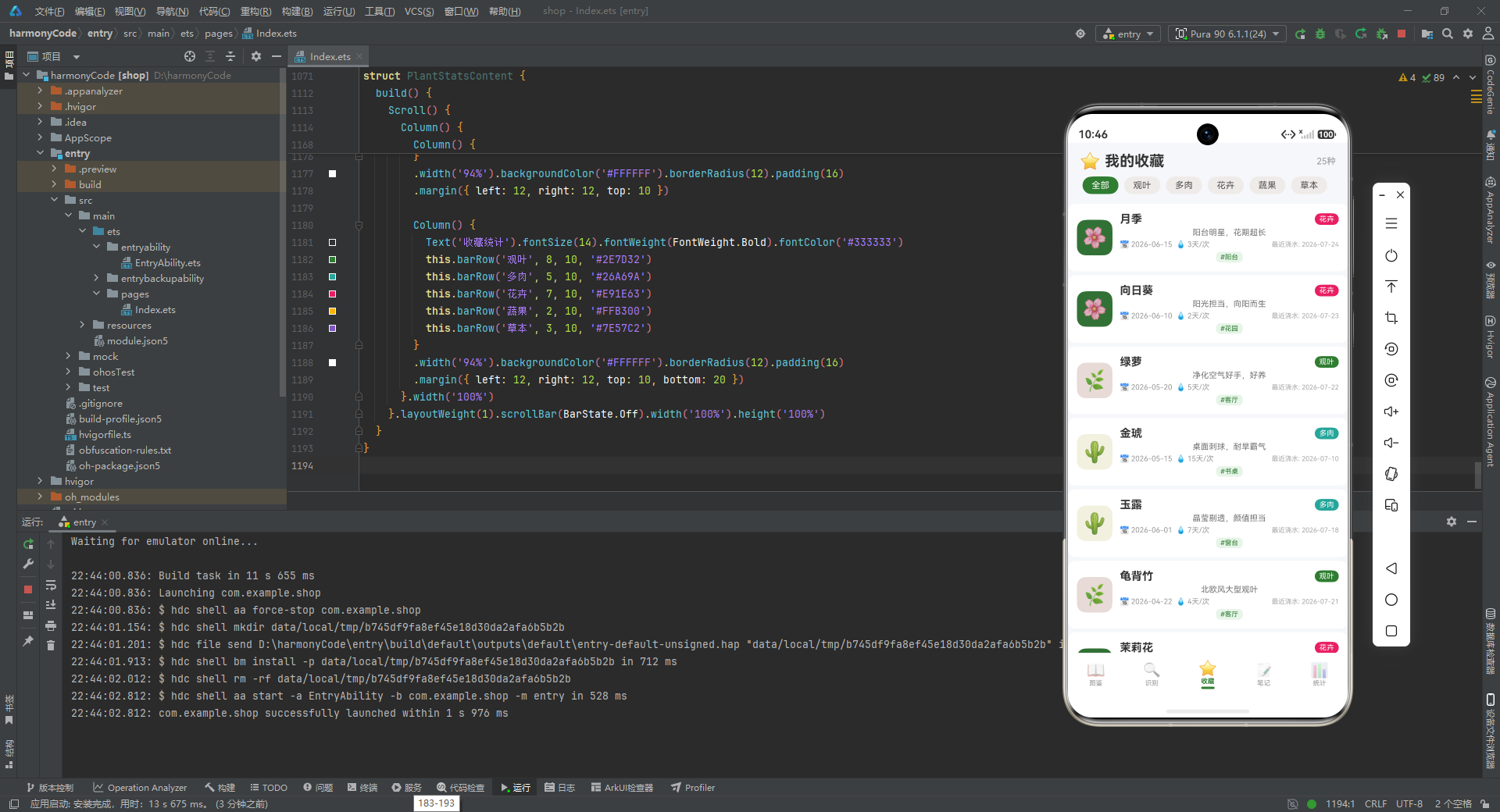
favoriteItem Builder实现了收藏列表的单项渲染,采用左图右文的布局模式。左侧是一个48x48的图标区域,使用分类图标和浅色背景,justifyContent和alignItems设置为Center实现内容的水平和垂直居中。右侧Column包含四行内容:名称和分类标签、用户备注、收藏日期和浇水信息、位置标签。
分类标签使用胶囊形状展示,背景色从配置中动态获取。备注使用maxLines(1)和ellipsis截断,确保卡片高度一致。浇水信息行使用日历和水滴emoji作为视觉前缀,增强了信息的可读性。位置标签以#前缀的形式展示,使用主题色系形成视觉呼应。
9.4 主构建函数
  build() {
    Column() {
      Row() {
        Text('⭐').fontSize(22)
        Text('我的收藏').fontSize(20).fontWeight(FontWeight.Bold).fontColor('#333333')
          .margin({ left: 6 })
        Blank()
        Text('25种').fontSize(12).fontColor('#999999')
      }.width('100%').padding({ left: 16, right: 16, top: 12, bottom: 8 })

      Scroll() {
        Row() {
          this.categoryChip('全部')
          this.categoryChip('观叶')
          this.categoryChip('多肉')
          this.categoryChip('花卉')
          this.categoryChip('蔬果')
          this.categoryChip('草本')
        }.padding({ left: 16, right: 16, bottom: 8 })
      }.scrollable(ScrollDirection.Horizontal).scrollBar(BarState.Off).width('100%')

      Scroll() {
        Column() {
          this.favoriteItem(mockFavorites[0])
          this.favoriteItem(mockFavorites[1])
          // ... 共25条收藏
        }.padding({ bottom: 20 })
      }.layoutWeight(1).scrollBar(BarState.Off)
    }.width('100%').height('100%')
  }
}
build()函数的布局结构与图鉴模块高度一致,包含标题栏、分类筛选区、收藏列表三个主要区域。这种一致性的页面架构为用户提供了统一的浏览体验,降低了学习成本。标题栏显示"我的收藏"标题和收藏数量,筛选区支持按收藏分类过滤,列表区展示所有收藏植物的信息卡片。
十、笔记模块解析
10.1 养护类型辅助方法
@Component
struct NoteContent {
  @State selectedType: string = '全部'

  careTypeColor(t: string): string {
    if (CARE_TYPE_CONFIG[t]) {
      return CARE_TYPE_CONFIG[t].color
    }
    return '#999999'
  }

  careTypeIcon(t: string): string {
    if (CARE_TYPE_CONFIG[t]) {
      return CARE_TYPE_CONFIG[t].icon
    }
    return '📝'
  }
careTypeColor和careTypeIcon方法负责从CARE_TYPE_CONFIG配置中解析养护类型的视觉属性。当配置不存在时,颜色返回灰色,图标返回默认的备忘录图标。这种防御性设计确保了即使数据中存在未知的养护类型,UI也能正常渲染。
10.2 类型筛选Chip Builder
  @Builder typeChip(label: string) {
    Text(label).fontSize(12)
      .fontColor(this.selectedType === label ? '#FFFFFF' : '#555555')
      .backgroundColor(this.selectedType === label ? PLANT_THEME_COLOR : EARTH_BROWN_LIGHT)
      .borderRadius(14).padding({ left: 12, right: 12, top: 5, bottom: 5 })
      .margin({ right: 8 })
      .onClick(() => { this.selectedType = label })
  }
typeChip Builder与前面的筛选标签实现完全一致,只是绑定到selectedType状态变量。这种重复模式再次提示了组件化抽象的必要性,在大型项目中,通常会创建一个通用的FilterChip组件来统一处理这类需求。
10.3 笔记项Builder
  @Builder noteItem(note: CareNoteModel) {
    Row() {
      Column() {
        Text(this.careTypeIcon(note.careType)).fontSize(22)
        Text(note.careType).fontSize(8).fontColor('#999999').margin({ top: 2 })
      }.width(44).height(44).backgroundColor(this.careTypeColor(note.careType) + '22').borderRadius(10)
      .justifyContent(FlexAlign.Center).alignItems(HorizontalAlign.Center)

      Column() {
        Row() {
          Text(note.plantName).fontSize(14).fontWeight(FontWeight.Bold).fontColor('#333333')
          Text('  ' + note.careType).fontSize(10)
            .fontColor('#FFFFFF').backgroundColor(this.careTypeColor(note.careType))
            .borderRadius(8).padding({ left: 6, right: 6, top: 2, bottom: 2 })
          Blank()
          Text(note.date).fontSize(10).fontColor('#AAAAAA')
        }.width('100%')

        Text(note.content).fontSize(12).fontColor('#666666').margin({ top: 4 })
          .maxLines(2).textOverflow({ overflow: TextOverflow.Ellipsis })

        Row() {
          Text('🖼 ' + note.imageDesc).fontSize(10).fontColor('#999999')
        }.margin({ top: 4 })
      }.layoutWeight(1).margin({ left: 10 })
    }
    .width('100%').backgroundColor('#FFFFFF').borderRadius(10).padding(12)
    .margin({ left: 12, right: 12, top: 5 })
  }
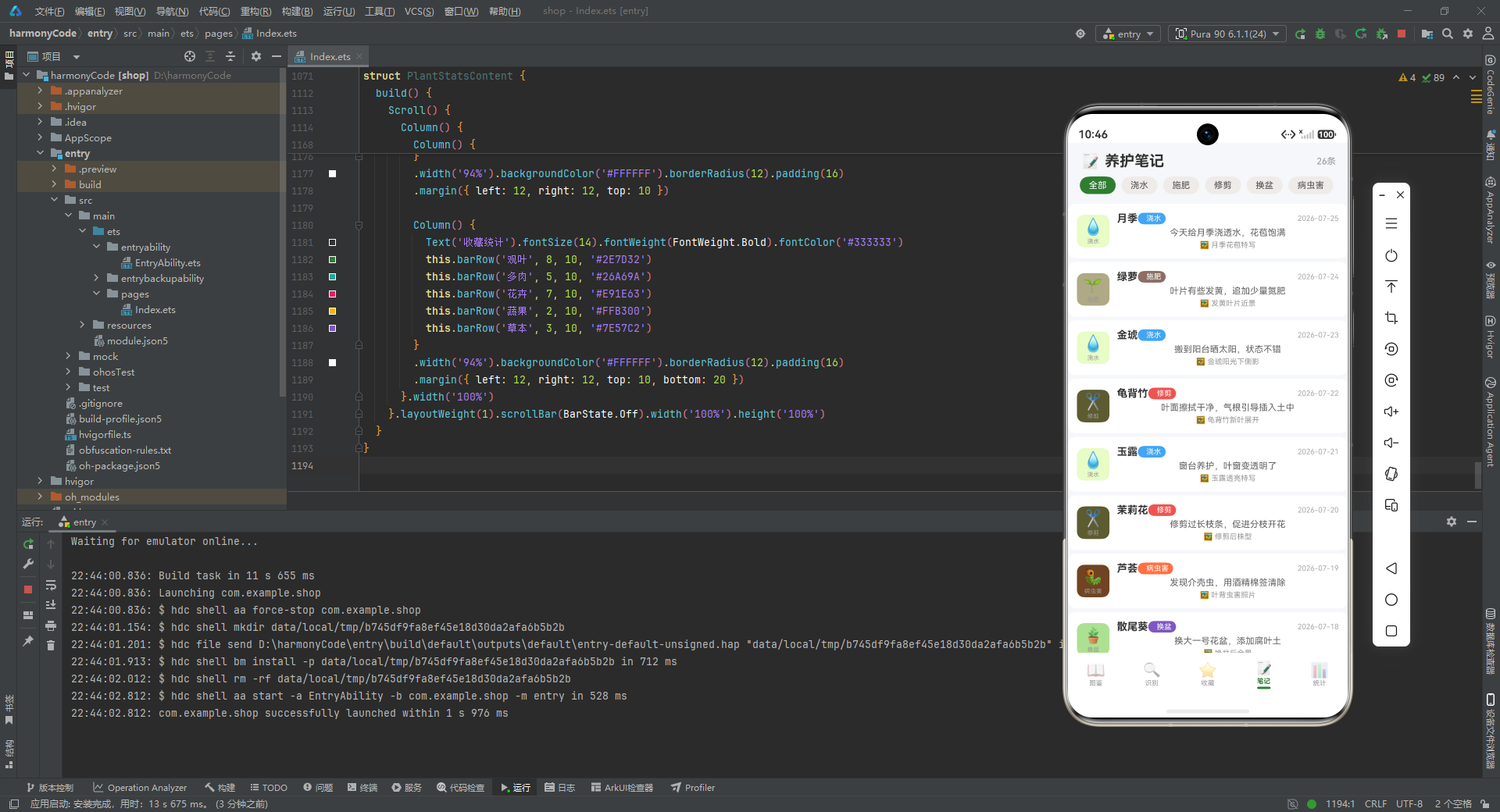
noteItem Builder实现了养护笔记列表的单项渲染,采用与收藏项类似的左图右文布局。左侧图标区域展示养护类型的图标和标签文字,使用动态颜色和浅色背景。右侧Column包含三行内容:植物名称、养护类型标签和日期、笔记内容、图片描述。
植物名称使用粗体强调,养护类型标签使用胶囊形状和动态颜色,日期右对齐显示。笔记内容限制为两行,超出部分显示省略号。图片描述使用图片emoji作为前缀,提示用户该笔记包含配图。
10.4 主构建函数
  build() {
    Column() {
      Row() {
        Text('📝').fontSize(22)
        Text('养护笔记').fontSize(20).fontWeight(FontWeight.Bold).fontColor('#333333')
          .margin({ left: 6 })
        Blank()
        Text('26条').fontSize(12).fontColor('#999999')
      }.width('100%').padding({ left: 16, right: 16, top: 12, bottom: 8 })

      Scroll() {
        Row() {
          this.typeChip('全部')
          this.typeChip('浇水')
          this.typeChip('施肥')
          this.typeChip('修剪')
          this.typeChip('换盆')
          this.typeChip('病虫害')
        }.padding({ left: 16, right: 16, bottom: 8 })
      }.scrollable(ScrollDirection.Horizontal).scrollBar(BarState.Off).width('100%')

      Scroll() {
        Column() {
          this.noteItem(mockNotes[0])
          this.noteItem(mockNotes[1])
          // ... 共26条笔记
        }.padding({ bottom: 20 })
      }.layoutWeight(1).scrollBar(BarState.Off)
    }.width('100%').height('100%')
  }
}
build()函数的布局结构与前两个模块保持一致,包含标题栏、类型筛选区、笔记列表三个主要区域。标题栏显示"养护笔记"标题和笔记数量,筛选区支持按养护类型过滤,列表区展示所有养护笔记的摘要信息。
十一、统计模块解析
11.1 统计卡片Builder
@Component
struct PlantStatsContent {
  @Builder statCard(icon: string, value: string, label: string, color: string) {
    Column() {
      Text(icon).fontSize(24)
      Text(value).fontSize(26).fontWeight(FontWeight.Bold).fontColor(color).margin({ top: 4 })
      Text(label).fontSize(10).fontColor('#999999').margin({ top: 2 })
    }.layoutWeight(1).alignItems(HorizontalAlign.Center)
  }
statCard Builder实现了统计卡片的通用渲染,接收图标、数值、标签和颜色四个参数。卡片采用垂直居中布局,从上到下依次显示图标emoji、数值和标签。数值使用大字号和动态颜色突出显示,标签使用小字号灰色文字说明数据含义。layoutWeight(1)确保多个卡片在Row中均匀分布。
11.2 条形图Builder
  @Builder barRow(label: string, count: number, maxCount: number, color: string) {
    Row() {
      Text(label).fontSize(11).fontColor('#555555').width(70)
      Column() {
        Row() {
          Column().width((count / maxCount) * 100 + '%').height(16).backgroundColor(color).borderRadius(4)
        }.width('100%')
      }.layoutWeight(1).backgroundColor('#F0F0F0').borderRadius(4).height(16)
      Text(count + '').fontSize(11).fontColor('#666666').width(30)
    }.margin({ top: 8 }).width('100%')
  }
barRow Builder实现了水平条形图的渲染,用于展示各科属或分类的数量分布。函数接收标签文本、当前数值、最大值和颜色四个参数。布局使用Row水平排列标签、进度条和数值。进度条使用嵌套的Column实现,外层是灰色背景轨道,内层是彩色进度填充,宽度根据count/maxCount的比例计算。
11.3 季节柱状图Builder
  @Builder seasonBar(season: string, count: number, maxCount: number) {
    Column() {
      Column().width(30).height((count / maxCount) * 80).backgroundColor(EARTH_BROWN).borderRadius(4)
      Text(season).fontSize(10).fontColor('#999999').margin({ top: 4 })
      Text(count + '').fontSize(10).fontColor(EARTH_BROWN).fontWeight(FontWeight.Bold)
    }.layoutWeight(1).alignItems(HorizontalAlign.Center)
  }
seasonBar Builder实现了季节分布的柱状图渲染。与barRow的水平布局不同,seasonBar采用垂直布局,从上到下依次是柱状条、季节标签和数值。柱状条的高度根据count/maxCount的比例计算,最大高度设为80像素。四个季节柱子使用layoutWeight(1)在Row中均匀分布,形成并排对比的效果。
11.4 难度分布Builder
  @Builder difficultyRow(label: string, count: number, total: number, color: string) {
    Row() {
      Text(label).fontSize(11).fontColor('#555555').width(50)
      Column() {
        Row() {
          Column().width((count / total) * 100 + '%').height(14).backgroundColor(color).borderRadius(4)
        }.width('100%')
      }.layoutWeight(1).backgroundColor('#F0F0F0').borderRadius(4).height(14)
      Text(count + '种').fontSize(11).fontColor('#666666').width(40)
    }.margin({ top: 8 }).width('100%')
  }
difficultyRow Builder与barRow结构相似,只是标签宽度调整为50像素,数值后缀添加"种"单位。这种细微的调整体现了组件对特定数据场景的适配,同时也提示了通用组件参数化的必要性。
11.5 主构建函数
  build() {
    Scroll() {
      Column() {
        Row() {
          Text('📊').fontSize(22)
          Text('数据统计').fontSize(20).fontWeight(FontWeight.Bold).fontColor('#333333')
            .margin({ left: 6 })
        }.width('100%').padding({ left: 16, right: 16, top: 12, bottom: 8 })

        Row() {
          this.statCard('📖', '30', '图鉴总数', PLANT_THEME_COLOR)
          this.statCard('🔍', '28', '识别记录', EARTH_BROWN)
          this.statCard('⭐', '25', '收藏植物', '#FFB300')
          this.statCard('📝', '26', '养护笔记', '#7E57C2')
        }
        .width('94%').backgroundColor('#FFFFFF').borderRadius(12).padding({ top: 16, bottom: 16 })
        .margin({ left: 12, right: 12 })

        Column() {
          Text('各科属植物数量').fontSize(14).fontWeight(FontWeight.Bold).fontColor('#333333')
          this.barRow('菊科', 3, 6, '#FFB300')
          this.barRow('蔷薇科', 3, 6, '#E91E63')
          this.barRow('仙人掌科', 3, 6, '#26A69A')
          this.barRow('百合科', 3, 6, '#7E57C2')
          this.barRow('天南星科', 4, 6, '#5C6BC0')
          this.barRow('景天科', 2, 6, '#26C6DA')
          this.barRow('木犀科', 3, 6, '#66BB6A')
          this.barRow('棕榈科', 2, 6, '#8D6E63')
        }
        .width('94%').backgroundColor('#FFFFFF').borderRadius(12).padding(16)
        .margin({ left: 12, right: 12, top: 10 })

        Row() {
          Column() {
            Text('识别次数').fontSize(11).fontColor('#999999')
            Text('28').fontSize(48).fontWeight(FontWeight.Bold).fontColor(PLANT_THEME_COLOR)
            Text('累计识别').fontSize(10).fontColor('#AAAAAA')
          }.alignItems(HorizontalAlign.Center).layoutWeight(1)

          Column() {
            Text('93%').fontSize(36).fontWeight(FontWeight.Bold).fontColor(EARTH_BROWN)
            Text('识别成功率').fontSize(10).fontColor('#AAAAAA').margin({ top: 4 })
          }.alignItems(HorizontalAlign.Center).layoutWeight(1)
        }
        .width('94%').backgroundColor('#FFFFFF').borderRadius(12).padding({ top: 20, bottom: 20 })
        .margin({ left: 12, right: 12, top: 10 })

        Column() {
          Text('养护难度分布').fontSize(14).fontWeight(FontWeight.Bold).fontColor('#333333')
          this.difficultyRow('简单', 14, 30, '#66BB6A')
          this.difficultyRow('中等', 13, 30, '#FFB300')
          this.difficultyRow('困难', 3, 30, '#EF5350')
        }
        .width('94%').backgroundColor('#FFFFFF').borderRadius(12).padding(16)
        .margin({ left: 12, right: 12, top: 10 })

        Column() {
          Text('季节花期分布').fontSize(14).fontWeight(FontWeight.Bold).fontColor('#333333')
          Row() {
            this.seasonBar('春季', 10, 12)
            this.seasonBar('夏季', 12, 12)
            this.seasonBar('秋季', 5, 12)
            this.seasonBar('冬季', 2, 12)
          }.width('100%').margin({ top: 12 })
        }
        .width('94%').backgroundColor('#FFFFFF').borderRadius(12).padding(16)
        .margin({ left: 12, right: 12, top: 10 })

        Column() {
          Text('收藏统计').fontSize(14).fontWeight(FontWeight.Bold).fontColor('#333333')
          this.barRow('观叶', 8, 10, '#2E7D32')
          this.barRow('多肉', 5, 10, '#26A69A')
          this.barRow('花卉', 7, 10, '#E91E63')
          this.barRow('蔬果', 2, 10, '#FFB300')
          this.barRow('草本', 3, 10, '#7E57C2')
        }
        .width('94%').backgroundColor('#FFFFFF').borderRadius(12).padding(16)
        .margin({ left: 12, right: 12, top: 10, bottom: 20 })
      }.width('100%')
    }.layoutWeight(1).scrollBar(BarState.Off).width('100%').height('100%')
  }
}
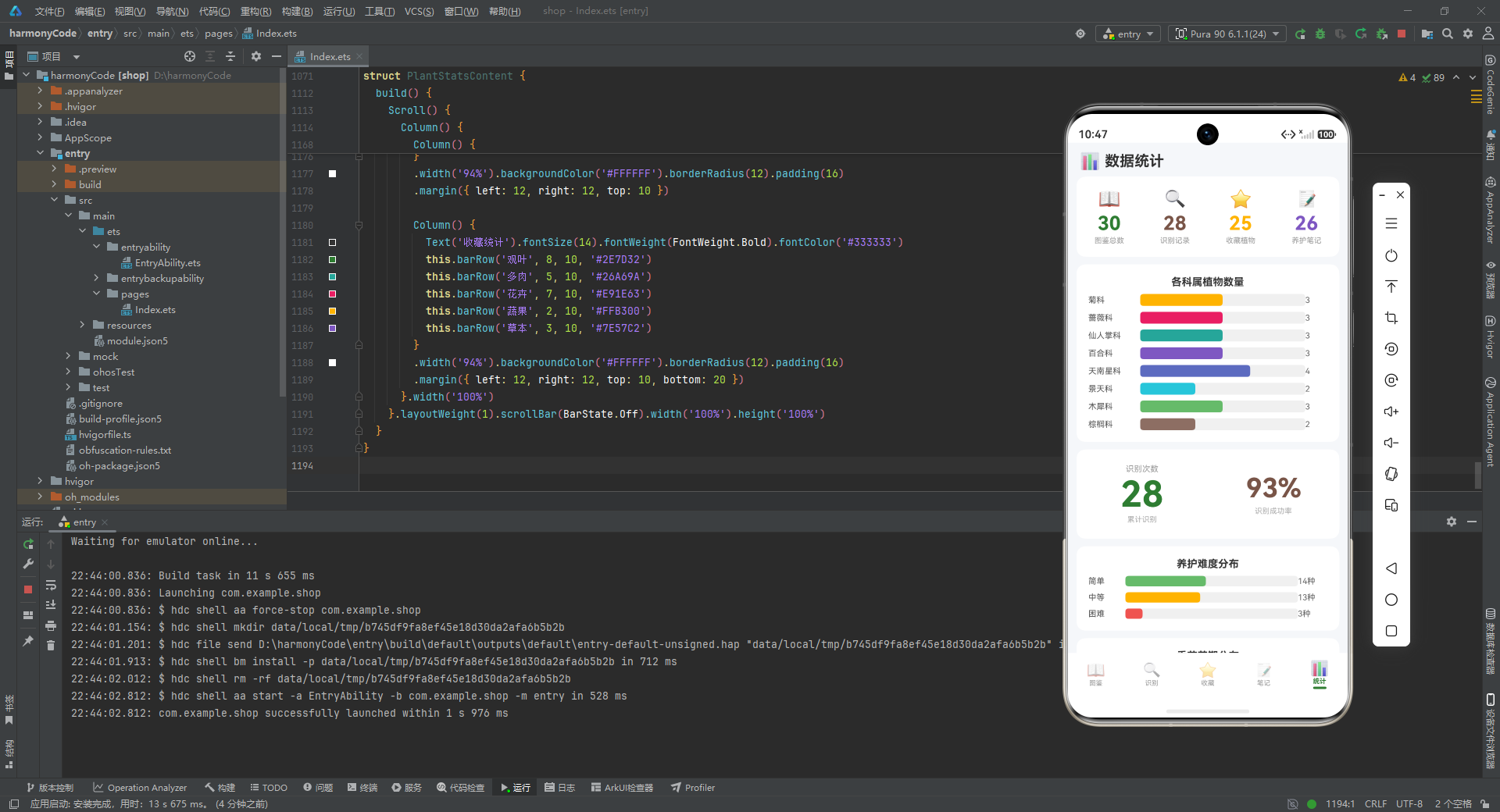
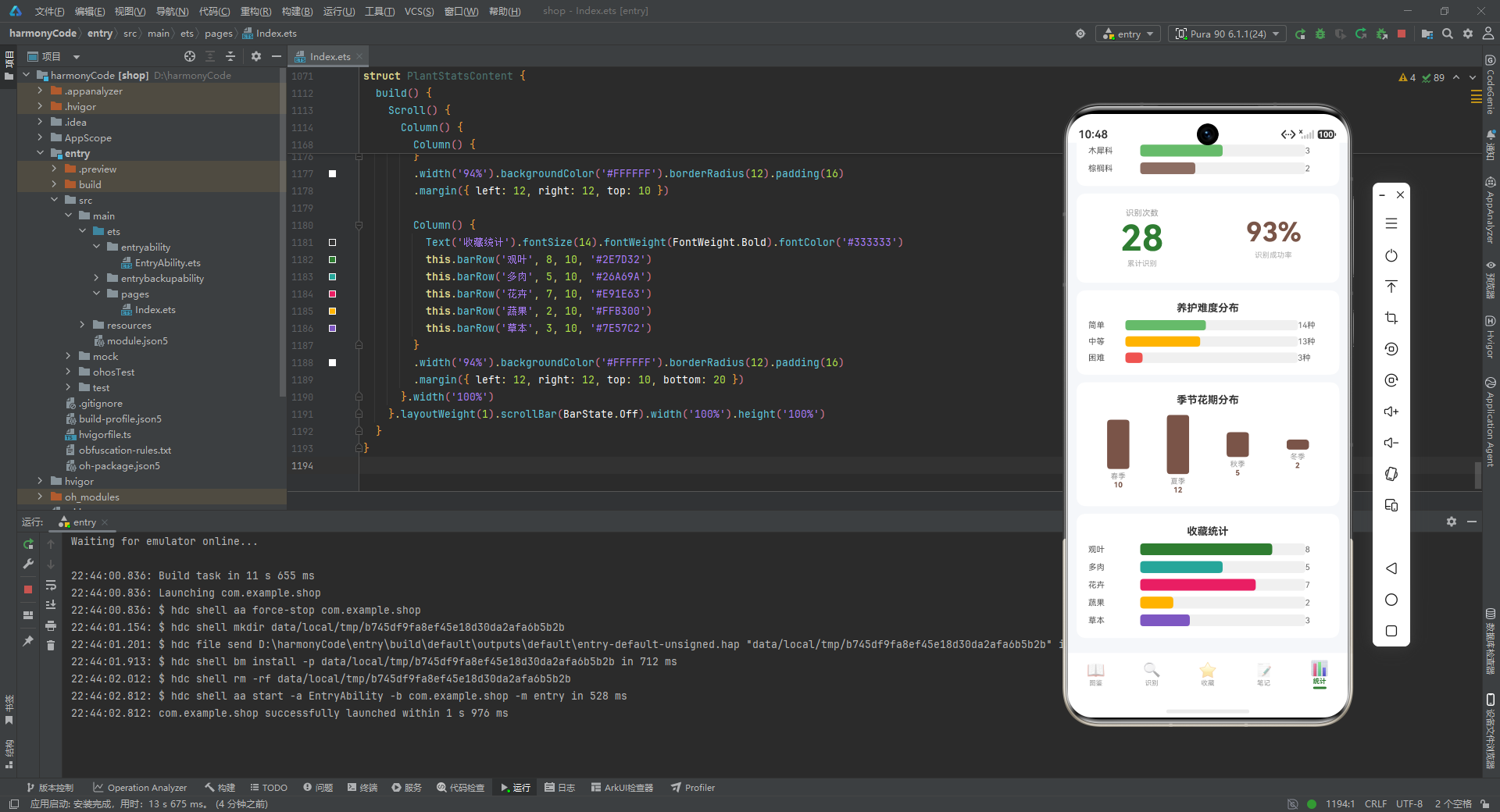
build()函数实现了数据统计页面的完整布局,使用Scroll容器支持垂直滚动。页面从上到下依次包含:标题栏、核心指标卡片、科属分布条形图、识别统计区域、难度分布条形图、季节花期柱状图、收藏分类条形图。
标题栏显示"数据统计"标题。核心指标卡片使用Row水平布局,展示图鉴总数、识别记录、收藏植物、养护笔记四个核心指标,每个指标使用不同的主题色进行视觉区分。科属分布条形图展示了8个科属的植物数量对比。识别统计区域使用大字号突出显示识别次数和成功率。难度分布和收藏统计使用条形图展示分类占比。季节花期使用柱状图展示四季分布。
整个统计页面采用了卡片化的布局设计,每个统计模块使用独立的白色卡片容器,圆角和阴影(通过背景色对比模拟)形成层次感。ScrollBar(BarState.Off)隐藏滚动条,保持界面简洁。
十二、技术方案横向对比
| 对比维度 | ArkTS声明式UI | 传统命令式UI (Android/iOS) | 跨平台框架 (Flutter/React Native) | Web技术 (HTML5/CSS/JS) |
|---|---|---|---|---|
| 开发效率 | 高,TypeScript类型安全,代码简洁,响应式编程减少样板代码 | 中低,需要手动管理View状态,代码量较大 | 中高,一套代码多平台运行,但桥接层有性能损耗 | 高,Web技术栈普及度高,但原生功能受限 |
| 渲染性能 | 极高,自研渲染引擎,差异化更新算法,接近原生性能 | 极高,直接使用平台原生渲染管线 | 高,Flutter使用自绘引擎,RN依赖原生组件但存在通信开销 | 中,依赖浏览器渲染,复杂动画和列表性能受限 |
| 状态管理 | 内置响应式系统,@State/@Observed自动追踪依赖,无需额外库 | 手动管理,MVP/MVVM需要样板代码或引入RxJava等库 | 需要引入Provider/Redux等状态管理库,学习成本较高 | 需要引入Redux/Vuex等状态管理库,生态复杂 |
| 类型安全 | 强,TypeScript静态类型检查,编译时捕获错误 | 中,Java/Kotlin/Swift有类型系统但XML布局无类型检查 | 中,Flutter的Dart有类型系统,RN的JavaScript类型较弱 | 弱,JavaScript动态类型,运行时错误风险高 |
| 组件复用 | 强,@Builder封装可复用UI片段,支持参数化和嵌套 | 中,自定义View需要继承和重写,XML布局复用有限 | 强,组件化设计成熟,Flutter的Widget和RN的Component都可复用 | 强,Web组件化成熟,Vue/React组件生态丰富 |
| 学习曲线 | 中低,TypeScript语法接近JavaScript,声明式UI直观 | 中高,需要掌握平台特定API和生命周期管理 | 中,Flutter的Dart语言较新,RN需要理解桥接原理 | 低,Web技术普及,但性能优化需要深入理解 |
| 生态整合 | 强,深度整合HarmonyOS系统能力,分布式特性原生支持 | 强,完整的平台生态,但跨设备能力需自行实现 | 中,依赖社区插件实现原生功能,一致性难以保证 | 弱,需要Cordova/Capacitor等桥接方案 |
| 调试体验 | 强,DevEco Studio提供预览、热重载、性能分析等完整工具链 | 强,Android Studio和Xcode功能完善 | 中,Flutter热重载优秀,RN调试相对复杂 | 中,浏览器开发者工具强大,但真机调试复杂 |
安装DevEco Studio程序

选择目标安装目录:

设置环境变量,但是需要重启一下:

新建一个空白模板:

设置API为24的模板项目:

初始化项目,自动下载相关依赖:

完整代码:
// ============ 植物图鉴与识别记录 Plant Encyclopedia ============
// 主题色: Botanical Green #2E7D32 + Earth Brown #795548
// ============ 类型定义 ============
interface PlantFamilyMeta { label: string; color: string; icon: string }
interface CareTypeMeta { label: string; color: string; icon: string }
interface FavCategoryMeta { label: string; color: string; icon: string }
interface DifficultyMeta { label: string; color: string; icon: string }
interface PlantItem {
id: number
name: string
scientificName: string
family: string
alias: string
morphology: string
flowerPeriod: string
origin: string
difficulty: string
toxic: string
}
interface RecognRecord {
id: number
date: string
result: string
confidence: number
location: string
photoDesc: string
weather: string
favorited: boolean
}
interface FavoritePlant {
id: number
name: string
favoriteDate: string
remark: string
tag: string
careFrequency: string
lastWatering: string
category: string
}
interface CareNote {
id: number
date: string
plantName: string
content: string
imageDesc: string
careType: string
}
// ============ 数据模型 ============
@Observed
export class PlantItemModel {
id: number = 0
name: string = ''
scientificName: string = ''
family: string = ''
alias: string = ''
morphology: string = ''
flowerPeriod: string = ''
origin: string = ''
difficulty: string = ''
toxic: string = ''
constructor(id: number, name: string, scientificName: string, family: string, alias: string,
morphology: string, flowerPeriod: string, origin: string, difficulty: string, toxic: string) {
this.id = id
this.name = name
this.scientificName = scientificName
this.family = family
this.alias = alias
this.morphology = morphology
this.flowerPeriod = flowerPeriod
this.origin = origin
this.difficulty = difficulty
this.toxic = toxic
}
}
@Observed
export class RecognRecordModel {
id: number = 0
date: string = ''
result: string = ''
confidence: number = 0
location: string = ''
photoDesc: string = ''
weather: string = ''
favorited: boolean = false
constructor(id: number, date: string, result: string, confidence: number, location: string,
photoDesc: string, weather: string, favorited: boolean) {
this.id = id
this.date = date
this.result = result
this.confidence = confidence
this.location = location
this.photoDesc = photoDesc
this.weather = weather
this.favorited = favorited
}
}
@Observed
export class FavoritePlantModel {
id: number = 0
name: string = ''
favoriteDate: string = ''
remark: string = ''
tag: string = ''
careFrequency: string = ''
lastWatering: string = ''
category: string = ''
constructor(id: number, name: string, favoriteDate: string, remark: string, tag: string,
careFrequency: string, lastWatering: string, category: string) {
this.id = id
this.name = name
this.favoriteDate = favoriteDate
this.remark = remark
this.tag = tag
this.careFrequency = careFrequency
this.lastWatering = lastWatering
this.category = category
}
}
@Observed
export class CareNoteModel {
id: number = 0
date: string = ''
plantName: string = ''
content: string = ''
imageDesc: string = ''
careType: string = ''
constructor(id: number, date: string, plantName: string, content: string, imageDesc: string, careType: string) {
this.id = id
this.date = date
this.plantName = plantName
this.content = content
this.imageDesc = imageDesc
this.careType = careType
}
}
// ============ 设计令牌 ============
const PLANT_THEME_COLOR: string = '#2E7D32'
const PLANT_THEME_COLOR_LIGHT: string = '#E8F5E9'
const EARTH_BROWN: string = '#795548'
const EARTH_BROWN_LIGHT: string = '#EFEBE9'
const BG_COLOR: string = '#F5F7FA'
const FAMILY_CONFIG: Record<string, PlantFamilyMeta> = {
'菊科': { label: '菊科', color: '#FFB300', icon: '🌻' },
'蔷薇科': { label: '蔷薇科', color: '#E91E63', icon: '🌹' },
'仙人掌科': { label: '仙人掌科', color: '#26A69A', icon: '🌵' },
'百合科': { label: '百合科', color: '#7E57C2', icon: '🌸' },
'天南星科': { label: '天南星科', color: '#5C6BC0', icon: '🌿' },
'景天科': { label: '景天科', color: '#26C6DA', icon: '🍃' },
'木犀科': { label: '木犀科', color: '#66BB6A', icon: '🌳' },
'棕榈科': { label: '棕榈科', color: '#8D6E63', icon: '🌴' }
}
const CARE_TYPE_CONFIG: Record<string, CareTypeMeta> = {
'浇水': { label: '浇水', color: '#42A5F5', icon: '💧' },
'施肥': { label: '施肥', color: '#8D6E63', icon: '🌱' },
'修剪': { label: '修剪', color: '#EF5350', icon: '✂️' },
'换盆': { label: '换盆', color: '#7E57C2', icon: '🪴' },
'病虫害': { label: '病虫害', color: '#FF7043', icon: '🐛' }
}
const FAV_CATEGORY_CONFIG: Record<string, FavCategoryMeta> = {
'观叶': { label: '观叶', color: '#2E7D32', icon: '🌿' },
'多肉': { label: '多肉', color: '#26A69A', icon: '🌵' },
'花卉': { label: '花卉', color: '#E91E63', icon: '🌸' },
'蔬果': { label: '蔬果', color: '#FFB300', icon: '🥕' },
'草本': { label: '草本', color: '#7E57C2', icon: '🌾' }
}
const DIFFICULTY_CONFIG: Record<string, DifficultyMeta> = {
'简单': { label: '简单', color: '#66BB6A', icon: '😊' },
'中等': { label: '中等', color: '#FFB300', icon: '😐' },
'困难': { label: '困难', color: '#EF5350', icon: '😣' }
}
// ============ 全局写死数据 - 植物图鉴 30条 ============
const mockPlants: PlantItemModel[] = [
new PlantItemModel(1, '向日葵', 'Helianthus annuus', '菊科', '太阳花、朝阳花', '一年生草本,高1-3米,茎直立粗壮被刚毛', '7-9月', '北美洲', '简单', '无毒'),
new PlantItemModel(2, '月季', 'Rosa chinensis', '蔷薇科', '月月红、长春花', '直立灌木,小枝有皮刺,奇数羽状复叶', '4-9月', '中国', '中等', '微毒'),
new PlantItemModel(3, '金琥', 'Echinocactus grusonii', '仙人掌科', '金琥仙人球、黄刺金琥', '球形多肉植物,球体深绿色,硬刺金黄色', '6-10月', '墨西哥', '简单', '无毒'),
new PlantItemModel(4, '百合', 'Lilium brownii', '百合科', '强瞿、百合蒜', '多年生草本,鳞茎球形,花大漏斗形', '6-7月', '中国', '中等', '有毒'),
new PlantItemModel(5, '绿萝', 'Epipremnum aureum', '天南星科', '黄金葛、魔鬼藤', '常绿藤本,叶心形翠绿,茎蔓生攀援', '四季常绿', '所罗门群岛', '简单', '有毒'),
new PlantItemModel(6, '玉露', 'Haworthia obtusa', '景天科', '琥珀玉露、水晶玉露', '小型多肉植物,叶晶莹剔透如玉', '春季', '南非', '中等', '无毒'),
new PlantItemModel(7, '桂花', 'Osmanthus fragrans', '木犀科', '木犀、九里香', '常绿乔木,高3-5米,花极芳香', '9-10月', '中国', '中等', '无毒'),
new PlantItemModel(8, '散尾葵', 'Dypsis lutescens', '棕榈科', '黄椰子、凤凰竹', '丛生常绿灌木,羽状复叶弯曲下垂', '四季常绿', '马达加斯加', '中等', '无毒'),
new PlantItemModel(9, '菊花', 'Chrysanthemum morifolium', '菊科', '秋菊、黄花', '多年生草本,头状花序单生或聚生', '9-11月', '中国', '简单', '微毒'),
new PlantItemModel(10, '玫瑰', 'Rosa rugosa', '蔷薇科', '徘徊花、刺客', '直立灌木,茎密生皮刺,花单生或数朵聚生', '5-6月', '中国', '中等', '无毒'),
new PlantItemModel(11, '仙人掌', 'Opuntia stricta', '仙人掌科', '仙巴掌、霸王树', '肉质灌木,茎片扁平绿色,刺座着生锐刺', '6-10月', '墨西哥', '简单', '无毒'),
new PlantItemModel(12, '芦荟', 'Aloe vera', '百合科', '库拉索芦荟、真芦荟', '多年生肉质草本,叶肥厚披针形', '2-3月', '阿拉伯半岛', '简单', '微毒'),
new PlantItemModel(13, '龟背竹', 'Monstera deliciosa', '天南星科', '蓬莱蕉、龟背蕉', '常绿藤本,叶大心形有不规则孔洞', '四季常绿', '墨西哥', '中等', '有毒'),
new PlantItemModel(14, '熊童子', 'Cotyledon tomentosa', '景天科', '熊掌、毛叶银波锦', '小型多肉灌木,叶被白色绒毛似熊掌', '夏季', '南非', '困难', '无毒'),
new PlantItemModel(15, '茉莉花', 'Jasminum sambac', '木犀科', '奈花、末丽花', '直立或攀援灌木,花白色极香', '5-8月', '印度', '中等', '无毒'),
new PlantItemModel(16, '蒲葵', 'Livistona chinensis', '棕榈科', '葵树、扇叶葵', '常绿乔木,叶大扇形掌状分裂', '四季常绿', '中国南部', '中等', '无毒'),
new PlantItemModel(17, '雏菊', 'Bellis perennis', '菊科', '延命菊、春菊', '多年生草本矮生,头状花序单生', '3-6月', '欧洲', '简单', '无毒'),
new PlantItemModel(18, '梅花', 'Prunus mume', '蔷薇科', '红梅花、酸梅', '落叶小乔木,花先叶开放单生或簇生', '2-3月', '中国', '中等', '无毒'),
new PlantItemModel(19, '蟹爪兰', 'Schlumbergera truncata', '仙人掌科', '圣诞仙人掌、锦上花', '附生肉质植物,茎节扁平边缘有尖齿', '11-2月', '巴西', '简单', '无毒'),
new PlantItemModel(20, '风信子', 'Hyacinthus orientalis', '百合科', '洋水仙、五色水仙', '多年生鳞茎草本,总状花序密集', '3-4月', '地中海', '中等', '有毒'),
new PlantItemModel(21, '春羽', 'Philodendron bipinnatifidum', '天南星科', '羽裂蔓绿绒、春芋', '常绿草本,叶大羽状深裂', '四季常绿', '巴西', '中等', '有毒'),
new PlantItemModel(22, '黑法师', 'Aeonium arboreum', '景天科', '紫叶莲花掌', '多肉灌木,叶紫黑色莲座状排列', '春季', '摩洛哥', '困难', '无毒'),
new PlantItemModel(23, '丁香', 'Syringa oblata', '木犀科', '紫丁香、华北丁香', '落叶灌木或小乔木,圆锥花序顶生', '4-5月', '中国', '中等', '无毒'),
new PlantItemModel(24, '棕竹', 'Rhapis excelsa', '棕榈科', '观音竹、筋头竹', '丛生常绿灌木,掌状深裂叶', '四季常绿', '中国', '简单', '无毒'),
new PlantItemModel(25, '非洲菊', 'Gerbera jamesonii', '菊科', '扶郎花、太阳花', '多年生草本,头状花序单生花梗长', '四季', '南非', '中等', '无毒'),
new PlantItemModel(26, '樱花', 'Prunus serrulata', '蔷薇科', '山樱花、福岛樱', '落叶乔木,花3-5朵成伞房状总状花序', '3-4月', '日本', '困难', '无毒'),
new PlantItemModel(27, '量天尺', 'Hylocereus undatus', '仙人掌科', '火龙果、霸王花', '攀援肉质灌木,三棱形茎', '7-12月', '中美洲', '简单', '无毒'),
new PlantItemModel(28, '文竹', 'Asparagus setaceus', '百合科', '云片竹、刺天冬', '攀援植物,叶状枝纤细羽状', '四季常绿', '南非', '中等', '无毒'),
new PlantItemModel(29, '合果芋', 'Syngonium podophyllum', '天南星科', '箭叶芋、白蝴蝶', '常绿藤本,叶箭形至掌状分裂', '四季常绿', '中美洲', '简单', '有毒'),
new PlantItemModel(30, '橡皮树', 'Ficus elastica', '木犀科', '印度榕、橡皮树', '常绿乔木,叶大厚革质亮绿', '四季常绿', '印度', '简单', '微毒')
]
// ============ 识别记录 28条 ============
const mockRecords: RecognRecordModel[] = [
new RecognRecordModel(1, '2026-07-25', '月季', 96, '小区花园', '粉色月季花朵特写', '晴 28℃', true),
new RecognRecordModel(2, '2026-07-23', '向日葵', 92, '公园花坛', '高茎黄色大花', '晴 31℃', true),
new RecognRecordModel(3, '2026-07-21', '绿萝', 88, '办公室', '心形绿叶藤蔓', '阴 26℃', false),
new RecognRecordModel(4, '2026-07-19', '金琥', 95, '花卉市场', '金色刺球状多肉', '晴 30℃', true),
new RecognRecordModel(5, '2026-07-17', '百合', 90, '朋友家', '白色漏斗形大花', '多云 27℃', false),
new RecognRecordModel(6, '2026-07-15', '桂花', 85, '小区院落', '小白花极香', '阴 25℃', false),
new RecognRecordModel(7, '2026-07-13', '龟背竹', 93, '商场大厅', '大叶有孔洞', '晴 29℃', true),
new RecognRecordModel(8, '2026-07-11', '玉露', 87, '多肉大棚', '透明肉质小叶', '多云 24℃', true),
new RecognRecordModel(9, '2026-07-09', '茉莉花', 91, '阳台', '白色小花清香', '晴 28℃', false),
new RecognRecordModel(10, '2026-07-07', '散尾葵', 84, '公司前台', '羽状复叶大盆栽', '阴 26℃', false),
new RecognRecordModel(11, '2026-07-05', '菊花', 89, '花展', '黄色头状花序', '晴 22℃', true),
new RecognRecordModel(12, '2026-07-03', '仙人掌', 94, '邻居窗台', '扁平绿色肉质茎', '晴 33℃', false),
new RecognRecordModel(13, '2026-07-01', '芦荟', 92, '厨房窗台', '肥厚披针形叶', '晴 30℃', true),
new RecognRecordModel(14, '2026-06-29', '熊童子', 86, '多肉展', '毛茸茸熊掌形叶', '多云 25℃', true),
new RecognRecordModel(15, '2026-06-27', '梅花', 78, '公园', '粉色小花先叶开放', '阴 20℃', false),
new RecognRecordModel(16, '2026-06-25', '玫瑰', 95, '花店', '红色大花有刺', '晴 27℃', true),
new RecognRecordModel(17, '2026-06-23', '蒲葵', 82, '街道', '大扇形掌状叶', '晴 31℃', false),
new RecognRecordModel(18, '2026-06-21', '雏菊', 88, '草坪边', '小白粉花矮生', '多云 23℃', false),
new RecognRecordModel(19, '2026-06-19', '风信子', 90, '花市', '紫色密集穗状花', '晴 22℃', true),
new RecognRecordModel(20, '2026-06-17', '春羽', 85, '客厅', '大叶羽状深裂', '阴 26℃', false),
new RecognRecordModel(21, '2026-06-15', '黑法师', 83, '阳台', '紫黑莲座状叶', '晴 28℃', true),
new RecognRecordModel(22, '2026-06-13', '丁香', 87, '公园', '紫色圆锥花序', '多云 24℃', false),
new RecognRecordModel(23, '2026-06-11', '棕竹', 80, '办公室', '掌状分裂细叶', '阴 25℃', false),
new RecognRecordModel(24, '2026-06-09', '非洲菊', 91, '花店', '橙色大花长花梗', '晴 27℃', true),
new RecognRecordModel(25, '2026-06-07', '蟹爪兰', 86, '窗台', '扁平茎节红色花', '阴 24℃', false),
new RecognRecordModel(26, '2026-06-05', '合果芋', 84, '商场', '箭形浅绿斑叶', '多云 26℃', false),
new RecognRecordModel(27, '2026-06-03', '文竹', 79, '书房', '纤细羽状小叶枝', '阴 23℃', false),
new RecognRecordModel(28, '2026-06-01', '橡皮树', 88, '大堂', '大厚亮绿革质叶', '晴 29℃', true)
]
// ============ 收藏植物 25条 ============
const mockFavorites: FavoritePlantModel[] = [
new FavoritePlantModel(1, '月季', '2026-06-15', '阳台明星,花期超长', '阳台', '3天/次', '2026-07-24', '花卉'),
new FavoritePlantModel(2, '向日葵', '2026-06-10', '阳光担当,向阳而生', '花园', '2天/次', '2026-07-23', '花卉'),
new FavoritePlantModel(3, '绿萝', '2026-05-20', '净化空气好手,好养', '客厅', '5天/次', '2026-07-22', '观叶'),
new FavoritePlantModel(4, '金琥', '2026-05-15', '桌面刺球,耐旱霸气', '书桌', '15天/次', '2026-07-10', '多肉'),
new FavoritePlantModel(5, '玉露', '2026-06-01', '晶莹剔透,颜值担当', '窗台', '7天/次', '2026-07-18', '多肉'),
new FavoritePlantModel(6, '龟背竹', '2026-04-22', '北欧风大型观叶', '客厅', '4天/次', '2026-07-21', '观叶'),
new FavoritePlantModel(7, '茉莉花', '2026-05-30', '花香醉人,泡茶佳品', '阳台', '2天/次', '2026-07-23', '花卉'),
new FavoritePlantModel(8, '百合', '2026-06-05', '优雅大方,切花首选', '客厅', '3天/次', '2026-07-20', '花卉'),
new FavoritePlantModel(9, '桂花', '2026-03-10', '金秋飘香,庭院必备', '庭院', '3天/次', '2026-07-19', '观叶'),
new FavoritePlantModel(10, '仙人掌', '2026-04-15', '防辐射好养活', '电脑旁', '20天/次', '2026-07-05', '多肉'),
new FavoritePlantModel(11, '芦荟', '2026-05-08', '美容多功能,实用型', '厨房', '10天/次', '2026-07-15', '草本'),
new FavoritePlantModel(12, '散尾葵', '2026-02-20', '热带风情大型绿植', '客厅', '4天/次', '2026-07-22', '观叶'),
new FavoritePlantModel(13, '熊童子', '2026-06-12', '毛茸茸超可爱', '窗台', '10天/次', '2026-07-14', '多肉'),
new FavoritePlantModel(14, '菊花', '2026-06-08', '秋日之花品种多', '阳台', '3天/次', '2026-07-18', '花卉'),
new FavoritePlantModel(15, '橡皮树', '2026-03-25', '叶厚色浓好打理', '客厅', '5天/次', '2026-07-20', '观叶'),
new FavoritePlantModel(16, '春羽', '2026-04-10', '热带雨林风大叶', '客厅', '4天/次', '2026-07-21', '观叶'),
new FavoritePlantModel(17, '黑法师', '2026-06-18', '神秘紫黑色系多肉', '阳台', '12天/次', '2026-07-13', '多肉'),
new FavoritePlantModel(18, '文竹', '2026-05-25', '书案清雅之选', '书房', '5天/次', '2026-07-19', '草本'),
new FavoritePlantModel(19, '合果芋', '2026-04-30', '白蝴蝶斑叶好看', '客厅', '4天/次', '2026-07-20', '观叶'),
new FavoritePlantModel(20, '风信子', '2026-06-02', '春日色彩缤纷', '阳台', '3天/次', '2026-07-16', '花卉'),
new FavoritePlantModel(21, '非洲菊', '2026-05-12', '鲜艳大花切花好', '阳台', '3天/次', '2026-07-17', '花卉'),
new FavoritePlantModel(22, '蒲葵', '2026-01-15', '庭院大扇叶', '庭院', '5天/次', '2026-07-18', '观叶'),
new FavoritePlantModel(23, '薄荷', '2026-06-20', '驱蚊提神两不误', '阳台', '2天/次', '2026-07-24', '草本'),
new FavoritePlantModel(24, '草莓', '2026-06-25', '阳台种草莓超开心', '阳台', '2天/次', '2026-07-23', '蔬果'),
new FavoritePlantModel(25, '小番茄', '2026-06-28', '迷你番茄可食用', '阳台', '2天/次', '2026-07-24', '蔬果')
]
// ============ 养护笔记 26条 ============
const mockNotes: CareNoteModel[] = [
new CareNoteModel(1, '2026-07-25', '月季', '今天给月季浇透水,花苞饱满', '月季花苞特写', '浇水'),
new CareNoteModel(2, '2026-07-24', '绿萝', '叶片有些发黄,追加少量氮肥', '发黄叶片近景', '施肥'),
new CareNoteModel(3, '2026-07-23', '金琥', '搬到阳台晒太阳,状态不错', '金琥阳光下侧影', '浇水'),
new CareNoteModel(4, '2026-07-22', '龟背竹', '叶面擦拭干净,气根引导插入土中', '龟背竹新叶展开', '修剪'),
new CareNoteModel(5, '2026-07-21', '玉露', '窗台养护,叶窗变透明了', '玉露透亮特写', '浇水'),
new CareNoteModel(6, '2026-07-20', '茉莉花', '修剪过长枝条,促进分枝开花', '修剪后株型', '修剪'),
new CareNoteModel(7, '2026-07-19', '芦荟', '发现介壳虫,用酒精棉签清除', '叶背虫害照片', '病虫害'),
new CareNoteModel(8, '2026-07-18', '散尾葵', '换大一号花盆,添加腐叶土', '换盆后全景', '换盆'),
new CareNoteModel(9, '2026-07-17', '向日葵', '浇透水,花盘已经朝向太阳', '向日葵仰头照', '浇水'),
new CareNoteModel(10, '2026-07-16', '桂花', '施磷钾肥促进花芽分化', '桂花枝叶状态', '施肥'),
new CareNoteModel(11, '2026-07-15', '仙人掌', '一个月没浇水依然健康', '仙人掌特写', '浇水'),
new CareNoteModel(12, '2026-07-14', '熊童子', '掉了几片叶子,可能浇水过多', '掉落叶片照片', '病虫害'),
new CareNoteModel(13, '2026-07-13', '菊花', '打顶修剪控制高度', '修剪前后对比', '修剪'),
new CareNoteModel(14, '2026-07-12', '橡皮树', '叶面喷水保湿,擦拭灰尘', '亮绿叶片特写', '浇水'),
new CareNoteModel(15, '2026-07-11', '春羽', '发现叶斑病,剪除病叶并喷药', '病叶特写照片', '病虫害'),
new CareNoteModel(16, '2026-07-10', '黑法师', '搬到散射光位置,颜色变深', '紫黑叶片特写', '换盆'),
new CareNoteModel(17, '2026-07-09', '文竹', '黄叶较多,移到阴凉通风处', '文竹整体株型', '修剪'),
new CareNoteModel(18, '2026-07-08', '合果芋', '浇水后叶片精神多了', '合果芋叶片展开', '浇水'),
new CareNoteModel(19, '2026-07-07', '风信子', '花后剪去花茎,养球阶段', '风信子叶片', '修剪'),
new CareNoteModel(20, '2026-07-06', '非洲菊', '施复合肥,花色鲜艳', '非洲菊花朵特写', '施肥'),
new CareNoteModel(21, '2026-07-05', '蒲葵', '修剪枯黄叶尖', '修剪前后对比', '修剪'),
new CareNoteModel(22, '2026-07-04', '薄荷', '采摘嫩叶泡茶,越摘越茂盛', '采摘薄荷照片', '修剪'),
new CareNoteModel(23, '2026-07-03', '草莓', '采摘成熟果实,味道超甜', '红草莓特写', '浇水'),
new CareNoteModel(24, '2026-07-02', '小番茄', '施番茄专用肥,挂果多', '小番茄结果照片', '施肥'),
new CareNoteModel(25, '2026-07-01', '百合', '换盆换土,添加底肥', '换盆过程照片', '换盆'),
new CareNoteModel(26, '2026-06-30', '棕竹', '发现红蜘蛛,喷洒杀螨剂', '受害叶片照片', '病虫害')
]
// ============ 底部 Tab 枚举 ============
enum PlantTab { TAB1 = 0, TAB2 = 1, TAB3 = 2, TAB4 = 3, TAB5 = 4 }
// ============ 入口页面 ============
@Entry
@Component
struct PlantApp {
@State activeTab: PlantTab = PlantTab.TAB1
@Builder contentArea() {
Column() {
if (this.activeTab === PlantTab.TAB1) {
EncyclopediaContent()
} else if (this.activeTab === PlantTab.TAB2) {
RecognizeContent()
} else if (this.activeTab === PlantTab.TAB3) {
FavoriteContent()
} else if (this.activeTab === PlantTab.TAB4) {
NoteContent()
} else {
PlantStatsContent()
}
}.layoutWeight(1)
}
@Builder bottomTabItem(icon: string, label: string, tab: PlantTab) {
Column() {
Text(icon).fontSize(20).opacity(this.activeTab === tab ? 1.0 : 0.45)
Text(label).fontSize(9)
.fontColor(this.activeTab === tab ? PLANT_THEME_COLOR : '#999999')
.fontWeight(this.activeTab === tab ? FontWeight.Bold : FontWeight.Normal)
.margin({ top: 1 })
if (this.activeTab === tab) {
Column().width(18).height(3).backgroundColor(PLANT_THEME_COLOR).borderRadius(2).margin({ top: 2 })
}
}
.layoutWeight(1).alignItems(HorizontalAlign.Center)
.padding({ top: 5, bottom: 5 })
.onClick(() => { this.activeTab = tab })
}
build() {
Column() {
this.contentArea()
Row() {
this.bottomTabItem('📖', '图鉴', PlantTab.TAB1)
this.bottomTabItem('🔍', '识别', PlantTab.TAB2)
this.bottomTabItem('⭐', '收藏', PlantTab.TAB3)
this.bottomTabItem('📝', '笔记', PlantTab.TAB4)
this.bottomTabItem('📊', '统计', PlantTab.TAB5)
}
.width('100%').backgroundColor('#FFFFFF').padding({ top: 4, bottom: 6 })
}
.width('100%').height('100%').backgroundColor(BG_COLOR)
}
}
// ============ Tab1 图鉴 ============
@Component
struct EncyclopediaContent {
@State showAddModal: boolean = false
@State showEditModal: boolean = false
@State showDeleteConfirm: boolean = false
@State selectedFamily: string = '全部'
@State editPlantId: number = 0
@State deletePlantId: number = 0
@Builder modalOverlay(onClose: () => void) {
Column().width('100%').height('100%')
.backgroundColor('rgba(0,0,0,0.5)').onClick(onClose)
}
@Builder familyChip(label: string) {
Text(label).fontSize(12)
.fontColor(this.selectedFamily === label ? '#FFFFFF' : '#555555')
.backgroundColor(this.selectedFamily === label ? PLANT_THEME_COLOR : EARTH_BROWN_LIGHT)
.borderRadius(14).padding({ left: 12, right: 12, top: 5, bottom: 5 })
.margin({ right: 8 })
.onClick(() => { this.selectedFamily = label })
}
@Builder plantCard(plant: PlantItemModel) {
Column() {
Row() {
Text(plant.name).fontSize(15).fontWeight(FontWeight.Bold).fontColor('#333333')
Blank()
Text(plant.difficulty).fontSize(10)
.fontColor(DIFFICULTY_CONFIG[plant.difficulty] ? DIFFICULTY_CONFIG[plant.difficulty].color : '#999999')
.backgroundColor(this.difficultyBg(plant.difficulty))
.borderRadius(8).padding({ left: 6, right: 6, top: 2, bottom: 2 })
}.width('100%')
Text(plant.scientificName).fontSize(10).fontColor('#888888').fontStyle(FontStyle.Italic)
.margin({ top: 2 })
Row() {
Text(this.familyLabel(plant.family)).fontSize(10)
.fontColor('#FFFFFF').backgroundColor(this.familyColor(plant.family))
.borderRadius(8).padding({ left: 6, right: 6, top: 2, bottom: 2 })
Text(plant.toxic).fontSize(10)
.fontColor(this.toxicColor(plant.toxic))
.margin({ left: 6 })
}.margin({ top: 6 })
Row() {
Text('花期: ' + plant.flowerPeriod).fontSize(10).fontColor('#666666')
}.margin({ top: 6 })
Row() {
Text('原产: ' + plant.origin).fontSize(10).fontColor('#666666')
}.margin({ top: 3 })
Text(plant.morphology).fontSize(10).fontColor('#777777').maxLines(2)
.textOverflow({ overflow: TextOverflow.Ellipsis })
.margin({ top: 6 })
Row() {
Text('别名: ' + plant.alias).fontSize(9).fontColor('#999999').layoutWeight(1)
.maxLines(1).textOverflow({ overflow: TextOverflow.Ellipsis })
Text('✏️').fontSize(14).margin({ left: 8 })
.onClick(() => { this.editPlantId = plant.id; this.showEditModal = true })
Text('🗑').fontSize(14).margin({ left: 8 })
.onClick(() => { this.deletePlantId = plant.id; this.showDeleteConfirm = true })
}.margin({ top: 6 }).width('100%')
}
.width('48%').backgroundColor('#FFFFFF').borderRadius(12).padding(10)
.margin({ bottom: 8 })
}
@Builder plantRow(p1: PlantItemModel, p2: PlantItemModel) {
Row() {
this.plantCard(p1)
Blank()
this.plantCard(p2)
}.width('100%').padding({ left: 12, right: 12 })
}
@Builder plantRowSingle(p: PlantItemModel) {
Row() {
this.plantCard(p)
Blank()
}.width('100%').padding({ left: 12, right: 12 })
}
@Builder addModal() {
Column() {
this.modalOverlay(() => { this.showAddModal = false })
Column() {
Row() {
Text('新增植物').fontSize(18).fontWeight(FontWeight.Bold).fontColor('#333333')
Blank()
Text('✕').fontSize(18).fontColor('#999999')
.onClick(() => { this.showAddModal = false })
}
.width('100%').padding({ left: 20, right: 20, top: 18, bottom: 12 })
Scroll() {
Column() {
Text('植物名称').fontSize(13).fontColor('#666666').margin({ top: 8 })
TextInput({ placeholder: '如: 月季' }).fontSize(14)
.border({ width: 1, color: '#E0E0E0' }).borderRadius(8)
.margin({ top: 4 }).padding({ left: 8, right: 8 })
Text('学名').fontSize(13).fontColor('#666666').margin({ top: 12 })
TextInput({ placeholder: '如: Rosa chinensis' }).fontSize(14)
.border({ width: 1, color: '#E0E0E0' }).borderRadius(8)
.margin({ top: 4 }).padding({ left: 8, right: 8 })
Text('科属').fontSize(13).fontColor('#666666').margin({ top: 12 })
TextInput({ placeholder: '如: 蔷薇科' }).fontSize(14)
.border({ width: 1, color: '#E0E0E0' }).borderRadius(8)
.margin({ top: 4 }).padding({ left: 8, right: 8 })
Text('别名').fontSize(13).fontColor('#666666').margin({ top: 12 })
TextInput({ placeholder: '如: 月月红' }).fontSize(14)
.border({ width: 1, color: '#E0E0E0' }).borderRadius(8)
.margin({ top: 4 }).padding({ left: 8, right: 8 })
Text('形态特征').fontSize(13).fontColor('#666666').margin({ top: 12 })
TextInput({ placeholder: '描述植物形态' }).fontSize(14)
.border({ width: 1, color: '#E0E0E0' }).borderRadius(8)
.margin({ top: 4 }).padding({ left: 8, right: 8 })
Text('花期').fontSize(13).fontColor('#666666').margin({ top: 12 })
TextInput({ placeholder: '如: 4-9月' }).fontSize(14)
.border({ width: 1, color: '#E0E0E0' }).borderRadius(8)
.margin({ top: 4 }).padding({ left: 8, right: 8 })
Text('原产地').fontSize(13).fontColor('#666666').margin({ top: 12 })
TextInput({ placeholder: '如: 中国' }).fontSize(14)
.border({ width: 1, color: '#E0E0E0' }).borderRadius(8)
.margin({ top: 4 }).padding({ left: 8, right: 8 })
Text('养护难度').fontSize(13).fontColor('#666666').margin({ top: 12 })
Row() {
Text('简单').fontSize(12).fontColor('#555555').backgroundColor(EARTH_BROWN_LIGHT).borderRadius(8)
.padding({ left: 10, right: 10, top: 4, bottom: 4 }).margin({ right: 8 })
Text('中等').fontSize(12).fontColor('#555555').backgroundColor(EARTH_BROWN_LIGHT).borderRadius(8)
.padding({ left: 10, right: 10, top: 4, bottom: 4 }).margin({ right: 8 })
Text('困难').fontSize(12).fontColor('#555555').backgroundColor(EARTH_BROWN_LIGHT).borderRadius(8)
.padding({ left: 10, right: 10, top: 4, bottom: 4 })
}.margin({ top: 4 })
Text('毒性').fontSize(13).fontColor('#666666').margin({ top: 12 })
Row() {
Text('无毒').fontSize(12).fontColor('#555555').backgroundColor(EARTH_BROWN_LIGHT).borderRadius(8)
.padding({ left: 10, right: 10, top: 4, bottom: 4 }).margin({ right: 8 })
Text('微毒').fontSize(12).fontColor('#555555').backgroundColor(EARTH_BROWN_LIGHT).borderRadius(8)
.padding({ left: 10, right: 10, top: 4, bottom: 4 }).margin({ right: 8 })
Text('有毒').fontSize(12).fontColor('#555555').backgroundColor(EARTH_BROWN_LIGHT).borderRadius(8)
.padding({ left: 10, right: 10, top: 4, bottom: 4 })
}.margin({ top: 4 })
}.padding({ left: 20, right: 20, bottom: 20 })
}.layoutWeight(1).scrollBar(BarState.Off)
Row() {
Text('取消').fontSize(15).fontColor('#666666')
.layoutWeight(1).textAlign(TextAlign.Center)
.padding({ top: 12, bottom: 12 })
.onClick(() => { this.showAddModal = false })
Text('保存').fontSize(15).fontColor('#FFFFFF').backgroundColor(PLANT_THEME_COLOR)
.layoutWeight(1).textAlign(TextAlign.Center)
.padding({ top: 12, bottom: 12 }).borderRadius({ bottomLeft: 16 })
.onClick(() => { this.showAddModal = false })
}.width('100%')
}
.constraintSize({ maxHeight: '80%' })
.backgroundColor('#FFFFFF').borderRadius(16)
.alignItems(HorizontalAlign.Center)
.position({ x: '5%', y: '12%' })
}
.width('100%').height('100%').position({ x: 0, y: 0 }).zIndex(999)
}
@Builder editModal() {
Column() {
this.modalOverlay(() => { this.showEditModal = false })
Column() {
Row() {
Text('编辑植物').fontSize(18).fontWeight(FontWeight.Bold).fontColor('#333333')
Blank()
Text('✕').fontSize(18).fontColor('#999999')
.onClick(() => { this.showEditModal = false })
}
.width('100%').padding({ left: 20, right: 20, top: 18, bottom: 12 })
Scroll() {
Column() {
Text('植物名称').fontSize(13).fontColor('#666666').margin({ top: 8 })
TextInput({ placeholder: '植物名称' }).fontSize(14)
.border({ width: 1, color: '#E0E0E0' }).borderRadius(8)
.margin({ top: 4 }).padding({ left: 8, right: 8 })
Text('学名').fontSize(13).fontColor('#666666').margin({ top: 12 })
TextInput({ placeholder: '学名' }).fontSize(14)
.border({ width: 1, color: '#E0E0E0' }).borderRadius(8)
.margin({ top: 4 }).padding({ left: 8, right: 8 })
Text('科属').fontSize(13).fontColor('#666666').margin({ top: 12 })
TextInput({ placeholder: '科属' }).fontSize(14)
.border({ width: 1, color: '#E0E0E0' }).borderRadius(8)
.margin({ top: 4 }).padding({ left: 8, right: 8 })
Text('别名').fontSize(13).fontColor('#666666').margin({ top: 12 })
TextInput({ placeholder: '别名' }).fontSize(14)
.border({ width: 1, color: '#E0E0E0' }).borderRadius(8)
.margin({ top: 4 }).padding({ left: 8, right: 8 })
Text('形态特征').fontSize(13).fontColor('#666666').margin({ top: 12 })
TextInput({ placeholder: '形态特征' }).fontSize(14)
.border({ width: 1, color: '#E0E0E0' }).borderRadius(8)
.margin({ top: 4 }).padding({ left: 8, right: 8 })
Text('花期').fontSize(13).fontColor('#666666').margin({ top: 12 })
TextInput({ placeholder: '花期' }).fontSize(14)
.border({ width: 1, color: '#E0E0E0' }).borderRadius(8)
.margin({ top: 4 }).padding({ left: 8, right: 8 })
Text('原产地').fontSize(13).fontColor('#666666').margin({ top: 12 })
TextInput({ placeholder: '原产地' }).fontSize(14)
.border({ width: 1, color: '#E0E0E0' }).borderRadius(8)
.margin({ top: 4 }).padding({ left: 8, right: 8 })
}.padding({ left: 20, right: 20, bottom: 20 })
}.layoutWeight(1).scrollBar(BarState.Off)
Row() {
Text('取消').fontSize(15).fontColor('#666666')
.layoutWeight(1).textAlign(TextAlign.Center)
.padding({ top: 12, bottom: 12 })
.onClick(() => { this.showEditModal = false })
Text('保存').fontSize(15).fontColor('#FFFFFF').backgroundColor(PLANT_THEME_COLOR)
.layoutWeight(1).textAlign(TextAlign.Center)
.padding({ top: 12, bottom: 12 }).borderRadius({ bottomLeft: 16 })
.onClick(() => { this.showEditModal = false })
}.width('100%')
}
.constraintSize({ maxHeight: '80%' })
.backgroundColor('#FFFFFF').borderRadius(16)
.alignItems(HorizontalAlign.Center)
.position({ x: '5%', y: '12%' })
}
.width('100%').height('100%').position({ x: 0, y: 0 }).zIndex(999)
}
@Builder deleteModal() {
Column() {
this.modalOverlay(() => { this.showDeleteConfirm = false })
Column() {
Text('确认删除').fontSize(18).fontWeight(FontWeight.Bold).fontColor('#333333')
.margin({ top: 24 })
Text('确定要删除该植物图鉴记录吗?此操作不可撤销。').fontSize(13).fontColor('#888888')
.margin({ top: 8, left: 20, right: 20 }).textAlign(TextAlign.Center)
Row() {
Text('取消').fontSize(15).fontColor('#666666')
.layoutWeight(1).textAlign(TextAlign.Center)
.padding({ top: 14, bottom: 14 })
.onClick(() => { this.showDeleteConfirm = false })
Text('删除').fontSize(15).fontColor('#FFFFFF').backgroundColor('#EF5350')
.layoutWeight(1).textAlign(TextAlign.Center)
.padding({ top: 14, bottom: 14 }).borderRadius({ bottomRight: 16 })
.onClick(() => { this.showDeleteConfirm = false })
}.width('100%').margin({ top: 20 })
}
.width('70%').backgroundColor('#FFFFFF').borderRadius(16)
.alignItems(HorizontalAlign.Center)
.position({ x: '15%', y: '35%' })
}
.width('100%').height('100%').position({ x: 0, y: 0 }).zIndex(999)
}
difficultyBg(diff: string): string {
if (DIFFICULTY_CONFIG[diff]) {
return DIFFICULTY_CONFIG[diff].color + '22'
}
return '#EEEEEE'
}
familyColor(family: string): string {
if (FAMILY_CONFIG[family]) {
return FAMILY_CONFIG[family].color
}
return '#999999'
}
familyLabel(family: string): string {
if (FAMILY_CONFIG[family]) {
return FAMILY_CONFIG[family].icon + ' ' + FAMILY_CONFIG[family].label
}
return family
}
toxicColor(toxic: string): string {
if (toxic === '有毒') { return '#EF5350' }
if (toxic === '微毒') { return '#FFB300' }
return '#66BB6A'
}
build() {
Stack() {
Column() {
Row() {
Text('🌿').fontSize(22)
Text('植物图鉴').fontSize(20).fontWeight(FontWeight.Bold).fontColor('#333333')
.margin({ left: 6 })
Blank()
Text('30种').fontSize(12).fontColor('#999999')
}.width('100%').padding({ left: 16, right: 16, top: 12, bottom: 8 })
Scroll() {
Row() {
this.familyChip('全部')
this.familyChip('菊科')
this.familyChip('蔷薇科')
this.familyChip('仙人掌科')
this.familyChip('百合科')
this.familyChip('天南星科')
this.familyChip('景天科')
this.familyChip('木犀科')
this.familyChip('棕榈科')
}.padding({ left: 16, right: 16, bottom: 8 })
}.scrollable(ScrollDirection.Horizontal).scrollBar(BarState.Off).width('100%')
Scroll() {
Column() {
this.plantRow(mockPlants[0], mockPlants[1])
this.plantRow(mockPlants[2], mockPlants[3])
this.plantRow(mockPlants[4], mockPlants[5])
this.plantRow(mockPlants[6], mockPlants[7])
this.plantRow(mockPlants[8], mockPlants[9])
this.plantRow(mockPlants[10], mockPlants[11])
this.plantRow(mockPlants[12], mockPlants[13])
this.plantRow(mockPlants[14], mockPlants[15])
this.plantRow(mockPlants[16], mockPlants[17])
this.plantRow(mockPlants[18], mockPlants[19])
this.plantRow(mockPlants[20], mockPlants[21])
this.plantRow(mockPlants[22], mockPlants[23])
this.plantRow(mockPlants[24], mockPlants[25])
this.plantRow(mockPlants[26], mockPlants[27])
this.plantRow(mockPlants[28], mockPlants[29])
}.padding({ bottom: 20 })
}.layoutWeight(1).scrollBar(BarState.Off)
}.width('100%').height('100%')
Row() {
Text('+ 新增').fontSize(14).fontColor('#FFFFFF').fontWeight(FontWeight.Bold)
}
.backgroundColor(PLANT_THEME_COLOR).borderRadius(28)
.padding({ left: 20, right: 20, top: 10, bottom: 10 })
.position({ x: '70%', y: '88%' })
.onClick(() => { this.showAddModal = true })
if (this.showAddModal) { this.addModal() }
if (this.showEditModal) { this.editModal() }
if (this.showDeleteConfirm) { this.deleteModal() }
}.width('100%').height('100%')
}
}
// ============ Tab2 识别 ============
@Component
struct RecognizeContent {
confidenceColor(conf: number): string {
if (conf >= 90) { return '#66BB6A' }
if (conf >= 85) { return '#FFB300' }
return '#EF5350'
}
@Builder recordItem(record: RecognRecordModel) {
Row() {
Column() {
Text(record.date).fontSize(12).fontColor('#999999')
Column().width(2).layoutWeight(1).backgroundColor(PLANT_THEME_COLOR_LIGHT).margin({ top: 4 })
}.alignItems(HorizontalAlign.Center).height(80)
Column() {
Row() {
Text(record.result).fontSize(15).fontWeight(FontWeight.Bold).fontColor('#333333')
Blank()
Text(record.confidence + '%').fontSize(13).fontWeight(FontWeight.Bold)
.fontColor(this.confidenceColor(record.confidence))
}.width('100%')
Row() {
Text('📷 ' + record.photoDesc).fontSize(11).fontColor('#777777').layoutWeight(1)
.maxLines(1).textOverflow({ overflow: TextOverflow.Ellipsis })
}.margin({ top: 4 })
Row() {
Text('📍 ' + record.location).fontSize(11).fontColor('#888888')
Text(' ' + record.weather).fontSize(11).fontColor('#888888')
Blank()
Text(record.favorited ? '⭐' : '☆').fontSize(14)
}.margin({ top: 4 }).width('100%')
}
.layoutWeight(1).backgroundColor('#FFFFFF').borderRadius(10).padding(12)
.margin({ left: 8 })
}
.width('100%').padding({ left: 12, right: 12, top: 4 })
}
build() {
Column() {
Row() {
Text('🔍').fontSize(22)
Text('识别记录').fontSize(20).fontWeight(FontWeight.Bold).fontColor('#333333')
.margin({ left: 6 })
Blank()
Text('28条').fontSize(12).fontColor('#999999')
}.width('100%').padding({ left: 16, right: 16, top: 12, bottom: 8 })
Row() {
Column() {
Text('28').fontSize(28).fontWeight(FontWeight.Bold).fontColor(PLANT_THEME_COLOR)
Text('总识别').fontSize(10).fontColor('#999999')
}.alignItems(HorizontalAlign.Center).layoutWeight(1)
Column() {
Text('93%').fontSize(28).fontWeight(FontWeight.Bold).fontColor(EARTH_BROWN)
Text('成功率').fontSize(10).fontColor('#999999')
}.alignItems(HorizontalAlign.Center).layoutWeight(1)
Column() {
Text('12').fontSize(28).fontWeight(FontWeight.Bold).fontColor('#FFB300')
Text('已收藏').fontSize(10).fontColor('#999999')
}.alignItems(HorizontalAlign.Center).layoutWeight(1)
}
.width('94%').backgroundColor('#FFFFFF').borderRadius(12).padding({ top: 14, bottom: 14 })
.margin({ left: 12, right: 12, bottom: 8 })
Scroll() {
Column() {
this.recordItem(mockRecords[0])
this.recordItem(mockRecords[1])
this.recordItem(mockRecords[2])
this.recordItem(mockRecords[3])
this.recordItem(mockRecords[4])
this.recordItem(mockRecords[5])
this.recordItem(mockRecords[6])
this.recordItem(mockRecords[7])
this.recordItem(mockRecords[8])
this.recordItem(mockRecords[9])
this.recordItem(mockRecords[10])
this.recordItem(mockRecords[11])
this.recordItem(mockRecords[12])
this.recordItem(mockRecords[13])
this.recordItem(mockRecords[14])
this.recordItem(mockRecords[15])
this.recordItem(mockRecords[16])
this.recordItem(mockRecords[17])
this.recordItem(mockRecords[18])
this.recordItem(mockRecords[19])
this.recordItem(mockRecords[20])
this.recordItem(mockRecords[21])
this.recordItem(mockRecords[22])
this.recordItem(mockRecords[23])
this.recordItem(mockRecords[24])
this.recordItem(mockRecords[25])
this.recordItem(mockRecords[26])
this.recordItem(mockRecords[27])
}.padding({ bottom: 20 })
}.layoutWeight(1).scrollBar(BarState.Off)
}.width('100%').height('100%')
}
}
// ============ Tab3 收藏 ============
@Component
struct FavoriteContent {
@State selectedCategory: string = '全部'
categoryColor(cat: string): string {
if (FAV_CATEGORY_CONFIG[cat]) {
return FAV_CATEGORY_CONFIG[cat].color
}
return '#999999'
}
categoryIcon(cat: string): string {
if (FAV_CATEGORY_CONFIG[cat]) {
return FAV_CATEGORY_CONFIG[cat].icon
}
return '🌿'
}
@Builder categoryChip(label: string) {
Text(label).fontSize(12)
.fontColor(this.selectedCategory === label ? '#FFFFFF' : '#555555')
.backgroundColor(this.selectedCategory === label ? PLANT_THEME_COLOR : EARTH_BROWN_LIGHT)
.borderRadius(14).padding({ left: 12, right: 12, top: 5, bottom: 5 })
.margin({ right: 8 })
.onClick(() => { this.selectedCategory = label })
}
@Builder favoriteItem(item: FavoritePlantModel) {
Row() {
Column() {
Text(this.categoryIcon(item.category)).fontSize(28)
}.width(48).height(48).backgroundColor(this.categoryColor(item.category) + '22').borderRadius(12)
.justifyContent(FlexAlign.Center).alignItems(HorizontalAlign.Center)
Column() {
Row() {
Text(item.name).fontSize(15).fontWeight(FontWeight.Bold).fontColor('#333333')
Blank()
Text(item.category).fontSize(10)
.fontColor('#FFFFFF').backgroundColor(this.categoryColor(item.category))
.borderRadius(8).padding({ left: 6, right: 6, top: 2, bottom: 2 })
}.width('100%')
Text(item.remark).fontSize(11).fontColor('#777777').margin({ top: 3 })
.maxLines(1).textOverflow({ overflow: TextOverflow.Ellipsis })
Row() {
Text('📅 ' + item.favoriteDate).fontSize(10).fontColor('#999999')
Text(' 💧 ' + item.careFrequency).fontSize(10).fontColor('#999999')
Blank()
Text('最近浇水: ' + item.lastWatering).fontSize(9).fontColor('#AAAAAA')
}.margin({ top: 4 }).width('100%')
Row() {
Text('#' + item.tag).fontSize(9).fontColor(PLANT_THEME_COLOR)
.backgroundColor(PLANT_THEME_COLOR_LIGHT).borderRadius(6)
.padding({ left: 6, right: 6, top: 2, bottom: 2 })
}.margin({ top: 4 })
}.layoutWeight(1).margin({ left: 10 })
}
.width('100%').backgroundColor('#FFFFFF').borderRadius(10).padding(12)
.margin({ left: 12, right: 12, top: 5 })
}
build() {
Column() {
Row() {
Text('⭐').fontSize(22)
Text('我的收藏').fontSize(20).fontWeight(FontWeight.Bold).fontColor('#333333')
.margin({ left: 6 })
Blank()
Text('25种').fontSize(12).fontColor('#999999')
}.width('100%').padding({ left: 16, right: 16, top: 12, bottom: 8 })
Scroll() {
Row() {
this.categoryChip('全部')
this.categoryChip('观叶')
this.categoryChip('多肉')
this.categoryChip('花卉')
this.categoryChip('蔬果')
this.categoryChip('草本')
}.padding({ left: 16, right: 16, bottom: 8 })
}.scrollable(ScrollDirection.Horizontal).scrollBar(BarState.Off).width('100%')
Scroll() {
Column() {
this.favoriteItem(mockFavorites[0])
this.favoriteItem(mockFavorites[1])
this.favoriteItem(mockFavorites[2])
this.favoriteItem(mockFavorites[3])
this.favoriteItem(mockFavorites[4])
this.favoriteItem(mockFavorites[5])
this.favoriteItem(mockFavorites[6])
this.favoriteItem(mockFavorites[7])
this.favoriteItem(mockFavorites[8])
this.favoriteItem(mockFavorites[9])
this.favoriteItem(mockFavorites[10])
this.favoriteItem(mockFavorites[11])
this.favoriteItem(mockFavorites[12])
this.favoriteItem(mockFavorites[13])
this.favoriteItem(mockFavorites[14])
this.favoriteItem(mockFavorites[15])
this.favoriteItem(mockFavorites[16])
this.favoriteItem(mockFavorites[17])
this.favoriteItem(mockFavorites[18])
this.favoriteItem(mockFavorites[19])
this.favoriteItem(mockFavorites[20])
this.favoriteItem(mockFavorites[21])
this.favoriteItem(mockFavorites[22])
this.favoriteItem(mockFavorites[23])
this.favoriteItem(mockFavorites[24])
}.padding({ bottom: 20 })
}.layoutWeight(1).scrollBar(BarState.Off)
}.width('100%').height('100%')
}
}
// ============ Tab4 笔记 ============
@Component
struct NoteContent {
@State selectedType: string = '全部'
careTypeColor(t: string): string {
if (CARE_TYPE_CONFIG[t]) {
return CARE_TYPE_CONFIG[t].color
}
return '#999999'
}
careTypeIcon(t: string): string {
if (CARE_TYPE_CONFIG[t]) {
return CARE_TYPE_CONFIG[t].icon
}
return '📝'
}
@Builder typeChip(label: string) {
Text(label).fontSize(12)
.fontColor(this.selectedType === label ? '#FFFFFF' : '#555555')
.backgroundColor(this.selectedType === label ? PLANT_THEME_COLOR : EARTH_BROWN_LIGHT)
.borderRadius(14).padding({ left: 12, right: 12, top: 5, bottom: 5 })
.margin({ right: 8 })
.onClick(() => { this.selectedType = label })
}
@Builder noteItem(note: CareNoteModel) {
Row() {
Column() {
Text(this.careTypeIcon(note.careType)).fontSize(22)
Text(note.careType).fontSize(8).fontColor('#999999').margin({ top: 2 })
}.width(44).height(44).backgroundColor(this.careTypeColor(note.careType) + '22').borderRadius(10)
.justifyContent(FlexAlign.Center).alignItems(HorizontalAlign.Center)
Column() {
Row() {
Text(note.plantName).fontSize(14).fontWeight(FontWeight.Bold).fontColor('#333333')
Text(' ' + note.careType).fontSize(10)
.fontColor('#FFFFFF').backgroundColor(this.careTypeColor(note.careType))
.borderRadius(8).padding({ left: 6, right: 6, top: 2, bottom: 2 })
Blank()
Text(note.date).fontSize(10).fontColor('#AAAAAA')
}.width('100%')
Text(note.content).fontSize(12).fontColor('#666666').margin({ top: 4 })
.maxLines(2).textOverflow({ overflow: TextOverflow.Ellipsis })
Row() {
Text('🖼 ' + note.imageDesc).fontSize(10).fontColor('#999999')
}.margin({ top: 4 })
}.layoutWeight(1).margin({ left: 10 })
}
.width('100%').backgroundColor('#FFFFFF').borderRadius(10).padding(12)
.margin({ left: 12, right: 12, top: 5 })
}
build() {
Column() {
Row() {
Text('📝').fontSize(22)
Text('养护笔记').fontSize(20).fontWeight(FontWeight.Bold).fontColor('#333333')
.margin({ left: 6 })
Blank()
Text('26条').fontSize(12).fontColor('#999999')
}.width('100%').padding({ left: 16, right: 16, top: 12, bottom: 8 })
Scroll() {
Row() {
this.typeChip('全部')
this.typeChip('浇水')
this.typeChip('施肥')
this.typeChip('修剪')
this.typeChip('换盆')
this.typeChip('病虫害')
}.padding({ left: 16, right: 16, bottom: 8 })
}.scrollable(ScrollDirection.Horizontal).scrollBar(BarState.Off).width('100%')
Scroll() {
Column() {
this.noteItem(mockNotes[0])
this.noteItem(mockNotes[1])
this.noteItem(mockNotes[2])
this.noteItem(mockNotes[3])
this.noteItem(mockNotes[4])
this.noteItem(mockNotes[5])
this.noteItem(mockNotes[6])
this.noteItem(mockNotes[7])
this.noteItem(mockNotes[8])
this.noteItem(mockNotes[9])
this.noteItem(mockNotes[10])
this.noteItem(mockNotes[11])
this.noteItem(mockNotes[12])
this.noteItem(mockNotes[13])
this.noteItem(mockNotes[14])
this.noteItem(mockNotes[15])
this.noteItem(mockNotes[16])
this.noteItem(mockNotes[17])
this.noteItem(mockNotes[18])
this.noteItem(mockNotes[19])
this.noteItem(mockNotes[20])
this.noteItem(mockNotes[21])
this.noteItem(mockNotes[22])
this.noteItem(mockNotes[23])
this.noteItem(mockNotes[24])
this.noteItem(mockNotes[25])
}.padding({ bottom: 20 })
}.layoutWeight(1).scrollBar(BarState.Off)
}.width('100%').height('100%')
}
}
// ============ Tab5 统计 ============
@Component
struct PlantStatsContent {
@Builder statCard(icon: string, value: string, label: string, color: string) {
Column() {
Text(icon).fontSize(24)
Text(value).fontSize(26).fontWeight(FontWeight.Bold).fontColor(color).margin({ top: 4 })
Text(label).fontSize(10).fontColor('#999999').margin({ top: 2 })
}.layoutWeight(1).alignItems(HorizontalAlign.Center)
}
@Builder barRow(label: string, count: number, maxCount: number, color: string) {
Row() {
Text(label).fontSize(11).fontColor('#555555').width(70)
Column() {
Row() {
Column().width((count / maxCount) * 100 + '%').height(16).backgroundColor(color).borderRadius(4)
}.width('100%')
}.layoutWeight(1).backgroundColor('#F0F0F0').borderRadius(4).height(16)
Text(count + '').fontSize(11).fontColor('#666666').width(30)
}.margin({ top: 8 }).width('100%')
}
@Builder seasonBar(season: string, count: number, maxCount: number) {
Column() {
Column().width(30).height((count / maxCount) * 80).backgroundColor(EARTH_BROWN).borderRadius(4)
Text(season).fontSize(10).fontColor('#999999').margin({ top: 4 })
Text(count + '').fontSize(10).fontColor(EARTH_BROWN).fontWeight(FontWeight.Bold)
}.layoutWeight(1).alignItems(HorizontalAlign.Center)
}
@Builder difficultyRow(label: string, count: number, total: number, color: string) {
Row() {
Text(label).fontSize(11).fontColor('#555555').width(50)
Column() {
Row() {
Column().width((count / total) * 100 + '%').height(14).backgroundColor(color).borderRadius(4)
}.width('100%')
}.layoutWeight(1).backgroundColor('#F0F0F0').borderRadius(4).height(14)
Text(count + '种').fontSize(11).fontColor('#666666').width(40)
}.margin({ top: 8 }).width('100%')
}
build() {
Scroll() {
Column() {
Row() {
Text('📊').fontSize(22)
Text('数据统计').fontSize(20).fontWeight(FontWeight.Bold).fontColor('#333333')
.margin({ left: 6 })
}.width('100%').padding({ left: 16, right: 16, top: 12, bottom: 8 })
Row() {
this.statCard('📖', '30', '图鉴总数', PLANT_THEME_COLOR)
this.statCard('🔍', '28', '识别记录', EARTH_BROWN)
this.statCard('⭐', '25', '收藏植物', '#FFB300')
this.statCard('📝', '26', '养护笔记', '#7E57C2')
}
.width('94%').backgroundColor('#FFFFFF').borderRadius(12).padding({ top: 16, bottom: 16 })
.margin({ left: 12, right: 12 })
Column() {
Text('各科属植物数量').fontSize(14).fontWeight(FontWeight.Bold).fontColor('#333333')
this.barRow('菊科', 3, 6, '#FFB300')
this.barRow('蔷薇科', 3, 6, '#E91E63')
this.barRow('仙人掌科', 3, 6, '#26A69A')
this.barRow('百合科', 3, 6, '#7E57C2')
this.barRow('天南星科', 4, 6, '#5C6BC0')
this.barRow('景天科', 2, 6, '#26C6DA')
this.barRow('木犀科', 3, 6, '#66BB6A')
this.barRow('棕榈科', 2, 6, '#8D6E63')
}
.width('94%').backgroundColor('#FFFFFF').borderRadius(12).padding(16)
.margin({ left: 12, right: 12, top: 10 })
Row() {
Column() {
Text('识别次数').fontSize(11).fontColor('#999999')
Text('28').fontSize(48).fontWeight(FontWeight.Bold).fontColor(PLANT_THEME_COLOR)
Text('累计识别').fontSize(10).fontColor('#AAAAAA')
}.alignItems(HorizontalAlign.Center).layoutWeight(1)
Column() {
Text('93%').fontSize(36).fontWeight(FontWeight.Bold).fontColor(EARTH_BROWN)
Text('识别成功率').fontSize(10).fontColor('#AAAAAA').margin({ top: 4 })
}.alignItems(HorizontalAlign.Center).layoutWeight(1)
}
.width('94%').backgroundColor('#FFFFFF').borderRadius(12).padding({ top: 20, bottom: 20 })
.margin({ left: 12, right: 12, top: 10 })
Column() {
Text('养护难度分布').fontSize(14).fontWeight(FontWeight.Bold).fontColor('#333333')
this.difficultyRow('简单', 14, 30, '#66BB6A')
this.difficultyRow('中等', 13, 30, '#FFB300')
this.difficultyRow('困难', 3, 30, '#EF5350')
}
.width('94%').backgroundColor('#FFFFFF').borderRadius(12).padding(16)
.margin({ left: 12, right: 12, top: 10 })
Column() {
Text('季节花期分布').fontSize(14).fontWeight(FontWeight.Bold).fontColor('#333333')
Row() {
this.seasonBar('春季', 10, 12)
this.seasonBar('夏季', 12, 12)
this.seasonBar('秋季', 5, 12)
this.seasonBar('冬季', 2, 12)
}.width('100%').margin({ top: 12 })
}
.width('94%').backgroundColor('#FFFFFF').borderRadius(12).padding(16)
.margin({ left: 12, right: 12, top: 10 })
Column() {
Text('收藏统计').fontSize(14).fontWeight(FontWeight.Bold).fontColor('#333333')
this.barRow('观叶', 8, 10, '#2E7D32')
this.barRow('多肉', 5, 10, '#26A69A')
this.barRow('花卉', 7, 10, '#E91E63')
this.barRow('蔬果', 2, 10, '#FFB300')
this.barRow('草本', 3, 10, '#7E57C2')
}
.width('94%').backgroundColor('#FFFFFF').borderRadius(12).padding(16)
.margin({ left: 12, right: 12, top: 10, bottom: 20 })
}.width('100%')
}.layoutWeight(1).scrollBar(BarState.Off).width('100%').height('100%')
}
}
十三、总结与展望
本应用作为HarmonyOS ArkTS技术的典型实践案例,充分展现了声明式UI框架在现代移动应用开发中的技术优势。从架构设计的角度来看,应用采用了清晰的分层架构:类型定义层确保数据结构的一致性,数据模型层通过@Observed实现响应式状态管理,配置层实现设计与业务的解耦,组件层通过@Builder实现UI的模块化复用。这种分层架构使得代码具有良好的可维护性和可测试性,每个层次都有明确的职责边界,修改一个层次不会对其他层次造成意外影响。
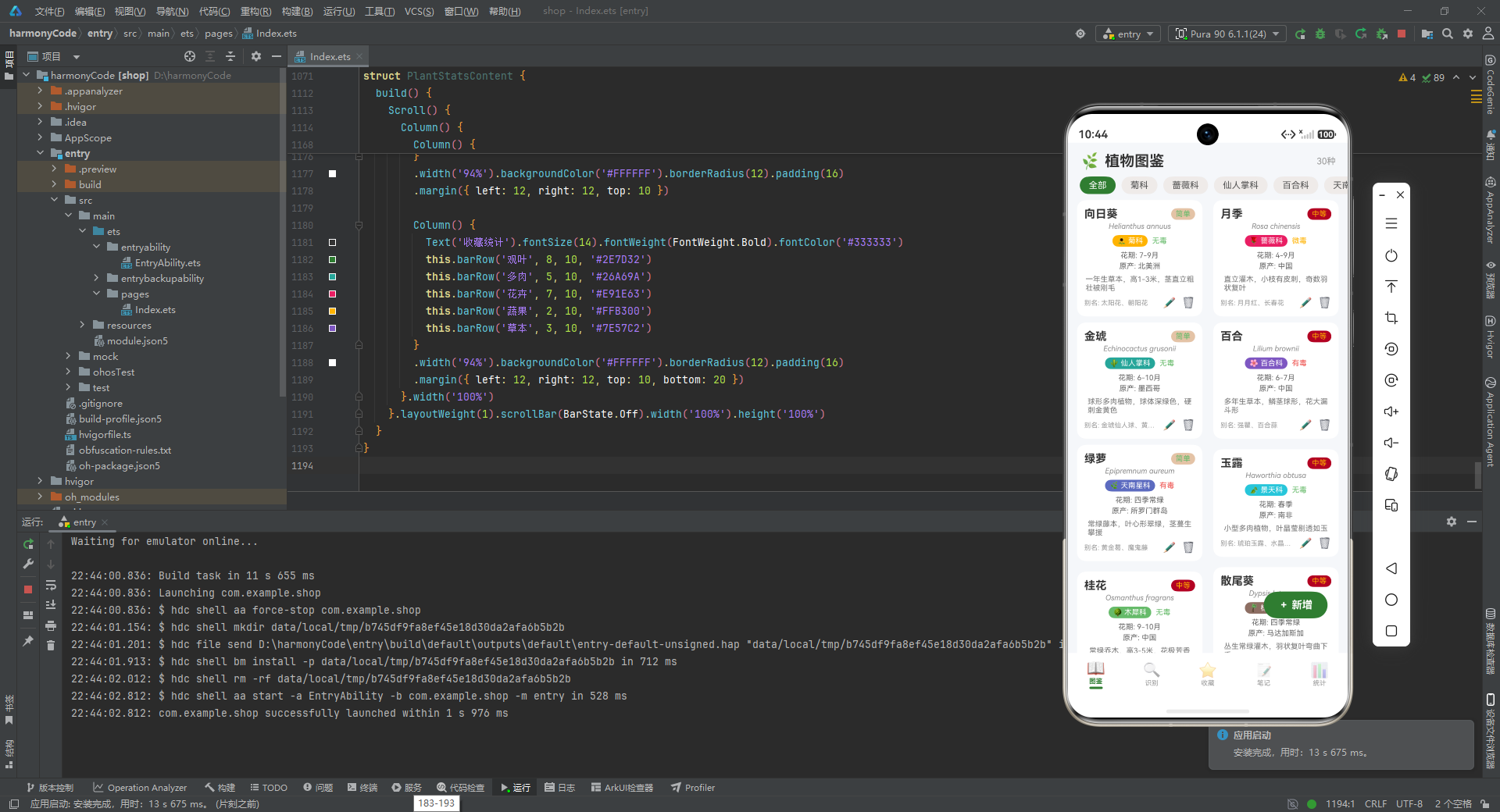
状态管理是本应用的核心技术亮点。ArkTS的响应式系统通过装饰器自动建立数据与UI之间的依赖关系,开发者无需手动订阅和取消订阅,也无需关心具体的更新时机。当@Observed装饰的模型属性发生变化时,框架能够精确地定位到依赖该属性的UI节点并执行差异化更新,这种细粒度的更新策略确保了应用在高频数据变化场景下依然保持流畅的用户体验。相比传统的命令式框架需要手动调用setState或notifyDataSetChanged,ArkTS的声明式编程模型大大降低了状态管理的复杂度,使得开发者可以将更多精力投入到业务逻辑的实现上。
UI工程化方面,应用采用了多种最佳实践。设计令牌(Design Tokens)的使用确保了视觉一致性,主题色、辅助色、背景色等核心色彩变量集中定义,便于主题切换和全局调整。配置驱动开发模式将科属分类、养护类型、收藏分类等元数据外置化,使得视觉风格的调整无需修改组件代码。@Builder装饰器的广泛使用实现了UI片段的封装和复用,plantCard、recordItem、favoriteItem等Builder函数在不同场景中保持一致的设计语言。然而,代码中也存在一些重复模式(如多个筛选Chip Builder的实现几乎相同),这提示了在大型项目中需要进一步抽象通用组件的必要性。
性能优化方面,应用采用了多项行之有效的策略。ForEach的显式索引遍历确保了列表渲染的稳定性,避免了因数据顺序变化导致的节点重建。Scroll组件的scrollBar(BarState.Off)设置隐藏了滚动条,减少了不必要的渲染开销。条件渲染(if条件语句)确保只有当前可见的模态框才会挂载到组件树中,未显示的模态框不会占用渲染资源。这些优化手段虽然细微,但在数据量较大的场景下能够显著提升应用的响应速度。未来的优化方向可以包括引入懒加载机制,当列表数据量进一步增长时只渲染可见区域的内容。
在功能层面,可以引入AI图像识别能力,将识别记录模块从静态数据展示升级为实时识别功能。可以增加浇水提醒的推送通知,将养护笔记转化为真正的日程管理工具。社交功能的引入可以让用户分享养护经验,形成植物爱好者社区。在技术层面,可以考虑将数据持久化到本地数据库或云端,实现数据的跨设备同步。可以探索ArkUI-X跨平台能力,将应用扩展到其他操作系统平台。可以采用模块化架构将各功能模块拆分为独立的动态特性包,支持按需下载和安装。
更多推荐

 1
1 0
0- 0


 已为社区贡献13条内容

所有评论(0)