
Python常用模块:warnings、string、collections、tqdm、rich
warnings
忽略警告信息。
import warnings

# 在控制台中不输出警告信息
warnings.filterwarnings("ignore")
string
string 模块提供了一些使用纯 Python 字符串时可能用不到的实用功能,主要包括文本常量、字符串模板和自定义格式化。string 模块是字符串方法的补充,而非替代。几乎所有常见的字符串操作(如大小写转换、查找替换等)都应优先使用 Python 字符串自带的方法,它们更直接、更高效。而 string 模块则专注于提供一些更特殊的功能。
1. 丰富的文本常量:告别手动定义
string 模块提供了许多预定义的字符串常量
| 常量名 | 说明 | 内容示例 |
|---|---|---|
string.ascii_letters | 包含所有 ASCII 字母(大小写) | 'abcdefghijklmnopqrstuvwxyzABCDEFGHIJKLMNOPQRSTUVWXYZ' |
string.ascii_lowercase | 所有 ASCII 小写字母 | 'abcdefghijklmnopqrstuvwxyz' |
string.ascii_uppercase | 所有 ASCII 大写字母 | 'ABCDEFGHIJKLMNOPQRSTUVWXYZ' |
string.digits | 十进制数字 | '0123456789' |
string.hexdigits | 十六进制数字(包含大小写字母) | '0123456789abcdefABCDEF' |
string.octdigits | 八进制数字 | '01234567' |
string.punctuation | ASCII 标点符号 | `‘!"#$%&’()*+,-./:;<=>?@[\]^_{ |
string.whitespace | ASCII 空白字符 | 包含空格、制表符、换行等 |
string.printable | 所有可打印的 ASCII 字符 | 是上述 digits, ascii_letters, punctuation, whitespace 的集合 |
# 生成一个仅包含字母的随机字符串(实际常用random.choices)
import random
import string
random_str = ''.join(random.choices(string.ascii_letters, k=4))
print(random_str)
capwords() 函数:快速转换单词首字母大写
import string

text = "the quick brown fox jumps over the lazy dog."
# The Quick Brown Fox Jumps Over The Lazy Dog.
print(string.capwords(text))
collections
Counter 计数器
Counter 是 Python 标准库 collections 模块中的一个字典子类,专门用于计数可哈希对象。它的核心功能是统计序列或可迭代对象中每个元素出现的次数。
from collections import Counter

# 从列表创建
colors = ['red', 'blue', 'red', 'green', 'blue', 'blue']
counter = Counter(colors)
print(counter)  # Counter({'blue': 3, 'red': 2, 'green': 1})

# 从字符串创建(统计字符出现次数)
char_count = Counter('abracadabra')
print(char_count)  # Counter({'a': 5, 'b': 2, 'r': 2, 'c': 1, 'd': 1})
tqdm
tqdm 是 Python 中一个非常流行的进度条库,tqdm 是 Python 中一个非常流行的进度条库。
pip install tqdm
常用参数:
- desc:在进度条左侧添加描述文字描述,例如“Loading”。
- unit:设置进度单位的名称,默认为 ‘it’(迭代)
- ncols:固定进度条宽度(字符数)
- leave:进度条完成后是否保留在屏幕上(True/False)
- position:多行进度条时指定当前进度条的行号(用于嵌套循环)

1. 包装可迭代对象(最常用)
在 for 循环中,用 tqdm 包装你的可迭代对象(如 list、range、array 等)
from tqdm import tqdm
import time

for i in tqdm(range(100)):
    time.sleep(0.01)   # 模拟耗时操作
控制台中不断的刷新进度。

2. 手动更新进度
对于循环次数未知或需要手动控制进度的情况,可以创建一个 tqdm 实例,然后调用 update() 方法。
from tqdm import tqdm
import time

total = 100
pbar = tqdm(total=total)   # 创建进度条实例
for i in range(total):
    time.sleep(0.01)
    pbar.update(1)         # 每次增加1
pbar.close()               # 关闭进度条
with简写自动clsoe()
from tqdm import tqdm
import time

with tqdm(total=100) as pbar:
    for i in range(100):
        time.sleep(0.01)
        pbar.update(1)
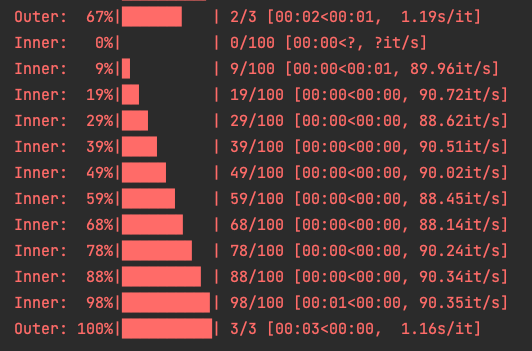
3. 双层循环示例
from tqdm import tqdm
import time

for i in tqdm(range(3), desc="Outer"):
    for j in tqdm(range(100), desc="Inner", leave=False):
        time.sleep(0.01)
4. 与 pandas 集成
tqdm 提供了 pandas 的扩展,可对 apply 等操作显示进度条
import pandas as pd
from tqdm import tqdm

# 注册 pandas 支持
tqdm.pandas()

df = pd.DataFrame({'a': range(100)})
df.progress_apply(lambda x: x**2)   # 使用 progress_apply 替代 apply

5. 在 Jupyter Notebook 中使用
若在 Jupyter Notebook 中运行,建议使用 tqdm.notebook 子模块以获得更好的显示效果
from tqdm.notebook import tqdm

for i in tqdm(range(100)):
    time.sleep(0.01)
rich
在 Rich 模块中,print 的作用是作为 Python 内置 print 函数的“即插即用”增强版。它能让你在不改变使用习惯的前提下,为终端输出添加丰富的样式和色彩,使内容更美观、易读。
-
print 方法: 这是 Rich 最快捷的入口。它的函数签名与 Python 的内置 print 完全一致,支持 sep、end、file 和 flush 等所有参数。你可以像使用普通 print 一样使用它。
-
自动语法高亮与美化: 当你打印列表、字典等数据结构时,Rich 会自动进行语法高亮(用不同颜色区分数据类型)和美化打印(Pretty Print)。这使得调试时查看复杂数据变得异常清晰。
-
内置 Console Markup: 你可以在字符串中使用类似 [bold magenta] 的简单标记语法,为文本添加颜色和样式(如粗体、斜体、下划线)
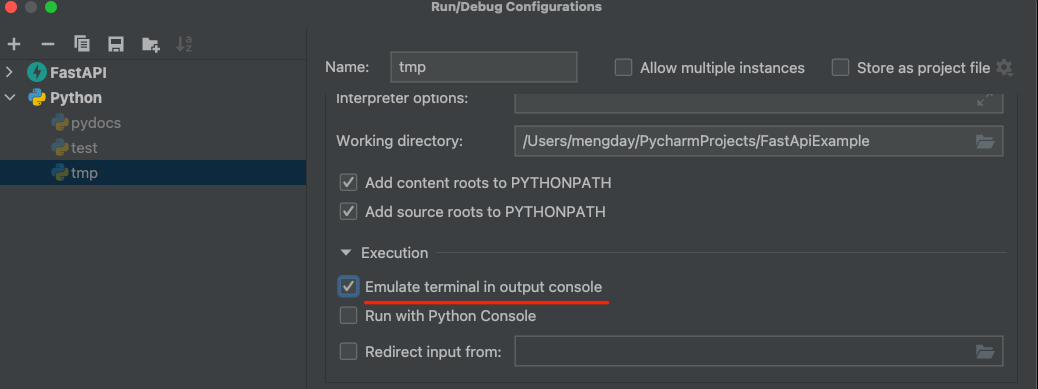
PyCharm支持rich,需要配置一下:
- 在 PyCharm 菜单栏点击 Run -> Edit Configurations…。
- 在左侧列表中找到并选中你正在运行的 Python 文件。
- 在右侧的配置面板中,找到 Execution 区域。
- 勾选 “Emulate terminal in output console” (模拟终端输出) 选项。
- 点击 OK 保存,然后重新运行你的代码。
pip install rich
from rich import print as print

print([1, 2, 3])

print("Hello, [bold magenta]World[/bold magenta]!")

from rich.console import Console
console = Console()
console.print("The answer is", 42, style="bold green")

更多推荐
 7
7 0
0- 0


 已为社区贡献8条内容

所有评论(0)