
用 Python 建立机械臂任务领域模型-领域模型(上): 类型注解 / 不可变2026.8.11
typing--类型提示支持
版本:Python3.5 新增,用来提供类型提示(type hints)
⚠️重点:Python 解释器运行时不会校验、强制类型!
注解只给 IDE、mypy、linters 这类第三方静态检查工具看,运行时传错类型代码照样跑。
示例代码:
def surface_area_of_cube(edge_length: float) -> str:
    return f"The surface area of the cube is {6 * edge_length ** 2}."
edge_length: float:提示参数edge_length应该传float类型-> str:提示函数返回值应该是str字符串
运行时你传入整数
surface_area_of_cube(10)也完全没问题,不会报错;只有 mypy 静态检查才会告警。
关键概念总结
1.类型提示!= 运行时强制校验
def foo(x: int) -> int:
    return x

foo("abc") # ✅运行完全正常,不会抛类型错误;静态检查工具才会报类型不匹配
2.简单类型直接写原生类型;复杂泛型、联合类型、回调类型,用typing模块。
Typing常用特殊类型
from typing import (
    Any, Union, Optional, Literal, NoReturn,
    TypeVar, Generic, Type, Annotated,
    NewType, TypeAlias
)
1.Any:任意类型,闭关类型检查
def f(x: Any) -> None: ...
2.Union[A,B]|竖线语法A | B:二选一
from typing import Union
x: Union[int, str]
x: int | str   # 3.10+ 推荐
3.Optional[T ] = T | None: 可以是 T 或者 None
from typing import Optional
a: Optional[str]
a: str | None  # 等价
4. Literal : 限定固定几个字面量值
from typing import Literal
Mode = Literal["read", "write", "append"]
def open_file(mode: Mode) -> None: ...
5.NoReturn : 函数永远不会返回
from typing import NoReturn
def crash() -> NoReturn:
    raise RuntimeError()
6.Annotated[ T , meta1 , meta2 ] :给类型附加元数据
from typing import Annotated
Age = Annotated[int, "0~150"]
Type aliases 类型别名
新增 type 关键字语法,用来给复杂类型起简短别名,简化冗长的类型注解。
静态类型检查器会把别名等价替换成原始类型;运行时只是普通对象,不会做类型校验。
三种写法对比
写法1 : type 别名 = 元素类型(推荐)
# 给 list[float] 起别名 Vector
type Vector = list[float]

def scale(scalar: float, vector: Vector) -> Vector:
    return [scalar * num for num in vector]

# 类型检查通过,普通list[float]等价于Vector
new_vector = scale(2.0, [1.0, -4.2, 5.4])
复杂嵌套类型效果,大幅简化签名
from collections.abc import Sequence

type ConnectionOptions = dict[str, str]
type Address = tuple[str, int]
type Server = tuple[Address, ConnectionOptions]

# 使用别名,代码可读性高
def broadcast_message(message: str, servers: Sequence[Server]) -> None:
    ...

# 类型检查器内部等价展开成下面这一大串,效果完全一样
def broadcast_message(
    message: str,
    servers: Sequence[tuple[tuple[str, int], dict[str, str]]]
) -> None:
    ...
写法2: 兼容旧版本,直接赋值
# 普通赋值实现类型别名,旧Python版本没有type关键字就这么写
Vector = list[float]
缺点:阅读代码时,人分不清这到底是普通变量,还是仅仅给类型起的别名。
写法3:TypeAlias显示标记,可读性增强
from typing import TypeAlias

Vector: TypeAlias = list[float]
TypeAlias 只是标记提示,告诉阅读者 & mypy:这一行是类型别名,不是普通变量。运行时无任何行为。
NewType
核心:制造一个逻辑上独立的新类型,运行时没有真实新类,仅静态检查 (mypy) 做校验,用来防止业务逻辑传错参数。
核心:制造一个逻辑上独立的新类型,运行时没有真实新类,仅静态检查 (mypy) 做校验,用来防止业务逻辑传错参数。
静态检查器把 UserId 看作 int 的逻辑子类。
def get_user_name(user_id: UserId) -> str:
    ...

user_a = get_user_name(UserId(42351))  # ✅类型通过

user_b = get_user_name(-1)  # ❌静态检查报错:普通int不能直接当作UserId
运行时完全不拦截。 UserId(524313) 运行时本质就是直接返回传入的数字,没有包装开销。 如果你直接写 get_user_name(-1),代码照样跑,只是 mypy/lsp 会告警。
运算后变回底层原生类型
对 NewType 实例做加减等运算,返回值退化成原始底层类型 (int),不再是 NewType。
output = UserId(23413) + UserId(54341)
# output → 类型是 int,不是 UserId!
- 可以把
UserId传给需要int的地方(向上兼容) - 但普通
int不能直接传给需要UserId的函数,必须手动UserId(xxx)包装。
不能继承,但是可以嵌套 NewType
❌错误:不能用class去继承 NewType 生成的对象
UserId = NewType('UserId', int)
class AdminUserId(UserId): pass
# 运行时报错,类型检查也不通过
✅正确:基于一个 NewType 再新建另一个 NewType
from typing import NewType
UserId = NewType('UserId', int)
ProUserId = NewType('ProUserId', UserId)
TypedDict:字典的结果注解(描述dict key-value类型)
from typing import TypedDict

class User(TypedDict):
    id: int
    name: str
    age: int | None

u: User = {"id":1, "name":"a", "age":20}
total=False:所有字段可选
class User(TypedDict, total=False):
    id: int
    name: str
泛型 TypeVar + Generic
from typing import TypeVar, Generic

T = TypeVar("T")

class Box(Generic[T]):
    def __init__(self, value: T):
        self.value: T = value

b = Box[str]("hello")
约束类型变量:
T = TypeVar("T", int, str)   # 只能int/str
NumT = TypeVar("NumT", bound=int | float) # 上界约束
Protocol 协议
不看继承关系,只看是否具备对应方法 / 属性
from typing import Protocol

class HasName(Protocol):
    name: str

def greet(obj: HasName) -> str:
    return f"hi {obj.name}"
只要对象有name:str,就算满足协议,不需要显式继承。
dataclasses / Enum 配合类型注解
1.IntEnum / StrEnum:成员本身就是 int/str,可以直接参与运算;注解直接写类名
from enum import StrEnum
class Color(StrEnum):
    RED = "r"

def func(c: Color) -> str:
    return c.value
2.dataclass 字段直接写类型注解,field()不改变类型
from dataclasses import dataclass, field

@dataclass
class Item:
    count: int = field(default=0)
特殊工具类型
Self:注解返回自身实例(3.11+,from typing import Self)
from typing import Self
class A:
    def copy(self) -> Self:
        return A()
Type[T]:代表类对象本身,不是实例
from typing import Type
class Base: pass
def make(cls: Type[Base]) -> Base:
    return cls()
实践
给task.py补_ _post_init_ _类型守卫(object/destination 必须是枚举、max_retries 必须是 int 且非 bool)
如下是task.py文件
"""机械臂任务领域模型:PickAndPlaceTask(第 1 周 D2)。"""

from __future__ import annotations

from dataclasses import dataclass
from enum import StrEnum
from typing import Any


class ObjectType(StrEnum):
    """目标物类型(冻结类别表 v0.1)。"""

    RED_BLOCK = "red_block"
    BLUE_BLOCK = "blue_block"
    GREEN_CAP = "green_cap"
    YELLOW_BOX = "yellow_box"


class DestinationType(StrEnum):
    """目标容器类型。"""

    LEFT_BIN = "left_bin"
    RIGHT_BIN = "right_bin"


# 定位与运动学属于机械臂后端能力:领域层/JSON 层一律拒绝这些低层字段。
FORBIDDEN_LOW_LEVEL_FIELDS: frozenset[str] = frozenset(
    {
        "x",
        "y",
        "z",
        "rx",
        "ry",
        "rz",
        "joint_angles",
        "joint1",
        "joint2",
        "joint3",
        "joint4",
        "joint5",
        "joint6",
        "velocity",
        "speed",
        "torque",
        "force",
        "threshold",
    }
)


@dataclass(frozen=True, slots=True)
class PickAndPlaceTask:
    """一次"抓取-放置"任务。字段名 object 与领域 JSON 对齐(见 task_json.py)。"""

    object: ObjectType
    destination: DestinationType
    max_retries: int = 2

    def __post_init__(self) -> None:
        if self.max_retries < 0:
            raise ValueError(f"max_retries 不能为负数: {self.max_retries}")

    def to_dict(self) -> dict[str, Any]:
        return {
            "object": self.object.value,
            "destination": self.destination.value,
            "max_retries": self.max_retries,
        }
定位:上层业务领域模型,只描述业务意图,不包含机械臂底层运动学、坐标、关节角度,做高层任务表达,输出可序列化 JSON 字典下发给后端执行器。
1.整体结构
ObjectType:待抓取物体枚举StrEnumDestinationType:放 置目标容器枚举StrEnumFORBIDDEN_LOW_LEVEL_FIELDS:常量集合,禁止底层字段(领域层防护)PickAndPlaceTask(frozen=True, slots=True):dataclass 不可变任务实体- 字段:
object物体类型、destination目标位置、max_retries最大重试次数 __post_init__:业务校验to_dict():序列化输出给 JSON / 下游
- 字段:
from __future__ import annotations  # 延迟注解,低版本Python支持前向引用
from dataclasses import dataclass
from enum import StrEnum
from typing import Any
2. StrEnum 枚举类分析
class ObjectType(StrEnum):
    RED_BLOCK = "red_block"
    BLUE_BLOCK = "blue_block"
    GREEN_CAP = "green_cap"
    YELLOW_BOX = "yellow_box"
.value拿到原始字符串,序列化使用;和外部 JSON 字符串直接对齐- 好处:写代码用枚举,序列化输出原始字符串,不需要额外转换。
DestinationType同理,定义放置目标容器。
注意:不要直接传字符串给
PickAndPlaceTask构造,必须传枚举实例;to_dict()取出.value转字符串输出。
3.FORBIDDEN_LOW_LEVEL_FIELDS 常量
FORBIDDEN_LOW_LEVEL_FIELDS: frozenset[str] = frozenset({
    "x","y","z","rx","ry","rz",
    "joint_angles","joint1"..."force"
})
frozenset不可变集合,运行时不会被修改。- 架构约束:领域层不允许出现底层运动学字段。
- 用途:后续解析外部 JSON 输入的时候,可以做校验:如果输入 dict 包含这里面任意 key,直接拒绝,防止底层参数污染上层任务模型。
领域模型只描述 “抓什么、放到哪”;坐标、关节、速度交给底层运动学模块去解算,职责分离。
4.@dataclass(frozen=True, slots=True)
@dataclass(frozen=True, slots=True)
class PickAndPlaceTask:
    object: ObjectType
    destination: DestinationType
    max_retries: int = 2
两个关键参数:
frozen=True冻结对象- 对象实例一旦创建,字段不能修改
task.object = xxx直接抛FrozenInstanceError - 任务一旦构造完成,不可变;任务是事件 / 指令,不允许中途修改,符合领域建模思想;同时实例可以 hash,可以放进
set/ 做字典 key。
- 对象实例一旦创建,字段不能修改
slots=True- 取消实例
__dict__字典,使用固定 slots 存储字段,节省内存;同时禁止给实例动态新增任意属性。 - 防止外部乱赋值
task.xxx = 123乱加底层字段。
- 取消实例
字段说明:
object: ObjectType:待抓取物体,枚举类型,无默认,创建实例必须传入destination: DestinationType:放置目标,枚举类型,无默认max_retries: int = 2:重试次数,默认值 2
5. post_init 业务校验钩子
def __post_init__(self) -> None:
    if self.max_retries < 0:
        raise ValueError(f"max_retries 不能为负数: {self.max_retries}")
- dataclass 在
__init__赋值完成之后自动调用__post_init__ - 做业务合法性校验:重试次数不能负数。
注意:
frozen=True冻结模式下,不能直接给 self.xxx 赋值,只能做校验、抛异常,不能修改字段。这里只做校验逻辑,写法是正确。
缺点:这里没有校验 object、destination 是否为空,但因为是枚举类型,构造时传非法值直接类型报错;静态 mypy 会拦截。如果是从外部 json 反序列化,依然要手动校验。
6. to_dict () 序列化方法
def to_dict(self) -> dict[str, Any]:
    return {
        "object": self.object.value,
        "destination": self.destination.value,
        "max_retries": self.max_retries,
    }
- 将领域模型转为普通字典,方便后续 json.dumps 下发给机械臂后端。
- 重点:不能直接丢枚举对象,下游需要原始字符串,所以取
.value。 - 返回字典 key 和外部 JSON 协议字段完全对齐。
添加类型守卫(src/arm_agent/domain/task.py)
def __post_init__(self) -> None:
if not isinstance(self.object, ObjectType):
raise TypeError(f"object 必须是 ObjectType,got {self.object!r}")
if not isinstance(self.destination, DestinationType):
raise TypeError(f"destination 必须是 DestinationType,got {self.destination!r}")
if isinstance(self.max_retries, bool) or not isinstance(self.max_retries, int):
raise TypeError(f"max_retries 必须是 int,got {self.max_retries!r}")
if self.max_retries < 0:
raise ValueError(f"max_retries 不能为负数: {self.max_retries}")
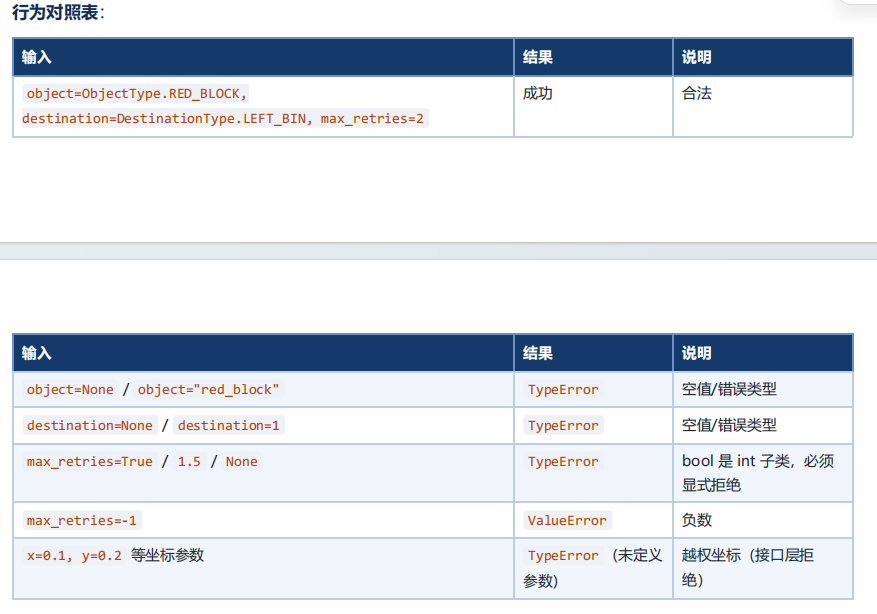
各条校验解读
isinstance(self.object, ObjectType)
- 校验必须传枚举实例,不能直接传裸字符串
"red_block"。 - 静态 mypy 可以拦截,但反序列化 from_dict 手动构造时容易传入原始字符串,运行时防御。
注意:
StrEnum实例,isinstance("red_block", ObjectType)→ False;isinstance(ObjectType.RED_BLOCK, ObjectType)→ True。
destination同理,强制枚举实例,拒绝裸字符串。
isinstance(self.max_retries, bool) or not isinstance(self.max_retries, int)
Python 中
bool是int的子类:isinstance(True, int) → True。
- 所以要单独拦截
True / False,防止max_retries=True(等价 1)、max_retries=False(等价 0)被误放行。 - 拒绝浮点数、字符串等其他类型。
self.max_retries <0:业务逻辑,重试次数不能负数。
关键注意点:frozen=True 的限制
当前类标记了 @dataclass(frozen=True, slots=True)
__post_init__这里只做校验抛异常,没有赋值修改字段,写法完全安全,不会报 FrozenInstanceError。- 不能写
self.object = ObjectType(xxx),冻结对象不允许写属性。
如果输入是原始字符串,不能在 post_init 内部转换成枚举赋值,只能在上层
from_dict()完成转换再传入构造函数。
误示范(frozen 下会崩溃)
# 禁止!frozen=True,不能写self.xxx
if isinstance(self.object, str):
    self.object = ObjectType(self.object)
字符串→枚举的转换逻辑,放到 from_dict 类方法,不要放在 __post_init__。、
配套 from_dict 示例(和这套校验配合)
@classmethod
def from_dict(cls, data: dict[str, Any]) -> "PickAndPlaceTask":
    bad_keys = FORBIDDEN_LOW_LEVEL_FIELDS & data.keys()
    if bad_keys:
        raise ValueError(f"禁止传入底层运动学字段: {bad_keys}")

    obj = ObjectType(data["object"])
    dest = DestinationType(data["destination"])
    retries = int(data.get("max_retries", 2))
    return cls(object=obj, destination=dest, max_retries=retries)
from_dict把字符串转为枚举实例,再传给 dataclass 构造;__post_init__做最后一层防守校验。
分析操纵机器臂具体文件Panthera.py
Panthera.py具体源码:
import time
import sys
import os
import yaml
import numpy as np
import pinocchio as pin
from scipy.spatial.transform import Rotation as R
from scipy.interpolate import CubicSpline
try:
import hightorque_robot as htr
except ImportError as e:
print(f"导入hightorque_robot失败: {e}")
print("请确保已安装hightorque_robot whl包")
print("安装方法: pip install hightorque_robot-*.whl")
sys.exit(1)
#######################
# Panthera 机械臂控制类
#######################
class Panthera(htr.Robot): # 继承自htr.Robot
#######################
# 初始化相关
#######################
def __init__(self, config_path=None):
"""
初始化 Panthera 机械臂
参数:
config_path: 配置文件路径,如果为 None 则使用默认路径
"""
# 确定配置文件路径
if config_path is None:
script_dir = os.path.dirname(os.path.abspath(__file__))
config_path = os.path.normpath(
os.path.join(script_dir, "..", "..", "robot_param", "Follower.yaml")
)
# 初始化成员变量
self._init_member_variables()
# 加载配置文件
self._load_config_file(config_path)
# 保存配置文件目录
self.config_dir = os.path.dirname(os.path.abspath(config_path))
# 加载基础配置参数(不依赖电机数量)
self._load_joint_limits()
self._load_gripper_limits()
# 初始化父类和电机
super().__init__(config_path)
self.Motors = self.get_motors()
self._init_motors()
# 加载电机相关参数(依赖电机数量)
self._load_motor_parameters()
self._load_moveit_parameters()
# 加载 URDF 模型
self._load_urdf_model()
def _init_member_variables(self):
"""初始化成员变量"""
self.config = None
self.model = None
self.data = None
self.joint_names = None
self.joint_ids = []
self.joint_limits = None
self.gripper_limits = None
self.end_effector_frame_id = None
def _load_config_file(self, config_path):
"""
加载 YAML 配置文件
参数:
config_path: 配置文件路径
"""
try:
with open(config_path, 'r', encoding='utf-8') as f:
self.config = yaml.safe_load(f)
print(f"配置文件加载成功: {config_path}")
except Exception as e:
print(f"配置文件加载失败: {e}")
sys.exit(1)
def _load_joint_limits(self):
"""从配置文件加载关节限位"""
try:
if 'robot' in self.config and 'joint_limits' in self.config['robot']:
self.joint_limits = {
'lower': np.array(self.config['robot']['joint_limits']['lower']),
'upper': np.array(self.config['robot']['joint_limits']['upper'])
}
print(f"关节限位加载成功: lower={self.joint_limits['lower']}, upper={self.joint_limits['upper']}")
else:
print("警告: 配置文件中未找到 joint_limits")
except Exception as e:
print(f"关节限位加载失败: {e}")
def _load_gripper_limits(self):
"""从配置文件加载夹爪限位"""
try:
if 'robot' in self.config and 'gripper_limits' in self.config['robot']:
self.gripper_limits = {
'lower': self.config['robot']['gripper_limits']['lower'],
'upper': self.config['robot']['gripper_limits']['upper']
}
print(f"夹爪限位加载成功: lower={self.gripper_limits['lower']}, upper={self.gripper_limits['upper']}")
else:
print("警告: 配置文件中未找到 gripper_limits")
except Exception as e:
print(f"夹爪限位加载失败: {e}")
def _init_motors(self):
"""初始化电机并打印电机信息"""
self.gripper_id = len(self.Motors)
self.motor_count = len(self.Motors) - 1
print("初始化机械臂...")
print(f"发现 {self.motor_count} 个电机")
if self.motor_count == 0:
print("未发现电机。请检查您的配置和连接。")
return
# 打印电机信息
for i, motor in enumerate(self.Motors):
print(f"Motor {i}: ID={motor.get_motor_id()}, "
f"Type={motor.get_motor_enum_type()}, "
f"Name={motor.get_motor_name()}")
def _load_motor_parameters(self):
"""从配置文件加载电机相关参数(最大力矩、速度限幅、加速度限制)"""
# 加载最大力矩
if 'robot' not in self.config or 'max_torque' not in self.config['robot']:
print("错误: 配置文件中缺少 robot.max_torque 参数")
sys.exit(1)
self.max_torque = np.array(self.config['robot']['max_torque'])
if len(self.max_torque) != self.motor_count:
print(f"错误: max_torque 长度 ({len(self.max_torque)}) 与电机数量 ({self.motor_count}) 不匹配")
sys.exit(1)
print(f"最大力矩加载成功: {self.max_torque.tolist()}")
# 加载速度限幅
if 'robot' not in self.config or 'velocity_limits' not in self.config['robot']:
print("错误: 配置文件中缺少 robot.velocity_limits 参数")
sys.exit(1)
self.velocity_limits = np.array(self.config['robot']['velocity_limits'])
if len(self.velocity_limits) != self.motor_count:
print(f"错误: velocity_limits 长度 ({len(self.velocity_limits)}) 与电机数量 ({self.motor_count}) 不匹配")
sys.exit(1)
print(f"速度限幅加载成功: {self.velocity_limits.tolist()}")
# 加载加速度限制
if 'robot' not in self.config or 'acceleration_limits' not in self.config['robot']:
print("错误: 配置文件中缺少 robot.acceleration_limits 参数")
sys.exit(1)
self.acceleration_limits = np.array(self.config['robot']['acceleration_limits'])
if len(self.acceleration_limits) != self.motor_count:
print(f"错误: acceleration_limits 长度 ({len(self.acceleration_limits)}) 与电机数量 ({self.motor_count}) 不匹配")
sys.exit(1)
print(f"加速度限制加载成功: {self.acceleration_limits.tolist()}")
def _load_moveit_parameters(self):
"""从配置文件加载 MoveIt 笛卡尔控制器参数"""
if 'moveit_cartesian' not in self.config:
print("错误: 配置文件中缺少 moveit_cartesian 参数")
sys.exit(1)
moveit_config = self.config['moveit_cartesian']
# 加载 eef_step
if 'eef_step' not in moveit_config:
print("错误: 配置文件中缺少 moveit_cartesian.eef_step 参数")
sys.exit(1)
self.eef_step = moveit_config['eef_step']
# 加载 jump_threshold
if 'jump_threshold' not in moveit_config:
print("错误: 配置文件中缺少 moveit_cartesian.jump_threshold 参数")
sys.exit(1)
self.jump_threshold = moveit_config['jump_threshold']
# 加载 resample_dt
if 'resample_dt' not in moveit_config:
print("错误: 配置文件中缺少 moveit_cartesian.resample_dt 参数")
sys.exit(1)
self.resample_dt = moveit_config['resample_dt']
print(f"MoveIt笛卡尔参数加载成功: eef_step={self.eef_step}m, "
f"jump_threshold={self.jump_threshold}rad, resample_dt={self.resample_dt}s")
def _load_urdf_model(self):
"""加载URDF模型用于运动学计算"""
try:
# 获取URDF文件路径(相对于配置文件的路径)
urdf_relative_path = self.config['urdf']['file_path']
# 计算URDF的绝对路径(相对于配置文件所在目录)
config_dir = getattr(self, "config_dir", os.path.dirname(os.path.abspath(__file__)))
urdf_path = os.path.normpath(os.path.join(config_dir, urdf_relative_path))
# 使用pinocchio加载URDF
self.model = pin.buildModelFromUrdf(urdf_path)
self.data = self.model.createData()
# 获取关节信息
self.joint_names = self.config['kinematics']['joint_names']
# 获取关节ID(跳过universe joint)
for joint_name in self.joint_names:
if self.model.existJointName(joint_name):
joint_id = self.model.getJointId(joint_name)
self.joint_ids.append(joint_id)
else:
print(f"警告: 关节 {joint_name} 未在模型中找到")
print(f"URDF加载成功: {urdf_path}")
print(f"模型包含 {self.model.njoints - 1} 个关节(不含base)")
print(f"配置关节数: {len(self.joint_ids)}")
# 获取末端执行器 frame ID
end_effector_link = self.config['urdf']['end_effector_link']
if self.model.existFrame(end_effector_link):
self.end_effector_frame_id = self.model.getFrameId(end_effector_link)
print(f"末端执行器frame: {end_effector_link} (ID: {self.end_effector_frame_id})")
else:
print(f"警告: 末端执行器frame '{end_effector_link}' 未找到,回退到最后一个关节")
self.end_effector_frame_id = self.model.getFrameId(self.joint_names[-1])
except Exception as e:
print(f"URDF加载失败: {e}")
#######################
# 状态获取方法
#######################
def get_current_state(self):
"""获取当前关节状态"""
state = []
for i in range(self.motor_count):
motor_state = self.Motors[i].get_current_motor_state()
state.append(motor_state)
return state
def get_current_pos(self):
"""获取当前关节角度,返回np.ndarray"""
joint_angles = np.zeros(self.motor_count)
for i in range(self.motor_count):
state = self.Motors[i].get_current_motor_state()
joint_angles[i] = state.position
return joint_angles
def get_current_vel(self):
"""获取当前关节速度,返回np.ndarray"""
joint_velocities = np.zeros(self.motor_count)
for i in range(self.motor_count):
state = self.Motors[i].get_current_motor_state()
joint_velocities[i] = state.velocity
return joint_velocities
def get_current_torque(self):
"""获取当前关节力矩,返回np.ndarray"""
joint_torques = np.zeros(self.motor_count)
for i in range(self.motor_count):
state = self.Motors[i].get_current_motor_state()
joint_torques[i] = state.torque
return joint_torques
def get_current_state_gripper(self):
"""获取当前夹爪状态"""
return self.Motors[self.gripper_id-1].get_current_motor_state()
def get_current_pos_gripper(self):
"""获取当前夹爪位置"""
state = self.Motors[self.gripper_id-1].get_current_motor_state()
return state.position
def get_current_vel_gripper(self):
"""获取当前夹爪速度"""
state = self.Motors[self.gripper_id-1].get_current_motor_state()
return state.velocity
def get_current_torque_gripper(self):
"""获取当前夹爪力矩"""
state = self.Motors[self.gripper_id-1].get_current_motor_state()
return state.torque
#######################
# 基础运动控制
#######################
def Joint_Pos_Vel(self, pos, vel, max_tqu=None, iswait=False, tolerance=0.1, timeout=15.0):
"""
单关节位置速度最大力矩控制(每个关节独立设置)
参数:
pos: 目标位置列表/数组 [joint1, joint2, ..., jointN]
vel: 目标速度列表/数组 [joint1, joint2, ..., jointN]
max_tqu: 最大力矩列表/数组,如果为None则使用配置文件中的默认值
iswait: 是否等待运动完成
tolerance: 位置容差(弧度)
timeout: 等待超时时间(秒)
返回:
bool: 控制是否成功执行
说明:
每个关节独立设置位置和速度,适用于各关节需要不同运动速度的场景
"""
# 如果未提供max_tqu,使用配置文件中的默认值
if max_tqu is None:
max_tqu = self.max_torque
else:
max_tqu = np.asarray(max_tqu)
# 检查关节数量(除了夹爪电机)
if not (len(pos) == len(vel) == len(max_tqu) == self.motor_count):
raise ValueError(f"关节参数长度必须为{self.motor_count}")
# 转换为numpy数组
pos = np.asarray(pos)
# 检查位置是否在限位范围内
if self.joint_limits is not None:
lower = self.joint_limits['lower']
upper = self.joint_limits['upper']
# 检查是否有位置超出限位
out_of_range = np.logical_or(pos < lower, pos > upper)
if np.any(out_of_range):
print("\n" + "="*60)
print("警告:检测到目标位置超出关节限位范围!")
print(f"目标位置: {pos}")
print(f"限位下限: {lower}")
print(f"限位上限: {upper}")
out_indices = np.where(out_of_range)[0]
for idx in out_indices:
print(f" 关节{idx+1}: {pos[idx]:.3f} 不在 [{lower[idx]:.3f}, {upper[idx]:.3f}] 范围内")
print("控制指令已被拒绝,保护机械臂安全")
print("="*60 + "\n")
return False
# 控制关节(除了夹爪电机)
for i in range(self.motor_count):
motor = self.Motors[i]
motor.pos_vel_MAXtqe(pos[i], vel[i], max_tqu[i])
self.motor_send_cmd()
if iswait:
return self.wait_for_position(pos, tolerance, timeout)
return True
def Joint_Vel(self, vel):
"""
关节速度控制
参数:
vel: 目标速度列表/数组 [joint1, joint2, ..., jointN] (rad/s)
返回:
bool: 控制是否成功执行
说明:
直接控制关节速度,不进行位置限位检查
适用于需要精确速度控制的场景
速度将被限制在配置文件设定的范围内
"""
# 参数检查
if len(vel) != self.motor_count:
raise ValueError(f"目标速度长度必须为{self.motor_count}")
# 转换为numpy数组
vel = np.asarray(vel)
# 速度限幅检查
if self.velocity_limits is not None:
# 检查是否有速度超出限幅
abs_vel = np.abs(vel)
out_of_limit = abs_vel > self.velocity_limits
if np.any(out_of_limit):
print("\n" + "="*60)
print("警告:检测到目标速度超出限幅范围!")
print(f"目标速度: {vel}")
print(f"速度限幅: ±{self.velocity_limits}")
out_indices = np.where(out_of_limit)[0]
for idx in out_indices:
print(f" 关节{idx+1}: {vel[idx]:.3f} rad/s 超出限幅 ±{self.velocity_limits[idx]:.3f} rad/s")
print("速度将被限制在安全范围内")
print("="*60 + "\n")
# 限幅处理
vel = np.clip(vel, -self.velocity_limits, self.velocity_limits)
# 关节限位保护:到达限位时,朝限位方向的速度置0,反方向可正常运动
if self.joint_limits is not None:
current_pos = self.get_current_pos()
lower = np.asarray(self.joint_limits['lower'])
upper = np.asarray(self.joint_limits['upper'])
limit_margin = 0.02 # rad,提前触发保护的裕量
at_upper = current_pos >= (upper - limit_margin)
at_lower = current_pos <= (lower + limit_margin)
vel = np.where(at_upper & (vel > 0), 0.0, vel)
vel = np.where(at_lower & (vel < 0), 0.0, vel)
# 控制关节(除了夹爪电机)
for i in range(self.motor_count):
motor = self.Motors[i]
motor.velocity(vel[i])
self.motor_send_cmd()
return True
def moveJ(self, pos, duration, max_tqu=None, iswait=False, tolerance=0.1, timeout=15.0):
"""
关节空间运动控制(所有关节在指定时间内同步到达目标位置)
参数:
pos: 目标位置列表/数组 [joint1, joint2, ..., jointN] (rad)
duration: 运动时间(秒),所有关节将在该时间内同时到达目标位置
max_tqu: 最大力矩列表/数组,如果为 None 则使用配置文件中的默认值
iswait: 是否等待运动完成
tolerance: 位置容差(弧度)
timeout: 等待超时时间(秒)
返回:
bool: 控制是否成功执行
说明:
该函数通过 (目标位置 - 当前位置) / duration 计算每个关节的平均速度,
确保所有关节在指定的时间内同时到达目标位置,适用于需要协调运动的场景。
类似于工业机器人中的 moveJ 指令。
"""
# 如果未提供max_tqu,使用配置文件中的默认值
if max_tqu is None:
max_tqu = self.max_torque
else:
max_tqu = np.asarray(max_tqu)
# 参数检查
if len(pos) != self.motor_count:
raise ValueError(f"目标位置长度必须为{self.motor_count}")
if len(max_tqu) != self.motor_count:
raise ValueError(f"最大力矩长度必须为{self.motor_count}")
if duration <= 0:
raise ValueError(f"运动时间必须大于0,当前值: {duration}")
# 转换为numpy数组
pos = np.asarray(pos)
# 检查位置是否在限位范围内
if self.joint_limits is not None:
lower = self.joint_limits['lower']
upper = self.joint_limits['upper']
out_of_range = np.logical_or(pos < lower, pos > upper)
if np.any(out_of_range):
print("\n" + "="*60)
print("警告:检测到目标位置超出关节限位范围!")
print(f"目标位置: {pos}")
print(f"限位下限: {lower}")
print(f"限位上限: {upper}")
out_indices = np.where(out_of_range)[0]
for idx in out_indices:
print(f" 关节{idx+1}: {pos[idx]:.3f} 不在 [{lower[idx]:.3f}, {upper[idx]:.3f}] 范围内")
print("控制指令已被拒绝,保护机械臂安全")
print("="*60 + "\n")
return False
# 获取当前位置
current_pos = self.get_current_pos()
# 计算速度: v = (目标位置 - 当前位置) / 时间
# 这样可以确保所有关节在duration时间内同时到达目标位置
vel = (pos - current_pos) / duration
# 调用单关节位置速度控制
return self.Joint_Pos_Vel(pos, vel, max_tqu, iswait, tolerance, timeout)
def pos_vel_tqe_kp_kd(self, pos, vel, tqe, kp, kd):
"""关节五参数MIT控制模式"""
# 检查关节数量(除了夹爪电机)
params = [pos, vel, tqe, kp, kd]
if not all(len(p) == self.motor_count for p in params):
raise ValueError(f"关节参数长度必须为{self.motor_count}")
# 转换为numpy数组
pos = np.asarray(pos)
# 检查位置是否在限位范围内
if self.joint_limits is not None:
lower = self.joint_limits['lower']
upper = self.joint_limits['upper']
# 检查是否有位置超出限位
out_of_range = np.logical_or(pos < lower, pos > upper)
if np.any(out_of_range):
print("\n" + "="*60)
print("警告:检测到目标位置超出关节限位范围!")
print(f"目标位置: {pos}")
print(f"限位下限: {lower}")
print(f"限位上限: {upper}")
out_indices = np.where(out_of_range)[0]
for idx in out_indices:
print(f" 关节{idx+1}: {pos[idx]:.3f} 不在 [{lower[idx]:.3f}, {upper[idx]:.3f}] 范围内")
print("控制指令已被拒绝,保护机械臂安全")
print("="*60 + "\n")
return False
# 控制关节(除了夹爪电机)
for i in range(self.motor_count):
motor = self.Motors[i]
motor.pos_vel_tqe_kp_kd(pos[i], vel[i], tqe[i], kp[i], kd[i])
self.motor_send_cmd()
return True
#######################
# 夹爪控制
#######################
def gripper_control(self, pos, vel, max_tqu=0.5):
"""夹爪控制(位置速度最大力矩模式)"""
# 检查夹爪位置是否在限位范围内
if self.gripper_limits is not None:
lower = self.gripper_limits['lower']
upper = self.gripper_limits['upper']
# 检查位置是否超出限位
if pos < lower or pos > upper:
print("\n" + "="*60)
print("警告:检测到夹爪目标位置超出限位范围!")
print(f"目标位置: {pos}")
print(f"限位下限: {lower}")
print(f"限位上限: {upper}")
print(f"夹爪位置 {pos:.3f} 不在 [{lower:.3f}, {upper:.3f}] 范围内")
print("控制指令已被拒绝,保护夹爪安全")
print("="*60 + "\n")
return False
self.Motors[self.gripper_id-1].pos_vel_MAXtqe(pos, vel, max_tqu)
self.motor_send_cmd()
return True
def gripper_control_MIT(self, pos, vel, tqe, kp, kd):
"""夹爪控制(5参数MIT模式)"""
# 检查夹爪位置是否在限位范围内
if self.gripper_limits is not None:
lower = self.gripper_limits['lower']
upper = self.gripper_limits['upper']
# 检查位置是否超出限位
if pos < lower or pos > upper:
print("\n" + "="*60)
print("警告:检测到夹爪目标位置超出限位范围!")
print(f"目标位置: {pos}")
print(f"限位下限: {lower}")
print(f"限位上限: {upper}")
print(f"夹爪位置 {pos:.3f} 不在 [{lower:.3f}, {upper:.3f}] 范围内")
print("控制指令已被拒绝,保护夹爪安全")
print("="*60 + "\n")
return False
self.Motors[self.gripper_id-1].pos_vel_tqe_kp_kd(pos, vel, tqe, kp, kd)
self.motor_send_cmd()
return True
def gripper_open(self, pos=1.6, vel=0.5, max_tqu=0.5):
"""打开夹爪"""
self.gripper_control(pos, vel, max_tqu)
def gripper_close(self, pos=0.0, vel=0.5, max_tqu=0.5):
"""关闭夹爪"""
self.gripper_control(pos, vel, max_tqu)
#######################
# 位置检查辅助方法
#######################
def check_position_reached(self, target_positions, tolerance=0.1):
"""检查前关节位置是否到达"""
all_reached = True
position_errors = []
self.send_get_motor_state_cmd()
self.motor_send_cmd()
# 检查前6个关节
for i in range(self.motor_count):
state = self.Motors[i].get_current_motor_state()
error = abs(state.position - target_positions[i])
position_errors.append(error)
if error > tolerance:
all_reached = False
return all_reached, position_errors
def wait_for_position(self, target_positions, tolerance=0.01, timeout=15.0):
"""等待位置到达"""
start_time = time.time()
while (time.time() - start_time) < timeout:
reached, _ = self.check_position_reached(target_positions, tolerance)
if reached:
return True
time.sleep(0.02)
return False
#######################
# 运动学方法
#######################
def forward_kinematics(self, joint_angles=None):
"""使用pinocchio计算正运动学,返回末端位置和变换矩阵"""
if self.model is None:
print("模型未加载")
return None
# 如果未提供关节角度,获取当前角度
if joint_angles is None:
joint_angles = self.get_current_pos()
# 创建关节配置向量
q = np.zeros(self.model.nq)
for i, joint_name in enumerate(self.joint_names):
if i < len(joint_angles):
joint_id = self.model.getJointId(joint_name)
idx = self.model.joints[joint_id].idx_q
q[idx] = joint_angles[i]
# 计算正运动学
pin.forwardKinematics(self.model, self.data, q)
pin.updateFramePlacements(self.model, self.data)
# 获取末端执行器 frame 的变换矩阵
eef_transform = self.data.oMf[self.end_effector_frame_id]
position = eef_transform.translation.copy()
rotation = eef_transform.rotation.copy()
# 构建4x4变换矩阵
T = np.eye(4)
T[:3, :3] = rotation
T[:3, 3] = position
return {
'position': position.tolist(),
'rotation': rotation,
'transform': T,
'joint_angles': joint_angles
}
def get_jacobian(self, joint_angles=None):
"""
获取末端执行器的雅可比矩阵(世界对齐坐标系)
参数:
joint_angles: 关节角度,为None时使用当前角度
返回:
J: 6×6 雅可比矩阵,列对应 joint_names 顺序
"""
if self.model is None:
print("模型未加载")
return None
if joint_angles is None:
joint_angles = self.get_current_pos()
q = np.zeros(self.model.nq)
for i, joint_name in enumerate(self.joint_names):
joint_id = self.model.getJointId(joint_name)
idx = self.model.joints[joint_id].idx_q
q[idx] = joint_angles[i]
pin.forwardKinematics(self.model, self.data, q)
pin.updateFramePlacements(self.model, self.data)
J_full = pin.computeFrameJacobian(
self.model, self.data, q,
self.end_effector_frame_id, pin.LOCAL_WORLD_ALIGNED
)
J = np.zeros((6, len(self.joint_names)))
for i, joint_name in enumerate(self.joint_names):
jid = self.model.getJointId(joint_name)
idx = self.model.joints[jid].idx_v
J[:, i] = J_full[:, idx]
return J
def get_manipulability(self, joint_angles=None):
"""
计算当前位形的可操作度 μ = sqrt(det(JJ^T))
参数:
joint_angles: 关节角度,为None时使用当前角度
返回:
float: 可操作度,值越小越接近奇异位形
"""
J = self.get_jacobian(joint_angles)
if J is None:
return 0.0
JJT = J @ J.T
det = np.linalg.det(JJT)
return np.sqrt(max(det, 0.0))
@staticmethod
def compute_damped_pseudoinverse(J, damping=0.01):
"""
计算雅可比阻尼伪逆 J_damp = J^T (JJ^T + λ^2I)^(-1)
参数:
J: 雅可比矩阵
damping: 阻尼系数 λ
返回:
J_damp: 阻尼伪逆矩阵
"""
m = J.shape[0]
JJT = J @ J.T
try:
J_damp = J.T @ np.linalg.inv(JJT + (damping ** 2) * np.eye(m))
except np.linalg.LinAlgError:
J_damp = J.T @ np.linalg.inv(JJT + (damping * 10) ** 2 * np.eye(m))
return J_damp
def inverse_kinematics(self, target_position, target_rotation=None, init_q=None,
max_iter=1000, eps=1e-3, damping=1e-2, adaptive_damping=True,
multi_init=True, num_attempts=8):
"""
使用阻尼最小二乘法(Damped Least Squares)计算逆运动学
参数:
target_position: 目标位置 [x, y, z] (m)
target_rotation: 目标旋转矩阵 3x3,如果为None则只考虑位置
init_q: 初始关节角度,如果为None则使用当前角度(multi_init=False时有效)
max_iter: 最大迭代次数
eps: 收敛阈值(位置误差范数)
damping: 阻尼系数 λ,用于避免雅可比矩阵奇异性
adaptive_damping: 是否使用自适应阻尼系数
multi_init: 是否使用多初始值尝试(提高求解成功率)
num_attempts: 多初始值尝试次数(仅在multi_init=True时有效)
返回:
np.ndarray: 关节角度数组 [joint1, joint2, ..., jointN] (rad)
None: 如果求解失败
说明:
阻尼最小二乘法使用公式: Δq = J^T(JJ^T + λ^2I)^(-1) * e
相比标准伪逆方法,DLS在接近奇异位形时更加稳定和鲁棒
自适应阻尼会根据误差大小动态调整阻尼系数
当multi_init=True时,会尝试多个不同的初始关节配置:
- 当前位置
- 零位
- 关节限位中点
- 随机配置(在关节限位范围内)
返回第一个成功求解的结果,或最佳结果
"""
if self.model is None:
print("模型未加载")
return None
# 如果启用多初始值尝试
if multi_init:
return self._inverse_kinematics_dls_multi_init_impl(
target_position, target_rotation, num_attempts,
max_iter, eps, damping, adaptive_damping
)
# 单初始值求解
return self._inverse_kinematics_dls_single_impl(
target_position, target_rotation, init_q,
max_iter, eps, damping, adaptive_damping
)
def _inverse_kinematics_dls_single_impl(self, target_position, target_rotation, init_q,
max_iter, eps, damping, adaptive_damping):
"""
阻尼最小二乘法逆运动学求解的单初始值实现(内部函数)
"""
# 目标位姿
if target_rotation is None:
target_rotation = np.eye(3)
target_rotation_matrix = np.array(target_rotation)
oMdes = pin.SE3(target_rotation_matrix, np.array(target_position))
# 初始关节角度
if init_q is None:
init_q = self.get_current_pos()
q = np.zeros(self.model.nq)
for i, joint_name in enumerate(self.joint_names):
if i < len(init_q):
joint_id = self.model.getJointId(joint_name)
idx = self.model.joints[joint_id].idx_q
q[idx] = init_q[i]
# 获取末端执行器 frame ID
frame_id = self.end_effector_frame_id
# 获取关节限位
lower_limits = None
upper_limits = None
if self.joint_limits is not None:
lower_limits = self.joint_limits['lower']
upper_limits = self.joint_limits['upper']
# 迭代求解
dt = 1e-1
lambda_base = damping # 基础阻尼系数
for i in range(max_iter):
# 计算正运动学和误差
pin.forwardKinematics(self.model, self.data, q)
pin.updateFramePlacements(self.model, self.data)
iMd = self.data.oMf[frame_id].actInv(oMdes)
err = pin.log(iMd).vector
# 计算误差范数
err_norm = np.linalg.norm(err)
# 检查收敛
if err_norm < eps:
# 提取关节角度并返回 numpy array
result = []
for joint_name in self.joint_names:
jid = self.model.getJointId(joint_name)
idx = self.model.joints[jid].idx_q
result.append(q[idx])
return np.array(result)
# 计算雅可比矩阵
J = pin.computeFrameJacobian(self.model, self.data, q, frame_id, pin.LOCAL)
J = -np.dot(pin.Jlog6(iMd.inverse()), J)
# 自适应阻尼系数(根据误差大小调整)
if adaptive_damping:
# 误差越大,阻尼系数越小,允许更大的步长
# 误差越小,阻尼系数越大,提高稳定性
lambda_adaptive = lambda_base * (1.0 + 1.0 / (err_norm + 0.1))
else:
lambda_adaptive = lambda_base
# 阻尼最小二乘法求解
# Δq = J^T(JJ^T + λ^2I)^(-1) * e
JJT = J.dot(J.T)
damping_matrix = lambda_adaptive**2 * np.eye(6)
# 求解线性系统 (JJ^T + λ^2I) * α = e
try:
alpha = np.linalg.solve(JJT + damping_matrix, err)
except np.linalg.LinAlgError:
print(f"阻尼最小二乘法求解失败(迭代 {i+1}),矩阵可能病态")
return None
# 计算关节速度 v = J^T * α
v = -J.T.dot(alpha)
# 限制速度大小,防止数值爆炸
v_norm = np.linalg.norm(v)
max_velocity = 10.0
if v_norm > max_velocity:
v = v * (max_velocity / v_norm)
# 更新关节角度
q_new = pin.integrate(self.model, q, v * dt)
# 检查新的关节角度是否在限位范围内
if lower_limits is not None and upper_limits is not None:
q_check = []
for joint_name in self.joint_names:
jid = self.model.getJointId(joint_name)
idx = self.model.joints[jid].idx_q
q_check.append(q_new[idx])
q_check = np.array(q_check)
# 检查是否超出限位
out_of_range = np.logical_or(q_check < lower_limits, q_check > upper_limits)
if np.any(out_of_range):
print("DLS逆解迭代过程中检测到关节角度超出限位,目标位姿可能不可达")
print(f"当前迭代: {i+1}/{max_iter}, 误差范数: {err_norm:.6f}")
return None
q = q_new
print(f"DLS逆解未收敛,最终误差: {err_norm:.6f},请检查是否超出工作空间")
return None
def _inverse_kinematics_dls_multi_init_impl(self, target_position, target_rotation,
num_attempts, max_iter, eps, damping, adaptive_damping):
"""
阻尼最小二乘法逆运动学求解的多初始值实现(内部函数)
"""
# 准备多个初始值
init_configs = []
# 1. 当前位置
init_configs.append(self.get_current_pos())
# 2. 零位
init_configs.append(np.zeros(self.motor_count))
# 3. 中间位置(关节限位的中点)
if self.joint_limits is not None:
mid_config = (self.joint_limits['lower'] + self.joint_limits['upper']) / 2
init_configs.append(mid_config)
# 4. 随机配置(在关节限位范围内)
if self.joint_limits is not None:
lower = self.joint_limits['lower']
upper = self.joint_limits['upper']
for _ in range(num_attempts - 3):
random_config = np.random.uniform(lower, upper)
init_configs.append(random_config)
else:
# 如果没有限位信息,使用随机小角度
for _ in range(num_attempts - 3):
random_config = np.random.uniform(-np.pi/4, np.pi/4, self.motor_count)
init_configs.append(random_config)
# 尝试每个初始值
best_result = None
best_error = float('inf')
for i, init_q in enumerate(init_configs[:num_attempts]):
result_q = self._inverse_kinematics_dls_single_impl(
target_position=target_position,
target_rotation=target_rotation,
init_q=init_q,
max_iter=max_iter,
eps=eps,
damping=damping,
adaptive_damping=adaptive_damping
)
if result_q is not None:
# 验证解的质量(计算实际末端位置与目标位置的误差)
fk_result = self.forward_kinematics(result_q)
if fk_result is not None:
actual_pos = np.array(fk_result['position'])
target_pos = np.array(target_position)
error = np.linalg.norm(actual_pos - target_pos)
if error < best_error:
best_error = error
best_result = result_q
# 如果误差足够小,直接返回
if error < eps:
print(f"多初始值求解成功(尝试 {i+1}/{num_attempts}),误差: {error:.6f}m")
return result_q
if best_result is not None:
print(f"多初始值求解完成,最佳误差: {best_error:.6f}m")
return best_result
print(f"多初始值求解失败,尝试了 {num_attempts} 个不同的初始配置")
return None
#######################
# MoveIt 风格笛卡尔控制
#######################
def compute_cartesian_path(self, waypoints, avoid_collisions=False):
"""
计算笛卡尔路径
参数:
waypoints: 路径点列表 [{'position': [x,y,z], 'rotation': R}]
avoid_collisions: 是否进行碰撞检测
返回:
joint_trajectory: 关节轨迹
fraction: 完成比例 [0, 1]
"""
if len(waypoints) < 2:
print("错误:至少需要2个路径点")
return None, 0.0
joint_trajectory = []
current_q = self.get_current_pos()
# 对每对相邻路径点进行插值
for i in range(len(waypoints) - 1):
start_pose = waypoints[i]
end_pose = waypoints[i + 1]
# 计算这段路径的插值点
segment_traj, success = self._interpolate_segment(
start_pose, end_pose, current_q
)
if not success:
# 部分成功,返回已完成的部分
fraction = (i + len(segment_traj) / self._compute_segment_steps(start_pose, end_pose)) / (len(waypoints) - 1)
return joint_trajectory, fraction
# 添加到总轨迹
joint_trajectory.extend(segment_traj)
if len(segment_traj) > 0:
current_q = segment_traj[-1]
return joint_trajectory, 1.0
def _interpolate_segment(self, start_pose, end_pose, init_q):
"""
对单段路径进行插值(内部方法)
参数:
start_pose: 起始位姿字典 {'position': [x,y,z], 'rotation': R}
end_pose: 终止位姿字典 {'position': [x,y,z], 'rotation': R}
init_q: 初始关节角度,用于逆运动学求解
返回:
segment_trajectory: 关节轨迹列表
success: 是否成功完成插值(bool)
说明:
该方法根据 eef_step 参数计算插值步数,对位置进行线性插值,
对姿态进行 SLERP 球面插值,然后对每个插值点求解逆运动学。
包含关节跳变检测(jump_threshold),确保轨迹平滑连续。
"""
# 1. 计算需要的步数
num_steps = self._compute_segment_steps(start_pose, end_pose)
segment_trajectory = []
current_q = init_q
# 2. 对每个插值点进行处理
for step in range(1, num_steps + 1):
t = step / num_steps
# 3. 位置线性插值
pos = (1 - t) * np.array(start_pose['position']) + t * np.array(end_pose['position'])
# 4. 姿态 SLERP 插值
rot_start = R.from_matrix(start_pose['rotation'])
rot_end = R.from_matrix(end_pose['rotation'])
# 使用 scipy 的 slerp 方法
key_times = [0, 1]
key_rots = R.from_quat([rot_start.as_quat(), rot_end.as_quat()])
slerp = R.from_quat(key_rots.as_quat())
# 简化的 SLERP:四元数线性插值 + 归一化
q_start = rot_start.as_quat()
q_end = rot_end.as_quat()
# 确保选择最短路径(点积为负则取反)
if np.dot(q_start, q_end) < 0:
q_end = -q_end
# 线性插值
q_interp = (1 - t) * q_start + t * q_end
# 归一化
q_interp = q_interp / np.linalg.norm(q_interp)
# 转回旋转矩阵
rot_interp = R.from_quat(q_interp)
# 5. 逆运动学求解
q_solution = self.inverse_kinematics(
target_position=pos,
target_rotation=rot_interp.as_matrix(),
init_q=current_q,
multi_init=False
)
if q_solution is None:
# IK 失败
print(f" IK 失败于步骤 {step}/{num_steps}")
return segment_trajectory, False
# 6. 关节跳变检测(MoveIt 的关键特性)
if len(segment_trajectory) > 0:
if self._has_joint_jump(current_q, q_solution):
print(f" 检测到关节跳变于步骤 {step}/{num_steps}")
return segment_trajectory, False
segment_trajectory.append(q_solution)
current_q = q_solution
return segment_trajectory, True
def _compute_segment_steps(self, start_pose, end_pose):
"""
计算段落需要的步数(基于 eef_step 和姿态变化)
考虑位置距离和姿态变化,取较大值
"""
# 计算笛卡尔位置距离
position_distance = np.linalg.norm(
np.array(end_pose['position']) - np.array(start_pose['position'])
)
# 计算姿态变化(使用旋转角度)
from scipy.spatial.transform import Rotation as R
rot_start = R.from_matrix(start_pose['rotation'])
rot_end = R.from_matrix(end_pose['rotation'])
# 计算相对旋转
rot_diff = rot_end * rot_start.inv()
angle_diff = rot_diff.magnitude() # 旋转角度(弧度)
# 根据位置距离计算步数
steps_from_position = int(np.ceil(position_distance / self.eef_step))
# 根据姿态变化计算步数(假设每步最大旋转 0.1 rad ≈ 5.7°)
max_rotation_per_step = 0.1 # rad
steps_from_rotation = int(np.ceil(angle_diff / max_rotation_per_step))
# 取较大值,至少为1
num_steps = max(1, steps_from_position, steps_from_rotation)
return num_steps
def _has_joint_jump(self, q1, q2):
"""
检测关节跳变(MoveIt 的 jump_threshold)
如果任何关节的变化超过阈值,认为发生了跳变
"""
q1 = np.array(q1)
q2 = np.array(q2)
joint_deltas = np.abs(q2 - q1)
# 检查是否有关节变化超过阈值
if np.any(joint_deltas > self.jump_threshold):
max_jump_idx = np.argmax(joint_deltas)
print(f" 关节 {max_jump_idx + 1} 跳变: {np.rad2deg(joint_deltas[max_jump_idx]):.2f}°")
return True
return False
def compute_time_parameterization(self, joint_trajectory, duration=None):
"""
轨迹时间参数化(MoveIt 的 IterativeParabolicTimeParameterization)
自动计算每个路径点的时间戳,确保满足速度/加速度限制
"""
if len(joint_trajectory) < 2:
return [0.0]
timestamps = [0.0]
if duration is not None:
# 用户指定总时间,均匀分配
dt = duration / (len(joint_trajectory) - 1)
for i in range(1, len(joint_trajectory)):
timestamps.append(timestamps[-1] + dt)
else:
# 自动计算时间(基于速度/加速度限制)
for i in range(1, len(joint_trajectory)):
q_prev = np.array(joint_trajectory[i - 1])
q_curr = np.array(joint_trajectory[i])
# 计算关节位移
delta_q = q_curr - q_prev
# 计算所需时间(考虑速度限制)
dt_vel = np.max(np.abs(delta_q) / self.velocity_limits)
# 考虑加速度限制(简化版)
dt_acc = np.sqrt(2 * np.max(np.abs(delta_q)) / np.max(self.acceleration_limits))
# 取较大值
dt = max(dt_vel, dt_acc, 0.01) # 最小 10ms
timestamps.append(timestamps[-1] + dt)
return timestamps
def smooth_trajectory_spline(self, joint_trajectory, timestamps):
"""
使用三次样条插值平滑轨迹(提高丝滑度)
这会生成连续的速度和加速度
"""
if len(joint_trajectory) < 2:
return joint_trajectory, [0.0], [np.zeros(self.motor_count)]
# 转换为 numpy 数组
q_array = np.array(joint_trajectory)
t_array = np.array(timestamps)
# 为每个关节创建三次样条
splines = []
for joint_idx in range(q_array.shape[1]):
spline = CubicSpline(t_array, q_array[:, joint_idx], bc_type='clamped')
splines.append(spline)
# 重新采样(更密集的点 - 关键!)
dt_resample = self.resample_dt # 使用可配置的重采样频率
t_new = np.arange(t_array[0], t_array[-1], dt_resample)
# 确保包含最后一个点
if t_new[-1] < t_array[-1]:
t_new = np.append(t_new, t_array[-1])
q_smooth = []
v_smooth = []
for t in t_new:
q_t = [spline(t) for spline in splines]
v_t = [spline(t, 1) for spline in splines] # 一阶导数 = 速度
q_smooth.append(q_t)
v_smooth.append(v_t)
return q_smooth, t_new.tolist(), v_smooth
def moveL(self, target_position, target_rotation=None, duration=None,
use_spline=True, max_tqu=None):
"""
笛卡尔空间直线运动(参考 MoveIt 的实现思路)
参数:
target_position: 目标位置 [x, y, z] (m)
target_rotation: 目标姿态(3x3 旋转矩阵),如果为 None 则保持当前姿态
duration: 运动时间(秒),如果为 None 则根据速度/加速度限制自动计算
use_spline: 是否使用三次样条插值平滑轨迹(默认 True)
max_tqu: 最大力矩限制数组,如果为 None 则使用配置文件中的默认值
返回:
bool: 运动是否成功执行
说明:
该方法实现了类似 MoveIt 的笛卡尔路径规划和执行流程:
1. 使用 compute_cartesian_path 计算笛卡尔路径(基于 eef_step 插值)
2. 使用 compute_time_parameterization 进行时间参数化
3. 可选使用 smooth_trajectory_spline 进行样条平滑
4. 使用 Joint_Pos_Vel 模式执行轨迹
特点:
- 末端执行器沿直线运动
- 姿态使用 SLERP 球面插值
- 包含关节跳变检测(jump_threshold)
- 满足速度和加速度限制
- 轨迹平滑连续
示例:
# 移动到目标位置,保持当前姿态
robot.moveL([0.3, 0.0, 0.4])
# 移动到目标位置和姿态,指定运动时间
robot.moveL([0.3, 0.0, 0.4], target_rotation=R, duration=3.0)
"""
print("="*60)
print("MoveIt 风格 moveL 开始")
print("="*60)
# 1. 获取当前位姿
current_fk = self.forward_kinematics()
if current_fk is None:
print("错误:无法获取当前位姿")
return False
start_pose = {
'position': current_fk['position'],
'rotation': current_fk['rotation']
}
if target_rotation is None:
target_rotation = start_pose['rotation']
end_pose = {
'position': target_position,
'rotation': target_rotation
}
# 2. 计算笛卡尔路径(MoveIt 的 computeCartesianPath)
print(f"\n步骤1: 计算笛卡尔路径 (eef_step={self.eef_step*1000:.1f}mm)")
waypoints = [start_pose, end_pose]
joint_trajectory, fraction = self.compute_cartesian_path(waypoints)
if joint_trajectory is None or len(joint_trajectory) == 0:
print("错误:路径规划失败")
return False
print(f" ✓ 路径规划完成: {len(joint_trajectory)} 个关节配置")
print(f" ✓ 完成比例: {fraction*100:.1f}%")
if fraction < 0.99:
print(f" ⚠ 警告:只完成了 {fraction*100:.1f}% 的路径")
# 3. 时间参数化(MoveIt 的 IterativeParabolicTimeParameterization)
print(f"\n步骤2: 轨迹时间参数化")
timestamps = self.compute_time_parameterization(joint_trajectory, duration)
total_time = timestamps[-1]
print(f" ✓ 总时间: {total_time:.2f}s")
if total_time > 0:
print(f" ✓ 平均频率: {len(joint_trajectory)/total_time:.1f}Hz")
else:
print(f" ⚠ 警告:轨迹时间为0(可能是位置未改变,只改变姿态)")
# 4. 样条平滑(可选,进一步提升丝滑度)
if use_spline:
print(f"\n步骤3: 三次样条平滑")
joint_trajectory, timestamps, velocities = self.smooth_trajectory_spline(
joint_trajectory, timestamps
)
print(f" ✓ 重采样后: {len(joint_trajectory)} 个点")
else:
# 计算速度(差分法)
velocities = []
for i in range(len(joint_trajectory) - 1):
dt = timestamps[i+1] - timestamps[i]
vel = (np.array(joint_trajectory[i+1]) - np.array(joint_trajectory[i])) / dt
velocities.append(vel)
velocities.append(velocities[-1] if velocities else np.zeros(self.motor_count))
# 5. 执行轨迹
print(f"\n步骤4: 执行轨迹")
success = self._execute_trajectory(
joint_trajectory, timestamps, velocities, max_tqu
)
if success:
print("\n✓ moveL 执行成功")
else:
print("\n✗ moveL 执行失败")
return success
def _execute_trajectory(self, joint_trajectory, timestamps, velocities, max_tqu=None):
"""
执行轨迹(使用 MIT 模式 + 重力补偿)
"""
# 获取最大力矩限制
if max_tqu is None:
if hasattr(self, 'max_torque'):
max_tqu = self.max_torque
else:
max_tqu = np.array([21.0, 36.0, 36.0, 21.0, 10.0, 10.0])
kp = [30.0, 50.0, 60.0, 25.0, 15.0, 10.0]
kd = [3.0, 5.0, 6.0, 2.5, 1.5, 1.0]
start_time = time.perf_counter()
for i in range(len(joint_trajectory)):
loop_start = time.perf_counter()
# 计算当前应该执行的时间点
target_time = timestamps[i]
# 等待到正确的时间点
while (time.perf_counter() - start_time) < target_time:
time.sleep(0.0001)
# # 使用 Joint_Pos_Vel 模式发送控制指令
# success = self.Joint_Pos_Vel(
# pos=joint_trajectory[i],
# vel=velocities[i],
# max_tqu=max_tqu,
# iswait=False
# )
# 使用 MIT 模式发送控制指令
tqe = np.asarray(self.get_Gravity(joint_trajectory[i]))
tqe = np.clip(tqe, -np.asarray(max_tqu), np.asarray(max_tqu))
success = self.pos_vel_tqe_kp_kd(
pos=joint_trajectory[i],
vel=velocities[i],
tqe=tqe,
kp=kp,
kd=kd
)
if not success:
print(f" ✗ 控制失败于点 {i+1}/{len(joint_trajectory)}")
return False
# 监控时序
actual_time = time.perf_counter() - start_time
time_error = actual_time - target_time
if time_error > 0.005: # 超过 5ms
print(f" ⚠ 时序延迟: {time_error*1000:.1f}ms")
total_time = time.perf_counter() - start_time
print(f" ✓ 实际执行时间: {total_time:.3f}s")
return True
#######################
# 动力学方法
#######################
def get_Gravity(self, q=None):
"""
获取重力补偿力矩 G(q),返回np.ndarray
默认重力方向设定为 Z 轴负方向 [0, 0, -9.81]
可以根据自己需求再修改
参数:
q: 关节角度数组,如果为None则使用当前角度
返回:
G: 重力补偿力矩数组 np.ndarray
"""
if q is None:
q = self.get_current_pos()
# 确保为numpy数组(如果已是数组则不复制)
q = np.asarray(q)
# 临时保存原始重力设置
original_gravity = self.model.gravity.copy()
# 设置重力方向为 Z 轴负方向
self.model.gravity.linear = np.array([0.0, 0.0, -9.81])
# 计算重力补偿
G = pin.computeGeneralizedGravity(self.model, self.data, q)
# 恢复原始重力设置
self.model.gravity.linear = original_gravity.linear
return G
def get_Coriolis(self, q=None, v=None):
"""获取科氏力矩阵 C(q,v),返回np.ndarray"""
if q is None:
q = self.get_current_pos()
if v is None:
v = self.get_current_vel()
# 确保为numpy数组
q = np.asarray(q)
v = np.asarray(v)
# 计算科氏力矩阵
C = pin.computeCoriolisMatrix(self.model, self.data, q, v)
return C
def get_Coriolis_vector(self, q=None, v=None):
"""获取科氏力向量 C(q,v)*v(向后兼容),返回np.ndarray"""
C = self.get_Coriolis(q, v)
if v is None:
v = self.get_current_vel()
else:
v = np.asarray(v)
return C.dot(v)
def get_Mass_Matrix(self, q=None):
"""获取完整的质量矩阵,返回np.ndarray"""
if q is None:
q = self.get_current_pos()
# 确保为numpy数组
q = np.asarray(q)
# 计算质量矩阵
M = pin.crba(self.model, self.data, q)
# 返回完整的质量矩阵
return M[:len(q), :len(q)]
def get_Inertia_Terms(self, q=None, a=None):
"""获取惯性力矩 M(q)*a,返回np.ndarray"""
if q is None:
q = self.get_current_pos()
if a is None:
a = np.zeros(self.motor_count)
# 确保为numpy数组
q = np.asarray(q)
a = np.asarray(a)
# 计算质量矩阵
M = pin.crba(self.model, self.data, q)
# 计算惯性力矩 M*a
inertia_torque = M[:len(q), :len(q)].dot(a)
return inertia_torque
def get_Dynamics(self, q=None, v=None, a=None):
"""获取完整动力学 tau = M(q)*a + C(q,v)*v + G(q),返回np.ndarray"""
if q is None:
q = self.get_current_pos()
if v is None:
v = self.get_current_vel()
if a is None:
a = np.zeros(self.model.nv)
# 确保为numpy数组
q = np.asarray(q)
v = np.asarray(v)
a = np.asarray(a)
# 计算完整动力学
tau = pin.rnea(self.model, self.data, q, v, a)
return tau
def get_friction_compensation(self, vel=None, Fc=None, Fv=None, vel_threshold=0.01):
"""
计算摩擦力补偿力矩(库伦摩擦 + 粘性摩擦模型),返回np.ndarray
参数:
vel: 关节速度数组 [6,] (rad/s),如果为None则使用当前速度
Fc: 库伦摩擦系数数组 [6,] (Nm) - 恒定摩擦力
Fv: 粘性摩擦系数数组 [6,] (Nm·s/rad) - 速度相关摩擦系数
vel_threshold: 速度阈值 (rad/s),低于此值使用特殊处理避免抖动
返回:
tau_friction: 摩擦力补偿力矩数组 np.ndarray [6,] (Nm)
摩擦模型:
τ_friction = Fc * sign(vel) + Fv * vel
当 |vel| < vel_threshold 时,只使用粘性摩擦项避免符号跳变
"""
# 获取速度
if vel is None:
vel = self.get_current_vel()
else:
vel = np.asarray(vel)
# 确保摩擦系数为numpy数组
Fc = np.asarray(Fc)
Fv = np.asarray(Fv)
# 向量化计算摩擦力补偿
# 计算完整的摩擦模型(库伦 + 粘性)
full_friction = Fc * np.sign(vel) + Fv * vel
# 低速区只使用粘性摩擦
low_speed_friction = Fv * vel
# 使用条件选择:|vel| < threshold 时用低速模型,否则用完整模型
tau_friction = np.where(np.abs(vel) < vel_threshold, low_speed_friction, full_friction)
return tau_friction
#######################
# 轨迹规划辅助方法
#######################
@staticmethod
def septic_interpolation(start_pos, end_pos, duration, current_time):
"""七次多项式插值轨迹生成(速度、加速度、加加速度连续),返回np.ndarray"""
# 转换为numpy数组
start_pos = np.asarray(start_pos)
end_pos = np.asarray(end_pos)
if current_time <= 0:
return start_pos, np.zeros_like(start_pos), np.zeros_like(start_pos)
if current_time >= duration:
return end_pos, np.zeros_like(end_pos), np.zeros_like(end_pos)
# 归一化时间
t = current_time / duration
t2 = t * t
t3 = t2 * t
t4 = t3 * t
t5 = t4 * t
t6 = t5 * t
t7 = t6 * t
# 七次多项式系数 (位置)
a0 = 1 - 35*t4 + 84*t5 - 70*t6 + 20*t7
a1 = 35*t4 - 84*t5 + 70*t6 - 20*t7
# 一阶导数系数 (速度)
da0 = -140*t3 + 420*t4 - 420*t5 + 140*t6
da1 = 140*t3 - 420*t4 + 420*t5 - 140*t6
# 二阶导数系数 (加速度)
dda0 = -420*t2 + 1680*t3 - 2100*t4 + 840*t5
dda1 = 420*t2 - 1680*t3 + 2100*t4 - 840*t5
# 向量化计算位置、速度、加速度
pos = a0 * start_pos + a1 * end_pos
vel = (da0 * start_pos + da1 * end_pos) / duration
acc = (dda0 * start_pos + dda1 * end_pos) / (duration * duration)
return pos, vel, acc
@staticmethod
def septic_interpolation_with_velocity(start_pos, end_pos, start_vel, end_vel, duration, current_time):
"""
七次多项式插值轨迹生成(指定起始和终止速度),返回np.ndarray
可以实现非零速度的平滑过渡
"""
# 转换为numpy数组
start_pos = np.asarray(start_pos)
end_pos = np.asarray(end_pos)
start_vel = np.asarray(start_vel)
end_vel = np.asarray(end_vel)
if current_time <= 0:
return start_pos, start_vel, np.zeros_like(start_pos)
if current_time >= duration:
return end_pos, end_vel, np.zeros_like(end_pos)
# 归一化时间
t = current_time / duration
t2 = t * t
t3 = t2 * t
t4 = t3 * t
t5 = t4 * t
t6 = t5 * t
t7 = t6 * t
# 七次多项式系数(考虑速度边界条件)
# p(t) = a0 + a1*t + a2*t^2 + a3*t^3 + a4*t^4 + a5*t^5 + a6*t^6 + a7*t^7
# 边界条件:p(0)=p0, p(1)=p1, v(0)=v0, v(1)=v1, a(0)=0, a(1)=0, j(0)=0, j(1)=0
p0 = start_pos
p1 = end_pos
v0 = start_vel * duration # 转换为归一化速度
v1 = end_vel * duration
# 向量化系数计算(满足8个边界条件)
a0 = p0
a1 = v0
a2 = np.zeros_like(p0) # 起始加速度为0
a3 = np.zeros_like(p0) # 起始加加速度为0
# 通过矩阵求解得到的系数
a4 = 35*(p1 - p0) - 20*v0 - 15*v1
a5 = -84*(p1 - p0) + 45*v0 + 39*v1
a6 = 70*(p1 - p0) - 36*v0 - 34*v1
a7 = -20*(p1 - p0) + 10*v0 + 10*v1
# 向量化计算位置
pos = a0 + a1*t + a2*t2 + a3*t3 + a4*t4 + a5*t5 + a6*t6 + a7*t7
# 向量化计算速度(一阶导数)
vel = (a1 + 2*a2*t + 3*a3*t2 + 4*a4*t3 + 5*a5*t4 + 6*a6*t5 + 7*a7*t6) / duration
# 向量化计算加速度(二阶导数)
acc = (2*a2 + 6*a3*t + 12*a4*t2 + 20*a5*t3 + 30*a6*t4 + 42*a7*t5) / (duration * duration)
return pos, vel, acc
@staticmethod
def rotation_matrix_from_euler(roll, pitch, yaw):
"""
从欧拉角(RPY)创建旋转矩阵
参数:
roll: 绕 X 轴旋转角度(弧度)
pitch: 绕 Y 轴旋转角度(弧度)
yaw: 绕 Z 轴旋转角度(弧度)
返回:
3x3 旋转矩阵
"""
rot = R.from_euler('xyz', [roll, pitch, yaw])
return rot.as_matrix()
if __name__ == "__main__":
robot = Panthera()
首先梳理get_current_state/moveJ/moveL/gripper_open/gripper_close模块抄入能力并记录,为后续调用做准备。
一、SDK 原始签名(Panthera-HT_SDK → panthera_python/scripts/Panthera_lib/Panthera.py)
1. get_current_state(L243)
def get_current_state(self):
    """获取当前关节状态"""
    state = []
    for i in range(self.motor_count):
        motor_state = self.Motors[i].get_current_motor_state()
        state.append(motor_state)
    return state          # list[电机状态对象](每项含 position 等)
辅助方法(可一并抄):
get_current_state_gripper()(L275,夹爪状态)、get_current_pos_gripper()(L279,夹爪位置)。
2. moveJ(L415)
def moveJ(self, pos, duration, max_tqu=None, iswait=False, tolerance=0.1, timeout=15.0):
    """
    关节空间运动控制(所有关节在指定时间内同步到达目标位置)
    参数:
        pos:      目标位置列表 [joint1..jointN](rad)
        duration: 运动时间(秒)
        max_tqu:  最大力矩列表,None=配置默认
        iswait:   是否等待运动完成
        tolerance:位置容差(弧度)
        timeout:  等待超时(秒)
    返回: bool 控制是否成功执行
    """
3. moveL(L1208)
def moveL(self, target_position, target_rotation=None, duration=None,
          use_spline=True, max_tqu=None):
    """
    笛卡尔空间直线运动(参考 MoveIt)
    参数:
        target_position: [x, y, z](m)
        target_rotation: 3x3 旋转矩阵,None=保持当前姿态
        duration:        运动时间(秒),None=按速度/加速度限制自动计算
        use_spline:      是否三次样条平滑(默认 True)
        max_tqu:         最大力矩限制数组,None=配置默认
    返回: bool 运动是否成功执行
    """
4. gripper_open(L563)
def gripper_open(self, pos=1.6, vel=0.5, max_tqu=0.5):
    """打开夹爪"""
    self.gripper_control(pos, vel, max_tqu)
5. gripper_close(L567)
def gripper_close(self, pos=0.0, vel=0.5, max_tqu=0.5):
    """关闭夹爪"""
    self.gripper_control(pos, vel, max_tqu)
底层实现都走
gripper_control(self, pos, vel, max_tqu=0.5)(L519,位置-速度-最大力矩模式,pos 受夹爪限位检查:开≈1.6、关≈0.0)。
| 能力 | SDK 签名(Panthera.py) | 参数说明 | 返回 | 对应上层 ArmPort |
|---|---|---|---|---|
| 关节状态 | get_current_state(self) | — | list[电机状态](含 position) | status() |
| 关节运动 | moveJ(pos, duration, max_tqu=None, iswait=False, tolerance=0.1, timeout=15.0) | pos 弧度;duration 秒 | bool | move_to_joint(joints, velocity_scaling) |
| 笛卡尔直线 | moveL(target_position, target_rotation=None, duration=None, use_spline=True, max_tqu=None) | target_position 米;姿态为 3×3 矩阵 | bool | move_to_pose(x,y,z,rx,ry,rz,speed) |
| 开夹爪 | gripper_open(pos=1.6, vel=0.5, max_tqu=0.5) | pos≈1.6(限位内) | bool(经 gripper_control) | gripper("open") |
| 关夹爪 | gripper_close(pos=0.0, vel=0.5, max_tqu=0.5) | pos≈0.0 | bool | gripper("close") |
更多推荐
 12
12 0
0- 0


 已为社区贡献1条内容

所有评论(0)