
Claude code 源码精读 之 智能体循环
Claude code 源码精读 之 智能体循环
Agentic Loop
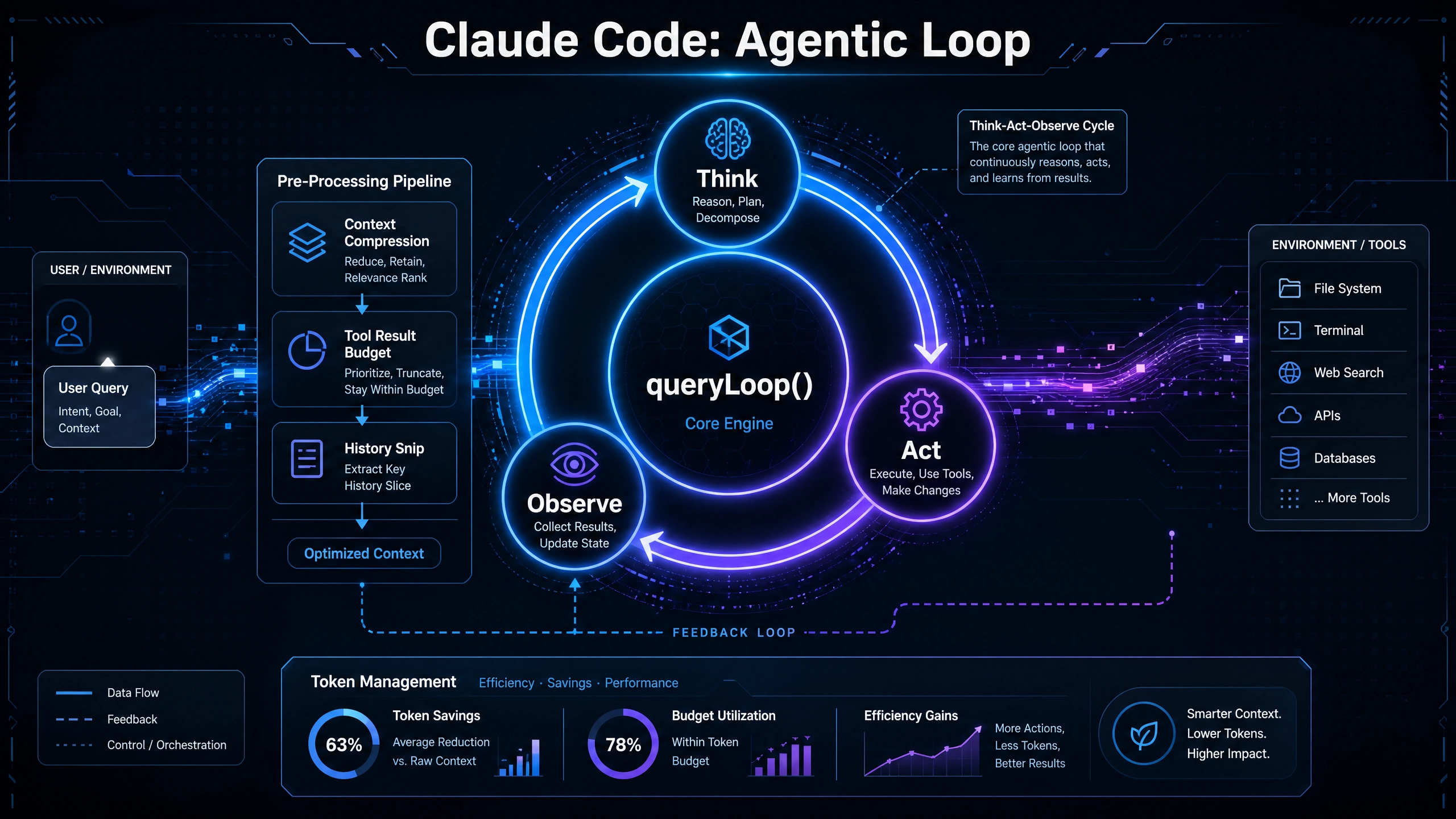
Agentic Loop(智能体循环),核心实现在 src/query.ts 的 queryLoop() 异步生成器函数。它是一个 while(true) 无限循环,每次迭代代表一次”思考→行动→观察”周期。
queryLoop() 的每次迭代(src/query.ts 中 while(true) 主循环)包含以下阶段。
阶段 1:上下文预处理(Pre-Processing Pipeline)
messagesForQuery(原始消息)
  ↓ applyToolResultBudget()    — 工具结果预算截断(按 maxResultSizeChars)
  ↓ snipCompactIfNeeded()      — 历史 Snip 压缩(HISTORY_SNIP feature)
  ↓ microcompact()             — 微压缩(工具结果摘要)
  ↓ applyCollapsesIfNeeded()   — 上下文折叠(CONTEXT_COLLAPSE feature)
  ↓ autocompact()              — 自动压缩(超出阈值时触发)
messagesForQuery(处理后的消息)→ 发往 API
每个步骤的输出是下一步的输入,形成串行管道。Snip 和 Microcompact 的释放 token 数会传递给 autocompact 的阈值计算(snipTokensFreed),避免重复压缩。
applyToolResultBudget,在 query() 调用前对消息中的工具结果,应用聚合预算限制,,确保单个 API 用户消息中所有工具结果的总大小不超过预设阈值。将过大的新工具结果持久化到磁盘,替换为预览消息。
应用场景
场景一:大型文件读取
FileReadTool 读取 100KB 文件
→ 超过 DEFAULT_MAX_RESULT_SIZE_CHARS (50,000 字符)
→ persistToolResult 保存到磁盘
→ 替换为预览 + 文件路径消息
→ 模型只看到 2KB 预览
场景二:并行工具结果聚合
用户消息包含 3 个工具结果:30K + 40K + 50K = 120K
→ 超过每消息预算限制(默认 100K)
→ 选择最大的 50K 结果进行持久化
→ 总大小降为 70K,低于预算
详细分析见文章。
阶段 2:流式 API 调用(Streaming Loop)
deps.callModel() 发起流式请求(src/query.ts 中 attemptWithFallback 循环内),返回一个 AsyncGenerator。在流式过程中:
AssistantMessage 被收集到 assistantMessages[] 数组
tool_use 块 被提取到 toolUseBlocks[],设置 needsFollowUp = true
StreamingToolExecutor 在流式过程中就开始并行执行工具(不等流结束)
可恢复的错误(prompt-too-long、max-output-tokens)被暂扣(withheld),先尝试恢复
错误即时恢复:工具失败不需要推倒重来——stop hook 可以注入阻塞错误让 AI 修正策略
 const message of deps.callModel({
            messages: prependUserContext(messagesForQuery, userContext),
            systemPrompt: fullSystemPrompt,
            thinkingConfig: toolUseContext.options.thinkingConfig,
            tools: toolUseContext.options.tools,
            signal: toolUseContext.abortController.signal,

 ......

   const msgToolUseBlocks = (
                Array.isArray(assistantMessage.message?.content)
                  ? assistantMessage.message.content
                  : []
              ).filter(
                (content: { type: string }) => content.type === 'tool_use',
              ) as ToolUseBlock[]

  .....

  if (
                streamingToolExecutor &&
                !toolUseContext.abortController.signal.aborted
              ) {
                for (const toolBlock of msgToolUseBlocks) {
                  streamingToolExecutor.addTool(toolBlock, assistantMessage)
                }
              }
            }

            if (
              streamingToolExecutor &&
              !toolUseContext.abortController.signal.aborted
            ) {
              for (const result of streamingToolExecutor.getCompletedResults()) {
                if (result.message) {
                  yield result.message
                  toolResults.push(
                    ...normalizeMessagesForAPI(
                      [result.message],
                      toolUseContext.options.tools,
                    ).filter(_ => _.type === 'user'),
                  )
                }
              }
            }
systemPrompt 是一个结构化的指令集合,它:
- 定义AI的角色和行为规范(Claude Code 助手)
- 提供环境上下文(工作目录、Git状态、操作系统等)
- 指导工具使用策略(核心工具 vs 延迟工具、权限模式等)
- 包含任务执行原则(代码风格、安全注意事项、确认机制等)
- 支持动态扩展(通过 appendSystemPrompt、MCP指令、记忆机制等)
//  QueryEngine.ts
// 1. 获取默认提示部分(来自 getSystemPrompt)
const { defaultSystemPrompt, userContext, systemContext } = await fetchSystemPromptParts({...})

// 2. 组装最终 systemPrompt(可能包含自定义提示、记忆机制、追加提示等)
const systemPrompt = asSystemPrompt([
  ...(customPrompt !== undefined ? [customPrompt] : defaultSystemPrompt),
  ...(memoryMechanicsPrompt ? [memoryMechanicsPrompt] : []),
  ...(appendSystemPrompt ? [appendSystemPrompt] : []),
])
默认的 systemPrompt(来自 getSystemPrompt)包含多个章节,例如:
1. 简介部分(getSimpleIntroSection)
You are an interactive agent that helps users with software engineering tasks. Use the instructions below and the tools available to you to assist the user.

<网络安全风险提示...>
2. 系统部分(getSimpleSystemSection)
# System
• All text you output outside of tool use is displayed to the user...
• Tools are executed in a user-selected permission mode...
• Your tool list has two categories: core tools (Read, Edit, Write, Bash...)...
• IMPORTANT — tool priority: When a task can be done by a core tool, use that core tool directly...
• Tool results and user messages may include <system-reminder> or other tags...
• The system will automatically compress prior messages in your conversation...
3. 任务执行部分(getSimpleDoingTasksSection)
# Doing tasks
• The user will primarily request you to perform software engineering tasks...
• You are highly capable and often allow users to complete ambitious tasks...
• Default to helping. Decline a request only when helping would create a concrete...
• In general, do not propose changes to code you haven't read...
• Do not create files unless they're absolutely necessary for achieving your goal...
4. 环境信息(computeSimpleEnvInfo)
# Environment
You have been invoked in the following environment:
• Primary working directory: /home/user/projects/claude-code
• Is a git repository: Yes
• Platform: win32
• Shell: Command Prompt (cmd.exe) (use Unix shell syntax, not Windows...)
• OS Version: Windows 11 Pro 10.0.22631
• You are powered by the model named Claude 3.5 Sonnet...
• Assistant knowledge cutoff is August 2025.
5. 工具使用指南(getUsingYourToolsSection)
# Using your tools
• Break down and manage your work with the TaskCreate tool...
• Prefer dedicated tools over Bash when possible...
6. 其他动态章节
- MCP服务器指令(如果连接了MCP服务器)
- 临时目录说明(getScratchpadInstructions)
- 函数结果清理说明(getFunctionResultClearingSection)
- 令牌预算提示(如果启用 TOKEN_BUDGET feature)
- Brief工具说明(如果启用 KAIROS feature)
阶段 3:工具执行(Tool Execution)
如果 needsFollowUp 为 true,循环不会终止,而是执行工具:
// 两种工具执行器(互斥)
const toolUpdates = streamingToolExecutor
  ? streamingToolExecutor.getRemainingResults()  // 流式:获取已完成的+等待中的
  : runTools(toolUseBlocks, assistantMessages, canUseTool, toolUseContext)
for await (const update of toolUpdates) {
      if (update.message) {
        yield update.message

        if (
          update.message.type === 'attachment' &&
          update.message.attachment!.type === 'hook_stopped_continuation'
        ) {
          shouldPreventContinuation = true
        }

        toolResults.push(
          ...normalizeMessagesForAPI(
            [update.message],
            toolUseContext.options.tools,
          ).filter(_ => _.type === 'user'),
        )
      }
      if (update.newContext) {
        updatedToolUseContext = {
          ...update.newContext,
          queryTracking,
        }
      }
    }
    queryCheckpoint('query_tool_execution_end')
工具结果通过 normalizeMessagesForAPI() 标准化后,与原始消息合并,进入下一轮循环迭代。
阶段 4:终止或继续
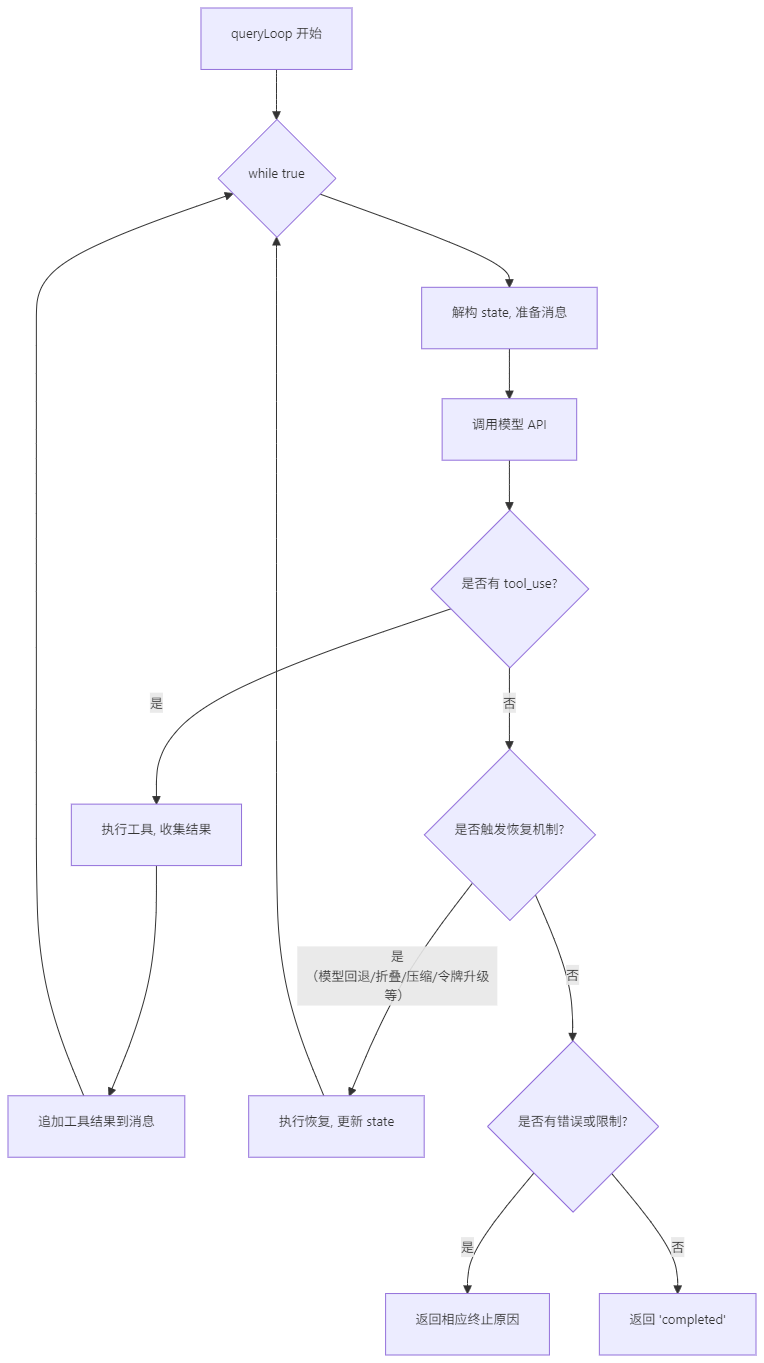
每次迭代结束时,根据条件决定 return(终止)或 continue(继续)
终止条件(循环结束,返回 Terminal)
当以下任意情况发生时,循环会通过 return 语句结束,并返回一个包含 reason 的终止对象:
| 序号 | 终止原因 | 触发场景 | 代码位置(约) |
| 1 | blocking_limit | 上下文长度达到硬性阻塞限制(且未启用自动压缩/上下文折叠等恢复机制) | 第829行 |
| 2 | image_error | 图像尺寸或调整大小错误 | 第1223行 |
| 3 | model_error | 模型API调用抛出错误(非恢复性错误) | 第1242行 |
| 4 | aborted_streaming | 用户在模型流式输出期间中断(Ctrl+C) | 第1323行 |
| 5 | prompt_too_long / image_error | 提示过长或媒体大小错误,且无法通过上下文折叠或响应式压缩恢复 | 第1447、1454行 |
| 6 | stop_hook_prevented | 停止钩子(stop hook)明确要求停止继续 | 第1554行 |
| 7 | completed | 正常完成:没有待处理的工具调用(needsFollowUp === false),且未触发其他错误/恢复流程 | 第1632行 |
| 8 | aborted_tools | 用户在工具执行期间中断 | 第1794行 |
| 9 | hook_stopped | 工具执行期间的钩子指示停止继续 | 第1799行 |
| 10 | max_turns | 达到 maxTurns 参数设置的最大轮次限制 | 第2024行 |
继续条件(循环进入下一轮迭代)
当以下任意情况发生时,循环会通过 continue 语句(或隐式地通过更新 state 后回到 while 顶部)进入下一轮迭代:
| 序号 | 继续原因 | 触发场景 | 代码位置(约) |
| 1 | 模型回退(fallback) | 当前模型触发回退(如容量不足),切换到备用模型并重试同一请求 | 第1193行 |
| 2 | 上下文折叠耗尽重试 | 提示过长错误后,通过“上下文折叠”机制释放已暂存的折叠内容,并重试请求 | 第1387行 |
| 3 | 响应式压缩重试 | 提示过长或媒体大小错误后,通过响应式压缩生成摘要,并重试请求 | 第1437行 |
| 4 | 最大输出令牌升级 | 达到输出令牌限制后,将 max_output_tokens 从默认值升级到更高值(如64k)并重试 | 第1492行 |
| 5 | 最大输出令牌恢复 | 输出令牌限制后,向对话中插入一条“继续”的元消息,让模型接着上次中断的地方继续 | 第1523行 |
| 6 | 停止钩子阻塞 | 停止钩子返回阻塞性错误(如“需要用户确认”),将这些错误作为消息插入后继续 | 第1580行 |
| 7 | 令牌预算继续 | 令牌预算机制判断当前轮次还可继续,插入 nudging 消息后继续 | 第1615行 |
| 8 | 工具调用(默认继续) | 最常见的继续场景:当模型返回 tool_use 块(needsFollowUp === true)时,执行完所有工具后,将工具结果作为用户消息追加,并更新 state,循环继续处理下一轮模型调用 | 第2040行(隐式) |
核心逻辑流程图
一个完整的迭代示例
用户:“帮我找到项目里所有未使用的导入语句,然后删掉它们”
迭代 1: 思考→行动
  预处理管道: applyToolResultBudget → snipCompact(HISTORY_SNIP feature) → microcompact → applyCollapses(CONTEXT_COLLAPSE feature) → autocompact
    → 上下文很短,无需压缩
  API 调用: 返回 tool_use(Glob, "**/*.ts")
  工具执行: 返回 42 个文件路径
  → needsFollowUp = true
  → transition: { reason: 'next_turn' }, continue

迭代 2: 思考→行动
  预处理管道: 42 个文件结果仍在预算内
  API 调用: 返回 tool_use(Grep, "import.*from")
  工具执行: 在 15 个文件中找到 120 条 import
  → needsFollowUp = true
  → transition: { reason: 'next_turn' }, continue

迭代 3: 思考→行动(多轮)
  预处理管道: 120 条 Grep 结果触发 microcompact → 摘要化
  API 调用: 返回 3 个 tool_use(FileEdit, ...)
  工具执行: 删除 5 条未使用导入
  → needsFollowUp = true
  → transition: { reason: 'next_turn' }, continue

迭代 4: 总结
  API 调用: 返回纯文本"已清理 3 个文件中的 5 条未使用导入"
  → needsFollowUp = false
  → Stop hooks 通过
  → Token Budget 检查通过(如果启用)
  → return { reason: 'completed' }
更多推荐

 4
4 0
0- 0


 已为社区贡献11条内容

所有评论(0)