
Vue3+TS 交互式三层关系图
·
目录
一、效果展示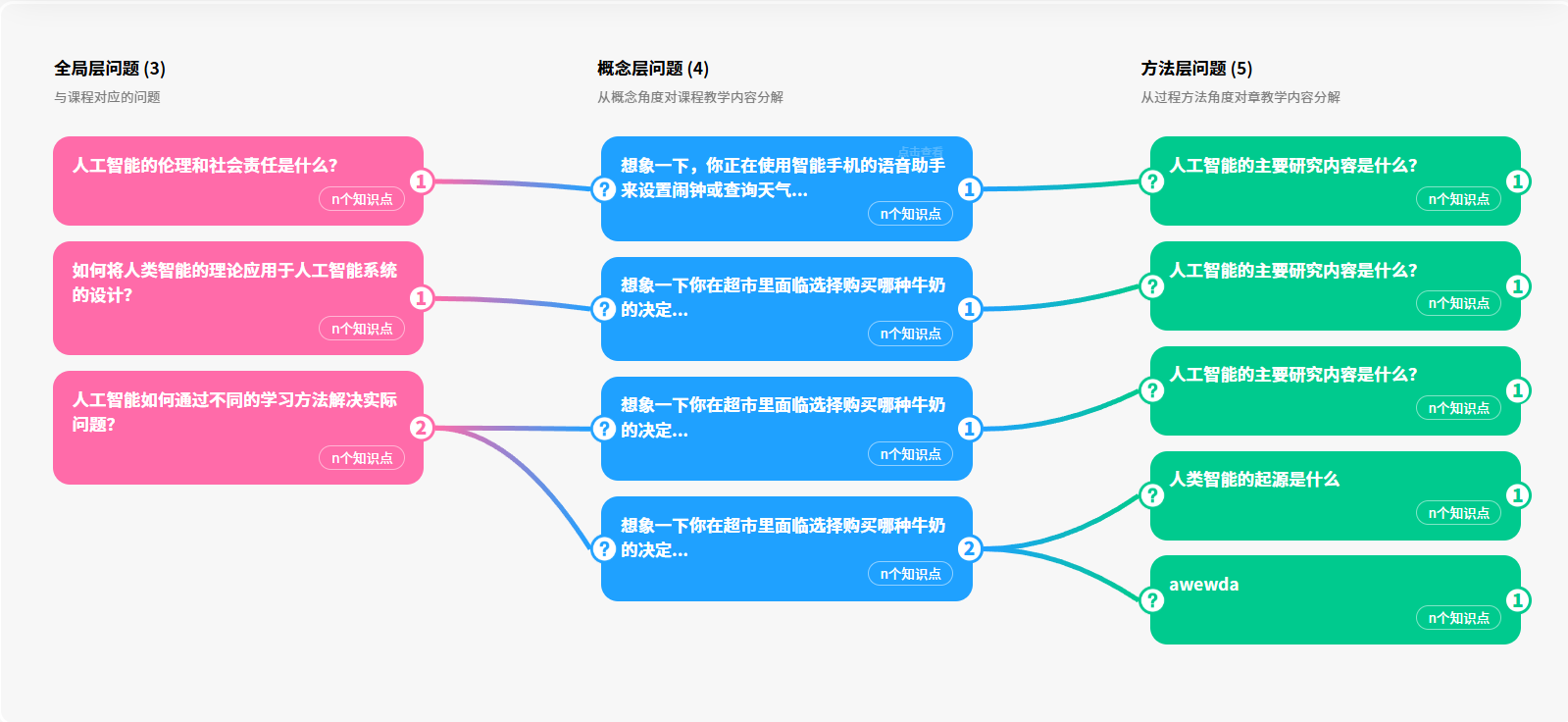
二、图表介绍
1.关系链:
这是一个三层的关系图,关系链对应如下: 左-中:1-n , '中-左:1-1' ,'中-右:1-n','右-中:1-1' 。
2.功能介绍:
(1).节点效果:
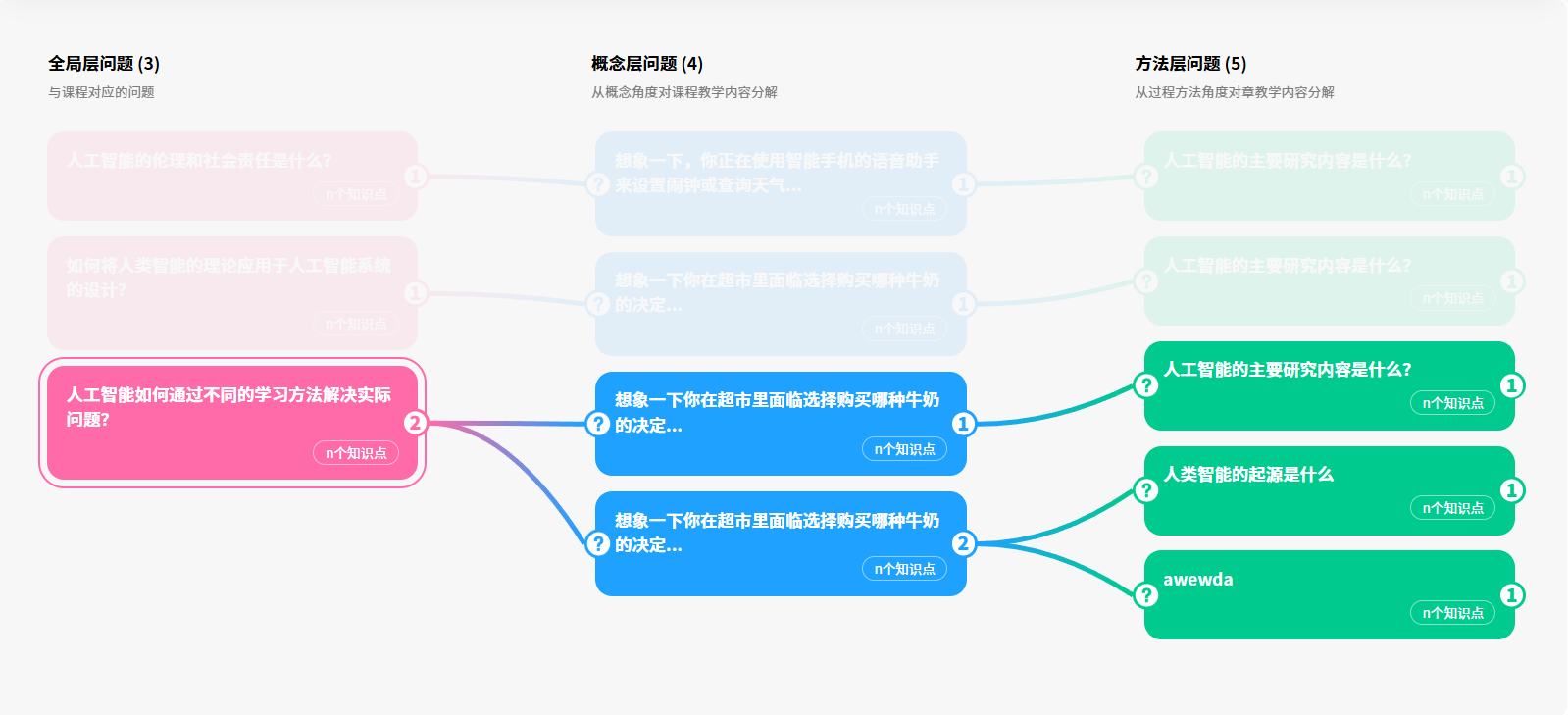
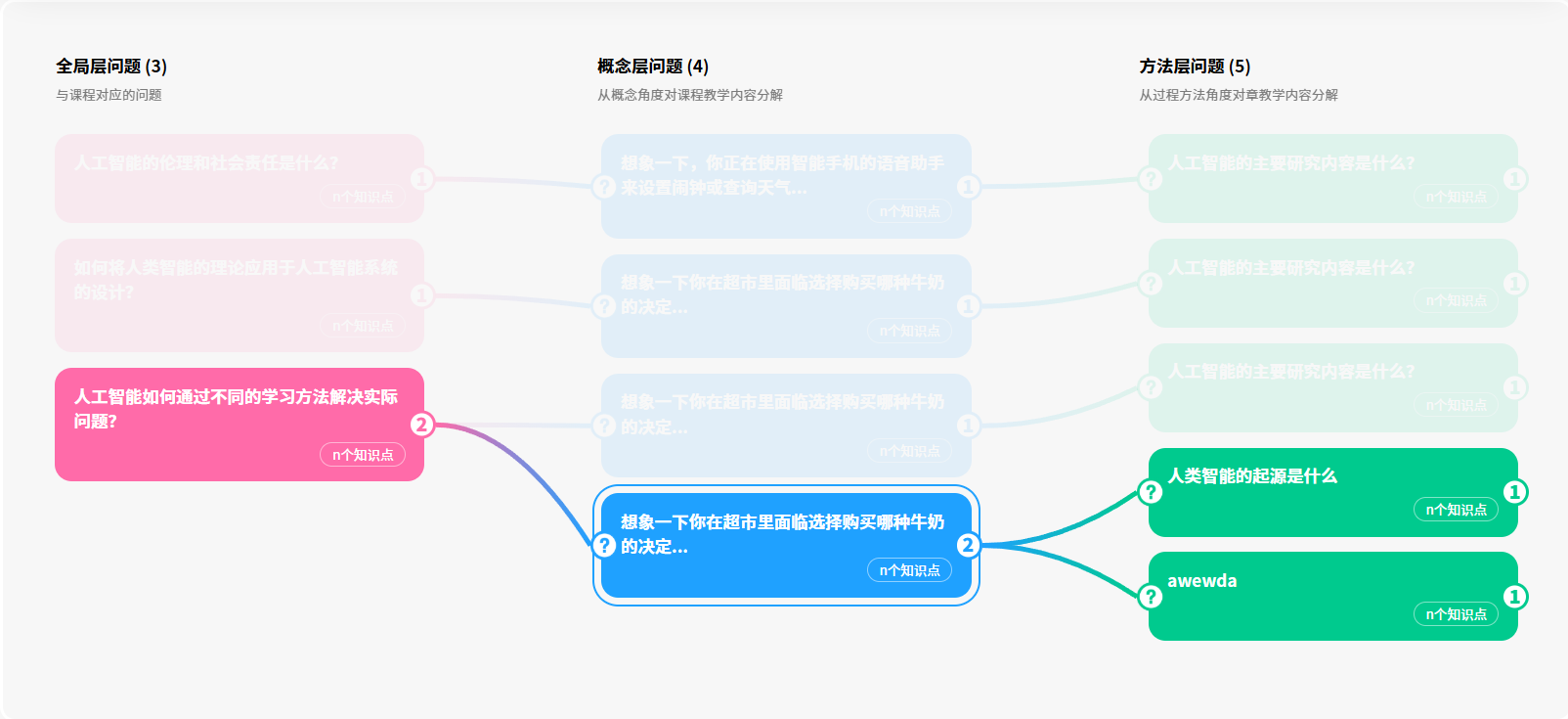
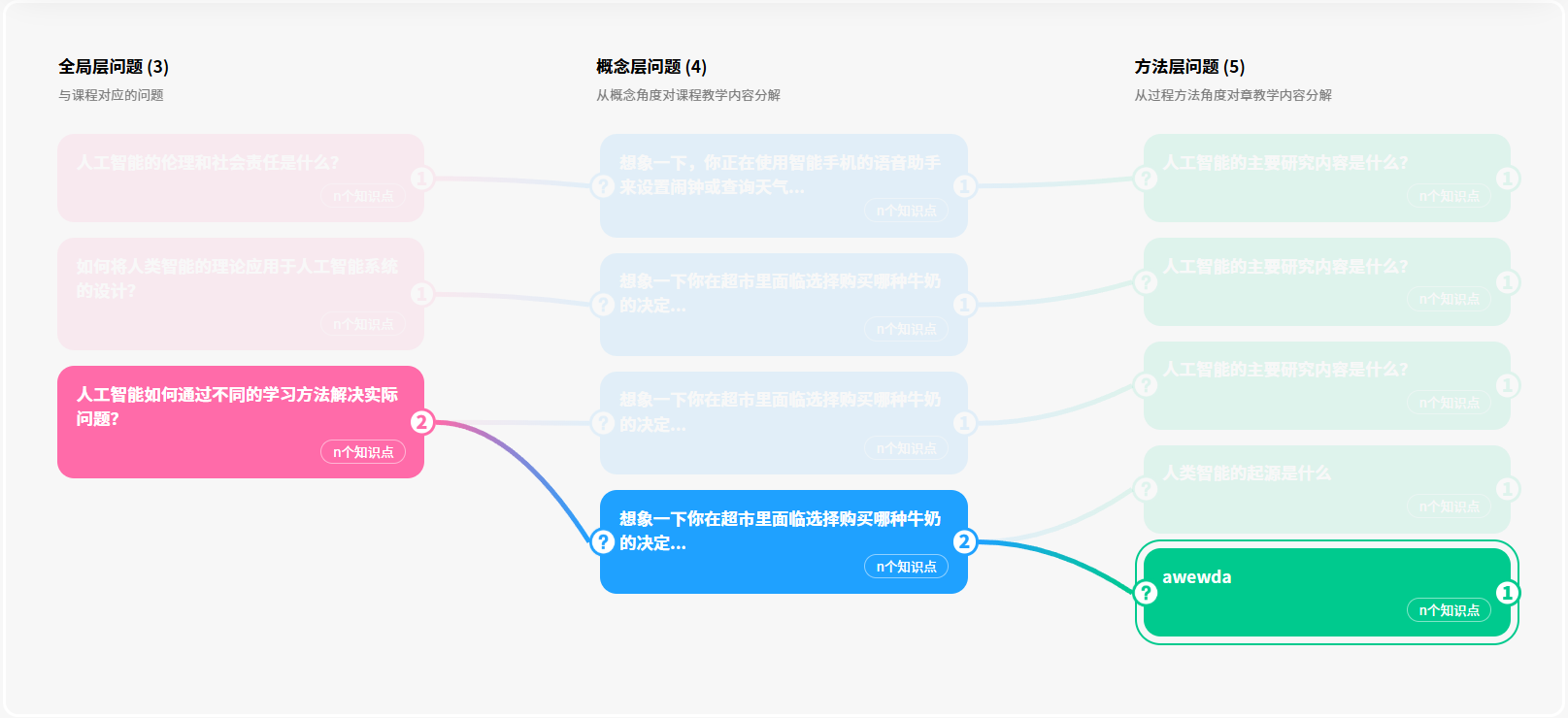
默认全部显示,无高亮。点击任意一个节点后,高亮显示点击的节点并添加outline属性,与其关联的节点同时高亮(仅与自己相关的所有节点)。除被点击节点及其关联节点以外的所有节点,降低透明度,突出高亮节点。再次点击拥有outline的节点,可退出高亮显示。在高亮期间,点击没有outline的节点,outline属性转移至被点击节点;点击高亮节点以外的节点时,已高亮节点降低透明度,被点击节点及其关联节点高亮。
(2).线条效果:
每个节点都被线条与关联节点连接,线条颜色为链接的两个节点的颜色渐变。线条由svg为绘制画板,结合贝塞尔(Bézier)曲线绘制。线条展示状态跟随其连接的两个节点,链接的两个节点高亮,则线条也高亮;否则,降低透明度。
三、代码展示
1.节点代码
(1)节点HTML:
        <div class="leftLine">
          <div class="content">
            <ul>
              <li v-for="item in leftAbout" :key="item.id" class="list">
                <div
                  ref="listContentleft"
                  class="list-content"
                  :data-id="item.id"
                  :style="
                    checkTrueOrFalse(activeLeftId, item.id)
                      ? activeStyle
                      : fadeStyle
                  "
                  @click="handleLeftClick(item.id, $event)"
                >
                  <p class="left-bg" />
                  <p class="edit-detail">
                    <span class="edit-look">点击查看</span>
                  </p>
                  <div class="question-padding-1">{{ item.content }}</div>
                  <div class="difficult_list">
                    <p><span class="difficult" /></p>
                    <p class="knowledge_num">
                      <span class="knowledge">{{ count(item) }}个知识点</span>
                    </p>
                  </div>
                  <p class="circle">
                    <span class="circle-bg">{{ item.children.length }}</span>
                  </p>
                </div>
              </li>
            </ul>
          </div>
        </div>

        <div class="centerLine">
          <div class="content">
            <ul>
              <li v-for="item in centerAbout" :key="item.id" class="list">
                <div
                  ref="listContentCenter"
                  class="list-content"
                  :data-id="item.id"
                  :data-parent-id="item.parentId"
                  :style="
                    checkTrueOrFalse(activeCenterId, item.id)
                      ? activeStyle
                      : fadeStyle
                  "
                  @click="handleCenterClick(item.id, item.parentId, $event)"
                >
                  <p class="center-bg" />
                  <p class="edit-detail">
                    <span class="edit-look">点击查看</span>
                  </p>
                  <div class="question-padding-2">{{ item.content }}</div>
                  <div class="difficult_list">
                    <p><span class="difficult" /></p>
                    <p class="knowledge_num">
                      <span class="knowledge">{{ item.children.length }}个知识点</span>
                    </p>
                  </div>
                  <p class="circle">
                    <span class="circle-bg">{{ item.children.length }}</span>
                  </p>
                </div>
              </li>
            </ul>
          </div>
        </div>

        <div class="rightLine">
          <div class="content">
            <ul>
              <li v-for="item in rightAbout" :key="item.id" class="list">
                <div
                  ref="listContentRight"
                  class="list-content"
                  :data-id="item.id"
                  :data-parent-id="item.parentId"
                  :style="
                    checkTrueOrFalse(activeRightId, item.id)
                      ? activeStyle
                      : fadeStyle
                  "
                  @click="handleRightClick(item.id, item.parentId, $event)"
                >
                  <p class="right-bg" />
                  <p class="edit-detail">
                    <span class="edit-look">点击查看</span>
                  </p>
                  <div class="question-padding-1">{{ item.content }}</div>
                  <div class="difficult_list">
                    <p><span class="difficult" /></p>
                    <p class="knowledge_num">
                      <span class="knowledge">1个知识点</span>
                    </p>
                  </div>
                  <p class="circle"><span class="circle-bg">1</span></p>
                </div>
              </li>
            </ul>
          </div>
        </div>
(2).节点TS:
const listContentleft = ref<HTMLDivElement[]>([]);
const listContentCenter = ref<HTMLDivElement[]>([]);
const listContentRight = ref<HTMLDivElement[]>([]);

const leftAbout = [
  {
    id: "1",
    content: "人工智能的伦理和社会责任是什么?",
    children: [
      {
        id: "1-1",
        parentId: "1",
        content:
          "想象一下,你正在使用智能手机的语音助手来设置闹钟或查询天气...",
        children: [
          {
            id: "1-1-1",
            parentId: "1-1",
            content: "人工智能的主要研究内容是什么?"
          }
        ]
      }
    ]
  },
  {
    id: "2",
    content: "如何将人类智能的理论应用于人工智能系统的设计?",
    children: [
      {
        id: "2-1",
        parentId: "2",
        content:
          "想象一下你在超市里面临选择购买哪种牛奶的决定...想象一下你在超市里面临选择购买哪种牛奶的决定...想象一下你在超市里面临选择购买哪种牛奶的决定...想象一下你在超市里面临选择购买哪种牛奶的决定...想象一下你在超市里面临选择购买哪种牛奶的决定...",
        children: [
          {
            id: "2-1-1",
            parentId: "2-1",
            content: "人工智能的主要研究内容是什么?"
          }
        ]
      }
    ]
  },
  {
    id: "3",
    content: "人工智能如何通过不同的学习方法解决实际问题?",
    children: [
      {
        id: "3-1",
        parentId: "3",
        content: "想象一下你在超市里面临选择购买哪种牛奶的决定...",
        children: [
          {
            id: "3-1-1",
            parentId: "3-1",
            content: "人工智能的主要研究内容是什么?"
          }
        ]
      },
      {
        id: "3-2",
        parentId: "3",
        content: "想象一下你在超市里面临选择购买哪种牛奶的决定...",
        children: [
          { id: "3-2-1", parentId: "3-2", content: "人类智能的起源是什么" },
          { id: "3-2-2", parentId: "3-2", content: "awewda" }
        ]
      }
    ]
  }
];
const centerAbout = computed(() => leftAbout.map(item => item.children).flat());
const rightAbout = computed(() =>
  centerAbout.value.map(item => item.children).flat()
);

const OPACITY = {
  ACTIVE: 1, // 激活状态透明度
  INACTIVE: 0.1 // 未激活状态透明度
};
const activeLeftId = ref<string | null>(null);
const activeCenterId = ref<string[]>([]);
const activeRightId = ref<string[]>([]);
const activeStyle = { opacity: `${OPACITY.ACTIVE}` };
const fadeStyle = { opacity: `${OPACITY.INACTIVE}` };
const lineColors = [
  "rgb(255, 107, 169)",
  "rgb(31, 161, 255)",
  "rgb(0, 202, 142)"
];

const checkTrueOrFalse = (
  value: string[] | null | string,
  id: string
): boolean => {
  if (value === null) return true;
  if (typeof value === "string") return value === id;
  if (Array.isArray(value)) return value.length > 0 ? value.includes(id) : true;
  return true;
};

const clearAllOutline = (excludeEl?: HTMLElement) => {
  listContentleft.value.forEach(
    div =>
      (div.style.outline =
        div !== excludeEl
          ? "rgba(151, 151, 151, 0) solid 2px"
          : div.style.outline)
  );
  listContentCenter.value.forEach(
    div =>
      (div.style.outline =
        div !== excludeEl
          ? "rgba(151, 151, 151, 0) solid 2px"
          : div.style.outline)
  );
  listContentRight.value.forEach(
    div =>
      (div.style.outline =
        div !== excludeEl
          ? "rgba(151, 151, 151, 0) solid 2px"
          : div.style.outline)
  );
};

const checkIshaveOutline = (e: HTMLElement | null): boolean => {
  if (!e) return false;
  const hasOutline =
    e.style.outline !== "rgba(151, 151, 151, 0) solid 2px" &&
    e.style.outline !== "";
  if (hasOutline) {
    e.style.outline = "rgba(151, 151, 151, 0) solid 2px";
    activeLeftId.value = null;
    activeCenterId.value = [];
    activeRightId.value = [];
    return true;
  }
  return false;
};

const activeStyleFun = (e: HTMLElement) => {
  const nodeColor = getComputedStyle(e).getPropertyValue("--node-color").trim();
  e.style.setProperty("outline", `${nodeColor} solid 2px`);
};
const defaultColor = (div: HTMLDivElement) =>
  div.style.setProperty("opacity", "1");

const handleLeftClick = async (id: string, e: MouseEvent) => {
  const targetDiv = (e.target as HTMLElement).closest(
    ".list-content"
  ) as HTMLElement;
  if (!targetDiv || checkIshaveOutline(targetDiv)) {
    renderConnection();
    return;
  }

  clearAllOutline(targetDiv);
  activeCenterId.value = [];
  activeRightId.value = [];
  activeLeftId.value = id;

  const targetLeftItem = leftAbout.find(item => item.id === id);
  if (targetLeftItem?.children) {
    targetLeftItem.children.forEach(item2 => {
      activeCenterId.value.push(item2.id);
      item2.children?.forEach(item3 => activeRightId.value.push(item3.id));
    });
  }

  await nextTick();
  activeStyleFun(targetDiv);
  renderConnection();
};

const handleCenterClick = async (
  id: string,
  parentId: string,
  e: MouseEvent
) => {
  const targetDiv = (e.target as HTMLElement).closest(
    ".list-content"
  ) as HTMLElement;
  if (!targetDiv || checkIshaveOutline(targetDiv)) {
    renderConnection();
    return;
  }

  clearAllOutline(targetDiv);
  activeCenterId.value = [];
  activeRightId.value = [];
  activeCenterId.value.push(id);
  activeLeftId.value = parentId;

  const targetCenterItem = centerAbout.value.find(item => item.id === id);
  if (targetCenterItem?.children) {
    targetCenterItem.children.forEach(item2 =>
      activeRightId.value.push(item2.id)
    );
  }

  await nextTick();
  activeStyleFun(targetDiv);
  renderConnection();
};

const handleRightClick = async (
  id: string,
  parentId: string,
  e: MouseEvent
) => {
  const targetDiv = (e.target as HTMLElement).closest(
    ".list-content"
  ) as HTMLElement;
  if (!targetDiv || checkIshaveOutline(targetDiv)) {
    renderConnection();
    return;
  }

  clearAllOutline(targetDiv);
  activeCenterId.value = [];
  activeRightId.value = [];
  activeRightId.value.push(id);
  activeCenterId.value.push(parentId);

  const targetCenterItem = centerAbout.value.find(item => item.id === parentId);
  if (targetCenterItem) activeLeftId.value = targetCenterItem.parentId;

  await nextTick();
  activeStyleFun(targetDiv);
  renderConnection();
};

const count = (item)=>{
  return  item.children.reduce((total, value) => {
      return total +  value.children.length
    }, 0);
}
2.svg线条绘制
(1).svgHTML:
<svg ref="svgRef" class="connection-svg" ></svg>(2).svgTS:
type Point = { x: number; y: number };
type ConnectionConfig = {
  strokeWidth: number;
  curveRadius?: number;
};
type ConnectionStyleMap = Record<
  "left-center" | "center-right",
  ConnectionConfig
>;

const contentBoxRef: Ref<HTMLDivElement | null> = ref(null);
const svgRef: Ref<SVGSVGElement | null> = ref(null);

const connectionStyles: ConnectionStyleMap = {
  "left-center": { strokeWidth: 4, curveRadius: -60 },
  "center-right": { strokeWidth: 4, curveRadius: -60 }
};

const clearAllConnections = () => {
  const svg = svgRef.value;
  if (svg) svg.innerHTML = "";
};

const getRelativePoint = (
  el: HTMLElement,
  relationship: string
): Point | null => {
  if (!contentBoxRef.value) return null;
  const contentRect = contentBoxRef.value.getBoundingClientRect();
  let elRect: DOMRect | null = null;
  let divisorX, divisorY;
  if (relationship === "parent") {
    (elRect = el.childNodes[4].getBoundingClientRect()),
      (divisorX = 1),
      (divisorY = 0.5);
  } else {
    (elRect = el.childNodes[0].getBoundingClientRect()),
      (divisorX = 0.2),
      (divisorY = 0.5);
  }
  return {
    x: elRect.left - contentRect.left + elRect.width * divisorX, // 水平中心
    y: elRect.top - contentRect.top + elRect.height * divisorY // 垂直中心
  };
};

// 判断节点是否处于激活状态
const isNodeActive = (
  layer: "left" | "center" | "right",
  nodeId: string
): boolean => {
  switch (layer) {
    case "left":
      // 左节点激活:activeLeftId等于当前节点ID,或未点击任何节点(默认全部激活)
      return activeLeftId.value === null || activeLeftId.value === nodeId;
    case "center":
      // 中节点激活:activeCenterId包含当前节点ID,或未点击任何节点
      return (
        activeCenterId.value.length === 0 ||
        activeCenterId.value.includes(nodeId)
      );
    case "right":
      // 右节点激活:activeRightId包含当前节点ID,或未点击任何节点
      return (
        activeRightId.value.length === 0 || activeRightId.value.includes(nodeId)
      );
    default:
      return false;
  }
};

const drawConnection = (
  parentEl: HTMLElement,
  childEl: HTMLElement,
  styleKey: "left-center" | "center-right"
) => {
  const svg = svgRef.value;
  if (!svg || !contentBoxRef.value) return;

  const parentPoint = getRelativePoint(parentEl, "parent");
  const childPoint = getRelativePoint(childEl, "child");
  if (!parentPoint || !childPoint) return;

  // 关键修改:获取关联节点ID,并判断其激活状态
  const parentId = parentEl.dataset.id || ""; // 父节点ID(左/中节点)
  const childId = childEl.dataset.id || ""; // 子节点ID(中/右节点)
  // 按层级判断父/子节点是否激活
  const parentLayer = styleKey === "left-center" ? "left" : "center";
  const childLayer = styleKey === "left-center" ? "center" : "right";
  const isParentActive = isNodeActive(parentLayer, parentId);
  const isChildActive = isNodeActive(childLayer, childId);

  // 计算连线透明度:仅当父+子节点都激活时,连线才完全不透明;否则透明
  const lineOpacity =
    isParentActive && isChildActive ? OPACITY.ACTIVE : OPACITY.INACTIVE;

  // 获取节点颜色、创建渐变
  const parentColor = getComputedStyle(parentEl)
    .getPropertyValue("--node-color")
    .trim();
  const childColor = getComputedStyle(childEl)
    .getPropertyValue("--node-color")
    .trim();
  const gradientId = `gradient-${parentId}-${childId}`;
  let gradient = svg.querySelector(`#${gradientId}`);
  if (!gradient) {
    let defs =
      svg.querySelector("defs") ||
      document.createElementNS("http://www.w3.org/2000/svg", "defs");
    if (!svg.querySelector("defs")) svg.insertBefore(defs, svg.firstChild);

    gradient = document.createElementNS(
      "http://www.w3.org/2000/svg",
      "linearGradient"
    );
    gradient.setAttribute("id", gradientId);
    gradient.setAttribute("x1", "0%");
    gradient.setAttribute("y1", "0%");
    gradient.setAttribute("x2", "100%");
    gradient.setAttribute("y2", "0%");

    const startStop = document.createElementNS(
      "http://www.w3.org/2000/svg",
      "stop"
    );
    startStop.setAttribute("offset", "0%");
    startStop.setAttribute("stop-color", parentColor);
    startStop.setAttribute("stop-opacity", "1"); // 渐变颜色本身不透明,透明度通过line控制

    const endStop = document.createElementNS(
      "http://www.w3.org/2000/svg",
      "stop"
    );
    endStop.setAttribute("offset", "100%");
    endStop.setAttribute("stop-color", childColor);
    endStop.setAttribute("stop-opacity", "1");

    gradient.appendChild(startStop);
    gradient.appendChild(endStop);
    defs.appendChild(gradient);
  }

  // 绘制连线
  const contentRect = contentBoxRef.value.getBoundingClientRect();
  svg.setAttribute("width", `${contentRect.width}px`);
  svg.setAttribute("height", `${contentRect.height}px`);

  const path = document.createElementNS("http://www.w3.org/2000/svg", "path");
  const { strokeWidth } = connectionStyles[styleKey];
  const controlX = (parentPoint.x + childPoint.x) / 2;
  const controlY = parentPoint.y;
  const pathD = `M${parentPoint.x},${parentPoint.y} Q${controlX},${controlY} ${childPoint.x},${childPoint.y}`;

  path.setAttribute("d", pathD);
  path.setAttribute("stroke", `url(#${gradientId})`);
  path.setAttribute("stroke-width", `${strokeWidth}`);
  path.setAttribute("fill", "none");
  path.setAttribute("stroke-opacity", `${lineOpacity}`);

  svg.appendChild(path);
};

const renderLine = (
  parentId: string,
  currentLayer: "left" | "center",
  index: number = 0
) => {
  if (!svgRef.value || !contentBoxRef.value) return;

  const parentEl = document.querySelector(
    `.${currentLayer}Line .list-content[data-id="${parentId}"]`
  );
  if (!parentEl) return;

  let children: Array<{
    id: string;
    parentId: string;
    children?: Array<{ id: string; parentId: string }>;
  }> = [];
  if (currentLayer === "left") {
    const leftItem = leftAbout.find(item => item.id === parentId);
    children = leftItem?.children || [];
  } else {
    children = centerAbout.value
      .filter(item => item.id === parentId && item.children?.length)
      .flatMap(item => item.children || []);
  }

  children.forEach(child => {
    const childLayer = currentLayer === "left" ? "center" : "right";
    const childEl = document.querySelector(
      `.${childLayer}Line .list-content[data-id="${child.id}"]`
    );

    if (childEl) {
      const styleKey = currentLayer === "left" ? "left-center" : "center-right";
      drawConnection(parentEl as HTMLElement, childEl as HTMLElement, styleKey);

      if (index === 0) {
        renderLine(child.id, "center", index + 1);
      }
    }
  });
};
const renderConnection = async () => {
  await nextTick(); // 等待DOM更新后再绘制
  clearAllConnections(); // 先清除旧连线

  leftAbout.forEach(leftItem => {
    renderLine(leftItem.id, "left");
  });
};
3.默认样式
onMounted(() => {
  listContentleft.value.forEach(div => defaultColor(div));
  listContentCenter.value.forEach(div => {
    div.style.setProperty("--content-item-color", lineColors[1]);
    defaultColor(div);
  });
  listContentRight.value.forEach(div => {
    div.style.setProperty("--content-item-color", lineColors[2]);
    defaultColor(div);
  });

  renderConnection();
  const handleResize = () => renderConnection();
  window.addEventListener("resize", handleResize);

  const cleanup = () => {
    window.removeEventListener("resize", handleResize);
    clearAllConnections();
  };
  return cleanup;
});
4.less样式
.main-box() {
width: 38%;
margin-left: 10%;
padding-top: .61667vw;
overflow: auto;
}
.edit-mixin() {
.edit-detail {
position: absolute;
right: .26042vw;
top: .3125vw;
.edit-look {
padding-right: .52083vw;
font-size: .625vw;
font-family: PingFang SC-Regular, PingFang SC;
font-weight: 400;
color: #fff;
opacity: 0;
cursor: pointer;
height: 1.04167vw;
display: flex;
align-items: center;
}
}
}
.content-bg() {
background-size: 100% 100%;
width: 1.5625vw;
height: 1.5625vw;
display: block;
position: absolute;
top: 50%;
left: -3%;
z-index: 99;
transform: translateY(-50%);
}
.list-content-color(@color) {
background-color: @color;
}
* {
padding: 0;
margin: 0;
list-style: none;
user-select: none;
}
.alone {
width: 100%;
position: relative;
padding-top: 4.6875vw;
.problem-graph {
position: relative;
display: flex;
flex-direction: column;
width: 100%;
// height: 90vh;
overflow: hidden;
border: 0.2083vw solid #fff;
border-radius: 0.8333vw;
padding: 1.5625vw 2.08333vw;
.header {
display: flex;
width: 100%;
background-size: 100% 100%;
position: relative;
z-index: 10;
.head {
width: 26.5%;
// display: flex;
// justify-content: space-between;
padding: 1.25vw 0px 0.83333vw;
margin-left: .8vw;
.primary {
letter-spacing: 0px;
color: var(---, #000);
font-family: "Alibaba PuHuiTi 3.0";
font-size: 0.9375vw;
font-style: normal;
font-weight: 700;
line-height: 1.35417vw;
padding: 0px 0px 0.41667vw;
}
.second {
opacity: 0.5;
letter-spacing: 0px;
text-align: justify;
color: var(---, #000);
font-family: "Alibaba PuHuiTi 3.0";
font-size: 0.72917vw;
font-style: normal;
font-weight: 400;
line-height: 1.04167vw;
}
&:nth-child(2),
&:nth-child(3) {
margin-left: 10%;
}
}
}
.content-box {
position: relative;
display: flex;
width: 100%;
height: 100%;
padding-bottom: 2.08333vw;
.connection-svg {
position: absolute;
top: 0;
left: 0;
z-index: 1;
pointer-events: none;
}
.leftLine {
width: 38%;
padding-top: 0.61667vw;
position: relative;
overflow: auto;
--node-color: rgb(255 107 169);
.left-bg {
.content-bg();
}
}
.centerLine {
.main-box();
--node-color: rgb(31 161 255);
.center-bg {
background: url('@/assets/empty/problem-blue.png');
.content-bg();
}
}
.rightLine {
.main-box();
--node-color: rgb(0 202 142);
.right-bg {
background: url('@/assets/empty/problem-green.png');
.content-bg();
}
}
.content {
width: 100%;
ul {
height: 100%;
.list {
width: 95%;
border-radius: .9375vw;
margin: 0 auto .41667vw;
border: .26042vw solid rgba(151, 151, 151, 0);
position: relative;
--content-item-color: #FF6BA9;
.list-content {
background: var(--content-item-color);
border-radius: .9375vw;
cursor: pointer;
padding: .83333vw 1.04167vw;
position: relative;
outline-offset: 6px;
z-index: 2;
outline: rgb(151 151 151 / 0%) solid 2px;
transition:
outline 0.2s ease,
opacity 0.2s ease;
.question-padding-1 {
width: 100%;
color: #fff;
font-family: "Alibaba PuHuiTi 3.0";
font-size: .9375vw;
font-style: normal;
font-weight: 700;
line-height: 1.35417vw;
padding-bottom: .52083vw;
}
.edit-mixin();
.question-padding-2 {
width: 100%;
color: #fff;
font-family: "Alibaba PuHuiTi 3.0";
font-size: .9375vw;
font-style: normal;
font-weight: 700;
line-height: 1.35417vw;
}
.difficult_list {
display: flex;
align-items: center;
justify-content: space-between;
.difficult {
display: flex;
height: 1.35417vw;
justify-content: center;
align-items: center;
gap: .3125vw;
}
.knowledge_num {
display: flex;
height: 1.35417vw;
padding: .52083vw .625vw;
justify-content: center;
align-items: center;
gap: .52083vw;
border-radius: 2.03125vw;
border: 1px solid rgba(255, 255, 255, .5);
color: #fff;
font-family: "Alibaba PuHuiTi 3.0";
font-size: .72917vw;
font-style: normal;
font-weight: 400;
line-height: 1.04167vw;
}
}
.circle {
width: 1.5625vw;
height: 1.5625vw;
border-radius: 50%;
font-size: .625vw;
line-height: .72917vw;
text-align: center;
position: absolute;
top: 50%;
transform: translateY(-50%);
right: -3%;
z-index: 97;
display: flex;
justify-content: center;
align-items: center;
background-color: var(--content-item-color);
border: var(--content-item-color);
.circle-bg {
color: var(--content-item-color);
background-color: #fff;
border-radius: 50%;
height: 1.25vw;
width: 1.25vw;
line-height: 1.25vw;
font-family: "Alibaba PuHuiTi 3.0";
font-size: 1.04167vw;
font-style: normal;
font-weight: 900;
}
}
p:nth-child(2) {
display: flex;
justify-content: space-between;
padding: 0 .83333vw;
height: 1.14583vw;
}
&:hover {
.edit-detail {
.edit-look {
opacity: 1;
transition: .5s;
}
}
}
}
}
}
}
}
}
}更多推荐
 4
4 0
0- 0


 已为社区贡献1条内容

所有评论(0)