
【Python】打开网页,打开文件夹/文件,运行python脚本
打开网页:
1、os.system(...)
允许执行操作系统命令,参数为字符串类型的命令,将在子shell中执行命令。
import os

# 打开力扣网页
url = f'https://leetcode.cn/problemset/all/'
os.system(f'start {url}')
2、webbrowser.open(...)
使用默认或指定的浏览器打开网页。
import webbrowser

# 打开力扣网页
url = f'https://leetcode.cn/problemset/all/'
webbrowser.open(url)
3、pyside2中PySide2.QtGui.QDesktopServices.openUrl(...)
允许访问常见桌面服务。尝试在用户桌面环境下打开文件夹/文件/网页等。
from PySide2.QtGui import QDesktopServices

# 打开力扣网页
url = f'https://leetcode.cn/problemset/all/'
QDesktopServices.openUrl(url)
打开文件/文件夹
- Windows系统,使用 os.startfile(...) 打开文件/文件夹。
- Linux系统,使用 subprocess.Popen(...) 打开文件/文件夹。打开时相关参数是'xdg-open'。
- macOS系统,使用 subprocess.Popen(...) 打开文件/文件夹。打开时相关参数是'open'。基于Darwin,类似于Linux的内核。
可以使用os.name、sys.platform查看操作系统,查看更高层次的操作系统名称可以使用platform.system。
| os.name | sys.platform | |
| Windows系统 | 'nt' | 'win32' |
| Linux系统 |
'posix', 继续用os.uname().sysname查看 | 'linux' |
| macOS系统 |
'posix', 继续用os.uname().sysname查看 | 'darwin' |
import os, sys, subprocess

def open_file(file):
    if not os.path.exists(file):
        print(f'{file} does not exist.')
        return
    try:
        # windows系统
        if sys.platform == 'win32':
            os.startfile(file)
        # macOS系统
        elif sys.platform == 'darwin':
            subprocess.Popen(['open', file])
        # linux系统
        else:
            subprocess.Popen(['xdg-open', file])
        print(f'Opening folder: {file}')
    except Exception as e:
        print(f'Error opening folder: {e}')

if __name__ == '__main__':
    file = f'G:/do'
    open_file(file)                  # 打开文件夹
    filename = f'G:/do/data.txt'
    open_file(filename)              # 打开文件
运行python脚本:
subprocess模块,创建和管理子进程的、执行外部命令、处理输入输出、使用管道等。
subprocess.run(...),创建新的子进程执行指定命令。
subprocess.run(args, *, stdin=None, input=None, stdout=None, stderr=None, capture_output=False, shell=False, cwd=None, timeout=None, check=False, encoding=None, errors=None, text=None, env=None, universal_newlines=None, **other_popen_kwargs)参数:
args:要执行的命令,字符串或序列(例如:列表)。
stdin,stdout,stderr:分别指定处理标准输入、标准输出、标准错误的方式。
capture_output:若为True,则捕获标准输出和标准错误。
shell:若为True,则通过 shell 来执行命令。(推荐默认的False,避免恶意代码)
cwd:指定子进程的工作目录。
timeout:设置子进程的超时时间。超过该时间,子进程终止并等待,且引发TimeoutExpired异常。
check:若为True,当子进程非零退出码时,引发CalledProcessError异常。
encoding,errors:分别指定输入/输出的编码、错误。
text:若为True,则将输出解码为字符串(文本模式)。否则为字节类型。
env:指定子进程的环境变量。
返回:
CompletedProcess对象。包含返回码(returncode),输出结果(stdout),异常错误(stderr)等信息。
import os, sys, subprocess

def execute_pythonfile(filename):
        '''点击运行程序或者python文件'''
        # 文件不存在
        if not os.path.exists(filename):
            print(f'{filename} does not exist')
            return
        # 不是python文件
        if not filename.endswith('.py'):
            print(f'{filename} is not a .py file')
            return
        # 运行python文件
        try:
            result = subprocess.run([sys.executable, filename],
                                    check=True, capture_output=True, text=True)
            # 打印输出结果
            if result.stdout:
                print(result.stdout)
            # 错误信息
            elif result.stderr:
                print(f'Error: {result.stderr}')
        # 捕获运行时异常
        except Exception as e:
            print(f'Error running python file: {e}')

if __name__ == '__main__':
    filename = 'random_choice.py'
    execute_pythonfile(filename)
运行的python文件:
# random_choice.py
import random

def random_choice():
    what_list = ['Go for a walk', 'Read a book', 'Watch a movie', 'Listen to music']
    result = random.choice(what_list)
    return result

result = random_choice()
print(f'Random choice: {result}')
注意:若使用pyinstaller打包后,则subprocess.run可能并不能执行指定python脚本,而是又一次执行了打包生成的可执行文件。
尝试:直接导入python文件执行,而不是subprocess.run。或者 若打包后,使用导入,若没有打包,使用subprocess.run。 或者 修改.spec配置文件。
为了说明如何判断是否打包过,本次以第二种为例:(修改try... except...中的内容)
# 运行python文件
try:
    # pyinstaller打包后, 导入python文件执行
    if getattr(sys, 'frozen', False):
        from random_choice import random_choice
        result = random_choice()
        print(f'Random choice: {result}')
        print('----打包后,导入python文件再执行------------------')
    else:
        # 未打包, 运行python文件
        result = subprocess.run([sys.executable, python_file], check=True, text=True, capture_output=True)
        if result.stdout:
            print(f'Random choice: {result.stdout}')
        elif result.stderr:
            printt(f'Error: {result.stderr}')
        print('--------------未打包,使用subprocess.run运行python文件------------------')
except Exception as e:
    print(f'Error running python file: {e}')
帮助:
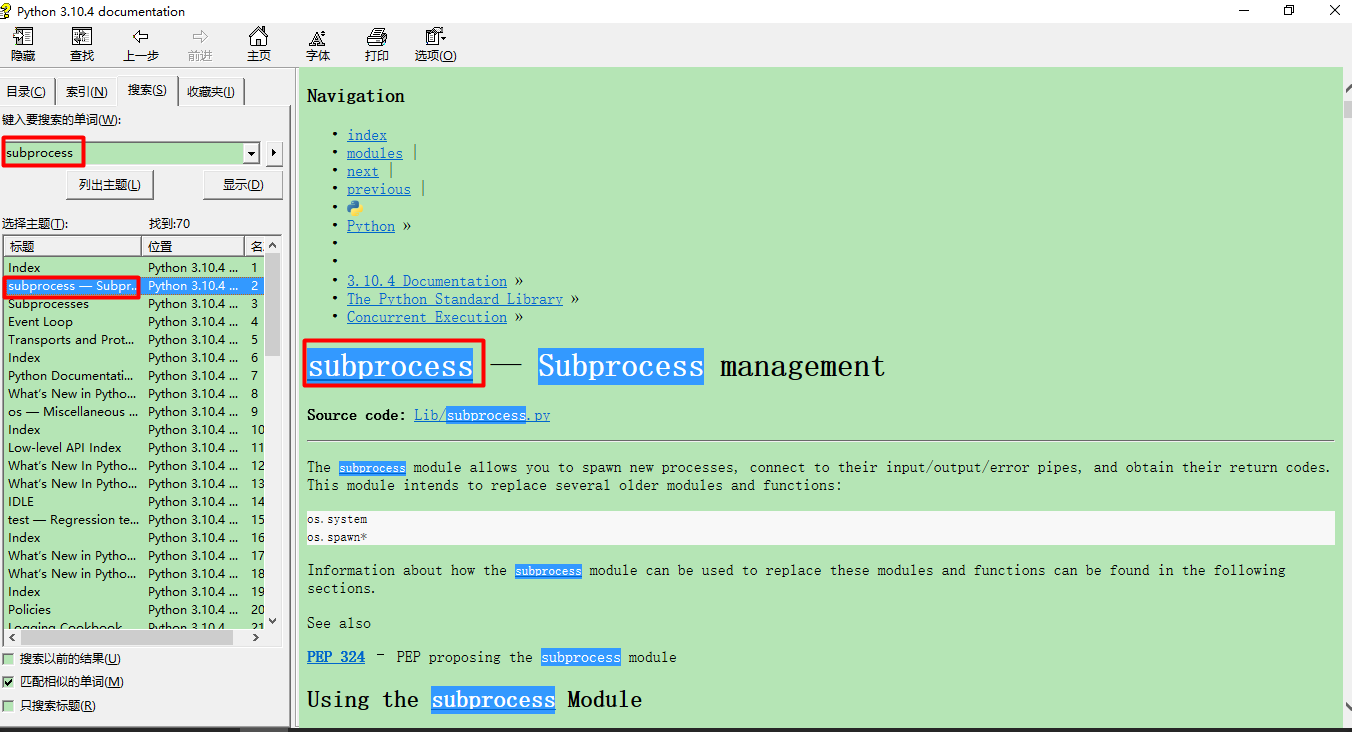
1、开始 --> python --> Python Manuals --> 搜索内置模块,例如:subprocess。
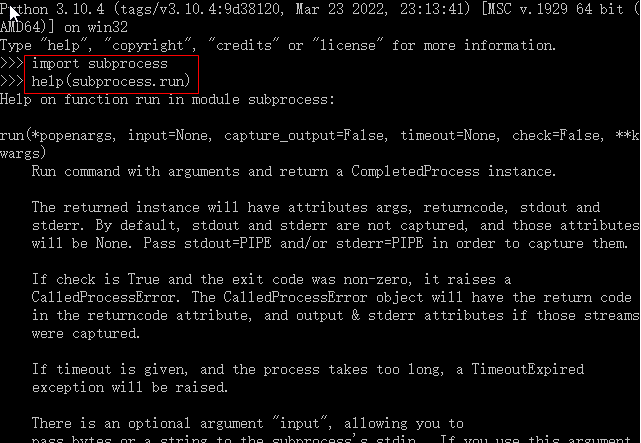
2、 打开Python解释器 --> import 内置模块,help(内置模块.方法)
3、若是第三方库,去第三方库的官方网站查看官方文档。
更多推荐
 7
7 0
0- 0


 已为社区贡献6条内容

所有评论(0)