
【vue3-element-admin 项目实战】:基于vue-pdf-embed 构建专业级PDF预览组件
🚀 作者主页: 有来技术
🔥 开源项目: youlai-mall ︱vue3-element-admin︱youlai-boot︱vue-uniapp-template
🌺 仓库主页: GitCode︱ Gitee ︱ Github
💖 欢迎点赞 👍 收藏 ⭐评论 📝 如有错误敬请纠正!
为什么选择vue-pdf-embed
在企业级Web应用中,PDF在线预览是一个常见且高频的需求,特别是在管理后台、合同平台或文档中心等场景。经过评估多种PDF预览解决方案后,我选择了vue-pdf-embed库,原因有三:
- 与Vue3生态完美兼容,支持TypeScript
- 基于PDF.js,渲染质量高且功能丰富
- 轻量级设计,API简洁易用,易于扩展
本文将基于开源项目 vue3-element-admin ,提供一套精简、可直接使用的PDF预览实现方案,技术栈为Vue3 + TypeScript + Element Plus + Vite。
效果预览: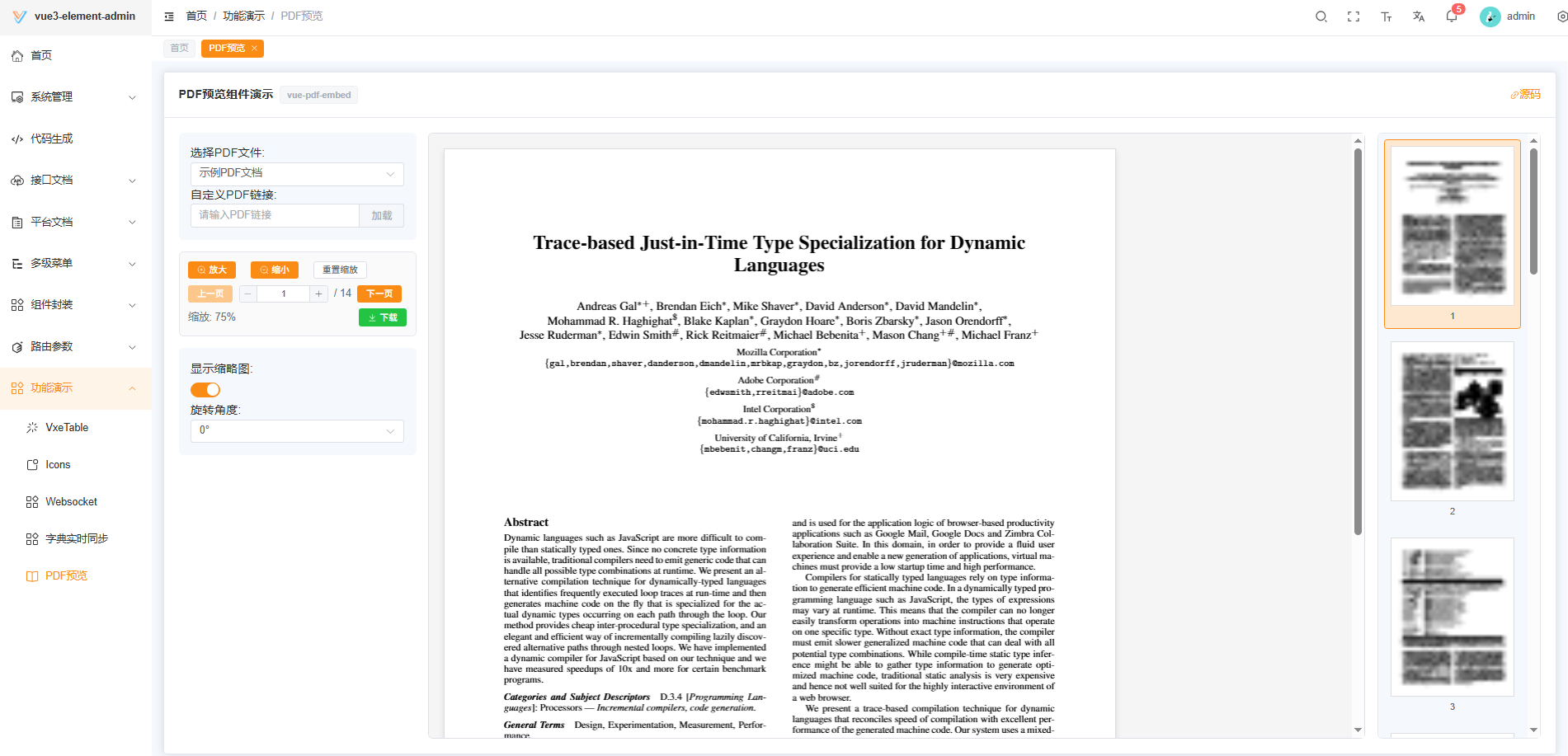
环境准备与依赖安装
首先,确保您的项目已经搭建好Vue3环境。如果您使用的是vue3-element-admin框架,可以直接在此基础上进行开发。
安装vue-pdf-embed依赖:
# 使用pnpm
pnpm add vue-pdf-embed

# 或使用npm
npm install vue-pdf-embed

# 或使用yarn
yarn add vue-pdf-embed
组件设计与实现
组件布局结构
我们的PDF预览组件采用三栏布局设计:
- 左侧控制面板:提供PDF选择、自定义链接输入、缩放控制、页面导航等功能
- 中间预览区域:展示PDF内容,支持加载状态和错误处理
- 右侧缩略图区域:可切换显示/隐藏,支持缩略图导航
这种布局既符合用户习惯,又能充分利用大屏幕空间,提供良好的阅读体验。
核心功能实现
将以下代码保存为src/views/pdf-preview.vue,可直接在项目中复制拷贝使用:
<template>
  <div class="pdf-preview">
    <el-card>
      <template #header>
        <div class="header">
          <span>PDF 预览(vue-pdf-embed)</span>
          <el-tag type="info">基于 vue3-element-admin</el-tag>
        </div>
      </template>

      <div class="layout">
        <!-- 左侧控制 -->
        <div class="side">
          <el-form label-position="top" size="small">
            <el-form-item label="选择示例PDF">
              <el-select v-model="selectedPdf" placeholder="请选择PDF">
                <el-option
                  v-for="item in pdfOptions"
                  :key="item.value"
                  :label="item.label"
                  :value="item.value"
                />
              </el-select>
            </el-form-item>

            <el-form-item label="自定义PDF链接">
              <el-input v-model="customPdfUrl" placeholder="输入 PDF 链接" @keyup.enter="loadCustomPdf">
                <template #append>
                  <el-button @click="loadCustomPdf" size="small">加载</el-button>
                </template>
              </el-input>
            </el-form-item>

            <el-divider />

            <div class="tools">
              <el-button @click="zoomIn" :disabled="!pdfSrc" size="small">放大</el-button>
              <el-button @click="zoomOut" :disabled="!pdfSrc" size="small">缩小</el-button>
              <el-button @click="resetZoom" :disabled="!pdfSrc" size="small">重置</el-button>

              <div class="pager" style="margin-top:8px">
                <el-button @click="prevPage" :disabled="currentPage <= 1" size="small">上一页</el-button>
                <el-input-number
                  v-model="currentPage"
                  :min="1"
                  :max="Math.max(totalPages, 1)"
                  size="small"
                  style="width: 100px"
                  @change="handlePageNumberChange"
                />
                <span>/ {{ totalPages }}</span>
                <el-button @click="nextPage" :disabled="currentPage >= totalPages" size="small">下一页</el-button>
              </div>

              <div style="margin-top:8px">
                <el-switch v-model="showThumbnails" active-text="显示缩略图" inactive-text="隐藏缩略图" />
              </div>

              <div style="margin-top:8px">
                <el-button type="success" @click="downloadPdf" :disabled="!pdfSrc" size="small">下载 PDF</el-button>
              </div>
            </div>
          </el-form>
        </div>

        <!-- 中间预览 -->
        <div class="main" ref="previewWrapRef">
          <div v-loading="loading" element-loading-text="PDF加载中..." class="viewer-wrap">
            <div v-if="error">
              <el-result icon="error" title="加载失败" :sub-title="error">
                <template #extra>
                  <el-button type="primary" @click="retryLoad">重试</el-button>
                </template>
              </el-result>
            </div>

            <div v-else-if="!pdfSrc">
              <el-empty description="请选择或输入 PDF 链接" />
            </div>

            <div v-else class="pdf-viewer">
              <VuePdfEmbed
                ref="pdfRef"
                :source="pdfSrc"
                :page="currentPage"
                :width="pageWidth"
                :rotation="rotation"
                class="pdf-embed"
                @loaded="onPdfLoaded"
                @loading-failed="onLoadingFailed"
                @page-loaded="onPageLoaded"
                @password-requested="onPasswordRequested"
              />
            </div>
          </div>
        </div>

        <!-- 右侧缩略图 -->
        <div class="thumb" v-if="showThumbnails && pdfSrc">
          <div class="thumbs">
            <div
              v-for="p in totalPages"
              :key="p"
              :class="['thumb-item', { active: p === currentPage }]"
              @click="goToPage(p)"
            >
              <VuePdfEmbed :source="pdfSrc" :page="p" :scale="0.18" class="thumb-mini" />
              <div class="label">{{ p }}</div>
            </div>
          </div>
        </div>
      </div>
    </el-card>
  </div>
</template>

<script setup lang="ts">
import { ref, onMounted, onBeforeUnmount, nextTick, watch } from 'vue';
import VuePdfEmbed from 'vue-pdf-embed';
import { ElMessage, ElMessageBox } from 'element-plus';

/* state */
const pdfSrc = ref<string>('');
const selectedPdf = ref<string>('');
const customPdfUrl = ref<string>('');
const loading = ref(false);
const error = ref('');
const totalPages = ref(0);
const currentPage = ref(1);
const scale = ref(1.0);
const rotation = ref(0);
const showThumbnails = ref(false);

const pdfOptions = [
  {
    label: '示例 PDF(Mozilla)',
    value: 'https://mozilla.github.io/pdf.js/web/compressed.tracemonkey-pldi-09.pdf',
  },
];

const pdfRef = ref<any>(null);
const previewWrapRef = ref<HTMLElement | null>(null);
const pageWidth = ref<number | undefined>(undefined);

const updatePageWidth = () => {
  const wrap = previewWrapRef.value;
  if (!wrap) return;
  const containerWidth = Math.max(200, wrap.clientWidth - 40);
  pageWidth.value = Math.round(containerWidth * scale.value);
};

onMounted(() => {
  if (!selectedPdf.value && pdfOptions.length) selectedPdf.value = pdfOptions[0].value;
  nextTick(updatePageWidth);
  window.addEventListener('resize', updatePageWidth);
});

onBeforeUnmount(() => {
  window.removeEventListener('resize', updatePageWidth);
});

watch(selectedPdf, (v) => { if (v) loadPdf(v); });

/* load */
const loadPdf = async (url: string) => {
  loading.value = true;
  error.value = '';
  pdfSrc.value = url;
  currentPage.value = 1;
  scale.value = 1.0;
  rotation.value = 0;
  nextTick(updatePageWidth);
};

const loadCustomPdf = () => {
  if (!customPdfUrl.value.trim()) return ElMessage.warning('请输入 PDF 链接');
  if (!customPdfUrl.value.toLowerCase().endsWith('.pdf')) return ElMessage.warning('请输入有效的 PDF 链接');
  loadPdf(customPdfUrl.value.trim());
};

/* events */
let lastLoadedSrc = ref('');
const onPdfLoaded = (pdf: any) => {
  loading.value = false;
  totalPages.value = pdf?.numPages || 0;
  if (pdfSrc.value !== lastLoadedSrc.value) {
    lastLoadedSrc.value = pdfSrc.value;
    ElMessage.success(`PDF 加载成功,共 ${totalPages.value} 页`);
  }
};
const onLoadingFailed = (e: any) => {
  loading.value = false;
  error.value = e?.message || 'PDF 加载失败';
  ElMessage.error(error.value);
};
const onPageLoaded = () => { /* 页面渲染完成可处理其它逻辑 */ };
const onPasswordRequested = async (callback: Function) => {
  try {
    const { value } = await ElMessageBox.prompt('此 PDF 受密码保护,请输入密码', '密码验证', {
      inputType: 'password',
      confirmButtonText: '确定',
      cancelButtonText: '取消',
    });
    callback(value);
  } catch {
    callback(null);
  }
};

const retryLoad = () => { if (pdfSrc.value) loadPdf(pdfSrc.value); };

/* controls */
const zoomIn = () => { scale.value = Math.min(scale.value + 0.25, 3.0); updatePageWidth(); };
const zoomOut = () => { scale.value = Math.max(scale.value - 0.25, 0.25); updatePageWidth(); };
const resetZoom = () => { scale.value = 1.0; updatePageWidth(); };

const prevPage = () => { if (currentPage.value > 1) currentPage.value--; };
const nextPage = () => { if (currentPage.value < totalPages.value) currentPage.value++; };
const goToPage = (p: number) => { if (p >= 1 && p <= totalPages.value) currentPage.value = p; };
const handlePageNumberChange = (cur?: number) => { if (typeof cur === 'number') goToPage(cur); };

/* download */
const downloadPdf = () => {
  if (!pdfSrc.value) return;
  const src = pdfSrc.value;
  if (/^https?:/i.test(src)) {
    (async () => {
      try {
        const resp = await fetch(src, { mode: 'cors' });
        const blob = await resp.blob();
        const cd = resp.headers.get('content-disposition') || '';
        const m = cd.match(/filename\*=UTF-8''([^;]+)|filename="?([^";]+)"?/i);
        let fileName = m ? decodeURIComponent(m[1] || m[2]) : '';
        if (!fileName) {
          try { fileName = new URL(src).pathname.split('/').pop() || `document-${Date.now()}.pdf`; }
          catch { fileName = `document-${Date.now()}.pdf`; }
        }
        const url = URL.createObjectURL(blob);
        const a = document.createElement('a');
        a.href = url;
        a.download = fileName.endsWith('.pdf') ? fileName : `${fileName}.pdf`;
        document.body.appendChild(a);
        a.click();
        a.remove();
        URL.revokeObjectURL(url);
        ElMessage.success('已开始下载');
      } catch {
        try { await pdfRef.value?.download?.(`document-${Date.now()}.pdf`); }
        catch { ElMessage.error('下载失败'); }
      }
    })();
    return;
  }
  try { pdfRef.value?.download?.(`document-${Date.now()}.pdf`); }
  catch {
    const link = document.createElement('a');
    link.href = src as string;
    link.download = `document-${Date.now()}.pdf`;
    document.body.appendChild(link);
    link.click();
    link.remove();
  }
};
</script>

<style scoped lang="scss">
.pdf-preview {
  .layout { display:flex; gap:16px; align-items:flex-start; }
  .side { width:300px; flex-shrink:0; }
  .main { flex:1; min-width:0; }
  .thumb { width:220px; flex-shrink:0; }
  .pdf-embed { border:1px solid #ddd; }
  .thumb-mini { width:100%; }
  .thumb-item { padding:8px; margin-bottom:8px; cursor:pointer; border:1px solid transparent; border-radius:4px; }
  .thumb-item.active { border-color:#409EFF; background:#f0f8ff; }
}
</style>
样式设计
我们采用了简洁而实用的样式设计:
- 使用Flex布局实现三栏结构,确保在不同屏幕尺寸下的自适应
- 为PDF预览区域添加边框,增强视觉分隔效果
- 缩略图区域采用高亮样式标记当前页,提升用户体验
- 整体风格与Element Plus组件库保持一致,确保UI的统一性
功能详解
PDF加载与错误处理
组件支持两种PDF加载方式:
- 从预设列表中选择PDF
- 输入自定义PDF链接并加载
为提升用户体验,我们实现了完善的加载状态和错误处理机制:
- 加载中显示加载动画
- 加载失败时展示错误信息和重试按钮
- 未选择PDF时显示空状态提示
关键代码实现:
const loadPdf = async (url: string) => {
  loading.value = true;
  error.value = '';
  pdfSrc.value = url;
  currentPage.value = 1;
  scale.value = 1.0;
  rotation.value = 0;
  nextTick(updatePageWidth);
};

const onLoadingFailed = (e: any) => {
  loading.value = false;
  error.value = e?.message || 'PDF 加载失败';
  ElMessage.error(error.value);
};
页面导航与缩放控制
组件提供了丰富的页面导航和缩放控制功能:
- 上一页/下一页按钮
- 页码输入框,支持直接跳转到指定页
- 放大/缩小/重置缩放按钮
缩放功能通过动态计算PDF宽度实现,并结合窗口大小调整自动适配容器宽度:
const updatePageWidth = () => {
  const wrap = previewWrapRef.value;
  if (!wrap) return;
  const containerWidth = Math.max(200, wrap.clientWidth - 40);
  pageWidth.value = Math.round(containerWidth * scale.value);
};

// 监听窗口大小变化
onMounted(() => {
  window.addEventListener('resize', updatePageWidth);
});
缩略图预览
缩略图功能是提升PDF浏览体验的重要部分,特别是对于多页PDF文档:
- 支持通过开关控制缩略图区域的显示/隐藏
- 缩略图使用小比例尺渲染PDF,优化性能
- 当前页高亮显示,点击缩略图可快速跳转
实现方式是复用VuePdfEmbed组件,但使用较小的比例尺:
<VuePdfEmbed :source="pdfSrc" :page="p" :scale="0.18" class="thumb-mini" />
密码保护支持
对于受密码保护的PDF文件,组件提供了友好的密码输入界面:
const onPasswordRequested = async (callback: Function) => {
  try {
    const { value } = await ElMessageBox.prompt('此 PDF 受密码保护,请输入密码', '密码验证', {
      inputType: 'password',
      confirmButtonText: '确定',
      cancelButtonText: '取消',
    });
    callback(value);
  } catch {
    callback(null);
  }
};
这种实现方式保证了安全性,同时提供了良好的用户体验。
PDF下载实现
组件提供了PDF下载功能,支持多种下载场景:
- 远程URL的PDF下载,自动提取文件名
- 本地PDF的下载,使用时间戳作为默认文件名
- 优雅降级处理,确保在不同环境下都能正常下载
下载功能的实现考虑了各种边界情况,保证了功能的健壮性。
总结与实践建议
本文提供了一个专业级PDF预览组件的完整实现,具有以下特点:
- 功能完备:支持PDF加载、页面导航、缩放控制、缩略图预览、密码保护和文件下载
- 用户体验优先:良好的错误处理、加载状态反馈和交互设计
- 易于集成:可直接复制到
vue3-element-admin项目中使用,无需额外配置
在实际项目中使用时,可以根据需求进一步扩展以下功能:
- 添加全文搜索功能
- 实现PDF标注和批注功能
- 增加页面旋转和打印支持
- 集成文档管理系统,实现更复杂的文档操作
通过这个组件,您可以在Vue3项目中快速实现专业级的PDF预览功能,提升用户体验和开发效率。
更多推荐
 5
5 0
0- 0


 已为社区贡献3条内容

所有评论(0)