
Vue 学习随笔系列二十六 —— 动态表头
·
表头定制
表头文字根据需求获取
一、表头与查询条件关联
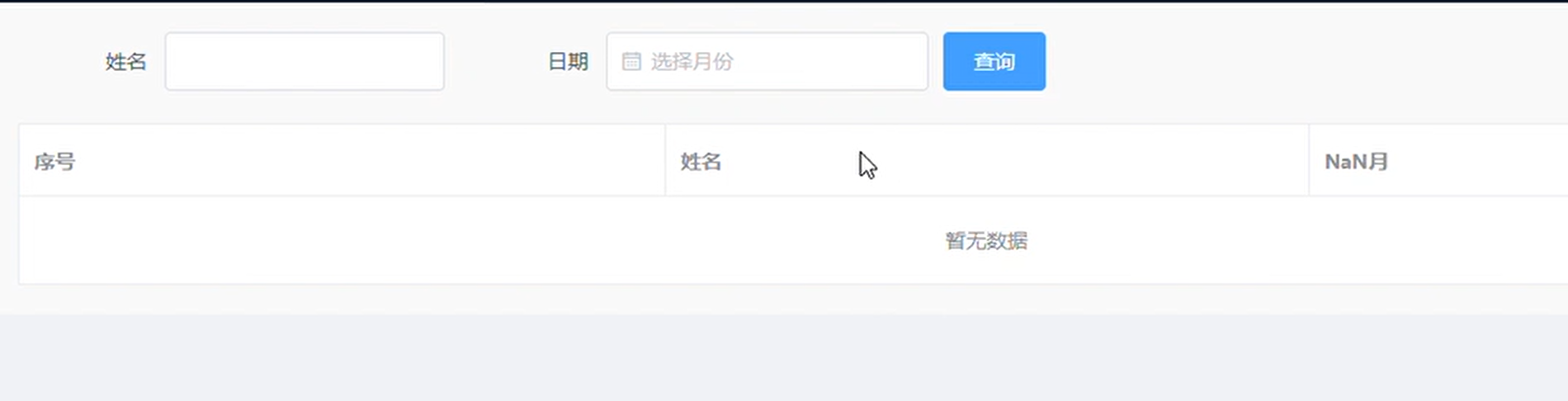
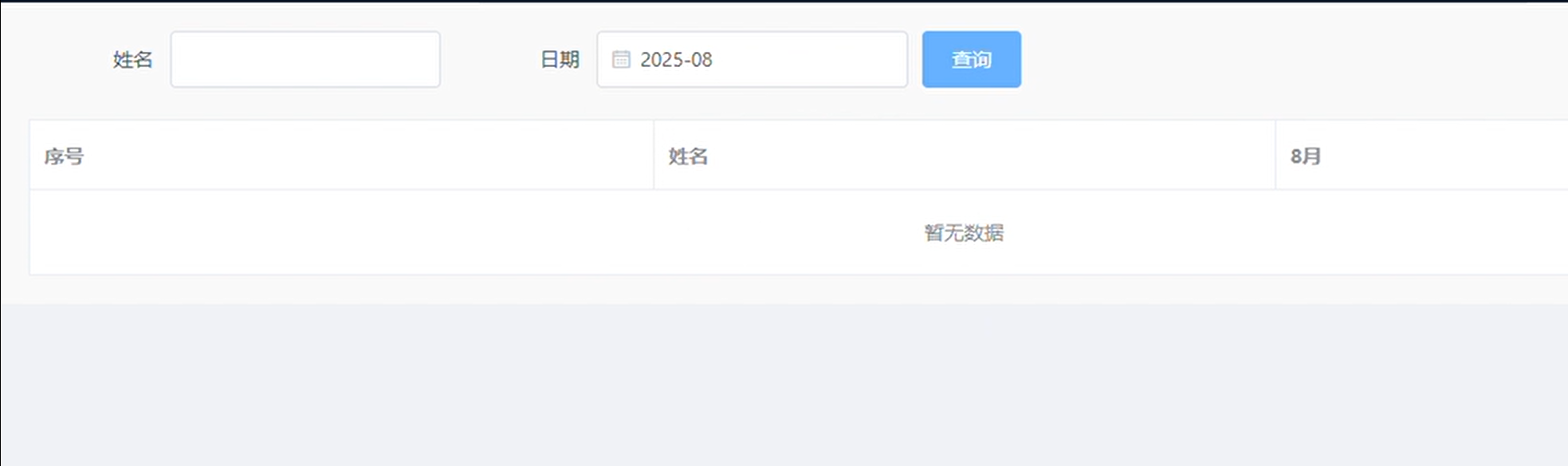
1、实现效果
2、代码实现
解析: 点击查询时,从查询条件中获取日期数据的月份字段,再将月份字段与表头文字组合,组成新的表头
<template>
  <div class="query-form">
  <el-form
    ref="form"
    :model="formData"
    label-width="100px"
    :inline="true"
  >
    <el-form-item label="姓名">
      <el-input v-model="formData.name"></el-input>
    </el-form-item>
    <el-form-item label="日期" prop="date">
      <el-date-picker
        v-model="formData.date"
        type="month"
        value-format="yyyy-MM"
        placeholder="选择月份"
      ></el-date-picker>
    </el-form-item>
    <el-form-item>
      <el-button type="primary" @click="query">查询</el-button>
      <!-- <el-button @click="resetForm">重置</el-button> -->
    </el-form-item>
  </el-form>

  <el-table
    :data="tableData"
    style="width: 100%"
    border
  >
    <el-table-column
      v-for="(item, index) in columns"
      :key="index"
      :prop="item.prop"
      :label="item.label"
    ></el-table-column>
  </el-table>
</div>
</template>

<script>
export default {
  name: 'QueryForm',
  data() {
    return {
      formData: {
        name: "",
        date: [],
      },
      columns: [],
      tableData: [],
    }
  },
  mounted() {
    this.getDate();
    this.query(); // 初始化时查询数据
  },
  methods: {
    getDate() {
      this.formData.date = this.$moment().format("yyyy-MM"); // 设置当前月份
    },
    query() {
      const month = new Date(this.formData.date).getMonth() + 1; // 获取当前月份
      this.columns = [
        { label: '序号', prop: 'index' },
        { label: '姓名', prop: 'name' },
        { label: `${month}月`, prop: 'date' },
      ];
      console.log(this.formData.date, month, this.columns)
    },
  }
}
</script>

<style lang="scss" scoped>
  .query-form {
    padding: 20px;
    background-color: #f9f9f9;
  }
</style>
二、根据数据类型切换表头
tableColumns.js
// 宕机表头
 const DowntimeColumns = [
  {
    prop: 'title',
    label: '姓名',
    minWidth: 80,
  },
  {
    prop: 'province',
    label: '省份',
    minWidth: 80,
  },
  {
    prop: 'city',
    label: '经济事项',
    minWidth: 80,
  },
  {
    prop: 'content',
    label: '宕机时长(h)',
    minWidth: 100,
  },
  {
    prop: 'status',
    label: '当前状态',
    slot: 'status',
    minWidth: 80,
  }
]

const timeoutColumns = [
  {
    prop: 'title',
    label: '姓名',
    minWidth: 80,
  },
  {
    prop: 'province',
    label: '省份',
    minWidth: 80,
  },
  {
    prop: 'city',
    label: '经济事项',
    minWidth: 80,
  },
  {
    prop: 'city',
    label: "滞留时长(h)",
    minWidth: 100,
  },
  {
    prop: 'status',
    label: '当前状态',
    slot: 'status',
    minWidth: 80,
  }
]
const excessColumns = [
  {
    prop: 'title',
    label: '姓名',
    minWidth: 80,
  },
  {
    prop: 'province',
    label: '省份',
    minWidth: 80,
  },
  {
    prop: 'city',
    label: '经济事项',
    minWidth: 80,
  },
  {
    prop: 'city',
    label: "单量/机器人数量",
    minWidth: 120,
  },
  {
    prop: 'status',
    label: '当前状态',
    slot: 'status',
    minWidth: 80,
  }
]

const abnormalColumns = [
  {
    prop: 'title',
    label: '姓名',
    minWidth: 80,
  },
  {
    prop: 'province',
    label: '省份',
    minWidth: 80,
  },
  {
    prop: 'city',
    label: '经济事项',
    minWidth: 80,
  },
  {
    prop: 'city',
    label: "异常描述",
    minWidth: 80,
  },
  {
    prop: 'status',
    label: '当前状态',
    slot: 'status',
    minWidth: 80,
  }
]


export {
  DowntimeColumns,
  timeoutColumns,
  excessColumns,
  abnormalColumns
}
<template>
  <div :class="{
    'warningInfo-box': true,
    'warningInfo-box-dark': isDarkTheme,
    'warningInfo-box-light': !isDarkTheme,
    'scroll_table': true,
  }">
  	<el-button size="small" @click="changeTable(0)">表格1</el-button>
  	<el-button size="small" @click="changeTable(1)">表格2</el-button>
  	<el-button size="small" @click="changeTable(3)">表格3</el-button>
  	<el-button size="small" @click="changeTable(4)">表格4</el-button>
    <el-table
      size="small"
      ref="scrollTable"
      :data="tableData"
      :max-height="tableHeight"
      @row-click="handleRowClick"
      @mouseenter.native="autoScroll(true)"
      @mouseleave.native="autoScroll(false)"
      :header-row-style="{background: 'rgba(20, 153, 255, 0.2)'}"
    >
      <el-table-column
        v-for="(item, index) in columns"
        :key="index"
        :prop="item.prop"
        :label="item.label"
        :align="item.align || 'center'"
        :min-width="item.minWidth"
        :show-overflow-tooltip="item.showOverflowTooltip || true"
      >
        <template slot-scope="scope">
          <!-- 若在具名插槽,根据传入的slot属性定位列元素,scope.row赋值 -->
          <!-- 若不存在具名插槽,正常渲染列内容 -->
          <span v-if="item.prop === 'status'" :style="formatCategory(scope.row.status).style">
            {{ scope.row.status }}
          </span>
          <span v-else>
            {{ scope.row[item.prop] }}
          </span>
        </template>
      </el-table-column>
    </el-table>
  </div>
</template>

<script>
import { DowntimeColumns, timeoutColumns, excessColumns, abnormalColumns } from './tableColumns'
import { computedSize } from '../components/computedSize';

export default {
  props: {
    pageConfig: Object
  },
  data() {
    return {
      scrolltimer: '', // 自动滚动的定时任务
      currentRow: null,
      tableRowClassName: "",
      columns: [...DowntimeColumns],
      tableHeight: 0,
      tableData: [
        {
          title: 'xx1',
          province: '江苏',
          city: '渠道-初审',
          status: '已派单',
          content: 'xx',
        },
        {
          title: 'xx2',
          province: '江苏',
          city: '渠道-初审',
          status: '处理中',
          content: 'xx',
        },
        {
          title: 'xx3',
          province: '江苏',
          city: '渠道-初审',
          status: '已接收',
          content: 'xx',
        },
        {
          title: 'xx4',
          province: '江苏',
          city: '渠道-初审',
          status: '未处理',
          content: 'xx',
        },
        {
          title: 'xx5',
          province: '江苏',
          city: '渠道-初审',
          status: '未处理',
          content: 'xx',
        },
        {
          title: 'xx6',
          province: '江苏',
          city: '渠道-初审',
          status: '未处理',
          content: 'xx',
        },
        {
          title: 'xx7',
          province: '江苏',
          city: '渠道-初审',
          status: '未处理',
          content: 'xx',
        },
        {
          title: 'xx8',
          province: '江苏',
          city: '渠道-初审',
          status: '未处理',
          content: 'xx',
        },
        {
          title: 'xx9',
          province: '江苏',
          city: '渠道-初审',
          status: '未处理',
          content: 'xx',
        },
        {
          title: 'xx10',
          province: '江苏',
          city: '渠道-初审',
          status: '未处理',
          content: 'xx',
        },
        {
          title: 'xx11',
          province: '江苏',
          city: '渠道-初审',
          status: '未处理',
          content: 'xx',
        },
        {
          title: 'xx12',
          province: '江苏',
          city: '渠道-初审',
          status: '未处理',
          content: 'xx',
        },
      ]
    }
  },
  computed: {
    isDarkTheme () {
      return !!this.pageConfig.isDarkTheme
    },
    formatCategory() {
      const tempMap = {
        '已派单': {
          style: { color: '#AEDBF1'}
        },
        '已接收': {
          style: { color: '#00C252'}
        },
        '处理中': {
          style: { color: '#FF8A48'}
        },
        '未处理': {
          style: { color: '#A21941'}
        },
      }
      return category => {
        return tempMap[category] || {}
      }
    },
  },

  created() {
    // this.tableHeight = window.innerHeight * 0.3 - 90;
    const { media } = computedSize();
    console.log(media)
    this.tableHeight = media == '2K' ? window.innerHeight * 0.3 - 100 : window.innerHeight * 0.3
  },
  mounted() {
    // window.onresize = () => {
    //   this.handleTableHeight()
    // }
    this.autoScroll()
  },
  beforeDestroy() {
    this.autoScroll()
  },
  methods: {
    handleTableHeight: function () {
      const { media } = computedSize();
      var _this = this;
      window.onresize = () => {
        _this.tableHeight = media == '2K' ? window.innerHeight * 0.3 - 100 : window.innerHeight * 0.3
      };
    },
    changeTable(type) {
      if (type == '0') {
        this.columns = [...DowntimeColumns]
      } else if (type == '1') {
        this.columns = [...timeoutColumns]
      } else if (type == '2') {
        this.columns = [...excessColumns]
      } else if (type == '3') {
        this.columns = [...abnormalColumns]
      }
      this.$refs.scrollTable.doLayout()
      console.log(this.columns)

    },
    // tableRowClassName({ row, rowIndex }) {
    //   console.log(row, rowIndex, this.currentRow)

    //   if (row === this.currentRow && this.currentRow !== null) {

    //     return 'current-row'
    //   }
    //   return ''
    // },
    // 设置自动滚动
    autoScroll(stop) {
        const table = this.$refs.scrollTable
        // 拿到表格中承载数据的div元素
        const divData = table.$refs.bodyWrapper
        // 拿到元素后,对元素进行定时增加距离顶部距离,实现滚动效果(此配置为每100毫秒移动1像素)
        if (stop) {
            //再通过事件监听,监听到 组件销毁 后,再执行关闭计时器。
            window.clearInterval(this.scrolltimer)
        } else {
            this.scrolltimer = window.setInterval(() => {
                // 元素自增距离顶部1像素
                divData.scrollTop += 1
                // 判断元素是否滚动到底部(可视高度+距离顶部=整个高度)
                // if (divData.clientHeight + divData.scrollTop + 2 == divData.scrollHeight) {
                  if(divData.clientHeight + divData.scrollTop >= divData.scrollHeight-1) {
                    // 重置table距离顶部距离
                    divData.scrollTop = 0
                    // 重置table距离顶部距离。值=(滚动到底部时,距离顶部的大小) - 整个高度/2
                    // divData.scrollTop = divData.scrollTop - divData.scrollHeight / 2
                }
            }, 50) // 滚动速度
        }
    },
    handleRowClick(row) {
      this.currentRow = row
      console.log('this.$refs.scrollTable.bodyWrapper', this.$refs.scrollTable.$refs.bodyWrapper)

      this.$refs.scrollTable.$refs.bodyWrapper.querySelectorAll('tr').forEach(tr => tr.classList.remove('selected-row'));
      const rowIndex = this.tableData.findIndex(item => item.title === row.title);
      if(rowIndex !== -1) {
        this.$refs.scrollTable.$refs.bodyWrapper.querySelectorAll('tr')[rowIndex].classList.add('selected-row');
      }
      this.$emit('handleRowClick', row);
    },
  }
}
</script>

<style lang="scss" scoped>
  .warningInfo-box {
    height: calc(100% - 35px);
    width: 100%;
    overflow: hidden;
  }
  .el-table {
    font-size: 12px;
  }

  .warningInfo-box-dark {
    ::v-deep .el-table {
      background-color: transparent !important;
      border: none;
    }

    /** 表格底部线条 */
    ::v-deep .el-table::before {
      background: transparent;
    }

    ::v-deep .el-table tr {
      background: transparent;
      border: none;
    }
    ::v-deep .el-table .el-table__cell.is-leaf {
      color: #B4C0CC;
      background: transparent;
      border: none;
    }
    ::v-deep .el-table .el-table__cell{
      border: none;
      color: #fff;
      padding: 4px 0;
      // font-size: 12px;
    }

    ::v-deep .selected-row {
      background-color: rgba(53, 180, 244, 0.13) !important;
      border-left: 4px solid #1499FF !important;
      cursor: pointer;
    }
    // 选中行时背景颜色设置
    ::v-deep .el-table--enable-row-hover .el-table__body tr:hover > td.el-table__cell {
      // background: transparent;
      background: rgba(20, 153, 255, 0.2);

    }

    ::v-deep .el-table--scrollable-y .el-table__body-wrapper {
      overflow: hidden;
    }

    ::v-deep .el-table .el-table__cell.gutter {
      background: transparent;
    }

    // /** 滚动条样式 */
    // ::v-deep .el-table__body-wrapper::-webkit-scrollbar-track {
    //   background-color: #063570; // 与大屏背景颜色一致,实现隐藏
    // }
    // ::v-deep .el-table__body-wrapper::-webkit-scrollbar {
    //   width: 10px;
    //   opacity: 0.5;
    // }
    // ::v-deep .el-table__body-wrapper::-webkit-scrollbar-thumb {
    //   border-radius: 15px;
    //   background-color: #0257aa;
    // }
  }
  /* 媒体查询,当屏幕分辨率大于 1920x1080 时,设置文字大小为 18px */
 // 2K
  @media screen and (max-width: 2560px) {
    .el-table {
      font-size: 18px;
    }
  }
  // 全高清屏幕
  @media screen and (max-width: 1920px) {
    .el-table {
      font-size: 12px;
    }
  }
</style>
更多推荐
 8
8 0
0- 0


 已为社区贡献2条内容

所有评论(0)