
unity(C#/cs)请求 python django后端服务器预制体渲染 scroll list 视频列表
以下是从 Django 后端准备 到 Unity 前端实现 “B 站式视频滚动列表” 的完整、详细流程,包含所有关键步骤(结合你之前遇到的问题和需求优化):作者提供的django后端服务
二、Unity 前端:实现 Scroll View 视频列表
1. 新建 Unity 项目与基础设置
- 打开 Unity,新建「2D 或 3D 项目」(建议 3D 核心,UI 适配更灵活)。
- 确保退出 Play 模式(顶部 Play 按钮为灰色,避免后续操作报错)。
2. 搭建 Scroll View 基础结构
Scroll View 是实现 “滚动列表” 的核心容器,步骤如下:
- 在 Hierarchy 面板右键 → UI → Scroll View,创建 Scroll View 组件。
- 调整 Scroll View 位置和大小(如铺满屏幕中间区域,宽 800,高 600),并删除默认的
Content子物体下的Text(无用)。 - 配置 Scroll View 核心子物体:
- Viewport:可视区域,只显示列表的可见部分,无需修改。
- Scrollbar Vertical:垂直滚动条,保留默认设置(控制上下滚动)。
- Content:存放所有视频卡片的父物体,需添加布局组件让卡片自动排列。
3. 配置 Content 布局(让卡片垂直排列)
选中 Scroll View → Viewport → Content,添加以下组件(确保卡片自动垂直排列且高度自适应):
- 添加 Vertical Layout Group 组件(控制子物体垂直布局):
- 勾选 Child Force Expand → Width(让每个视频卡片宽度适配 Content)。
- 取消勾选 Child Force Expand → Height(卡片高度由自身决定)。
- 设置 Spacing 为 10(卡片之间的垂直间距)。
- 设置 Padding 为 (20, 20, 20, 20)(Content 内边距,避免卡片贴边)。
- 添加 Content Size Fitter 组件(让 Content 高度随卡片数量自动变化):
- Horizontal Fit 设为
Unconstrained。 - Vertical Fit 设为
Preferred Size(Content 高度 = 所有卡片高度 + 间距总和)。
- Horizontal Fit 设为
4. 创建视频卡片预制体(VideoCard.prefab)
预制体是 “单个视频卡片的模板”,所有视频数据会通过脚本填充到这个模板中。
步骤 1:创建卡片根物体
- 在 Hierarchy 面板右键 → Create Empty,命名为
VideoCard。 - 选中
VideoCard,添加 Image 组件(作为卡片背景):- 设置 Color 为浅灰色(如 RGB (245,245,245)),Alpha 为 1(不透明)。
- 设置 Rect Transform 尺寸:宽 700,高 200(根据需求调整,确保显示完整信息)。
- 给
VideoCard添加 Button 组件(实现 “点击卡片播放视频” 的交互):- 无需修改 Button 其他设置,后续通过脚本绑定点击事件。
步骤 2:添加卡片子元素(封面、标题等)
为 VideoCard 添加以下子物体(右键 VideoCard → UI → 对应组件),并调整位置和样式:
| 子物体名称 | 组件类型 | 作用 | 位置 / 样式设置 |
|---|---|---|---|
| Cover | Image | 显示视频封面图 | 位置 (0,0,0),尺寸 (200,180);Raycast Target 设为 false(避免遮挡按钮点击) |
| Title | Text - TextMeshPro | 显示视频标题 | 位置 (220, 60, 0),尺寸 (450, 40);字体大小 16,颜色黑色,加粗 |
| Author | Text - TextMeshPro | 显示作者昵称 | 位置 (220, 20, 0),尺寸 (200, 20);字体大小 12,颜色灰色 |
| Description | Text - TextMeshPro | 显示视频描述 | 位置 (220, -20, 0),尺寸 (450, 40);字体大小 11,颜色深灰色 |
| ViewCount | Text - TextMeshPro | 显示播放量 | 位置 (600, -80, 0),尺寸 (100, 20);字体大小 12,颜色灰色,右对齐 |
- 注意:若创建 Text 时默认是
Text - TextMeshPro(Unity 推荐),直接使用即可;若需用旧版Text,右键VideoCard → UI → Text,后续脚本需对应修改(推荐 TMPro,文字更清晰)。
步骤 3:保存为预制体
- 在 Project 面板右键 → Create → Folder,命名为
Resources(脚本需从该文件夹加载预制体)。 - 拖动 Hierarchy 面板中的
VideoCard到 Project 面板的Resources文件夹中,生成VideoCard.prefab预制体。 - 删除 Hierarchy 面板中的
VideoCard(预制体已保存,后续通过脚本动态创建)。
5. 导入必要资源与插件(可选但推荐)
- TextMeshPro 资源:若创建
Text - TextMeshPro时提示 “缺少资源”,点击顶部菜单栏 Window → TextMeshPro → Import TMP Essential Resources,在弹出窗口点击Import(需退出 Play 模式)。 - 视频播放插件(后续播放视频用):若需实现视频播放,导入
AVPro Video或Unity Video Player(内置),此处先不配置,仅做准备。
模型脚本:VideoDataModels
using System;
using System.Collections.Generic;
using UnityEngine;

// 视频剧集模型
[Serializable]
public class Episode
{
    public int title;
    public string url;
    public string price;
}

// 评论模型
[Serializable]
public class Comment
{
    public string commentContent;
    public string creationTime;
}

// 弹幕模型
[Serializable]
public class Danmu
{
    public string text;
    public string color;
    public string time;
}

// 单个视频模型
[Serializable]
public class VideoItem
{
    public int video_id;
    public string avatar;
    public string cover;
    public string nickName;
    public string title;
    public string description;
    public List<Comment> commentContent;
    public List<Danmu> danmuList;
    public List<Episode> episodes;
    public string account;
    public int user_id;
    public string nickname;
    public float peoplePlayCount;
    public int followers_count;
    public int total_videos;
    public string total_play_count;
    public int total_comments_count;
    public string date;
    public string total_thumbs_up;
    public string total_dislikes;
    public string total_mantou;
    public string total_collections;
    public int total_forwards;
}

// 用户视频数据模型
[Serializable]
public class UserVideoData
{
    public string account;
    public int user_id;
    public string avatar;
    public string nickname;
    public int followers_count;
    public int total_videos;
    public float total_play_count;
    public int total_comments_count;
    public string date;
    public float total_thumbs_up;
    public float total_dislikes;
    public float total_mantou;
    public float total_collections;
    public int total_forwards;
    public List<VideoItem> videos;
}

// 视频列表响应模型
[Serializable]
public class VideoListResponse
{
    public List<UserVideoData> data;
}
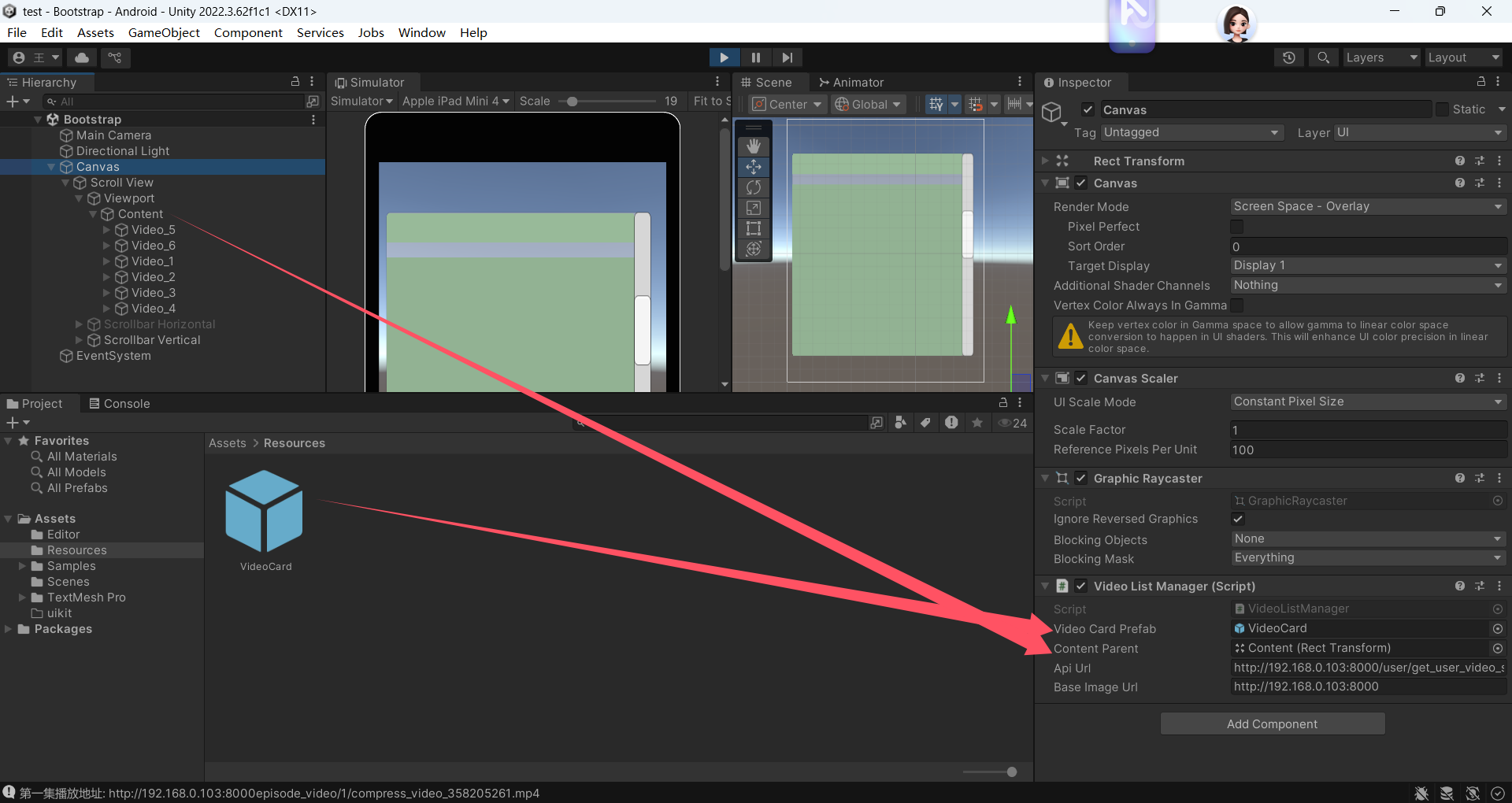
渲染卡片脚本:VideoListManager
using System;
using System.Collections;
using System.Collections.Generic;
using UnityEngine;
using UnityEngine.Networking;
using UnityEngine.UI;
using TMPro;

public class VideoListManager : MonoBehaviour
{
    public GameObject videoCardPrefab; // 视频卡片预制体
    public Transform contentParent;    // ScrollView的Content容器
    public string apiUrl = "http://192.168.0.103:8000/user/get_user_video_statistics/"; // API地址
    public string baseImageUrl = "http://192.168.0.103:8000/"; // 图片基础URL

    void Start()
    {
        Debug.Log("VideoListManager.Start: 开始初始化网络请求设置");
        // 开发环境设置:允许HTTP连接和忽略SSL验证
        System.Net.ServicePointManager.SecurityProtocol =
            System.Net.SecurityProtocolType.Tls12 |
            System.Net.SecurityProtocolType.Tls11 |
            System.Net.SecurityProtocolType.Tls;
        System.Net.ServicePointManager.ServerCertificateValidationCallback =
            (sender, certificate, chain, sslPolicyErrors) => true;

        Debug.Log("VideoListManager.Start: 开始发起视频列表请求");
        StartCoroutine(GetVideoList());
    }

    // 从后端获取视频列表
    IEnumerator GetVideoList()
    {
        Debug.Log($"VideoListManager.GetVideoList: 发起请求,目标URL: {apiUrl}");
        UnityWebRequest request = UnityWebRequest.Get(apiUrl);
        request.timeout = 10; // 设置超时时间
        request.SetRequestHeader("Accept", "application/json");

        yield return request.SendWebRequest();

        // 打印调试信息
        Debug.Log($"VideoListManager.GetVideoList: 请求状态: {request.result}");
        Debug.Log($"VideoListManager.GetVideoList: 响应码: {request.responseCode}");
        Debug.Log($"VideoListManager.GetVideoList: 响应内容长度: {request.downloadHandler.text.Length}");
        Debug.Log($"VideoListManager.GetVideoList: 响应内容前50字符: {request.downloadHandler.text.Substring(0, Math.Min(50, request.downloadHandler.text.Length))}");

        if (request.result == UnityWebRequest.Result.Success)
        {
            try
            {
                string json = request.downloadHandler.text;
                Debug.Log($"VideoListManager.GetVideoList: 完整JSON响应: {json}");

                // 处理JSON数据(兼容数组和对象格式)
                VideoListResponse response;
                if (json.StartsWith("["))
                {
                    Debug.Log("VideoListManager.GetVideoList: JSON数据以数组开头,进行包裹处理");
                    // 如果是数组格式,包裹成对象
                    json = "{\"data\":" + json + "}";
                    response = JsonUtility.FromJson<VideoListResponse>(json);
                }
                else
                {
                    Debug.Log("VideoListManager.GetVideoList: JSON数据以对象开头,直接解析");
                    // 如果是对象格式,直接解析
                    response = JsonUtility.FromJson<VideoListResponse>(json);
                }

                if (response != null)
                {
                    Debug.Log($"VideoListManager.GetVideoList: 响应对象不为空,data字段 {(response.data != null ? "非空" : "空")}");
                    if (response.data != null)
                    {
                        Debug.Log($"VideoListManager.GetVideoList: 成功解析到 {response.data.Count} 个用户数据");
                        ClearAllVideoCards();
                        CreateAllVideoCards(response.data);
                    }
                    else
                    {
                        Debug.LogError("VideoListManager.GetVideoList: 解析后的数据中data字段为空");
                    }
                }
                else
                {
                    Debug.LogError("VideoListManager.GetVideoList: 解析后得到的响应对象为空");
                }
            }
            catch (Exception e)
            {
                Debug.LogError($"VideoListManager.GetVideoList: 解析JSON失败: {e.Message}\n堆栈信息: {e.StackTrace}");
            }
        }
        else
        {
            Debug.LogError($"VideoListManager.GetVideoList: 请求失败: {request.error},详细响应: {request.downloadHandler.text}");
        }
    }

    // 创建所有视频卡片
    void CreateAllVideoCards(List<UserVideoData> userDatas)
    {
        Debug.Log($"VideoListManager.CreateAllVideoCards: 开始创建视频卡片,共 {userDatas.Count} 个用户数据");
        foreach (var userData in userDatas)
        {
            Debug.Log($"VideoListManager.CreateAllVideoCards: 处理用户数据,user_id: {userData.user_id}");
            if (userData.videos != null)
            {
                Debug.Log($"VideoListManager.CreateAllVideoCards: 用户 {userData.user_id} 有 {userData.videos.Count} 个视频");
                foreach (var video in userData.videos)
                {
                    CreateVideoCard(video);
                }
            }
            else
            {
                Debug.LogWarning($"VideoListManager.CreateAllVideoCards: 用户 {userData.user_id} 的videos字段为空");
            }
        }
    }

    // 创建单个视频卡片
    void CreateVideoCard(VideoItem video)
    {
        Debug.Log($"VideoListManager.CreateVideoCard: 开始创建视频卡片,video_id: {video.video_id},标题: {video.title}");
        if (videoCardPrefab == null)
        {
            Debug.LogError("VideoListManager.CreateVideoCard: 请赋值视频卡片预制体");
            return;
        }

        if (contentParent == null)
        {
            Debug.LogError("VideoListManager.CreateVideoCard: 请赋值Content容器");
            return;
        }

        // 实例化卡片
        GameObject card = Instantiate(videoCardPrefab, contentParent);
        card.name = $"Video_{video.video_id}"; // 命名卡片便于调试

        try
        {
            // 打印视频数据详细信息
            Debug.Log($"VideoListManager.CreateVideoCard: 视频 {video.video_id} 详细信息:标题-{video.title},描述-{video.description},封面URL-{video.cover},头像URL-{video.avatar}");

            // 设置标题(兼容Text和TextMeshPro)
            SetText(card.transform, "Title", video.title);

            // 设置描述
            SetText(card.transform, "Description", video.description);

            // 设置播放量
            SetText(card.transform, "PlayCount", $"播放量: {video.total_play_count}");

            // 设置发布日期
            string formattedDate = FormatDate(video.date);
            Debug.Log($"VideoListManager.CreateVideoCard: 视频 {video.video_id} 格式化后的日期:{formattedDate}");
            SetText(card.transform, "Date", formattedDate);

            // 设置作者
            SetText(card.transform, "Author", video.nickName);

            // 加载封面图
            LoadImageToUI(card.transform, "Cover", video.cover);

            // 加载头像
            LoadImageToUI(card.transform, "Avatar", video.avatar);

            // 绑定点击事件
            Button button = card.GetComponent<Button>();
            if (button != null)
            {
                button.onClick.AddListener(() => OnVideoClicked(video));
            }
            else
            {
                Debug.LogWarning($"VideoListManager.CreateVideoCard: 视频卡片 {video.video_id} 没有Button组件");
            }
        }
        catch (Exception e)
        {
            Debug.LogError($"VideoListManager.CreateVideoCard: 设置卡片 {video.video_id} 失败: {e.Message},堆栈信息: {e.StackTrace}");
        }
    }

    // 通用文本设置方法(兼容两种文本组件)
    void SetText(Transform parent, string childName, string text)
    {
        Debug.Log($"VideoListManager.SetText: 尝试设置{childName}的文本,文本内容:{text}");
        Transform child = parent.Find(childName);
        if (child == null)
        {
            Debug.LogWarning($"VideoListManager.SetText: 未找到名为 {childName} 的UI元素");
            return;
        }

        // 尝试设置Text组件
        Text uiText = child.GetComponent<Text>();
        if (uiText != null)
        {
            Debug.Log($"VideoListManager.SetText: 找到Text组件,设置{childName}的文本为:{text}");
            uiText.text = text;
            return;
        }

        // 尝试设置TextMeshPro组件
        TextMeshProUGUI tmpText = child.GetComponent<TextMeshProUGUI>();
        if (tmpText != null)
        {
            Debug.Log($"VideoListManager.SetText: 找到TextMeshPro组件,设置{childName}的文本为:{text}");
            tmpText.text = text;
            return;
        }

        Debug.LogWarning($"VideoListManager.SetText: {childName} 没有文本组件");
    }

    // 加载图片到UI
    void LoadImageToUI(Transform parent, string childName, string imageUrl)
    {
        Debug.Log($"VideoListManager.LoadImageToUI: 尝试加载{childName}的图片,图片URL:{imageUrl}");
        Transform child = parent.Find(childName);
        if (child == null)
        {
            Debug.LogWarning($"VideoListManager.LoadImageToUI: 未找到名为 {childName} 的UI元素");
            return;
        }

        Image image = child.GetComponent<Image>();
        if (image == null)
        {
            Debug.LogWarning($"VideoListManager.LoadImageToUI: {childName} 没有Image组件");
            return;
        }

        if (string.IsNullOrEmpty(imageUrl))
        {
            Debug.LogWarning($"VideoListManager.LoadImageToUI: {childName} 的图片URL为空");
            return;
        }

        // 处理相对路径
        if (!imageUrl.StartsWith("http"))
        {
            imageUrl = baseImageUrl + imageUrl;
            Debug.Log($"VideoListManager.LoadImageToUI: 拼接后的图片URL:{imageUrl}");
        }

        // 启动协程加载图片
        StartCoroutine(LoadRemoteImage(imageUrl, image, childName));
    }

    // 加载远程图片
    IEnumerator LoadRemoteImage(string url, Image targetImage, string imageName)
    {
        Debug.Log($"VideoListManager.LoadRemoteImage: 开始加载图片,图片名称:{imageName},URL:{url}");
        UnityWebRequest request = UnityWebRequestTexture.GetTexture(url);
        yield return request.SendWebRequest();

        if (request.result == UnityWebRequest.Result.Success)
        {
            Texture2D texture = DownloadHandlerTexture.GetContent(request);
            if (texture != null)
            {
                Debug.Log($"VideoListManager.LoadRemoteImage: 图片 {imageName} 加载成功,纹理尺寸:{texture.width}x{texture.height}");
                Sprite sprite = Sprite.Create(
                    texture,
                    new Rect(0, 0, texture.width, texture.height),
                    Vector2.one * 0.5f
                );
                targetImage.sprite = sprite;
            }
            else
            {
                Debug.LogError($"VideoListManager.LoadRemoteImage: 图片 {imageName} 加载成功,但纹理为空");
            }
        }
        else
        {
            Debug.LogError($"VideoListManager.LoadRemoteImage: 加载图片 {imageName} 失败: {request.error},响应码:{request.responseCode},响应内容:{request.downloadHandler.text}");
        }
    }

    // 视频点击事件
    void OnVideoClicked(VideoItem video)
    {
        Debug.Log($"VideoListManager.OnVideoClicked: 点击了视频: {video.title} (ID: {video.video_id})");

        if (video.episodes != null && video.episodes.Count > 0)
        {
            string firstEpisodeUrl = video.episodes[0].url;
            if (!firstEpisodeUrl.StartsWith("http"))
            {
                firstEpisodeUrl = baseImageUrl + firstEpisodeUrl;
                Debug.Log($"VideoListManager.OnVideoClicked: 拼接后的第一集播放地址: {firstEpisodeUrl}");
            }
            Debug.Log($"VideoListManager.OnVideoClicked: 第一集播放地址: {firstEpisodeUrl}");
            // 在这里添加视频播放逻辑
        }
        else
        {
            Debug.LogWarning("VideoListManager.OnVideoClicked: 该视频没有可用剧集");
        }
    }

    // 清除所有视频卡片
    void ClearAllVideoCards()
    {
        if (contentParent == null)
        {
            Debug.LogError("VideoListManager.ClearAllVideoCards: Content容器为空,无法清除视频卡片");
            return;
        }

        int childCount = contentParent.childCount;
        Debug.Log($"VideoListManager.ClearAllVideoCards: 清除前Content容器中有 {childCount} 个孩子");
        foreach (Transform child in contentParent)
        {
            Destroy(child.gameObject);
        }
        Debug.Log("VideoListManager.ClearAllVideoCards: 清除所有视频卡片完成");
    }

    // 格式化日期显示
    string FormatDate(string dateString)
    {
        if (string.IsNullOrEmpty(dateString))
        {
            Debug.LogWarning("VideoListManager.FormatDate: 日期字符串为空");
            return "未知日期";
        }

        try
        {
            if (DateTime.TryParse(dateString, out DateTime date))
            {
                string formattedDate = date.ToLocalTime().ToString("yyyy-MM-dd HH:mm");
                Debug.Log($"VideoListManager.FormatDate: 日期解析成功,原始日期:{dateString},格式化后:{formattedDate}");
                return formattedDate;
            }
            // 处理ISO格式日期
            else if (DateTime.TryParseExact(
                dateString,
                "yyyy-MM-ddTHH:mm:ss.fffZ",
                System.Globalization.CultureInfo.InvariantCulture,
                System.Globalization.DateTimeStyles.None,
                out DateTime isoDate))
            {
                string formattedDate = isoDate.ToLocalTime().ToString("yyyy-MM-dd HH:mm");
                Debug.Log($"VideoListManager.FormatDate: ISO日期解析成功,原始日期:{dateString},格式化后:{formattedDate}");
                return formattedDate;
            }
            else
            {
                Debug.LogWarning($"VideoListManager.FormatDate: 日期解析失败,无法识别的日期格式:{dateString}");
            }
        }
        catch (Exception e)
        {
            Debug.LogWarning($"VideoListManager.FormatDate: 日期格式化过程中出现异常: {e.Message}");
        }

        return dateString;
    }
}
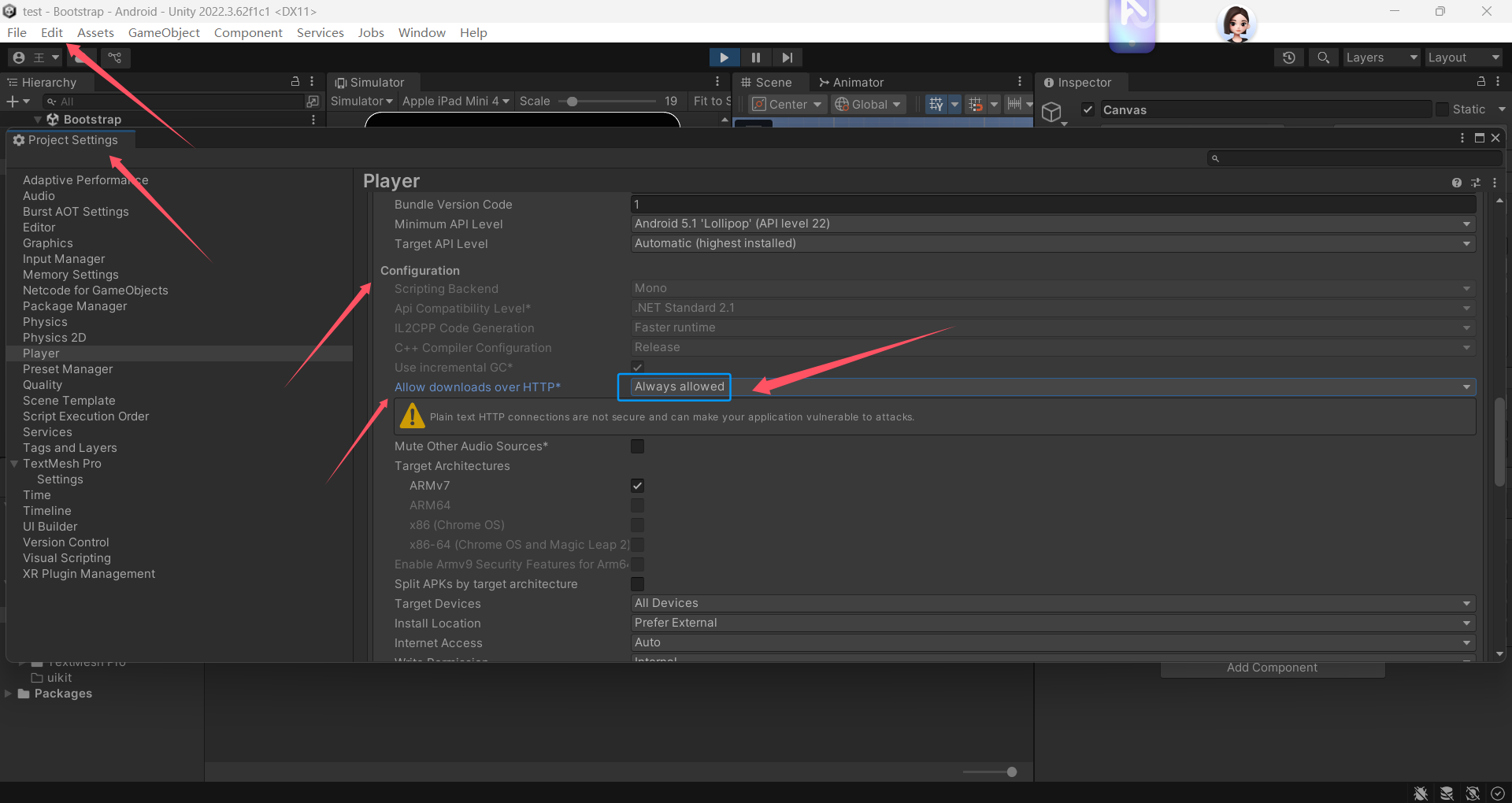
一定要允许支持http策略
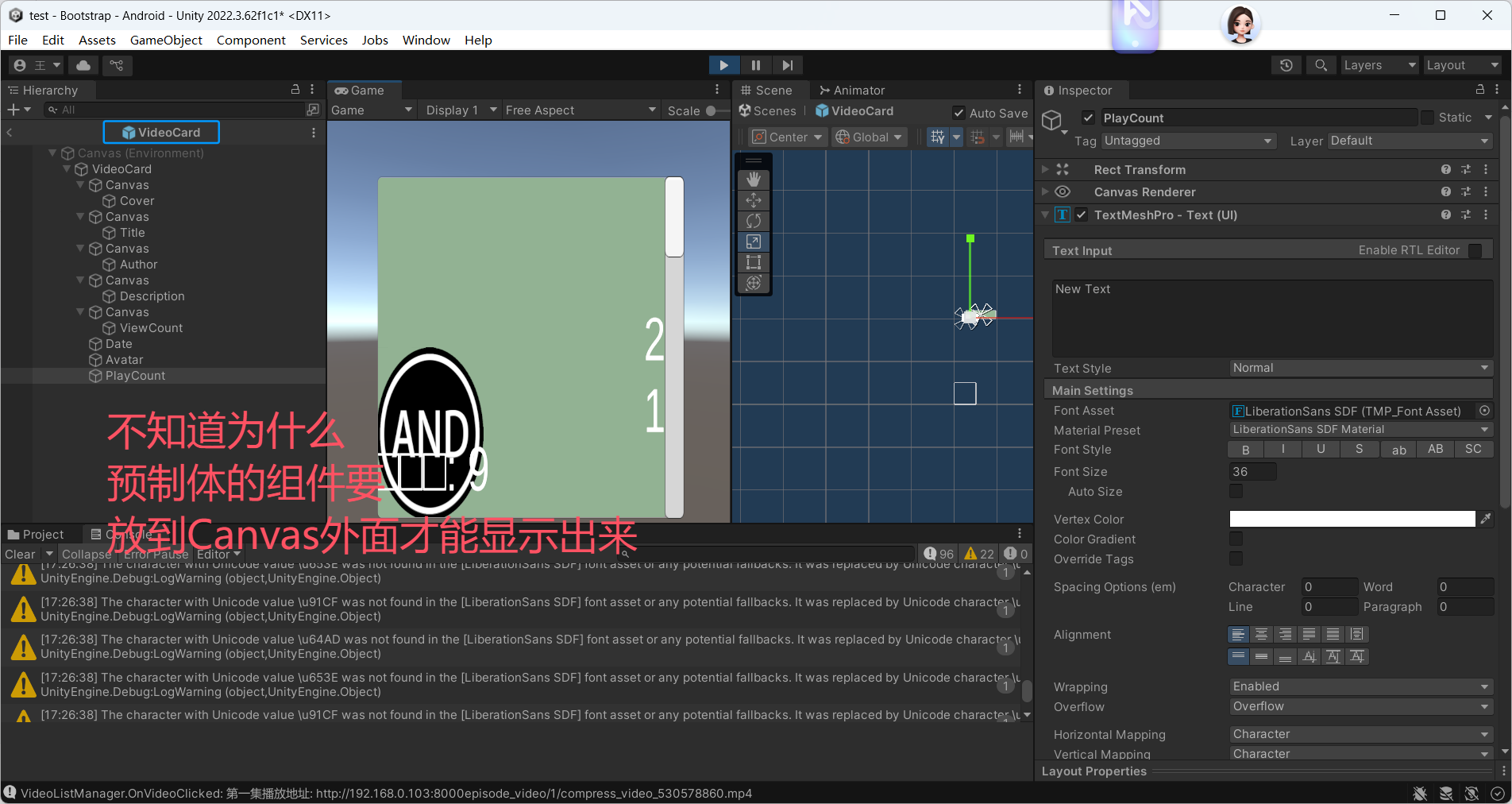
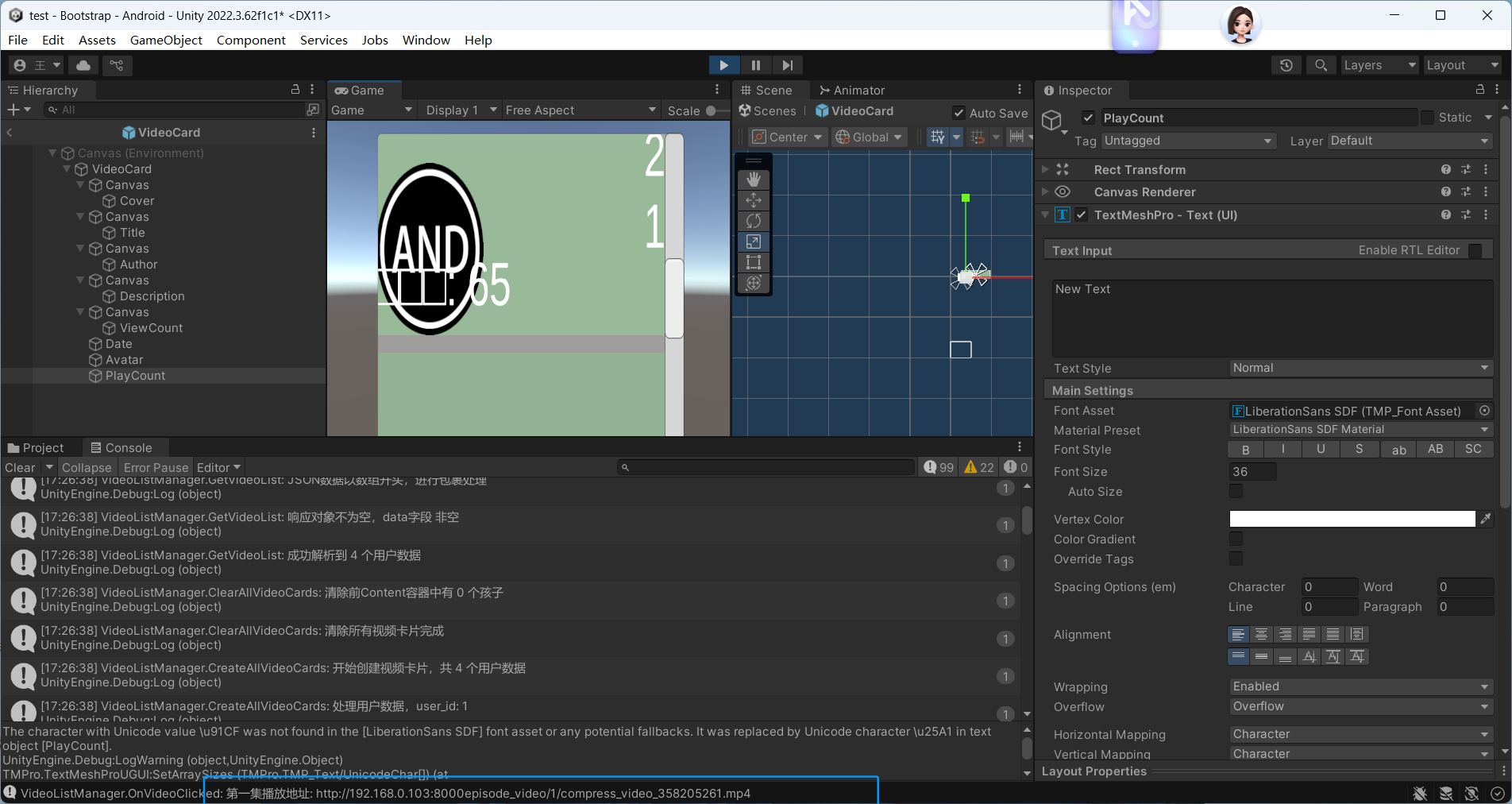
这个警告的核心原因是:你使用的 TextMeshPro 字体
LiberationSans SDF不支持中文(或特定 Unicode 字符,如报错中的\u9898,对应中文 “题” 字),导致中文无法正常显示,被默认的空白方块(\u25A1)替代。解决步骤:给 TextMeshPro 配置支持中文的字体
1. 理解问题本质
TextMeshPro(TMP)默认使用的
LiberationSans SDF是一款仅支持英文和少数西文字符的字体,不包含中文字形。要显示中文,必须为 TMP 配置支持中文的字体文件(如微软雅黑、思源黑体等)。2. 准备中文支持的字体文件
你需要一个支持中文的
.ttf或.otf格式字体文件(以下以 “思源黑体” 为例,免费且兼容性好):
- 获取字体:
- 从电脑本地提取:Windows 系统字体路径
C:\Windows\Fonts,找到 “微软雅黑”(msyh.ttc)、“宋体”(simsun.ttc);Mac 系统路径~/Library/Fonts。- 下载免费中文字体:如 思源黑体(Noto Sans SC)(Google 免费字体,推荐)。
- 导入 Unity:将下载 / 提取的字体文件(如
NotoSansSC-Regular.ttf)拖拽到 Unity 项目的Assets文件夹中(建议放在Fonts子文件夹下)。3. 为 TextMeshPro 生成 “中文支持的字体资产”
TMP 不能直接使用原始字体文件,需要生成专门的
TextMeshPro Font Asset(带 SDF 渲染优化,适配 UI 显示):
- 在 Project 面板中,右键点击导入的中文字体文件(如
NotoSansSC-Regular.ttf)→ Create → TextMeshPro → Font Asset。- 在弹出的 “Font Asset Creator” 窗口中,保持默认设置(或按需求调整),点击 Generate Font Atlas 生成字体资产(生成后会在字体文件同目录下出现一个
.asset文件,如NotoSansSC-Regular SDF.asset)。
- 关键设置:确保 “Character Set” 选择 “Chinese Simplified”(或 “Unicode Range” 包含中文编码范围
U+4E00-U+9FFF),这样生成的字体资产才会包含所有中文字形。4. 给 UI 文本组件配置中文字体
有两种方式配置:单个文本组件配置(仅修改当前文本)或 全局默认配置(所有新创建的 TMP 文本自动使用中文字体)。
方式 1:单个文本组件配置(针对报错的 “Title” 文本)
- 在 Hierarchy 面板中,找到报错的 “Title” 文本对象(属于视频卡片预制体或场景中的 UI 元素)。
- 选中该对象,在 Inspector 面板中找到
TextMeshPro - Text组件。- 点击
Font Asset字段右侧的下拉框,选择你刚才生成的中文 TMP 字体资产(如NotoSansSC-Regular SDF)。- 同理,将其他需要显示中文的文本组件(如 Description、Author、Date 等)的
Font Asset都替换为该中文字体。方式 2:全局默认配置(一劳永逸)
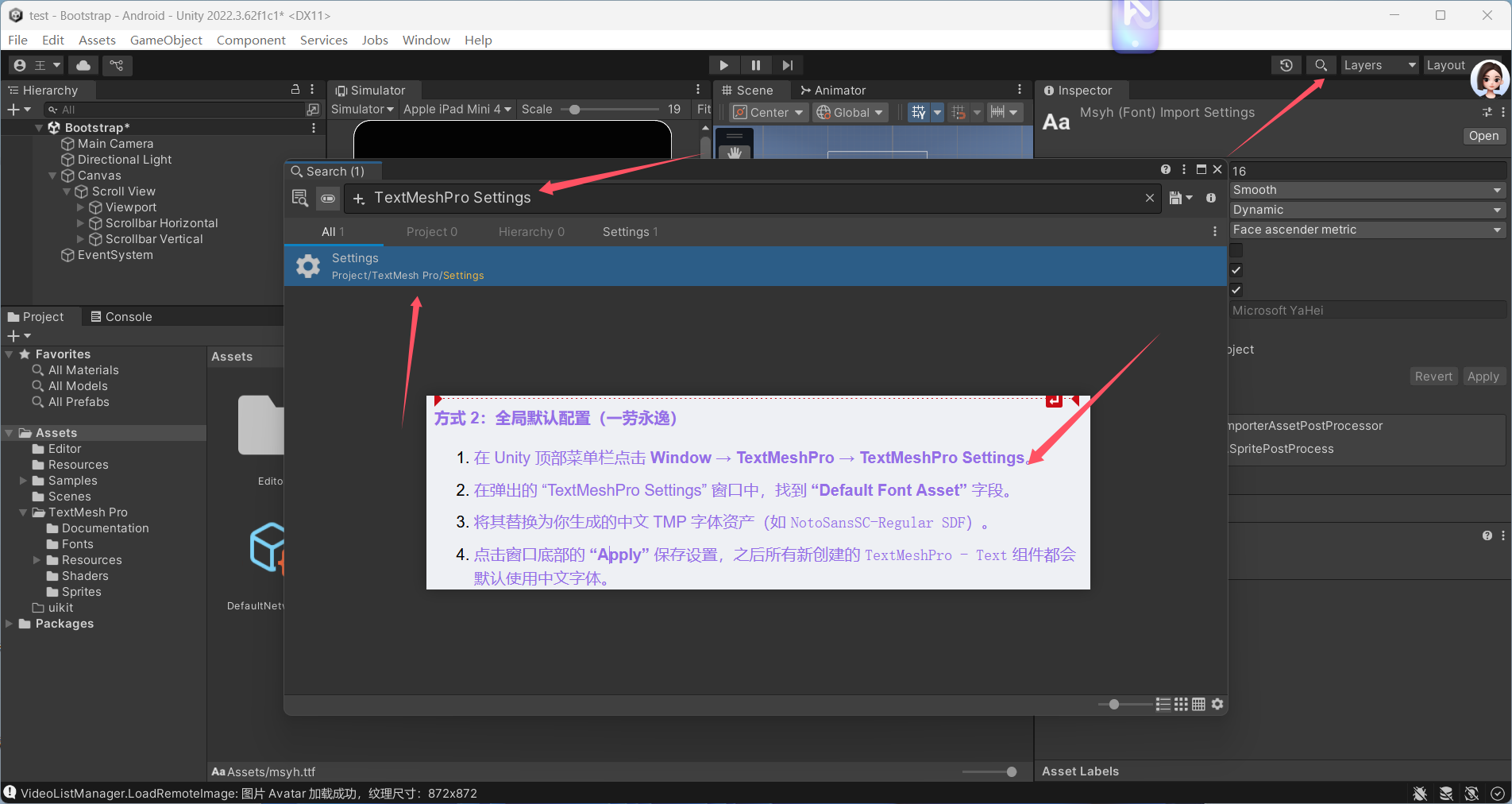
- 在 Unity 顶部菜单栏点击 Window → TextMeshPro → TextMeshPro Settings。
- 在弹出的 “TextMeshPro Settings” 窗口中,找到 “Default Font Asset” 字段。
- 将其替换为你生成的中文 TMP 字体资产(如
NotoSansSC-Regular SDF)。- 点击窗口底部的 “Apply” 保存设置,之后所有新创建的
TextMeshPro - Text组件都会默认使用中文字体。- TextMeshPro Settings
5. 验证效果
运行场景后,之前显示为空白方块的中文(如视频标题、描述等)会正常显示,Console 面板中关于
\u9898字符的警告会消失。补充说明
- 字体文件大小:中文字体包含的字形较多,生成的
Font Asset可能较大(通常几 MB 到十几 MB),如果是移动端项目,可在 “Font Asset Creator” 中选择 “Dynamic” 模式(动态加载字符,减少包体大小)。- 其他语言:如果需要支持日文、韩文等,只需导入对应语言的字体文件,重复步骤 3-4 即可。
- 旧版 Text 组件:如果你的 UI 用的是 Unity 原生
Text组件(非 TextMeshPro),直接将其Font字段替换为中文字体文件(如msyh.ttc)即可,无需生成 TMP 字体资产。按以上步骤操作后,中文显示问题会完全解决,UI 中的所有文本(标题、作者、描述等)都能正常渲染。
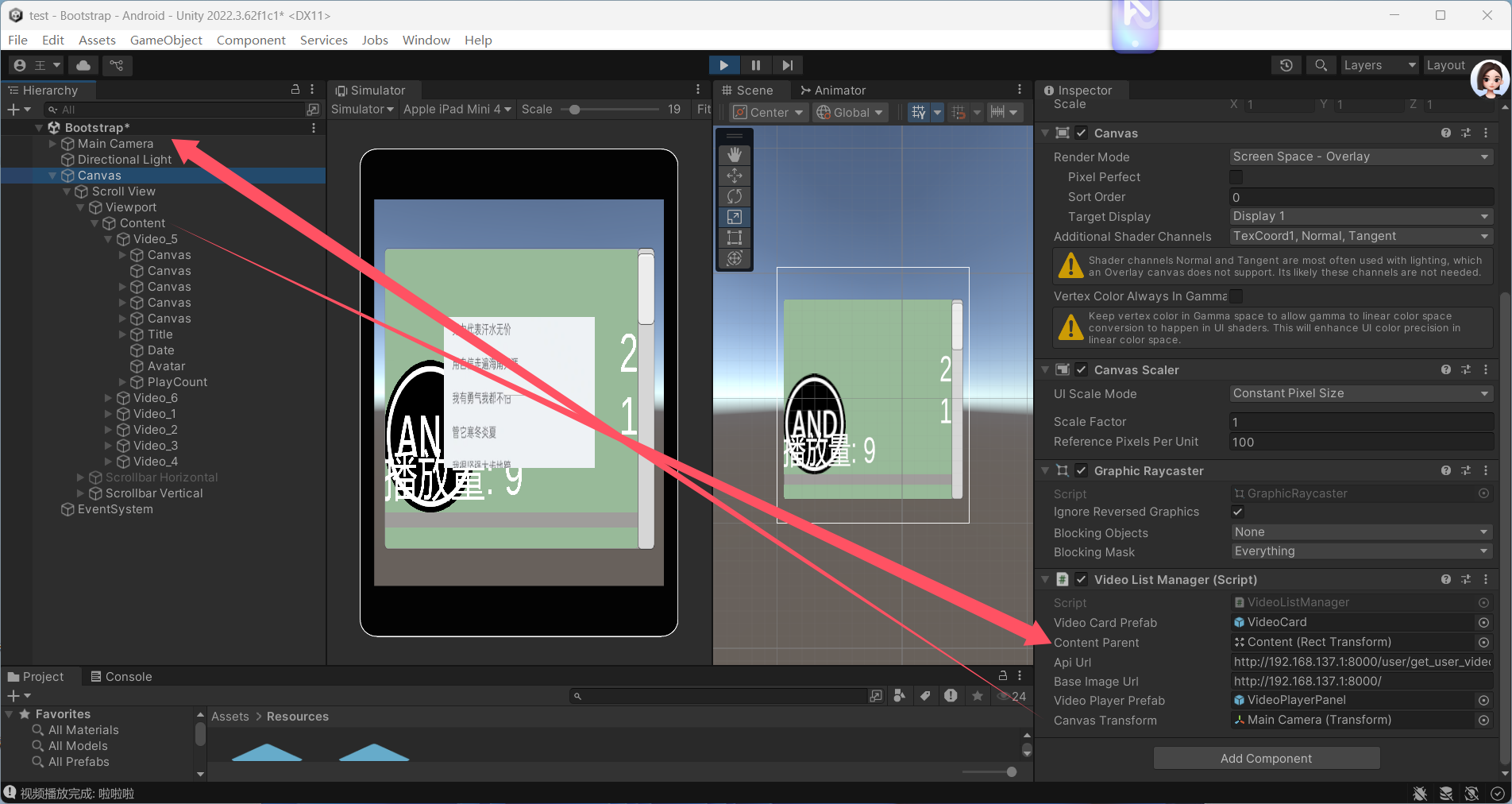
最终版本:
VideoDataModels
using System;
using System.Collections.Generic;
using UnityEngine;

// 视频剧集模型
[Serializable]
public class Episode
{
    public int title;
    public string url;
    public string price;
}

// 评论模型
[Serializable]
public class Comment
{
    public string commentContent;
    public string creationTime;
}

// 弹幕模型
[Serializable]
public class Danmu
{
    public string text;
    public string color;
    public string time;
}

// 单个视频模型
[Serializable]
public class VideoItem
{
    public int video_id;
    public string avatar;
    public string cover;
    public string nickName;
    public string title;
    public string description;
    public List<Comment> commentContent;
    public List<Danmu> danmuList;
    public List<Episode> episodes;
    public string account;
    public int user_id;
    public string nickname;
    public float peoplePlayCount;
    public int followers_count;
    public int total_videos;
    public string total_play_count;
    public int total_comments_count;
    public string date;
    public string total_thumbs_up;
    public string total_dislikes;
    public string total_mantou;
    public string total_collections;
    public int total_forwards;
}

// 用户视频数据模型
[Serializable]
public class UserVideoData
{
    public string account;
    public int user_id;
    public string avatar;
    public string nickname;
    public int followers_count;
    public int total_videos;
    public float total_play_count;
    public int total_comments_count;
    public string date;
    public float total_thumbs_up;
    public float total_dislikes;
    public float total_mantou;
    public float total_collections;
    public int total_forwards;
    public List<VideoItem> videos;
}

// 视频列表响应模型
[Serializable]
public class VideoListResponse
{
    public List<UserVideoData> data;
}
VideoListManager
unity scroll view 两大预制体 显示 请后后端python django服务器后端请求视频展示
视频滚动播放列表
注意文件中的基础请求网络路径要使用你局域网中的路径
using System;
using System.Collections;
using System.Collections.Generic;
using UnityEngine;
using UnityEngine.Networking;
using UnityEngine.UI;
using TMPro;
using UnityEngine.Video;

public class VideoListManager : MonoBehaviour
{
    public GameObject videoCardPrefab; // 视频卡片预制体
    public Transform contentParent;    // ScrollView的Content容器
    public string apiUrl = "http://192.168.0.103:8000/user/get_user_video_statistics/"; // API地址
    public string baseImageUrl = "http://192.168.137.1:8000/"; // 图片基础URL
    public GameObject videoPlayerPrefab; // 视频播放器预制体(需要预先创建)
    public Transform canvasTransform; // UI根节点

    private GameObject currentVideoPlayer; // 当前正在播放的视频播放器

    void Start()
    {
        Debug.Log("VideoListManager.Start: 开始初始化网络请求设置");
        // 开发环境设置:允许HTTP连接和忽略SSL验证
        System.Net.ServicePointManager.SecurityProtocol =
            System.Net.SecurityProtocolType.Tls12 |
            System.Net.SecurityProtocolType.Tls11 |
            System.Net.SecurityProtocolType.Tls;
        System.Net.ServicePointManager.ServerCertificateValidationCallback =
            (sender, certificate, chain, sslPolicyErrors) => true;

        Debug.Log("VideoListManager.Start: 开始发起视频列表请求");
        StartCoroutine(GetVideoList());
    }

    // 从后端获取视频列表
    IEnumerator GetVideoList()
    {
        Debug.Log($"VideoListManager.GetVideoList: 发起请求,目标URL: {apiUrl}");
        UnityWebRequest request = UnityWebRequest.Get(apiUrl);
        request.timeout = 10; // 设置超时时间
        request.SetRequestHeader("Accept", "application/json");

        yield return request.SendWebRequest();

        // 打印调试信息
        Debug.Log($"VideoListManager.GetVideoList: 请求状态: {request.result}");
        Debug.Log($"VideoListManager.GetVideoList: 响应码: {request.responseCode}");
        Debug.Log($"VideoListManager.GetVideoList: 响应内容长度: {request.downloadHandler.text.Length}");
        Debug.Log($"VideoListManager.GetVideoList: 响应内容前50字符: {request.downloadHandler.text.Substring(0, Math.Min(50, request.downloadHandler.text.Length))}");

        if (request.result == UnityWebRequest.Result.Success)
        {
            try
            {
                string json = request.downloadHandler.text;
                Debug.Log($"VideoListManager.GetVideoList: 完整JSON响应: {json}");

                // 处理JSON数据(兼容数组和对象格式)
                VideoListResponse response;
                if (json.StartsWith("["))
                {
                    Debug.Log("VideoListManager.GetVideoList: JSON数据以数组开头,进行包裹处理");
                    // 如果是数组格式,包裹成对象
                    json = "{\"data\":" + json + "}";
                    response = JsonUtility.FromJson<VideoListResponse>(json);
                }
                else
                {
                    Debug.Log("VideoListManager.GetVideoList: JSON数据以对象开头,直接解析");
                    // 如果是对象格式,直接解析
                    response = JsonUtility.FromJson<VideoListResponse>(json);
                }

                if (response != null)
                {
                    Debug.Log($"VideoListManager.GetVideoList: 响应对象不为空,data字段 {(response.data != null ? "非空" : "空")}");
                    if (response.data != null)
                    {
                        Debug.Log($"VideoListManager.GetVideoList: 成功解析到 {response.data.Count} 个用户数据");
                        ClearAllVideoCards();
                        CreateAllVideoCards(response.data);
                    }
                    else
                    {
                        Debug.LogError("VideoListManager.GetVideoList: 解析后的数据中data字段为空");
                    }
                }
                else
                {
                    Debug.LogError("VideoListManager.GetVideoList: 解析后得到的响应对象为空");
                }
            }
            catch (Exception e)
            {
                Debug.LogError($"VideoListManager.GetVideoList: 解析JSON失败: {e.Message}\n堆栈信息: {e.StackTrace}");
            }
        }
        else
        {
            Debug.LogError($"VideoListManager.GetVideoList: 请求失败: {request.error},详细响应: {request.downloadHandler.text}");
        }
    }

    // 创建所有视频卡片
    void CreateAllVideoCards(List<UserVideoData> userDatas)
    {
        Debug.Log($"VideoListManager.CreateAllVideoCards: 开始创建视频卡片,共 {userDatas.Count} 个用户数据");
        foreach (var userData in userDatas)
        {
            Debug.Log($"VideoListManager.CreateAllVideoCards: 处理用户数据,user_id: {userData.user_id}");
            if (userData.videos != null)
            {
                Debug.Log($"VideoListManager.CreateAllVideoCards: 用户 {userData.user_id} 有 {userData.videos.Count} 个视频");
                foreach (var video in userData.videos)
                {
                    CreateVideoCard(video);
                }
            }
            else
            {
                Debug.LogWarning($"VideoListManager.CreateAllVideoCards: 用户 {userData.user_id} 的videos字段为空");
            }
        }
    }

    // 创建单个视频卡片
    void CreateVideoCard(VideoItem video)
    {
        Debug.Log($"VideoListManager.CreateVideoCard: 开始创建视频卡片,video_id: {video.video_id},标题: {video.title}");
        if (videoCardPrefab == null)
        {
            Debug.LogError("VideoListManager.CreateVideoCard: 请赋值视频卡片预制体");
            return;
        }

        if (contentParent == null)
        {
            Debug.LogError("VideoListManager.CreateVideoCard: 请赋值Content容器");
            return;
        }

        // 实例化卡片
        GameObject card = Instantiate(videoCardPrefab, contentParent);
        card.name = $"Video_{video.video_id}"; // 命名卡片便于调试

        try
        {
            // 打印视频数据详细信息
            Debug.Log($"VideoListManager.CreateVideoCard: 视频 {video.video_id} 详细信息:标题-{video.title},描述-{video.description},封面URL-{video.cover},头像URL-{video.avatar}");

            // 设置标题(兼容Text和TextMeshPro)
            SetText(card.transform, "Title", video.title);

            // 设置描述
            SetText(card.transform, "Description", video.description);

            // 设置播放量
            SetText(card.transform, "PlayCount", $"播放量: {video.total_play_count}");

            // 设置发布日期
            string formattedDate = FormatDate(video.date);
            Debug.Log($"VideoListManager.CreateVideoCard: 视频 {video.video_id} 格式化后的日期:{formattedDate}");
            SetText(card.transform, "Date", formattedDate);

            // 设置作者
            SetText(card.transform, "Author", video.nickName);

            // 加载封面图
            LoadImageToUI(card.transform, "Cover", video.cover);

            // 加载头像
            LoadImageToUI(card.transform, "Avatar", video.avatar);

            // 绑定点击事件
            Button button = card.GetComponent<Button>();
            if (button != null)
            {
                button.onClick.AddListener(() => OnVideoClicked(video));
            }
            else
            {
                Debug.LogWarning($"VideoListManager.CreateVideoCard: 视频卡片 {video.video_id} 没有Button组件");
            }
        }
        catch (Exception e)
        {
            Debug.LogError($"VideoListManager.CreateVideoCard: 设置卡片 {video.video_id} 失败: {e.Message},堆栈信息: {e.StackTrace}");
        }
    }

    // 通用文本设置方法(兼容两种文本组件)
    void SetText(Transform parent, string childName, string text)
    {
        Debug.Log($"VideoListManager.SetText: 尝试设置{childName}的文本,文本内容:{text}");
        Transform child = parent.Find(childName);
        if (child == null)
        {
            Debug.LogWarning($"VideoListManager.SetText: 未找到名为 {childName} 的UI元素");
            return;
        }

        // 尝试设置Text组件
        Text uiText = child.GetComponent<Text>();
        if (uiText != null)
        {
            Debug.Log($"VideoListManager.SetText: 找到Text组件,设置{childName}的文本为:{text}");
            uiText.text = text;
            return;
        }

        // 尝试设置TextMeshPro组件
        TextMeshProUGUI tmpText = child.GetComponent<TextMeshProUGUI>();
        if (tmpText != null)
        {
            Debug.Log($"VideoListManager.SetText: 找到TextMeshPro组件,设置{childName}的文本为:{text}");
            tmpText.text = text;
            return;
        }

        Debug.LogWarning($"VideoListManager.SetText: {childName} 没有文本组件");
    }

    // 加载图片到UI
    void LoadImageToUI(Transform parent, string childName, string imageUrl)
    {
        Debug.Log($"VideoListManager.LoadImageToUI: 尝试加载{childName}的图片,图片URL:{imageUrl}");
        Transform child = parent.Find(childName);
        if (child == null)
        {
            Debug.LogWarning($"VideoListManager.LoadImageToUI: 未找到名为 {childName} 的UI元素");
            return;
        }

        Image image = child.GetComponent<Image>();
        if (image == null)
        {
            Debug.LogWarning($"VideoListManager.LoadImageToUI: {childName} 没有Image组件");
            return;
        }

        if (string.IsNullOrEmpty(imageUrl))
        {
            Debug.LogWarning($"VideoListManager.LoadImageToUI: {childName} 的图片URL为空");
            return;
        }

        // 处理相对路径
        if (!imageUrl.StartsWith("http"))
        {
            imageUrl = baseImageUrl + imageUrl;
            Debug.Log($"VideoListManager.LoadImageToUI: 拼接后的图片URL:{imageUrl}");
        }

        // 启动协程加载图片
        StartCoroutine(LoadRemoteImage(imageUrl, image, childName));
    }

    // 加载远程图片
    IEnumerator LoadRemoteImage(string url, Image targetImage, string imageName)
    {
        Debug.Log($"VideoListManager.LoadRemoteImage: 开始加载图片,图片名称:{imageName},URL:{url}");
        UnityWebRequest request = UnityWebRequestTexture.GetTexture(url);
        yield return request.SendWebRequest();

        if (request.result == UnityWebRequest.Result.Success)
        {
            Texture2D texture = DownloadHandlerTexture.GetContent(request);
            if (texture != null)
            {
                Debug.Log($"VideoListManager.LoadRemoteImage: 图片 {imageName} 加载成功,纹理尺寸:{texture.width}x{texture.height}");
                Sprite sprite = Sprite.Create(
                    texture,
                    new Rect(0, 0, texture.width, texture.height),
                    Vector2.one * 0.5f
                );
                targetImage.sprite = sprite;
            }
            else
            {
                Debug.LogError($"VideoListManager.LoadRemoteImage: 图片 {imageName} 加载成功,但纹理为空");
            }
        }
        else
        {
            Debug.LogError($"VideoListManager.LoadRemoteImage: 加载图片 {imageName} 失败: {request.error},响应码:{request.responseCode},响应内容:{request.downloadHandler.text}");
        }
    }

    // 视频点击事件 - 播放视频
    void OnVideoClicked(VideoItem video)
    {
        Debug.Log($"VideoListManager.OnVideoClicked: 点击了视频: {video.title} (ID: {video.video_id})");

        if (video.episodes != null && video.episodes.Count > 0)
        {
            string firstEpisodeUrl = video.episodes[0].url;
            if (!firstEpisodeUrl.StartsWith("http"))
            {
                firstEpisodeUrl = baseImageUrl + firstEpisodeUrl;
                Debug.Log($"VideoListManager.OnVideoClicked: 拼接后的第一集播放地址: {firstEpisodeUrl}");
            }

            Debug.Log($"VideoListManager.OnVideoClicked: 准备播放视频: {firstEpisodeUrl}");
            PlayVideo(firstEpisodeUrl, video.title);
        }
        else
        {
            Debug.LogWarning("VideoListManager.OnVideoClicked: 该视频没有可用剧集");
        }
    }

    // 播放视频
    void PlayVideo(string videoUrl, string videoTitle)
    {
        // 先关闭当前正在播放的视频
        if (currentVideoPlayer != null)
        {
            Destroy(currentVideoPlayer);
        }

        // 检查视频播放器预制体是否赋值
        if (videoPlayerPrefab == null)
        {
            Debug.LogError("请先赋值视频播放器预制体 (videoPlayerPrefab)");
            return;
        }

        // 检查Canvas根节点是否赋值
        if (canvasTransform == null)
        {
            Debug.LogError("请先赋值Canvas根节点 (canvasTransform)");
            return;
        }

        // 创建视频播放器
        currentVideoPlayer = Instantiate(videoPlayerPrefab, canvasTransform);
        currentVideoPlayer.name = $"VideoPlayer_{videoTitle}";

        // 获取VideoPlayer组件
        VideoPlayer videoPlayer = currentVideoPlayer.GetComponent<VideoPlayer>();
        if (videoPlayer == null)
        {
            videoPlayer = currentVideoPlayer.AddComponent<VideoPlayer>();
            Debug.LogWarning("视频播放器预制体中未找到VideoPlayer组件,已自动添加");
        }

        // 获取RawImage组件用于显示视频
        RawImage rawImage = currentVideoPlayer.GetComponentInChildren<RawImage>();
        if (rawImage == null)
        {
            Debug.LogError("视频播放器预制体中未找到RawImage组件,无法显示视频");
            return;
        }

        // 设置关闭按钮事件
        Button closeButton = currentVideoPlayer.GetComponentInChildren<Button>();
        if (closeButton != null)
        {
            closeButton.onClick.RemoveAllListeners();
            closeButton.onClick.AddListener(() =>
            {
                Destroy(currentVideoPlayer);
                currentVideoPlayer = null;
            });
        }
        else
        {
            Debug.LogWarning("视频播放器预制体中未找到关闭按钮");
        }

        // 配置视频播放器
        videoPlayer.source = VideoSource.Url;
        videoPlayer.url = videoUrl;
        videoPlayer.playOnAwake = false;
        videoPlayer.waitForFirstFrame = true;

        // 设置视频渲染目标
        videoPlayer.targetTexture = new RenderTexture(1920, 1080, 24);
        rawImage.texture = videoPlayer.targetTexture;

        // 开始播放视频
        videoPlayer.Play();
        Debug.Log($"开始播放视频: {videoTitle}");

        // 添加视频播放完成事件
        videoPlayer.loopPointReached += (vp) =>
        {
            Debug.Log($"视频播放完成: {videoTitle}");
        };
    }

    // 清除所有视频卡片
    void ClearAllVideoCards()
    {
        if (contentParent == null)
        {
            Debug.LogError("VideoListManager.ClearAllVideoCards: Content容器为空,无法清除视频卡片");
            return;
        }

        int childCount = contentParent.childCount;
        Debug.Log($"VideoListManager.ClearAllVideoCards: 清除前Content容器中有 {childCount} 个孩子");
        foreach (Transform child in contentParent)
        {
            Destroy(child.gameObject);
        }
        Debug.Log("VideoListManager.ClearAllVideoCards: 清除所有视频卡片完成");
    }

    // 格式化日期显示
    string FormatDate(string dateString)
    {
        if (string.IsNullOrEmpty(dateString))
        {
            Debug.LogWarning("VideoListManager.FormatDate: 日期字符串为空");
            return "未知日期";
        }

        try
        {
            if (DateTime.TryParse(dateString, out DateTime date))
            {
                string formattedDate = date.ToLocalTime().ToString("yyyy-MM-dd HH:mm");
                Debug.Log($"VideoListManager.FormatDate: 日期解析成功,原始日期:{dateString},格式化后:{formattedDate}");
                return formattedDate;
            }
            // 处理ISO格式日期
            else if (DateTime.TryParseExact(
                dateString,
                "yyyy-MM-ddTHH:mm:ss.fffZ",
                System.Globalization.CultureInfo.InvariantCulture,
                System.Globalization.DateTimeStyles.None,
                out DateTime isoDate))
            {
                string formattedDate = isoDate.ToLocalTime().ToString("yyyy-MM-dd HH:mm");
                Debug.Log($"VideoListManager.FormatDate: ISO日期解析成功,原始日期:{dateString},格式化后:{formattedDate}");
                return formattedDate;
            }
            else
            {
                Debug.LogWarning($"VideoListManager.FormatDate: 日期解析失败,无法识别的日期格式:{dateString}");
            }
        }
        catch (Exception e)
        {
            Debug.LogWarning($"VideoListManager.FormatDate: 日期格式化过程中出现异常: {e.Message}");
        }

        return dateString;
    }

    // 当物体被销毁时停止视频播放
    private void OnDestroy()
    {
        if (currentVideoPlayer != null)
        {
            Destroy(currentVideoPlayer);
        }
    }
}
更多推荐


 23
23 0
0- 0


 已为社区贡献1条内容

所有评论(0)