
c#特性与反射
课外阅读:
https://blog.csdn.net/wangjun_huster/article/details/71747489
https://www.whuanle.cn/archives/632
https://blog.csdn.net/AI_eye/article/details/118727616
https://www.runoob.com/csharp/csharp-attribute.html
https://www.runoob.com/csharp/csharp-reflection.html
1。特性的概念?
特性(Attribute)是用于在【运行时】传递程序中各种元素(比如类 、方法、结构、枚举、组件等)的【行为信息的声明性标签】。您可以通过使用特性向程序添加【声明性信息】。一个声明性标签是通过放置在它所应用的元素前面的方括号([ ])来描述的。
特性(Attribute)【用于添加元数据】,如编译器指令和注释、描述、方法、类等其他信息。.Net 框架提供了两种类型的特性:预定义特性和自定义特性。
运行时(运行IL中间语言),编译时:把源码转换成IL(中间语言,二进制)
各种元素:各种对象(最常用的类)
行为信息的声明性标签:标签是符号
特性:是在运行时向各种对象添加标签(元数据),“妖怪”
反射:是在运行时为了拿这个标签。“照妖镜” 缺点:性能损失 优点:为了解耦,降低耦合性。
原来,在给对象添加,扩展新属性和方法时,我们常用的方案:在原类中修改,或者对类继承进行扩展。
特性和原来修改对象或扩展对象的思想不一样的。原来使用的思想:继承。OOP面向对象编程思想
特性:AOP思想,面向切片编程思想
2。特性的分类?
a. 预定义特性,三种预定义特性:AttributeUsage、Conditional、Obsolete
b. 自定义特性,使用少。
在WindowForm自定义控件时常用的预定义特性:
[Browsable(true/false)]:控制该属性是否在属性窗口中显示。对于内部使用的属性,设为 false 可以保持设计器整洁。
[Category("分类名")]:将属性分组到“外观”、“行为”、“数据”等逻辑类别下,方便开发者查找。
[Description("说明文字")]:当开发者选中该属性时,在属性窗口底部显示一段描述性文字。
[DisplayName("显示名称")]:为属性指定一个不同于代码中名称的显示名称(例如代码中是 TextAlignment,显示时可以设为“文本对齐”)。
[DefaultValue(值)]:指定属性的默认值。设计器会根据这个值来判断是否需要在生成的代码中序列化该属性。如果当前值与默认值相同,则不会生成赋值代码,保持代码简洁。
特性:Attribute
属性:Property
// 写法1:自动属性, 此处无法校验数据
public float X {  get; set; }
public float Y { get; set; }// 快捷键 prop+enter


// 写法2:完整属性的写法, 有什么优点?可以校验数据
// 变量的命名规则 :只能包含数字,字母,下划线,数字不能以数字开头。
private float y;  // 字段建议:1。小写,私有  2。命名时私有有约定  加_开头
// 属性一般公开,命名一般建议大写(大驼峰,多个单词,每个单词的首字母大写。)
public float Y
{
    get { return y; }
    // 在此处校验数据
    set {
        if (value < 0)
        {
            throw new ArgumentException("Y坐标不能为负数");
        }
        y = value;
    }
}

// 3。写法3:箭头的写法  Lambda表达式。
public float Y => 10; // get访问器
private float y;
public float Y
{
    get => y;
    set => y = value;
}

public float Y1 { get { return 10; } }定义了一个只读属性
                                      永远返回10
                                      不能被修改

 public int MyProperty1 { get; } // 只读属性
 public int MyProperty2 { get; private set; } // 只读属性
想对某个类进行序列化和反序列化步骤:
1。安装类库(程序集,第三方模块包),Newtonsoft.Json
2。使用这个类库提供的API就可以序列化和反序列化
为啥序列化和反序列化?
序列化方便数据传输。
反序列化是为使用对象方便。
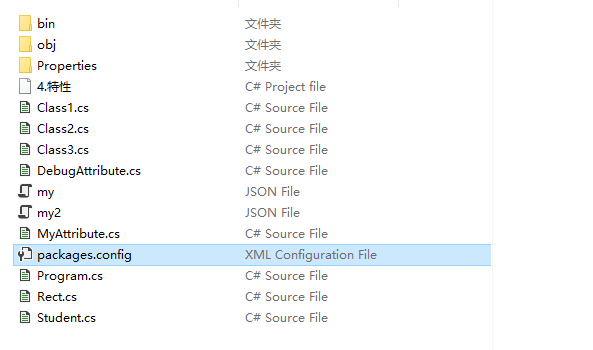
using System;
using System.Collections.Generic;
using System.Linq;
using System.Reflection;
using System.Text;
using System.Threading.Tasks;
using Newtonsoft.Json;

namespace _4.特性
{
    public class Program
    {
        public static void Main(string[] args)
        {
            // 特性:是在运行时给各种对象添加标签。
            // 特性分类:预定义的特性、自定义特性

            Student s = new Student()
            {
                Id = 1,
                Name = "张三",
                Age = 18
            };
            // 序列化为了方便传输
            string jsonStr = JsonConvert.SerializeObject(s);  // 把对象序列化成JSON字符串。
            Console.WriteLine(jsonStr);

            // 反序列化为了方便对象使用。  Order, UnOrder  Serialize, Deserialize
            Student newStudent = JsonConvert.DeserializeObject<Student>(jsonStr);  // 把JSON字符串反序列化成对象。
            Console.WriteLine(newStudent.Name);
            // 问题:newStudent和s是不是同一个对象?不是

            List<Student> list = new List<Student>() {
                new Student(){ Id=1, Name="李四1", Age=20},
                new Student(){ Id=2, Name="李四2", Age=20},
                new Student(){ Id=3, Name="李四3", Age=20},
            };

            string jsonStr2 = JsonConvert.SerializeObject(list);  // 把对象序列化成JSON字符串。
            Console.WriteLine(jsonStr2);

            List<Student> newList = JsonConvert.DeserializeObject<List<Student>>(jsonStr2);  // 把JSON字符串反序列化成对象。
            Console.WriteLine(newList[0].Id);
            Console.WriteLine(newList[0].Name);
            Console.WriteLine(newList[0].Age);

            Class2 c = new Class2();
            c.Method1();

            Class3 c1 = new Class3();
            c1.Method1();

            // 预编译指令
#if DEBUG
            Class1 c2 = new Class1();
            c2.Method1();
#endif


            // 用反射把Rect中添加的标签读取出来。

            // 拿程序集,创建实例,拿类型。
            Rect rect = new Rect(10, 20);  // 实例化
            //Type t = typeof(Rect);
            Type t = rect.GetType();  // 拿实例的类型

            // 拿特性添加的元数据。
            Object[] attributes = t.GetCustomAttributes(typeof(DebugAttribute),true);

            foreach (DebugAttribute item in attributes)
            {
                Console.WriteLine("日志编号:{0},修改人:{1},修改时间:{2},日志信息:{3}", item.Id,item.Name,item.UpdateTime,item.Remark);
            }

            MethodInfo methodInfo1 = t.GetMethod("Area");
            DebugAttribute attributes1 = (DebugAttribute)methodInfo1.GetCustomAttribute(typeof(DebugAttribute),true);
            Console.WriteLine("日志编号:{0},修改人:{1},修改时间:{2},日志信息:{3}", attributes1.Id, attributes1.Name, attributes1.UpdateTime, attributes1.Remark);


            Console.ReadKey();
        }
    }
}


using System;
using System.Collections.Generic;
using System.Linq;
using System.Security.Policy;
using System.Text;
using System.Threading.Tasks;

namespace _4.特性
{
    [Debug(Id = 1, Name = "张三1", UpdateTime = "2026-05-18 16:09", Remark = "创建这个类")]
    [Debug(Id = 2, Name = "张三2", UpdateTime = "2026-05-18 16:09", Remark = "修改了这个类,添加了一个方法")]
    public class Rect
    {
        public Rect(float w, float h)
        {
            this.Width = w;
            // this代表当前类Rect的实例
            this.Height = h;
        }

        public float Width { get; set; }
        public float Height { get; set; }

        [Debug(Id = 3, Name = "李四", UpdateTime = "2026-05-18 16:11", Remark = "创建这个方法")]
        public float Area()
        {
            return this.Width * this.Height;
        }

        [Debug(Id = 4, Name = "王五", UpdateTime = "2026-05-18 16:13", Remark = "创建这个方法")]
        public void Show()
        {
            Console.WriteLine("{0} * {1} = {2}", this.Width, this.Height, this.Area());
        }

    }
}


using System;
using System.Collections.Generic;
using System.Linq;
using System.Text;
using System.Threading.Tasks;

namespace _4.特性
{
    /// <summary>
    /// 类,只有属性,没有方法,失血对象,纯对象,POCO:是“Plain Old CLR Object”的缩写,意为“普通的旧CLR对象”。POJO:POJO是Plain Ordinary Java Object
    /// 实体类,一般对数据库表进行映射
    /// </summary>
    [Serializable]  // 使用特性:[]中使用特性名称即可, 支持序列化。
    // 序列化:把对象转换成字符串(json格式)  json是一种简单的数据交互格式。txt, xml。
    // 反序列化:把字符串转换成对象
    public class Student
    {
        public int Id { get; set; }
        public string Name { get; set; }
        public int Age { get; set; }
    }


}


using System;
using System.Collections.Generic;
using System.Linq;
using System.Text;
using System.Threading.Tasks;

namespace _4.特性
{
    // 自定义特性:
    // 1。建议特性名称以Attribute结尾
    // 2。必须 继承Attribute类

    // 使用时,必须使用[],[]中是特性的名称,可以省略Attribute

    // AttributeUsage特性主要控制自定义特性的使用范围。  枚举值:All, Class, Method等。 AllowMultiple = true控制特性是否可以重复使用。
    //[AttributeUsage(AttributeTargets.All, AllowMultiple = true, Inherited = true)]
    [AttributeUsage(AttributeTargets.All)]
    public class MyAttribute : Attribute
    {
    }
}


using System;
using System.Collections.Generic;
using System.Linq;
using System.Text;
using System.Threading.Tasks;

namespace _4.特性
{
    // 自定义特性,主要功能给某个对象的修改添加元数据。
    [AttributeUsage(AttributeTargets.All, AllowMultiple = true)]
    public class DebugAttribute : Attribute
    {
        public int Id { get; set; } // 修改的编号
        public string Name { get; set; }  // 修改人
        public string UpdateTime { get; set; }  // 修改时间
        public string Remark { get; set; }  // 备注
    }
}


using System;
using System.Collections.Generic;
using System.Linq;
using System.Text;
using System.Threading.Tasks;

namespace _4.特性
{
    [My]
    //[My,My]  // 使用多个特性用逗号隔开
    public class Class1
    {
        [My]
        private string _name = "张三";

        [My]
        public void Method1()
        {
            Console.WriteLine(_name);
        }
    }
}


using System;
using System.Collections.Generic;
using System.Linq;
using System.Text;
using System.Threading.Tasks;

namespace _4.特性
{
    [Obsolete]  // 这个特性标识某个类已经过时,也可以标识属性,字段,方法,事件等。
    public class Class2
    {
        [Obsolete] // 这个特性标识某个方法已经过时
        public void Method1()
        {

        }
    }
}


using System;
using System.Collections.Generic;
using System.Diagnostics;
using System.Linq;
using System.Text;
using System.Threading.Tasks;

namespace _4.特性
{
    public class Class3
    {
        [Conditional("DEBUG")]  // 这个特性标识某个方法在调试模式下才运行
        public void Method1()
        {
            Console.WriteLine("方法运行!");
        }
    }
}
3。反射的概念?
反射(Reflection)
指程序可以访问、检测和修改它本身状态或行为的一种能力。可以使用反射动态地创建类型的**实例,将类型绑定到现有对象,或从现有对象中获取类型。然后,可以调用类型的方法或访问其字段和属性。
反射:在运行期间,从对象中拿各种标签的,当然也可以拿类中的成员(属性,方法)
4。反射使用的优缺点?(面试题)
特性和反射都是在程序运行时动态地获取或改变运行状态的功能,可以通过特性对程序元素进行标记从而在程序运行时通过反射动态地获取到这些被标记元素,大幅提高灵活性和松耦合。
反射优点:
1、反射提高了程序的灵活性和扩展性。
2、降低耦合性,提高自适应能力。
3、它允许程序创建和控制任何类的对象,无需提前硬编码目标类。
反射缺点:
1、性能问题:使用反射基本上是一种解释操作,用于字段和方法接入时要远慢于直接代码。因此反射机制主要应用在对灵活性和拓展性要求很高的系统框架上,普通程序不建议使用。
2、使用反射会模糊程序内部逻辑;程序员希望在源代码中看到程序的逻辑,反射却绕过了源代码的技术,因而会带来维护的问题,反射代码比相应的直接代码更复杂。
using System;
using System.Collections.Generic;
using System.Linq;
using System.Reflection;
using System.Text;
using System.Threading.Tasks;

namespace _5._18.反射
{
    internal class Program
    {
        static void Main(string[] args)
        {
            // Class1 class1 = new Class1();// 原来直接实例化

            // 使用反射实例化对象,并访问类的成员。
            // Assembly程序集,Load()用来加载程序集,参数:程序集名称
            /*
             Assembly assembly =  Assembly.Load("Hello"); // 加载程序集  也可以使用LoadFrom()
             object obj =  assembly.CreateInstance("_5.18.反射.Class1"); // 创建实例
            */
            // 本项目没有直接强引用ClassLibrary1,而是把ClassLibrary1.dll放到项目的bin/debug目录下,就可以用反射来实例化。
            // 降低了本项目和ClassLibrary1的耦合性。
            // 1。先加载程序集
            Assembly assembly = Assembly.Load("ClassLibrary1");// 加载程序集  也可以使用LoadFrom()

            // 2. 实例化程序集中的某个类对象,参数:类完整名称   Person obj = new Person()
            object obj = assembly.CreateInstance("ClassLibrary1.Person"); // 实例化Person,装箱,性能低。

            // 3. 拿到类对象的类型
            Type type = obj.GetType();// 获取obj类型,也可以使用typeof(Person)拿类型。
            Console.WriteLine(type );// ClassLibrary1.Person

            // 4. 通过类型拿各种成员:属性,方法等。
            PropertyInfo propertyInfo1 = type.GetProperty("Name");// 获取属性,参数:属性名称
            propertyInfo1 .SetValue (obj, "张三");// 给属性赋值
            Console.WriteLine(propertyInfo1 .GetValue (obj));// 获取属性值

            PropertyInfo propertyInfo2 = type.GetProperty("Age");// 获取属性,参数:属性名称
            propertyInfo2.SetValue(obj, 20);// 给属性赋值
            Console.WriteLine(propertyInfo1.GetValue(obj));// 获取属性值

            MethodInfo methodInfo1 = type.GetMethod("Show"); // 拿到Show方法,参数:方法名称
            methodInfo1.Invoke(obj,null); // 调用方法,参数1:方法所属的对象,参数2:参数列表

            MethodInfo methodInfo2 = type.GetMethod("SayHello");  // 拿到SayHello方法,参数:方法名称
            object result=methodInfo2.Invoke(obj,new object[] {"abc"});// 调用方法,参数1:方法所属的对象,参数2:参数列表
            Console.WriteLine(result );

            Console.WriteLine("-------------------");
            MethodInfo[] methods =type .GetMethods();
            foreach (MethodInfo m in methods )
            {
                if (!(m.Name == "Show" || m.Name == "SayHello")) continue;
                // 获取参数信息数组
                ParameterInfo[] parameters =m.GetParameters ();
                if (parameters .Length >0)
                {
                    Console.WriteLine(m.Invoke (obj ,new object[] {"def"}));
                }
                else
                {
                    m.Invoke(obj ,null);
                }
            }


        }
    }
}


using System;
using System.Collections.Generic;
using System.Linq;
using System.Security.AccessControl;
using System.Text;
using System.Threading.Tasks;

namespace ClassLibrary1
{
    public  class Person
    {
        public string Name { get; set; }
        public int Age {  get; set; }

        public void Show()
        {
            Console.WriteLine("Name:{0},Age:{1}", Name, Age);
        }

        public string SayHello(string  msg)
        {
            return "hello" + msg;
        }
    }
}


类

using System;
using System.Collections.Generic;
using System.Linq;
using System.Text;
using System.Threading.Tasks;

namespace _5._18.反射
{
    internal class Class1
    {
        public int MyProperty1 { get; set; }
        public int MyProperty2 { get; set; }

        public void MyMethod1()
        {
            Console.WriteLine("MyMethod1");
        }

        public void MyMethod2()
        {
            Console.WriteLine("MyMethod2");
        }

    }
}
更多推荐



 13
13 0
0- 0


 已为社区贡献3条内容

所有评论(0)