
Java之IO--读写文件的方法
·
原文网址:Java之IO--读写文件的方法_IT利刃出鞘的博客-CSDN博客
简介
本文介绍Java读写文件的方法。
IO包分为字节流和字符流,但是除了这两个流之外,还存在一组字节流一字符流的转换类。
- OutputStreamWriter:Writer的子类,将输出的字符流变为字节流,即将一个字符流的输出对象变为字节流输出对象。
- InputStreamReader:Reader的子类,将输入的字节流变为字符流,即将一个字节流的输入对象变为字符流的输入对象。
如果以文件操作为例,则在内存中的字符数据需要通过OutputStreamWriter变为字节流才能保存在文件中,读取时需要将读入的字节流通过InputStreamReader变为字符流。
写文件
法1:OutputStreamWriter
package com.example.a;

import java.io.*;

public class Demo {
    public static void main(String[] args) {
        File f = new File ("E:" + File.separator + "test.txt");
        Writer out = null;

        try {
            out = new OutputStreamWriter(new FileOutputStream(f));
            out.write("hello world");
            out.close();
        } catch (IOException e) {
            throw new RuntimeException(e);
        }
    }
}
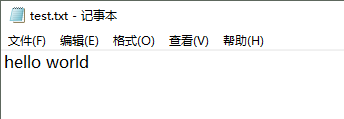
结果:生成了D:\test.txt,内容如下:
法2:PrintStream和PrintWriter
打印流是输出信息最方便的类,主要包含字节打印流(PrintStream)和字符打印流(PrintWriter)。打印流提供了非常方便的打印功能,可以打印任何的数据类型,如小数、整数、字符串等。
PrintStream是 OutputStream的子类,PrintWriter是Writer的子类。与 OutputStream相比起来, PrintStream可以更加方便地输出数据。PrintStream是将OutputStream类重新装饰了一下,就像送别人礼物,需要把礼物包装一下以显得更加好看,所以,这样的设计称为装饰设计模式。
本处使用PrintStream来展示。
package com.example.a;

import java.io.*;

public class Demo {
    public static void main(String[] args) {
        PrintStream ps = null;
        //通过 FileOutputStream实例化,意味着所有的输出是向文件之中打印
        try {
            ps = new PrintStream(new FileOutputStream(
                    "E:" + File.separator+ "test1.txt"));
        } catch (FileNotFoundException e) {
            throw new RuntimeException(e);
        }
        ps.print("hello ");
        ps.println("world!!!");
        ps.println("1 + 1 : " + 2);
        ps.close();
    }
}
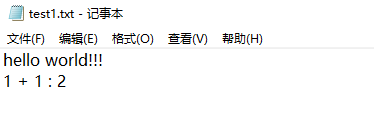
执行结果结果:生成了D:\test1.txt,内容如下:
解决文件不存在的问题
在写文件时,若文件不存在,则需要注意。若是绝对路径,会创建文件;若是相对路径,则会报错。
问题复现
package com.example.a;

import java.io.*;

public class Demo {
    public static void main(String[] args) {
        PrintStream ps = null;
        // 通过 FileOutputStream实例化,意味着所有的输出是向文件之中打印
        try {
            ps = new PrintStream(new FileOutputStream(
                    "tmp" + File.separator
                            + "aa" + File.separator
                            + "test.txt"));
        } catch (FileNotFoundException e) {
            throw new RuntimeException(e);
        }
        ps.print("hello ");
        ps.println("world!!!");
        ps.println("1 + 1 : " + 2);
        ps.close();
    }
}
结果
Exception in thread "main" java.lang.RuntimeException: java.io.FileNotFoundException: tmp\aa\test.txt (系统找不到指定的路径。)
	at com.example.a.Demo.main(Demo.java:15)
Caused by: java.io.FileNotFoundException: tmp\aa\test.txt (系统找不到指定的路径。)
	at java.io.FileOutputStream.open0(Native Method)
	at java.io.FileOutputStream.open(FileOutputStream.java:270)
	at java.io.FileOutputStream.<init>(FileOutputStream.java:213)
	at java.io.FileOutputStream.<init>(FileOutputStream.java:101)
	at com.example.a.Demo.main(Demo.java:10)
解决方案
package com.example.a;

import java.io.*;

public class Demo {
    public static void main(String[] args) {
        write("tmp" + File.separator
                        + "aa" + File.separator
                        + "test.txt",
                "hello world");
    }

    public static void write(String pathName, String data) {
        File file = new File(pathName);
        try {
            if (!file.exists()) {
                if (file.getParentFile() != null) {
                    // 先得到文件的上级目录,创建上级目录,再创建文件
                    file.getParentFile().mkdirs();
                }

                file.createNewFile();
            }

            PrintStream ps = new PrintStream(new FileOutputStream(file));

            ps.print(data);
            ps.close();
        } catch (IOException e) {
            e.printStackTrace();
        }
    }
}
结果
在当前路径下生成tmp\aa\test.txt,内容如下:
读文件
法1:InputStreamReader
上边是文章的部分内容,为统一维护,全文已转移到此网址:Java之IO-读写文件的方法 - 自学精灵
更多推荐
 10
10 0
0- 0


 已为社区贡献1条内容

所有评论(0)