
Vue 3 + ESLint 9 代码规范配置指南
·
在 Vue 3 项目里引入 ESLint,不只是为了“看着舒服”——它能帮你提前揪出潜在 bug,统一团队的代码风格,避免因为缩进、引号这类鸡毛蒜皮吵起来。关键插件是 eslint-plugin-vue,它专门为 Vue 文件提供了针对性规则。
开始之前:装包与初始化
一行命令搞定依赖:
# 安装 ESLint 核心库
npm install --save-dev eslint

# 交互式生成配置文件
npx eslint --init
初始化过程会问一些问题(比如你用的是哪种模块格式、框架、TypeScript 还是 JS 等),一路按项目需求选就行。
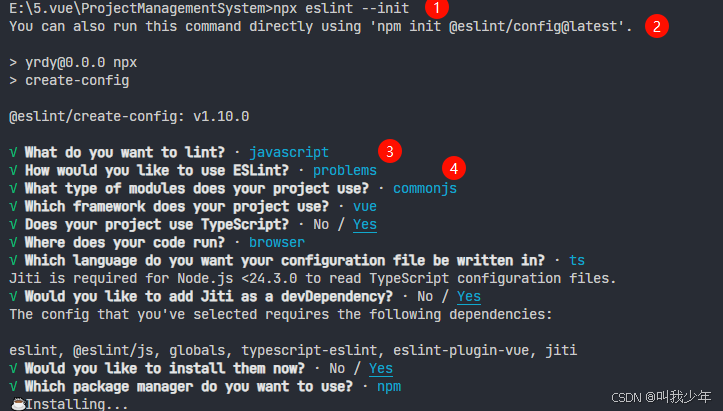
配置脚本:写入 package.json
把下面这段加进 scripts 里,日常敲 npm run lint 就能检查所有 .js、.ts、.vue 文件:
"scripts": {
  "dev": "vite",
  "build": "vue-tsc -b && vite build",
  "preview": "vite preview",
  "lint": "eslint . --ext .js,.ts,.vue",
  "lint:fix": "eslint . --ext .js,.ts,.vue --fix",
  "lint:src": "eslint src --ext .js,.ts,.vue",
  "lint:typescript": "eslint . --ext .ts,.vue",
  "lint:report": "eslint . --ext .js,.ts,.vue --format html > eslint-report.html",
  "precommit": "lint-staged"
}
常见坑:如果你用 pnpm,别忘了装
lint-staged 和husky,否则precommit脚本不会生效。
配置文件:eslint.config.ts(ESLint 9 风格)
ESLint 9 全面拥抱扁平配置(flat config),不再用 .eslintrc.js。以下是一个适配 Vue 3 + TypeScript 的示例:
import js from '@eslint/js';
import globals from 'globals';
import tseslint from 'typescript-eslint';
import pluginVue from 'eslint-plugin-vue';
import { defineConfig } from 'eslint/config';

export default defineConfig([
  {
    ignores: [
      'node_modules',
      'dist',
      '.gitignore',
      'package.json',
      'package-lock.json',
      '.DS_Store',
      'dev-dist',
      'dist_electron',
      '*.d.ts',
      'src/assets/**'
    ],
    files: ['**/*.{js,mjs,cjs,ts,mts,cts,vue}'],
    plugins: { js },
    extends: ['js/recommended'],
    languageOptions: { globals: globals.browser }
  },

  { files: ['**/*.js'], languageOptions: { sourceType: 'commonjs' } },
  /** js推荐配置 */
  tseslint.configs.recommended,
  /** vue推荐配置 */
  pluginVue.configs['flat/essential'],
  { files: ['**/*.vue'], languageOptions: { parserOptions: { parser: tseslint.parser } } }
]);
划重点:pluginVue.configs['flat/essential'] 是 ESLint 9 下 eslint-plugin-vue 的推荐入口。如果你需要更强的规则(如 strongly-recommended),可以改为 flat/strongly-recommended。
更多推荐


 3
3 0
0- 0


 已为社区贡献25条内容

所有评论(0)