
使用 HTML + JavaScript 实现仿微信上滑加载历史记录功能
文章目录
一、仿微信上滑加载历史记录功能
在日常的即时通讯场景中,聊天记录的管理与展示直接影响着用户的交互体验。在微信等聊天工具中,当用户想要查看更早的对话内容时,只需轻轻上滑至顶部,系统便会自动加载并插入历史消息,整个过程流畅自然,不会产生跳动或位移感。实现这一功能的核心在于如何处理 DOM 插入后的滚动位置保持问题:当新内容被插入到列表顶部时,浏览器默认会将视口推向下移,导致用户"丢失"当前阅读位置,产生视觉上的跳跃感。本文将介绍如何使用 HTML、CSS 和 JavaScript 实现仿微信上滑加载历史记录功能。
二、效果演示
打开页面后,聊天窗口会自动滚动到底部,显示最新的消息记录。当用户鼠标滚轮上滑至顶部区域时,顶部会出现"加载中…"的旋转提示,同时模拟网络延迟加载更早的消息。新消息插入后,滚动位置会保持在原处,不会让用户丢失阅读位置。当所有历史消息加载完毕后,顶部会显示"已显示全部历史"的提示,不再触发加载。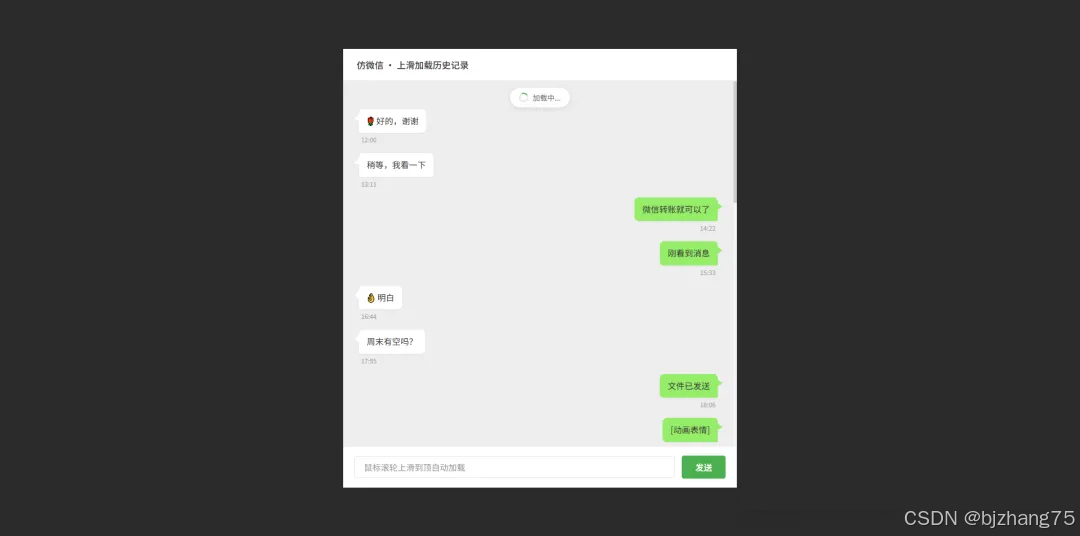
三、系统分析
1、页面结构
页面采用经典的聊天窗口布局,页面主要包括以下几个核心区域:
1.1 标题栏
标题栏(chat-titlebar)位于窗口最上方,显示当前聊天场景的标题信息。
<div class="chat-titlebar">
  <span>仿微信 · 上滑加载历史记录</span>
</div>
1.2 消息包装层
这是一个相对定位的容器(message-wrapper),作为消息区域的视觉边界,同时为内部的绝对定位元素(如加载提示)提供定位上下文。
message-wrapper 内部包含两个关键子元素:
- loadingContainer:绝对定位在顶部,用于显示加载状态,通过 opacity 控制显隐。
- messageList:实际的可滚动区域,采用 overflow-y: auto 实现垂直滚动。
<div class="message-wrapper">
  <div id="loadingContainer" class="loading-container">
    <div class="loading-content">
      <span class="loading-spinner"></span>
      <span>加载中...</span>
    </div>
  </div>
  <div id="messageList" class="message-area">
    <div id="statusContainer" class="status-container"></div>
    <div id="messageContainer"></div>
  </div>
</div>
1.3 消息列表区域
消息列表(message-area)被拆分为两个独立的部分,这是实现上滑加载的关键结构设计:
- statusContainer:位于滚动区域的顶部,用于显示"已显示全部历史"等静态提示信息。
- messageContainer:实际承载聊天消息的容器,历史消息通过 JavaScript 动态插入到此元素中。
1.4 输入区域
底部输入区域(input-area)固定输入框,当前版本为演示用途,已禁用实际输入功能,仅作为视觉占位。
<div class="input-area">
  <input type="text" placeholder="鼠标滚轮上滑到顶自动加载" disabled value="鼠标滚轮上滑到顶自动加载" style="color:#999;">
  <button disabled>发送</button>
</div>
2、核心功能实现
2.1 滚动位置保持原理
上滑加载历史消息最大的技术难点在于滚动位置的保持。当新内容被插入到 DOM 顶部时,浏览器会自动将后续内容向下推移,导致用户的视口位置发生跳跃。为了解决这个问题,我们需要在插入新内容前后记录滚动状态,并计算偏移量进行补偿。
本系统在 loadHistory() 函数中实现了这个功能。实现思路如下:在插入新消息之前,首先记录当前的 scrollHeight(内容总高度)和 scrollTop(当前滚动位置)。插入新内容后,scrollHeight 会增加,此时计算高度差值 newScrollHeight - oldScrollHeight,并将 scrollTop 设置为 oldScrollTop + 差值。这样,虽然内容整体下移了,但视口位置通过主动调整回到了用户原来的阅读位置,从视觉上看就是“新内容出现在上方,但当前看到的内容没有跳动”。
function loadHistory() {
  if (isLoading || !hasMore) return;

  isLoading = true;
  showLoading(true);
  showStatus('');

  setTimeout(() => {
    if (!hasMore || nextPage >= TOTAL_PAGES) {
      hasMore = false;
      isLoading = false;
      showLoading(false);
      showStatus('已显示全部历史');
      return;
    }

    const currentPage = nextPage;
    const oldScrollHeight = messageList.scrollHeight;
    const oldScrollTop = messageList.scrollTop;

    const newContent = generatePageContent(currentPage);
    messageContainer.insertAdjacentHTML('afterbegin', newContent);

    requestAnimationFrame(() => {
      const newScrollHeight = messageList.scrollHeight;
      messageList.scrollTop = oldScrollTop + (newScrollHeight - oldScrollHeight);

      nextPage++;
      if (nextPage >= TOTAL_PAGES) {
        hasMore = false;
        showStatus('已显示全部历史');
      }

      isLoading = false;
      showLoading(false);
    });
  }, 600);
}
2.2 滚动监听与加载触发
为了检测用户是否滚动到了列表顶部,我们需要监听 messageList 的 scroll 事件。考虑到滚动事件可能高频触发,代码中设置了 isLoading 标志位进行节流,避免重复触发加载逻辑。同时,通过判断 scrollTop <= 60 作为触发阈值,既保证了灵敏度,又避免了过于频繁的误触发。
function onScroll() {
  if (isLoading || !hasMore) return;
  if (messageList.scrollTop <= 60) {
    loadHistory();
  }
}
messageList.addEventListener('scroll', onScroll, { passive: true });
2.3 初始化滚动定位
initChat() 函数负责页面首次加载时,将滚动条自动滚动到最底部,显示最新的消息。
function initChat() {
  let initHtml = '';
  for (let p = 2; p >= 0; p--) {
    initHtml += generatePageContent(p);
  }

  messageContainer.insertAdjacentHTML('beforeend', initHtml);

  requestAnimationFrame(() => {
    messageList.scrollTop = messageList.scrollHeight;
  });

  nextPage = 3;
  hasMore = nextPage < TOTAL_PAGES;
}
五、完整代码
git地址:https://gitee.com/ironpro/hjdemo/blob/master/im-history/index.html
<!DOCTYPE html>
<html lang="zh-CN">
<head>
  <meta charset="UTF-8">
  <meta name="viewport" content="width=device-width, initial-scale=1.0">
  <title>仿微信上滑加载历史记录</title>
  <style>
    * {
      margin: 0;
      padding: 0;
      box-sizing: border-box;
    }
    body {
      background: #2b2b2b;
      min-height: 100vh;
      display: flex;
      justify-content: center;
      align-items: center;
      padding: 20px;
    }
    .chat-window {
      width: 700px;
      height: 780px;
      background-color: #ffffff;
      box-shadow: 0 1px 3px rgba(0, 0, 0, 0.1);
      display: flex;
      flex-direction: column;
      overflow: hidden;
    }
    .chat-titlebar {
      background-color: #ffffff;
      color: #333;
      padding: 16px 24px;
      font-size: 16px;
      font-weight: 500;
      display: flex;
      align-items: center;
      justify-content: space-between;
      border-bottom: 1px solid #e8e8e8;
      user-select: none;
    }
    .chat-titlebar span:first-child {
      display: flex;
      align-items: center;
      gap: 8px;
    }

    .chat-titlebar i {
      font-style: normal;
      color: #999;
      font-size: 14px;
    }

    .message-wrapper {
      flex: 1;
      position: relative;
      background-color: #ededed;
      overflow: hidden;
    }

    .message-area {
      height: 100%;
      overflow-y: auto;
      padding: 10px 20px;
      scroll-behavior: auto;
    }

    .clearfix::after {
      content: "";
      display: table;
      clear: both;
    }

    .msg-item {
      margin-bottom: 16px;
      width: 100%;
      clear: both;
    }

    .bubble {
      max-width: 70%;
      padding: 10px 14px;
      border-radius: 8px;
      font-size: 15px;
      line-height: 1.5;
      word-wrap: break-word;
      position: relative;
      box-shadow: 0 1px 2px rgba(0, 0, 0, 0.05);
    }

    .left .bubble {
      float: left;
      background-color: #ffffff;
      border-bottom-left-radius: 2px;
      color: #333;
      margin-left: 8px;
    }

    .left .bubble::before {
      content: '';
      position: absolute;
      left: -8px;
      top: 10px;
      width: 0;
      height: 0;
      border-top: 6px solid transparent;
      border-bottom: 6px solid transparent;
      border-right: 8px solid #ffffff;
    }

    .right .bubble {
      float: right;
      background-color: #95ec69;
      border-bottom-right-radius: 2px;
      color: #333;
      margin-right: 8px;
    }

    .right .bubble::after {
      content: '';
      position: absolute;
      right: -8px;
      top: 10px;
      width: 0;
      height: 0;
      border-top: 6px solid transparent;
      border-bottom: 6px solid transparent;
      border-left: 8px solid #95ec69;
    }

    .time-label {
      font-size: 11px;
      color: #999;
      margin-top: 4px;
      width: 100%;
      float: left;
    }

    .left .time-label {
      text-align: left;
      padding-left: 12px;
    }

    .right .time-label {
      text-align: right;
      padding-right: 12px;
    }

    .input-area {
      background-color: #ffffff;
      padding: 16px 20px;
      border-top: 1px solid #e8e8e8;
      display: flex;
      gap: 12px;
      align-items: center;
    }

    .input-area input {
      flex: 1;
      padding: 10px 16px;
      border: 1px solid #e0e0e0;
      border-radius: 4px;
      font-size: 15px;
      outline: none;
      background-color: white;
    }

    .input-area input:focus {
      border-color: #4caf50;
    }

    .input-area button {
      background-color: #4caf50;
      border: none;
      border-radius: 4px;
      padding: 10px 24px;
      color: white;
      font-weight: 500;
      font-size: 15px;
      cursor: pointer;
    }

    .input-area button:hover {
      background-color: #43a047;
    }

    .loading-container {
      position: absolute;
      top: 0;
      left: 0;
      right: 0;
      text-align: center;
      padding: 12px 0;
      z-index: 100;
      pointer-events: none;
      opacity: 0;
      transition: opacity 0.3s ease;
    }

    .loading-container.show {
      opacity: 1;
    }

    .loading-content {
      display: inline-flex;
      align-items: center;
      gap: 8px;
      background-color: rgba(255, 255, 255, 0.95);
      padding: 8px 16px;
      border-radius: 20px;
      box-shadow: 0 2px 8px rgba(0, 0, 0, 0.1);
      font-size: 13px;
      color: #666;
    }

    .loading-spinner {
      width: 16px;
      height: 16px;
      border: 2px solid #e0e0e0;
      border-top-color: #4caf50;
      border-radius: 50%;
      animation: spin 0.8s linear infinite;
    }

    @keyframes spin {
      to { transform: rotate(360deg); }
    }

    .status-container {
      text-align: center;
      padding: 12px 0;
      font-size: 12px;
      color: #999;
      min-height: 40px;
    }

    .message-area::-webkit-scrollbar {
      width: 6px;
    }

    .message-area::-webkit-scrollbar-track {
      background: #f5f5f5;
    }

    .message-area::-webkit-scrollbar-thumb {
      background: #cccccc;
      border-radius: 3px;
    }

    .message-area::-webkit-scrollbar-thumb:hover {
      background: #b0b0b0;
    }
  </style>
</head>
<body>
<div class="chat-window">
  <div class="chat-titlebar">
    <span>仿微信 · 上滑加载历史记录</span>
  </div>

  <div class="message-wrapper">
    <div id="loadingContainer" class="loading-container">
      <div class="loading-content">
        <span class="loading-spinner"></span>
        <span>加载中...</span>
      </div>
    </div>
    <div id="messageList" class="message-area">
      <div id="statusContainer" class="status-container"></div>
      <div id="messageContainer"></div>
    </div>
  </div>

  <div class="input-area">
    <input type="text" placeholder="鼠标滚轮上滑到顶自动加载" disabled value="鼠标滚轮上滑到顶自动加载" style="color:#999;">
    <button disabled>发送</button>
  </div>
</div>

<script>
  const messageList = document.getElementById('messageList');
  const messageContainer = document.getElementById('messageContainer');
  const loadingContainer = document.getElementById('loadingContainer');
  const statusContainer = document.getElementById('statusContainer');
  const PAGE_SIZE = 8;
  const TOTAL_PAGES = 10;
  let nextPage = 3;
  let isLoading = false;
  let hasMore = true;

  function createMessage(text, type, time) {
    return `<div class="msg-item ${type} clearfix">
          <div class="bubble">${text}</div>
          <div class="time-label">${time}</div>
        </div>`;
  }

  function generatePageContent(page) {
    let html = '';
    const samples = [
      '你昨天说的那个事情,我再想想',
      '嗯嗯,我也觉得挺好',
      '图片上这个地方是哪里?',
      '😂 哈哈,确实有意思',
      '收到,晚点联系',
      '没问题,就这样定',
      '🌹 好的,谢谢',
      '稍等,我看一下',
      '微信转账就可以了',
      '刚看到消息',
      '👌 明白',
      '周末有空吗?',
      '文件已发送',
      '[动画表情]',
      '地址发我一下'
    ];
    for (let i = 0; i < PAGE_SIZE; i++) {
      const type = Math.random() > 0.5 ? 'left' : 'right';
      const text = `${samples[(i + page * 3) % samples.length]}`;
      const hour = (8 + i + page * 2) % 24;
      const minute = (i * 11) % 60;
      const timeStr = `${hour.toString().padStart(2,'0')}:${minute.toString().padStart(2,'0')}`;
      html += createMessage(text, type, timeStr);
    }
    return html;
  }

  function initChat() {
    let initHtml = '';
    for (let p = 2; p >= 0; p--) {
      initHtml += generatePageContent(p);
    }

    messageContainer.insertAdjacentHTML('beforeend', initHtml);

    requestAnimationFrame(() => {
      messageList.scrollTop = messageList.scrollHeight;
    });

    nextPage = 3;
    hasMore = nextPage < TOTAL_PAGES;
  }

  function showLoading(show) {
    if (show) {
      loadingContainer.classList.add('show');
    } else {
      loadingContainer.classList.remove('show');
    }
  }

  function showStatus(text) {
    statusContainer.textContent = text || '';
  }

  function loadHistory() {
    if (isLoading || !hasMore) return;

    isLoading = true;
    showLoading(true);
    showStatus('');

    setTimeout(() => {
      if (!hasMore || nextPage >= TOTAL_PAGES) {
        hasMore = false;
        isLoading = false;
        showLoading(false);
        showStatus('已显示全部历史');
        return;
      }

      const currentPage = nextPage;
      const oldScrollHeight = messageList.scrollHeight;
      const oldScrollTop = messageList.scrollTop;

      const newContent = generatePageContent(currentPage);
      messageContainer.insertAdjacentHTML('afterbegin', newContent);

      requestAnimationFrame(() => {
        const newScrollHeight = messageList.scrollHeight;
        messageList.scrollTop = oldScrollTop + (newScrollHeight - oldScrollHeight);

        nextPage++;
        if (nextPage >= TOTAL_PAGES) {
          hasMore = false;
          showStatus('已显示全部历史');
        }

        isLoading = false;
        showLoading(false);
      });
    }, 600);
  }

  function onScroll() {
    if (isLoading || !hasMore) return;
    if (messageList.scrollTop <= 60) {
      loadHistory();
    }
  }
  messageList.addEventListener('scroll', onScroll, { passive: true });

  initChat();
</script>
</body>
</html>
更多推荐
 20
20 0
0- 0


 已为社区贡献6条内容

所有评论(0)