
Python ADB异步架构深度解析:实现原理与扩展方案
Python ADB异步架构深度解析:实现原理与扩展方案
 项目地址: https://gitcode.com/gh_mirrors/pu/pure-python-adb
 在Android开发与自动化测试领域,ADB(Android Debug Bridge)作为核心调试工具,其重要性不言而喻。传统的ADB命令行工具虽然功能强大,但在集成到Python自动化框架时存在诸多不便。pure-python-adb项目提供了一个纯Python实现的ADB客户端解决方案,通过创新的异步架构设计和模块化插件系统,为开发者带来了全新的Python ADB开发体验。
架构设计原理:从传统到现代的演进
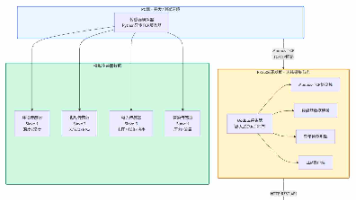
Android Debug Bridge的传统架构采用三层设计:命令行工具 → ADB服务器 → 设备守护进程。这种架构虽然稳定,但在Python自动化场景下存在明显的局限性。pure-python-adb通过重新设计客户端层,实现了与ADB服务器的无缝对接。

上图展示了传统ADB架构的工作流程:命令行工具通过本地回环地址与ADB服务器通信,服务器再与设备端的adb守护进程交互。这种架构的核心问题在于,Python程序需要通过subprocess调用外部命令行工具,效率低下且难以进行精细控制。

相比之下,pure-python-adb的架构更为简洁高效。Python客户端直接与ADB服务器通信,完全消除了对命令行工具的依赖。这种设计不仅提升了执行效率,还为异步编程和插件扩展提供了坚实基础。
核心实现机制:同步与异步双模支持
pure-python-adb的核心优势在于其双模架构设计。项目提供了同步和异步两套API,满足不同场景下的开发需求。
同步客户端实现
同步客户端位于ppadb/client.py,采用传统的同步编程模型,适合简单的脚本和快速原型开发:
from ppadb.client import Client as AdbClient

# 创建同步客户端
client = AdbClient(host="127.0.0.1", port=5037)

# 获取设备列表
devices = client.devices()

# 执行同步操作
device = devices[0]
result = device.shell("ls /sdcard")
同步客户端的实现基于标准的socket通信,通过connection.py中的连接管理类实现与ADB服务器的稳定通信。这种设计确保了向后兼容性和易用性。
异步客户端实现
异步客户端位于ppadb/client_async.py,基于asyncio实现,适合高并发场景:
import asyncio
from ppadb.client_async import ClientAsync as AdbClient

async def screenshot_all_devices():
    client = AdbClient(host="127.0.0.1", port=5037)
    devices = await client.devices()

    tasks = []
    for device in devices:
        task = device.screencap()
        tasks.append(task)

    results = await asyncio.gather(*tasks)
    return results
异步实现的关键在于connection_async.py中的异步连接管理,它使用async/await语法重构了所有I/O操作,显著提升了多设备并发操作的性能。
插件化扩展系统:功能模块化设计
pure-python-adb的另一个重要特性是其插件化架构。插件目录ppadb/plugins/提供了丰富的设备管理功能,每个插件都可以独立加载和使用。
设备监控插件
电池状态监控是Android设备管理的重要功能。ppadb/plugins/device/batterystats.py提供了完整的电池信息获取接口:
# 获取设备电池状态
battery_info = device.batterystats()
print(f"电池电量: {battery_info.get('level')}%")
print(f"充电状态: {battery_info.get('status')}")
该插件的设计充分体现了模块化思想,通过batterystats_section.py中的数据结构定义,实现了电池数据的结构化解析。
性能监控插件
CPU监控是性能分析的关键。ppadb/plugins/device/cpustat.py提供了详细的CPU使用率统计:
# 获取CPU使用率统计
cpu_stats = device.cpu_times()
print(f"用户态时间: {cpu_stats.user}")
print(f"系统态时间: {cpu_stats.system}")
输入控制插件ppadb/plugins/device/input.py则提供了完整的触摸和按键模拟功能,支持复杂的自动化操作。
高级功能实现:文件同步与设备管理
文件同步机制
文件同步是ADB的核心功能之一。pure-python-adb通过sync模块实现了高效的文件传输:
# 推送文件到设备
device.push("local_file.txt", "/sdcard/remote_file.txt")

# 从设备拉取文件
device.pull("/sdcard/screenshot.png", "local_screenshot.png")
同步模块的实现位于ppadb/command/sync/目录,支持断点续传和进度回调,确保了大数据传输的可靠性。
设备状态管理
设备状态监控是自动化测试的基础。pure-python-adb提供了丰富的设备状态查询接口:
# 获取设备属性
properties = device.get_properties()
print(f"设备型号: {properties.get('ro.product.model')}")
print(f"Android版本: {properties.get('ro.build.version.release')}")

# 检查设备连接状态
if device.is_connected():
    print("设备连接正常")
else:
    print("设备连接异常,正在尝试重连")
性能优化策略:连接管理与资源复用
连接池管理
在高并发场景下,连接管理成为性能瓶颈。pure-python-adb通过智能连接池实现了连接复用:
# 连接池配置示例
class ConnectionPool:
    def __init__(self, max_connections=10):
        self.max_connections = max_connections
        self.active_connections = []
        self.idle_connections = []

    def get_connection(self, host, port):
        # 优先使用空闲连接
        if self.idle_connections:
            return self.idle_connections.pop()

        # 创建新连接
        if len(self.active_connections) < self.max_connections:
            conn = create_connection(host, port)
            self.active_connections.append(conn)
            return conn

        # 等待连接释放
        return self.wait_for_connection()
异步任务调度
异步客户端的任务调度机制采用了高效的协程管理策略:
import asyncio
from concurrent.futures import ThreadPoolExecutor

class AsyncTaskScheduler:
    def __init__(self, max_workers=5):
        self.executor = ThreadPoolExecutor(max_workers=max_workers)
        self.loop = asyncio.get_event_loop()

    async def execute_concurrent(self, tasks):
        # 将阻塞任务转移到线程池
        futures = [
            self.loop.run_in_executor(self.executor, task)
            for task in tasks
        ]

        # 等待所有任务完成
        results = await asyncio.gather(*futures)
        return results
扩展开发指南:自定义插件实现
pure-python-adb的插件系统设计允许开发者轻松扩展功能。以下是创建自定义插件的步骤:
1. 插件基础结构
# custom_plugin.py
from ppadb.plugins import DevicePlugin

class CustomPlugin(DevicePlugin):
    def __init__(self, device):
        super().__init__(device)

    def custom_method(self, *args, **kwargs):
        # 实现自定义功能
        result = self.device.shell("custom_command")
        return self._parse_result(result)

    def _parse_result(self, raw_output):
        # 解析命令输出
        return {
            'data': raw_output,
            'timestamp': time.time()
        }
2. 插件注册机制
# 在设备对象中注册插件
device.register_plugin('custom', CustomPlugin)

# 使用自定义插件
custom_data = device.custom.custom_method()
3. 异步插件支持
# custom_async_plugin.py
from ppadb.plugins import AsyncDevicePlugin

class CustomAsyncPlugin(AsyncDevicePlugin):
    async def async_custom_method(self, *args, **kwargs):
        # 异步实现自定义功能
        result = await self.device.shell("async_command")
        return await self._async_parse_result(result)
实际应用场景:企业级解决方案
大规模设备管理
在CI/CD环境中,pure-python-adb可以管理数百台测试设备:
class DeviceManager:
    def __init__(self, client):
        self.client = client
        self.devices = {}

    async def discover_devices(self):
        """发现所有可用设备"""
        devices = await self.client.devices()
        for device in devices:
            device_info = await self._collect_device_info(device)
            self.devices[device.serial] = device_info

    async def batch_operation(self, operation_func):
        """批量执行操作"""
        tasks = []
        for serial, device in self.devices.items():
            task = operation_func(device)
            tasks.append(task)

        results = await asyncio.gather(*tasks, return_exceptions=True)
        return dict(zip(self.devices.keys(), results))
自动化测试集成
与主流测试框架集成,提供完整的自动化测试解决方案:
import pytest
from ppadb.client_async import ClientAsync

@pytest.fixture(scope="session")
async def adb_client():
    client = ClientAsync(host="127.0.0.1", port=5037)
    yield client
    await client.close()

@pytest.mark.asyncio
async def test_app_installation(adb_client):
    """测试应用安装功能"""
    devices = await adb_client.devices()
    device = devices[0]

    # 安装测试应用
    result = await device.install("test_app.apk")
    assert result == "Success"

    # 验证安装
    is_installed = await device.is_installed("com.example.testapp")
    assert is_installed is True
未来发展方向:云原生与AI集成
云原生架构支持
随着云原生技术的发展,pure-python-adb正在向容器化和微服务架构演进:
# 容器化部署示例
from kubernetes import client, config

class KubernetesDeviceManager:
    def __init__(self, namespace="adb-devices"):
        config.load_kube_config()
        self.api = client.CoreV1Api()
        self.namespace = namespace

    def deploy_adb_proxy(self, device_count=10):
        """部署ADB代理服务"""
        deployment = self._create_deployment(device_count)
        service = self._create_service()

        self.api.create_namespaced_deployment(
            namespace=self.namespace,
            body=deployment
        )

        self.api.create_namespaced_service(
            namespace=self.namespace,
            body=service
        )
AI增强的设备管理
集成机器学习算法,实现智能设备管理:
from sklearn.ensemble import RandomForestClassifier

class IntelligentDeviceManager:
    def __init__(self):
        self.classifier = RandomForestClassifier()
        self.training_data = []

    async def predict_device_health(self, device):
        """预测设备健康状态"""
        features = await self._extract_device_features(device)
        prediction = self.classifier.predict([features])

        return {
            'health_score': prediction[0],
            'recommendations': self._generate_recommendations(features)
        }

    async def _extract_device_features(self, device):
        """提取设备特征"""
        battery = await device.batterystats()
        cpu_stats = await device.cpu_times()

        return [
            battery.get('level', 0),
            cpu_stats.user,
            cpu_stats.system,
            # 更多特征...
        ]
总结与最佳实践
pure-python-adb通过创新的架构设计,为Python开发者提供了强大而灵活的Android设备管理解决方案。其核心优势包括:
- 纯Python实现:完全消除对外部命令行工具的依赖
- 异步架构:支持高性能并发操作
- 插件化设计:易于扩展和定制
- 企业级特性:支持大规模设备管理和自动化测试
在实际应用中,建议遵循以下最佳实践:
- 对于简单脚本,使用同步客户端
- 对于高并发场景,优先选择异步客户端
- 合理使用连接池管理资源
- 根据业务需求开发自定义插件
- 集成到现有的CI/CD流程中
随着Android生态的不断发展,pure-python-adb将继续演进,为开发者提供更加强大和智能的设备管理能力。无论是移动应用测试、IoT设备管理还是自动化运维,这个纯Python ADB实现都将成为不可或缺的工具。
更多推荐

 1
1 0
0- 0


 已为社区贡献11条内容

所有评论(0)