
iOS开发 SwiftUI 1 : Text的基本用法
·
Text的基本属性
目录
一、使用font修饰:
1.1 系统预设字体
struct SwiftUIViewText: View {
    var body: some View {
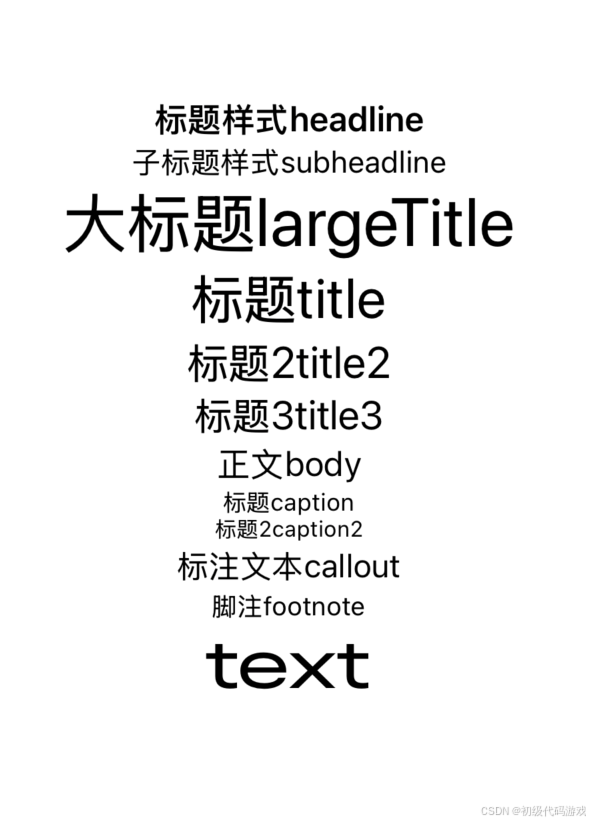
        Text("标题样式headline").font(.headline)
        Text("子标题样式subheadline").font(.subheadline)
        Text("大标题largeTitle").font(.largeTitle)
        Text("标题title").font(.title)
        Text("标题2title2").font(.title2)
        Text("标题3title3").font(.title3)
        Text("正文body").font(.body)
        Text("标题caption").font(.caption)
        Text("标题2caption2").font(.caption2)
        Text("标注文本callout").font(.callout)
        Text("脚注footnote").font(.footnote)

        Text("text")
            .font(.largeTitle)
    }
}
效果:
稍微解释一下几个“标题”的区别:
- headline 出版业的术语,一般指头版头条、整页的大标题
- title 文章的标题
- caption 其实根本不是标题,caption是图片下方的说明文字(也用于影片的字幕)
都是翻译的锅,如果分别翻译成“头条”、“标题”、“图注”应该就不会混淆了。
HTML一开始就错了?“H”是“heading”吧?怎么能分6级呢?
windows也不合适,窗口顶部为什么是“caption”?
1.2 直接设置字体
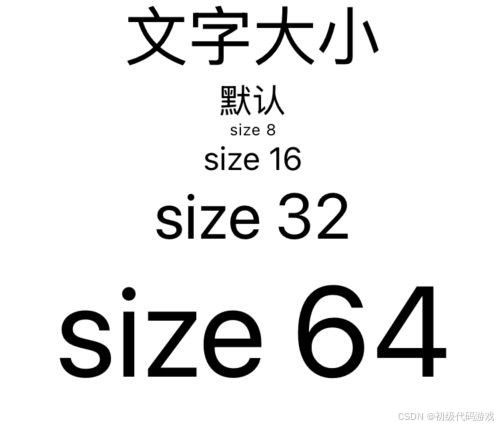
        Text("文字大小").font(.largeTitle)
        Text("默认")
        Text("size 8").font(.system(size:8))
        Text("size 16").font(.system(size:16))
        Text("size 32").font(.system(size:32))
        Text("size 64").font(.system(size:64))
效果:
二、使用fontWidth:
代码:
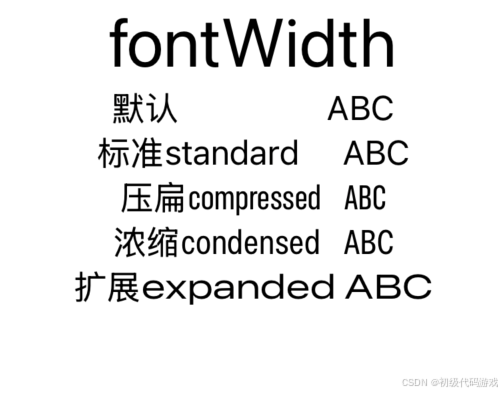
        Text("fontWidth").font(.largeTitle)
        Text("默认                 ABC")
        Text("标准standard     ABC").fontWidth(.standard)
        Text("压扁compressed     ABC").fontWidth(.compressed)
        Text("浓缩condensed    ABC").fontWidth(.condensed)
        Text("扩展expanded ABC").fontWidth(.expanded)
效果:
这里又有英文需要解释一下:
- compressed 压缩、压扁,伤害性比较大的
- condensed 浓缩,伤害性比较小
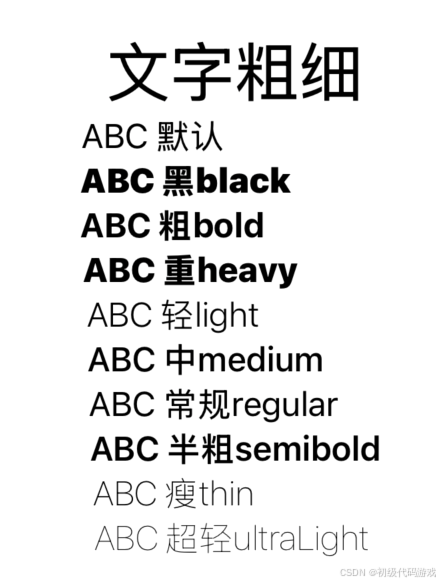
三、使用fontWeight:
        Text("文字粗细").font(.largeTitle)
        Text("ABC 默认                   ")
        Text("ABC 黑black              ").fontWeight(.black)
        Text("ABC 粗bold                ").fontWeight(.bold)
        Text("ABC 重heavy            ").fontWeight(.heavy)
        Text("ABC 轻light               ").fontWeight(.light)
        Text("ABC 中medium       ").fontWeight(.medium)
        Text("ABC 常规regular     ").fontWeight(.regular)
        Text("ABC 半粗semibold").fontWeight(.semibold)
        Text("ABC 瘦thin                ").fontWeight(.thin)
        Text("ABC 超轻ultraLight ").fontWeight(.ultraLight)
效果:
四、使用前景色(标准颜色)
        Text("标准颜色").font(.largeTitle)
        Text("颜色 默认")
        Text("黑色black").foregroundStyle(.black)
        Text("蓝色blue").foregroundStyle(.blue)
        Text("棕色brown").foregroundStyle(.brown)
        Text("透明clear👇")
        Text("透明clear").background(.blue).foregroundStyle(.clear).border(.blue)
        Text("透明clear").foregroundStyle(.clear).border(.blue)
        Text("青色cyan").foregroundStyle(.cyan)
        Text("灰色gray").foregroundStyle(.gray)
        Text("绿色green").foregroundStyle(.green)
        Text("靛蓝indigo").foregroundStyle(.indigo)
        Text("薄荷mint").foregroundStyle(.mint)
        Text("橙色orange").foregroundStyle(.orange)
        Text("粉色pink").foregroundStyle(.pink)
        Text("紫色purple").foregroundStyle(.purple)
        Text("红色red").foregroundStyle(.red)
        Text("青绿色teal").foregroundStyle(.teal)
        Text("白色white👇");
        Text("白色white").background(.blue).foregroundStyle(.white).border(.blue)
        Text("白色white").foregroundStyle(.white).border(.blue)
        Text("黄色yellow").foregroundStyle(.yellow)
注意以后要用foregroundStyle而不是foreground。
效果:
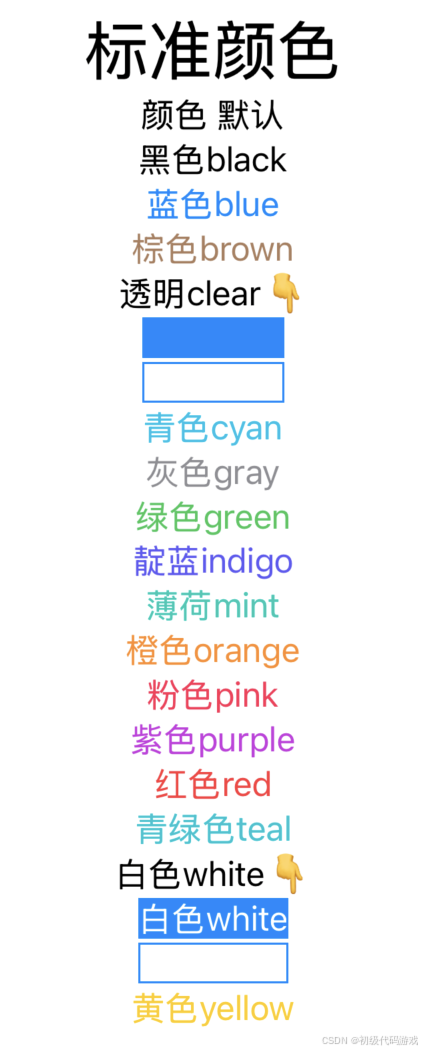
clear是透明色,也就是看不见(可能就是和背景色一致),为此加了边框和底色,可以看到白色背景和蓝色背景都是看不到的。
白色在白色背景上当然也看不到,所以也加了边框和背景来区别。
五、更多修饰
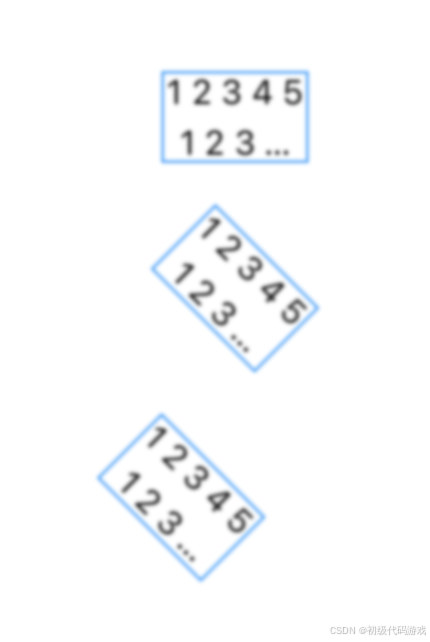
        Text("12345\n123\n12345").border(.blue).lineLimit(2).multilineTextAlignment(.center).tracking(5).lineSpacing(5).blur(radius: 1).padding()

        Text("12345\n123\n12345").border(.blue).lineLimit(2).multilineTextAlignment(.center).tracking(5).lineSpacing(5).blur(radius: 1)
            .rotationEffect(.degrees(45)).padding()
        Text("12345\n123\n12345").border(.blue).lineLimit(2).multilineTextAlignment(.center).tracking(5).lineSpacing(5).blur(radius: 1)
            .rotationEffect(.degrees(45),anchor:UnitPoint(x:0,y:0)).padding()
这三个只有旋转是不一样的。相关的几个修饰:
- border 边框,代码里设置了颜色,还可以设置宽度
- lineLimit 行数限制,换行可以是回车、换行和回车换行对,超出限制的显示为省略号
- multilineTextAlignment 多行文本的对齐方式,默认是居中对齐
- tracking 字符间距
- lineSpacing 行间距
- blur 模糊度,0是不模糊,1-3比较模糊,更高就看不清是啥了
- rotationEffect 平面旋转,第一个参数是角度,第二个参数是中心点,默认是中心旋转,还有个名字中间有个“3D”的是三维旋转
- padding 外部的间距
效果:
更多推荐


 23
23 0
0- 0


 已为社区贡献11条内容

所有评论(0)