
c#自定义控件
1。C#中控件和组件的区别:
一般组件派生于:Component类,所以从此类派生出的称之为组件。
一般用户控件派生于:Control类或UserControl类,所以从该类派生出的称之为用户控件。
ContainerControl充当容器
ScrollableControl支持滚动
他们之间的关系是:UserControl最终继承Control,Control最终继承Component。
概括一下:组件包括控件,即控件肯定是组件,但组件不一定是控件。
控件的突出特点:就是交互式组件(能动,能和客户交互),而用户控件则是将某些特定的组件或控件复合从而实现特定的业务功能。
https://blog.csdn.net/cxu123321/article/details/103014278
SetStyle()防止绘图闪烁问题
https://www.jb51.net/program/331631ly4.htm
防止闪烁其他方案(了解)
https://www.jb51.net/program/345290rqt.htm
2。自定义控件分类?
分类:完全自定义控件、扩展控件、复合控件
完全自定义控件:继承Control类
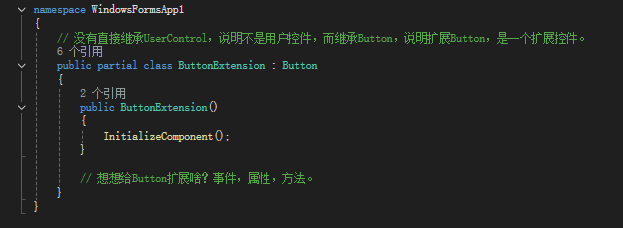
扩展控件:继承某个具体的控件类,如:Button,Label等
复合控件:继承UserControl类,又称用户控件或组合控件。即:把多个控件通过组合的形式,形成更大,功能更全的控件。******
https://www.cnblogs.com/zhangchenliang/archive/2012/08/17/2643744.html
https://blog.csdn.net/yysyangyangyangshan/article/details/7078471
3。特性简单理解?CategoryAttribute DescriptionAttribute
特性(Attribute)是用于在运行时传递程序中各种元素(比如类、属性、方法、结构、枚举、组件等)的行为信息的声明性标签。您可以通过使用特性向程序添加声明性信息。一个声明性标签是通过放置在它所应用的元素前面的方括号([ ])来描述的。
特性是运行时给各种元素添加声明性标签。语法:[某个特性]
特性(Attribute)用于添加元数据,如编译器指令和注释、描述、方法、类等其他信息。.Net 框架提供了两种类型的特性:预定义特性和自定义特性。
https://www.toutiao.com/article/6969542149637833230
https://www.toutiao.com/article/7106017793186824744
4。反射?
反射是指在程序运行中,查看、操作其他程序集或者自身的元数据的各种信息(类、方法,属性、变量、对象等)的行为。C#中的反射(Reflection)是一种强大的特性,允许你在运行时检查和操作程序集、类型和对象的信息,基本上,使用反射可以在代码运行时检查和操作指定的类及其成员。C#反射的原理主要基于元数据(与C#特性相似),即程序集中存储的有关类型、方法等的信息。因为反射可以在程序编译后获得信息,所以它提高了程序的拓展性和灵活性。
反射就是为了拿到各种元素对应的标签。Reflection反射
https://blog.csdn.net/qq_57671924/article/details/134208556
https://blog.csdn.net/naer_chongya/article/details/130532672
5。练习题参考文献:
a.圆角按钮:(自定义控件应用)
https://blog.csdn.net/shi_xi_sheng/article/details/130969580
b.单行文本框定高、文本垂直居中问题:(自定义控件应用)
https://www.cnblogs.com/weekend001/p/3518020.html
https://blog.csdn.net/mazhiyuan1981/article/details/124350065
https://blog.csdn.net/ngl272/article/details/125226552
c.winform界面美化技巧:IrisSkin4皮肤(了解,很旧,在网上可以找仿QQ皮肤)
https://blog.csdn.net/weixin_37864926/article/details/131822828
d.winform UI库:
https://www.cnblogs.com/bfyx/p/11361809.html
https://www.cnblogs.com/dxqNet/p/17088088.html
https://www.zhihu.com/question/267772520/answers/updated
// 参考:https://www.jb51.net/program/345290rqt.htm
using System;
using System.Collections.Generic;
using System.ComponentModel;
using System.Data;
using System.Drawing;  // GDI+重要的命令空间
using System.Drawing.Drawing2D;  // 2D绘图
using System.Drawing.Text;  // 文本
using System.Linq;
using System.Text;
using System.Threading.Tasks;
using System.Windows.Forms;

namespace WindowsFormsApp1
{
    // 自定义控件要注意:绘制的时候窗体闪烁,手段:1.开启双缓冲  2.重写属性或方法。如:CreateParams属性,WndProc()方法
    public partial class MyButton : Control
    {
        public MyButton()
        {
            InitializeComponent();
            this.DoubleBuffered = true; // ***开启双缓冲  有两种开启双缓冲方式:1。DoubleBuffered属性  2。SetStyle()

            this.SetStyle(ControlStyles.OptimizedDoubleBuffer, true);  // ***优化双缓冲  推荐。
            this.SetStyle(ControlStyles.AllPaintingInWmPaint, true);  // ***有助于减少闪烁

            // SetStyle()给自定义控件设置风格。其他用法。
            /*
            UserPaint: 指定控件必须调用 OnPaint 方法来绘制自己,而不是使用默认的绘制逻辑。这通常用于自定义控件的绘制。

            AllPaintingInWmPaint: 指定所有的绘制操作都应该在 WM_PAINT 消息处理中完成。这有助于减少闪烁,因为它确保了所有的绘制都通过一个单一的绘制消息进行。

            DoubleBuffer: 启用双缓冲,减少闪烁和图形失真。在.NET Framework 2.0之前,这是实现双缓冲的常用方法。

            OptimizedDoubleBuffer: 启用优化的双缓冲。这是在.NET Framework 2.0及更高版本中推荐的方法,因为它提供了更好的性能。

            ResizeRedraw: 当控件调整大小时,控件将重绘自身。默认情况下,控件在调整大小时不会重绘,除非设置了这个样式。

            SupportsTransparentBackColor: 允许控件的背景色是透明的。

            StandardClick: 指定控件响应标准的鼠标点击。如果未设置此样式,控件可能不会响应点击事件。

            Selectable: 指定控件可以被选中,通常用于键盘导航。

            UserMouse: 指定控件将处理鼠标事件,即使鼠标不在控件的区域内。

            UseAntiAlias: 指定控件使用抗锯齿技术来绘制文本和图形。

            UseSmoothScrolling: 指定控件使用平滑滚动。*/
            this.SetStyle(ControlStyles.UserPaint, true);  //***
            this.SetStyle(ControlStyles.ResizeRedraw, true); //***
            this.SetStyle(ControlStyles.SupportsTransparentBackColor, true);
            this.SetStyle(ControlStyles.StandardClick, true);
            this.SetStyle(ControlStyles.Selectable, true); //*** 能交互时,尽量让能选中,不能交互时,就不要设置这个样式。

            // 简写成如下代码:
            /*this.SetStyle(ControlStyles.UserPaint | ControlStyles.ResizeRedraw | ControlStyles.SupportsTransparentBackColor | ControlStyles.StandardClick | ControlStyles.Selectable | ControlStyles.UserMouse , true);*/
        }

        // 使用GDI+技术对控件进行完全重绘,GDI+重点对象:Graphics,Font,Brush|Color,Point|F,Rectangle|F等
        // 重写Paint事件,也可以给MyButton设置Paint事件。
        // PaintEventArgs事件参数,继承EventArgs
        protected override void OnPaint(PaintEventArgs e)
        {
            // base表示基类
            base.OnPaint(e);

            // 1.拿到要绘制的“画板,画布”,目的:将来在此处绘制图形
            Graphics g = e.Graphics;

            // 2.画板的一些配置参数(省略)    Smooth平滑,“锯齿,毛边”
            g.SmoothingMode = SmoothingMode.AntiAlias;  // 平滑模式 AntiAlias抗锯齿,HighSpeed高速度,HighQuality高质量
            g.InterpolationMode = InterpolationMode.HighQualityBicubic; // 插补模式
            g.TextRenderingHint = TextRenderingHint.AntiAlias;  // 文本渲染

            g.PixelOffsetMode = PixelOffsetMode.HighQuality; // 像素偏移模式
            g.CompositingQuality = CompositingQuality.HighQuality; // 合成质量
            g.CompositingMode = CompositingMode.SourceOver; // 合成模式

            //3.绘制图形   DrawXXX()绘制  FillXXX()填充
            // 参数:绘制的文字,字体,画笔,绘制的位置
            // Graphics,Font,Brush|Color,Point|F,Rectangle|F
            //g.DrawString("文字", new Font("宋体", 12, FontStyle.Underline), Brushes.Red, new Point(10, 10));
            //g.DrawImage(Properties.Resources.a, new Point(10, 10));

            g.FillRectangle(Brushes.Red, new Rectangle(10, 10, 100, 100));
        }


        protected override CreateParams CreateParams
        {
            get
            {
                CreateParams cp = base.CreateParams;
                cp.ExStyle |= 0x02000000; // WS_EX_COMPOSITED
                return cp;
            }
        }

        protected override void WndProc(ref Message m)
        {
            if (m.Msg == 0x0014) // WM_ERASEBKGND 消息
            {
                return; // 直接返回,不处理清除背景
            }
            base.WndProc(ref m);
        }
    }
}
刷新
//参考:
// https://www.jb51.net/program/341432teh.htm
// https://blog.csdn.net/tianminhjyusaf/article/details/132308584
//Invalidate(); // 按需刷新,延迟绘制,依赖于 OnPaint 事件,减少刷新次数,是最常用的重绘方法。
//Update(); // 强制刷新,依赖于 OnPaint 事件,比Invalidate刷新次数高,通常与 Invalidate() 一起使用,以确保立即处理重绘,而不是等待其他消息。
Refresh(); // 强制立即刷新,不依赖于 OnPaint 事件,比Update刷新次数高,在一定程度上等效于Invalidate和Update,可能会引起性能问题,因为它不提供优化的机会。
using System;
using System.Collections.Generic;
using System.ComponentModel;
using System.Data;
using System.Drawing;
using System.Linq;
using System.Text;
using System.Threading.Tasks;
using System.Windows.Forms;

namespace WindowsFormsApp1
{
    public partial class LoginControl : UserControl
    {
        // 公开事件
        [Description("登录事件")]
        public event EventHandler LoginEvent;
        public LoginControl()
        {
            InitializeComponent();
            AccountText = "admin";
            txtPassword.Text = "123456";
        }

        // 公开成员:属性,事件,方法

        // Browser浏览   able能
        [Browsable(true), Description("账号文本"), DefaultValue("admin")]
        public string AccountText
        {
            get { return txtAccount.Text; }
            set
            {
                if (string.IsNullOrWhiteSpace(value))
                {
                    throw new Exception("账号不能为空");
                }
                txtAccount.Text = value;

                //参考:
                // https://www.jb51.net/program/341432teh.htm
                // https://blog.csdn.net/tianminhjyusaf/article/details/132308584
                //Invalidate(); // 按需刷新,延迟绘制,依赖于 OnPaint 事件,减少刷新次数,是最常用的重绘方法。
                //Update(); // 强制刷新,依赖于 OnPaint 事件,比Invalidate刷新次数高,通常与 Invalidate() 一起使用,以确保立即处理重绘,而不是等待其他消息。
                Refresh(); // 强制立即刷新,不依赖于 OnPaint 事件,比Update刷新次数高,在一定程度上等效于Invalidate和Update,可能会引起性能问题,因为它不提供优化的机会。
            }
        }

        [Description("密码文本")]
        public string PasswordText
        {
            get { return txtPassword.Text; }
            set
            {
                if (string.IsNullOrWhiteSpace(value))
                {
                    throw new Exception("密码不能为空");
                }
                txtPassword.Text = value;
                Refresh();
            }
        }

        private void btnLogin_Click(object sender, EventArgs e)
        {
            // 触发事件两种方式:LoginEvent() 或 LoginEvent.Invoke()
            // 参数1:当前用户控件LoginControl实例。参数2:事件参数EventArgs
            //LoginEvent?.Invoke(this, new EventArgs() );
            // 触发事件:执行给事件绑定方法。即执行loginControl1_LoginEvent(object sender, EventArgs e)
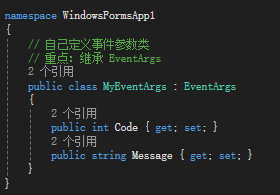
            LoginEvent?.Invoke(this, new MyEventArgs() { Code = 200, Message = "成功!" });

            // 相当于如下代码
            /*if(LoginEvent != null)
            {
                LoginEvent(this, new EventArgs());
            }*/
        }

        private void LoginControl_Paint(object sender, PaintEventArgs e)
        {
            Console.WriteLine("aaaa");
        }
    }
}
form1
using System;
using System.Collections.Generic;
using System.ComponentModel;
using System.Data;
using System.Drawing;
using System.Linq;
using System.Text;
using System.Threading.Tasks;
using System.Windows.Forms;

namespace WindowsFormsApp1
{
    public partial class Form1 : Form
    {
        public Form1()
        {
            InitializeComponent();
            loginControl1.AccountText = "guest";
            //MessageBox.Show(loginControl1.AccountText);
        }

        private void loginControl1_LoginEvent(object sender, EventArgs e)
        {
            var c = sender as LoginControl;
            var ex = e as MyEventArgs;
            MessageBox.Show(ex.Code.ToString() + ex.Message);

            if (string.IsNullOrEmpty(loginControl1.AccountText))
            {
                MessageBox.Show("账号不能为空!");
                return;
            }

            if (string.IsNullOrEmpty(loginControl1.PasswordText))
            {
                MessageBox.Show("密码不能为空!");
                return;
            }

            // 模拟 登录成功
            if (loginControl1.AccountText == "admin" && loginControl1.PasswordText == "123456")
            {
                MessageBox.Show("登录成功!");
            }
        }

        private void roundButton3_Click(object sender, EventArgs e)
        {
            MessageBox.Show("点击事件!");
        }
    }
}
using System;
using System.Collections.Generic;
using System.ComponentModel;
using System.Data;
using System.Drawing;
using System.Drawing.Drawing2D;
using System.Linq;
using System.Text;
using System.Threading.Tasks;
using System.Windows.Forms;

namespace WindowsFormsApp1
{
    public partial class RoundButton : Button
    {
        public RoundButton()
        {
            InitializeComponent();
            SetStyle(ControlStyles.UserPaint | ControlStyles.OptimizedDoubleBuffer | ControlStyles.AllPaintingInWmPaint, true);
            this.BackColor = Color.Blue;
        }

        private float radius = 10;
        [Description("圆角半径"), DefaultValue(10)]
        public float Radius
        {
            get { return radius; }
            set
            {
                radius = value;
                Refresh();
            }
        }

        private Color borderColor = Color.Red;
        [Description("边框颜色"), DefaultValue(typeof(Color), "Red")]
        public Color BorderColor
        {
            get { return borderColor; }
            set { borderColor = value; Refresh(); }
        }


        private float borderWidth = 1;
        [Description("边框宽度"), DefaultValue(1)]
        public float BorderWidth
        {
            get { return borderWidth; }
            set { borderWidth = value; Refresh(); }
        }


        protected override void OnPaint(PaintEventArgs e)
        {
            base.OnPaint(e);

            // 1。拿到画布
            Graphics g = e.Graphics;

            RectangleF rect = new RectangleF(BorderWidth, BorderWidth, this.Width - 2 * BorderWidth, this.Height - 2 * BorderWidth);
            SolidBrush brush = new SolidBrush(this.BackColor);  // 实体画刷
            GraphicsPath path = GetRoundedRect(rect, Radius); // 获取圆角矩形路径

            //2。绘制
            if (BorderWidth > 0)
            {
                var pen = new Pen(BorderColor, BorderWidth);  // 创建画笔
                g.DrawPath(pen, path); // 绘制圆角矩形边框
                this.Region = new Region(rect);
            }
            else
            {
                g.FillPath(brush, path); // 填充圆角矩形区域
                SizeF textSize = g.MeasureString(this.Text, this.Font);
                float x = (rect.Width - textSize.Width) / 2F;
                float y = (rect.Height - textSize.Height) / 2F;
                // 3。绘制文字
                g.DrawString(this.Text, this.Font, new SolidBrush(this.ForeColor), x, y);
                this.Region = new Region(path);
            }
        }

        private GraphicsPath GetRoundedRect(RectangleF rect, float radius)
        {
            GraphicsPath path = new GraphicsPath(); // 创建图形路径对象。
            if (radius == 0)
            {
                path.AddRectangle(rect); // 如果半径为0,则直接返回矩形路径。
            }
            else
            {
                float diameter = radius * 2; // 直径等于半径的两倍。
                int arcAngle = 90; // 圆弧的角度为90度。可以根据需要调整这个值以改变圆角的弧度。
                path.AddArc(rect.X + BorderWidth, rect.Y + BorderWidth, diameter, diameter, 180, arcAngle); // 左上角圆弧。
                path.AddArc(rect.Right - diameter - BorderWidth, rect.Y + BorderWidth, diameter, diameter, 270, arcAngle); // 右上角圆弧。
                path.AddArc(rect.Right - diameter - BorderWidth, rect.Bottom - diameter - BorderWidth, diameter, diameter, 0, arcAngle); // 右下角圆弧
                path.AddArc(rect.X + BorderWidth, rect.Bottom - diameter - BorderWidth, diameter, diameter, 90, arcAngle); // 左下角圆弧
                path.CloseFigure();
            }
            return path;
        }
    }
}
更多推荐
 15
15 0
0- 0


 已为社区贡献3条内容

所有评论(0)