
身份证 OCR 识别总是失败?一文教你快速排查(附 Python/Java/PHP/C 示例)
·
一、引言:为什么你的身份证OCR识别总是在失败?
“识别失败!”
如果你在做身份证识别相关的开发,这可能是你最熟悉的一句报错。
明明照片清晰可见,OCR 却给出空结果;
正面能识别,反面却无论如何都通不过;
测试环境一切正常,上线后却频繁异常……
实际上,身份证 OCR 的识别率不仅取决于算法本身,还受拍摄条件、图片处理、接口调用方式、编码格式等多个因素影响。
作为长期提供 OCR 服务的厂商,我们每天处理 数百万级身份证识别请求,积累了大量真实场景经验,总结出一套完整的排查体系与最佳实践,帮助开发者快速定位问题、有效提升识别成功率。
二、我们能提供什么?(用于增强专业可信度)
为了方便不同开发者快速接入,我们提供了多语言、多平台的 完整接入示例代码:
1.主流编程语言 Demo:Python、PHP、Java、C/C++
2.支持各种自动化工具/脚本语言:按键精灵、易语言、触动精灵、懒人精灵、一触即发、天若OCR
所有示例都经过实际线上验证,可直接复制运行。
我们将这些内容持续整理、优化,形成 开发者友好的接入指南,并在 CSDN持续发布,帮助更多开发者少踩坑、少走弯路。
三、免费在线测试效果(业务人员也可以轻松测试身份证OCR效果)
以下是真实测试图,访问网址可以进入页面在线免费测试https://market.shiliuai.com/id-card-ocr:
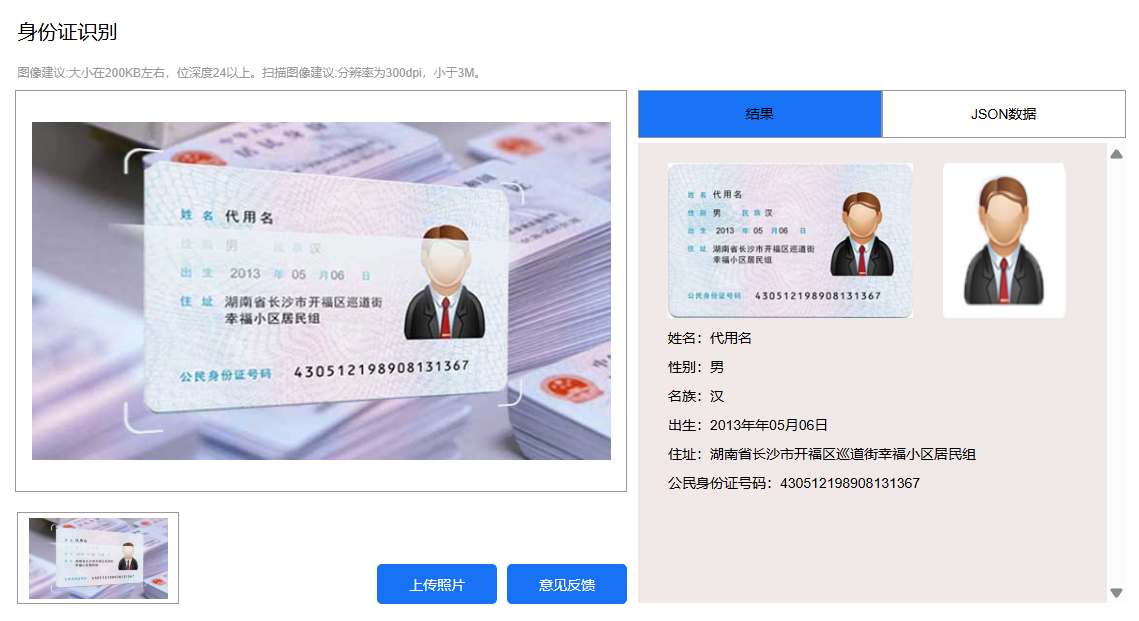
四、代码案例
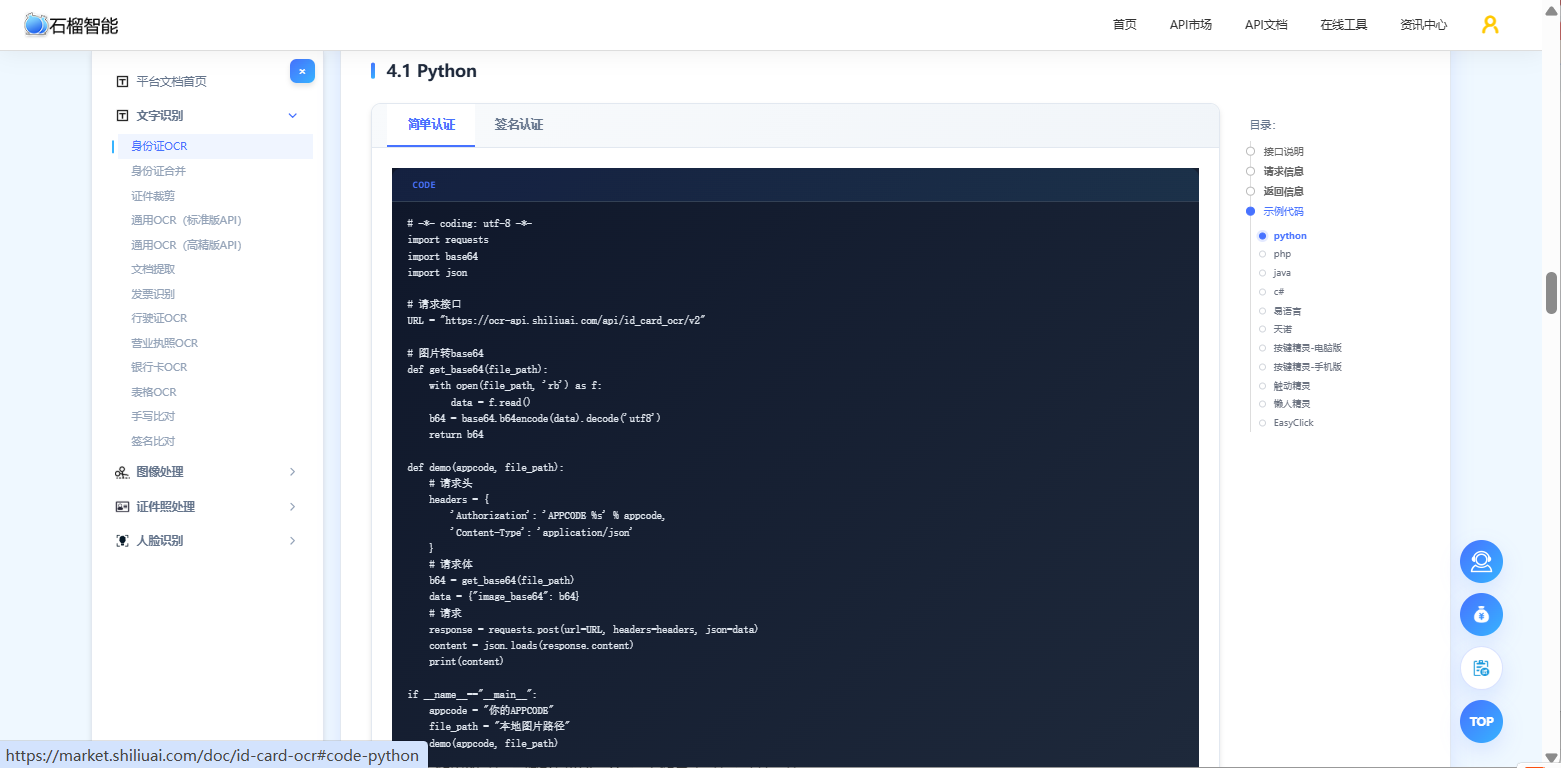
1.python代码案例
# API文档:https://market.shiliuai.com/doc/id-card-ocr
import requests
import base64
import json

# 请求接口
URL = "https://ocr-api.shiliuai.com/api/id_card_ocr/v2"

# 图片转base64
def get_base64(file_path):
    with open(file_path, 'rb') as f:
        data = f.read()
    b64 = base64.b64encode(data).decode('utf8')
    return b64

def demo(appcode, file_path):
    # 请求头
    headers = {
        'Authorization': 'APPCODE %s' % appcode,
        'Content-Type': 'application/json'
    }
    # 请求体
    b64 = get_base64(file_path)
    data = {"image_base64": b64}
    # 请求
    response = requests.post(url=URL, headers=headers, json=data)
    content = json.loads(response.content)
    print(content)

if __name__=="__main__":
    appcode = "你的APPCODE"
    file_path = "本地图片路径"
    demo(appcode, file_path)
2.php代码案例
// API文档:https://market.shiliuai.com/doc/id-card-ocr
// 图片转base64
function get_base64($path){
    if($fp = fopen($path, "rb", 0)) {
        $binary = fread($fp, filesize($path));
        fclose($fp);
        $b64 = base64_encode($binary);
    }else{
        $b64="";
        printf("%s 文件不存在", $path);
    }
    return $b64;
}

// 请求接口
$url = "https://ocr-api.shiliuai.com/api/id_card_ocr/v2";
$appcode = "你的appcode";
$img_path = "图片路径";
$method = "POST";

// 请求头
$headers = array();
array_push($headers, "Authorization:APPCODE " . $appcode);
array_push($headers, "Content-Type:application/json");

// 请求体
$b64 = get_base64($img_path);
$data = array(
    "image_base64" => $b64
);
$post_data = json_encode($data);

// 请求
$curl = curl_init();
curl_setopt($curl, CURLOPT_CUSTOMREQUEST, $method);
curl_setopt($curl, CURLOPT_URL, $url);
curl_setopt($curl, CURLOPT_HTTPHEADER, $headers);
curl_setopt($curl, CURLOPT_FAILONERROR, false);
curl_setopt($curl, CURLOPT_RETURNTRANSFER, true);
curl_setopt($curl, CURLOPT_HEADER, true);
curl_setopt($curl, CURLOPT_SSL_VERIFYPEER, false);
curl_setopt($curl, CURLOPT_SSL_VERIFYHOST, false);
curl_setopt($curl, CURLOPT_POSTFIELDS, $post_data);

$result = curl_exec($curl);
var_dump($result);
3.java代码案例
// API文档:https://market.shiliuai.com/doc/id-card-ocr
import com.alibaba.fastjson2.JSON;
import com.alibaba.fastjson2.JSONObject;
import org.apache.http.HttpResponse;
import org.apache.http.client.methods.HttpPost;
import org.apache.http.entity.StringEntity;
import org.apache.http.impl.client.CloseableHttpClient;
import org.apache.http.impl.client.HttpClients;
import org.apache.http.util.EntityUtils;
import org.apache.commons.io.FileUtils;
import java.io.File;
import java.io.IOException;
import java.util.HashMap;
import java.util.Map;
import java.util.Base64;

public class Main {
    public static String get_base64(String path) {
        String b64 = "";
        try {
            // 使用Commons IO简化文件读取
            byte[] content = FileUtils.readFileToByteArray(new File(path));
            // 使用JDK自带的Base64
            b64 = Base64.getEncoder().encodeToString(content);
        } catch (IOException e) {
            e.printStackTrace();
        }
        return b64;
    }

    public static void main(String[] args) {
        String url = "https://ocr-api.shiliuai.com/api/id_card_ocr/v2"; // 请求接口
        String appcode = "你的APPCODE";
        String imgFile = "本地图片路径";

        Map headers = new HashMap<>();
        headers.put("Authorization", "APPCODE " + appcode);
        headers.put("Content-Type", "application/json");

        // 请求体
        JSONObject requestObj = new JSONObject();
        requestObj.put("image_base64", get_base64(imgFile));
        String bodys = requestObj.toString();

        try (CloseableHttpClient httpClient = HttpClients.createDefault()) {
            // 创建POST请求
            HttpPost httpPost = new HttpPost(url);

            // 设置请求头
            for (Map.Entry entry : headers.entrySet()) {
                httpPost.addHeader(entry.getKey(), entry.getValue());
            }

            // 设置请求体
            StringEntity entity = new StringEntity(bodys, "UTF-8");
            httpPost.setEntity(entity);

            // 执行请求
            HttpResponse response = httpClient.execute(httpPost);
            int stat = response.getStatusLine().getStatusCode();
            if (stat != 200) {
                System.out.println("Http code: " + stat);
                return;
            }
            String res = EntityUtils.toString(response.getEntity());
            JSONObject res_obj = JSON.parseObject(res);
            System.out.println(res_obj.toJSONString());
        } catch (Exception e) {
            e.printStackTrace();
        }
    }
}
4.c#代码案例
//API文档:https://market.shiliuai.com/doc/id-card-ocr
using System.Text;
using Newtonsoft.Json;
using Newtonsoft.Json.Linq;

namespace MyCSharpApp
{
    public class Program
    {
        public static string GetBase64(string path)
        {
            string b64 = "";
            try
            {
                // 读取文件内容
                byte[] content = File.ReadAllBytes(path);
                // 转换为Base64
                b64 = Convert.ToBase64String(content);
            }
            catch (Exception e)
            {
                Console.WriteLine(e.Message);
            }
            return b64;
        }

        public static async Task Main(string[] args)
        {
            string url = "https://ocr-api.shiliuai.com/api/id_card_ocr/v2"; // 请求接口
            string appcode = "你的APPCODE";
            string imgFile = "本地图片路径";

            // 设置请求头
            Dictionary headers = new Dictionary
            {
                { "Authorization", "APPCODE " + appcode }
            };

            JObject requestObj = new JObject();
            requestObj["image_base64"] = GetBase64(imgFile);
            string body = requestObj.ToString();

            try
            {
                using (HttpClient client = new HttpClient())
                {
                    // 设置请求头
                    foreach (var header in headers)
                    {
                        client.DefaultRequestHeaders.Add(header.Key, header.Value);
                    }
                    // 创建请求内容
                    StringContent content = new StringContent(body, Encoding.UTF8, "application/json");
                    // 发送请求并获取响应
                    HttpResponseMessage response = await client.PostAsync(url, content);
                    if (!response.IsSuccessStatusCode)
                    {
                        Console.WriteLine($"Http code: {(int)response.StatusCode}");
                        return;
                    }
                    // 读取响应内容
                    string responseContent = await response.Content.ReadAsStringAsync();
                    JObject resObj = JObject.Parse(responseContent);
                    Console.WriteLine(resObj.ToString(Formatting.Indented));
                }
            }
            catch (Exception e)
            {
                Console.WriteLine(e.Message);
            }
        }
    }
}
5.易语言代码案例
API文档:https://market.shiliuai.com/doc/id-card-ocr
版本 2
.支持库 spec
.支持库 dp1

.子程序 身份证OCR识别_核心库版
.局部变量 局_网址, 文本型
.局部变量 局_方式, 整数型
.局部变量 局_提交数据, 文本型
.局部变量 局_提交协议头, 文本型
.局部变量 局_结果, 字节集
.局部变量 局_返回, 文本型
.局部变量 图片数据, 字节集
.局部变量 base64图片, 文本型

图片数据 = 读入文件 ("你的图片路径.jpg")
base64图片 = 编码_BASE64编码 (图片数据)
局_提交数据 = "{" + #引号 + "image_base64" + #引号 + ":" + #引号 + base64图片 + #引号 + "}"
局_网址 = "https://ocr-api.shiliuai.com/api/id_card_ocr/v2"
局_方式 = 1
局_提交协议头 = "Authorization: APPCODE 你的AppCode" + #换行符 + "Content-Type: application/json"
局_结果 = 网页_访问_对象 (局_网址, 局_方式, 局_提交数据, , , 局_提交协议头, , , , , , , , , , , , , )
局_返回 = 到文本 (编码_编码转换对象 (局_结果, , , ))
返回 (局_返回)
6.天诺代码案例
API文档:https://market.shiliuai.com/doc/id-card-ocr

public static string OCR_IDCard_Easy(Image image, string appcode)
{
    string url = "https://ocr-api.shiliuai.com/api/id_card_ocr/v2";
    var headers = new Dictionary
    {
        {"Authorization", "APPCODE " + appcode},
        {"Content-Type", "application/json"}
    };
    string body = "{\"image_base64\":\"" + CustomHelp.ImageTobase64(image) + "\"}";
    return CustomHelp.HttpPost(url, body, headers);
}
7.按键精灵(电脑版)代码案例
API文档:https://market.shiliuai.com/doc/id-card-ocr

Import "Encrypt.dll"
VBSBegin
Function Base64Encode(filePath)
    Set inStream = CreateObject("ADODB.Stream")
    inStream.Type = 1
    inStream.Open
    inStream.LoadFromFile filePath
    inStream.Position = 0
    Set dom = CreateObject("MSXML2.DOMDocument")
    Set elem = dom.createElement("tmp")
    elem.dataType = "bin.base64"
    elem.nodeTypedValue = inStream.Read
    Base64Encode = elem.Text
    inStream.Close
End Function

Function ocr_easy(appcode, imgPath)
    url = "https://ocr-api.shiliuai.com/api/id_card_ocr/v2"
    jsonBody = "{""image_base64"":""" & Base64Encode(imgPath) & """}"
    Set http = CreateObject("MSXML2.XMLHTTP")
    http.Open "POST", url, False
    http.setRequestHeader "Authorization", "APPCODE " & appcode
    http.setRequestHeader "Content-Type", "application/json"
    http.send jsonBody
    ocr_easy = http.responseText
End Function
VBSEnd

appcode = "你的APPCODE"
res = ocr_easy(appcode, "你的图片路径.jpg")
TracePrint res
8.按键精灵(手机版)代码案例
API文档:https://market.shiliuai.com/doc/id-card-ocr

Import "yd.luae"
Import "zm.luae"

Dim imagePath = "/sdcard/Pictures/test.png"
SnapShotEx imagePath

Function ocr_easy(appcode, imagePath)
    Dim url = "https://ocr-api.shiliuai.com/api/id_card_ocr/v2"
    Dim body = "{""image_base64"":""" & yd.Base64EncodeFile(imagePath) & """}"
    Dim headers = {null}
    headers["Authorization"] = "APPCODE " & appcode
    headers["Content-Type"] = "application/json"
    Dim res = yd.HttpPost(url, body, headers)
    ocr_easy = yd.JsonDecode(res)
End Function

Dim appcode = "你的 APPCODE"
Dim t1 = TickCount()
Dim res = ocr_easy(appcode, imagePath)
Dim t2 = TickCount()
TracePrint res["success"]
9.懒人精灵代码案例
API文档:https://market.shiliuai.com/doc/id-card-ocr

function ocr_easy(appcode, imagePath)
    local url = "https://ocr-api.shiliuai.com/api/id_card_ocr/v2"
    local body = jsonLib.encode({ image_base64 = getFileBase64(imagePath) })
    local headers = {}
    headers["Authorization"] = "APPCODE " .. appcode
    headers["Content-Type"] = "application/json"
    local resp = httpPost(url, body, { headers = headers })
    return jsonLib.decode(resp)
end
10.EasyClick代码案例
API文档:https://market.shiliuai.com/doc/id-card-ocr

function main()
    local request = image.requestScreenCapture(10000, 0)
    if not request then
        request = image.requestScreenCapture(10000, 0)
    end
    local appCode = "你的 APPCODE"
    local img = image.captureFullScreenEx()
    console.time("t")
    local res = ocr_easy(appCode, img)
    logd(console.timeEnd("t"))
    logd(res.success)
end

function ocr_easy(appCode, img)
    local url = "https://ocr-api.shiliuai.com/api/id_card_ocr/v2"
    local imgBase64 = image.toBase64Format(img, "jpg", 100)
    image.recycle(img)
    local body = JSON.stringify({ image_base64 = imgBase64 })
    local params = {
        url = url,
        method = "POST",
        headers = {
            ["Authorization"] = "APPCODE " .. appCode,
            ["Content-Type"] = "application/json"
        },
        requestBody = body
    }
    local res = http.request(params)
    return JSON.parse(res.body)
end
五、身份证 OCR 常见错误与解决方案(收藏级)
| 错误 | 场景 | 可能原因 | 解决方案 |
|---|---|---|---|
| 识别为空 | 正反面都失败 | Base64 错误、图片压缩 | 去除 data URI;关闭压缩 |
| 反面识别不了 | 只有正面可以 | 反光、曝光 | 改变光线角度、关闭闪光灯 |
| 图片解码失败 | API 返回错误码 | Base64 损坏 | 不要加 URL 编码 |
| 布局检测失败 | 身份证未完整框入 | 图片被裁剪 | 必须保留四角 |
| OCR 不稳定 | 有时成功有时失败 | 小图、模糊、压缩 | 上传原图,不要裁剪 |
六、身份证OCR正常时,示例响应结果
{
  "name": "张三",
  "id_number": "110101199001015678",
  "address": "北京市东城区xx路xx号",
  "valid_date": "2015.06.20-2035.06.20",
  "issue": "北京市公安局"
}
七、“FAQ”模块
Q:复印件能识别吗?
A:可以,但识别率一样,达到99.9%+,不建议用于实名场景。
Q:为什么线上识别失败比本地多?
A:理论是一样的,可能性出现在您的生产网路稳定性,接口API的网络稳定。

小龙虾开发者社区是 CSDN 旗下专注 OpenClaw 生态的官方阵地,聚焦技能开发、插件实践与部署教程,为开发者提供可直接落地的方案、工具与交流平台,助力高效构建与落地 AI 应用
更多推荐


 14
14 0
0- 0


 已为社区贡献2条内容

所有评论(0)