
MAF快速入门(21)RC5引入的Script运行能力
skill的拼图终于完整了,我也相信GA版本就快到来了!
1 RC5的新变化
在RC5之前,我们使用Skills的方式还主要是静态知识注入,一方面解决如何让Agent知道领域知识,另一方面让Agent通过渐进式披露策略降低Token消耗。而至于script能力,MAF一直为开放,而前面的内容,圣杰也给出了一个思路。但是到了RC5,官方实现来了,别激动,请接住!
Skill的定位变化
有了script的运行能力,skill从 静态知识包 开始走向 可执行能力包,其新增的接口 run_skill_script 就是来执行script的入口。
根据之前的了解,现在AgentSkillProvider就能有三个接口来构建Skill了:
-
load_skill
-
read_skill_resource
-
run_skill_script
因此,我们对Agent Skills的定义也会更加完善:
即 Agent Skill = 指令 + 资源 + 脚本 共同组成的可移植能力包
MAF Skills的4层架构
从MAF对Skills的实现来看,它做了较多的抽象 和 工程化,基本可以拆分为4层,如下图所示:
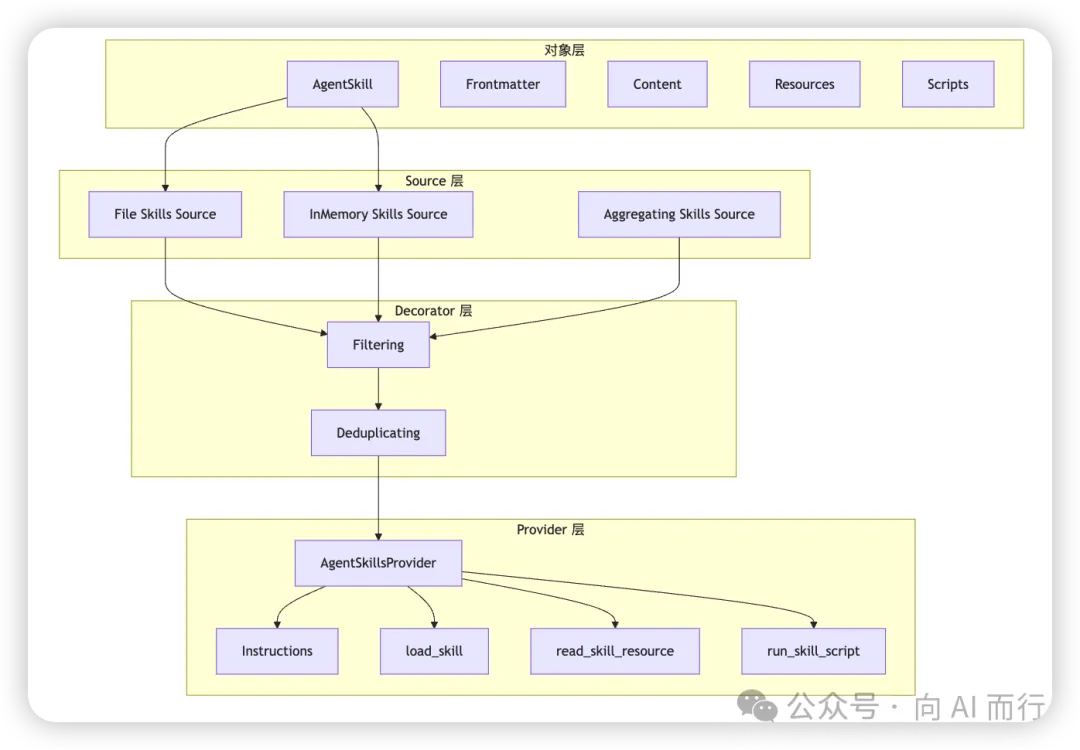
- 1. 对象层:定义 Skill 是什么
- 2. Source 层:定义 Skill 从哪里来
- 3. Decorator 层:定义 Skill 怎么过滤、去重、组合
- 4. Provider 层:定义 Skill 怎么进入 Agent 运行时
更多地解析推荐大家阅读圣杰的《MAF悄悄更新到RC5,Agent Skills的脚本运行能力Ready了》,这里我就不再重复了,下面我们具体看看DEMO。
Code as Skill : 代码定义Skill
在RC5中,支持在代码中定义Skill,而不再限制于目录中的markdown文档,在Source层,它叫做 AgentInMemorySkillsSource。下面也会给出一个例子展示这个代码定义Skill的模式。
2 快速开始:单位转换器
这里我们直接来看官方团队给出的案例:单位转换器。虽然,这个案例有点脱了裤子放屁的意思,但是足够简单和覆盖知识点。
我们希望创建一个单位转换的Agent,能够通过查询skill及其相关计算规则 和 运行脚本 回复用户关于单位转换的结果。
老规矩,我们先写Skill的内容:SKILL.md,references 和 scripts。
SKILL.md
首先,我们创建这个SKILL.md,内容如下:

---
name: unit-converter
description: 使用乘法换算系数在常见单位之间进行转换。在需要将英里/公里、磅/千克等单位互相换算时使用。
---

## 使用方法

当用户请求单位换算时:
1. 先查看 `references/conversion-table.md`,找到正确的换算系数
2. 使用 `--value <数值> --factor <系数>` 运行 `scripts/convert.py` 脚本(例如:`--value 26.2 --factor 1.60934`)
3. 输出内容需要清晰地展示换算系数、换算过程和换算结果,并同时标明换算前后的两个单位

reference: 转换公式表
其次,我们创建一个conversion-table.md,用于告诉Agent转换的系数和公式:

# Conversion Tables(换算表)

Formula(公式): **result = value × factor(结果 = 数值 × 系数)**

> Note(说明):
> - `From` / `To` 列请保持英文(miles, kilometers, pounds, kilograms),便于在工具参数/代码中稳定引用。
> - 中文列仅用于阅读理解。

| From       | To         | Factor   | From (中文) | To (中文) |
|------------|------------|----------|------------ |----------|
| miles      | kilometers | 1.60934  | 英里        | 千米/公里 |
| kilometers | miles      | 0.621371 | 千米/公里   | 英里     |
| pounds     | kilograms  | 0.453592 | 磅          | 千克/公斤 |
| kilograms  | pounds     | 2.20462  | 千克/公斤   | 磅       |

scripts: 可执行脚本
这里我们编写了一个python脚本 convert.py 来做一个简单的运算,虽然它太简单了:

# 单位换算脚本
# 使用乘法系数对数值进行换算:result = value × factor
#
# 用法:
#   python scripts/convert.py --value 26.2 --factor 1.60934
#   python scripts/convert.py --value 75 --factor 2.20462

import argparse
import json


def main() -> None:
    parser = argparse.ArgumentParser(
        description="Convert a value using a multiplication factor.",
        epilog="Examples:\n"
        "  python scripts/convert.py --value 26.2 --factor 1.60934\n"
        "  python scripts/convert.py --value 75 --factor 2.20462",
        formatter_class=argparse.RawDescriptionHelpFormatter,
    )
    parser.add_argument("--value", type=float, required=True, help="The numeric value to convert.")
    parser.add_argument("--factor", type=float, required=True, help="The conversion factor from the table.")
    args = parser.parse_args()

    result = round(args.value * args.factor, 4)
    print(json.dumps({"value": args.value, "factor": args.factor, "result": result}))


if __name__ == "__main__":
    main()

自定义脚本执行器
这里,官方定义了一个ScriptRunner,它会通过一个本地进程来执行Skill中的脚本,也就是上面的 convert.py 代码脚本。

internal static class SubprocessScriptRunner
{
    /// <summary>
    /// Runs a skill script as a local subprocess.
    /// </summary>
    public static async Task<object?> RunAsync(
        AgentFileSkill skill,
        AgentFileSkillScript script,
        AIFunctionArguments arguments,
        CancellationToken cancellationToken)
    {
        if (!File.Exists(script.FullPath))
        {
            return $"Error: Script file not found: {script.FullPath}";
        }

        string extension = Path.GetExtension(script.FullPath);
        string? interpreter = extension switch
        {
            ".py" => "python3",
            ".js" => "node",
            ".sh" => "bash",
            ".ps1" => "pwsh",
            _ => null,
        };

        var startInfo = new ProcessStartInfo
        {
            RedirectStandardOutput = true,
            RedirectStandardError = true,
            UseShellExecute = false,
            CreateNoWindow = true,
            WorkingDirectory = Path.GetDirectoryName(script.FullPath) ?? ".",
        };

        if (interpreter is not null)
        {
            startInfo.FileName = interpreter;
            startInfo.ArgumentList.Add(script.FullPath);
        }
        else
        {
            startInfo.FileName = script.FullPath;
        }

        if (arguments is not null)
        {
            foreach (var (key, value) in arguments)
            {
                if (value is bool boolValue)
                {
                    if (boolValue)
                    {
                        startInfo.ArgumentList.Add(NormalizeKey(key));
                    }
                }
                else if (value is not null)
                {
                    startInfo.ArgumentList.Add(NormalizeKey(key));
                    startInfo.ArgumentList.Add(value.ToString()!);
                }
            }
        }

        Process? process = null;
        try
        {
            process = Process.Start(startInfo);
            if (process is null)
            {
                return $"Error: Failed to start process for script '{script.Name}'.";
            }

            Task<string> outputTask = process.StandardOutput.ReadToEndAsync(cancellationToken);
            Task<string> errorTask = process.StandardError.ReadToEndAsync(cancellationToken);

            await process.WaitForExitAsync(cancellationToken).ConfigureAwait(false);

            string output = await outputTask.ConfigureAwait(false);
            string error = await errorTask.ConfigureAwait(false);

            if (!string.IsNullOrEmpty(error))
            {
                output += $"\nStderr:\n{error}";
            }

            if (process.ExitCode != 0)
            {
                output += $"\nScript exited with code {process.ExitCode}";
            }

            return string.IsNullOrEmpty(output) ? "(no output)" : output.Trim();
        }
        catch (OperationCanceledException) when (cancellationToken.IsCancellationRequested)
        {
            // Kill the process on cancellation to avoid leaving orphaned subprocesses.
            process?.Kill(entireProcessTree: true);
            throw;
        }
        catch (OperationCanceledException)
        {
            throw;
        }
        catch (Exception ex)
        {
            return $"Error: Failed to execute script '{script.Name}': {ex.Message}";
        }
        finally
        {
            process?.Dispose();
        }
    }

    /// <summary>
    /// Normalizes a parameter key to a consistent --flag format.
    /// Models may return keys with or without leading dashes (e.g., "value" vs "--value").
    /// </summary>
    private static string NormalizeKey(string key) => "--" + key.TrimStart('-');
}

可以看到,在该Runner中定义了一些基本的校验规则,然后就通过启动一个本地进程去执行脚本。
主文件C#代码
这里,我们还是一步一步来看:
Step1. 创建SkillsProvider

var skillsProvider = new AgentSkillsProvider(
    skillPath: Path.Combine(Directory.GetCurrentDirectory(), "skills"),
    scriptRunner: SubprocessScriptRunner.RunAsync);
Console.WriteLine("✅ AgentSkillsProvider 创建成功");
Console.WriteLine("📂 自动注册工具: load_skill, read_skill_resource, run_skill_script");
Console.WriteLine();

Step2. 创建Agent:

AIAgent agent = chatClient.AsAIAgent(new ChatClientAgentOptions
{
    Name = "UnitConverterAgent",
    ChatOptions = new()
    {
        Instructions = "你是一个专业的AI助手,负责帮助用户实现单位的转换。",
    },
    // 🔑 知识层:通过 AIContextProviders 注入 Skills
    AIContextProviders = [skillsProvider],
});
Console.WriteLine("✅ Agent 创建成功");
Console.WriteLine();

Step3. 测试Agent:

var session = await agent.CreateSessionAsync();
Console.WriteLine("━━━━━━━━━━━━━━━━━━━━━━━━━━━━━━━━━━━━━━━━━━━━━━");
Console.WriteLine($"开始测试:基于 File-Based Skills");
// 中文问题:英里 -> 公里
var question1 = "马拉松比赛的距离26.2 英里是多少公里?";
Console.WriteLine($"👤 用户: {question1}");
Console.WriteLine();
var response1 = await agent.RunAsync(question1, session);
Console.WriteLine("━━━━━━━━━━━━━━━━━━━━━━━━━━━━━━━━━━━━━━━━━━━━━━");
Console.WriteLine($"🤖 Agent: {response1.Text}");
Console.WriteLine("━━━━━━━━━━━━━━━━━━━━━━━━━━━━━━━━━━━━━━━━━━━━━━");
Console.WriteLine();
// 英文问题:磅 -> 千克
var question2 = "How many pounds is 75 kilograms?";
Console.WriteLine($"👤 用户: {question2}");
Console.WriteLine();
var response2 = await agent.RunAsync(question2, session);
Console.WriteLine("━━━━━━━━━━━━━━━━━━━━━━━━━━━━━━━━━━━━━━━━━━━━━━");
Console.WriteLine($"🤖 Agent: {response2.Text}");
Console.WriteLine("━━━━━━━━━━━━━━━━━━━━━━━━━━━━━━━━━━━━━━━━━━━━━━");
Console.WriteLine();
测试效果如下图:
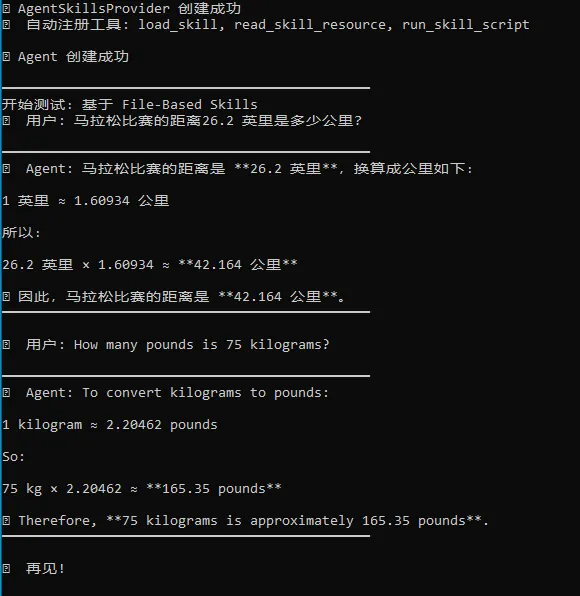
可以看到,无论是中文还是英文,它都严格按照skill中的要求,输出了换算系数、换算过程 和 最终结果。
3 快速开始:代码定义Skills
这里我们再来看看官方的第二个DEMO:通过代码定义Skills,这里就会用到 AgentInlineSkill 这个新增对象。

var unitConverterSkill = new AgentInlineSkill(
    name: "unit-converter",
    description: "使用乘法换算系数在常见单位之间进行转换。在需要将英里/公里、磅/千克等单位互相换算时使用。",
    instructions: """
        当用户请求单位换算时,请使用本 Skill。

        1. 查看 `conversion-table` 资源,找到正确的换算系数。
        2. 查看 `conversion-policy` 资源,了解取整和格式化规则。
        3. 使用 `convert` 脚本,并传入从表中查到的数值和系数。
        """)
    // 1. 静态资源: conversion tables
    .AddResource(
        "conversion-table",
        """
        # 换算表

        公式: **结果 = 数值 × 系数**

        | From        | To          | Factor   |
        |-------------|-------------|----------|
        | miles       | kilometers  | 1.60934  |
        | kilometers  | miles       | 0.621371 |
        | pounds      | kilograms   | 0.453592 |
        | kilograms   | pounds      | 2.20462  |
        """)
    // 2. 动态资源: conversion policy (运行时计算)
    .AddResource("conversion-policy", () =>
    {
        const int Precision = 4;
        return $"""
            # 换算策略

            **小数位数:** {Precision}
            **格式:** 始终同时显示原始值、换算后值以及单位
            **生成时间:** {DateTime.UtcNow:O}
            """;
    })
    // 3. 代码脚本: convert by C# code
    .AddScript("convert", (double value, double factor) =>
    {
        double result = Math.Round(value * factor, 4);
        return JsonSerializer.Serialize(new { value, factor, result });
    });
var skillsProvider = new AgentSkillsProvider(unitConverterSkill);
可以看到,MAF释放的信号很明确:Skill不只是磁盘中的markdown文件!Code as Skill!
那么,这类型的动态skill适合哪些场景呢?
答案:它特别适合那些只存在于运行时的信息,比如:
- 当前租户配置;
- 当前区域;
- 实时配额;
- 当前系统状态;
- 动态生成的业务规则。
这些信息如果硬要放到磁盘中形成文件,反而不自然。
4 小结
本文介绍了RC5引入的令人激动的script执行能力,有了script执行能力,Agent Skill才变得更加完整,也从静态知识包 开始走向 可执行能力包,Agent Skill = 知识 + 资源 + 脚本。
由此也可见,MAF对Skill的理解也在不断地进化,开始往软件工程层面迈进!
不过,要真的走上生产环境,还需要在应用层面考虑安全性 和 扩展性方面的内容,毕竟企业级应用还是得控制风险!
示例源码
GitHub: GitHub - EdisonTalk/MAFD: Microsoft Agent Framwork Demos · GitHub
参考资料
圣杰,《.NET + AI 智能体开发进阶》(推荐指数:★★★★★)
Microsoft Learn,《Agent Framework Tutorials》

作者:爱迪生
出处:https://edisontalk.cnblogs.com
本文版权归作者和博客园共有,欢迎转载,但未经作者同意必须保留此段声明,且在文章页面明显位置给出原文链接。

分类: 【001】.NET Core, 【025】GenAI实践之路
免责声明:本内容来自平台创作者,博客园系信息发布平台,仅提供信息存储空间服务。


粉丝 - 5375 关注 - 50
会员号:132(终身会员VIP)
推荐博客
+加关注
0
0
« 上一篇: MAF快速入门(20)基于File-Based App开发MVP项目
» 下一篇: MAF快速入门(22)声明式Agent实战
posted @ 2026-04-03 08:30 EdisonZhou 阅读(239) 评论(0) 收藏 举报
登录后才能查看或发表评论,立即 登录 或者 逛逛 博客园首页
【推荐】 凌霞 618 年中大促,Halo 与 1Panel 产品全线半价,叠加满减!
【推荐】HarmonyOS 6.1.0 创新特性“悬浮页签+沉浸光感”精品文章专题
【推荐】科研领域的连接者艾思科蓝,一站式科研学术服务数字化平台

编辑推荐:
- 让 Agent 在对话中成长:自进化机制的五层实现
- 代码之外:一个技术人的职场困境与自我和解
- 贩卖焦虑的时代,我终于接住了真实的焦虑
- 工良吐槽篇:万字长文细说 AI 落地之笑谈
- 代码是 AI 写的,生产事故谁背锅?
历史上的今天:
- 2016-04-03 借助 Lucene.Net 构建站内搜索引擎(上)
公告
洋名:Edison Zhou(关于我)
现居:成都
就职:西门子SEWC
技能:码砖与扯淡
认证:系统架构设计师、CSM、PMP
关注:.NET、微服务、DevOps、MES/MOM、AIGC、敏捷开发等
爱好:足球、电影、阅读、遛娃
座右铭:“大志非才不就,大才非学不成”
LinkedIn:Profile
GitHub:Fork Me
公众号:EdisonTalk
.NET, DevOps, 系统架构, MES/MOM, AIGC

友情链接
01.角落的白板报-梁铜铭
02.晓晨Master-李志强
03.圣杰-颜圣杰
04.懒得勤快-陈宇
05.田园里的蟋蟀-岳中新
昵称: EdisonZhou

园龄: 14年3个月
荣誉: 推荐博客
粉丝: 5375
关注: 50
+加关注
搜索
积分与排名
- 积分 - 1426769
- 排名 - 206
合集 (2)
随笔分类 (756)
- 【001】.NET Core(78)
- 【001】.NET Framework(23)
- 【002】ASP.NET WebForm(21)
- 【003】ASP.NET MVC(19)
- 【004】Java那些事儿(5)
- 【005】云原生(44)
- 【006】NoSQL(25)
- 【007】OOAD与设计模式(31)
- 【008】Unity VR & AR(7)
- 【009】Web前端开发(4)
- 更多
随笔档案 (637)
- 2026年4月(4)
- 2026年3月(3)
- 2026年2月(4)
- 2026年1月(5)
- 2025年12月(6)
- 2025年11月(3)
- 2025年10月(3)
- 2025年8月(1)
- 2025年7月(5)
- 2025年6月(1)
- 更多
阅读排行榜
- 1. Spring Cloud 微服务架构学习笔记与示例(316216)
- 2. 你必须知道的Docker数据卷(Volume)(87964)
- 3. 你必须知道的Dockerfile(77258)
- 4. 【大型网站技术实践】初级篇:借助LVS+Keepalived实现负载均衡(76344)
- 5. 自己动手写工具:自动点击小插件(65451)
评论排行榜
- 1. .NET Core微服务之基于Consul实现服务治理(84)
- 2. 【大型网站技术实践】初级篇:借助Nginx搭建反向代理服务器(84)
- 3. 【大型网站技术实践】初级篇:借助LVS+Keepalived实现负载均衡(63)
- 4. Exceptionless 5.0.0 本地Docker快速部署介绍(58)
- 5. .NET 全栈开发工程师学习路径(57)
推荐排行榜

小龙虾开发者社区是 CSDN 旗下专注 OpenClaw 生态的官方阵地,聚焦技能开发、插件实践与部署教程,为开发者提供可直接落地的方案、工具与交流平台,助力高效构建与落地 AI 应用
更多推荐


 4
4 0
0- 0


 已为社区贡献1条内容

所有评论(0)