
GitHub 最火的 10 个项目(附上手命令+配图)
GitHub 最火的 10 个项目(附上手命令+配图)
先说清楚:这篇不讲虚的,就讲三件事:
- 这项目到底解决什么问题
- 你怎么最快跑起来
- 它适不适合你现在的场景
数据来自 GitHub Trending 周榜(since=weekly),快照日期是 2026-05-25。周榜会滚动,过几天可能就换人了。
1) codegraph
仓库:https://github.com/colbymchenry/codegraph
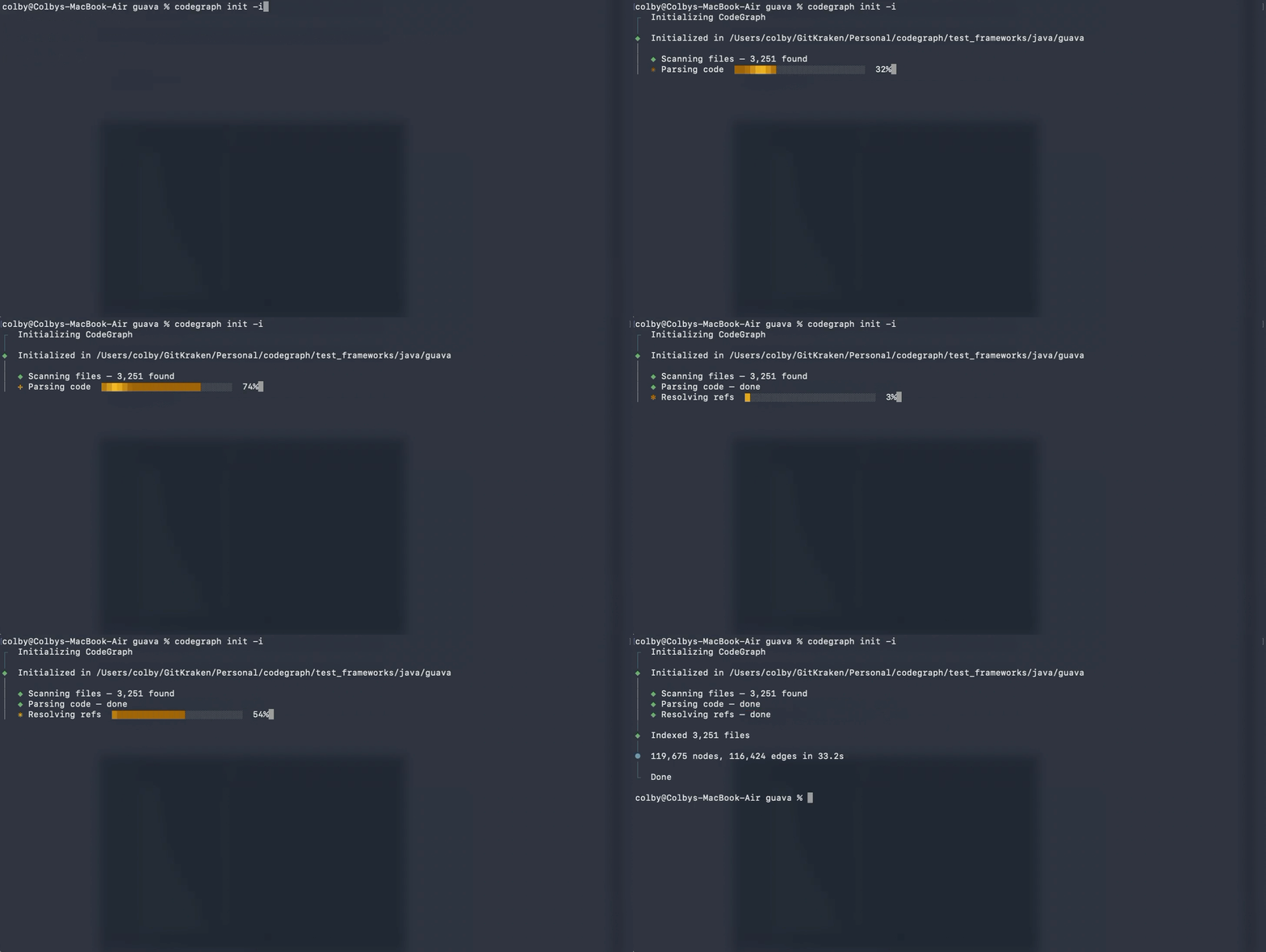
这项目一句话:给 AI 编码助手“提前准备上下文”。
以前代理要先到处 grep,再慢慢找文件;它是先把代码关系建成图,后面直接查图。
快速安装
# macOS/Linux
curl -fsSL https://raw.githubusercontent.com/colbymchenry/codegraph/main/install.sh | sh
# Windows
irm https://raw.githubusercontent.com/colbymchenry/codegraph/main/install.ps1 | iex
最小上手
npx @colbymchenry/codegraph
codegraph init -i
我觉得值在哪
- 大仓库里省时间很明显
- 问“这个模块怎么串起来”更容易答准
注意
- 官方 benchmark 很漂亮,但建议你自己仓库 A/B 一次再下结论。
2) OpenHuman
仓库:https://github.com/tinyhumansai/openhuman
它想做的是“长期陪跑型”个人 AI 助手,不是一次性聊天机器人。
重点是本地记忆 + 多平台连接(比如 GitHub/日历/协作工具)。
安装
curl -fsSL https://raw.githubusercontent.com/tinyhumansai/openhuman/main/scripts/install.sh | bash
# Windows
irm https://raw.githubusercontent.com/tinyhumansai/openhuman/main/scripts/install.ps1 | iex
适合谁
- 想把日常工作流交给 AI 协助的人
注意
- README 标了 Early Beta,别一上来就当“绝对稳定生产工具”。
3) academic-research-skills
仓库:https://github.com/Imbad0202/academic-research-skills
这是给学术流程做的技能包:选题、文献综述、写作、评审、修订一条龙。
上手(插件生态)
/plugin marketplace add Imbad0202/academic-research-skills
/plugin install academic-research-skills
示例
/ars-plan
/ars-lit-review "你的研究主题"
注意
- 文献结论和引用必须人工复核,别全自动信。
4) ai-engineering-from-scratch
仓库:https://github.com/rohitg00/ai-engineering-from-scratch
这是“课程型仓库”,不是单服务项目。
更适合系统学习:从基础到工程落地。
开始方式
git clone https://github.com/rohitg00/ai-engineering-from-scratch.git
cd ai-engineering-from-scratch
怎么用
- 按 phase 一个个跑,不要贪多并行。
5) RuView
仓库:https://github.com/ruvnet/RuView
这条路线很有意思:用 WiFi 信号做感知,不用摄像头。
适合隐私敏感场景探索。
示例启动
cargo run -p wifi-densepose-sensing-server -- --pretrain --dataset data/csi/ --pretrain-epochs 50
注意
- 对硬件和数据采集要求高,门槛不低。
6) agentmemory
仓库:https://github.com/rohitg00/agentmemory
它干的事很直接:让编码代理“记住你之前干过啥”。
不然每次新会话都要重讲一遍,太浪费。
安装/启动
npm install -g @agentmemory/agentmemory
agentmemory
agentmemory demo
适合场景
- 多天连续开发、多人协作、反复上下文切换
注意
- 记忆要有治理策略(过期、清理、隐私分层)。
7) Understand-Anything
仓库:https://github.com/Lum1104/Understand-Anything
把代码库变成“可交互知识图谱”,你可以边看边问。
对接手老项目特别友好。
上手
/plugin marketplace add Lum1104/Understand-Anything
/plugin install understand-anything
/understand
优点
- onboarding 很强
- 做改动前看影响范围很实用
8) CloakBrowser
仓库:https://github.com/CloakHQ/CloakBrowser
主打自动化浏览器反检测增强,偏测试/对抗研究场景。
安装
pip install cloakbrowser
# 或
npm install cloakbrowser playwright-core
示例(Python)
from cloakbrowser import launch
browser = launch()
page = browser.new_page()
page.goto("https://example.com")
重点提醒
- 只能用于合法授权场景,合规优先。
9) supertonic
仓库:https://github.com/supertone-inc/supertonic
本地端 TTS(文字转语音),强调低延迟、隐私友好。
安装
pip install supertonic
最小示例
from supertonic import TTS
tts = TTS(auto_download=True)
style = tts.get_voice_style(voice_name="M1")
audio = tts.speak("hello world", style=style)
适合
- 本地语音助手、实时播报、边缘设备语音能力
10) oh-my-pi
仓库:https://github.com/can1357/oh-my-pi
终端 AI 编码代理,偏“重度开发者工具链”。
安装
# macOS/Linux
curl -fsSL https://omp.sh/install | sh
# Windows
irm https://omp.sh/install.ps1 | iex
# Bun
bun install -g @oh-my-pi/pi-coding-agent
最小上手
pi --help
适合
- 常驻终端、追求高频开发效率的人
最后:怎么选最省时间?
- 想马上提效:
codegraph + oh-my-pi - 想让代理“越用越懂你”:
agentmemory - 想快速看懂老项目:
Understand-Anything - 想系统学 AI 工程:
ai-engineering-from-scratch - 想做语音能力:
supertonic

小龙虾开发者社区是 CSDN 旗下专注 OpenClaw 生态的官方阵地,聚焦技能开发、插件实践与部署教程,为开发者提供可直接落地的方案、工具与交流平台,助力高效构建与落地 AI 应用
更多推荐



 7
7 0
0- 0


 已为社区贡献1条内容

所有评论(0)