
Langchain4j——支持skills
是MCP的进阶版。其他不做赘述,本篇博客只做使用记录。
·
前言
agent skills是MCP的进阶版。其他不做赘述,本篇博客只做使用记录。
使用前需要使用最低1.13.0版本
Langchain4j支持Agent Skills是最低要求版本1.13.0。
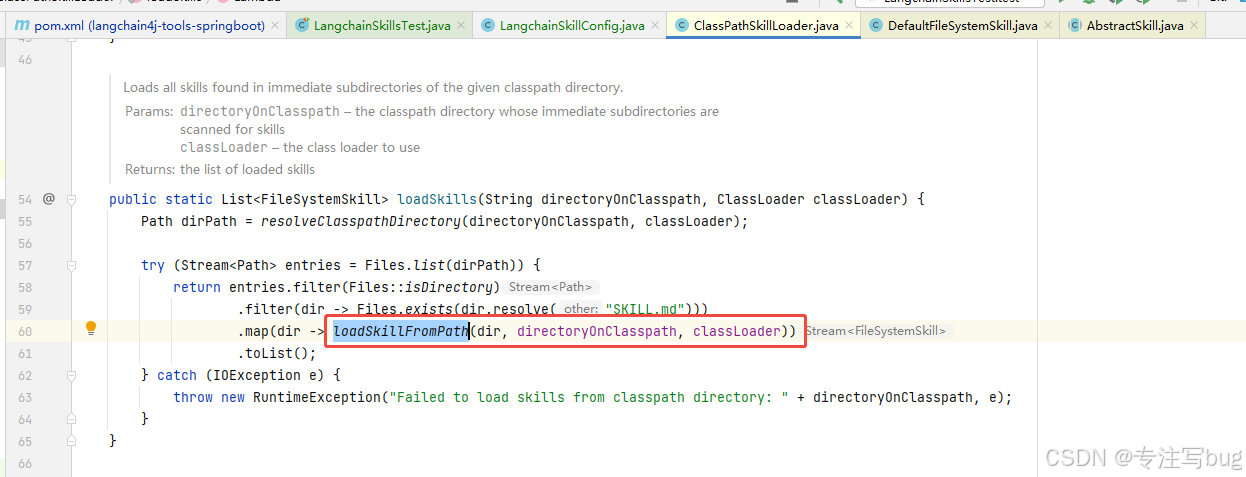
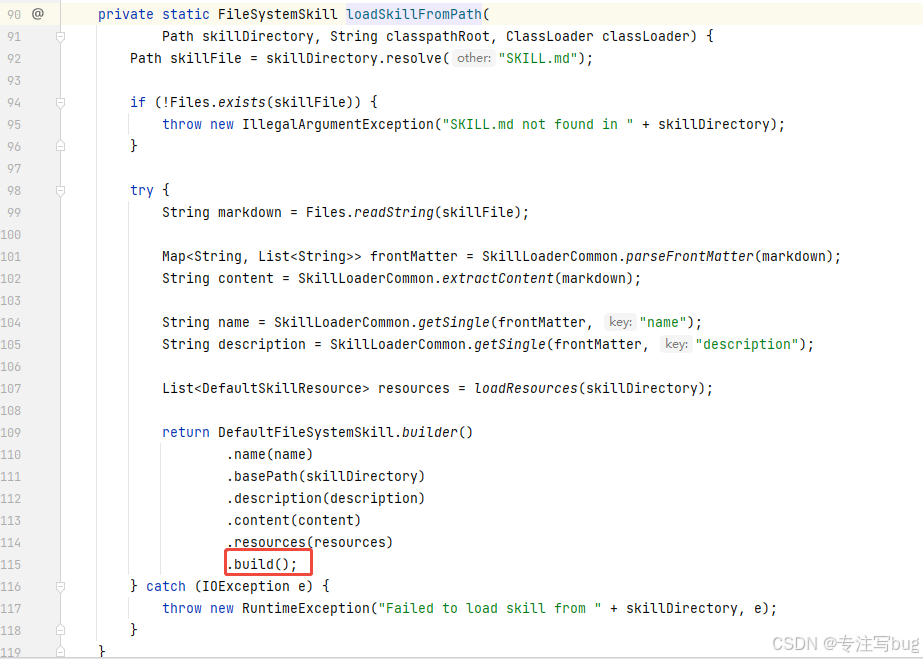
原因在于ClassPathSkillLoader.loadSkills("skill")再读取解析后需要调用dev.langchain4j.skills.ClassPathSkillLoader#loadSkillFromPath方法构建对象。
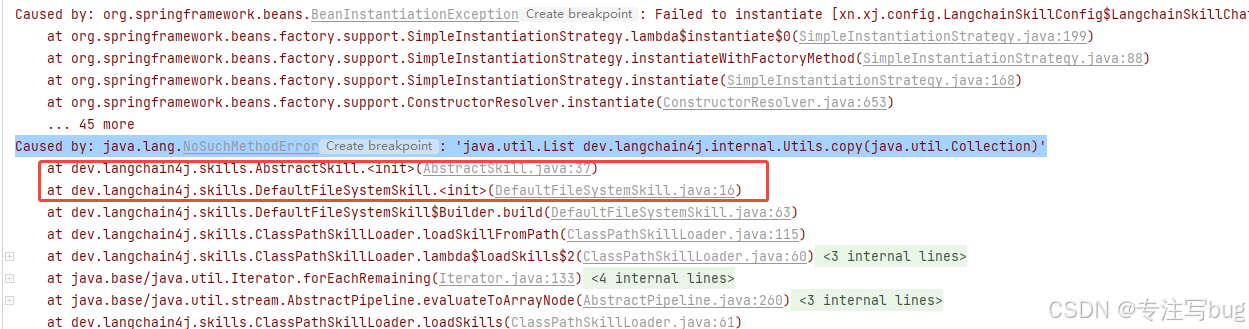
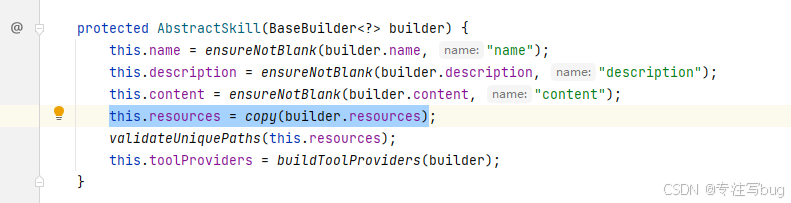
其中dev.langchain4j.skills.DefaultFileSystemSkill.Builder#build中调用了父类的构造方法dev.langchain4j.skills.AbstractSkill#AbstractSkill时,需要设定dev.langchain4j.skills.AbstractSkill#resources参数。在对this.resources = copy(builder.resources)处理时出现下列的报错:
Caused by: java.lang.NoSuchMethodError: 'java.util.List dev.langchain4j.internal.Utils.copy(java.util.Collection)

测试代码版本环境
- jdk 17
- langchain4j 1.13.0
- langchain4j-skills 1.13.0-beta23
依赖如下:
<dependency>
    <groupId>dev.langchain4j</groupId>
    <artifactId>langchain4j</artifactId>
    <!--<version>1.1.0</version>-->
    <version>1.13.0</version>
</dependency>
<dependency>
    <groupId>dev.langchain4j</groupId>
    <artifactId>langchain4j-spring-boot-starter</artifactId>
    <!--<version>1.1.0-beta7</version>-->
    <version>1.13.0-beta23</version>
</dependency>
        <dependency>
    <groupId>dev.langchain4j</groupId>
    <artifactId>langchain4j-skills</artifactId>
    <version>1.13.0-beta23</version>
</dependency>
准备工作
1、准备skill
在src/main/resources下新增skills目录,并增加weather技能和SKILL.md。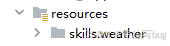
---
name: weather
description: Get current weather conditions and forecasts.
---
# Weather
Two free services, no API keys needed.
## wttr.in (primary)
Quick one-liner:
```bash
curl -s "wttr.in/London?format=3"
# Output: London: ⛅️ +8°C
```
Compact format:
```bash
curl -s "wttr.in/London?format=%l:+%c+%t+%h+%w"
# Output: London: ⛅️ +8°C 71% ↙5km/h
```
Full forecast:
```bash
curl -s "wttr.in/London?T"
```
Format codes: `%c` condition · `%t` temp · `%h` humidity · `%w` wind · `%l` location · `%m` moon
Tips:
- URL-encode spaces: `wttr.in/New+York`
- Airport codes: `wttr.in/JFK`
- Units: `?m` (metric) `?u` (USCS)
- Today only: `?1` · Current only: `?0`
- PNG: `curl -s "wttr.in/Berlin.png" -o /tmp/weather.png`
## Open-Meteo (fallback, JSON)
Free, no key, good for programmatic use:
```bash
curl -s "https://api.open-meteo.com/v1/forecast?latitude=51.5&longitude=-0.12¤t_weather=true"
```
Find coordinates for a city, then query. Returns JSON with temp, windspeed, weathercode.
Docs: https://open-meteo.com/en/docs
2、编写service
package xn.xj.config;

import dev.langchain4j.memory.ChatMemory;
import dev.langchain4j.memory.chat.MessageWindowChatMemory;
import dev.langchain4j.model.chat.ChatModel;
import dev.langchain4j.model.chat.StreamingChatModel;
import dev.langchain4j.service.AiServices;
import dev.langchain4j.service.SystemMessage;
import dev.langchain4j.skills.ClassPathSkillLoader;
import dev.langchain4j.skills.FileSystemSkill;
import dev.langchain4j.skills.Skills;
import jakarta.annotation.Resource;
import org.springframework.context.annotation.Bean;
import org.springframework.context.annotation.Configuration;
import java.util.List;

@Configuration
public class LangchainSkillConfig {

    public interface LangchainSkillChatService {
        @SystemMessage(value = """
                你是智能助手,根据用户提问描述的城市信息,提取城市名称,调用相关的技能获取城市的天气情况。
                """)
        String chat(String userMessage);
    }

    @Resource
    private ChatModel qwenChatModel;

    @Resource
    private StreamingChatModel qwenStreamingChatModel;

    @Bean
    public LangchainSkillConfig.LangchainSkillChatService createLangchainSkillChatService() {
        ChatMemory chatMemory = MessageWindowChatMemory.withMaxMessages(10);

        // 读取 src/main/resources/skill/xxx
        List<FileSystemSkill> classPathSkills = ClassPathSkillLoader.loadSkills("skills");
        Skills skills = Skills.from(classPathSkills);
        LangchainSkillConfig.LangchainSkillChatService aiChatService = AiServices.builder(LangchainSkillConfig.LangchainSkillChatService.class)
                .chatMemory(chatMemory)
                .chatModel(qwenChatModel)
                // 如果还有tools,则使用 toolProviders(List.of(toolxx,skills.toolProvider()))
                .toolProvider(skills.toolProvider())
                .build();

        return aiChatService;
    }
}
3、编写测试类
import org.junit.jupiter.api.Test;
import org.springframework.beans.factory.annotation.Autowired;
import org.springframework.boot.test.context.SpringBootTest;
import xn.xj.Application;
import xn.xj.config.LangchainSkillConfig;

@SpringBootTest(classes = Application.class)
public class LangchainSkillsTest {

    @Autowired
    private LangchainSkillConfig.LangchainSkillChatService langchainSkillServer;

    @Test
    public void test() {
        String chat = langchainSkillServer.chat("您好,武汉今天天气咋样?");
        System.out.println(chat);
    }
}

小龙虾开发者社区是 CSDN 旗下专注 OpenClaw 生态的官方阵地,聚焦技能开发、插件实践与部署教程,为开发者提供可直接落地的方案、工具与交流平台,助力高效构建与落地 AI 应用
更多推荐



 6
6 0
0- 0


 已为社区贡献1条内容

所有评论(0)